How Far Can Bluetooth Headphones Work? (2026 Guide)

You press play, set your phone on the kitchen counter, and walk into the next room. The music holds for a few steps — then it stutters, drops, and comes back in pieces.
That cut-out is the range limit talking. Every pair of Bluetooth headphones has one, and the number on the box is not the number you get in your house.
This guide gives you the real numbers: what your headphones reach in open space, through one wall, through two, and what you can do when the signal gives up too soon.
The short version: most Bluetooth headphones are rated for about 10 metres (33 feet), and in a clear room they often reach 40–50 feet. One wall cuts that to 25–35 feet, two walls to 15–25 feet. Keep the phone in the open, not in your pocket, and the music holds much farther.
How Far Can Bluetooth Headphones Work?
Most Bluetooth headphones work up to about 10 metres (33 feet) from your phone in clear open space — and good ones often reach 40 to 50 feet before the sound breaks up. Indoors, walls and your body pull that number down fast.
Bluetooth headphone range refers to how far your headphones can stay connected to your phone or laptop before the sound breaks up. Most pairs are rated at about 10 metres (33 feet), but walls, your body and Wi-Fi can cut that in half indoors.
Bluetooth headphones usually work up to 10 metres (33 feet) from the source device in clear open space, though most people get less indoors. According to real-world testing by S3 Semi, AirPods Pro held a usable signal for 40 to 45 feet in an open living room, while Sony WH-1000XM4 headphones reached 45 to 50 feet.
The distance your Bluetooth headphones work depends on the power class of the radio inside them, not the Bluetooth version on the box. According to the Bluetooth SIG, the key factors are transmit power, receiver sensitivity, antenna gain and the physical environment — so a bigger antenna and a stronger radio matter more than a newer version number.
Short answer: same room, fine. Next room, probably fine. Two rooms away, expect trouble.
Here's my honest take: the range number printed on the box is the least useful spec in the whole listing. It describes a lab, not your living room — and buying headphones by that number alone wastes money.
What Do Bluetooth Power Classes Mean for Your Headphones?
Bluetooth power classes set how strong the radio signal is. Class 2 covers nearly every pair of headphones and earbuds you can buy, at about 10 metres. Class 1 reaches about 100 metres, but almost no headphones use it.
Bluetooth power classes set the ceiling on how far headphones can work, with Class 2 devices rated at about 10 metres and Class 1 devices rated at about 100 metres. Most phones, earbuds and headphones are Class 2, which is why the 33-foot figure shows up on nearly every box — and why it rarely survives a wall or two.
| Power class | Transmit power | Rated range | Found in |
|---|---|---|---|
| Class 1 | 100 mW (20 dBm) | About 100 m (328 ft) | Long-range dongles, some speakers and industrial gear |
| Class 2 | 2.5 mW (4 dBm) | About 10 m (33 ft) | Nearly all phones, earbuds and headphones |
| Class 3 | 1 mW (0 dBm) | About 1 m (3 ft) | Rare short-range accessories |
Class 2 wins because it sips battery. A tiny earbud cell cannot push a strong signal for hours, so makers cap the power and keep the range short. That trade-off is the reason your earbuds die at 20 feet while a plugged-in speaker keeps playing from the garden.
One catch most guides skip: range is set by the weaker of the two devices. A Class 1 dongle paired with Class 2 earbuds still behaves like a Class 2 link, because the earbuds cannot shout back far enough. Both ends matter, not just the strong one.
Earbuds vs over-ear headphones: over-ears are better suited for longer range because their bigger bodies hold larger antennas and stronger batteries. Earbuds work better when you stay close to your phone. The key difference is antenna size, not sound quality.
How Far Do Bluetooth Headphones Reach Through Walls?
One drywall wall costs you about a third of your range. Two walls cost you more than half. Brick, concrete and metal cost you far more than drywall ever will.
Real-world testing shows the drop clearly. S3 Semi tested AirPods Pro and Sony WH-1000XM4 headphones with phones in the same house, walking away until the music broke up. Here is what they found.
| Situation | AirPods Pro | Sony WH-1000XM4 |
|---|---|---|
| Open room, clear line of sight | 40–45 ft usable | 45–50 ft usable |
| One drywall wall | 25–30 ft | 30–35 ft |
| Two drywall walls | 15–20 ft, heavy stuttering | 20–25 ft, occasional skips |
| Exterior insulated wall | 10–15 ft | 10–15 ft |
The pattern is simple: each wall eats 40–50% of your range, and a floor eats 60–70%. Two rooms away is where most pairs give up.
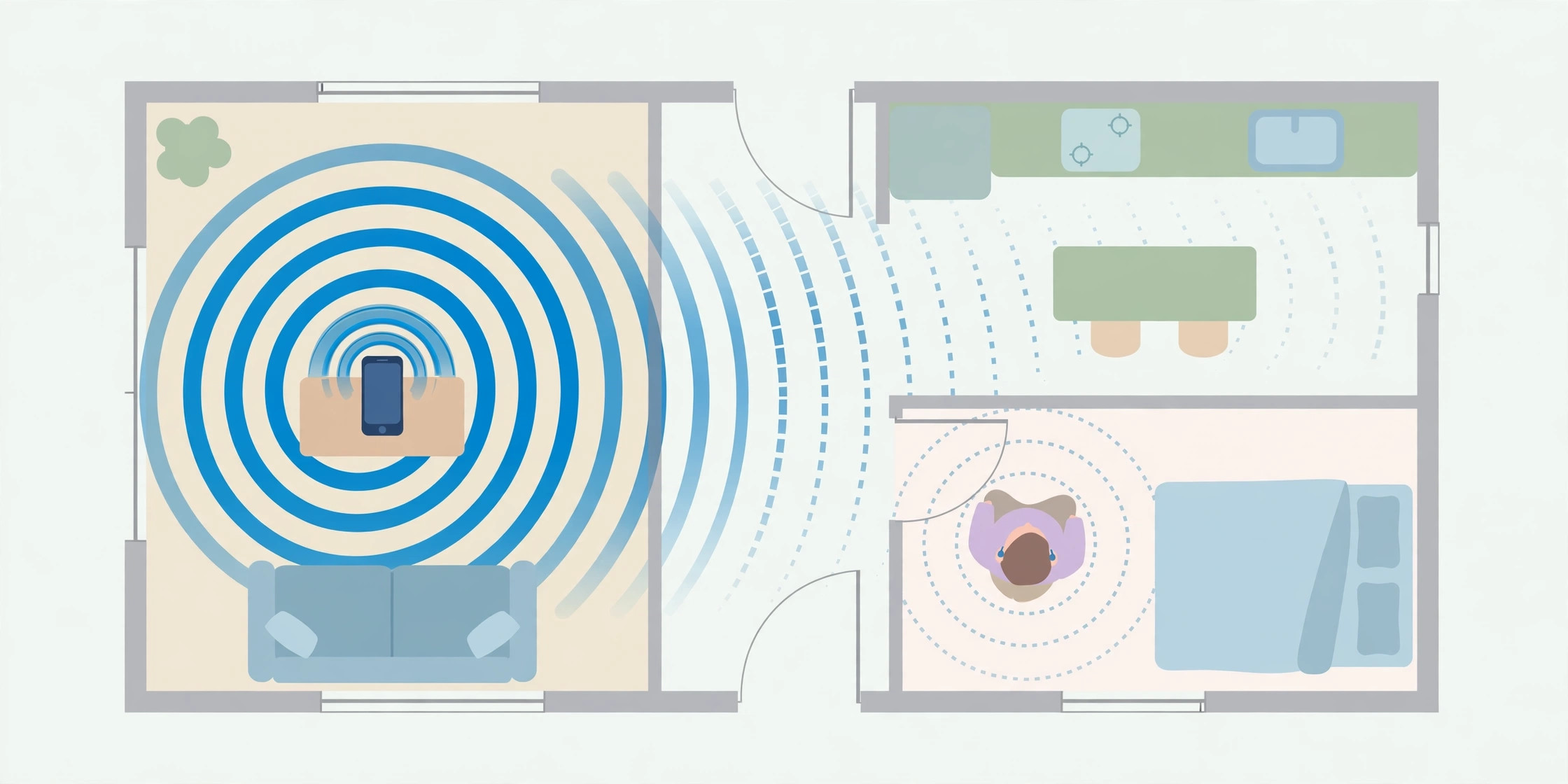
Wall material matters more than wall count. Wood, glass and plasterboard let the signal through with a small loss. Brick, concrete and plaster slow it down a lot. Metal stops it cold — a fridge, a filing cabinet or foil-backed insulation can block the signal outright.
Water is the quiet one. Bluetooth runs at 2.4 GHz, the same frequency a microwave oven uses to heat food, because water soaks up energy at that frequency. Your body is mostly water, so standing between your phone and your headphones is like putting a wet wall in the way.
Quick note: a door left open helps more than you would think. A clear doorway is a gap in the wall, and the signal slips through it.
Why Do My Headphones Cut Out at 15 Feet?
Because 15 feet through a wall and a body is not 15 feet in open air. The rated range assumes a clear line of sight — your house, your pocket and your Wi-Fi router all take their cut.
Look — if your headphones cut out at 15 feet while the box promises 33, here's what actually works: take the phone out of your pocket first. That one move fixes more cut-outs than any setting ever will.
- Your body is in the way. A phone in a back pocket puts your whole torso between the two radios. Turn around and the signal has to cross your body twice. Front pocket or a table beats back pocket every time.
- Wi-Fi is crowding the band. Bluetooth shares the 2.4 GHz band with Wi-Fi routers, microwaves, baby monitors and wireless keyboards. A busy router next to your phone can halve the range on its own.
- The phone is the weak link. Some phones transmit at lower power to save battery, and a phone buried in a bag or under a pile of clothes transmits worse still. The headphones can only hear what reaches them.
- Low battery throttles the radio. Some headphones and phones cut transmit power when the battery runs low. A pair at 10% may reach half as far as the same pair fully charged.
- Your house is the obstacle course. A kitchen full of appliances, a metal door frame, a brick chimney breast — each one chips away at the signal before it reaches your ears.
I've seen conflicting data — some guides say 5 to 10 metres indoors, others report 40 to 50 feet in open rooms. My read is both are right: the small number is what you get through walls, and the big number is what you get with a clear line of sight.
If the cut-outs follow you everywhere, the problem may not be range at all. See why your Bluetooth headphones keep cutting out for the full cause-by-cause fix list.
Does a Newer Bluetooth Version Mean Longer Range?
Not for music. A newer Bluetooth version can reach farther, but headphones stream audio over the standard mode — not the long-range mode — so the version number on the box tells you almost nothing about range.
Bluetooth 5.0 added a long-range mode called LE Coded PHY, which trades speed for distance and can stretch a link to roughly four times the normal range. That sounds like a fix for short headphone range. It is not, because music needs more speed than that mode can spare.
Your phone and headphones keep streaming over the standard 1M PHY, the same mode older versions used. The long-range mode is built for sensors that send tiny sips of data — a temperature sensor, a door lock, a tracker — not for stereo audio. So a pair labelled Bluetooth 5.3 reaches about as far as a pair labelled Bluetooth 5.0, and both reach about as far as a good Bluetooth 4.2 pair did.
Or maybe I should say it this way: the version number is a menu of features, not a distance rating. A newer version can mean better sound, lower delay or smarter power use — but it does not mean your headphones reach farther from your phone.
When you shop, look for the radio class and the maker's tested range instead. A Class 1 transmitter or a pair with a tested 30-metre outdoor range tells you more than "Bluetooth 5.4" ever will. Our Bluetooth 5.3 earbuds guide checks the real specs, version number aside.
How Can I Make My Bluetooth Headphones Reach Farther?
You can usually add 10–20 feet with five free moves: put the phone in the open, keep a clear line of sight, step away from the router, and cut the interference around you.
To extend your Bluetooth headphones' range, follow these steps: 1. Put your phone on a table in the open. 2. Keep a clear line of sight. 3. Move away from your Wi-Fi router. 4. Switch off Bluetooth devices you are not using. 5. Add a Class 1 transmitter for a TV or desk setup.
- Put the phone on a table, not in a pocket. A phone in the open has a clear path to your headphones. A phone in a pocket or bag loses a metre or two before the signal even leaves it.
- Keep a line of sight. Stand so nothing solid sits between the phone and your head. Even turning to face the phone can steady a shaky link.
- Move away from the router. Wi-Fi routers, microwaves and wireless keyboards all crowd 2.4 GHz. A few steps away from the router gives Bluetooth room to breathe.
- Turn off Bluetooth devices you are not using. Old pairings, a smartwatch, a second pair of earbuds in the case — each one adds chatter on the same band. Fewer devices, cleaner signal.
- Charge both ends. Low battery can throttle the radio on phones and headphones alike. A full charge restores the full transmit power.
- Update the firmware. Makers sometimes improve radio behaviour in updates. Check the headphone app and your phone's software for anything pending.
- Keep the phone off metal and water. A phone on a metal desk, next to a fish tank or behind a fridge loses range fast. Wood or plastic surfaces are kinder to the signal.
None of these moves doubles your range. They buy back the feet your house and your habits took away — and that is usually enough to reach the kitchen.
Can a Bluetooth Transmitter Give My Headphones More Range?
Yes — for a fixed source like a TV or a desktop PC, a Class 1 transmitter is the single biggest range upgrade you can buy. It replaces the weak radio in your TV or laptop with a strong one that has a proper antenna.
A transmitter plugs into the audio source and broadcasts to your normal headphones. High-end models use Class 1 chips with external antennas and hold a link through walls that a phone could never cross. Some reach 50 metres in open space and keep working through a wall or two indoors.
The catch is the same as always: the headphones are still Class 2. A strong transmitter fixes the source end, but the earbuds still have to shout back. You gain real distance — often double what a phone gives you — but you do not get the full 100 metres the box claims.
Transmitters make the most sense when the source never moves: a TV, a desktop PC, a home stereo. For a phone you carry around, the pocket fix beats the hardware fix. See our best Bluetooth transmitter for headphones roundup for the six models worth buying, with the range each one actually delivers.
How Do I Test My Own Headphones' Range?
Walk away from your phone with music playing and count your steps until the sound stutters. Do it twice — once in the open, once through a wall — and you will know your real range in two minutes.
- Pick a song you know well. A steady track makes stutters easy to hear. Saved music on the phone works best, since streaming adds its own hiccups.
- Set the phone on a table in the open. Not in a pocket, not behind the TV. This is your best-case number.
- Walk away slowly, facing the phone. Count your steps. Note where the sound first stutters — that is your usable range, not the point where it dies completely.
- Walk back, then repeat through a wall. Put the phone in the next room and walk away again. The gap between the two numbers is what your walls cost you.
- Try it with the phone in your pocket. If the range collapses, your body is the problem, not the headphones — and the pocket fix from the section above is your answer.
Two minutes. One song. Your real number.
Frequently Asked Questions
What's the real range of Bluetooth headphones?
About 10 metres (33 feet) rated, and 40–50 feet in a clear room for good pairs. Walls, your body and Wi-Fi pull that down fast indoors.
Can I leave my phone in another room with Bluetooth headphones on?
Usually yes for one room away — expect 25–35 feet through a single drywall wall. Two rooms away, most pairs stutter or drop.
Why do my Bluetooth headphones cut out when my phone is in my pocket?
Your body absorbs the 2.4 GHz signal, and a back pocket puts your whole torso in the way. Move the phone to a front pocket or a table.
Does Bluetooth 5.3 have a longer range than Bluetooth 5.0?
Not for music. Both stream audio over the standard mode, so the version number changes little. Radio class and antenna size matter more.
How do I make my Bluetooth headphones reach farther?
Put the phone in the open, keep a clear line of sight, step away from the router, and switch off unused Bluetooth devices nearby.
Do walls block Bluetooth headphones?
Yes — each drywall wall cuts range by about 40–50%. Brick, concrete and metal block far more, and a floor costs 60–70%.
Is 30 feet too far for Bluetooth headphones?
In open space, no — most good pairs hold 30 feet easily. Through a wall or two, 30 feet is where the sound starts to break up.