Why Do My Bluetooth Headphones Keep Cutting Out? (2026)

Your song is playing. Then it isn't. A second of silence, the music jumps back in, and a minute later it happens again — on the walk to work, at the gym, right in the middle of a call.
Most cut-outs have a simple cause, and most of them are not your headphones' fault. This guide helps you find the cause in five minutes, then fix it — on iPhone, Android and Windows, for earbuds and over-ears alike.
The short version: cut-outs almost always come from a weak radio link, not broken headphones. Charge both devices, keep the phone close with nothing in the way, and test a song saved on the phone. That five-minute test tells you whether the problem is the signal, the stream, the settings or the hardware — and the fix follows from the answer.
Why Do My Bluetooth Headphones Keep Cutting Out?
Bluetooth headphones cut out because something weakens the radio link between the headphones and the phone. Walls, distance, interference, low battery or old software all make the link drop packets, and each lost packet is a gap in the sound.
Bluetooth headphones cutting out refers to brief gaps in the sound while the headphones stay connected. The music stops for a second or two, then comes back on its own. It is not the same as the headphones switching off.
Bluetooth headphones cut out most often because something weakens the radio link between the headphones and the phone. According to Soundcore, walls, furniture and your own body absorb the 2.4 GHz signal, and Wi-Fi routers, microwaves and other wireless devices crowd the same band. Low battery, old firmware and a second device grabbing the link cause the rest.
Most cut-outs clear up once the phone sits close to the headphones with nothing in the way. According to Bose, most Bluetooth headphones hold a steady link for about 30 feet in open space, and walls, metal or a body shrink that range fast. A quick test with the phone in your hand tells you if distance is the cause.
I've seen conflicting data — some sources say Bluetooth 5.x reaches 240 metres, others say 30 feet in practice. My read is both are true in their own way: 240 metres needs a clear line of sight and both ends on the newest standard, while a phone in a back pocket gives you a few feet at best.
Here's the thing: the causes split into two groups, and they need different fixes.
- Signal problems. Distance, walls, your body, Wi-Fi and microwaves all crowd the same 2.4 GHz band. The fix is position, not settings.
- Device problems. Low battery, old firmware, a bad pairing, a second device grabbing the link, or a codec set too high. The fix is a charge, an update or a re-pair.
Signal first. Settings second.
How Do I Tell What Kind of Cut-Out I Have?
Watch what the Bluetooth status does when the sound drops. If the headphones stay connected, the signal or the stream is struggling. If they show disconnected, the battery, the pairing or another device is the cause.
Bluetooth headphones cutting out vs disconnecting: cutting out is better suited for a signal problem because the link stays live and the sound just gaps. Disconnecting works better as a pairing or battery clue. The key difference is the connection status — connected means signal trouble, disconnected means the link broke.
The fastest way to find the cause is to watch what the Bluetooth status does when the sound drops. If the headphones stay connected while the sound gaps, the radio link or the stream is struggling. If they show disconnected, the battery, the pairing or another device is the likely cause.
Match your symptom to the cause before you change anything. Resetting everything first wipes a good pairing and tells you nothing.
| What happens | Most likely cause | First test |
|---|---|---|
| Sound gaps for a second, headphones stay connected | Interference, range or a struggling stream | Play a song saved on the phone, phone in hand |
| Headphones show disconnected, then reconnect | Low battery, bad pairing, multipoint or power saving | Charge both sides, turn off Bluetooth on other devices |
| Sound jumps to the phone speaker | Another device or app grabbed the audio | Check the audio output on the phone |
| Only one earbud goes silent | That earbud's battery, charging contacts or ear sensor | Charge both buds, clean the contacts, test the quiet one alone |
| Cut-outs only on calls, music is fine | Hands-Free profile or a weak mic link | See the Windows section below |
One test beats ten guesses.
Why Do My Headphones Cut Out When I Walk?
Your body blocks the signal. Bluetooth runs on the 2.4 GHz band, and the human body absorbs that frequency well — so a phone in a back pocket puts your whole body between the phone and the earbuds.
Walking makes it worse because the signal path keeps changing. Your head turns, your arm swings, the phone shifts in your pocket — and each change can break the link for a second. Add a busy street full of other Bluetooth devices and Wi-Fi, and the earbuds have to fight for clean air.
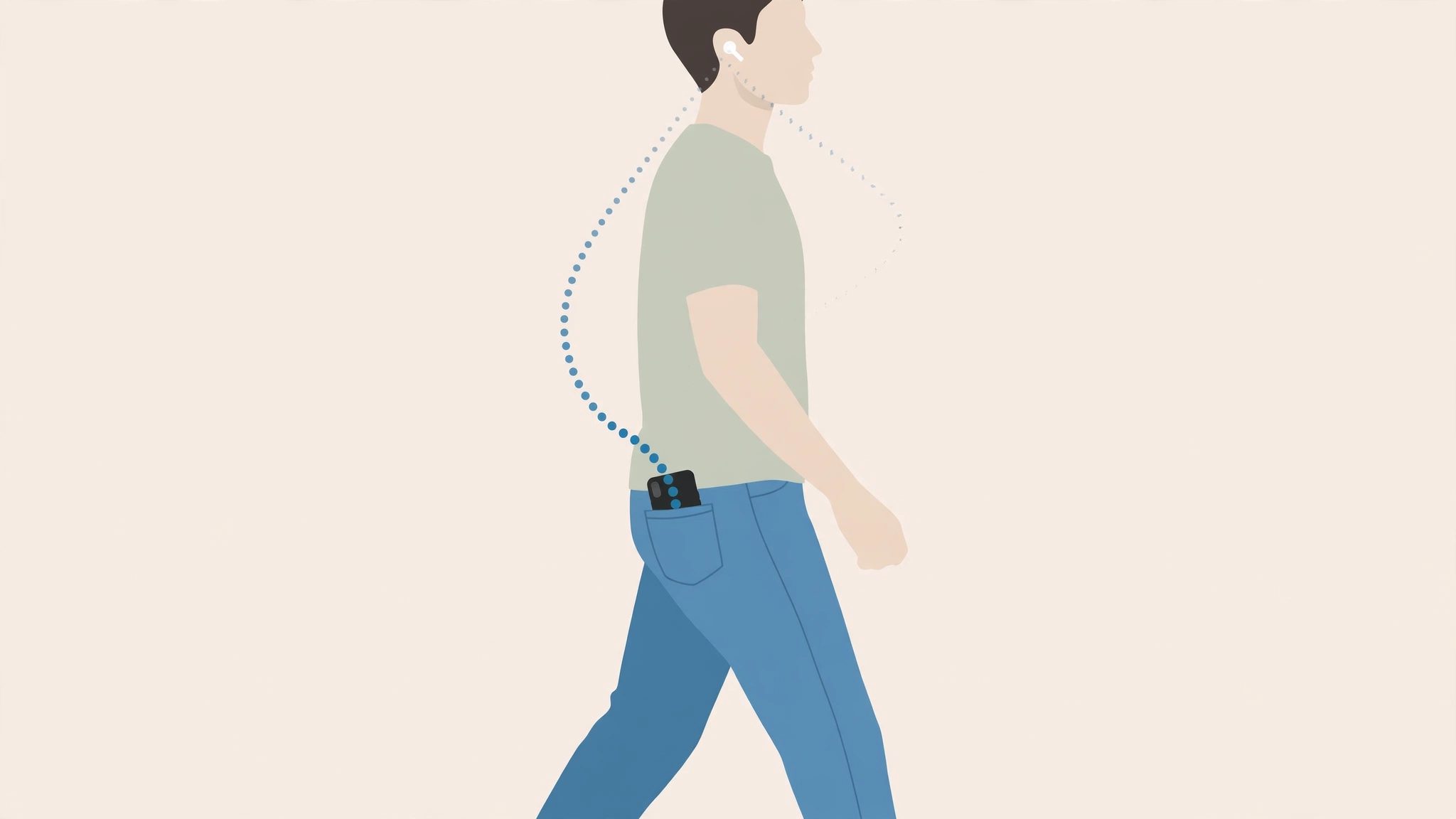
Or maybe I should say it this way: the phone and the earbuds need a clear path, and your body is in the way. Move the phone to a front pocket on the same side as the earbud that connects first, or hold it in your hand for a minute and see if the dropouts stop.
- Front pocket, same side. The earbud that links first is usually the one nearest the phone. Keep the phone on that side.
- No bag on your back. A backpack or a bag slung behind you adds a layer between the phone and the earbuds.
- Thick or metal cases count. A metal case or a wallet case with a metal plate can block the signal. Take the case off and test.
- Gyms and stations are crowded. Dozens of phones, watches and routers share the same band. If it only happens there, it is the room, not the headphones.
Same side. Front pocket. Test it.
Why Do My AirPods Keep Cutting Out?
Three things AirPods do by design can look like cut-outs: automatic switching, ear detection and the low-battery shut-off. Check those before you blame the Bluetooth link.
Automatic switching moves the AirPods to another Apple device on its own. If your iPad or Mac grabs them mid-song, the sound stops on your phone and starts somewhere else. Open the AirPods settings and set Connect to This iPhone to When Last Connected to This iPhone instead of Automatically, and the jumping stops.
Ear detection pauses the sound when an AirPod slips out of your ear — or when the sensor thinks it did. A dirty sensor or a loose fit can trigger pauses that feel like dropouts. Clean the sensor, check the fit, and try turning Automatic Ear Detection off for a day to see if the pauses stop.
Low battery has its own warning. A chime sounds at 10 percent, then again just before the AirPods switch off. If the sound dies after a chime, charge the case and both AirPods for 30 seconds, then test the quiet one on its own.
Apple's own advice starts with updates. Update the iPhone or Mac, then check the AirPods firmware against Apple's list. If the dropouts survive all of that, unpair the AirPods, restart the phone and pair them again.
Design first. Fault second.
Why Do My Bluetooth Headphones Cut Out on Windows?
Windows causes most of its own cut-outs. The usual suspects are the Hands-Free profile, a USB 3.0 port sitting next to the Bluetooth radio, an old driver, or a codec set higher than the link can hold.
Calls are the giveaway. When a call starts, Windows can switch the headphones to the Hands-Free profile, which drops the sound quality and can stutter. If music plays fine but calls cut out, the profile is the problem. Set the headphones as the default output and the default communication device in Sound settings, and check that the app is using the stereo output, not the hands-free one.
USB 3.0 is the hidden one. A USB 3.0 hard drive or hub next to the laptop's Bluetooth radio throws noise across the 2.4 GHz band. Move the drive to a port on the other side, or use a short USB extension cable to put distance between the drive and the radio.
They're small, they're always on, and they're juggling a lot of radio traffic at once — so the codec matters too. LDAC sends up to 990 kbps, and a busy room can break that stream where a lighter codec holds. Sennheiser's own guidance for LDAC stuttering says to switch to AAC or SBC when the link struggles, and to turn off phone Bluetooth power-saving modes if they exist. On Android, the LDAC setting has a connection-quality option — pick that over sound quality when dropouts are the problem.
Run the built-in troubleshooter first: Settings, then System, then Troubleshoot, then Other troubleshooters, then Bluetooth. Then update the Bluetooth driver in Device Manager — laptop and motherboard makers often ship drivers with codec support that Windows Update does not. If the built-in radio is the weak point, a USB Bluetooth adapter can replace it, though it cannot fix a failing pair of headphones or a crowded room.
Profile, port, driver, codec. In that order.
How Do I Fix Bluetooth Headphones That Keep Cutting Out?
Work through the steps in order. Each one rules out a cause, so you stop as soon as the sound holds steady — most people never get past step three.
To fix Bluetooth headphones that keep cutting out, follow these steps: 1. Charge both the headphones and your phone. 2. Move the phone within a few feet, in the same room. 3. Play a song saved on the phone, not a stream. 4. Turn off Bluetooth on other nearby devices. 5. Forget the headphones and pair them again.
- Charge both sides. Charge the headphones and the phone fully, then test again. Low battery thins the signal before the headphones switch off.
- Move the phone close. Keep the phone within a few feet, in the same room, with no wall or metal between it and the headphones. If the dropouts stop, it was distance or blocking.
- Play a saved song. Play a track saved on the phone, not a stream, to separate a signal problem from a streaming problem. If the saved song plays clean and the stream does not, check the app or the network.
- Switch off other Bluetooth devices. Turn off Bluetooth on nearby devices you are not using, so nothing else grabs the link. If your headphones use multipoint, see what Bluetooth multipoint is — a second device can steal the audio without warning.
- Forget and re-pair. Remove the headphones from the Bluetooth list, restart the phone, then pair them again from scratch. A stale pairing profile is a common cause of dropouts that survive everything else.
- Update the firmware. Open the headphone app — Sony Sound Connect, Bose Music, Jabra Sound+ or the maker's own app — and install any firmware update. Makers ship stability fixes this way, and an old build can drop out for no other reason.
Look — if you're on your third re-pair and the sound still drops, here's what actually works: stop resetting and start testing. Play a saved song with the phone in your hand, in a quiet room, fully charged. If that holds, the headphones are fine and the room is the problem. If it still drops, the fault is in the headphones or the phone.
If the headphones still cut out after all six steps, and they do it on a second phone or laptop too, the fault is in the headphones. One device, one room, one pair — that is the test that decides it. For the full reset walkthrough, see how to reset Bluetooth headphones, and if the headphones never link at all, see why your Bluetooth headphones won't connect.
Test, don't guess.
Why Does Only One Earbud Keep Cutting Out?
One earbud dropping on its own is almost never a signal problem. It is that earbud's battery, its charging contacts, or its ear sensor.
Earbuds charge unevenly. One bud can sit a millimetre off its contacts in the case and charge to half while the other fills up. Clean the contacts on the bud and in the case with a dry cloth, seat both buds firmly, and charge the case too — a case with power does not guarantee both buds made contact.
Check the balance as well. A dirty ear sensor can make the bud think it left your ear, so it pauses. Clean the sensor, test the quiet bud on its own, and check the phone's left-right balance in the accessibility settings — a balance slider knocked to one side looks exactly like a dead earbud.
One bud. One cause. Usually the case.
When Should I Replace My Bluetooth Headphones?
Replace them only if the dropouts follow the headphones to every device, in every room, fully charged. Anything less is a fixable problem, not a broken pair.
Most cut-outs are not your headphones' fault, and buying a new pair rarely fixes them. A new pair meets the same walls, the same Wi-Fi and the same pocket — the radio environment stays the same. That is an opinion, and plenty of people will disagree — but if the dropouts follow the room, not the headphones, the money is better spent elsewhere.
Replace the headphones when the pattern points at the hardware: they cut out on a second phone and a laptop, in a quiet room, fully charged, after a re-pair and a firmware update. A battery that dies in an hour, a hinge that crackles when you move, or one earbud that never holds a charge are hardware faults too.
Before you buy, check the spec sheet for the features that stop this happening again: multipoint if you juggle two devices, a newer Bluetooth version for a steadier link, and a companion app with firmware updates. See the best Bluetooth 5.3 earbuds for pairs that hold up, and how to fix Bluetooth audio delay if the sound lags as well as drops.
Room problem? Keep the pair. Headphone problem? Replace it.
Frequently Asked Questions
Why do my Bluetooth headphones keep cutting out every few minutes?
Usually weak signal, interference or low battery. Charge both devices, keep the phone close, and test a song saved on the phone. If that plays clean, the stream or the room is the problem.
Why do my Bluetooth headphones cut out when my phone is in my pocket?
Your body absorbs the 2.4 GHz signal, and a back pocket puts your whole body between the phone and the earbuds. Move the phone to a front pocket on the same side as the earbud that connects first.
Why do my AirPods keep cutting out when I walk?
Walking changes the signal path, and a phone in a back pocket or bag makes it worse. Keep the phone in a front pocket, turn off automatic switching, and check the battery in both AirPods.
How do I stop my Bluetooth headphones from cutting out on Windows 11?
Run the Bluetooth troubleshooter, update the Bluetooth driver, and move the headphones off the Hands-Free profile. If you use LDAC, switch the codec to connection quality instead of sound quality.
Why does only one earbud keep cutting out?
Usually that earbud is low on battery, dirty, or not seating in the case to charge. Clean the charging contacts, charge both buds fully, and test the quiet one on its own.
Can a phone case make my Bluetooth headphones cut out?
Yes, if it is thick or has metal in it. Metal cases and wallet cases with metal plates block the signal. Take the case off for a quick test — if the dropouts stop, the case is the cause.
Should I replace my headphones if they keep cutting out?
Not yet. Most cut-outs come from the signal, the settings or the battery, not broken hardware. Replace them only if the dropouts follow the headphones to every device, in every room, fully charged.