Best Wireless Headset for Work in 2026: 6 Picks

Your callers keep saying you sound far away. If you've tried a music headphone for calls, you've probably heard it yourself — and the laptop mic isn't any better. That's what this guide fixes.
Search "wireless headset" and the results are mostly music headphones — Sony, Bose and Sennheiser over-ears built for listening, not for talking. They sound wonderful. Their microphones are an afterthought. A work headset is the opposite product: the microphone is the whole point, the boom sits centimetres from your mouth, and the question is not how it sounds to you but how you sound to the person on the other end of the call.
A wireless headset for work is a headset built around its microphone, not its speakers. It uses a boom mic that sits centimetres from your mouth, a USB dongle for a stable connection, and certification for Teams or Zoom. Music headphones prioritise sound quality; a work headset prioritises how you sound to your callers.
This guide is about that headset. Every price below was verified on 17 November 2026 from US Amazon listings and published price tables, and every battery, microphone and certification claim is stated as the manufacturer states it — not the number on the retailer's listing. The six picks below are current models sold on Amazon US, each with a clear job: a best overall work headset, the best ANC for noisy offices, the best premium pick, the best AI noise suppression, the best budget pick, and the one music headphone that is genuinely good enough for calls to earn a place here.
Quick Comparison
| Product | Key Specs | ||
|---|---|---|---|
| #1 | Jabra Evolve2 65 UC StereoBest Overall | 3-mic boom · 37h battery · no ANC · Link380 dongle · 30m range · $274.99 | Check Price |
| #2 | Poly Voyager Focus 2 UCBest ANC for Noisy Offices | 4-mic boom · hybrid ANC · 25h talk time · 50m range · charging stand · $169.99 | Check Price |
| #3 | Jabra Evolve2 75 UC StereoBest Premium | 8-mic boom · hybrid ANC · 36h battery · 40mm speakers · 30m range · $339.00 | Check Price |
| #4 | Logitech Zone Wireless 2Best AI Noise Suppression | AI noise suppression · hybrid ANC · 15h talk time (ANC on) · flip-to-mute boom · $249.99 | Check Price |
| #5 | Anker PowerConf H700Best Budget | AI noise reduction · hybrid ANC · 24h talk time · multipoint · 184g · $129.99 | Check Price |
| #6 | Sony WH-1000XM6Best for Music + Calls | 12-mic array · best-in-class ANC · 30h battery · no boom mic · multipoint · $449.99 list, $378 street | Check Price |
Jabra Evolve2 65 vs Poly Voyager Focus 2: the Jabra is better suited for quiet rooms because its 3-mic boom and 37-hour battery are the best in this guide. The Poly works better when the office is noisy. The key difference is ANC — the Poly has hybrid ANC, the Jabra has none.
The best wireless headset for work is the Jabra Evolve2 65 UC Stereo at $274.99. According to Layer3labs' 2026 business-headset test, it ranks as the best overall business headset, thanks to its 3-mic boom and 37-hour battery. It suits quiet home offices best, since it has no active noise cancelling.
A wireless headset for work differs from a music headphone because the microphone is the whole product. Business headsets put a boom mic centimetres from your mouth, while music headphones hide microphones in the earcups. According to the manufacturers' own specifications, every business pick in this guide except the Sony uses a boom mic.
You should spend $130 to $275 on a wireless headset for work. The Anker PowerConf H700 at $129.99 covers the basics with hybrid ANC and 24 hours of talk time. The Jabra Evolve2 65 at $274.99 adds the best call quality and the longest battery. Paying more buys comfort and noise cancelling, not a better microphone.
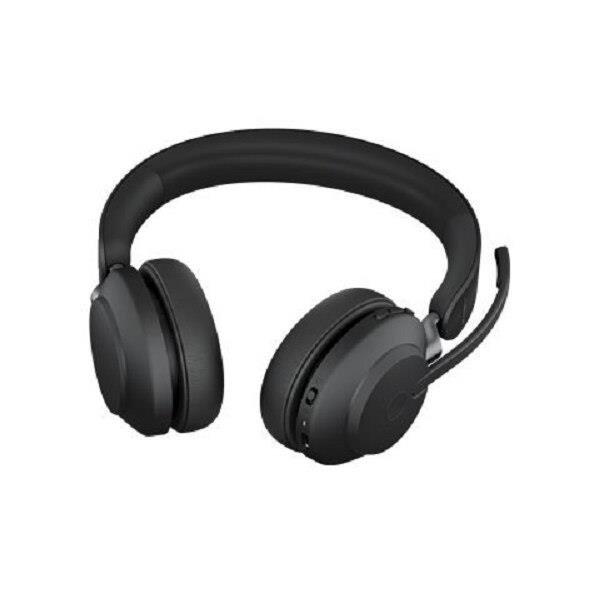
Jabra Evolve2 65 UC Stereo
Best OverallBuy if: you want the best all-round work headset — clear calls, the longest battery here, and a dongle that just works
Don't buy if: your office is noisy — this headset has no active noise cancelling, and the Poly at #2 does for $105 less
The Evolve2 65 is the consensus pick across every serious business-headset test, and the reason is the microphone: three digital MEMS microphones on a boom that sits right at your mouth, with a lift-to-mute action that feels natural — raise the boom to mute, lower it to unmute or answer. Layer3labs' 2026 business-headset test ranks it the best overall business headset, and the battery is the longest in this guide: up to 37 hours of music, up to 35 hours of talk time with the busylight off, or 24 hours with it on. The 360° busylight on both earcups is visible from every angle, so colleagues can see you are on a call before they interrupt.
The microphone is the whole product.
The honest limit is the one the box does not shout about: this headset has no active noise cancelling. What it has is passive noise isolation — the on-ear cushions block some sound, but in a noisy open office you will hear the room, and the room will not be filtered for you. That is the whole reason the Poly Voyager Focus 2 sits at #2: it has hybrid ANC and costs $105 less. If your calls happen in a quiet home office, the Evolve2 65 is the better headset. If they happen in a noisy one, it is not.
One naming note: Jabra sells this headset in more variants than any other pick here. UC means generic unified communications; MS means Microsoft Teams-certified, with a dedicated Teams button. Stereo means two earcups; mono means one, and the mono is lighter at 99.2g against the stereo's 176.4g. The Link380a is the USB-A dongle; the Link380c is USB-C. The version in this guide is the UC Stereo with the Link380a dongle at $274.99 — the MS Stereo with the Link380c is $198.98, and the Mono UC with the Link380c is $289.00, so check which variant the listing actually is before you buy.
Pros
- Best all-round call quality in this guide — 3-mic boom right at your mouth
- Longest battery here: 37h music, up to 35h talk time
- Lift-to-mute boom and 360° busylight are genuinely useful every day
- The default recommendation across business-headset tests — the safe pick
Cons
- No active noise cancelling — passive isolation only, so noisy offices leak in
- On-ear fit can press after several hours of continuous wear
- $274.99 is not cheap for a headset without ANC
- UC vs MS, mono vs stereo, Link380a vs Link380c — check the variant on the listing
Price $274.99 (UC Stereo, Link380a). Check the price before buying, as prices change.
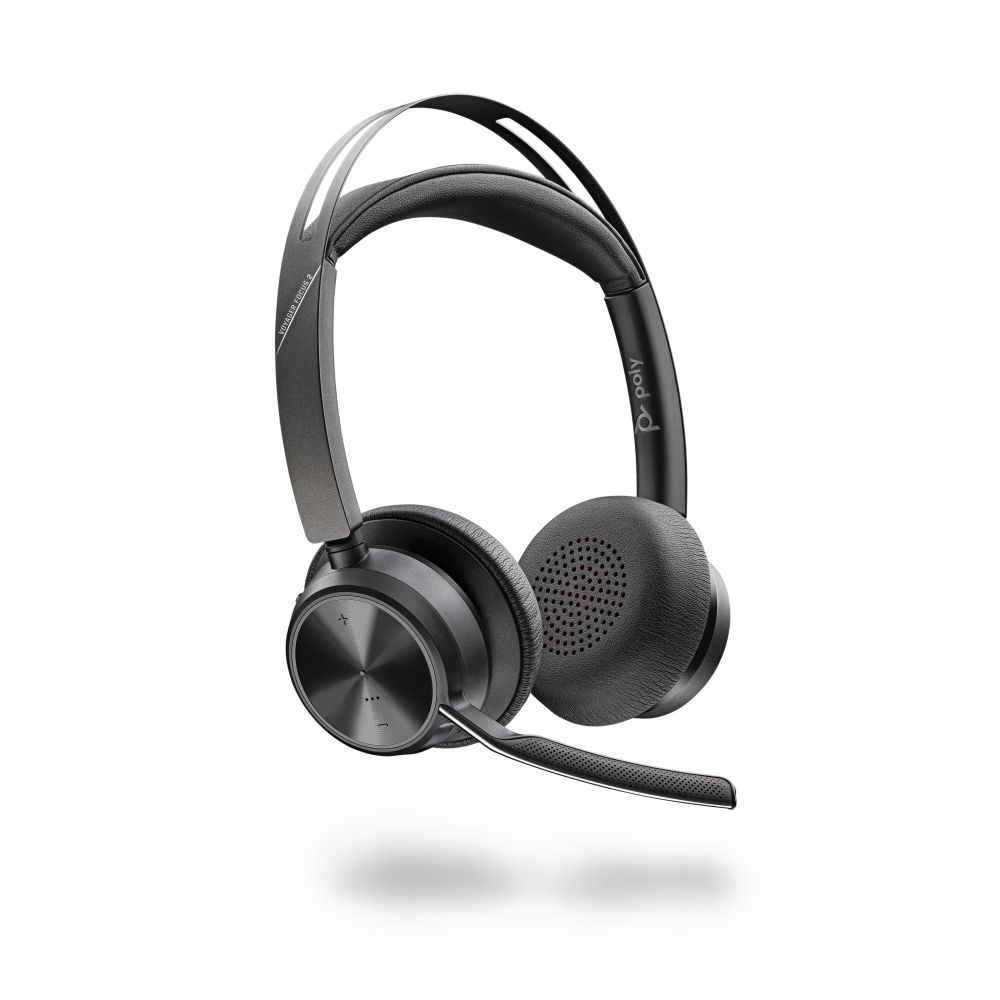
Poly Voyager Focus 2 UC
Best ANC for Noisy OfficesBuy if: your calls happen in a noisy office — hybrid ANC plus a 4-mic boom is the best noisy-room combination here, and it costs $105 less than the top pick
Don't buy if: you take back-to-back calls all day — 25 hours of talk time is the shortest among the business headsets here
The Voyager Focus 2 is the pick for the room the Evolve2 65 cannot handle. It pairs hybrid active noise cancelling — which quiets the office for you — with a 4-microphone noise-cancelling boom, which quiets the office for your callers. Layer3labs ranks it the best ANC and microphone combination for noisy offices, and the wireless range is the longest in this guide at up to 50 metres, so you can walk to the kitchen mid-call without dropping. The charging stand in this variant means the headset is always charged when you sit down — it lives on the stand, not in a drawer.
The stand is the quiet hero here.
The trade is talk time. Up to 25 hours is the shortest among the business headsets here, against 35 hours on the Evolve2 65 and 36 on the Evolve2 75. In practice 25 hours is still three full working days of calls, and the stand tops it up between them, so it only bites if you travel without the stand. The other detail is the price: this variant — UC with the charging stand and a USB-A dongle — is $169.99, down from $219.99 in September 2026. The USB-C variant is $271.81, so the dongle connector alone changes the price by $100 — check which one the listing includes.
One naming note: Poly sells the Focus 2 as UC (generic) and Teams (Microsoft Teams-certified), with or without the charging stand, and with a USB-A or USB-C dongle. The original Voyager Focus — no "2" — is an older headset from 2017 without the hybrid ANC, and it still appears in search results. The "2" is the whole product: check for it on the listing.
Pros
- Best noisy-office combination here: hybrid ANC for you, 4-mic boom for your callers
- Longest wireless range in this guide — up to 50m
- Charging stand keeps it topped up between calls
- $169.99, down from $219.99 — $105 less than the top pick
Cons
- 25h talk time is the shortest among the business headsets here
- On-ear fit, like the Jabra picks — not over-ear
- USB-A vs USB-C dongle changes the price by $100 — check the listing
- The older Voyager Focus (no "2") still appears in search — it has no hybrid ANC
Price $169.99 (UC with charging stand, USB-A). Check the price before buying, as prices change.
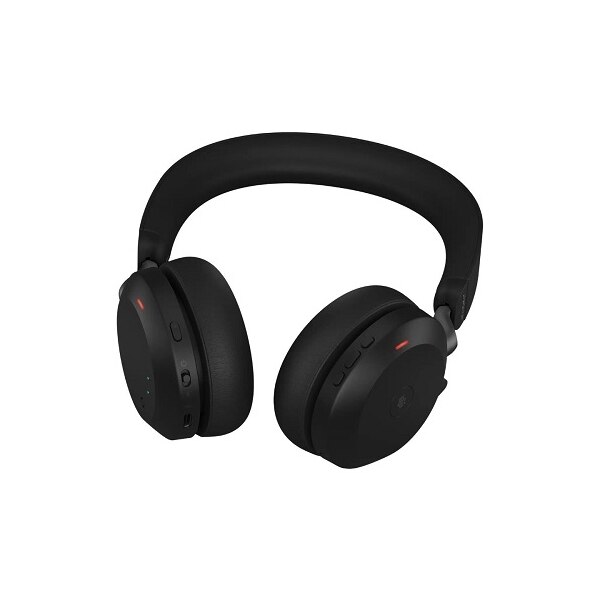
Jabra Evolve2 75 UC Stereo
Best PremiumBuy if: you want the best microphone array and the most comfortable fit in this guide, and you take calls all day
Don't buy if: your calls are mostly in a quiet room — the Evolve2 65 at #1 does that job for $64 less
The Evolve2 75 is the Evolve2 65 with everything turned up: eight microphones instead of three, hybrid active noise cancelling instead of passive isolation, and dual-foam ear cushions that are the most comfortable fit in this guide for all-day wear. The battery is 36 hours, the speakers are 40mm, the wireless range is 30 metres, and it is Microsoft Teams-certified. Layer3labs ranks it the best premium business headset, and the reason is simple: it is the only headset here that is best-in-class on both sides of the call — what you hear and what your callers hear.
Comfort is the 75's real edge.
The honest question is whether you need it. Against the Evolve2 65, the 75 buys you ANC and five more microphones for $64 — $339.00 against $274.99. Against the Voyager Focus 2, it buys you a longer battery and a better mic array for $169 more, while giving up the 50-metre range and the charging stand at that price. The with-stand version runs $388–$409, so the stand alone is another $50–$70. If you take calls all day in a noisy office, the 75 earns it. If your room is quiet, the 65 is the same headset where it matters and $64 cheaper.
One naming note: like the 65, the 75 comes in UC, MS and UC+ variants, with or without the charging stand, and with a USB-A or USB-C dongle. There is also an Evolve2 75 SE, a cheaper line with a different feature set. The version in this guide is the UC Stereo with the USB-C dongle at $339.00 — check for "75" and "UC" on the listing, and check whether the stand is included before you compare prices.
Pros
- Best microphone array here — 8 mics plus hybrid ANC
- 36h battery and the most comfortable all-day fit in this guide
- Teams-certified, 40mm speakers, 30m range
- The premium pick across business-headset tests
Cons
- $339 is $64 more than the Evolve2 65 for a similar headset in a quiet room
- With-stand version runs $388–$409 — the stand is another $50–$70
- Overkill if your calls are mostly in a quiet home office
- UC vs MS vs UC+, stand or no stand — check the variant on the listing
Price $339.00 (UC Stereo, USB-C). Check the price before buying, as prices change.
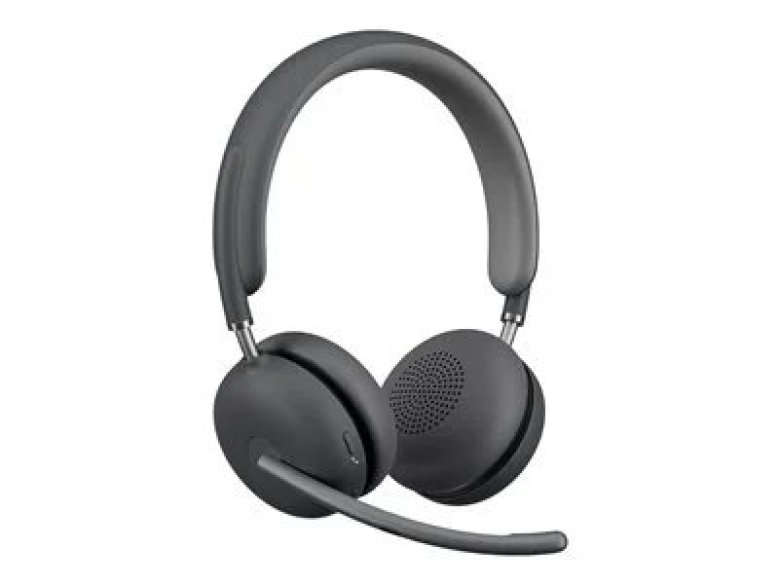
Logitech Zone Wireless 2
Best AI Noise SuppressionBuy if: background noise is your problem — its AI noise suppression is the best in this guide at keeping dogs, keyboards and coffee shops out of your calls
Don't buy if: you need more than 15 hours of talk time — that is the shortest battery here, and it only just covers a full workday
The Zone Wireless 2 is the pick for the noisiest life, not the noisiest office. Its AI noise suppression — tuned through Logitech's Logi Tune software — is the best in this guide at removing background noise from your microphone, and the hybrid ANC quiets the room for you. DeskDeploy's October 2026 test ranks it the best overall wireless headset for work, and it is the only pick here certified for all three platforms by version: Microsoft Teams, Zoom and Google Meet, depending on which variant you buy. The boom flips up to mute, which is the fastest mute in this guide.
Fifteen hours is the number to watch.
The trade is the battery. Fifteen hours of talk time with ANC on is the shortest in this guide, and it is the one number that could actually bite: a full day of back-to-back calls plus music between them gets close to the limit, and there is no charging stand in the box to top it up. The other trap is the name. Logitech sells the Zone Wireless 2 at $249.99 — and the Zone Wireless 2 ES, an "Essential" variant, at $179.99. The ES is a different headset with a different feature set, not a sale price on the same one. If a listing shows $179.99, check whether it says ES before you buy.
One naming note: the original Zone Wireless — no "2" — is the older model without the AI noise suppression or the hybrid ANC, and it still appears in search results at a lower price. The "2" is the whole product. Check for it, and check for ES, before you compare prices.
Pros
- Best AI noise suppression here — dogs, keyboards and coffee shops stay out of your calls
- Certified for Teams, Zoom and Google Meet (by version) — the widest certification here
- Flip-to-mute boom is the fastest mute in this guide
- Best overall in DeskDeploy's October 2026 work-headset test
Cons
- 15h talk time with ANC on is the shortest battery here
- No charging stand in the box to top it up between calls
- The Zone Wireless 2 ES at $179.99 is a different, cheaper headset — easy to buy by mistake
- $249.99 is a lot for 15 hours of battery
List price $249.99 — often $229.99 street. Check the price before buying, as prices change.
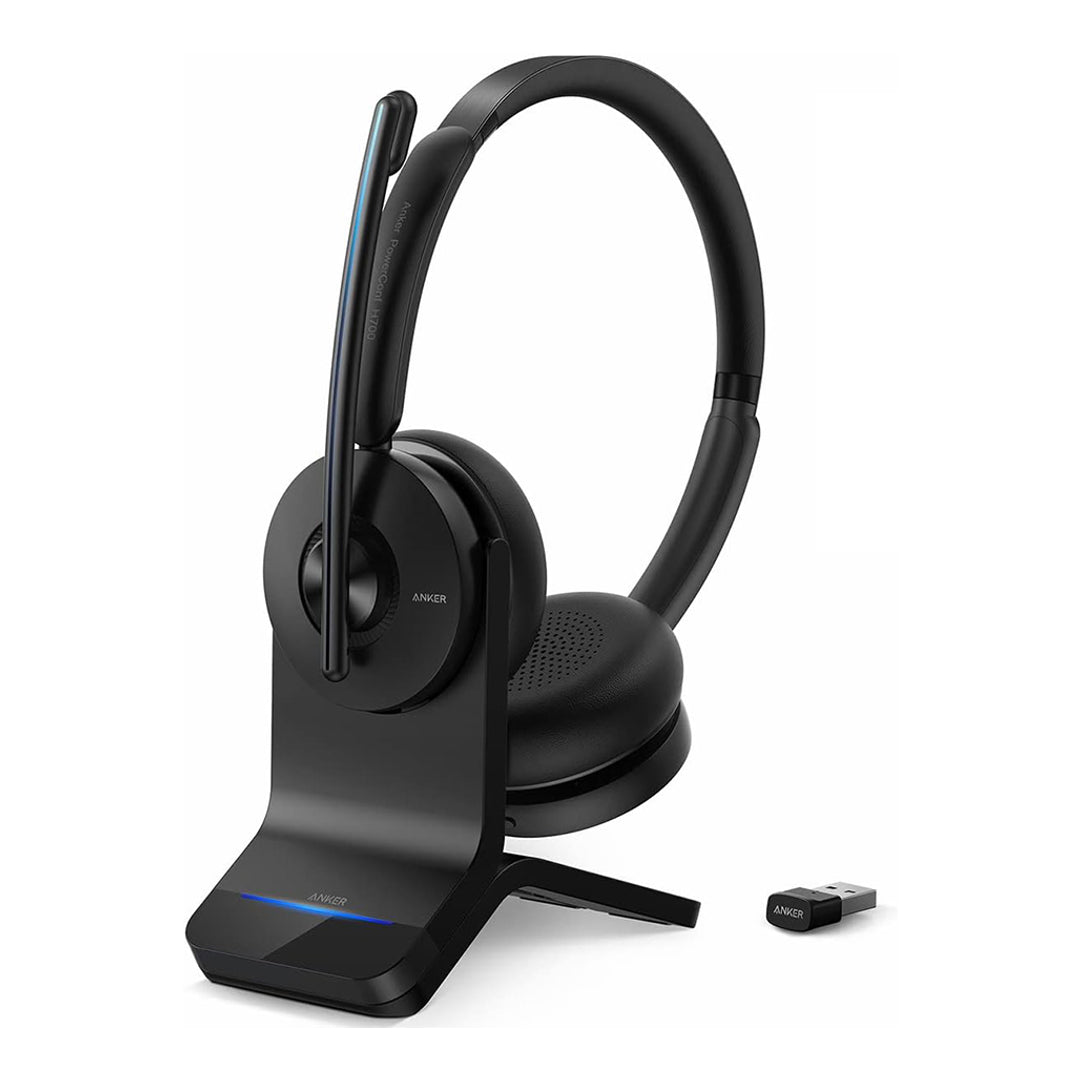
Anker PowerConf H700
Best BudgetBuy if: you want a real business headset — hybrid ANC, AI noise reduction, 24 hours of talk time — for $129.99
Don't buy if: your IT department requires formal Teams or Zoom certification — the H700 is compatible, not certified
The H700 is the budget pick because it is the cheapest headset in this guide that is still a business headset, not a music headphone with a mic bolted on. For $129.99 you get hybrid active noise cancelling, AI noise reduction on the microphone, 24 hours of talk time, multipoint connection to two devices at once, and meeting transcription through Anker's app. At 184g it is light for an on-ear headset with a boom, and it ships with a USB dongle for a stable PC connection. Layer3labs ranks it the best budget business headset, and the reason is the spec sheet: nothing else under $150 has this combination.
Nothing else under $150 does this.
The honest limit is certification. The H700 works with Microsoft Teams and Zoom — it is compatible — but it is not formally certified for either, which matters if your employer standardises on certified hardware or your IT department will only support it. Anker's support and firmware track record in UC deployments is also shorter than Jabra's or Poly's, both of which have been in offices for a decade. And the charging dock is not in the $129.99 box: the headset alone is $129.99, and the version with the dock is $149.99–$150. Buy the dock version if the headset will live on your desk.
One naming note: Anker sells a whole PowerConf family, and the name is the trap. The PowerConf H700 is the headset in this guide. The PowerConf speakerphone — a puck that sits on a conference table — is a completely different product with the same family name, and it appears in the same search results. If the product in the photo has no headband, it is not the H700.
Pros
- $129.99 — the cheapest real business headset here, by $40
- Hybrid ANC and AI noise reduction at a budget price
- 24h talk time and multipoint to two devices
- Meeting transcription in Anker's app — no other pick here has it
Cons
- Compatible with Teams and Zoom, not formally certified for either
- Anker's UC support track record is shorter than Jabra's or Poly's
- Charging dock costs extra — $149.99 with the dock, $129.99 without
- Mic quality is good, not class-leading — the Jabra and Poly booms are clearer
Price $129.99 headset only; $149.99 with charging dock. Check the price before buying, as prices change.
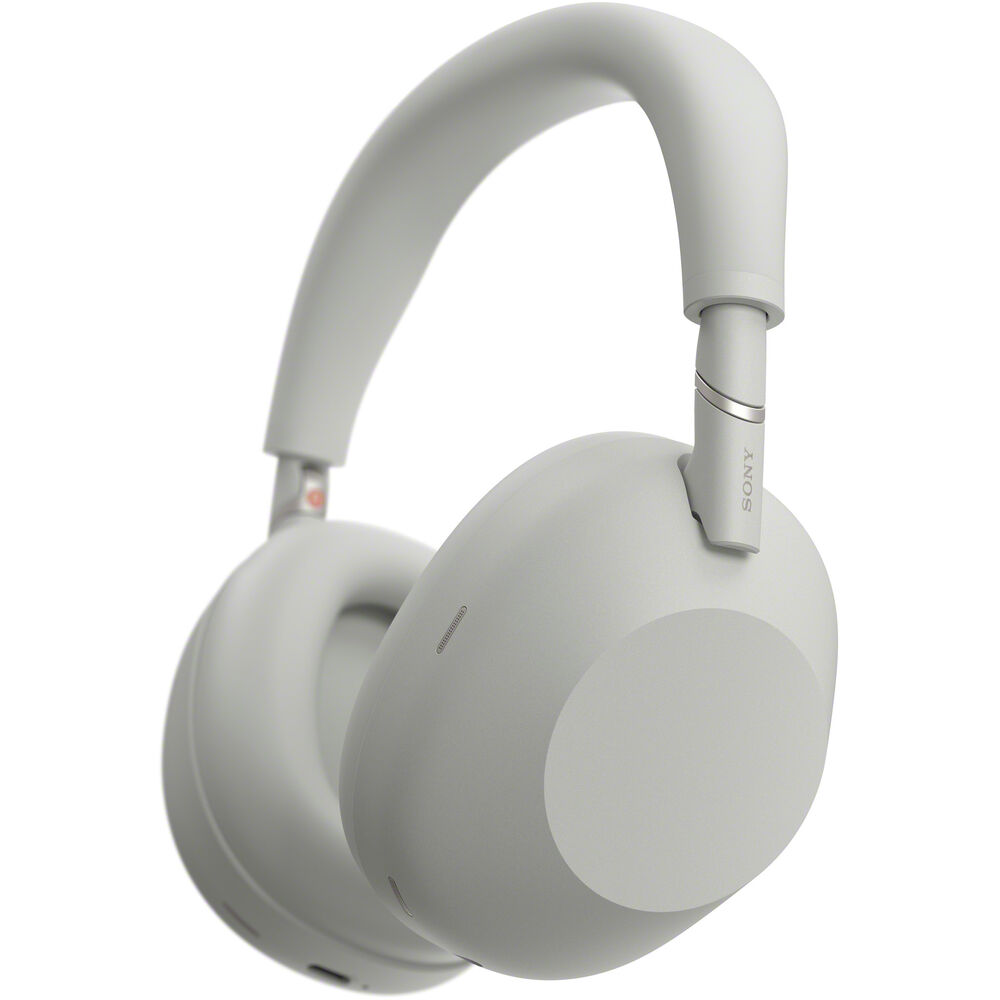
Sony WH-1000XM6
Best for Music + CallsBuy if: you want one headset for music and calls — the best ANC and the best sound in this guide, with call quality good enough for real work
Don't buy if: calls are the whole job — a boom mic beats it on every call, and the business headsets here cost half as much
The XM6 is the only music headphone in this guide, and it earns its place because it is the one music headphone whose microphones are genuinely good enough for work. Sony's 12-microphone array, driven by the QN3 processor, gives it the best noise cancelling in this guide by a distance — SoundGuys calls it the best ANC headphone of 2025 — and the 30mm drivers give it the best sound too. The battery is 30 hours with ANC on, it connects to two devices at once, and at $378 street on Amazon against a $449.99 list price, it is the most expensive pick here for a reason: it is two products, a flagship music headphone and a capable call headset, in one.
Two products in one box.
The honest limit is physics. The XM6 has no boom mic — its microphones sit in the earcups, centimetres further from your mouth than any business headset here — so your callers hear more of your room than they would on the Jabra or Poly. It is also not Teams-certified, and it costs $449.99 list against $129.99 for the Anker. If calls are the whole job, buy a business headset and keep the money. If you already live in music between calls and want one headset that does both well, the XM6 is the only pick here that does.
One naming note: the WH-1000XM5 is the previous model, still sold, and still a very good headphone. The XM6 is the 2025 model with the QN3 processor, the 12-mic array and the redesigned folding hinge. If a listing shows a price well under $378, check whether it says XM5 — the two look similar and the older one is the cheaper one for a reason.
Pros
- Best ANC and best sound in this guide by a distance
- 30h battery with ANC on, multipoint to two devices
- The only pick here that is a flagship music headphone and a capable call headset
- 12-mic array with the QN3 processor — the best mic on any music headphone here
Cons
- No boom mic — callers hear more of your room than on any business headset here
- Not Teams-certified
- $449.99 list is the most expensive pick here, by a distance
- Overkill if calls are the whole job — the business headsets cost half as much
List price $449.99 — often $378 street on Amazon. Check the price before buying, as prices change.
Is a Boom Mic Really Better Than a Built-In Mic?
Yes — and the reason is distance, not technology. A boom microphone sits two or three centimetres from your mouth, so your voice arrives loud and the room arrives quiet. A built-in microphone sits in the earcup, ten or more centimetres away, so your voice arrives quieter and the room arrives louder — and no amount of noise suppression fully closes that gap. That is why every business headset in this guide except the Sony has a boom, and why the Sony, good as its 12-mic array is, still puts more of your room on the call than the cheapest boom headset here.
Here's the thing: if your callers ever say "you sound far away" or "what was that noise?", the fix is a boom mic, not a better headphone. The boom also gives you the fastest mute in the category — on the Jabra picks you raise the boom to mute, on the Logitech you flip it up — which beats hunting for a mute button on an earcup mid-sentence. Built-in mics are fine for a quick call in a quiet room. For all-day calls, the boom is the whole product.
What Does Teams or Zoom Certification Actually Do?
Certification means the headset was tested by Microsoft or Zoom against their standard and passed — and in practice it buys you three things. First, the headset's buttons work inside the app: answer, end and mute from the earcup, and on the MS variants a dedicated Teams button that opens the app. Second, the microphone and speaker levels are tuned to the platform's standard, so you do not arrive too loud, too quiet or distorted. Third, your IT department will support it — many employers only approve certified hardware, and an uncertified headset can be a support ticket that never gets answered.
What certification does not mean is that an uncertified headset will not work. The Anker H700 is compatible with Teams and Zoom — it connects, it carries audio, calls work — it simply was not put through the formal certification programme. For personal use that is fine. For a work laptop managed by an employer, buy certified: UC means generic unified communications, MS means Teams-certified, and the Teams variants of the Poly headsets carry the same idea. The certification is printed on the box and in the product name — if it is not there, the headset is not certified.
Bluetooth or USB Dongle — Which Is Better for Work Calls?
The dongle — and it is not close, with one exception. A USB dongle is a dedicated wireless link between the headset and one computer: it pairs once, it stays paired, and the audio profile is optimised for calls, which means your microphone and your speakers work at the same time at full quality. Native Bluetooth on a laptop does two things badly for calls: it drops to a low-quality "headset profile" the moment the microphone turns on, so music and voices go muddy mid-call, and it can drop the connection when the laptop sleeps or another device competes for it.
The Jabra, Poly and Anker headsets in this guide all ship with a dongle — Jabra's Link380, Poly's BT700, Anker's USB dongle — and every one of them is worth using. Plug the dongle in, leave it in, and connect the headset to your phone over Bluetooth separately if you need multipoint. The Logitech Zone Wireless 2 is the exception that proves the rule: its Teams version is certified by Microsoft for use over native Bluetooth with no dongle at all, while its UC version ships with a USB-C receiver. The Sony XM6 has no dongle either — which is one more reason it is the music pick, not the work pick. If your headset comes with a dongle, use it. The dongle is the difference between a call that works and a call that drops.
Can One Headset Connect to a Laptop and a Phone at Once?
Yes — the feature is called multipoint, and every pick in this guide supports it. With multipoint, the headset stays connected to your laptop and your phone at the same time: a call on the laptop plays through the headset, and when your phone rings, the headset switches to the phone automatically. When the call ends, it switches back. The Anker H700, the Logitech Zone Wireless 2, the Poly Voyager Focus 2 and the Sony XM6 all do this, and so do the two Jabra Evolve2 models.
One detail worth knowing: on the Jabra headsets, the USB dongle counts as one of the two connections, so the standard pair is laptop-via-dongle plus phone-via-Bluetooth. That is the setup most people want anyway — the dongle for stable calls on the laptop, Bluetooth for the phone beside it. If your working day is laptop calls with a phone beside you, multipoint is the feature to check for, and all six picks here have it.
How Much Talk Time Do You Actually Need?
More than you think, and the number on the box is not the number you get. Manufacturers quote talk time with the busylight off and the ANC off, in a quiet room, at moderate volume. Turn the ANC on, turn the busylight on, take calls back to back, and the real number is lower — the Evolve2 65, for example, is rated 35 hours of talk with the busylight off and 24 hours with it on. The practical rule: take the quoted talk time, subtract a third, and that is your real working day.
I've seen conflicting data — some listings quote 37 hours of talk time for the Evolve2 65, while Jabra's own spec sheet says 35 hours with the busylight off and 24 with it on. My read is the 35/24 split is the honest one, so that's the number to plan around.
By that rule, the Logitech Zone Wireless 2 at 15 hours is the only pick here that could actually run out — a full day of back-to-back calls plus music between them gets close to the limit, and there is no charging stand in the box. Every other pick here covers a working week of calls on one charge: 24 hours on the Anker, 25 on the Poly, 30 on the Sony, 35 on the Jabra 65 and 36 on the Jabra 75. The other thing that matters is the stand: the Poly and the Anker dock versions live on a charging stand, so they are always full when you sit down. A headset without a stand needs you to remember to charge it, and you will forget on the day you have six calls.
Mono or Stereo — Which Is Better for Work Calls?
For calls, mono — one earcup — is better if you work in an office with other people, and stereo is better if you work alone. A mono headset leaves one ear open, so you hear the colleague at the next desk, the doorbell, or the announcement that the meeting moved rooms, without taking the headset off. It is also lighter: the Jabra Evolve2 65 mono is 99.2g against 176.4g for the stereo, and after eight hours that difference is real. Call centres have known this for decades, which is why mono is the default there.
Stereo is better for everything else: music between calls sounds fuller, ANC works better with two earcups sealing the sound, and the headset doubles as a music headphone after work. Every pick in this guide is stereo except the mono variants of the Jabra headsets, which cost about the same as the stereo versions — the Mono UC Evolve2 65 is $289.00 against $274.99 for the stereo, so mono is not the cheaper option, it is the situational one. Buy mono if you need to hear the room. Buy stereo for everything else.
Can I Use a Wireless Headset With a Desk Phone?
Usually yes, but not with the headset alone. A wireless headset connects to a desk phone through one of two routes: a Bluetooth connection, if the desk phone has Bluetooth — most modern IP phones from Poly, Cisco and Yealink do — or a dedicated electronic hookswitch cable, which lets the headset answer and end calls from the earcup. The Jabra, Poly and Logitech headsets in this guide all support desk-phone connection through their dongles and, on the Jabra and Poly, through a hookswitch cable sold separately.
The detail to check is the phone, not the headset. Older analogue desk phones without Bluetooth and without a hookswitch port cannot take a wireless headset at all, and no headset fixes that. If your desk phone is a modern IP phone, check its specifications for Bluetooth or EHS support before you buy the headset — and if you are buying for a whole office, buy the headset and the phone from the same brand family, because Jabra headsets pair most cleanly with Jabra-compatible phones and Poly with Poly. For home workers on a laptop and a mobile, this does not matter at all: the laptop and the phone are the whole setup.
The Exact-Model Trap Decoder
Seven names in this market each hide two or three different headsets. Check the model number on the listing — the name alone will not save you.
The generation and model traps
| Name on the Box | What It Actually Is |
|---|---|
| Jabra Evolve2 65 / 65 Flex / 65 SE | Three different headsets: the 65 is the standard one in this guide ($274.99, no ANC). The 65 Flex adds hybrid ANC and a wireless charging pad — a different headset at a different price. The 65 SE is a cheaper line with a different feature set. Check for "65" without Flex or SE. |
| Jabra Evolve2 75 / 75 SE; UC / MS / UC+ | The 75 is the premium pick in this guide ($339.00). The 75 SE is a cheaper line. UC is generic unified communications; MS is Teams-certified with a Teams button; UC+ adds a charging stand. The variant changes the price by $50–$70 — check which one the listing is. |
| Poly Voyager Focus 2 / Focus 2 UC / Focus 2 Teams | The Focus 2 is the headset in this guide. UC is generic, Teams is Microsoft Teams-certified. With or without the charging stand, and USB-A or USB-C dongle — the dongle alone changes the price by $100. The original Voyager Focus (no "2") is a 2017 headset without hybrid ANC. |
| Logitech Zone Wireless 2 / Zone Wireless 2 ES / Zone Wireless | The Zone Wireless 2 is the pick in this guide ($249.99). The Zone Wireless 2 ES is an "Essential" variant at $179.99 — a different headset, not a sale price. The original Zone Wireless (no "2") is the older model without AI noise suppression or hybrid ANC. |
| Anker PowerConf H700 / PowerConf speakerphone | The H700 is the headset in this guide ($129.99). The PowerConf speakerphone is a puck that sits on a conference table — a completely different product with the same family name. If the photo has no headband, it is not the H700. |
| Sony WH-1000XM6 / WH-1000XM5 | The XM6 is the 2025 model in this guide ($449.99 list, $378 street) with the QN3 processor and 12-mic array. The XM5 is the previous model, still sold, and still very good — but if a listing is well under $378, check whether it says XM5. |
| "UC" vs "MS" on the box | UC means generic unified communications — it works with Teams, Zoom and the rest. MS means Microsoft Teams-certified, with a dedicated Teams button. The MS variant is not better hardware, it is a different certification — and the two are priced differently, so check which one you are buying. |
What each pick's microphone and battery actually do
| Headset | Microphone | ANC | Talk Time | Range |
|---|---|---|---|---|
| Jabra Evolve2 65 UC Stereo | 3-mic boom | No — passive only | 35h (busylight off) | 30m |
| Poly Voyager Focus 2 UC | 4-mic boom | Hybrid | 25h | 50m |
| Jabra Evolve2 75 UC Stereo | 8-mic boom | Hybrid | 36h | 30m |
| Logitech Zone Wireless 2 | AI noise suppression, flip-to-mute boom | Hybrid | 15h (ANC on) | 50m |
| Anker PowerConf H700 | AI noise reduction | Hybrid | 24h | 10m |
| Sony WH-1000XM6 | 12-mic array, no boom | Best-in-class | 30h (ANC on) | — |
Buying Guide: What Actually Matters
To pick the right work headset, follow these steps: 1. Decide where you take calls. 2. Check for a boom mic. 3. Match the certification to your employer. 4. Compare talk time with the busylight on.
Buy the microphone first, the speakers second. A work headset is judged by how you sound to your callers, not by how music sounds to you. A boom mic two centimetres from your mouth beats any built-in mic array, however many microphones it has. If the headset has no boom, it is a music headphone — buy it for music, not for calls.
Check the ANC, not the noise-cancelling claim. "Noise cancelling" on a headset box can mean the microphone, the earcups, or both — and the Evolve2 65, the bestseller in this guide, has no active noise cancelling at all, only passive isolation. If your office is noisy, you need hybrid ANC on the earcups and a noise-cancelling boom on the mic. The Poly at #2 has both for $169.99.
Match the certification to your employer. If your laptop is managed by an employer, buy a certified headset — MS for Teams, or a Zoom-certified variant — because that is what IT will support. For personal use, compatibility is enough, and the Anker H700 at $129.99 is the value pick. The certification is in the product name: UC, MS or Teams. If it is not there, the headset is not certified.
Use the dongle. The Jabra, Poly and Anker headsets here ship with a USB dongle, and the dongle is the difference between a call that works and a call that drops to a muddy headset profile mid-sentence. Plug it in, leave it in, and connect your phone over Bluetooth separately if you need multipoint. The one certified exception is the Logitech Zone Wireless 2 Teams version, which Microsoft certifies over native Bluetooth with no dongle — its UC version ships with a USB-C receiver.
Count the talk time with the busylight on. Manufacturers quote talk time with the busylight off and the ANC off. Subtract a third for real use. By that rule the Logitech at 15 hours is the only pick here that could run out in a day of back-to-back calls — every other pick covers a working week.
Buy by job, not by brand. A quiet home office wants the Evolve2 65. A noisy open office wants the Voyager Focus 2. An all-day caller wants the Evolve2 75. A coffee-shop worker wants the Zone Wireless 2. A tight budget wants the H700. A music lover who also takes calls wants the XM6. The brand is marketing — the four specs that decide whether a work headset is any good are the boom mic, the ANC, the certification, and the talk time.
Look — if you're on calls all day in a noisy office, here's what actually works: the Poly at #2, not the Jabra at #1. Or maybe I should say it this way: buy the headset your callers will like, not the one you like.
Here's an opinion that might get pushback: most people should buy the $169.99 Poly over the $274.99 Jabra. The Jabra wins on paper — better mic, longer battery — but most people work in noisy rooms, and that's where the Poly earns its keep.
What to Skip
A music headphone sold as a work headset. If the product has no boom mic, it is a music headphone, however good its microphone array is. The Sony XM6 is the one exception in this guide, and it is here as the music-plus-calls pick, not as the work pick.
The Evolve2 65 for a noisy office. It is the best headset in this guide for a quiet room and the wrong one for a noisy one — no ANC, passive isolation only. In a noisy office the Poly Voyager Focus 2 is better and $105 cheaper.
A headset without a dongle for laptop calls — unless it is certified for native Bluetooth. Native Bluetooth drops to a low-quality headset profile the moment the microphone turns on, and it drops the connection when the laptop sleeps. The one exception in this guide is the Logitech Zone Wireless 2 Teams version, which Microsoft certifies over native Bluetooth with no dongle. If the headset ships with a dongle, use it. If it does not ship with one and is not certified for native Bluetooth, think twice before buying it for work.
The wrong Jabra, Poly or Logitech. The model numbers in the trap decoder above are not trivia — the Evolve2 65 Flex is a different headset from the 65, the Zone Wireless 2 ES is a different headset from the Zone Wireless 2, and the Voyager Focus without the "2" is a 2017 headset without hybrid ANC. Check the model number on the listing, not the shape of the box.
An uncertified headset for a managed work laptop. If your employer standardises on certified hardware, an uncertified headset is a support ticket that never gets answered. The Anker H700 is compatible with Teams and Zoom, not certified for either — fine for personal use, the wrong buy for a managed laptop.
A charging-stand price compared against a no-stand price. The Poly with the stand is $169.99; without it, a different price. The Jabra 75 with the stand is $388–$409; without it, $339.00. Compare like with like, or the "deal" is a different product.
Frequently Asked Questions
What's the best wireless headset for work calls?
The Jabra Evolve2 65 UC Stereo at $274.99 — a 3-mic boom, 37-hour battery, and the best call quality. For noisy offices, the Poly Voyager Focus 2 UC at $169.99 is better, with hybrid ANC and a 4-mic boom.
Should I get a boom mic or use a built-in mic?
Get the boom. It sits centimetres from your mouth, so your voice arrives loud and the room arrives quiet. A built-in mic sits in the earcup, much further away, and no noise suppression fully closes that gap.
Do I need a USB dongle, or is Bluetooth enough?
Use the dongle. It keeps your mic and speakers at full quality at the same time. Native Bluetooth drops to a low-quality headset profile the moment the mic turns on, and it can drop when the laptop sleeps.
Can one headset connect to my laptop and phone at once?
Yes, if it supports multipoint. All six picks here connect to two devices at once and switch automatically when a call comes in. On the Jabra models, the dongle counts as one connection, so pair laptop-via-dongle with phone-via-Bluetooth.
What's the difference between UC and MS versions?
UC means generic unified communications — it works with Teams, Zoom and the rest. MS means Microsoft Teams-certified, with a dedicated Teams button. MS isn't better hardware, just a different certification, and the two are priced differently.
Can I use a work headset for music too?
Yes, but work headsets sound like work headsets. If music matters as much as calls, get the Sony WH-1000XM6 — the best ANC and sound here. If calls are the whole job, a business headset costs half as much.
How long should a work headset battery last?
At least 15 hours of talk time covers a full day of calls. Take the quoted number, subtract a third for ANC and the busylight, and the Jabra Evolve2 65 at 35 hours covers a working week.