How to Clean Bluetooth Headphones (2026 Guide)

One earbud sounds quieter than the other. The ear pads smell faintly of sweat. You hold the headphones up to the light and see a dull film of grime on the mesh — and you have no idea what is safe to wipe it with.
You are not alone. Most people never clean their headphones until something sounds wrong. The fix takes about five minutes, and it needs nothing fancier than a cloth, a soft brush and warm water.
Cleaning Bluetooth headphones means removing earwax, sweat, dust and skin oils from the ear tips, speaker mesh, ear pads and charging case with a dry or barely damp cloth — never by soaking them or blasting them with water.
The short version: power the headphones off, pull off the ear tips or pads, wash those parts separately in warm soapy water, brush the speaker mesh dry with a soft toothbrush, wipe the shells with a barely damp microfibre cloth, and let everything air-dry fully before it goes back together. Skip the running water, the sharp tools and the household sprays.
How Often Should I Clean My Bluetooth Headphones?
Once a month is enough for most people. Wipe them down after every sweaty workout, and give them a full clean the moment one side sounds quieter.
How often you should clean Bluetooth headphones depends on how much you wear them. According to Consumer Reports, once a month is enough for most people, while daily gym users should wipe earbuds down after every sweaty session. Sweat and earwax build up fast, and a quick wipe stops the mesh clogging before the sound goes dull.
Bluetooth headphones get dirty because they sit against skin all day. Earwax, sweat, sunscreen and pocket lint collect on the mesh and ear pads, and the mix breeds bacteria that can irritate ears. According to Apple Support, regular cleaning keeps AirPods working well and stops long-term damage from grime and moisture.
Look — if one earbud sounds quieter than the other right now, here is what actually works: clean the mesh first, before you blame the battery or the Bluetooth link. Wax clogs the tiny holes so slowly that you never notice the sound fading until one side is clearly behind the other.
- Daily wearers: a 30-second wipe with a dry cloth each night, full clean once a month.
- Gym and runners: wipe after every session — sweat is the fastest way to wreck ear pads — and full clean every two weeks.
- Occasional users: a full clean every couple of months is plenty, plus a wipe whenever they look dusty.
- Shared headphones: clean before every new user. No exceptions.
Five minutes a month. That is the whole habit.
What Do I Need to Clean Bluetooth Headphones?
A soft dry toothbrush, a microfibre cloth, cotton swabs, warm water and a drop of mild dish soap. That is the full kit — and most of it is already in your bathroom.
The tools you need to clean Bluetooth headphones are simple. A soft dry toothbrush loosens wax from the mesh, a microfibre cloth wipes the shells and ear cups, and cotton swabs reach the charging pins and seams. Most of it is already in your bathroom drawer, so there is no need to buy a special kit.
Here's an opinion some readers will argue with: skip the fancy cleaning kits. A soft toothbrush and a microfibre cloth do the same job for free, and the kits mostly repackage those two things in a nicer box. The one extra worth buying is cleaning putty — it pulls wax out of the mesh in a way a swab never will.
| Tool | What it is for | What to avoid |
|---|---|---|
| Soft dry toothbrush | Brushing wax and dust off the speaker mesh | Hard bristles or a metal brush — they scratch the mesh |
| Microfibre cloth | Wiping shells, ear cups and the headband | Paper towels — they can scratch coated plastic |
| Cotton swabs | Seams, mic holes and charging pins | Soaking them wet — damp only, never dripping |
| Cleaning putty or Blu Tack | Pulling wax out of the mesh without pushing it deeper | Cheap putty that leaves residue behind |
| Warm water + mild dish soap | Washing removable silicone tips and pads only | Using it on the earbuds or headphones themselves |
| Wooden toothpick | Stubborn wax at the edge of the mesh | Metal pins or needles — one slip tears the mesh |
Don't soak them, don't scrub them, and don't poke the mesh. Gentle wins every time.
How Do I Clean Wireless Earbuds?
Pull the tips off, wash the tips, brush the mesh dry, wipe the shells, and let everything dry fully. The whole job takes five minutes.
To clean wireless earbuds, follow these steps: 1. Power them off and pull off the ear tips. 2. Wash the tips in warm soapy water and dry them fully. 3. Brush the mesh gently with a dry soft toothbrush, mesh facing down. 4. Wipe the shells with a barely damp microfibre cloth. 5. Let every part air-dry before the earbuds go back in the case.
- Power them off and unpair. Switch the earbuds off so a stray touch does not trigger anything mid-clean, and keep them out of the case while you work.
- Pull the ear tips off. Silicone tips pop off with a firm tug; foam tips slide off more slowly. Wash silicone tips in warm water with a drop of dish soap, rinse, and leave them to dry fully. Foam tips cannot be washed — wipe them with a dry cloth and replace them when they stay dirty.
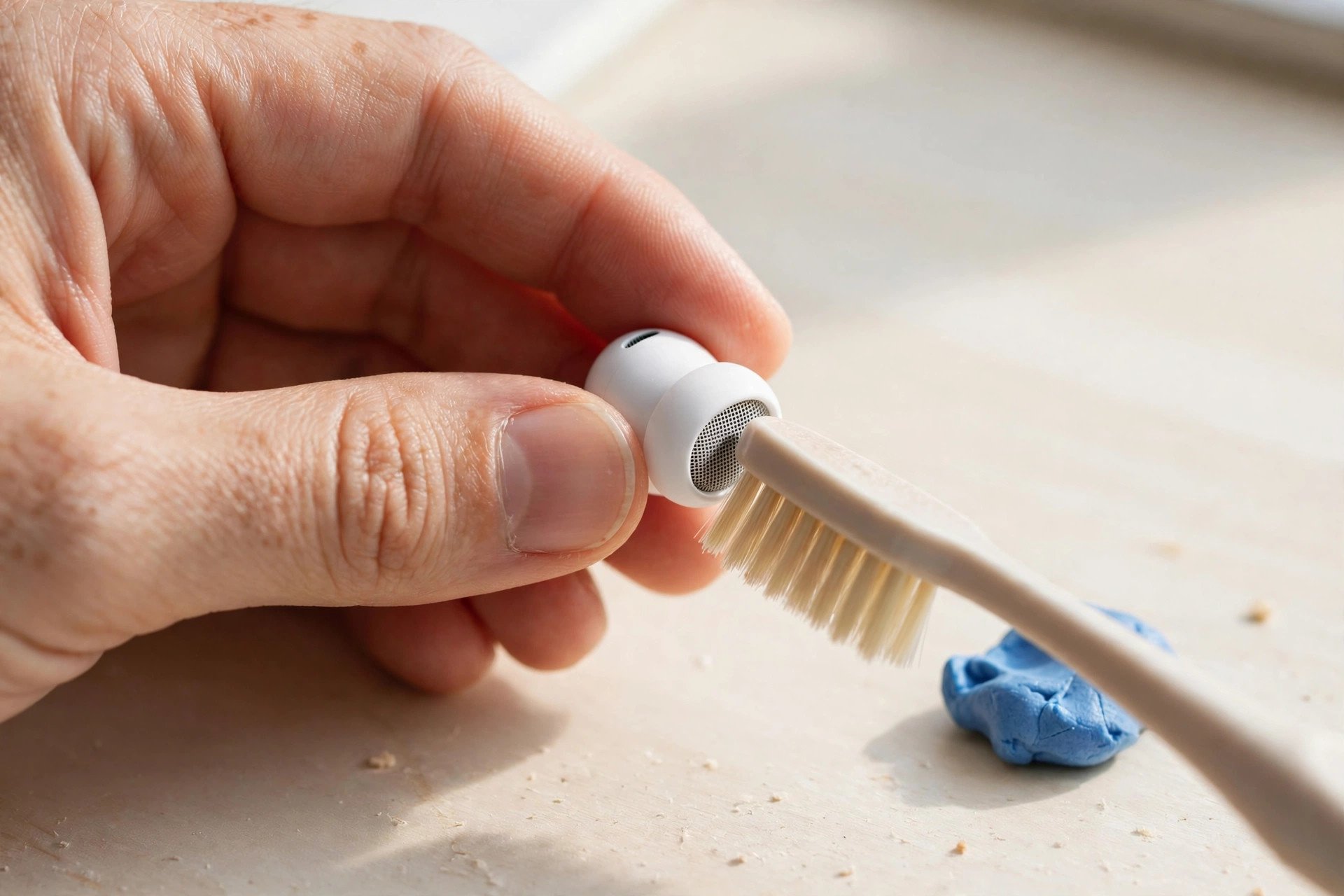
- Brush the mesh. Hold the earbud mesh-side down so debris falls out, not further in. Brush gently with a dry soft toothbrush at an angle, and press a small piece of cleaning putty against the mesh to lift out what the brush leaves behind.
- Wipe the shells. A microfibre cloth barely dampened with fresh water takes off skin oils and sunscreen. For stubborn grime on plastic or silicone, a cotton swab dampened with 70% isopropyl alcohol works — but wipe it dry right after, and never use alcohol on foam.
- Dry everything before it goes back together. AirPods need at least two hours to dry fully after any wet step, according to Apple Support. Do not rush this — a damp earbud in a charging case corrodes the contacts.
Or maybe I should say it this way: the mesh is the whole job. The shells just look dirty; the mesh is what actually changes the sound. Spend your time there.
How Do I Clean Over-Ear Bluetooth Headphones?
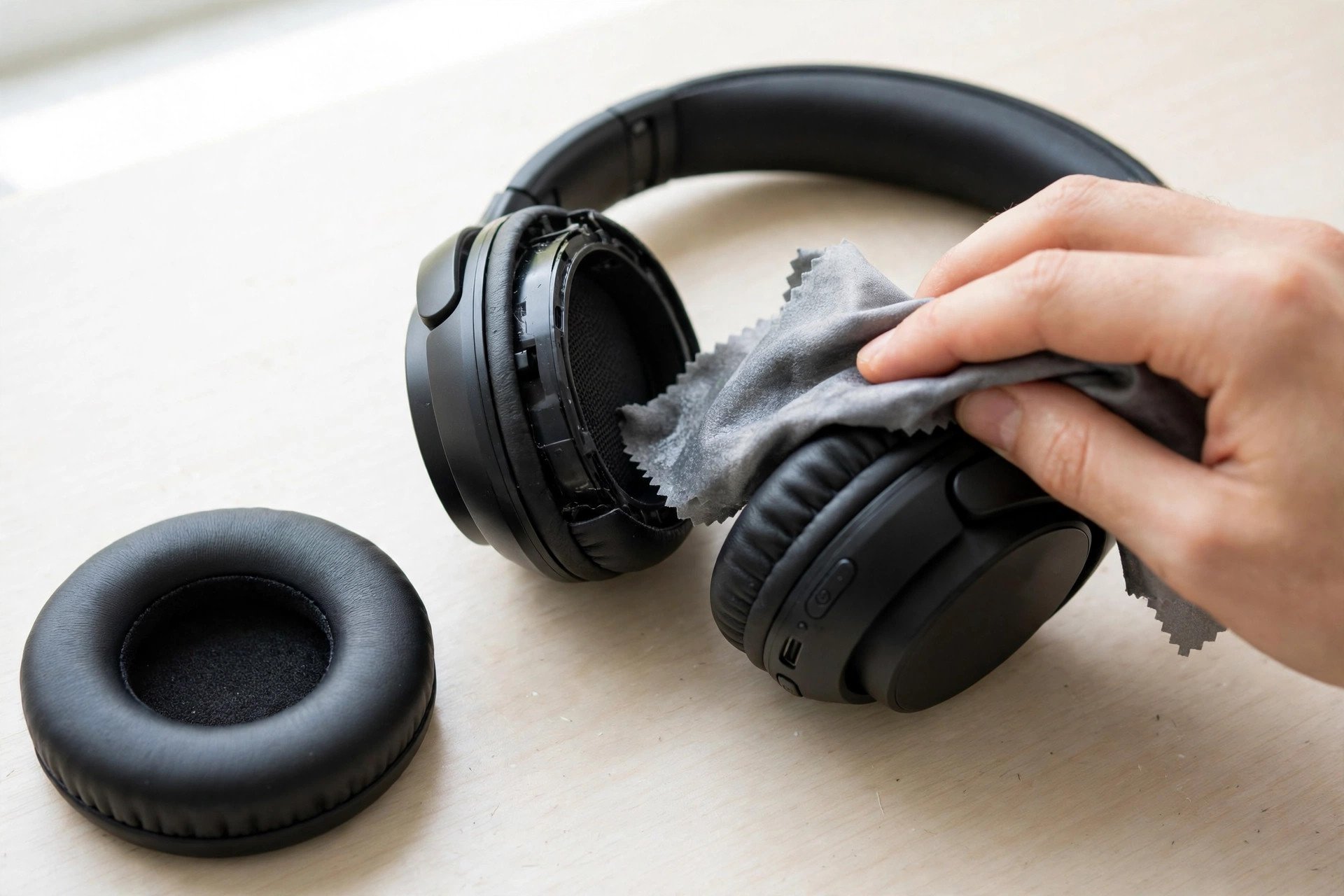
Take the ear pads off if they detach, wipe the cups and headband with a damp cloth, and clean the pads on their own. Sweat lives in the pads, not on the plastic.
Cleaning earbuds vs over-ear headphones: earbuds need mesh work because wax clogs the tiny speaker holes and dulls the sound. Over-ears need pad care because sweat soaks into the cushions and cracks them over time. The key difference is where the dirt hides — inside the mesh for earbuds, inside the pads for over-ears.
- Power off and disconnect. Turn the headphones off and unpair them. Never clean powered-on electronics.
- Remove the ear pads if they come off. Most pads twist or pull off — check the manual first, because forcing a glued pad tears it. Wash removable synthetic-leather pads in warm soapy water and air-dry them fully. Fabric pads get a spot clean with mild soap and water.
- Wipe the ear cups and headband. A microfibre cloth slightly dampened with water handles the outside. Pay attention to the inside of the headband and the touch controls — skin oils build up there fastest.
- Brush the driver mesh. With the pads off, a dry soft toothbrush loosens dust from the mesh over the drivers. Hold the cup facing down and brush lightly.
- Dry, then reassemble. Leave everything out in the open air for at least 30 minutes. Clip the pads back on only when they are fully dry to the touch.
If the pads smell even after washing, they are done. See how to replace headphone ear pads — fresh pads cost far less than new headphones, and they fix both the smell and the flaking.
How Do I Clean the Charging Case?
Brush the lint out dry, wipe the contacts with a barely damp swab, and leave the case open to dry. Never let liquid touch the charging pins.
The case gets neglected far more than the earbuds. Lint from pockets packs into the bottom of the wells, dust settles on the charging contacts, and both stop the earbuds charging properly — which looks exactly like a dead battery.
- Start dry. Run a dry cotton swab around the inside walls and the earbud wells. A wooden toothpick lifts compacted lint out of corners a swab cannot reach.
- Clean the pins with a dry brush. Glide a dry soft toothbrush along the tiny metal charging prongs. Dampness on the pins leads to corrosion, and corrosion leads to a new pair of earbuds.
- Dampen only for the outside. A cloth lightly dampened with isopropyl alcohol is fine for the case exterior and the lid hinge. Keep it away from the wells.
- Leave it open. Let the case sit open for a few minutes after cleaning so any trace of moisture evaporates before the earbuds go back in.
Here's the thing: if your earbuds keep showing a low battery right after charging, clean the case before you buy a new pair. Dirty contacts are the cheapest fault in the book.
How Do I Get Earwax Out of the Headphone Mesh?
Brush it dry first, then lift it out with cleaning putty. Never push it in with a pin — and never pour liquid onto the mesh.
Earwax is the one cleaning job people get wrong most often. The mesh is a fine grille over the driver, and anything sharp pokes straight through it. Anything wet pushes the wax deeper. The right order is dry, then sticky, then — only if the maker allows it — barely damp.
- Brush dry, mesh down. A clean soft toothbrush, held at an angle with the mesh facing the floor, flicks loose wax out of the holes.
- Press putty onto the mesh. A small piece of cleaning putty or Blu Tack pressed flat against the mesh grabs wax out of the tiny holes. Hold it for a second, pull it away, and repeat two or three times until the mesh looks clear.
- Stubborn wax only: Bose suggests a cotton swab dampened with 3% hydrogen peroxide, wiped off at once. Keep it off the drivers and electronics, and expect some discolouring on light-coloured plastic.
- Apple's exception. Only a handful of Apple models — AirPods 3, 4, 5, AirPods Pro 2 and Pro 3 — have an approved wet method for wax on the mesh. For every other pair, stay dry.
If the sound is still muffled after the mesh is visibly clear, the fault is elsewhere. See why your Bluetooth headphones won't connect or how to reset Bluetooth headphones before you assume the earbuds are dead.
Can I Use Alcohol or Water to Clean My Headphones?
Plain water on a cloth is safe for almost everything. Alcohol is safe on plastic, rubber and silicone, but never on foam, wood or genuine leather — and your maker's manual wins over any general rule.
I've seen conflicting data — some guides say never use rubbing alcohol on earbuds at all, while others say 70% isopropyl alcohol is fine on plastic and silicone. My read is both are partly right: the alcohol itself is safe on hard plastic and silicone, but it strips coatings and dissolves foam, so the safe default is a cloth dampened with fresh water, and alcohol only where the manual allows it.
- Plastic, rubber, silicone: 70% isopropyl alcohol is fine occasionally, dried off right after. Samsung and Google both say skip chemicals for Galaxy Buds and Pixel Buds, though — so check the manual first.
- Foam and wood: never touch alcohol. A dry cloth only.
- Synthetic leather: a water-damp cloth and nothing stronger.
- Genuine leather: a dedicated leather cleaner, nothing else.
- Water: fine on a wrung-out cloth and for washing detached silicone tips. Never run water over the earbuds, never submerge them, and never trust an IP rating while cleaning — water resistance is about accidents, not washing.
When in doubt, use less liquid, not more. A damp cloth fixes 90% of headphone grime.
What Should I Never Do When Cleaning Headphones?
Never submerge them, never use bleach or household cleaners, never poke the mesh with metal, and never put them back in the case while damp. Each one kills headphones in a different way.
| Never do this | Why it wrecks them |
|---|---|
| Run them under the tap or soak them | Water forces its way past seals into the drivers and battery |
| Use bleach, window cleaner or acetone | They dissolve coatings, crack plastic and strip adhesives |
| Poke the mesh with a pin or paper clip | One slip tears the grille and exposes the driver |
| Blast the mesh with compressed air | It pushes wax and dust deeper into the driver housing |
| Put earbuds in the washing machine or dishwasher | Heat, detergent and tumbling destroy batteries and seals |
| Dry them with a hair dryer or radiator | Heat warps pads, melts glue and cracks leather |
| Charge them while damp | Wet contacts corrode and can short the battery |
Anyway, the pattern is simple: if a cleaning step feels forceful, it is wrong. Headphones are cleaned with patience, not pressure.
How Do I Keep My Headphones Clean for Longer?
Wipe them after sweaty use, store them in the case, and keep them out of pockets full of lint. Small habits beat deep cleans.
- Wipe after the gym. A 30-second wipe with a dry cloth after a sweaty session stops salt and oils soaking into the pads.
- Use the case. Earbuds loose in a pocket collect lint in the mesh and the charging wells. The case exists for a reason.
- Keep sunscreen and lotion away. Put headphones on after sunscreen dries, not before — the oils stain pads and clog mesh.
- Store them dry. A silica gel pack in the case or the drawer absorbs the moisture that breeds smells.
- Swap foam tips and pads on schedule. Foam ear tips wear out in a few months of daily use; ear pads last one to two years. Fresh ones sound better and smell better.
Clean gear lasts longer. That is the whole argument.
Frequently Asked Questions
What's the fastest way to clean Bluetooth headphones?
Power them off, pull off the tips or pads, brush the mesh dry with a soft toothbrush, and wipe the shells with a barely damp microfibre cloth. Five minutes, no special kit needed.
Can I use alcohol wipes on my earbuds?
On plastic and silicone shells, yes — 70% isopropyl alcohol is fine if you dry it off after. Never use alcohol on foam tips, wood, or leather, and check your maker's manual first.
How do I clean AirPods?
Wipe them with a cloth slightly dampened with fresh water, then dry with a lint-free cloth. Pop the tips off and wash them in soapy water, and let everything dry for two hours.
Why does one earbud sound quieter than the other?
Usually wax clogging the speaker mesh on the quiet side. Brush the mesh dry and lift the wax out with cleaning putty — the volume often comes straight back.
How do I clean smelly headphone ear pads?
Wash removable pads in warm soapy water and air-dry them fully. If the smell stays, the pads are worn out — replace them rather than masking the smell with spray.
Can I wash my earbuds under running water?
No. Even water-resistant earbuds should never go under a tap — pressure forces water past the seals. Wash only the detached silicone tips under water.
How often should I replace my ear pads?
Every one to two years with daily use, sooner if they crack, flake, or keep their smell after washing. Fresh pads also restore the sound seal.