How to Fix Bluetooth Audio Delay (2026 Guide)

The gunshot sounds a beat after the muzzle flash. The actor's lips move, then the words arrive. You bought decent earbuds, you restarted them twice, and the lag is still there — right on cue, every time.
Bluetooth audio delay is the gap between a sound being produced and your ears hearing it through wireless earbuds or headphones. Bluetooth has to compress the audio, send it over the air, and decode it before it plays — a chain that typically adds 150–250 milliseconds with the standard SBC codec.
This guide starts with where the delay shows up, because that points at the fix: videos, games, TV and calls each break in a different place. It covers the two things the top-ranking pages skip — the Windows mic trap that turns your headset muffled and mono mid-game, and the honest answer for PS5 and Xbox owners, which is that Bluetooth audio doesn't work there at all. Most readers will be fixed in ten minutes, with no new hardware.
The short answer: turn on game mode, re-pair the earbuds, and fix the codec — and if you're still over 150 ms after that, switch to a wire.
Why Is My Bluetooth Audio Delayed?
Because Bluetooth was built for music and calls, not for sound that has to land on a frame.
Your phone or PC compresses the audio into a codec, sends it over the air, and your earbuds decode it and play it back — and each of those steps takes time, on top of a buffer added to stop dropouts. You're not doing anything wrong, and it isn't your earbuds' fault — it's the codec. Nothing is broken. That chain is simply what wireless audio costs.
Bluetooth audio delay is the gap between a sound and when you hear it. It comes from the codec chain, not a fault in your earbuds. According to the ATSC broadcast standard, audio should stay within about 45 milliseconds of the picture. Standard Bluetooth runs three to four times over that line, which is why the delay feels wrong.
The standard Bluetooth codec is the main reason your earbuds lag in games. According to published codec specifications, aptX Low Latency runs at roughly 32–40 milliseconds while the standard SBC codec runs at 150–250 milliseconds. That gap is why switching codecs, or switching to game mode, changes the feel of a shooter more than any other single setting.
The codec decides the delay.
How Much Delay Is Normal?
It depends on the codec your earbuds and your device agree on — and both ends have to support it.
If either side doesn't support a faster codec, the connection silently falls back to SBC, the slowest option. The table below shows the typical ranges from published codec specs and independent measurements. Treat them as ranges, not promises: real-world delay moves with the implementation, the buffer, and the radio conditions.
Most people start to notice Bluetooth delay at around 40–45 milliseconds, roughly two frames of a 60 fps game. At 150 milliseconds and above, footsteps and gunshots land a clear beat behind the action, and competitive play turns into guesswork. Video apps hide the same delay by holding the picture back. Games cannot, because the action happens live.
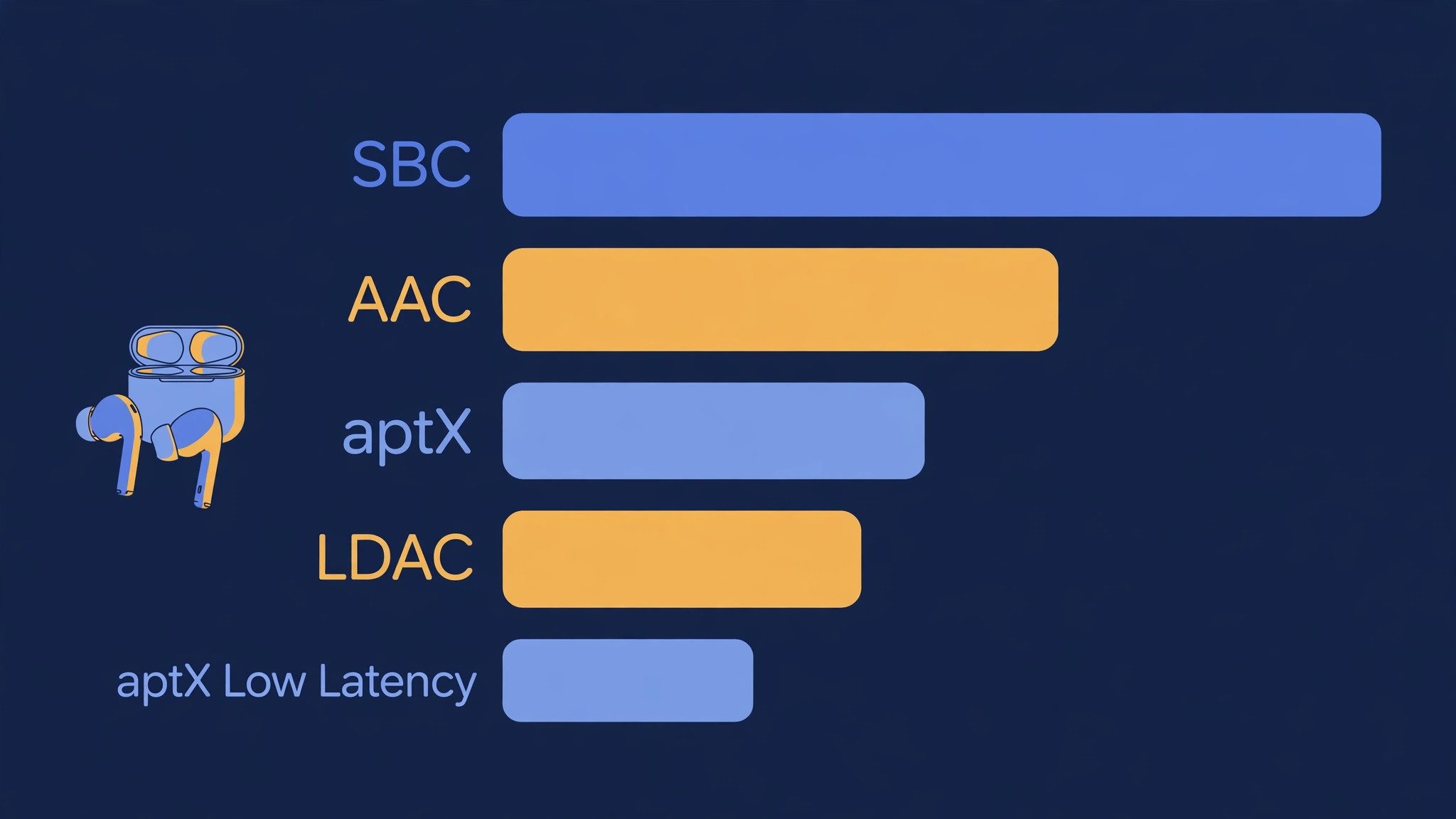
| Codec | Typical delay | Best for | Gaming? |
|---|---|---|---|
| SBC | 150–250 ms | Everything — the universal fallback | Poor: footsteps arrive late |
| AAC | 120–220 ms | Apple devices, music | Poor for shooters, fine for story games |
| aptX | 60–170 ms | Android phones, Windows | Workable for casual play |
| aptX Adaptive | 50–80 ms | Android, some earbuds | Good: the practical low-latency pick |
| aptX Low Latency | 32–40 ms | Dongles and some Android phones | Best Bluetooth option for games |
| LDAC | 200 ms or more | High-resolution music | Bad for games — switch it off |
| LE Audio (LC3) | 20–50 ms | Newer phones and earbuds | Excellent where both ends support it |
I've seen conflicting data. One source puts aptX Adaptive at 50–80 ms, another at 60–100 ms, and a third measures the Sony XM6's LC3 at 30–50 ms in practice. My read is the label matters less than the implementation: two earbuds on the same codec can feel different, so test the options on your own pair before trusting any number. Or maybe I should say it this way: the codec table tells you what's possible, not what you'll get.
Test, don't trust the label.
Why Do Bluetooth Headphones Lag in Games but Not in Videos?
Because video apps cheat, and games can't.
When you watch YouTube or Netflix, the app knows the audio will arrive late, so it holds the video back by the same amount — lips and words line up because the picture waited. A game can't hold anything back: when you tap to fire, the frame has to render now, so the sound simply arrives late.
Here's the thing: that 150–250 ms is about nine frames at 60 fps. A single frame lasts 16.7 ms, so SBC's delay is roughly nine frames of audio lag — which is exactly why it feels wrong even when you can't put it into words. Story games don't care much. A cinematic soundtrack arriving a fifth of a second late is annoying, not unplayable. Competitive shooters do care: a footstep you hear late is a footstep you can't react to.
Nine frames late is a lost duel.
Look — if you're in a ranked match with standard Bluetooth earbuds, here's what actually works: turn on game mode first, and if that doesn't get you under about 80 ms, stop tweaking and switch to the controller jack or a 2.4 GHz dongle. No setting makes SBC fast.
What Are the Fastest Fixes?
If you only have five minutes, do these in order — they solve the large majority of cases.
To fix Bluetooth audio delay, follow these steps: 1. Turn on your earbuds' game mode. 2. Re-pair the earbuds from scratch. 3. Move closer to the source device. 4. On Windows, turn off the hands-free mic profile. 5. On Android, switch to a low-latency codec.
- Turn on game mode. Open your earbuds' companion app — Galaxy Wearable, Nothing X, Soundcore, Razer Audio — and switch on game mode or low-latency mode. Some earbuds use a triple-tap on the stem instead. Game mode shrinks the buffer and trades a little range for speed, often cutting the delay to 50–60 ms.
- Re-pair from scratch. Forget the earbuds in your device's Bluetooth settings, put them back in the case and close the lid for 10 seconds, then pair again. This resets the delay-reporting handshake between the earbuds and the operating system, which is what goes stale after waking from sleep or switching between two paired devices.
- Move closer and clear the path. Sit within a few feet of the source with a clear line of sight. Your body, a desk, and a wall all weaken the signal, and a weak signal means re-sent packets — which means more delay. The interference section explains why this gets worse in a busy house.
- On Windows, turn off the hands-free mic profile. If the lag started the moment a game or Discord opened your mic, Windows switched your headset from stereo music mode to the hands-free calling profile. The fix is in the Windows section below.
- On Android, switch to a low-latency codec. Developer Options lets you pick the codec directly. The steps are in the Android section below — and if your earbuds support aptX Adaptive or aptX Low Latency, this is the single biggest change you can make.
If the delay is gone, you're done. If it's better but still there, keep going — the next sections deal with the causes that need a real fix, not a toggle.
How Do I Fix Bluetooth Audio Delay on Windows 11?
Start with the mic trap, because it is the commonest Windows cause and the one most guides bury.
The moment a game, Discord, or your browser opens your Bluetooth headset's microphone, Windows switches the headset from stereo A2DP to the Hands-Free Profile — and that profile is mono, muffled, and slower. Your music was crisp a second ago; now it sounds like a phone call from 2005.
- Pick the Stereo endpoint. Right-click the speaker icon → Sound settings → pick your headphones under Output — the Stereo entry, not the Hands-Free one — and set it as the default. If the game keeps grabbing the mic, the next step stops it.
- Disable Hands-Free Telephony. Open the classic Sound control panel → Playback → right-click your headphones → Properties → Services → untick Hands-Free Telephony. This stops Windows from ever switching the headset into calling mode. Use a separate mic — a USB mic or the laptop's built-in one — for voice chat instead. Our guide to fixing a headset mic not working on PC covers the mic side of this.
- Turn off audio enhancements. Settings → System → Sound → your device → set Audio enhancements to Off. Windows Sonic and other spatial effects add processing, and processing adds delay.
- Update the Bluetooth driver. Device Manager → Bluetooth → right-click your adapter → Update driver. Then restart. Stale drivers are the number-one Windows cause in most fix guides, and the cheapest one to rule out.
- Use an aptX Low Latency adapter if your PC lacks the codec. Windows negotiates the best codec both ends share, and most built-in adapters only offer SBC. A small USB transmitter that supports aptX Low Latency — Creative's BT-W3 is the one most guides name — gives Windows a faster codec to negotiate with. You can check the current price of the Creative BT-W3 on Amazon if you want to see what it costs today.
Fix the mic profile first.
Quick note: if the delay only appeared after a Windows update, reinstall the Bluetooth driver from your PC maker's support page rather than trusting the generic one Windows Update supplied. The same advice applies to the audio crackling that shows up after updates — our audio crackling guide walks through the driver side in detail.
How Do I Fix Bluetooth Audio Delay on Android?
Android gives you more control than any other platform — the codec menu is right there in Developer Options, if you know where to look.
That control is the fix, and it is also the trap: pick a codec your earbuds don't support and the connection falls back to SBC anyway.
- Turn on game mode in the earbuds' app. Same first step as everywhere else — it shrinks the buffer before anything else matters.
- Open Developer Options. Settings → About phone → tap Build number seven times. Go back to Settings → Developer Options.
- Set the Bluetooth Audio Codec. Pick aptX Adaptive or aptX Low Latency if your earbuds support them; AAC if they don't; SBC only as a last resort. If you use Sony earbuds, turn LDAC off for games — it sounds superb for music and lags badly for anything live.
- Toggle "Disable Bluetooth A2DP hardware offload". If the delay appeared after an update, or only with LDAC, try flipping this switch — it moves the audio processing back to software and fixes a known offload bug on some phones. If it makes things worse, flip it back.
- Re-pair after changing codecs. Forget the earbuds, put them in the case for 10 seconds, pair again — the new codec only negotiates on a fresh connection.
Change the codec, then re-pair.
One more thing worth knowing: some Android phones run a per-app audio delay setting in Developer Options too. It helps video apps; it does nothing for games, for the same reason video apps can sync and games can't.
How Do I Fix Bluetooth Audio Delay on iPhone?
iOS gives you far less control than Android — there is no codec menu, and iPhones use AAC with most earbuds.
That sounds like bad news, but it also means the fixes are short: the problem is almost always a stale connection, not a wrong setting.
- Forget and re-pair. Settings → Bluetooth → tap the i next to your earbuds → Forget This Device. Put the earbuds back in the case for 10 seconds, then pair again. This alone clears a large share of iPhone sync issues.
- Turn on game mode. If your earbuds have one — most gaming-focused pairs do, in their companion app — use it. It is the only latency control iOS leaves you.
- Update the earbuds' firmware. Open the companion app and check for a firmware update; several brands have shipped latency fixes this way.
- Check the app, not the phone. If YouTube is in sync but one game lags, the game is the problem — some games handle Bluetooth audio worse than others, and no iPhone setting changes that.
- Accept the floor. With AAC and no codec menu, an iPhone's Bluetooth delay sits around 120–200 ms. For video and story games that's fine. For competitive shooters, use wired earbuds or a 2.4 GHz headset — the controller jack on a console, or a Lightning or USB-C adapter on the phone.
On iPhone, re-pairing does the heavy lifting.
Why Does My Bluetooth Audio Lag on My TV?
Because the TV is doing two things at once that fight each other: its picture processing delays the video, and its Bluetooth audio has its own delay — and the two don't match.
Cable and console HDMI inputs are the worst case, because the TV's game or PC mode strips out the processing that would otherwise hide the gap.
- Use the TV's AV sync slider. Samsung, LG, Sony and TCL all ship one — look for "Bluetooth Audio Sync", "AV Sync" or "Audio Delay" in the sound settings. Nudge it until lips match words. This fixes movies and shows; it won't help games, because games can't wait.
- Turn off Game mode for movies, on for games. Game mode cuts picture processing, which changes the sync — so set the delay separately for each input if your TV allows it.
- Use a Bluetooth transmitter for the TV. A small transmitter plugged into the TV's optical or headphone output — with aptX Low Latency support — replaces the TV's own Bluetooth with a faster link. Our wireless audio adapter roundup covers the transmitters worth buying.
- Or skip Bluetooth entirely for the TV. A soundbar or wired headphones have no sync problem to fix, and for a shared living room that is usually the simpler answer.
Can I Use Bluetooth Headphones on PS5 or Xbox?
No — not directly. The PS5 and Xbox Series X|S don't support Bluetooth audio at all.
Their Bluetooth radios handle controllers, not headphones, because standard Bluetooth is too slow for game audio — so both console makers would rather you use a low-latency wireless headset on a dedicated 2.4 GHz dongle, or a wired connection, than deliver a laggy Bluetooth experience.
- PS5: plug wired headphones into the DualSense controller's 3.5mm jack, use a USB-dongle headset, or use a headset built on Sony's PlayStation Link wireless tech — the Pulse Elite is Sony's own example, and Sony describes it as lossless and ultra-low latency.
- Xbox Series X|S: same jack on the controller, or a headset made for Xbox Wireless or with an Xbox-compatible dongle — the SteelSeries Arctis Nova 7X is the usual example.
- Nintendo Switch is the exception. It gained Bluetooth audio in a system update, so you can pair earbuds directly — but the mic doesn't work over Bluetooth, and only two wireless controllers can connect while Bluetooth audio is on.
- PC is the flexible case. Everything in the Windows section applies, and a 2.4 GHz gaming headset is the straightforward upgrade when Bluetooth keeps letting you down.
Consoles skipped Bluetooth on purpose.
Why Does the Delay Get Worse Sometimes?
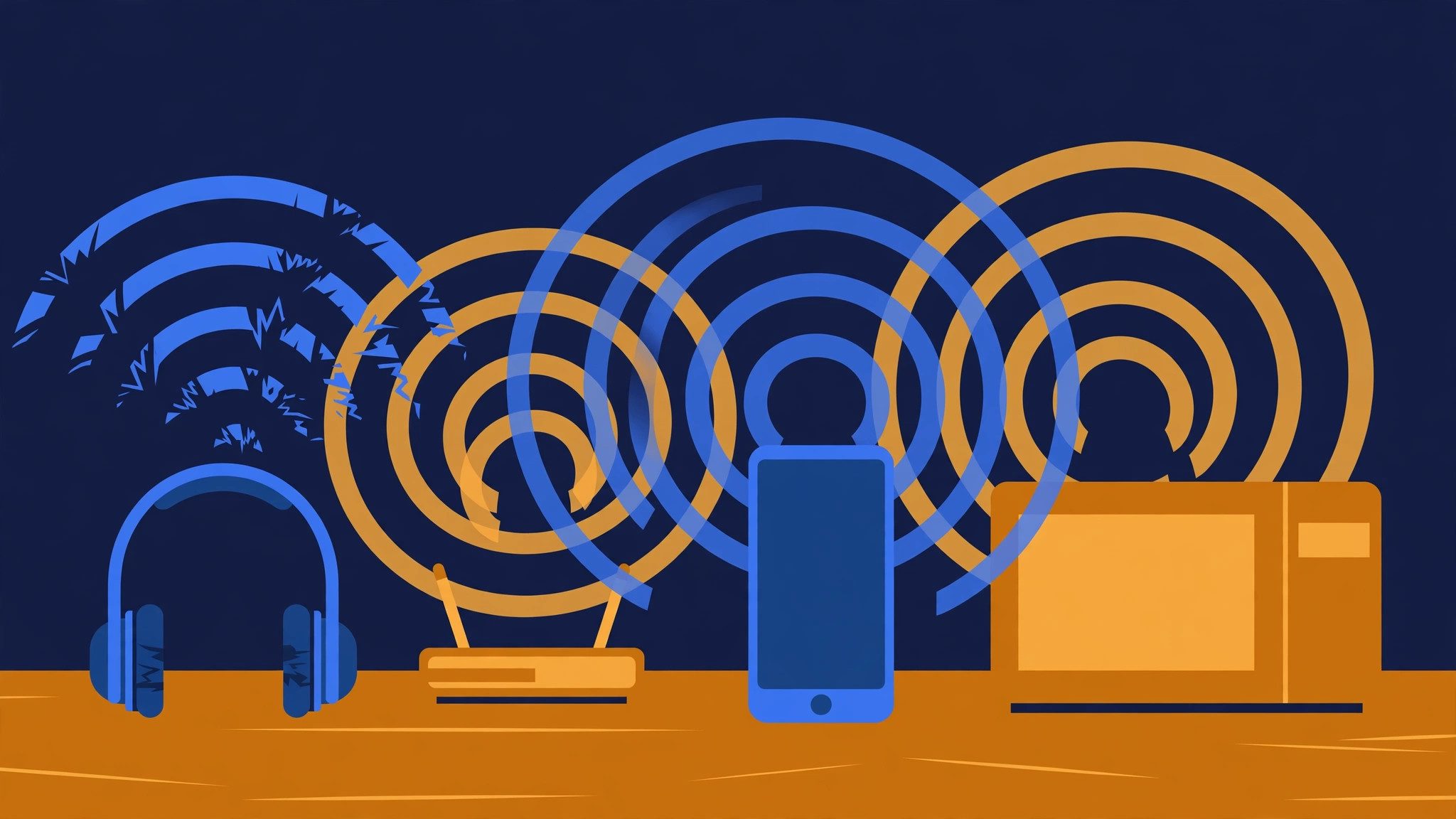
Because Bluetooth shares the 2.4 GHz band with nearly everything else in your home — and when the band gets busy, packets get re-sent, and re-sent packets arrive late.
The delay you notice on a quiet morning can double on a busy evening with the microwave running and the neighbours' Wi-Fi at full blast.
- Move your own devices to 5 GHz Wi-Fi. If your router broadcasts both bands, move phones and laptops to 5 GHz and leave 2.4 GHz as clear as possible for the headset.
- Move the dongle, not the headset. A USB Bluetooth or 2.4 GHz dongle plugged straight into a USB 3.0 port sits inside that port's radio noise — put it on a short USB extension cable, or in a USB 2.0 port, with a clear line of sight to the headset.
- Get closer and stay in the room. Bluetooth is a short-range link: walls, bodies and distance all cost packets.
- Kill multipoint when it matters. Two paired devices means the earbuds juggle two connections, and the handover is where the delay-reporting handshake goes stale. Disconnect the device you're not using before a game.
When Should I Stop Fixing It and Switch to 2.4 GHz or Wired?
Use this as the rule.
Bluetooth vs 2.4 GHz vs wired: Bluetooth suits music and calls. 2.4 GHz works better when you need lag-free game audio. Wired is best when you want zero delay at zero cost. The key difference is the radio: Bluetooth shares a crowded band and buffers audio; a 2.4 GHz dongle runs a tuned link.
If game mode and a codec switch get you under roughly 80 ms, keep the Bluetooth earbuds — you won't feel the rest in most games. Still above 150 ms after the fixes in this guide? Stop. That is the floor of the codec you're stuck on, and no setting lowers it. A 2.4 GHz gaming headset lands at 15–20 ms, and a wired pair at effectively zero — both are cheaper than the hours you'd spend chasing a number Bluetooth can't reach. Our gaming headset roundup ranks the 2.4 GHz options by platform.
Here's my honest take, and it might get pushback: for competitive shooters, Bluetooth is the wrong tool, full stop. No codec, no game mode and no dongle makes it as fast as a wire or a 2.4 GHz link — and chasing the last 50 ms with settings is time you could spend actually playing. Bluetooth is for music, calls and story games. The ranked queue deserves a faster connection.
Under 80 ms, keep the earbuds. Over 150, switch.
Frequently Asked Questions
What's the best way to fix Bluetooth audio delay?
Start with game mode on your earbuds, then re-pair them from scratch. If the lag stays, switch the codec on Android or turn off the hands-free mic profile on Windows. Those three steps fix most cases.
Why do my Bluetooth headphones lag in games but not in videos?
Video apps delay the picture to match slow Bluetooth audio. Games can't do that — the action happens live, so the sound arrives late. Game mode or a low-latency codec is the fix.
How do I fix Bluetooth delay on Windows 11?
Set the Stereo output as default, turn off audio enhancements, and disable the Hands-Free Telephony service so the mic can't drag the headset into mono mode. Then update your Bluetooth driver.
Why does my Bluetooth audio sound muffled when I open a game?
The game opened your headset's microphone, so Bluetooth switched from stereo music mode to the hands-free calling profile. Use a separate mic, or disable Hands-Free Telephony in Windows.
Can I use Bluetooth headphones with a PS5 or Xbox?
Not directly — neither console supports Bluetooth audio. Plug wired headphones into the controller's headphone jack, or use a headset with a 2.4 GHz dongle made for your console.
Does Bluetooth 5.3 or LE Audio fix the delay?
Partly. LE Audio's LC3 codec can cut delay to roughly 20–50 milliseconds, but both your phone and your earbuds must support it. Most pairs in use today don't, so it isn't a fix you can switch on.
Why does my Bluetooth audio delay get worse sometimes?
Interference. Wi-Fi routers, microwaves and USB 3.0 ports all crowd the 2.4 GHz band Bluetooth uses. Move closer to the source, move the router to 5 GHz, and keep the dongle off USB 3.0.