How to Make Bluetooth Headphones Louder (2026 Guide)

You pushed the volume to max and the podcast still sounds like it is coming from the next room. You already pressed the headphone buttons and restarted your phone, and nothing changed.
Most quiet Bluetooth headphones are not broken. A loose ear tip, a safety limiter, or a phone and headphones that disagree on volume can each cut the sound in half on their own — and all three are fixable in minutes.
Making Bluetooth headphones louder means raising the sound that reaches your ears, not just pushing the slider to 100. The real fixes are a tighter ear-tip seal, a volume limiter switched off, and the phone and headphones agreeing on one volume level. Most quiet pairs need one of those three, not new hardware.
The short version: clean the mesh, get a tight seal, then switch off the volume limiter and raise both volumes — the phone's and the headphones'. If the pair is still quiet after that, the cause is the codec, the app, or the Bluetooth profile, and the ladder below finds it.
Why Are My Bluetooth Headphones So Quiet Even at Max Volume?
Bluetooth headphones sound quiet at full volume when the sound is capped before it reaches the driver, or when it leaks out before it reaches your ear. The usual culprits are a safety limiter, the phone and headphones disagreeing on volume, a loose ear-tip seal, or a clogged speaker mesh.
Bluetooth headphones sound quiet at full volume when the phone and the headphones disagree on volume, or when a safety limiter caps the output. According to GadgetsFocus, the usual cause is absolute volume desync: the phone shows 100% while the headphone's own amplifier sits much lower. A clogged mesh or loose ear-tip seal can cut the sound by as much.
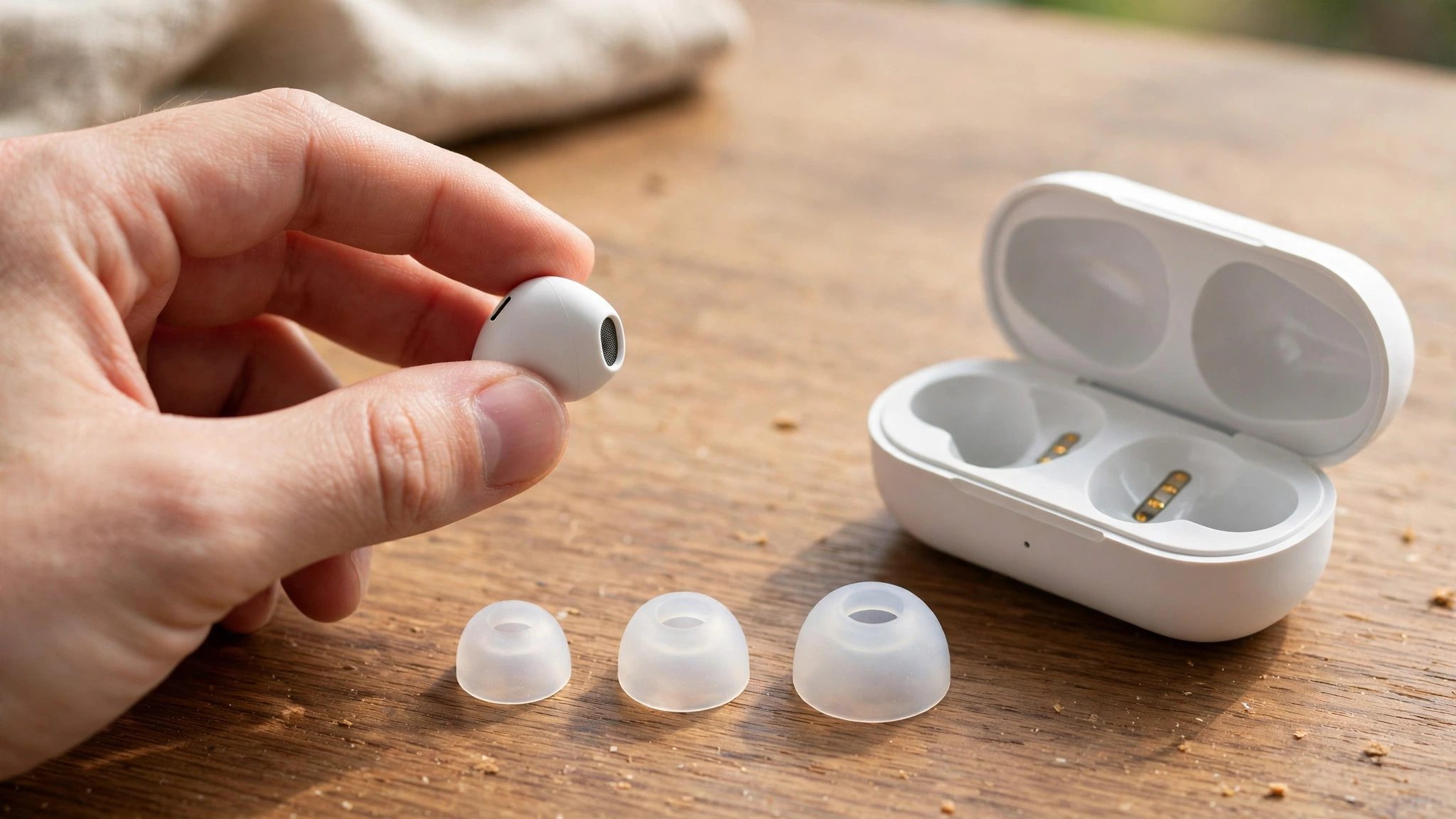
Cleaning the speaker mesh is the fastest volume fix on earbuds, because earwax on the fine mesh can muffle the sound even when the electronics work fine. According to soundcore, dust, oil and earwax build up on the speaker grille and block sound output, so a dry soft brush often restores the volume in under a minute.
Earbuds vs over-ear headphones: earbuds get louder from a seal, because a foam tip that closes the ear canal can add more volume than any setting. Over-ears get louder from clean pads and the Bluetooth profile, since a broken seal or a hands-free profile caps the sound. The key difference is where the sound leaks — the tip for earbuds, the pad for over-ears.
| What happens | Most likely cause | Check first |
|---|---|---|
| Quiet on every device and app | Fit, mesh, or the headphones' own limit | Clean the mesh, try foam tips, check the headphone app |
| Quiet on one device only | That device's limiter or volume sync | iPhone Headphone Safety or Android absolute volume |
| Quiet only in one app | That app's volume or normalisation | App settings — turn off "normalise volume" |
| Quiet right after a call starts | Hands-free profile stuck on | End the call, reconnect as Stereo |
| One side quieter than the other | Balance shifted or one mesh blocked | Centre the balance, clean the quiet side |
| Suddenly quieter than yesterday | Low battery, firmware quirk, or a new limit | Charge fully, restart, check for updates |
Match your symptom to the row above before you change anything. It tells you where the fault lives, so you fix the right thing first.
Quiet everywhere means the headphones. Quiet on one device means the settings.
How Do I Make My Bluetooth Headphones Louder in 9 Steps?
Work in this order — easiest first. Most quiet pairs get loud by step 4, and you should only try volume booster apps after every real fix has failed.
To make Bluetooth headphones louder, follow these steps: 1. Clean the speaker mesh and try a bigger ear tip. 2. Turn off Reduce Loud Sounds on iPhone or the media volume limit on Android. 3. Raise both the phone volume and the headphone volume. 4. Turn off ANC and test again. 5. Try a different EQ preset or codec.
Most Bluetooth headphones can play far louder than the safe limit, so a quiet pair usually has a fixable cause rather than weak drivers. According to HeadphonesAddict, every Bluetooth pair they tested reached more than adequate loudness, and a quiet pair is usually a settings, fit, or cleaning problem. Work the ladder below before you shop for a new pair.
- Clean the speaker mesh and ear tips. Brush the mesh on each earbud with a dry soft brush, mesh-down so debris falls out. Wipe over-ear pads with a dry cloth. Earwax and lint on the mesh can muffle the sound a lot, and it builds up so slowly you never notice it happening. Our cleaning guide shows the safe method for earbuds and over-ears.
- Get the seal right. Try a bigger ear tip, or swap silicone tips for memory foam — foam expands to close the ear canal, and a closed canal keeps the bass in. For over-ears, press the pads flat against your head and check that glasses arms are not breaking the seal. A bad seal is the single biggest volume thief on earbuds.
- Raise both volumes. Bluetooth has two volume controls: the phone's slider and the headphones' own buttons. Raise the phone to max, then press the headphone volume button up until it stops. If the two ever disagree, the lower one wins — and the next step explains why.
- Turn off the volume limiter. On iPhone, open Settings → Sounds & Haptics → Headphone Safety and switch off Reduce Loud Sounds. On Android, check Settings → Sound for a media volume limit and switch it off. The exact paths are in the platform sections below.
- Centre the balance slider. A balance slider nudged to one side makes the whole pair feel quieter, because one ear is doing all the work. iPhone: Settings → Accessibility → Audio & Visual → Balance. Android: Settings → Accessibility → Audio adjustment. Our one-side fix guide has the exact paths for Windows and Mac too.
- Turn off ANC and transparency, then test. Noise cancelling and transparency modes change how loud the sound feels, and some modes cap the output. Switch both off and listen — if the volume jumps back, the mode was the cause, and you can pick the mode that sounds best afterwards.
- Check the app's own volume. Spotify, YouTube, Zoom and Teams each have their own volume and normalisation settings. In Spotify, set Audio Quality to Very High and switch off "Normalise volume" — that setting lowers loud tracks to match quiet ones. In a browser, check the tab is not muted.
- Try a different codec and update the firmware. On Android, Developer Options lets you switch the Bluetooth codec — LDAC or aptX can sound clearer and fuller than SBC if your headphones support them. Open the maker's companion app and install any firmware update; makers sometimes fix low-volume bugs that way.
- Re-pair and restart. Forget the headphones in Bluetooth settings, restart the phone, then pair again as a new device. A fresh link re-syncs the volume handshake between the phone and the headphones, and it clears the glitches a restart alone misses.
Look — if you're on a noisy train right now, here's what actually works: clean the mesh, push the tips in until the seal feels snug, and switch the limiter off. That takes five minutes and it fixes most quiet pairs on the spot.
Or maybe I should say it this way: the seal is the volume. Everything else is fine-tuning.
Here's an opinion that might get pushback: check the fit before you touch a single setting. Most guides bury the ear-tip seal at the bottom, but a loose tip can cost you more volume than any limiter — and no EQ preset can put back sound that leaked out of your ear.
Seal first. Settings second.
How Do I Make Bluetooth Headphones Louder on iPhone?
iPhone caps headphone volume in two places — Headphone Safety and the Music app's EQ — and both are easy to miss. Check them in this order, and test after each one.
- Switch off Reduce Loud Sounds. Open Settings → Sounds & Haptics → Headphone Safety. If Reduce Loud Sounds is on, it caps the volume somewhere between 75 and 100 dB — raise the cap to 100 dB or switch it off and test again. This is the most common reason an iPhone pair sounds quieter than the same pair on Android.
- Check the balance. Open Settings → Accessibility → Audio & Visual and slide Balance to the centre. A shifted balance makes one ear quieter and the whole pair feel weak.
- Try the Late Night EQ. In Apple Music, open Settings → Apps → Music → EQ and pick Late Night. It compresses the dynamic range, which lifts quiet parts of a track and makes everything sound louder at the same volume. It only affects Apple Music, but it is free and it works.
- Check Screen Time. If the phone was ever set up with parental controls, a volume limit may be hiding there. Open Settings → Screen Time → Content & Privacy Restrictions and check the volume limit setting — a limit set years ago can still be capping the sound today.
iOS also tracks your listening over a rolling 7-day window, so a week of loud listening can trigger a warning and a temporary drop in volume. If the volume suddenly fell for no clear reason, check the Headphone Safety screen for a notification about your exposure.
Quick note: with Apple or Beats headphones, iOS measures the decibel level fairly well. With third-party earbuds it estimates, and the estimate can be off — so iOS may cap the volume on a pair that is not actually playing that loud.
If you've switched the limiter off, centred the balance, and tried the EQ, and you're still stuck — the fault is in the headphones, not the phone. Run the seal and cleaning steps above, then test the pair on another device.
How Do I Make Bluetooth Headphones Louder on Android?
Android's quiet-pair problem is usually absolute volume — the phone and the headphones sharing one slider and disagreeing about it. Toggle it once, test, and keep the setting that sounds louder.
- Switch off the media volume limit. On Samsung, open Settings → Sounds and vibration → Volume, tap the three dots, and open Media volume limit — make sure it is off. On other Android phones, look in Settings → Sound for a volume limit or hearing-protection switch and switch it off.
- Disable absolute volume. Open Settings → About phone and tap Build number seven times to unlock Developer Options. Then open Settings → System → Developer Options → Disable absolute volume and switch it on. This splits the phone slider from the headphone volume, so you can raise both to max separately — and a pair stuck at half volume often jumps straight to full.
- Try a different codec. In the same Developer Options menu, open Bluetooth audio codec and pick LDAC or aptX if your headphones support them. If the sound gets worse or the connection drops, switch back to SBC — a codec the headphones do not support helps nobody.
- Check the headphone app. Sony, Bose, JBL, Soundcore and most other makers put a volume limit, an EQ and a "safe listening" switch inside their companion app. Open it and check all three before you blame the phone.
I've seen conflicting data — some guides say disable absolute volume, others say leave it on because newer Android versions handle the sync better. My read is to toggle it once and test: if the volume jumps, keep it off; if nothing changes, turn it back on. The test takes thirty seconds and it settles the question for your exact phone and headphones.
Here's the thing: Samsung and Pixel phones hide these settings in different menus, so if a path above does not match your phone, search Settings for "volume limit" or "absolute volume" — the switch is there, just under a different name.
One more check for Samsung owners: the Galaxy Wearable app has its own volume settings for Galaxy Buds, and a "hearing enhancement" switch can cap the output. Open the app, check the earbud settings, and make sure nothing there is holding the volume back.
How Do I Make Bluetooth Headphones Louder on Windows or Mac?
On a computer, the usual cause is the wrong Bluetooth profile: the headphones connect as a headset for calls instead of as headphones for music, and the call profile sounds much quieter. Pick Stereo and the volume comes back.
Windows 11:
- Open Settings → System → Sound and check the output device. If it says "Headset (Hands-Free AG Audio)", switch it to "Headphones (Stereo)". The hands-free profile is for calls — it sounds thin and quiet, and it is the most common reason a pair sounds fine on a phone but quiet on a laptop.
- With Stereo selected, open the device's properties and set the left and right levels equal, normally 100/100. While you are there, turn Mono audio off under Settings → System → Sound.
- For extra lift, open the classic Sound settings (Settings → System → Sound → More sound settings), open your headphones' Properties, and look for the Enhancements tab — Loudness Equalization lives there on most devices and it evens out quiet and loud parts.
Mac:
- Open System Settings → Sound → Output and make sure your headphones are selected — not the Mac speakers, and not a hands-free profile.
- Use the Balance slider on the same screen to centre the left and right channels.
- If the pair is quiet only in one app, check that app's own volume — Zoom, Teams and browsers each have their own output level, and a muted tab looks exactly like a quiet pair.
On both systems, a restart of the Bluetooth service fixes the stubborn cases: turn Bluetooth off, wait ten seconds, turn it back on, and pair again. If the pair is loud on your phone and quiet on the computer after all this, the computer's profile or driver is the cause — not the headphones.
Stereo for music. Hands-free for calls. Never the other way round.
Can I Make My Headphones Louder Than Max?
Yes — but only a little, and only with trade-offs. Volume booster apps push digital gain past 100%, which adds distortion and can damage the drivers and your hearing, so they are a last resort, not a first step.
Volume booster apps work by adding a second layer of volume between your device and your headphones. On Android, apps like Volume Booster and Precise Volume can raise the output above the system maximum; on iPhone, the options are thinner, because iOS does not let apps push past the system cap — the Music app's Late Night EQ is the closest honest equivalent. On Windows, the free app Equalizer APO with the Peace interface can add clean gain, and it is the best option on a computer.
Use a booster only after the ladder above has failed, keep the boost small, and turn it off when you stop needing it. Pushing the gain hard makes the sound harsh, clips the loud parts, and can cook a small earbud driver over time. If a booster is the only thing that makes the pair loud enough, the pair is the wrong pair — no app can add clean volume that the driver cannot produce.
A portable DAC or headphone amplifier is a better answer than a booster app, but only in wired mode: most Bluetooth headphones already have a small amplifier built in, so a DAC only helps when you plug the cable in. If your over-ears sound quiet wired into a laptop, a small USB DAC/amp can help — check the headphones' impedance first, because high-impedance studio pairs need the extra power and most consumer pairs do not.
When an upgrade is the honest answer, look at sensitivity, not just the brand. Sensitivity is measured in decibels per milliwatt — a higher number means the pair plays louder from the same phone. Closed-back over-ears also help, because they block outside noise and let the music stand out. Our noise cancelling earbuds roundup and true wireless earbuds roundup both list pairs that play loud without a booster.
Boosters are a plaster. The right pair is the cure.
How Loud Is Too Loud?
Sound above 85 decibels can damage your hearing if you listen for hours, and Bluetooth headphones at full volume can pass that level easily. The fix is simple: get the pair loud enough to hear clearly, then turn it back down a notch.
Follow the 60/60 rule: 60% volume for no more than 60 minutes at a stretch, then take a short break. It is a rough guide, not a medical limit, but it keeps most listening well inside the safe zone. If you need full volume to hear a podcast on a train, the problem is the noise around you — noise cancelling or foam tips will do more for you than another notch on the slider.
Stop and turn it down if your ears ring after you take the headphones off, if voices sound muffled for a while afterwards, or if you need to raise your voice to be heard over the music leaking from your own earbuds. Those are the early signs of hearing damage, and they are the reason the limiters in this guide exist in the first place. Our hearing loss guide explains the risks and the warning signs in full.
Loud enough to enjoy. Never loud enough to hurt.
Frequently Asked Questions
What's the fastest way to make my Bluetooth headphones louder?
Clean the speaker mesh, push the ear tips in for a tight seal, and turn off any volume limit in your phone's settings. Those three fixes take five minutes and solve most quiet-pair cases.
Why are my Bluetooth headphones so quiet on iPhone?
iPhone's Headphone Safety setting can cap the volume at 75–100 dB. Open Settings → Sounds & Haptics → Headphone Safety and raise or switch off Reduce Loud Sounds.
How do I make my Bluetooth headphones louder on Android?
Turn off the media volume limit, then open Developer Options and toggle Disable absolute volume so the phone and headphones stop fighting over one slider.
Can I make my headphones louder than the maximum volume?
Volume booster apps can push digital gain past 100%, but they add distortion and can hurt your hearing or the drivers. Fix the fit and settings first, and treat boosters as a last resort.
Does cleaning my earbuds really make them louder?
Yes. Earwax on the speaker mesh can muffle the sound a lot. Brush the mesh gently with a dry soft brush and the volume often comes straight back.
Why are my headphones loud on one device but quiet on another?
Each device has its own limiters, codecs and volume sync. The quiet device usually has a safety cap on, absolute volume out of sync, or the hands-free Bluetooth profile selected.
Is it safe to listen at maximum volume?
Not for long. Sound above 85 dB can damage hearing over time, so follow the 60/60 rule: 60% volume for no more than 60 minutes at a stretch.