Do Bluetooth Headphones Cause Hearing Loss? (2026 Guide)

Your ears rang after yesterday's long session. You turned the volume down a notch, but the ringing is still there this morning — and now you're wondering if the damage is already done. If you wear earbuds for hours a day, that worry is fair.
Do Bluetooth headphones cause hearing loss? Yes, they can — but the Bluetooth part is not the problem. Hearing loss from headphones is noise-induced: loud sound over long hours damages the tiny hair cells in your inner ear. The risk comes from volume and time, not from the wireless signal.
The short version: yes, Bluetooth headphones can cause hearing loss — but only when the volume stays high for long hours. The Bluetooth signal itself is not the cause. Keep the volume at 60% or below, take a short break each hour, and your hearing stays safe for years of daily listening.
Do Bluetooth Headphones Cause Hearing Loss?
Yes, Bluetooth headphones can cause hearing loss — but only when the volume stays high for long hours. The Bluetooth signal itself plays no part in it. Loud sound is the cause, and it works the same way whether the headphones are wired or wireless.
Bluetooth headphones can cause hearing loss when the volume stays high for long hours. According to the World Health Organization, about 1.1 billion young people worldwide risk hearing damage from unsafe listening, including loud personal audio devices. The danger is the sound dose — how loud, for how long — not the Bluetooth signal itself.
Loud listening damages hearing slowly, so most people notice it late. According to the Centers for Disease Control and Prevention, sounds above 85 decibels can start causing damage after two hours, and earbuds at full volume can reach 100 decibels or more. At that level, safe listening time shrinks to minutes, not hours.
Look — if you're the person who wears earbuds from the morning commute to the last call of the day, this guide is for you. The fear is fair. The buds sit right in your ears, and the ringing after a loud session feels like a warning. It is one. But it is a warning about volume, not about Bluetooth.
Short answer first, details next.
How Does Hearing Loss From Headphones Actually Happen?
Loud sound damages the tiny hair cells inside your cochlea — the spiral organ in your inner ear. Those cells turn sound waves into signals for your brain, and they do not grow back. Once enough of them are damaged, the hearing loss is permanent.
Headphone hearing loss happens inside the cochlea, the spiral organ in your inner ear. Loud sound bends and breaks the tiny hair cells that turn sound waves into signals for your brain. Those cells do not grow back, so the damage they take is permanent — which is why prevention matters more than any cure.
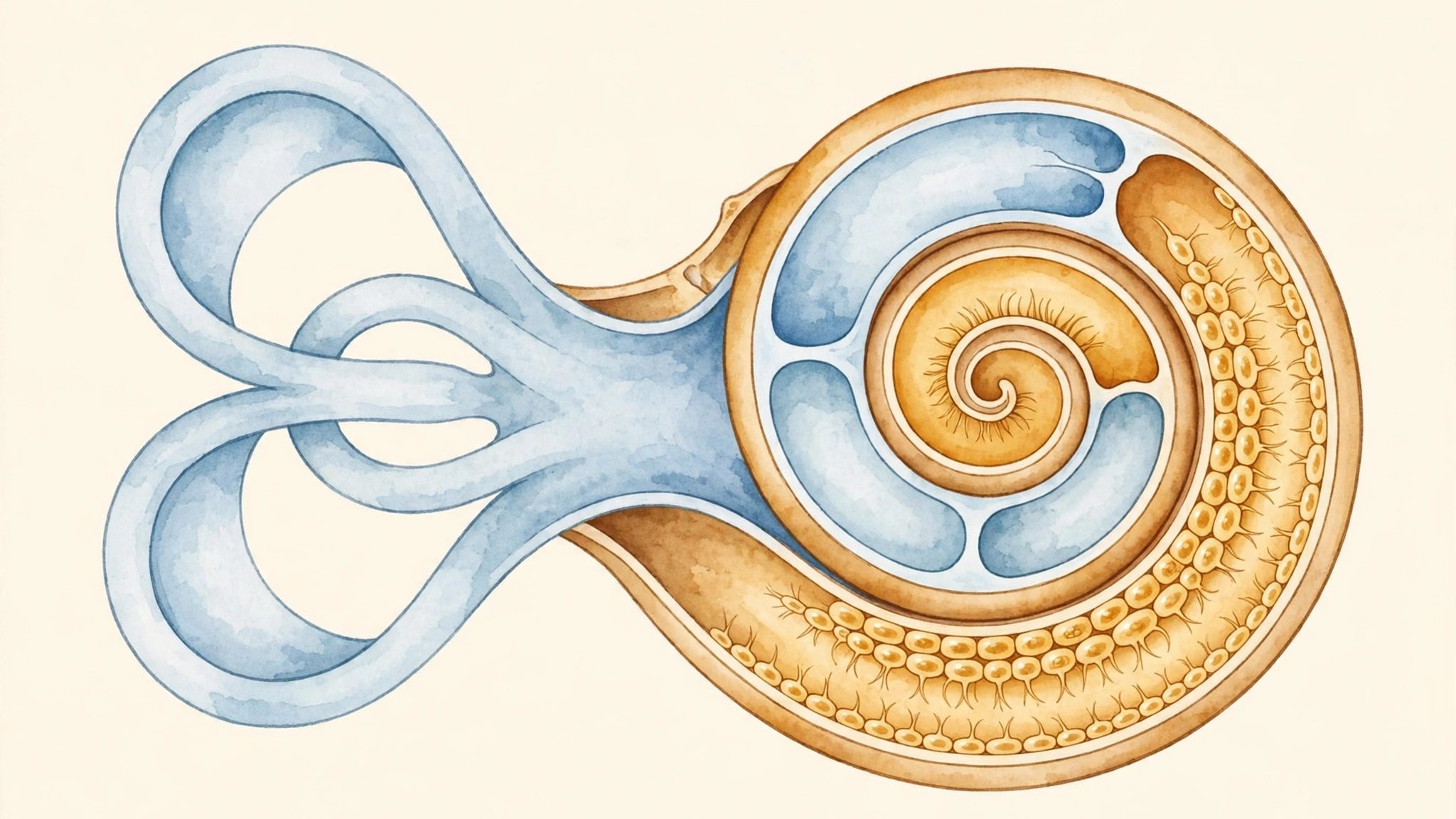
Think of the hair cells like grass in a field. A gentle breeze bends the grass and it springs back. A storm flattens it, and some of it never stands up again. Sound works the same way: quiet sounds bend the cells and they recover, loud sounds flatten them, and repeated loud sessions kill them off for good.
Two things decide how fast the damage builds up: how loud, and how long. A few minutes at full volume can do more harm than a whole day at a sensible level. The dose is what counts, and the dose adds up across the week — an hour of loud listening every day is not seven separate small risks, it is one big weekly dose.
Or maybe I should say it this way: your ears don't keep a daily score. They keep a running total.
How Loud Is Too Loud?
80 decibels is the safe line for long listening — about the level of a doorbell. Above that, your safe time shrinks fast: 90 decibels gives you four hours a week, 100 decibels gives you twenty minutes. Most phones sit near 80 decibels at 50 to 60% volume.
Decibels are tricky because the scale is not a straight line. Going from 80 to 90 decibels is not a small step — the sound is ten times more intense, and it sounds about twice as loud. Every 3-decibel rise cuts your safe listening time in half. That is why the jump from "a bit loud" to "way too loud" happens faster than most people expect.
The World Health Organization puts the safe weekly budget in plain numbers:
| Sound level | Safe time per week | Sounds like |
|---|---|---|
| 80 dB | 40 hours | Doorbell |
| 85 dB | 12 hours 30 minutes | Heavy traffic inside a car |
| 90 dB | 4 hours | Shouted conversation |
| 95 dB | 1 hour 15 minutes | Motorcycle |
| 100 dB | 20 minutes | Hair dryer |
| 105 dB | 8 minutes | Car horn at 5 metres |
| 110 dB | 2 minutes 30 seconds | Shouting in your ear |
Most earbuds can reach 100 decibels or more at full volume. That means a single loud commute can use up your whole week's budget before lunch. The Centers for Disease Control and Prevention puts it simply: keep the volume at 70% of maximum or below, and treat anything over 85 decibels as a two-hour limit.
Here's the thing: your phone's volume bar does not show decibels. A rough guide is that 50 to 60% of maximum lands near 80 to 85 decibels on most phones — the safe zone. Above 80%, you are in the danger zone, and you should be counting minutes, not hours.
One quick test works anywhere: if someone standing next to you can hear your music, it is too loud. Turn it down until the sound stays inside your ears.
Are Earbuds Worse for Your Hearing Than Over-Ear Headphones?
At the same volume, yes — earbuds are worse. They sit closer to your eardrum and seal the sound in, so more of the energy reaches your inner ear. Over-ear headphones spread the sound out, and with noise cancelling you can listen at a lower volume.
Earbuds vs over-ear headphones: earbuds are worse for your hearing at the same volume because they sit closer to your eardrum and seal sound in. Over-ear headphones work better for long listening sessions because the sound spreads out and noise cancelling keeps the volume lower. The key difference is distance — a few millimetres changes the dose your ears receive.
That does not mean earbuds are dangerous and over-ears are safe. It means the same volume setting is not the same dose. An earbud at 80% and an over-ear pair at 80% do not hit your ears equally — the bud delivers more of its energy straight to the eardrum, with nowhere for the sound to escape.
The fix is not to throw your earbuds away. It is to match the tool to the job: earbuds for short trips and calls, over-ear headphones for the long sessions — the workday playlist, the cross-country flight, the four-hour study block. Our noise cancelling earbuds guide ranks the pairs that let you hear clearly at low volume, and our true wireless earbuds guide covers the best all-round picks.
Here's an opinion that might get pushback: noise cancelling is the best hearing-protection purchase most people will ever make. Not earplugs, not a volume app — noise cancelling, because it works by letting you turn the volume down instead of fighting the world with louder sound.
Distance matters. Use it.
Can Bluetooth Itself Damage Your Hearing, or Is It Just the Volume?
It is just the volume. Bluetooth uses low-power, non-ionizing radio waves, and no study has linked them to hearing damage. The risk is identical for wired and wireless headphones — the wire changes nothing about the sound dose.
The confusion is understandable. The buds sit in your ears for hours, and "wireless radiation" sounds like something that should hurt. But Bluetooth's radio signal runs at a maximum of 2.5 milliwatts — a tiny fraction of a mobile phone's output — and it is non-ionizing, which means it cannot damage cells the way X-rays can. Health agencies have found no link between Bluetooth and hearing loss, and the research keeps pointing at the same culprit: loud sound, for too long.
A 2026 editorial in a medical journal put it plainly: Bluetooth earphones carry similar acoustic risks to wired devices, because hearing damage depends on sound intensity, not on how the sound gets to your ears. Swap the Bluetooth buds for a wired pair at the same volume, and the risk stays exactly the same.
I've seen conflicting data — some sources say the 60/60 rule is the gold standard, others point to the WHO's 80-decibel weekly budget as the real line. My read is both point the same way: keep it quieter, take breaks, and check your dose. The numbers disagree on the details, not on the direction.
If the radio waves still worry you after all that, wired headphones are the honest answer: zero radio exposure, lower cost, no battery to charge. The volume rules still apply, though — a wire doesn't make loud safe. Our Bluetooth safety guide covers the radiation question in full, including the cancer research, kids and pacemakers.
Volume is the risk. The wire is a distraction.
What Are the Warning Signs Your Headphones Are Already Damaging Your Hearing?
Ringing in your ears after a session is the first sign. Muffled hearing, trouble following conversations in noisy rooms, and needing to turn the TV up louder than before are the others. If any of these last more than a day, get your hearing checked.
The signs creep in slowly, which is what makes them easy to miss. Hearing loss from headphones rarely arrives all at once — it builds up over months, and the brain is good at filling in the gaps until the gaps get too big. Watch for these:
- Ringing, buzzing or hissing in one or both ears after listening — tinnitus, and the most common early sign.
- Muffled sound after a session, like your ears are stuffed with cotton wool.
- Trouble hearing high sounds — birdsong, a doorbell, a child's voice — before anything else.
- Asking people to repeat themselves more often, especially in restaurants or busy rooms.
- Turning the TV or phone up louder than you used to, or louder than others find comfortable.
- Your ears feel full or ache after listening, or sounds seem too sharp and harsh.
One warning sign deserves its own line: if you keep turning the volume up over weeks to get the same clarity you used to get at a lower level, that is not your headphones wearing out. That is your hearing changing — and it is the clearest signal to turn things down and book a hearing test.
Quick note: a single loud session can leave your ears ringing for a few hours. That usually fades. The danger sign is the ringing that is still there the next morning, or that comes back after every session.
Can Hearing Loss From Headphones Heal or Get Better?
No — not once the hair cells are dead. Damaged hair cells in the inner ear do not grow back, so permanent hearing loss from headphones cannot be reversed. The ringing or muffled hearing right after a loud session can fade in a day or two, but repeated damage stays.
This is the hard truth in the whole guide, so it deserves plain words. After a loud concert or a long session at full volume, your ears can feel muffled and ring for hours. That is called a temporary threshold shift, and it usually clears up within 16 to 48 hours as the hair cells recover. But research suggests some damage can remain even after the ringing stops — the cells look recovered, but they are weaker than before.
Do it again next weekend, and again the weekend after, and the temporary shifts stack up into a permanent loss. The first sounds to go are the high ones — birdsong, consonants like "s" and "f" — which is why people often notice they can't follow conversations in noisy rooms long before they notice anything wrong in a quiet one.
There is no pill, supplement or ear drop that regrows hair cells. Hearing aids can help once the loss is there, and they work well, but they manage the damage — they don't undo it. The only real cure is the one you can still use today: stop adding to the dose.
That sounds bleak. It is also the most useful fact in this guide, because it turns every quiet session into a win.
How Can I Protect My Hearing and Still Use My Headphones?
Seven small habits cover almost everything: cap the volume, take breaks, use noise cancelling, check your weekly dose, use over-ear headphones for long sessions, clean the tips, and see a doctor if ringing lasts more than a day.
To protect your hearing with Bluetooth headphones, follow these steps: 1. Cap the volume at 60% in your phone settings. 2. Take a 5-minute break every hour. 3. Switch noise cancelling on in loud places. 4. Check your weekly listening dose in your phone's health app. 5. Use over-ear headphones for long sessions. 6. See a doctor if ringing lasts more than a day.
- Cap the volume at 60%. Set the maximum-volume limit in your phone settings so a stray swipe can't blast your ears. On iPhone it is under Settings > Sounds & Haptics > Headphone Safety; on Android it is the volume warning that pops up when you push past the safe line.
- Take a 5-minute break every hour. Take the earbuds out for a few minutes after each hour of listening. Your ears recover fast with short rests — the 60/60 rule (60% volume, 60 minutes, then a break) is the simple version of this.
- Switch noise cancelling on in loud places. On the train, the plane or a busy street, ANC lets you hear clearly at a much lower volume instead of fighting the noise with louder sound.
- Check your weekly dose. iPhone's Health app shows your headphone audio levels for the past seven days, and it warns you after too many hours over 80 decibels. Android's Digital Wellbeing and the volume warnings do the same job — look at the number once a week, not once a year.
- Use over-ear headphones for long sessions. Save the earbuds for short trips and calls. For the workday playlist or the long flight, over-ear headphones spread the sound out and keep the dose lower.
- Clean the ear tips weekly. Wipe the tips with a dry cloth once a week. Dirty tips carry bacteria, and ear infections swell the ear canal — which makes everything sound muffled and tempts you to turn the volume up.
- See a doctor if ringing lasts more than a day. Ringing or muffled hearing that is still there the next morning is a sign to get a hearing test, not to wait and hope. A test takes twenty minutes and tells you exactly where you stand.
Kids need the same habits with a lower ceiling. A child's ears are more sensitive, and damage in childhood lasts a lifetime — volume-limited headphones capped at 85 decibels take the guesswork out. Our wireless sleep earbuds guide covers the flat pairs built for overnight listening at low volume.
Small habits. Big difference.
Frequently Asked Questions
What's the safest volume for Bluetooth headphones?
Keep it at 60% of maximum or below. The WHO says 80 decibels is safe for up to 40 hours a week — roughly the level of a doorbell — and most phones sit near that range at 50 to 60% volume.
Can I use Bluetooth headphones every day without damaging my hearing?
Yes, at sensible volumes with breaks. Cap the volume at 60%, take a short break each hour, and use noise cancelling so you can listen quieter in loud places.
How do I know if my headphones are too loud?
If someone next to you can hear your music, or your ears ring or feel muffled after a session, turn it down. Your phone's headphone volume warnings are worth listening to.
Are earbuds worse for your hearing than headphones?
At the same volume, yes — earbuds sit closer to your eardrum and seal sound in. Over-ear headphones spread the sound out, and with noise cancelling you can listen at a lower volume.
Can hearing loss from headphones be reversed?
No. Damaged hair cells in the inner ear do not grow back. Ringing or muffled hearing right after a loud session can fade in a day or two, but repeated damage is permanent.
Should kids use Bluetooth headphones?
Yes, at sensible volumes — and volume-limited headphones capped at 85 decibels are the smart pick for children. Their ears are more sensitive, and damage in childhood lasts a lifetime.
Is it the Bluetooth or the volume that hurts my hearing?
The volume. Bluetooth uses low-power radio waves with no proven link to hearing damage. Loud sound over long hours is the cause, wired or wireless.