Best Laptop Stand for Dual Screen Setup (2026): 6 Picks

Your monitor sits at eye level. Your laptop sits on the desk, far below it. Every glance at chat, email or notes means a dip of the head, then a climb back up to the main screen.
You have tried the cheap fixes. Books under the laptop. A basic riser that lifts it a bit, but not enough. Maybe you pushed the laptop to the side and told yourself the neck ache would fade. It hasn't.
A laptop stand for a dual screen setup is a stand or mount that lifts your laptop beside an external monitor. It lines the two screens up so your eyes move sideways, not up and down.
This guide ranks six ways to do that job — five mounts with a laptop tray and one tabletop stand for desks that cannot take a clamp. Our plain laptop-only picks live in the laptop stand for desk setup guide; this one is for the two-screen desk, where height match matters more than looks.
No prices are printed in this guide — mount prices move often and listings disagree on the same model. Check the live price before buying. All specs are the makers' own figures — never a guess.
What's the Best Laptop Stand for a Dual Screen Setup?
The VIVO STAND-V002C. It puts one monitor and one laptop on a single desk mount, holds screens from 13 to 32 inches, and gives the clearest fit limits in this guide. For the common desk — one laptop, one 24 or 27 inch monitor, one external keyboard — it is the safest buy.
The best laptop stand for a dual screen setup is the VIVO STAND-V002C for most desks. According to VIVO, it holds a 13 to 32 inch monitor up to 22 lb and a laptop up to 17 inches. That mix fits the common laptop plus 27 inch monitor desk.
A monitor arm with a laptop tray beats a plain riser when both screens stay on all day. It lifts the laptop off the desk, moves it left or right, and keeps the keyboard zone clear. A tabletop stand still wins when your desk cannot take a clamp.
You don't need a bigger desk, you don't need a second monitor, and you don't need to suffer through it. You need the laptop screen up where your eyes already work. That is the whole job.
Look — if you're in the spot where chat lives on the laptop and work lives on the monitor, here's what actually works: centre the monitor, raise the laptop beside it, and type on a separate keyboard. Our external keyboard guide covers that last part.
Should Your Laptop Screen Match Your Monitor Height?
Close, not perfect. Set the main monitor first, with its top at or just below eye level. Then raise the laptop until the tops of both screens feel close, and angle the laptop in a little. Your eyes should travel sideways, not bob up and down.
Your laptop screen should sit close to your monitor height, not flat on the desk. According to OSHA, the top of the main screen should sit at or just below eye level. Raise the laptop until the tops feel level, then angle it in a little.
Here's the thing: perfect symmetry is a photo goal, not a comfort goal. A 14 inch laptop beside a 27 inch monitor will never match edge for edge. Chase the viewing line instead — main screen centred, laptop close beside it, both at a similar distance from your face.
Which screen gets centred? The one you look at most. If the monitor holds your main app all day, the monitor goes in front and the laptop becomes the side screen. If you split time evenly, centre the join between the two and turn both screens in a touch.
Main screen first. Laptop second.
Mount With a Laptop Tray or Tabletop Stand — Which Is Better?
A mount with a laptop tray is better for a fixed desk. A tabletop stand is better when the desk cannot take a clamp. The mount frees the desk surface and holds both screens on arms; the stand sits on top and asks for no tools.
Monitor arm with laptop tray vs tabletop stand: the arm is better suited for a fixed desk because it frees the surface and lines both screens up. The tabletop stand works better when your desk is glass, rented, or moves often. The key difference is the clamp.
My honest take: for most fixed desks, the mount beats the prettier tabletop stand, even though the clamp looks less clean in photos. A tray on an arm puts the laptop exactly where the monitor needs it. A tabletop stand can do the same job, but it eats desk depth and sits where the keyboard wants to be.
Or maybe I should say it this way: buy the mount for the desk you sit at every day, and buy the tabletop stand for the desk you cannot clamp, drill or keep. Both routes need an external keyboard once the laptop screen rises.
Will It Fit Your Monitor, Laptop and Desk?
Check four numbers before you buy: monitor size, monitor weight without its stand, VESA holes, and desk thickness. Then check the laptop tray size. Most failed setups skip one of those five checks.
VESA is the square of screw holes on the back of the monitor — 75x75mm or 100x100mm on every mount here. No VESA holes means no arm mount, full stop. Weigh the monitor without its factory stand, because the arm only carries the panel. Stay under the arm limit with room to spare.
The desk matters as much as the screens. Clamps need a clear edge with no frame rail or drawer in the way. Glass tops and thin hollow tops are a poor match for clamp pressure. HUANUO limits its mounts here to wooden desks, so read that line before you order.
I've seen conflicting data — some HUANUO listings say the monitor arm holds 22 lb, while the maker's own product details say 17.6 lb. My read is simple: trust the lower number. A mount that sags helps no one.
Five checks. Two minutes. No returns.
Quick Comparison
| Product | Screens it holds | Fit limits | Best for | ||
|---|---|---|---|---|---|
| #1 | VIVO STAND-V002CBest Overall | 1 monitor + laptop tray | 13–32 in monitor, 22 lb; laptop to 17 in | Most laptop + monitor desks | Check Price |
| #2 | Mount-It! MI-7352LTMNBest Tilt Range | 1 monitor + laptop tray | Monitor to 32 in; 17.6 lb per arm; laptop to 17 in | Wide tilt, tall pole | Check Price |
| #3 | HUANUO HNCM2Best for Wooden Desks | 1 monitor + laptop tray | 13–32 in monitor; use 17.6 lb limit; laptop to 17 in | Compact wooden desks | Check Price |
| #4 | Viozon Dual ArmBest Reach | 1 monitor + laptop tray | 17–32 in monitor, 19.8 lb; laptop 12–17 in | Long reach, big tilt | Check Price |
| #5 | WALI M002XLLPBest for Two Monitors + Laptop | 2 monitors + laptop tray | Monitors to 27 in, 22 lb each; laptop to 17 in | Three-screen desks | Check Price |
| #6 | Twelve South Curve FlexBest No-Clamp | Laptop only, beside your monitor | Laptops 8.66 in wide+, to 7 lb; screen to 22 in high | Glass or rented desks | Check Price |
The “Best for” column is the honest summary: the VIVO covers the most desks, the WALI is for three screens, and the Curve Flex is the no-clamp escape hatch. Buy the mount that matches the screens you own today.
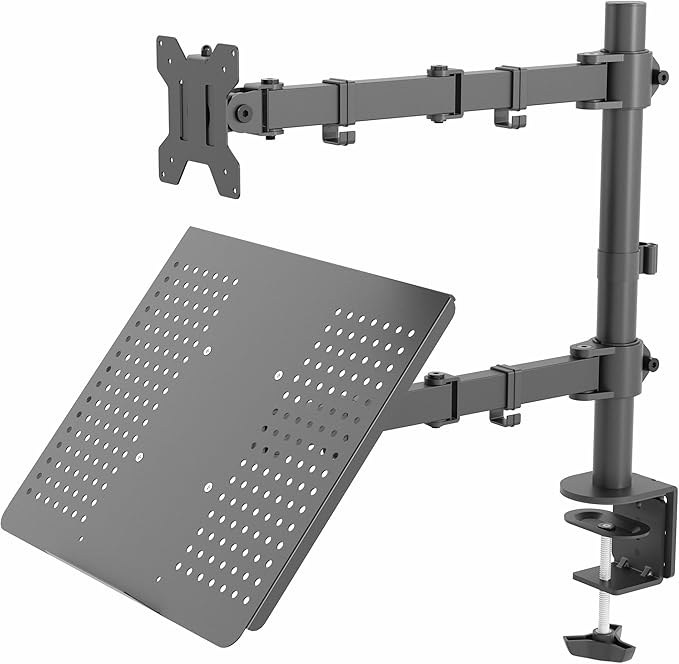
VIVO STAND-V002C Monitor and Laptop Desk Mount
Best OverallBuy if: you run one laptop beside one monitor and want the safest fit
Don't buy if: you need wide monitor tilt or a gas-spring arm
The STAND-V002C is the plain, well-specced answer to this search. One arm holds a 13 to 32 inch monitor up to 22 lb on VESA 75x75mm or 100x100mm holes. The second arm carries a vented tray for laptops up to 17 inches. Both arms slide up and down a 17 inch centre pole, so the laptop screen can meet the monitor at the height you set.
The mount clamps to desks up to 3.4 inches thick, or uses the grommet base on desks up to 3 inches. Cable clips run along the arms and pole. VIVO backs it with a 3-year warranty. The trade is movement: monitor tilt is only 15 degrees each way, and height changes mean loosening the arm on the pole, not a light push on a gas spring.
Pros
- Monitor and laptop on one mount
- Clear 22 lb monitor limit
- Vented tray for laptops to 17 inches
- 3-year warranty
Cons
- Monitor tilt only ±15°
- No gas spring — height slides on the pole
- 17 inch pole suits seated desks best
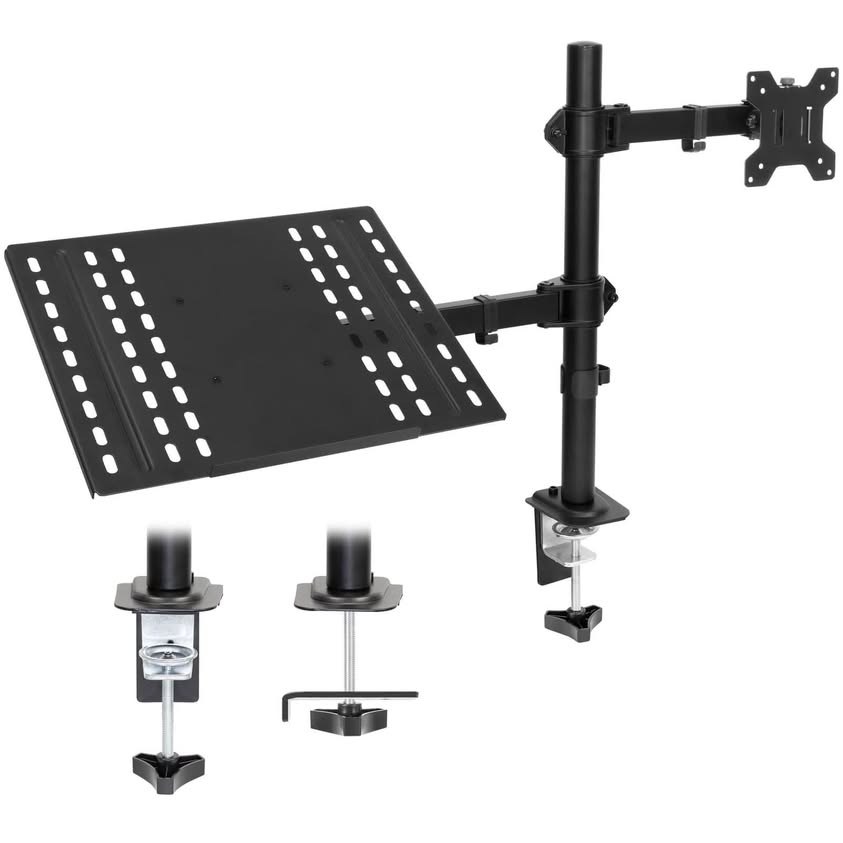
Mount-It! MI-7352LTMN Laptop Desk Mount with Monitor Arm
Best Tilt RangeBuy if: you want more tilt and a taller pole than the VIVO
Don't buy if: your monitor weighs close to 22 lb without its stand
The MI-7352LTMN pairs a 14 by 11.8 inch vented laptop tray with a monitor arm for screens up to 32 inches. Laptops up to 17 inches fit the tray. The laptop tilts ±45° and the monitor tilts ±90°, so portrait mode and steep viewing angles are easy to reach. The tray lifts and lowers on a 19 inch pole.
Mount-It! rates each arm at 17.6 lb, lower than the VIVO's 22 lb monitor limit. That is fine for most 24 and 27 inch panels, but weigh yours first. The clamp and grommet fit desks up to 3.4 inches thick. Buy this one for movement; buy the VIVO for the higher weight limit and clearer warranty line.
Pros
- Wide tilt on both arms
- Large vented 14 x 11.8 inch tray
- 19 inch pole
- Clamp or grommet base
Cons
- 17.6 lb per arm limit
- Heavier monitors need care
- Check VESA holes before buying
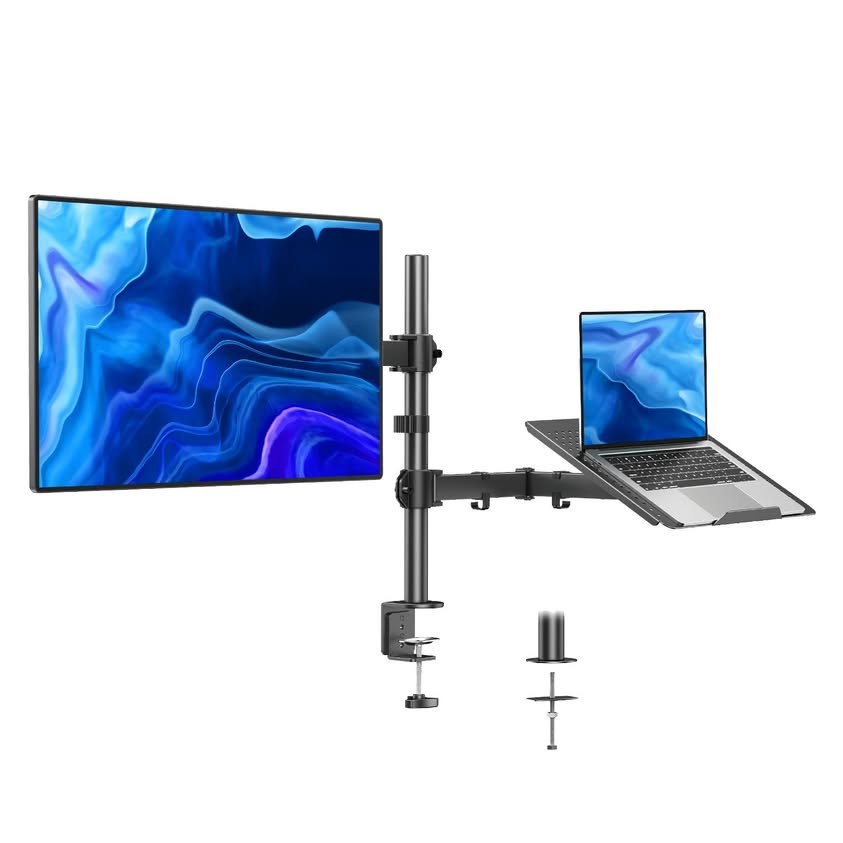
HUANUO HNCM2 Adjustable Monitor Arm with Laptop Tray
Best for Wooden DesksBuy if: your desk is wood and you want a compact laptop plus monitor mount
Don't buy if: your desk is glass, metal-framed or not wood
The HNCM2 combines a monitor arm for 13 to 32 inch VESA screens with a 14 by 12 inch ventilated laptop tray. The tray has a 0.8 inch bottom lip to stop the laptop sliding. Both arms tilt ±45°, swivel ±90° and rotate 360°, with height adjustment up to 17 inches. Cable management runs through the mount.
Read the desk line twice: HUANUO says the clamp and grommet fit wooden desks only. The clamp fits 0.39 to 3.35 inch tops; the grommet fits 0.39 to 2.76 inch tops. Use the maker's lower 17.6 lb monitor-arm figure when you weigh your screen, even if a retailer listing prints 22 lb.
Pros
- Big ventilated tray with safety lip
- ±45° tilt and 360° rotation
- Compact single-clamp layout
- Built-in cable management
Cons
- Wooden desks only
- Capacity figures conflict — use 17.6 lb
- Height tops out at 17 inches
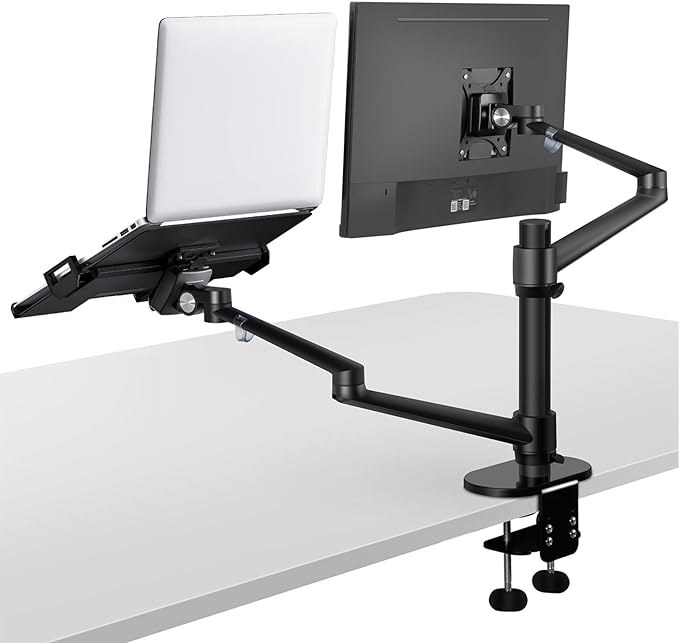
Viozon Monitor and Laptop Mount, 2-in-1 Dual Arm
Best ReachBuy if: you need long reach and wide angle changes
Don't buy if: your monitor is under 17 inches or your laptop ports sit under the tray grips
The Viozon is the reach pick. Its monitor arm fits 17 to 32 inch screens up to 19.8 lb on VESA 75x75mm or 100x100mm holes. The arm extends up to 20.5 inches and reaches about 16.9 inches high. The laptop arm fits 12 to 17 inch laptops, tilts 45°, and reaches about 16.5 inches high. Both arms swivel 360°.
The aluminium build feels a step up from thin steel arms, and cable management keeps the desk tidy. The weak spots are age and fit: monitors under 17 inches fall outside the stated range, and the tray grips can sit over side ports on some laptops. Check your port layout before you buy.
Pros
- 20.5 inch extension
- Wide tilt and 360° swivel
- Aluminium arms
- Fits 12 to 17 inch laptops
Cons
- Monitors start at 17 inches
- Tray grips can cover side ports
- Older design than the VIVO
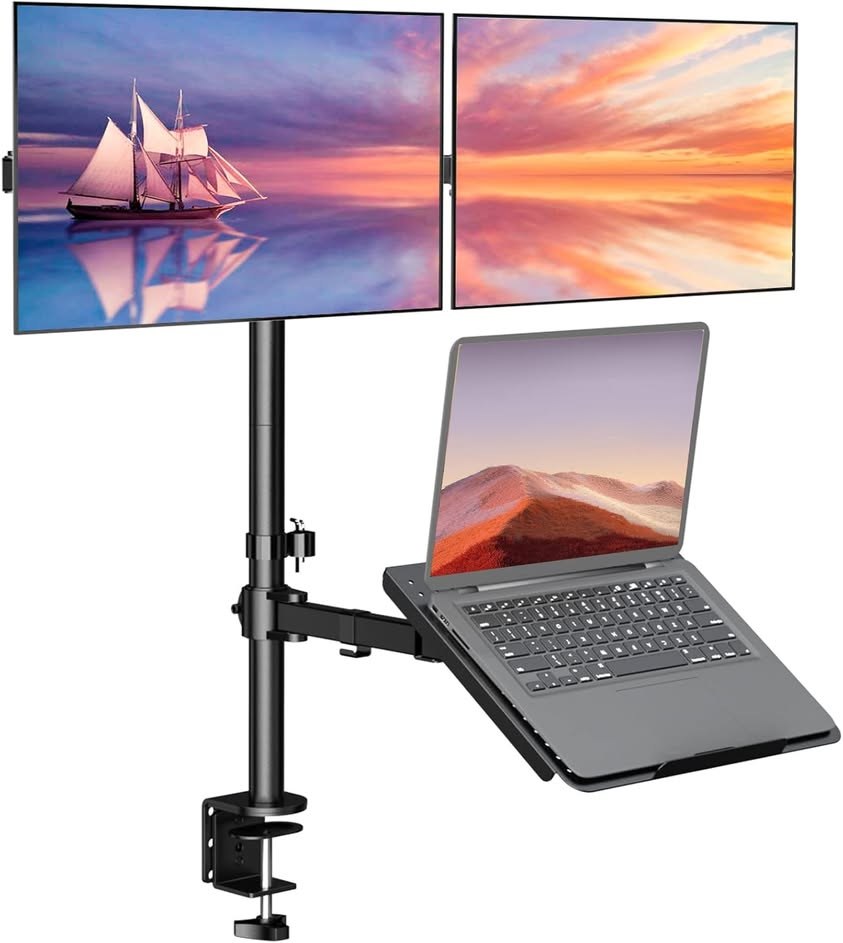
WALI M002XLLP Dual Monitor Stand with Laptop Tray
Best for Two Monitors + LaptopBuy if: your “dual screen” desk means two monitors plus the laptop
Don't buy if: your monitors are 32 inches or your desk is small
The M002XLLP is the three-screen option. Three arms on an extra tall 31.5 inch pole hold two monitors up to 27 inches at 22 lb each, plus a laptop up to 17 inches on a 14 by 11 inch vented tray. The monitor arms tilt and swivel ±90° and rotate to portrait. The clamp fits desks up to 4 inches; the grommet base fits up to 3 inches.
That height helps tall desks and stacked layouts, but the limits are firm. Monitors stop at 27 inches. The laptop tray tilts only 15°. The whole rig needs desk width and depth that a one-monitor mount does not. If you only run one external monitor, this is more mount than you need — our dual monitor stand guide covers two-monitor-only stands.
Pros
- Two monitors plus a laptop
- Extra tall 31.5 inch pole
- 22 lb per monitor arm
- Vented tray with bottom lip
Cons
- Monitors capped at 27 inches
- Laptop tray tilts only 15°
- Large footprint
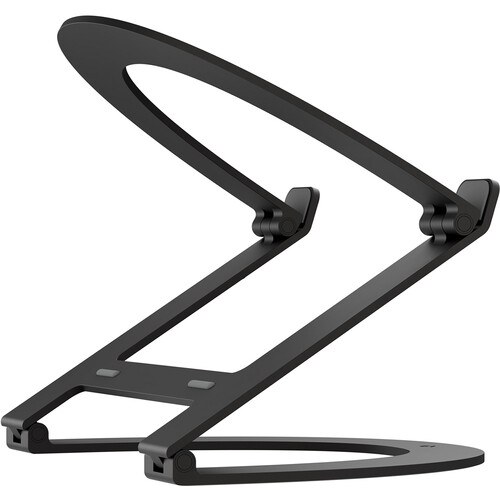
Twelve South Curve Flex Laptop Stand
Best No-ClampBuy if: your desk cannot take a clamp and you still need real height
Don't buy if: you plan to type on the raised laptop all day
The Curve Flex is the tabletop answer with real reach. Twelve South says it lifts a laptop screen and camera up to 22 inches, enough to align with external monitors such as a 27 inch Studio Display. The stand itself opens to 10.8 inches tall, adjusts keyboard angle from 0 to 45°, and folds flat for a bag. It fits laptops at least 8.66 inches wide and up to 7 lb.
That height comes with a rule: use an external keyboard. At full lift the laptop keyboard sits high, and the hinged stand is built to hold a screen, not to take typing force. For glass desks, rented desks and hot-desking, that trade beats a clamp you cannot use. For a fixed desk, the mounts above still win on space.
Pros
- No clamp or tools
- Screen lift up to 22 inches
- Folds flat with a travel sleeve
- Aligns with tall monitors
Cons
- Needs an external keyboard
- Flexes if you type on the laptop
- Premium price for a tabletop stand
How to Set Up a Laptop and Monitor as Two Screens in 5 Steps
Centre the main screen, raise the laptop, angle both screens, place the keyboard, then fix the settings. Five steps, ten minutes, and the two screens start to feel like one workspace.
To set up a laptop and monitor as two screens, follow these steps: 1. Centre the screen you use most. 2. Raise the laptop to match it. 3. Angle both screens in slightly. 4. Put the keyboard in front of you. 5. Match the display settings to the desk.
- Centre the screen you use most. Put the main screen in front of your chair and keyboard. If both screens get equal use, centre the join between them.
- Raise the laptop to match it. Lift the laptop until the tops of both screens feel close. Keep the main screen top at or just below eye level.
- Angle both screens in slightly. Turn the laptop a little toward you. Keep the inner edges close so your head turns less.
- Put the keyboard in front of you. Place the external keyboard and mouse at elbow height. Do not type on the raised laptop all day.
- Match the display settings to the desk. Set the screens to extend, not mirror. Drag the display icons so left and right match the real desk.
Quick note: sit in the chair before you judge the result. A setup that looks level from standing height can feel wrong once your eyes settle at desk height.
Buying Guide: What Actually Matters
After the two-screen check, four things matter most: weight limit, VESA holes, desk clamp fit and tray size — in that order.
Weight comes first because arms fail by sag, not by snapping. Weigh the monitor without its stand. Keep a margin under the limit, since tilt joints hold less well near the top of the range. The VIVO's 22 lb limit gives the most headroom here for one monitor.
VESA holes come next. Every mount in this guide needs 75x75mm or 100x100mm holes on the monitor back. Some slim monitors hide the holes under a cover; some have none at all. No holes means the Curve Flex route, or a new monitor.
Desk fit decides whether the mount stays put. Measure the top thickness and check under the edge for frame rails, drawers and cable trays. Glass tops need a tabletop stand. Wooden tops suit every clamp here, within each maker's thickness range.
Tray size is the quiet check. A 17 inch laptop on a small tray can overhang and block side ports. Measure the laptop base, then compare it with the tray size. Leave the charging port and headphone jack clear of lips and grips.
Fit first. Features second.
Stands to Skip in 2026
Fixed low risers as a dual-screen fix. A 2 inch lift helps a solo laptop, but it leaves the screen far below a raised monitor. Our laptop riser guide ranks those stands for keyboard clearance, not for two-screen height match.
Dual monitor stands with no laptop tray. They hold two monitors well, but the laptop still sits flat on the desk. Buy one only if the laptop stays closed in clamshell mode.
Vertical laptop docks for open-screen work. They park a closed laptop neatly, which is useful storage. They do not raise an open laptop screen beside a monitor.
No-name mounts with no weight limit. If a listing hides the arm capacity, tray size or desk range, skip it. A mount holds expensive screens over your desk; vague specs are a warning, not a bargain.
Frequently Asked Questions
What's the best laptop stand for a dual screen setup?
The VIVO STAND-V002C for most desks. It holds one 13 to 32 inch monitor and a laptop up to 17 inches on one mount.
How high should my laptop sit next to a monitor?
Raise it until the tops of both screens feel close. Keep the main screen top at or just below eye level.
Should the laptop go on the left or right of the monitor?
Either side works. Put the screen you use most in front of you, then place the laptop close beside it.
Can I use a dual monitor stand for a laptop and one monitor?
Yes, if one arm takes a laptop tray. Check the tray size, the arm weight limit and the VESA plate first.
Do I need an external keyboard with a laptop tray?
Yes for all-day work. The tray lifts the screen, so the laptop keys sit too high and too far away.
What if my desk cannot take a clamp?
Use a tabletop stand such as the Twelve South Curve Flex. It lifts the laptop beside the monitor with no clamp.
Should I mirror or extend the laptop screen?
Extend it for work. Each screen can show different apps, and the cursor moves across like one wide desk.