Best Laptop Stand for Desk Setup (2026): 6 Picks

By three in the afternoon your neck aches, your shoulders have crept up to your ears, and your laptop screen is still six inches too low. You tried the stack of books. It wobbled. You tried a cheap folding stand. It flexed every time you typed. The problem was never your posture. It was the height of your screen.
This guide fixes that in five minutes. First, a test that finds your number — the lift your screen actually needs. Then six stands, each matched to a desk, not a spec sheet. Every spec below is checked against the maker's page or the exact listing, and no invented star ratings appear anywhere.
No prices are printed in this guide — stand prices move by seller and week, and rival pages disagree by $30 on the same stand in the same week. Check the live price before buying. All lift and weight figures are the makers' own claims, not test results.
How High Should Your Laptop Screen Sit?
The top of your screen should sit at or just below your eye level, with the screen about an arm's length away — roughly 20 inches. For most people at a normal desk, that means lifting the laptop 5 to 8 inches.
A laptop stand for desk setup is a raised platform that lifts your laptop screen to eye level at a desk. It trades the built-in keyboard for a separate one, so your neck stays straight and your hands stay low. Fixed, adjustable and vertical stands do the same job in different ways.
How high a laptop screen should sit comes down to eye level. According to OSHA's workstation guidance, the top line of a monitor should sit at or below eye level, about 20 inches from your eyes. A laptop flat on a desk sits far below that line. Most desks need 5 to 8 inches of lift to close the gap.
Find your number before you shop. Stack books under your laptop until the top of the screen lines up with your eyes, then measure the stack. That number is your lift. If you don't measure first, you'll buy the wrong height — and you won't know until your neck tells you.
Whether a laptop stand fixes neck pain depends on the cause. A stand helps when the pain comes from looking down at a low screen for hours. According to a 2024 study in the journal Work, holding the neck bent forward raises muscle fatigue fast. A stand alone will not fix a bad chair.
Or maybe I should say it this way: the stand doesn't fix your posture — it removes the reason you slouch. Sit at your normal desk, eyes forward, and the screen should already be there. If you still have to look down, the stand is too short, not your spine.
Fixed, Adjustable or Vertical — Which Type Fits Your Desk?
Pick by where the laptop lives. One desk, one person: fixed. A desk you share, or a sit-stand desk: adjustable. A bag between offices: portable. A closed laptop driving a monitor: vertical.
Fixed vs adjustable vs vertical: a fixed stand is better suited for one desk because it never wobbles and never needs adjusting. An adjustable stand works better when two people share a desk or you switch between sitting and standing. The key difference is who moves — you, or the stand.
Whether a laptop stand is worth it depends on how you work. If you sit at a desk for hours with an external keyboard and mouse, a stand is one of the cheapest ergonomic upgrades you can buy. If you type on the laptop itself, skip it — a raised keyboard hurts your wrists.
| Your setup | Buy this type | Why |
|---|---|---|
| One desk, one person | Fixed riser | Set it once, never touch it again |
| Shared desk or sit-stand desk | Adjustable | Height changes with the person or the position |
| Travel, cafés, hybrid work | Portable folding | Light enough to carry, tall enough to matter |
| Closed lid + external monitor | Vertical dock | Frees the whole desk, laptop becomes a desktop |
A fixed stand is a single piece of shaped metal. Nothing moves, nothing loosens, and the screen sits at the same height every morning. An adjustable stand trades some of that solidity for range — useful when two people of different heights share one desk, or when you alternate between sitting and standing. A vertical dock holds the laptop upright and closed, which only works if an external monitor is your main screen.
Quick Comparison
| Product | Lift / Fit | ||
|---|---|---|---|
| #1 | Rain Design mStandBest Overall | Fixed 5.9 in / 14–15.6 in laptops | Check Price |
| #2 | Twelve South Curve FlexBest Adjustable | Up to 10.78 in / up to 7 lb | Check Price |
| #3 | Nulaxy C1Best Budget Adjustable | Adjustable, dual-rod / 10–17 in | Check Price |
| #4 | Roost V3Best for Travel | 6.5–12.5 in / 6 oz, folds flat | Check Price |
| #5 | Besign LS03Best Budget Fixed | Fixed ~6 in / 10–15.6 in, up to 8.8 lb | Check Price |
| #6 | OMOTON Double VerticalBest Vertical Dock | Two slots, 14–42 mm / up to 17.3 in | Check Price |
Lift figures are the makers' own numbers. No prices are printed — check the live price before buying.
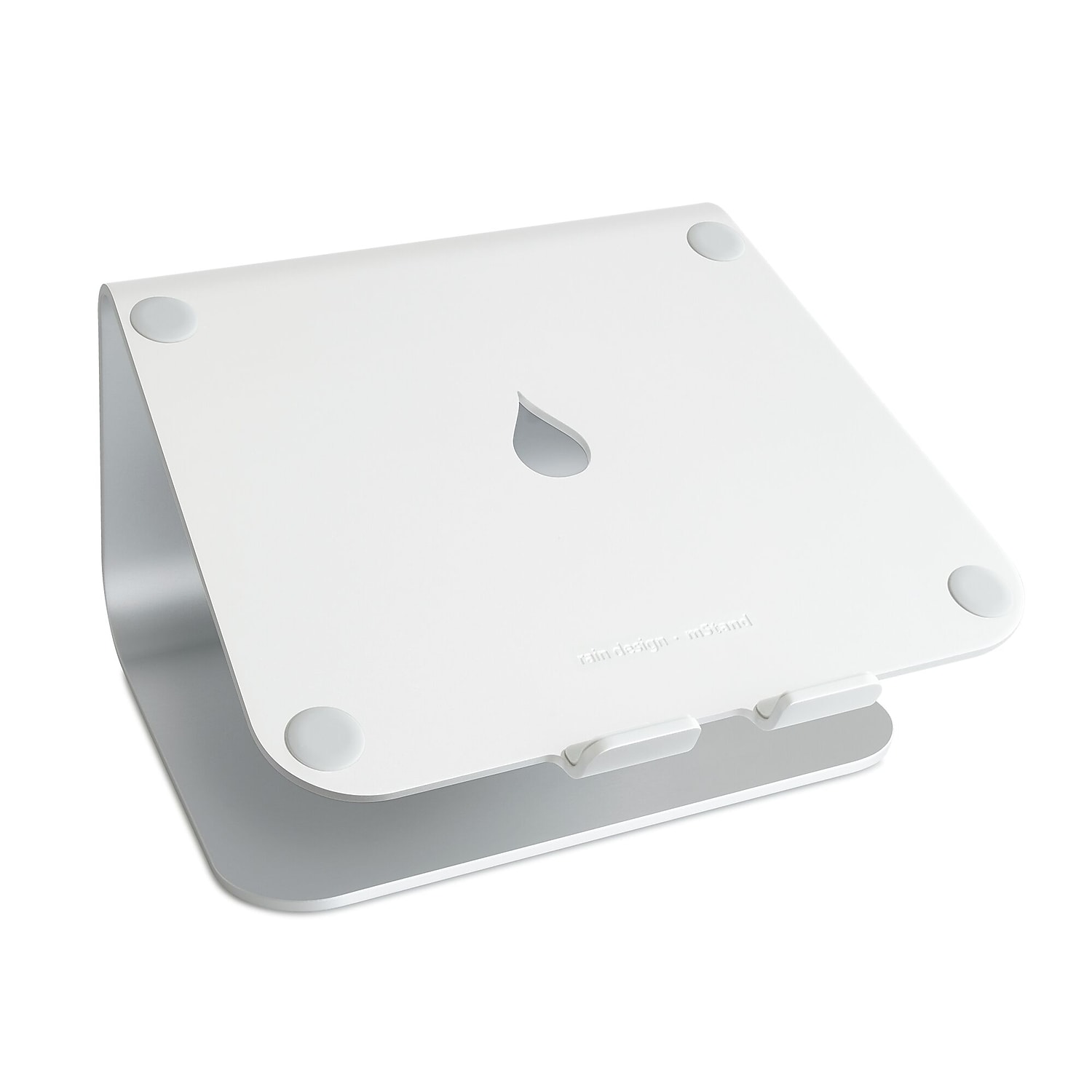
Rain Design mStand
Best OverallBuy if: you work at one desk and want a stand you set once and never think about again
Don't buy if: you share the desk with someone taller or shorter, or you travel with it
The mStand is the default desk stand for a reason, and it has been for years. One piece of anodised aluminium, bent into a single curve, with a teardrop hole in the middle for cables. It lifts the screen a fixed 5.9 inches at an 18-degree tilt, weighs 3 lb, and measures 10 by 7.5 inches — a footprint that suits MacBooks of all sizes and most 14 to 15.6-inch laptops. There are no hinges, no screws, no settings to drift. It just sits there, holding your screen at eye level, for as long as you own the desk.
The fixed height is the whole point and the whole limit. If 5.9 inches matches your lift number, nothing here beats it. If it doesn't, no adjustment will save you — and deep 17-inch laptops can overhang the 7.5-inch-deep plate. At 3 lb it is also a desk fixture, not a travel stand. Buy it for the desk it lives on, and leave it there.
Pros
- One solid piece — nothing to loosen or wear out
- Fixed 5.9-inch lift suits most desks
- Cable hole keeps the desk tidy
- Stable enough for heavy laptops
Cons
- Fixed height — wrong if you share the desk
- No angle adjustment
- Deep 17-inch laptops can overhang the plate
- Heavy at 3 lb — not a travel stand
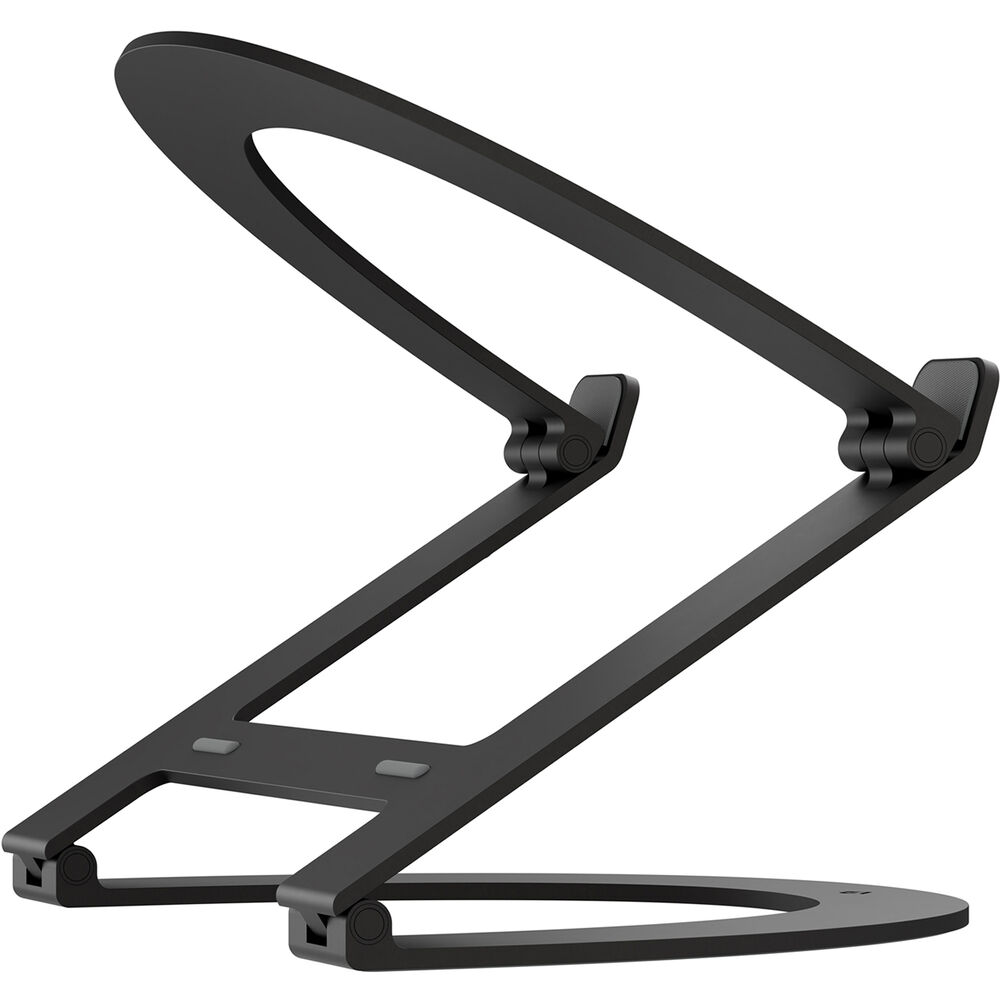
Twelve South Curve Flex
Best AdjustableBuy if: two people share your desk, or you switch between sitting and standing
Don't buy if: you want the cheapest stand, or you never change the height once it's set
The Curve Flex is the adjustable answer to the mStand. Two aluminium loops joined by hinges, folding flat to 1.18 inches for a bag and rising to a 10.78-inch stand height with a 0 to 45-degree tilt. It holds laptops at least 8.66 inches wide and up to 7 lb, and it weighs 1.75 lb. Twelve South says the screen can sit up to 22 inches high on a 16-inch MacBook Pro — that number is the screen top, not the stand, since the laptop's own screen adds its height on top of the stand. Read the stand height when you compare, not the screen-top claim.
The range is real. At full height it lifts a screen far above what a fixed stand can do, which is what tall sitters and standing desks need. The trade is fuss: two hinges to set, two hands to adjust, and a price well above the fixed stands here. If you set it once and never touch it again, the mStand does the same job for less.
Pros
- Tallest lift here — up to 10.78 inches of stand height
- Height and tilt both adjust
- Folds flat to 1.18 inches for travel
- Suits shared desks and sit-stand setups
Cons
- Two hinges to adjust each time
- Needs two hands to change height
- Costs well above the fixed stands
- Heavier than a travel-only stand
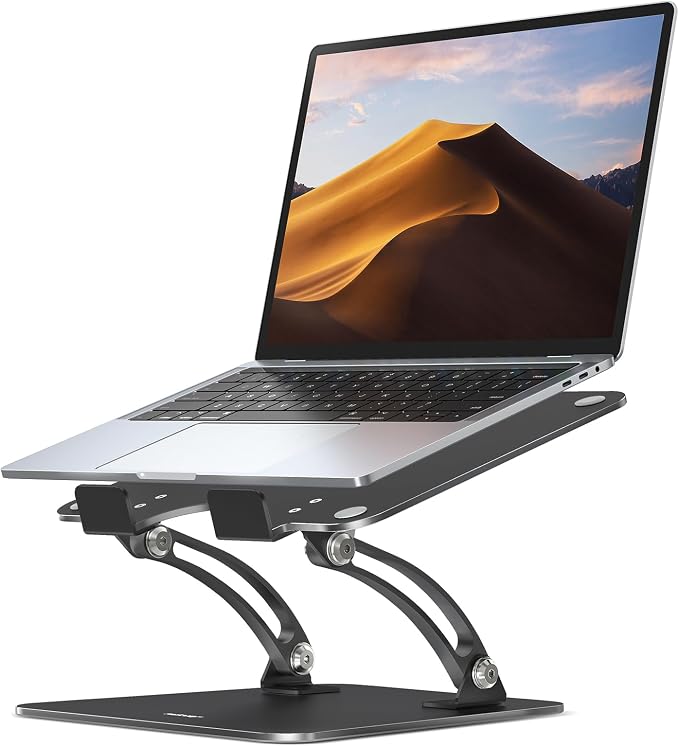
Nulaxy C1
Best Budget AdjustableBuy if: you want adjustable height on a small budget and your laptop is a normal weight
Don't buy if: you need the sturdiest stand for a heavy 17-inch machine
The C1 is the budget way into an adjustable stand. Two aluminium rods on a folding base, with a heat-vent panel under the laptop and a front lip that holds the machine in place. Listings say it fits 10 to 17-inch laptops, though some say 10 to 16 inches — the range is not stated the same way twice, so measure your laptop against the 17-inch claim with care. It folds flat for a bag, and the vent panel leaves air under the laptop instead of trapping it against a solid plate.
I've seen conflicting data — some listings rate the C1 at 22 lb, others at 44 lb. My read is the lower number is the one to trust, because the 44 lb figure shows up on reseller pages, not the maker's own listing. Either way, 22 lb covers every normal laptop twice over. The real limit is the design: two rods and two hinges mean more moving parts than a fixed stand, and the folded shape is wider than a travel stand like the Roost.
Pros
- Adjustable height at a budget price
- Heat-vent panel keeps air under the laptop
- Folds flat for a bag
- Dual-rod base is steady for normal laptops
Cons
- Load rating conflicts across listings (22 vs 44 lb)
- Size range conflicts too (10–16 vs 10–17 in)
- More moving parts than a fixed stand
- Wider folded than a true travel stand
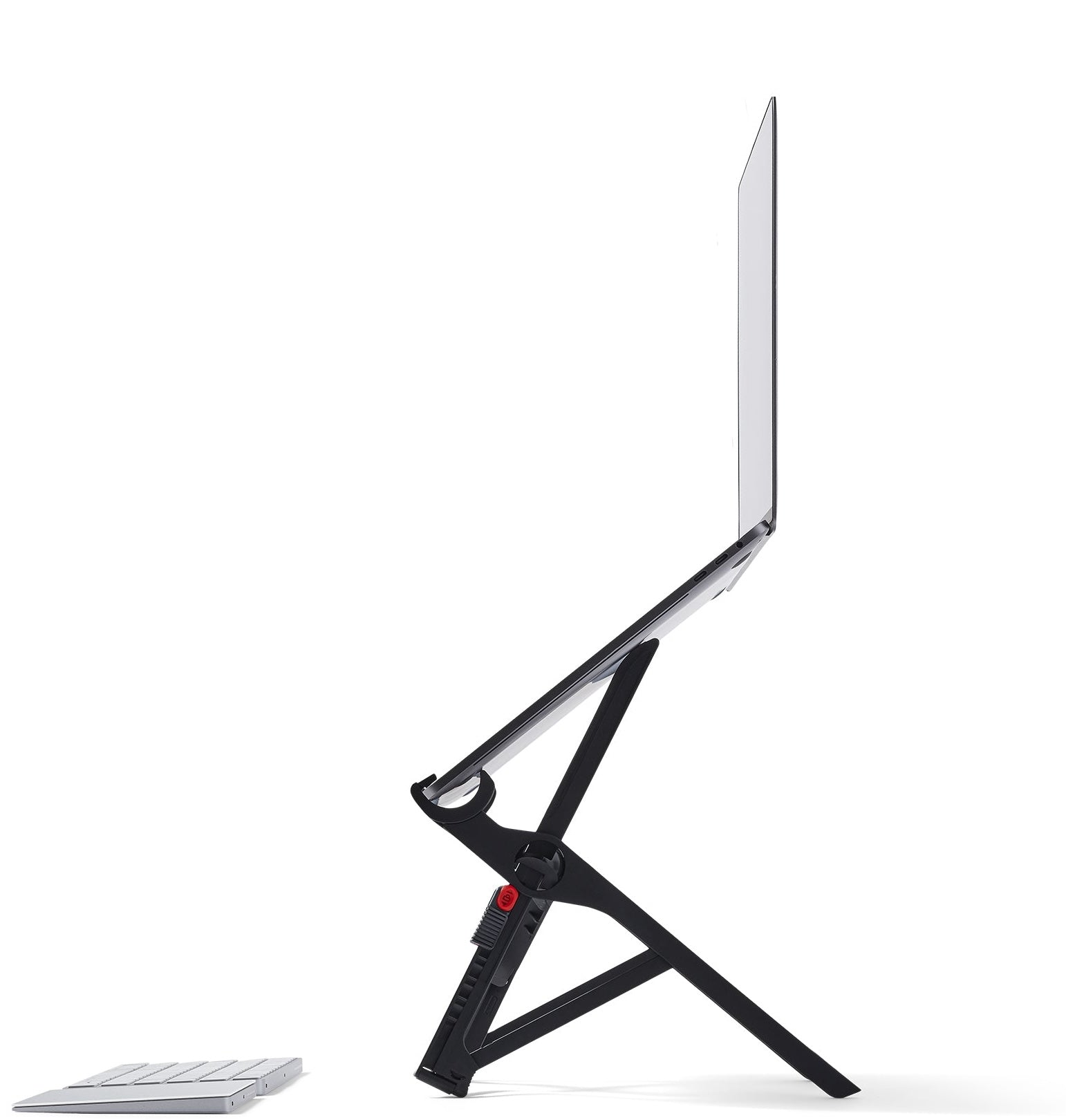
Roost V3
Best for TravelBuy if: you work from cafés, coworking desks and hotel rooms and want real height from a 6 oz stand
Don't buy if: your laptop's front edge is thicker than 0.75 inches, or you never leave your desk
The Roost V3 is the stand for people who don't have a desk. It folds to a 1 by 1.5 by 13-inch stick, weighs 6 oz, and opens into seven heights from 6.5 to 12.5 inches of screen lift — taller than most fixed stands, from something that fits in a laptop sleeve. Glass-fibre-reinforced nylon keeps it light, and maker-cited reviews put the max load at 50 lb. It fits 12 to 18-inch laptops, as long as the front edge is under 0.75 inches thick.
Buy the V3, not the V3 Plus. The Plus is a different model with a 5 to 14-inch lift and a quick-release height catch, and listings mix the two up. The V3's own limits are honest ones: it is a folding frame, so it needs a flat, hard surface, and it takes a few seconds to open and lock. On a desk it is overkill; in a bag it is the only pick here that earns its place.
Pros
- Tallest portable lift here — up to 12.5 inches
- Weighs just 6 oz and folds to a stick
- Seven height settings
- Strong for its weight — 50 lb max load per maker-cited reviews
Cons
- Needs a flat, hard surface to sit steady
- Takes a few seconds to open and lock
- Won't fit laptops with a front edge over 0.75 in
- Easy to confuse with the V3 Plus — check the model
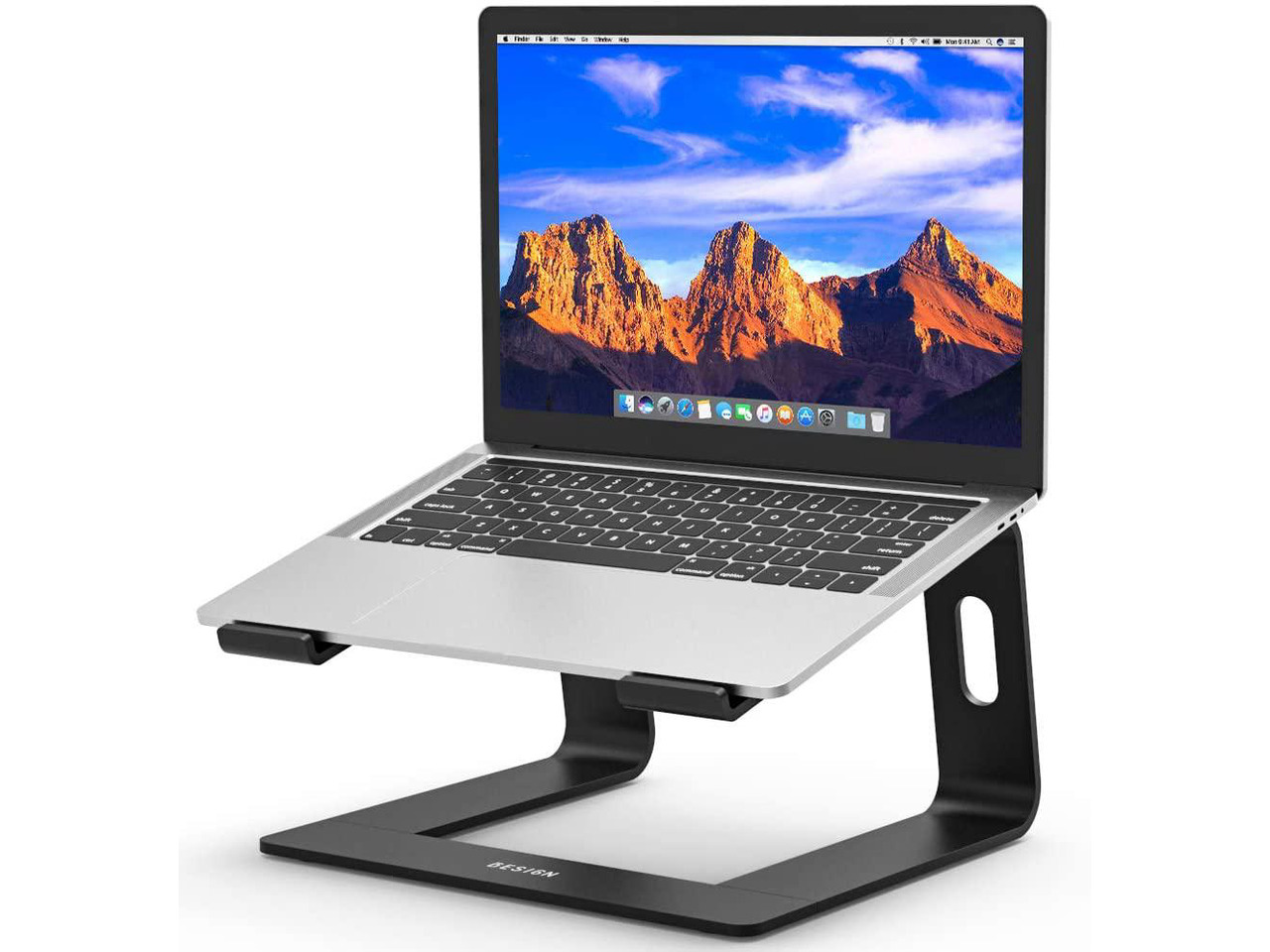
Besign LS03
Best Budget FixedBuy if: you want the mStand's fixed 6-inch lift at a fraction of its price
Don't buy if: your laptop is bigger than 15.6 inches, or you want adjustable height
The LS03 is the mStand's shape at a budget price. A fixed aluminium riser that lifts the screen about 6 inches — 5.71 inches by one measured figure — with rubber pads, a detachable three-piece build, and a rated load of 8.8 lb. It fits 10 to 15.6-inch laptops, measures 10.24 by 9.45 by 5.71 inches, and weighs 1.76 lb. For a single desk and a normal laptop, it does the same job as the top pick.
The savings show up in the details. Three pieces slot together instead of one solid bend, so it feels less planted than the mStand if you move it daily. The 15.6-inch cap rules out 17-inch laptops outright. And the fixed 6-inch lift suits most desks but not tall sitters — if your lift number came out above 7 inches, this stand is too short for you.
Pros
- Fixed 6-inch lift at a budget price
- Solid aluminium build with rubber pads
- Detachable — packs down if you need it to
- Same lift as the mStand for far less
Cons
- Fixed height — no adjustment
- 15.6-inch cap rules out 17-inch laptops
- Three-piece build feels less planted than one-piece
- 6-inch lift is too short for tall sitters
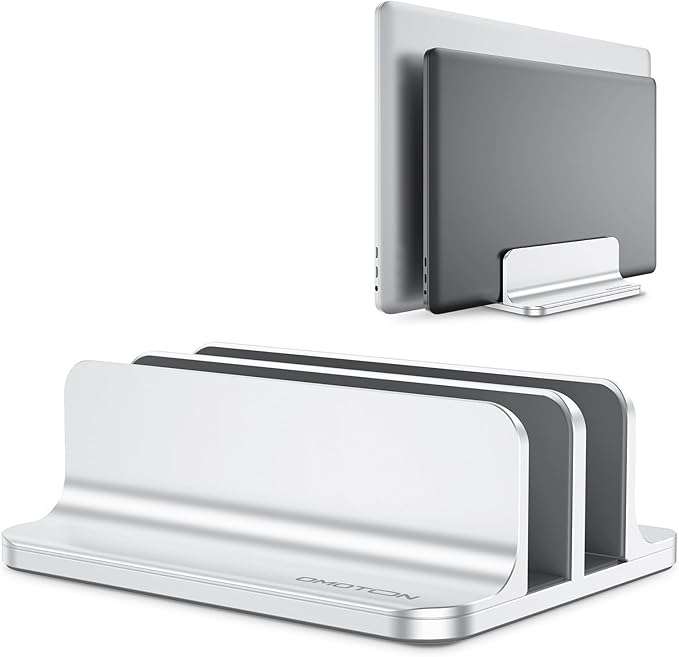
OMOTON Double Vertical
Best Vertical DockBuy if: you work closed-lid with an external monitor and want your desk back — or you dock two laptops
Don't buy if: you use the laptop's own screen, or your laptop is thicker than the slots allow
The OMOTON is a different kind of stand: it doesn't lift your laptop, it parks it. Two upright slots hold one or two closed laptops on their sides, freeing the whole desk for a monitor, keyboard and mouse. Each slot adjusts from 14 to 42 mm wide, the stand fits laptops up to 17.3 inches, and the whole thing weighs 690 g in anodised aluminium with silicone mats. A closed 15-inch laptop lying flat covers roughly 35 by 24 cm of desk — standing it up gives that space back.
Measure thickness, not screen size. A 14-inch MacBook Pro is about 15.5 mm thick and a 16-inch about 16.8 mm, so both fit — but a laptop in a thick case may not. The slots adjust with nuts, not a quick lever, so set the width once and leave it. And remember this is a closed-lid stand: without an external monitor it is useless, and a closed laptop needs its vents clear, which the next section covers.
Pros
- Frees the whole desk for a monitor setup
- Holds two laptops in one base
- Slots adjust 14–42 mm for thick laptops
- Silicone mats stop scratches and slipping
Cons
- Closed-lid only — needs an external monitor
- Width adjusts with nuts, not a quick lever
- A laptop in a thick case may not fit
- Closed-lid heat needs vent clearance
Will It Fit Your Laptop?
Check four things, not one: screen size, weight, thickness, and where the vents sit. Screen size alone is a rough guide — a 17-inch gaming laptop can overhang a stand built for thin 15-inch machines even when its weight is fine.
Screen size is the number every listing shouts, and it is the least useful of the four. A 17-inch gaming laptop is deeper and heavier than a 15-inch ultrabook, and it will overhang a plate built for thin machines. Weight matters more: the mStand's 3 lb of aluminium holds a heavy laptop without flexing, while a light folding stand can bow under the same machine. Thickness decides vertical docks — the OMOTON's slots take 14 to 42 mm, so measure your laptop's thickest point, case included, before you buy.
Depth is the one nobody checks. A laptop deeper than the stand's plate hangs off the front, and the front lip ends up carrying weight it wasn't built for. Measure from the hinge to the front edge and compare it with the stand's depth. The mStand's plate is 7.5 inches deep; the Besign's is 9.45 inches. If your laptop is deeper than the plate, pick a longer stand.
Quick note: MacBooks are the easy case. The mStand and Curve Flex were built for them first, and a MacBook Air or Pro fits every pick here except the vertical dock's thickness check. Windows laptops vary far more — measure yours.
Can You Type on the Laptop While It's on the Stand?
You can, but you shouldn't for long. A raised keyboard bends your wrists up and your shoulders forward — you've traded a neck problem for a shoulder-and-wrist problem.
Look — if you're working from a laptop at a kitchen table, here's what actually works: a stand that lifts the screen, plus a keyboard that stays on the table. Your hands stay low and flat, your screen stays at eye level, and nothing hurts by three in the afternoon. That is the whole setup, and it is why every pick in this guide assumes you own an external keyboard and mouse.
Short bursts are fine. Answering one email on the raised keyboard won't hurt you. An eight-hour day will. If you don't own a keyboard yet, our wireless keyboard for office work guide picks six by the same rule — quiet, long battery, and a layout that fits your desk.
Will a Stand Block Your Laptop's Vents?
Some can. A solid plate under the laptop can cover the bottom intake vents and push temperatures up. Pick a stand with an open frame or a vent cutout, and check the vents stay clear after you set it down.
Here's the thing: most laptops pull cool air in from underneath. A stand with a solid metal plate can cover those intakes, and a laptop that ran cool on a bare desk can run hot on a stand. The Nulaxy's heat-vent panel and the Roost's open frame exist for exactly this reason — air keeps moving under the machine. A fixed plate like the mStand leaves the middle open too, thanks to the teardrop cutout, but it still covers more of the base than an open frame does.
Check before you settle in. Set the laptop on the stand, look underneath, and confirm the intake grilles are not sitting on solid metal. Fan stands exist as well, but the evidence is mixed — some owners report higher temperatures with a fan stand than without one. Airflow from the shape of the stand matters more than a small fan bolted to it.
How to Set Up Your Laptop Stand in 4 Steps
Measure first, buy second, and the setup takes ten minutes. Get the lift number right and the rest is just placing things.
To set up a laptop stand, follow these steps: 1. Measure your lift with stacked books. 2. Set the stand to that height. 3. Place your external keyboard and mouse in front of it. 4. Check that your laptop's vents stay clear.
Step one is the book stack from the first section: pile books under the laptop until the top of the screen is at eye level, then measure the pile. Step two is matching the stand to that number — a fixed stand at the right height, or an adjustable stand set to it. Step three is the keyboard and mouse on the desk in front, at elbow height, with your shoulders relaxed. Step four is the vent check from the last section: look under the laptop and confirm the intakes are clear. Sit down, type a sentence, and check your eyes are level with the top of the screen. If they are, you are done.
Buying Guide: What Actually Matters
After the lift number, the four things worth your attention are fit, stability, material and weight — in that order.
Fit comes first because a stand that doesn't fit is a paperweight. Screen size, weight, thickness, depth — the checklist from the fit section. Stability comes second: a one-piece aluminium stand never wobbles, a folding stand always has some give, and a stand that rocks when you type will drive you mad by lunch. Material decides both: aluminium is the safe default, plastic flexes under heavy laptops, and glass-fibre nylon (the Roost) is the exception that proves the rule.
Weight matters only if the stand travels. A 3 lb mStand is perfect on a desk and absurd in a bag; a 6 oz Roost is the reverse. Don't pay for portability you won't use, and don't buy a desk stand for a café.
Here's my honest take: most people should buy the cheapest fixed stand in this guide and stop shopping. The extra height range of an $80 adjustable stand mostly goes unused once you find your number — and a fixed stand never loosens, never slips, never needs a second thought. Adjustable fans will push back on that, and they're right if you share a desk. For one person at one desk, though, simple wins.
For a MacBook, any pick here works. The mStand and Curve Flex were designed around MacBooks, the OMOTON's slots fit them, and the Besign and Nulaxy take them too. Windows laptops need the fit check more — measure depth and thickness, not just the screen size on the box.
Stands to Skip in 2026
Floor stands and sit-stand desk converters in a "desk setup" roundup. Several top-ranking pages for this query list 16 to 51-inch floor stands alongside desk risers. A floor stand is a different product for a different room. Desk setup means desk.
Cheap plastic folding stands that flex. The ones that cost less than lunch and fold into a credit-card shape. They hold a laptop up for a photo and bow under it for a workday. If the listing won't state a load rating, the maker doesn't want you to know it.
Single-product advertorials posing as roundups. A page that recommends one stand — usually the author's own — and calls it a comparison. One pick is a shop, not a guide.
Stands with no stated load rating at all. Every honest stand states how much it holds. No rating means no accountability when your laptop slides off.
Frequently Asked Questions
What's the best laptop stand for a desk setup in 2026?
The Rain Design mStand — a fixed 5.9-inch lift from one solid piece of aluminium, with nothing to loosen. If you share a desk or stand sometimes, get the Twelve South Curve Flex instead.
How high should my laptop screen sit?
The top of the screen at or just below eye level, about 20 inches from your eyes. Most people need 5 to 8 inches of lift — stack books to find your number, then buy to it.
Is a laptop stand worth it?
Yes, if you work at a desk for hours and use an external keyboard and mouse. No, if you type on the laptop itself — a raised keyboard trades neck pain for wrist pain.
Can I type on my laptop while it's on the stand?
You can, but you shouldn't for long. A raised keyboard bends your wrists up and your shoulders forward. Use an external keyboard and mouse whenever the screen is raised.
Will a laptop stand block my laptop's vents?
Some can. Stands with a solid plate under the laptop can cover bottom intake vents and raise temperatures. Pick a stand with an open frame or a vent cutout, and check your vents stay clear.
Are vertical laptop stands safe?
Yes, for closed-lid use with an external monitor, as long as the slots fit your laptop's thickness and the vents stay clear. A loose slot can let the laptop tip.
Should I get a fixed or an adjustable laptop stand?
Fixed, if one person uses one desk — it never wobbles. Adjustable, if you share the desk or switch between sitting and standing. Vertical, if you work closed-lid with a monitor.