Best Laptop Riser for External Keyboard (2026): 6 Picks

Your neck aches by midday. You look down at your laptop for six hours, and by lunch your shoulders have crept up to your ears. You tried a stack of books. It worked, and it looked terrible, and the books slid. You tried a cheap folding wedge. It lifted the back edge two inches and changed nothing for your neck.
So you bought an external keyboard — or you are about to. And now you have found the real problem: the screen and the keyboard do not fit together. Raise the screen and the keyboard has nowhere to go. Keep the keyboard low and your neck bends down to the screen. This guide ranks six risers by the question the keyword actually asks: can you put your external keyboard where it belongs and still see the screen at eye level?
No prices are printed in this guide — the same stand was listed at three different prices in the same month, and rival pages disagree by $20 or more on the same model. Check the live price before buying. All heights and sizes are the makers' own figures, or a reviewer's measurement where stated — never a guess.
Do I Need an External Keyboard with a Laptop Stand?
Yes — once the stand lifts your laptop more than a few inches. A raised laptop puts its keyboard too high to type on, so a separate keyboard on the desk at elbow height is what makes a stand work at all.
A laptop riser for external keyboard use is a stand that lifts your laptop screen to eye level while a keyboard and mouse sit on the desk in front of it. The built-in keyboard goes unused, because the screen and the keys can no longer sit at the right height at the same time.
Whether you need an external keyboard with a laptop stand comes down to height. According to BerkBox's data on 101 stands, 71 of them leave the built-in keyboard more than 3.5 inches above the desk. Once a stand lifts the laptop that high, typing on it strains your wrists, and a separate keyboard at elbow height is the fix.
A laptop riser works with an external keyboard by splitting one job into two. The riser holds the screen at eye level while the keyboard sits flat on the desk at elbow height. According to DeskGearReviews, a full-size mechanical keyboard needs at least 100 mm of clearance and 355 to 430 mm of width to fit under a stand.
Quick note: "riser" and "stand" mean the same thing here. No maker or reviewer draws a consistent line between them, so this guide uses both words for the same product. What matters is not the name — it is whether the lift is tall enough for your neck and whether your keyboard fits.
How High Should a Laptop Stand Be?
High enough that the top of your screen sits at eye level. For most people that means the laptop's hinge sits 6 to 9 inches above the desk — and the only way to know your number is to measure your own eye height.
How high a laptop stand should be depends on your eye height. According to BerkBox, the hinge needs to sit 6 to 9 inches above the desk for the screen top to reach eye level — 6 inches under 5 foot 6, 9 inches over 6 foot. Measure your eye height above the desk, then subtract the screen height.
Sit in your normal chair, at your normal desk, and measure from the desk surface to your eyes. Then measure your laptop's screen height — from the hinge to the top edge. The difference is the lift you need. A 15-inch laptop screen is about 9 inches tall, so if your eyes sit 15 inches above the desk, you need about 6 inches of lift. That single number rules out half the stands on the market before you spend anything.
One trade-off nobody mentions: raising the screen pushes it farther away. Research cited by SitApp found the screen sits about 72 cm away on a stand, versus 52 cm flat on the desk — 20 cm farther. If the text looks small at the new distance, bump the font size up a notch instead of lowering the stand. Your neck will thank you.
I've seen conflicting data — Rain Design says the iLevel 2 lifts 5.4 to 7.9 inches, Wirecutter measures 6.5 to 8.5, and Nulaxy's own page and its Amazon listing disagree by double on the C1's weight limit. My read is that makers measure different points, so I've used the lower, more conservative figure wherever they disagree, and the one measurement I trust most is the one you take yourself: your eye height above your desk.
Fixed or Adjustable — Which Is Better for an External Keyboard?
Fixed, if one person uses one desk. Adjustable, if the desk is shared or the stand travels. The keyboard question settles it: a fixed stand's open frame either fits your keyboard or it doesn't, and an adjustable stand lets you raise the platform until it does.
Fixed riser vs adjustable riser: a fixed riser is better suited for one person at one desk because it never wobbles and never needs adjusting. An adjustable riser works better when two people share a desk or you travel, since the height changes with the user. The key difference is stability versus flexibility.
Here's the thing: a fixed riser is one solid piece. Nothing loosens, nothing sags, and the laptop sits exactly where you left it every morning. The price is that the height is the height — if 5.9 inches does not put your screen at eye level, you are stacking books under the stand, which defeats the point.
An adjustable riser trades that certainty for range. Two people of different heights can share one desk, and a traveller can fold the stand into a bag. The cost is the hinge. Every adjustable stand here has a joint that can loosen over years, and every one of them wobbles a little more at full extension. With an external keyboard in front of you, that wobble barely matters — your hands never touch the laptop.
Or maybe I should say it this way: buy the fixed stand if your desk never changes. Buy the adjustable one if your life does. Most buyers who pay for adjustment never touch the hinge after week one — and that is fine, as long as they set it right on day one.
Quick Comparison
| Product | Lift / Fit | Keyboard underneath | ||
|---|---|---|---|---|
| #1 | Lamicall Adjustable Laptop StandBest Overall | ~60–300 mm lift / 10–17.3 in | Yes — full-size | Check Price |
| #2 | Rain Design mStandBest Fixed | 5.9 in fixed / up to 16 in | No — in front | Check Price |
| #3 | Rain Design iLevel 2Best Adjustable | 5.4–7.9 in / up to 16 in | No — in front | Check Price |
| #4 | Nulaxy C1Best Budget | ~2.4–10.6 in / 10–16 in | No — in front | Check Price |
| #5 | Roost V3Best Travel | 6.5–12.5 in lift / 12–18 in | No — in front | Check Price |
| #6 | BoYata N19Best for Tall Users | 2–10 in / 11–17 in | No — in front | Check Price |
Only the Lamicall passes the keyboard test. The other five are still good risers — your keyboard just sits in front of them, on the desk, which is where it belongs on a deep desk. Lift figures are the makers' numbers unless stated otherwise.
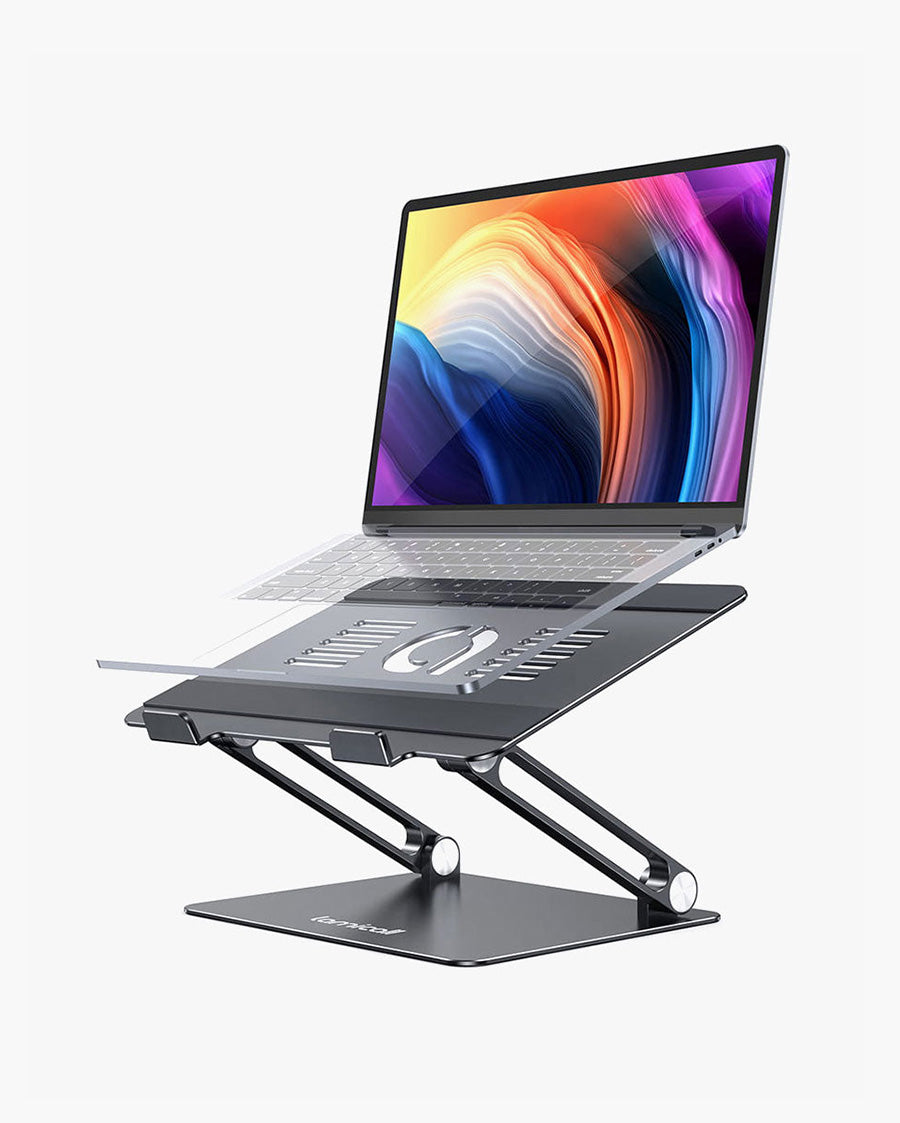
Lamicall Adjustable Laptop Stand
Best OverallBuy if: you want your full-size keyboard under the stand, not in front of it
Don't buy if: you hate stiff hinges, or you need a stand that folds into a pocket
The Lamicall is the only pick here that wins the test this guide is built on. DeskGearReviews measured about 280 mm of clearance underneath at max height and about 400 mm of usable width — a 370 mm Keychron K8 Pro slides under with ease, and even a 450 mm board worked, snugly. The reason is the leg placement: the legs sit at the outer edges, so the space between them stays open. A rival stand with legs angled inward blocks the keyboard at the back, no matter how wide it looks on paper.
It is also the critics' pick. Tom's Guide and TechRadar both put the Lamicall first, and it folds flat for a bag. The frame fits 10 to 17.3-inch laptops in aluminium alloy, and the platform is deep enough for a 17-inch machine. The one thing to check before you buy is the exact model: Lamicall sells several near-identical adjustable stands, including a 360° rotating-base variant, and the rotating one is a different product. Buy the foldable aluminium adjustable stand for 10 to 17.3-inch laptops — that is the one tested here.
Pros
- Full-size mechanical keyboard fits underneath — the only pick here that does
- Tom's Guide and TechRadar both picked it first
- Folds flat and fits 10 to 17.3-inch laptops
- Legs at the outer edges keep the space under it open
Cons
- Hinge is stiff and needs two hands to adjust
- No consistent inch figure for height — DeskGearReviews measured it in mm
- Several near-identical Lamicall models — easy to buy the wrong one
- Weighted base adds noticeable mass
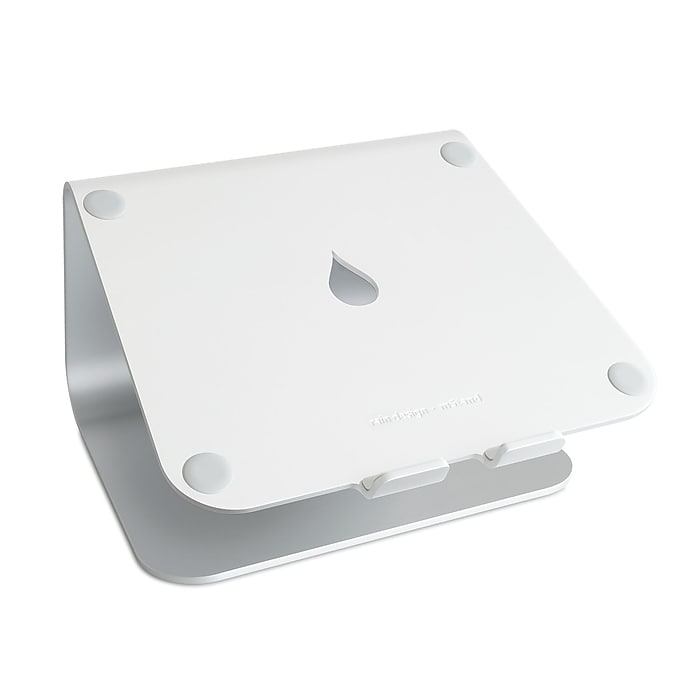
Rain Design mStand
Best FixedBuy if: one person uses one desk at one height and you want zero wobble, forever
Don't buy if: your keyboard must slide underneath, or you are over 6 foot tall
The mStand is one piece of aluminium, bent into shape. No hinge, no joint, nothing to loosen — it will hold your laptop at exactly 5.9 inches for as long as you own it. A 2-inch cable hole at the back keeps the charging cable tidy, and the 10 by 7.5-inch footprint takes all MacBooks including the 16-inch Pro. It is the default recommendation for a permanent desk on almost every roundup that tests stands properly, and it is our pick in our laptop stand for desk setup guide too.
For this keyword, though, it has one hard limit: the keyboard does not fit underneath it. DeskGearReviews measured the usable space at only about 135 mm high by 270 mm wide — a full-size Keychron K8 Pro at 370 mm wide simply cannot fit beneath it. Your keyboard sits in front of the stand, which is fine on a desk 24 inches deep or more, and a problem on a shallow one. It also caps PC laptops at 10.4 inches of depth, so measure a thick Windows machine before you buy.
Pros
- One solid piece — nothing to loosen or sag
- Cable hole keeps the desk tidy
- Fits all MacBooks including the 16-inch Pro
- The default pick for a permanent desk
Cons
- Fixed 5.9 inches — wrong for tall users
- Keyboard does not fit underneath — it goes in front
- PC laptops deeper than 10.4 inches don't fit
- Doesn't fold or travel
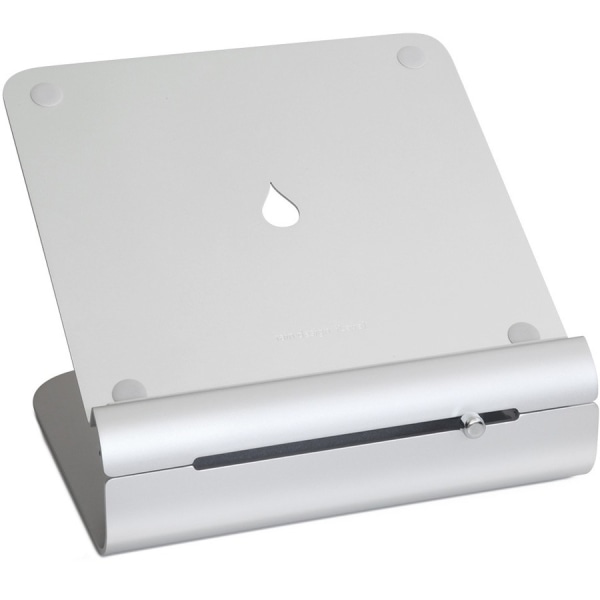
Rain Design iLevel 2
Best AdjustableBuy if: two people share one desk, or you want to change height without lifting the laptop off
Don't buy if: you need the tallest lift here, or you travel with your stand
The iLevel 2 is the adjustable version of the mStand, and it has one trick no other stand here has: a front slider knob that changes the height without lifting the laptop off. Rain Design puts the height at 5.4 to 7.9 inches, and it is Wirecutter's long-standing pick after testing 20 stands. The aluminium body is solid at desk height, the footprint is 10.1 by 8.8 inches, and it fits laptops with a depth under 10.1 inches.
Two honest limits. First, height and angle move together — you cannot set them independently, so the tallest setting is also the steepest. Second, it gets bouncy at the top of its range; Tom's Guide found typing on the laptop at the highest setting felt too bouncy, and Digital Trends called it slightly bouncy too. With an external keyboard in front of you, that barely matters — your hands never touch the laptop. And at 8.5 inches at the back by Wirecutter's measure, it may still leave taller people looking down.
Pros
- Front slider changes height without lifting the laptop
- Wirecutter's long-standing pick after testing 20 stands
- Solid aluminium — no wobble at desk height
- Clean look that suits any desk
Cons
- Height and angle move together — can't set them separately
- Bouncy at the highest setting
- Doesn't fold — never travels
- Tallest setting may still leave tall users looking down
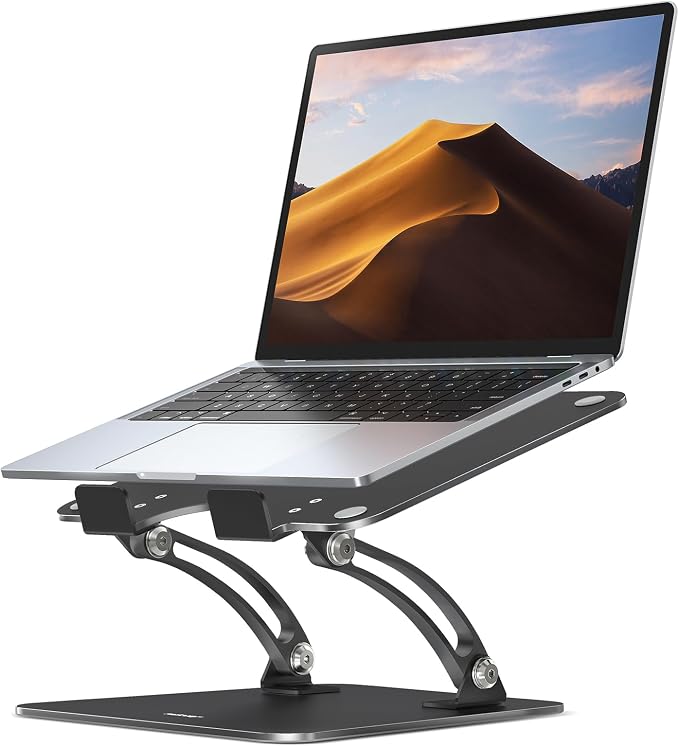
Nulaxy C1
Best BudgetBuy if: you want a real eye-level lift for about the price of lunch
Don't buy if: your laptop is over 16 inches, or you need a stand that lasts a decade
The Nulaxy C1 is the cheapest genuine eye-level lift in this guide. A Z-type dual-hinge aluminium stand that folds flat, with a vented top panel and silicone pads, it dominates Amazon's laptop-stand bestsellers and shows up as the budget pick on nearly every roundup. It is the stand to buy when you are not sure a riser will suit you — the cost of finding out is small.
Two things to know before you buy. First, Nulaxy publishes no height range at all; Wirecutter measured about 2.4 to 10.6 inches, which is the figure used here. Second, the capacity figures disagree by double: Nulaxy's own page claims 17 inches and 44 lb, while Amazon's listing for the same model says 10 to 16 inches and 22 lb. This guide uses the lower figures. The hinges are also the part most likely to loosen over years of use — adjustable joints are never quite as rigid as a solid casting.
Pros
- Cheapest real eye-level lift here
- Folds flat for a bag
- Vented top panel with silicone pads
- Height range covers short and tall users
Cons
- Capacity figures conflict — Nulaxy says 44 lb, Amazon says 22 lb
- Hinges loosen over years of use
- Bounces if you type on the laptop at full height
- Nulaxy publishes no height range of its own
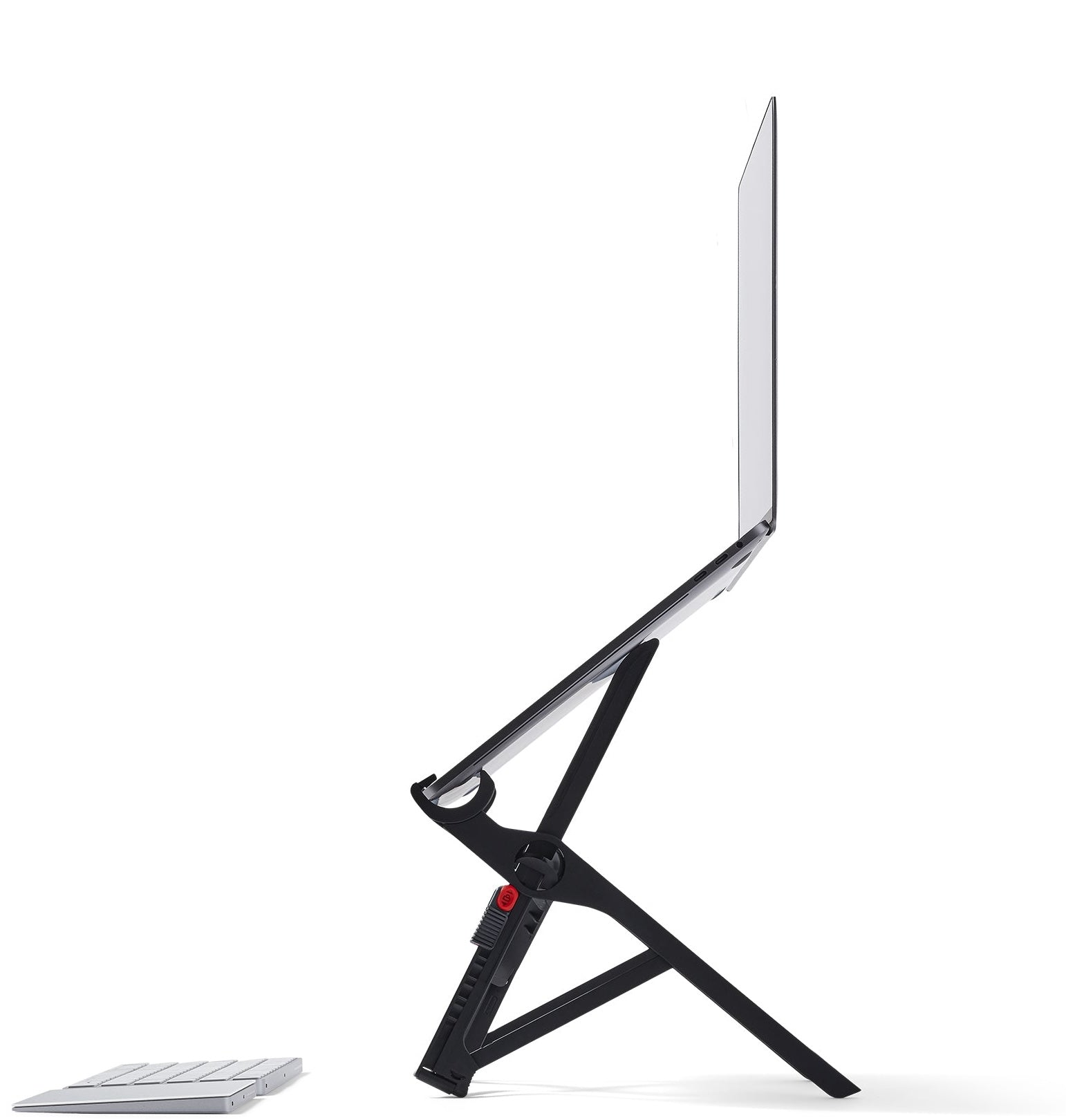
Roost V3
Best TravelBuy if: you work from cafés, co-working desks and hotel rooms and want a real lift in your bag
Don't buy if: you want a shelf to park things on, or your laptop is a heavy 16-inch workstation
The Roost V3 is the lightest way to get a real eye-level lift away from your desk. It weighs about 6 ounces, folds to a 13-inch stick that slips into a laptop sleeve, and offers 7 height settings with 6.5 to 12.5 inches of screen lift (Roost's figure) for laptops from 12 to 18 inches. The fibreglass-reinforced nylon frame and self-adjusting PivotGrip arms hold the laptop without a platform at all — there is no shelf, no tray, and nothing under the machine but air.
That open design is the trade. There is no shelf to park a keyboard under, no cable routing, and nothing to rest a notebook on — the keyboard sits in front, and you need a compact travel keyboard to go with it. It also costs five to six times the Nulaxy for the same lift, and Roost states no laptop weight limit, so a heavy 16-inch workstation is a judgement call, not a rated one. Do not confuse it with the Roost V3 Plus, a newer model with 11 settings and a quick-release height adjustment — the V3 here is the original.
Pros
- About 6 oz — the lightest stand here by far
- Folds to a 13-inch stick that fits a laptop sleeve
- 7 height settings, up to 12.5 inches of lift
- Open frame keeps air under the laptop
Cons
- No shelf — nothing parks underneath it
- Costs 5–6× the Nulaxy for the same lift
- No stated laptop weight limit
- Needs a compact travel keyboard to go with it
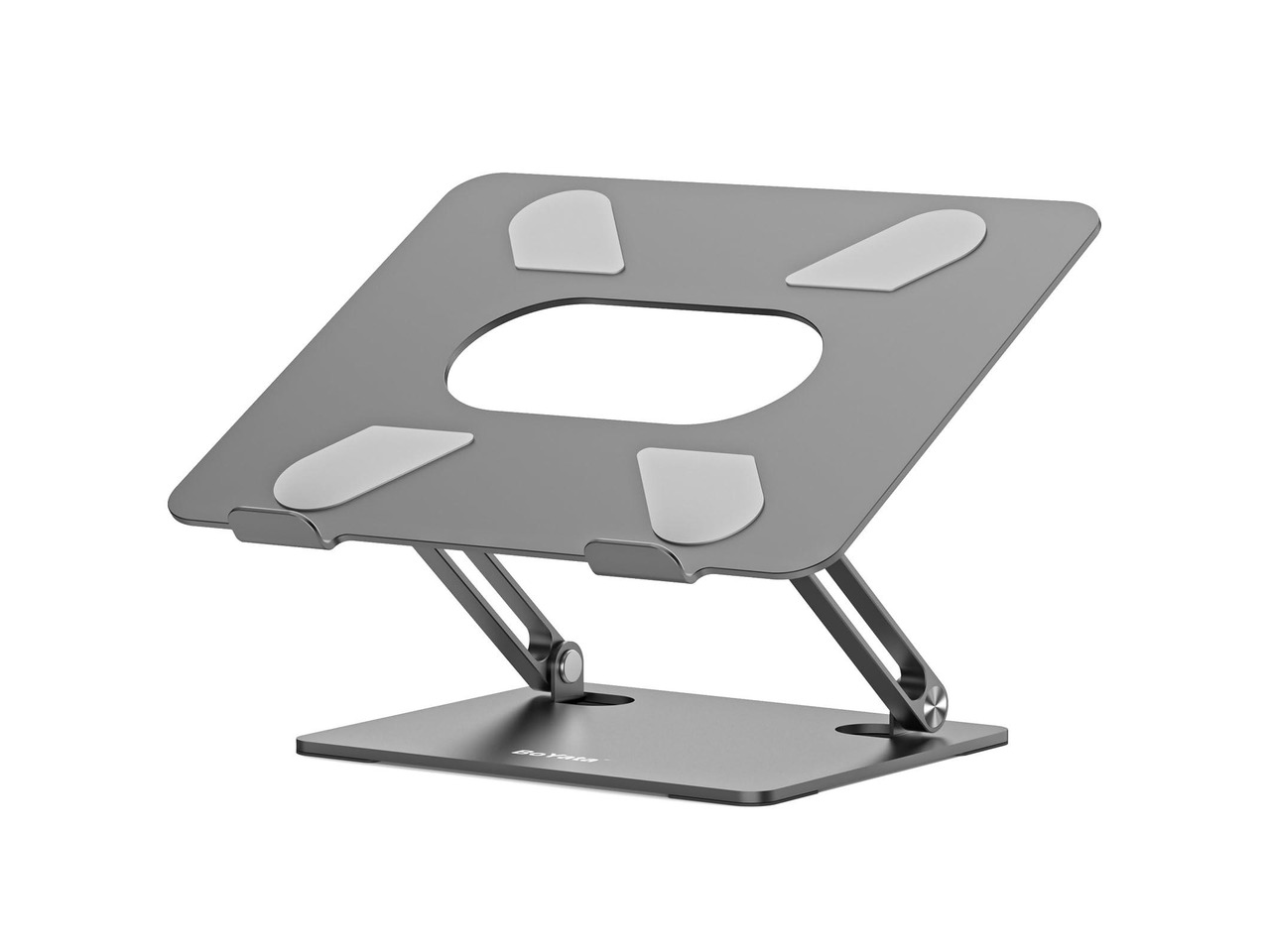
BoYata N19
Best for Tall UsersBuy if: you are tall, your laptop is 17 inches, or your machine is heavy and other stands sag
Don't buy if: you type on the laptop itself, or you travel with your stand
The BoYata N19 is the tallest desk stand in this guide, and the one most often praised for holding heavy machines without sagging. A Z-type dual-hinge stand in aluminium alloy with stepless adjustment, it lifts from 2 to 10 inches (DeskForged's hands-on measurement) and fits 11 to 17-inch laptops, with a heat-vent cutout in the platform and a rated capacity of 44 lb. It is the pick for tall users and 17-inch or gaming laptops that the fixed 5.9-inch mStand cannot serve.
The catch is the wobble — and it is not a secret. DeskForged found that at 9 inches with aggressive typing, the screen shakes visibly, and called it physics, not a defect: a Z-hinge at full extension is a lever arm. BoYata's own manual warns that sway happens when you type on the laptop, and suggests an external keyboard. That is exactly this guide's premise, so the N19's worst trait disappears the moment you put a keyboard in front of it. Check the model name before you buy: BoYata sells several stands under one brand name, and roundups mix them up. You want the N19.
Pros
- Tallest desk stand here — 2 to 10 inches of lift
- Holds heavy 17-inch laptops without sagging
- Stepless adjustment, aluminium build
- Heat-vent cutout keeps air under the laptop
Cons
- Wobbles when typing directly on it at height
- Hinges painfully stiff out of the box
- About 3 lb — never travels
- Several BoYata models share the name — check it's the N19
Will My Keyboard Fit Under the Stand?
Only under the Lamicall, if your keyboard is full-size. Every other pick here puts the keyboard in front of the stand — which works fine, as long as your desk is deep enough for both.
The test is two numbers, not one: height and width. A full-size mechanical keyboard needs at least 100 mm of vertical clearance and 355 to 430 mm of width to fit under a stand (DeskGearReviews' measurement). The stand's height is not the same as the usable clearance — the mStand is 150 mm tall, but only about 135 mm of that is usable space, and only 270 mm wide. A 370 mm Keychron K8 Pro simply cannot fit beneath it.
| Your keyboard | Width | Where it goes |
|---|---|---|
| 60% compact board | ~295 mm | Under the Lamicall; in front of the rest |
| Tenkeyless (TKL) | ~360 mm | Under the Lamicall; in front of the rest |
| Full-size mechanical | 370–450 mm | Under the Lamicall only — and snugly at 450 mm |
Look — if you're buying a stand to hide a full-size keyboard underneath it, here's what actually works: measure your keyboard first, then buy the Lamicall. Every other stand in this guide is a good riser with the keyboard in front. That is not a flaw. It is a desk-depth question. A desk 24 inches deep holds a stand plus a keyboard with room to spare. A desk under 20 inches deep gets crowded fast, and that is when the under-stand fit starts to matter.
MacBook owners get one more wrinkle. DeskGearReviews tested on a 15-inch MacBook Pro, and the numbers above come from that machine. A 16-inch MacBook Pro is deeper, and a thick Windows gaming laptop is deeper still — and depth is what the mStand's 10.4-inch limit and the iLevel 2's 10.1-inch limit are about. Measure your laptop's depth, not just its screen size.
Does a Laptop Stand Wobble When Typing?
Yes, on adjustable stands at full height — and no, it does not matter once you use an external keyboard. The wobble comes from typing on the laptop itself, and the external keyboard removes the force that causes it.
Three things make a stand wobble. A Z-hinge at full extension is a lever arm: the higher you set it, the more a tap at the front moves the screen. A narrow folding footprint gives the stand less to stand on. And typing on the laptop itself is the input force — every keystroke pushes the machine a fraction of a millimetre. Put those three together and the screen shakes.
The fix is the external keyboard. Your hands leave the laptop, the force disappears, and the stand holds still. That is why the BoYata manual tells you to use one, and why the iLevel 2's bounce at the top setting is a footnote in this guide instead of a deal-breaker. Fixed stands skip the problem entirely: the mStand is one solid piece, and there is nothing in it that can move.
Test it yourself when the stand arrives. Type a paragraph on the laptop at full height, then type the same paragraph on the external keyboard. If the screen shakes in the first test and holds still in the second, the stand is fine — your hands were the problem, and you have already solved it.
How to Set Up Your Riser in 4 Steps
Measure first, buy second, and the setup takes ten minutes. Get the height right and the rest is just placing things.
To set up a laptop riser with an external keyboard, follow these steps: 1. Measure your eye height above the desk. 2. Set the riser so the top of the screen sits at eye level. 3. Put the keyboard and mouse on the desk in front, at elbow height. 4. Work a full day, then adjust once more.
Step one is the measurement from the height section: sit in your chair, measure from the desk to your eyes, and subtract your screen height. Step two is matching the stand to that number — with an adjustable stand, start one notch lower than you think and work up. Step three is the keyboard and mouse on the desk in front, at elbow height, with the mouse at the same level as the keyboard. Step four is the one people skip: work a full day before you call it done. A height that feels right for ten minutes can ache by lunch.
Buying Guide: What Actually Matters
After the height check, the four things worth your attention are keyboard clearance, stability, weight and vents — in that order.
Height comes first because a stand that cannot reach your eye level is a paperweight with a brand name. Measure your eye height, subtract your screen height, and buy to that number. Keyboard clearance comes second: if your keyboard must slide underneath, only the Lamicall does it — otherwise, check your desk is deep enough for the keyboard in front. Stability comes third: fixed stands never wobble, adjustable stands wobble at full height, and the external keyboard makes the difference moot. Weight comes fourth, and only if the stand travels — 6 ounces in a bag beats 3 lb on a shelf.
Vents come last, and they matter more on Windows machines than on MacBooks. Most Windows laptops pull cool air in from underneath, so a solid tray can block the bottom intakes — an open frame like the Roost or the Lamicall's vented panel keeps the air moving. A MacBook Air pulls air from the rear hinge instead, so the tray matters less and the lift matters more. Flip your laptop over, find the intake grilles, and check the stand leaves them clear.
Here's my honest take: for one person at one desk, the fixed mStand beats every adjustable stand here, and most buyers who pay for adjustment never touch the hinge after week one. Adjustable-stand fans will push back on that, and they're right if two people share the desk or the stand travels. For one person at one desk doing office work, though, simple and solid wins.
Stands to Skip in 2026
Vertical docks that hold the laptop closed. Two of the five picks on one ranking page are vertical docks — stands that hold the laptop shut, upright, like a book on a shelf. They are fine for a closed-lid desk with a monitor, and useless for this keyword: you cannot see the laptop screen at all, so the external keyboard has nothing to pair with.
Keyboard risers — the other kind. Small feet that tilt a keyboard, sold under names like Alrhso and Bewudy, rank alongside laptop risers and confuse the search. A keyboard riser lifts the keyboard; a laptop riser lifts the laptop. If the product has no platform for a laptop, it is not what you are shopping for.
Low-lift wedges. Stick-on stands and slim wedges that lift the back edge an inch or two — the iVoler tops out at 5.6 inches, a MOFT at about 2. They tilt the keyboard, they do not raise the screen, and your neck will not notice the difference. A riser that cannot reach eye level is not a riser.
Single-product advertorials posing as roundups. A page that recommends one stand — usually the author's own — and calls it a comparison. One pick is a shop, not a guide.
Frequently Asked Questions
What's the best laptop riser for an external keyboard in 2026?
The Lamicall Adjustable Laptop Stand — it is the only pick here a full-size keyboard fits underneath, and Tom's Guide and TechRadar both picked it first.
Do I need an external keyboard with a laptop stand?
Yes, once the lift passes a few inches. BerkBox found 71 of 101 stands leave the built-in keyboard more than 3.5 inches above the desk — too high to type on all day.
How high should a laptop stand be?
High enough that the top of the screen sits at eye level — the hinge 6 to 9 inches above the desk. Measure your eye height, subtract the screen height, and buy to that number.
Will my keyboard fit under the stand?
Only under the Lamicall here. A full-size board needs 100 mm of clearance and 355 to 430 mm of width, and the other five picks put the keyboard in front instead.
Does a laptop stand wobble when typing?
Adjustable stands wobble at full height if you type on the laptop itself. An external keyboard removes the force that causes it, and fixed stands never wobble at all.
Are laptop stands good for your neck?
Yes, when the screen top reaches eye level — that is the whole point. One trade-off: the screen sits about 20 cm farther away, so bump the font size up if text looks small.
Do laptop stands work for MacBooks?
Yes — every pick here fits MacBooks, including the 16-inch Pro. MacBooks vent from the rear hinge, so the tray matters less; Windows laptops need the vent check more.