Best Ergonomic Keyboard for Wrist Pain (2026): 6 Picks

Your wrists ache by mid-afternoon. The ache started as a dull throb after long days, and now it shows up earlier each week. You tried a wrist rest. You tried typing lighter. You tried breaks. None of it stuck, because the board itself keeps bending your wrists the same way, hour after hour.
That is the reader this guide is for: someone who types for a living, whose wrists hurt right now, and who wants a keyboard that stops making it worse. Six boards below, picked for real wrist pain — not for the word "ergonomic" on the box.
One honest note before the picks: a keyboard can fix your posture, but it cannot fix everything. The evidence is mixed, and this guide says so plainly in the section below. If numbness wakes you at night for more than two weeks, see a doctor first. A keyboard is a tool, not a treatment.
What Is the Best Ergonomic Keyboard for Wrist Pain?
The Logitech Ergo K860 is the best ergonomic keyboard for wrist pain for most people. Its split curved layout and cushioned wrist rest hold your wrists straight, and it needs no adjustment to help. If your pain is severe, the Kinesis Advantage360 goes further — but it asks far more of you in return.
The best ergonomic keyboard for wrist pain is a board shaped to keep your wrists straight while you type. Split halves, a curved layout or a wave shape all cut the sideways bend and backward tilt that strain the carpal tunnel. Which one suits you depends on how bad the pain is.
The best ergonomic keyboard for wrist pain is the Logitech Ergo K860. According to Logitech, its split curved layout and cushioned palm rest keep wrists in a neutral position, and owner reviews consistently report less end-of-day ache. It needs no adjustment to help, which is why it suits first-time ergonomic buyers better than fully split boards.
Split keyboards help wrist pain by letting each hand sit shoulder-width apart, which cuts the sideways wrist bend called ulnar deviation. According to a 1999 study of 90 office workers, a split keyboard reduced that bend from 12 degrees to within 5 degrees of neutral. The posture change is real, though pain relief varies from person to person.
Look — if you're in the "my wrists hurt every single day" situation, here's what actually works: buy the board that helps on day one, not the board you have to learn. The K860 types like a normal keyboard from the first hour. The fully split boards in this guide help more in theory, and plenty of people give up on them in week one because typing feels slow and strange. Relief you quit using is no relief at all.
Do Ergonomic Keyboards Actually Help Wrist Pain?
They help posture for sure, and they ease pain for some people — but they are not a proven cure. The honest answer is messier than most roundups admit, and it matters, because it decides how much you should spend.
Ergonomic keyboards ease wrist pain for some typists and do little for others. According to a 2022 Cochrane review of two trials of 105 people, one trial found less pain after 12 weeks while the other found no difference at six months. Treat the board as one part of a fix that needs breaks, posture and, for numbness, a doctor.
Here's the thing: the posture science and the pain science point in different directions. Split keyboards measurably straighten your wrists — that 1999 study is solid, and later lab work agrees. But straight wrists and less pain are not the same thing. The Cochrane review, the best summary of the clinical trials we have, found only two trials good enough to include, 105 people between them. One small trial of 25 people found less pain after 12 weeks, but not after six. The other, 80 people over six months, found no difference at all. Neither found better hand function or nerve conduction.
I've seen conflicting data — some sources say split boards cut pain, others say the trials show nothing. My read is that the posture benefit is real and the pain benefit is personal: people with mild, posture-driven ache tend to feel better, while people with nerve damage or advanced carpal tunnel usually need more than a keyboard. OSHA says much the same — alternative keyboards can help you hold a neutral wrist, but the evidence does not prove they prevent injury.
So buy the keyboard for the right reason. It stops you re-straining your wrists every day. It does not repair damage already done, and it will not replace breaks, a decent chair, or medical care when the symptoms are serious.
Split vs Curved vs Wave: Which Shape Helps Your Wrists?
Split helps most, curved is easiest, wave is cheapest. The shape decides how much your wrists have to change — and how much you have to change to use it.
Split vs curved vs wave: a split keyboard suits the worst wrist pain because each half moves to shoulder width and tents upward. A curved board suits first-time buyers because the shape is fixed and typing feels normal from day one. A wave board suits tight budgets because it costs least. The key difference is adjustability.
A split keyboard is two halves you can pull apart and angle. Your hands sit shoulder-width, your wrists stop bending sideways, and with a tenting kit the thumb side lifts so your forearms rotate less. That is the full fix, and it is also the most to learn — expect a week of slower typing.
A curved board keeps one piece but bends the key layout into an arc with a raised middle. Your wrists stay straighter than on a flat board, and nothing about typing changes. The K860 and the Sculpt are both curved boards with a split in the middle — a halfway house that suits most people.
A wave board is the gentlest step: one piece, keys arranged in a shallow wave, plus a cushioned rest. It cuts wrist bend a little and costs the least. If your pain is mild and your budget is small, start here.
Or maybe I should say it this way: the shape is only half the story. Tenting and tilt do the rest. Negative tilt — the front edge lower than the back — keeps wrists flat instead of bent back. Tenting lifts the thumb side. A board with both, set up right, beats a fancier board left flat on the desk.
Our Top Pick
Logitech Ergo K860
Best Overall for Wrist Pain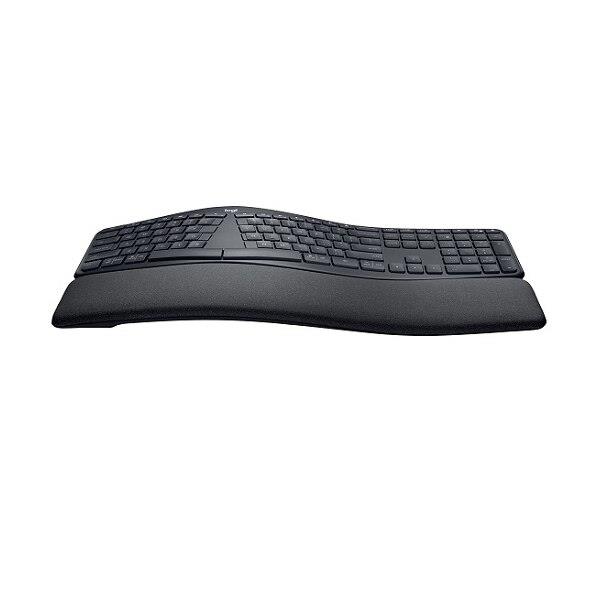
The K860 is the best ergonomic keyboard for wrist pain because it helps without asking anything of you. The split curved layout, cushioned wrist rest and negative tilt hold your wrists straight from the first hour, the keys are quiet, and it connects to three devices over Bluetooth or a 2.4 GHz dongle. No learning curve, no accessories to buy, no setup to get wrong.
Check Price on AmazonQuick Comparison
| Product | Key Specs | ||
|---|---|---|---|
| #1 | Logitech Ergo K860Best Overall | Split curved · Cushioned wrist rest · Negative tilt · Wireless | Check Price |
| #2 | Microsoft Sculpt Ergonomic KeyboardBest Budget | Domed split · Cushioned palm rest · Negative tilt · Wireless dongle | Check Price |
| #3 | Kinesis Freestyle2Best Fully Split | Fully split · Halves separate to 20 in · Tenting kit optional · Wired USB | Check Price |
| #4 | Logitech Wave KeysBest Value | Wave shape · Cushioned palm rest · Quiet keys · Wireless | Check Price |
| #5 | Kinesis Advantage360Best for Severe Pain | Split key wells · Cherry MX switches · Adjustable tenting · Wired USB-C | Check Price |
| #6 | ProtoArc EK01Best Full-Size Budget Split | Full-size split · Backlit keys · Cushioned wrist rest · Wireless | Check Price |
The 6 Best Ergonomic Keyboards for Wrist Pain in 2026
Every board here is a real ergonomic design — a split, a curve, or a wave that changes how your wrists sit. No flat board with a wrist rest bolted on made the cut.
Logitech Ergo K860
Best Overall for Wrist PainBuy if: you want real wrist relief with no learning curve and no setup
Don't buy if: you want mechanical switches or halves that separate fully
The K860 tops this list because it is the easiest board here to live with. The curved split layout angles your hands naturally, the pillowed wrist rest supports your palms, and the negative tilt keeps your wrists flat instead of bent back. Owners with mild carpal tunnel symptoms report the difference within days, and the quiet scissor keys suit shared offices.
It connects over Bluetooth or a 2.4 GHz dongle, pairs with three devices, and runs on two AAA batteries for months. The one real trade-off is the keys: they are soft scissor switches, not mechanical, so typists who love a crisp click will find them dull. And the split is fixed — the halves do not pull apart like the Freestyle2.
Pros
- Split curved layout with cushioned wrist rest
- Negative tilt keeps wrists straight
- Quiet keys for shared offices
- Bluetooth + 2.4 GHz, three-device pairing
Cons
- Soft scissor keys — no mechanical feel
- Fixed split, halves can't separate
- Wide board needs desk space
- No backlight
Prices change frequently — click through to see today's price.
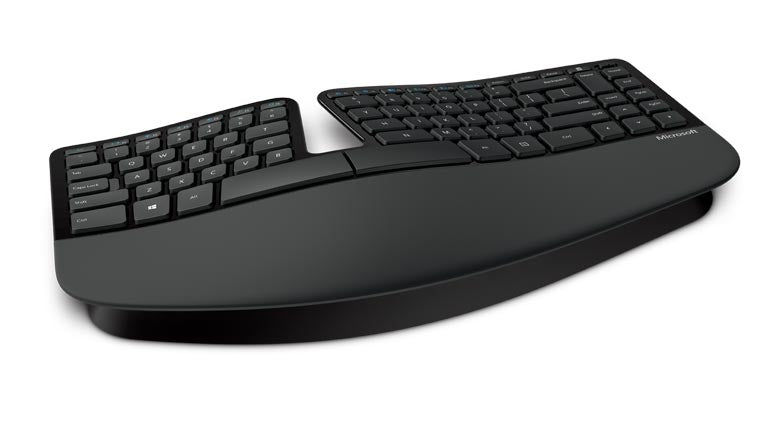
Microsoft Sculpt Ergonomic Keyboard
Best BudgetBuy if: you want to test the ergonomic idea for the least money
Don't buy if: you want mechanical switches or a board with long-term support from Microsoft
The Sculpt is the cheapest way to find out whether an ergonomic board helps you. Its domed split layout guides your hands into a natural arc, the cushioned palm rest takes pressure off the carpal tunnel area, and the negative tilt keeps wrists flat. Office workers have used it for years, and many call it the board that ended their typing pain.
Two catches. First, Microsoft discontinued the Sculpt line — InCase now sells the same design, so check the seller name on the listing before you buy. Second, the keys are soft membrane, which mechanical fans call mushy. The keyboard is usually sold as part of the Sculpt Ergonomic Desktop set, which adds a mouse and a separate number pad — handy, but the pad eats desk space.
Pros
- Cheapest real ergonomic board here
- Domed split with cushioned palm rest
- Negative tilt, quiet membrane keys
- Proven over years of office use
Cons
- Microsoft discontinued it — now sold by InCase
- Soft membrane keys won't suit mechanical fans
- Separate number pad takes desk space
- Wireless dongle only, no Bluetooth
Prices change frequently — click through to see today's price.
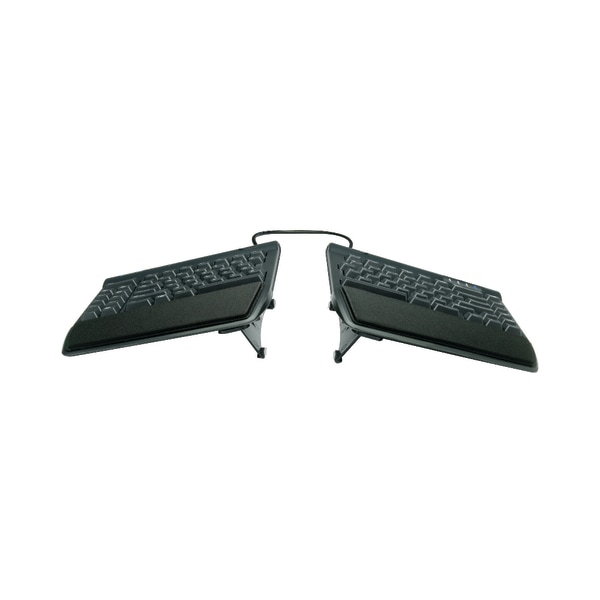
Kinesis Freestyle2
Best Fully SplitBuy if: you want your hands shoulder-width apart with a real tenting option
Don't buy if: you need wireless or you hate the idea of relearning how to type
The Freestyle2 is the workhorse split keyboard. The two halves separate by up to 20 inches, so your hands sit exactly shoulder-width and the sideways wrist bend disappears. Add the optional tenting kit and the thumb side lifts, cutting forearm rotation too. Physical therapists recommend it for a reason — it is the most adjustable non-mechanical split board you can buy.
It is wired USB only, and the low-force membrane keys feel plain next to a mechanical board. The tenting kit costs extra, and the board looks dated. But if your pain comes from your wrists bending sideways all day, no fixed board in this guide adjusts as far as this one.
Pros
- Halves separate up to 20 inches
- Optional tenting kit for forearm rotation
- Low-force keys, detachable palm rests
- Long track record with therapists
Cons
- Wired USB only — no wireless
- Tenting kit costs extra
- Membrane keys feel plain
- Takes wide desk space when split
Prices change frequently — click through to see today's price.
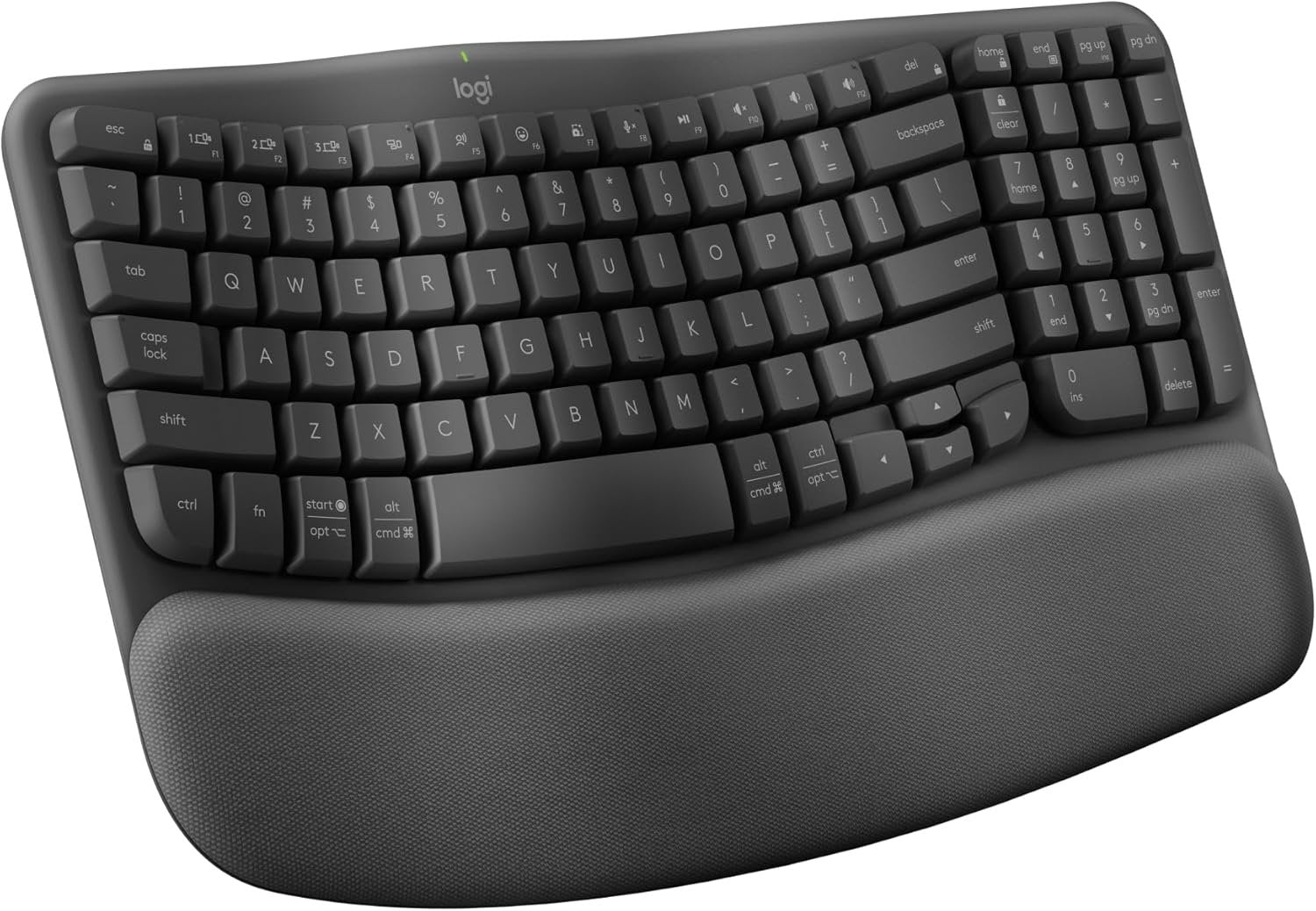
Logitech Wave Keys
Best ValueBuy if: you want the cheapest real step up from a flat keyboard
Don't buy if: your pain is severe — a wave shape adjusts less than a split
Wave Keys is the gentle on-ramp. The wave-shaped key layout angles your hands just enough to cut wrist bend, the cushioned palm rest supports your wrists, and the quiet keys suit any office. It types like a normal keyboard from minute one — no adjustment period, no relearning, no accessories.
The trade-off is range. It is one solid piece, so the halves cannot separate and there is no tenting. If your pain is mild or you just want a kinder board for long days, that is plenty. If your pain is already severe, spend more and get a real split.
Pros
- Cheapest real upgrade from a flat board
- Wave shape with cushioned palm rest
- Quiet keys, no learning curve
- Bluetooth + Logi Bolt, multi-device
Cons
- Single piece — halves can't separate
- No tenting adjustment
- Membrane keys only
- No backlight
Prices change frequently — click through to see today's price.
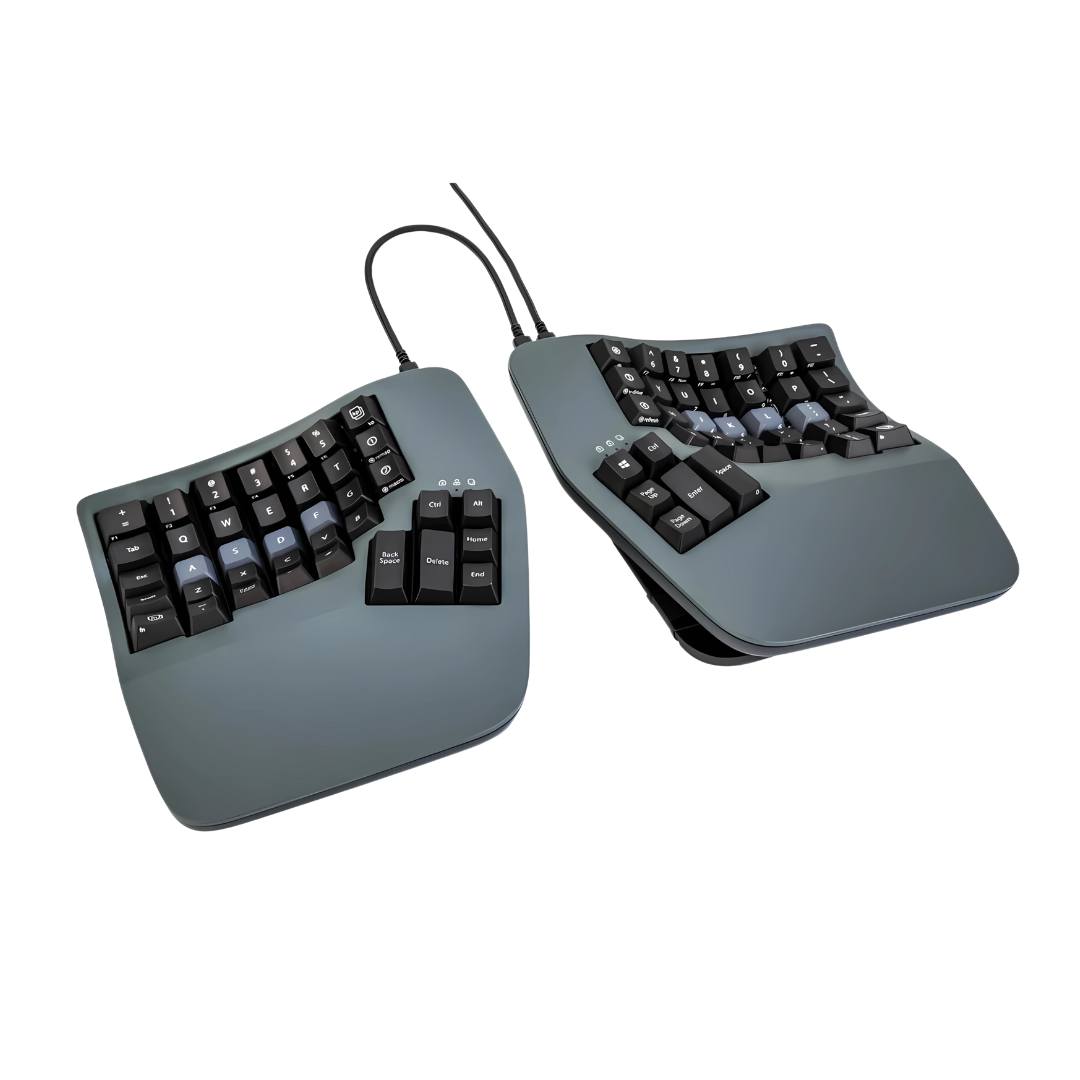
Kinesis Advantage360
Best for Severe PainBuy if: your wrist pain is severe and you type all day, every day
Don't buy if: you want a board that feels normal on day one
The Advantage360 is the most aggressive ergonomic design in this guide — and the one heavy typists with carpal tunnel swear by. The keys sit in deep contoured wells that match how your fingers actually move, so wrist extension drops to almost nothing. Cherry MX Brown or Red switches keep the key force light, the halves tent to your angle, and thumb clusters take the load off your pinkies.
It is also the hardest board here to adopt. The layout is columnar, not staggered, so the first week feels like learning to type again. The base model is wired USB-C, and it costs far more than the K860. But for severe, daily, all-day pain, no other board here changes the mechanics of typing as much.
Pros
- Contoured key wells end wrist extension
- Cherry MX Brown or Red switches
- Adjustable tenting, thumb clusters
- Fully programmable (ZMK firmware)
Cons
- Steepest learning curve here
- Base model is wired USB-C only
- Premium price
- Large footprint on the desk
Prices change frequently — click through to see today's price.
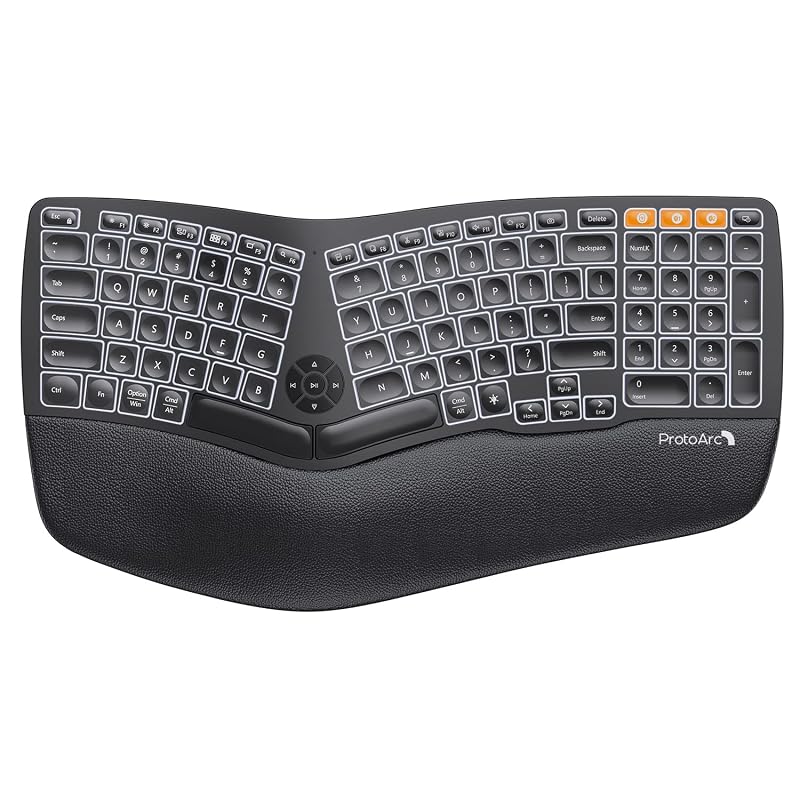
ProtoArc EK01
Best Full-Size Budget SplitBuy if: you want a full-size split board with a number pad and backlight for little money
Don't buy if: you want a premium brand or a mechanical feel
The EK01 is the budget full-size split. You get a real split layout, a cushioned wrist rest, backlit keys, a full number pad, and dual Bluetooth plus 2.4 GHz wireless — all rechargeable over USB-C. For the money, no other board here packs in as much.
The keys are soft and quiet rather than crisp, the wrist rest is fixed in place, and ProtoArc's support is thinner than Logitech's or Kinesis'. Watch the variant too: the EK01 Plus is a different model with its own listing, so check the name on the listing before you buy. But as a first full-size split that costs little, it is hard to beat.
Pros
- Full-size split with number pad
- Backlit keys, cushioned wrist rest
- Dual Bluetooth + 2.4 GHz, rechargeable
- Lowest-cost full-size split here
Cons
- Soft keys — no mechanical feel
- Fixed wrist rest, can't remove it
- Thinner brand support than Logitech
- EK01 Plus is a different model — check the listing
Prices change frequently — click through to see today's price.
How Do I Set Up an Ergonomic Keyboard to Ease Wrist Pain?
Set the height, split the halves, tilt the front down, rest your palms — then give it a week. A good board set up badly helps no one.
To set up an ergonomic keyboard for wrist pain, follow these steps: 1. Place the board so your elbows sit at 90 degrees. 2. Split the halves to shoulder width. 3. Tilt the front edge down slightly. 4. Rest your palms on the rest, not your wrists. 5. Type with straight wrists for one week.
Step one decides everything else. If your chair is too low or your desk too high, your wrists bend before you press a key. Elbows at 90 degrees, forearms level, board at elbow height. Step two only applies to split boards — pull the halves apart until your hands sit naturally, not pinched together. Step three is the tilt: most boards ship flat, so use the feet or the tenting kit to drop the front edge down.
Step four is the mistake almost everyone makes. Rest your palms on the rest, not your wrists. Pressing your wrist bones into a rest squeezes the carpal tunnel — the exact thing you are trying to stop. Step five is patience: the first days feel slow, and that is normal. Judge the board after a full week of real work, not after an afternoon.
Quick note: the board is one part of the setup. Your mouse matters as much — a flat mouse twists your wrist the same way a flat keyboard does. Our ergonomic mouse guide covers the other half of the problem.
Keyboards to Skip in 2026
Cheap "ergonomic" boards that are just a curved shell. If the keys sit in straight rows and nothing splits, tilts or tents, the word on the box is doing all the work. Skip it.
The original Kinesis Advantage2. Superseded by the Advantage360, which adds adjustable tenting, USB-C and open-source firmware. Old roundups still list the Advantage2 first because they were written before the 360 shipped.
The Microsoft Sculpt Comfort Keyboard. Similar name, different board — it is a flat wave keyboard with no split and no tilt. Buyers mix it up with the Sculpt Ergonomic constantly. Check for the word "Ergonomic" and the split in the middle.
The ProtoArc EK01 Plus when you wanted the EK01. The Plus is a different model with its own keys and layout. Both are fine boards, but they are not the same board — buy the one you researched.
A wrist rest on its own. A rest helps only when the board underneath already holds your wrists straight. On a flat keyboard, a rest just props your wrists into the same bent position, higher up.
Buying Guide: What Actually Matters
After the shape, the four things worth your attention are tenting, tilt, key force and the adjustment period — in that order.
Shape decides the ceiling. A split board can fix sideways bend completely; a curved board fixes it partly; a wave board fixes it a little. Match the shape to the pain: mild ache, wave or curved; daily pain, split; severe pain, a contoured split like the Advantage360.
Tenting and tilt decide whether the shape works. Tenting lifts the thumb side and cuts forearm rotation. Negative tilt drops the front edge and keeps wrists flat. A board with both, set up right, beats a fancier board left flat. Check for them on the listing — "ergonomic" alone promises neither.
Key force decides how tired your fingers get. Light keys mean less work per press, and over thousands of presses a day that adds up. The Freestyle2's low-force keys and the Advantage360's Cherry MX Reds are light; heavy clicky switches are the wrong direction for sore wrists.
The adjustment period decides whether you keep the board. Split and contoured boards feel wrong for the first few days — slower typing, wrong keys, frustration. That is normal. Give it two to four weeks before you judge it, and keep your old board nearby for the first week so a deadline never forces you back.
One opinion some readers will push back on: most people with wrist pain should buy the boring board, not the most adjustable one. The K860 helps from hour one because there is nothing to set up wrong. A split board helps more only if you actually adjust it, tent it, and stick with it for a month. Plenty of people buy the fancy board, never adjust it, and conclude ergonomic keyboards don't work. The board wasn't the problem.
Frequently Asked Questions
What's the best ergonomic keyboard for wrist pain?
The Logitech Ergo K860. Its split curved layout, cushioned wrist rest and negative tilt ease wrist strain with no setup, and it suits most people with mild to moderate pain.
Do ergonomic keyboards help carpal tunnel?
They can help posture, but they are not a proven treatment. A 2022 Cochrane review found mixed results: one small trial saw less pain at 12 weeks, the other saw no difference at six months.
Should I get a split or curved ergonomic keyboard?
Pick split if your pain is bad or you type all day — it adjusts to shoulder width and tents. Pick curved if you want relief with no learning curve; it types like a normal board from day one.
How long does it take for an ergonomic keyboard to help?
Give it two to four weeks of daily use. Your hands need time to learn the new shape, and the first few days often feel slower before the ache starts to ease.
Are ergonomic keyboards good for gaming?
For casual play, yes — the K860 and Wave Keys handle it fine. For fast competitive games, the membrane keys and wide layouts feel slow, so most gamers keep a second board.
Why does my wrist still hurt with an ergonomic keyboard?
The board fixes posture, not the cause. Long hours without breaks, a low chair, or a mouse that twists your wrist can keep the pain going — and lasting numbness needs a doctor, not a keyboard.
When should I see a doctor about wrist pain?
See a doctor if numbness wakes you at night for more than two weeks, if your grip weakens, or if pain keeps getting worse after six weeks with ergonomic gear.