Best Wireless Keyboard for Office Work in 2026: 6 Picks

Your laptop keyboard was never meant for eight hours a day. Hunched over a 13-inch deck, wrists bent, keys cramped — and the moment you dock the laptop to a monitor at a proper distance, the built-in keyboard is too far away to use. So you buy a wireless keyboard. Then the lists you open are gaming roundups talking about polling rates, or they crown a board that clicks through every video call.
This guide does the opposite. It starts with your actual problem — noise, sore wrists, or juggling three devices — and matches a board to it. Six picks, all office-only. No gaming boards leaked in, no invented models, and every battery figure is stated with the backlight on and off, because that is where the makers' numbers hide the truth.
No prices are printed in this guide — keyboard prices move by seller and week, so check the live price before buying. Battery figures are the makers' own claims, not test results, and where owners disagree with the maker — the MX Keys S battery, the K380s Bluetooth drops — the disagreement is stated on the card.
Are Wireless Keyboards Good for Office Work?
Yes — for typing, email, spreadsheets and calls, a wireless keyboard is as good as a wired one. The real trade-off is battery, not lag. Pick a board with a receiver as well as Bluetooth, and it will not let you down mid-meeting.
A wireless keyboard for office work is a cable-free keyboard built for long typing days: quiet keys, a layout that fits your desk, and a connection that stays up through meetings. It trades the wire for a battery and a Bluetooth or USB receiver link.
Wireless keyboards are good for office work. According to Logitech, the MX Keys S runs up to five months on a charge with the backlight off, and Bluetooth plus a USB receiver covers both home and office desks. The real trade-off is not lag — it is battery. A board with a receiver and a spare battery plan will not let you down mid-meeting.
A wireless keyboard is better than a wired one for most office work. According to mkbguide's lab test, the MX Keys S averages 35 decibels per keystroke, quiet enough for shared rooms. Wired boards still win for zero battery worry and the lowest latency, but for typing, email and spreadsheets, wireless is the calmer desk.
Look — if you're on video calls all day and your current board clicks through every meeting, here's what actually works: a scissor-switch board like the MX Keys S, not a clicky mechanical. The click is the problem, not the wire. And if your wrists hurt, no switch type fixes that — only a split or wave layout does, which is why the K860 is pick two.
Here's my honest take: for most offices, quiet matters more than ergonomic shape. A split board helps sore wrists, but a loud board annoys a whole room — and your colleagues will notice the noise long before your wrists thank you. Ergonomic fans will push back on that, and they have a point if your pain is real. But if you share a room, buy quiet first.
Do You Need a Number Pad for Office Work?
If you type numbers all day — finance, data entry, accounting — yes, get a full-size board with a number pad. Everyone else gains mouse room and straighter shoulders without one.
A keyboard with a number pad suits office work when you type numbers all day. Finance, data entry and accounting roles use the pad constantly, and a full-size board keeps those keys under your right hand. If your work is mostly writing, email and calls, a compact board without a pad gives your mouse more room and keeps your shoulders straighter.
Decide this before you shop, not after. A full-size board is wider, so your mouse sits further right and your shoulder opens up — fine on a big desk, awkward on a small one. A compact board (tenkeyless, or TKL — no number pad) pulls the mouse in close and feels better on a hot-desk. Four of the six picks here are full-size with a pad. The K380s is the compact one. The MX Mechanical also comes as a Mini without a pad if you want the same switches in a smaller shell.
Quick note: a full-size board is not the same as a big board. The K950 is full-size and slim; the K860 is full-size and huge. Check the width in millimetres, not the word "full-size".
Quick Comparison
| Product | Switch / Battery / Layout | ||
|---|---|---|---|
| #1 | Logitech MX Keys SBest Overall | Scissor / 10 days–5 months / full-size, numpad | Check Price |
| #2 | Logitech Ergo K860Best Ergonomic | Scissor, split / 24 months, 2× AAA / full-size, numpad | Check Price |
| #3 | Logitech Signature Slim K950Best Quiet Value | Scissor / 36 months, 2× AAA / full-size, numpad | Check Price |
| #4 | Logitech MX MechanicalBest Mechanical for Office | Tactile Quiet mechanical / 15 days–10 months / full-size, numpad | Check Price |
| #5 | Keychron B6 ProBest Battery Value | Scissor, ultra-slim / up to 1,200 h claimed / full-size, numpad | Check Price |
| #6 | Logitech Pebble Keys 2 K380sBest Budget Compact | Scissor, round keys / 3 years, 2× AAA / compact, no numpad | Check Price |
Battery ranges are the makers' figures: the short end is backlight on, the long end is backlight off. No prices are printed — check the live price before buying.
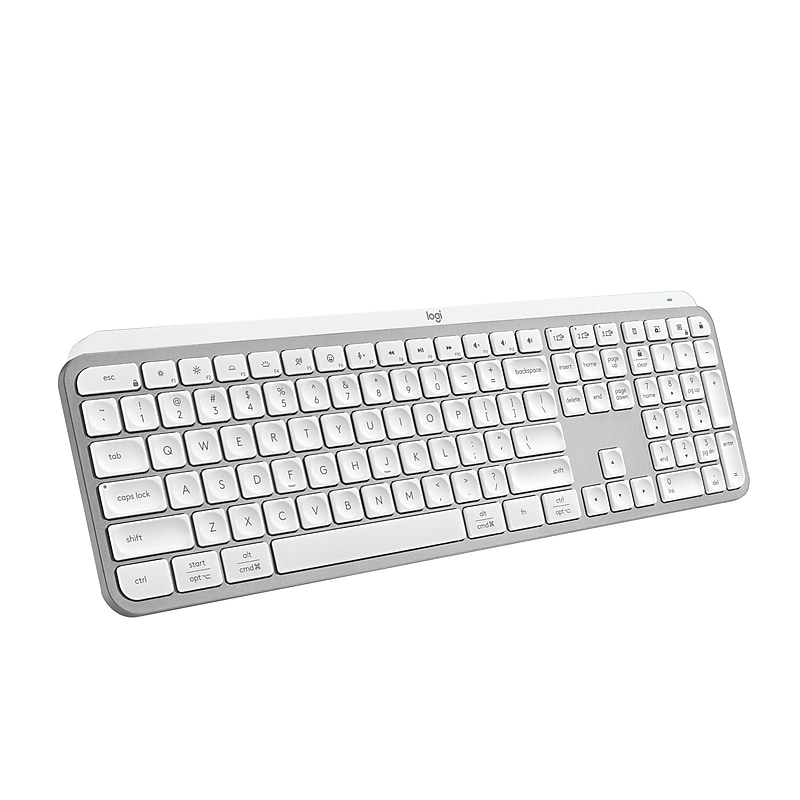
Logitech MX Keys S
Best OverallBuy if: you want the quietest full-size office keyboard with a number pad and three-device switching
Don't buy if: you want a mechanical feel, or you hate charging a keyboard
The MX Keys S is the default office keyboard for a reason, and seven of the nine top-ranking guides for this query crown it best overall. Low-profile scissor keys with spherically dished keycaps, about 1.8 mm of travel, rated for 10 million keystrokes. It is the quietest scissor board in mkbguide's roundup — their lab measured 35 decibels per keystroke on average. Bluetooth Low Energy plus an included Logi Bolt receiver covers three devices with Easy-Switch, and Logi Options+ adds Smart Actions and Flow for moving between computers.
I've seen conflicting data — Logitech rates the battery at 10 days with the backlight on, while some owners in dim rooms say they charge every few days. My read is that backlight brightness, not the battery, decides the real number: turn it down and the maker's figure holds. With the backlight off, Logitech claims up to five months from the 1,500 mAh cell. The smart adaptive backlight lights the keys as your hands approach and dims with the room. No onboard storage for the Bolt receiver, and it is a premium price for a scissor board — but nothing here is easier to live with.
Pros
- Quietest scissor board in this roundup
- Full-size with a number pad
- Three-device switching (Bluetooth + Logi Bolt)
- Smart adaptive backlight
Cons
- Backlight-on battery is short — 10 days (maker's claim)
- No storage slot for the Bolt receiver
- Premium price for a scissor board
- No mechanical or hot-swap option
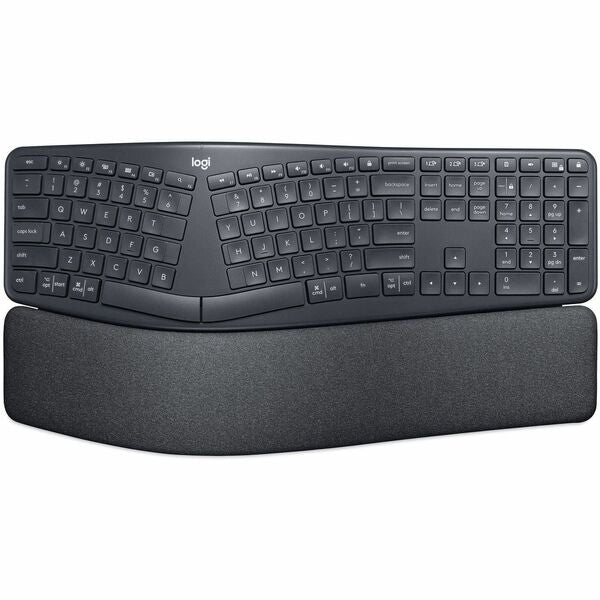
Logitech Ergo K860
Best ErgonomicBuy if: your wrists ache after long typing days and you have real desk space
Don't buy if: you switch between three devices constantly, or your desk is small
The K860 is the only pick that changes your posture instead of just padding it. A split, curved keyframe with an integrated memory-foam wrist rest and a palm lift that adjusts to 0, −4 or −7 degrees. Logitech's Perfect Stroke scissor keys stay quiet, and two AAA batteries are rated for up to 24 months — no charging, ever. Logitech claims 54% more wrist support and 25% less wrist bending than a standard keyboard without a palm rest, from its own design comparison.
Or maybe I should say it this way: the K860 is not a keyboard you buy for speed — it is a keyboard you buy for your wrists. The split layout needs days to weeks of adjustment and will slow your typing at first. It is also big and heavy — about 18 by 9 inches and 2.56 lb — so measure your desk. No backlight, and no three-device Easy-Switch hopping like the MX line. If you want a gentler ergonomic step, the Logitech Wave Keys is the smaller wave-shaped alternate with a cushioned palm rest.
Pros
- Only pick that changes wrist and forearm posture
- Memory-foam wrist rest built in
- Up to 24 months on 2× AAA (maker's claim)
- Quiet Perfect Stroke keys
Cons
- Split layout needs days to weeks to learn
- Large and heavy — needs real desk space
- No backlight
- No three-device Easy-Switch
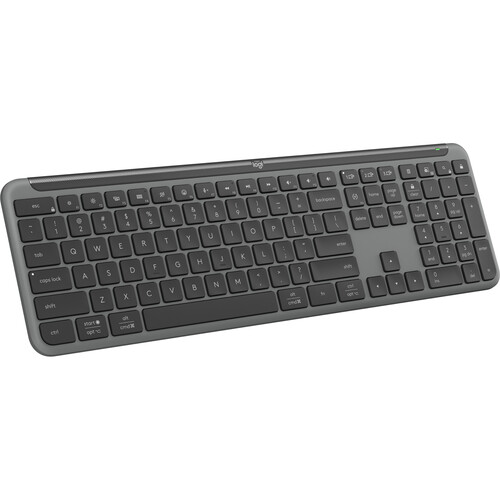
Logitech Signature Slim K950
Best Quiet ValueBuy if: you want a full-size quiet board with a number pad that you never have to charge
Don't buy if: you type in a dark room and need a backlight
The K950 is the "set it and forget it" office board. Full-size with a number pad, slim, near-silent laptop-style keys, three-device switching over Bluetooth 5.1 plus a Logi Bolt receiver, and two AAA batteries rated by Logitech for up to 36 months. Shortcut keys for playback, mute, volume and the snipping tool sit along the top, and Logi Options+ lets you remap keys on Windows and macOS.
Don't buy it if you won't use the number pad — you're paying for keys you'll never touch, and a compact board would suit your desk better. The trade for the three-year battery is simple: no backlight at all, and no USB-C charging port. The shell uses at least 48% post-consumer recycled plastic, and the feel is plainer than the MX line. That is the deal. Quiet, full-size, three devices, three years, no charging.
Pros
- Up to 36 months on 2× AAA (maker's claim)
- Full-size with a number pad
- Three-device switching (Bluetooth + Logi Bolt)
- Near-silent keys, meeting-friendly
Cons
- No backlight at all
- No wrist rest
- Some customisation needs the desktop software
- Plainer feel than the MX line
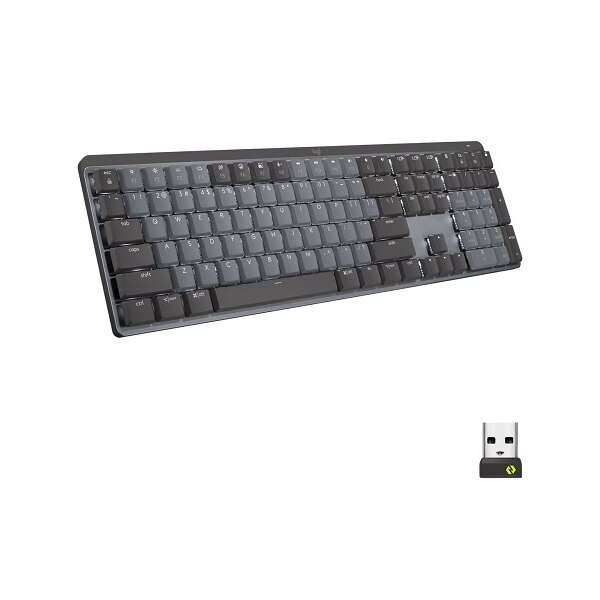
Logitech MX Mechanical
Best Mechanical for OfficeBuy if: you want a real mechanical feel that stays quiet enough for a shared office
Don't buy if: you want to swap switches later, or you need a light board
The MX Mechanical is the mechanical board for people who share a room. Low-profile mechanical switches in the Tactile Quiet variant — 1.3 mm actuation, 3.2 mm travel, 55 g actuation, rated for 50 million keystrokes — with a soft bump and no click. Full-size with a number pad (110 keys on the US layout), smart white backlight, Bluetooth Low Energy plus Logi Bolt for three devices, and the same Logi Options+ and Flow ecosystem as the MX Keys S.
Order the Tactile Quiet switches only. Logitech also sells this board in Linear and Clicky — Clicky is wrong for a shared office, and the listing will not warn you. The 2022 model is still current with no "S" refresh, and the switches are soldered, so you cannot swap to silent switches later. Battery is the usual backlight story: up to 15 days with it on, up to 10 months with it off, from the same 1,500 mAh cell — a 15-minute charge gives about a day. At around 828 g it is the heaviest board here.
Pros
- Mechanical feel without the noise (Tactile Quiet)
- Switches rated 50M keystrokes
- Full-size with a number pad
- Three-device switching, same MX ecosystem
Cons
- Backlight-on battery is short — 15 days (maker's claim)
- Switches are soldered — no swapping later
- Heaviest board here at about 828 g
- 2022 model, no "S" refresh yet
Keychron B6 Pro
Best Battery ValueBuy if: you want the cheapest full-size multi-device office board and almost never want to charge it
Don't buy if: you need a backlight, or you want a premium-feeling board
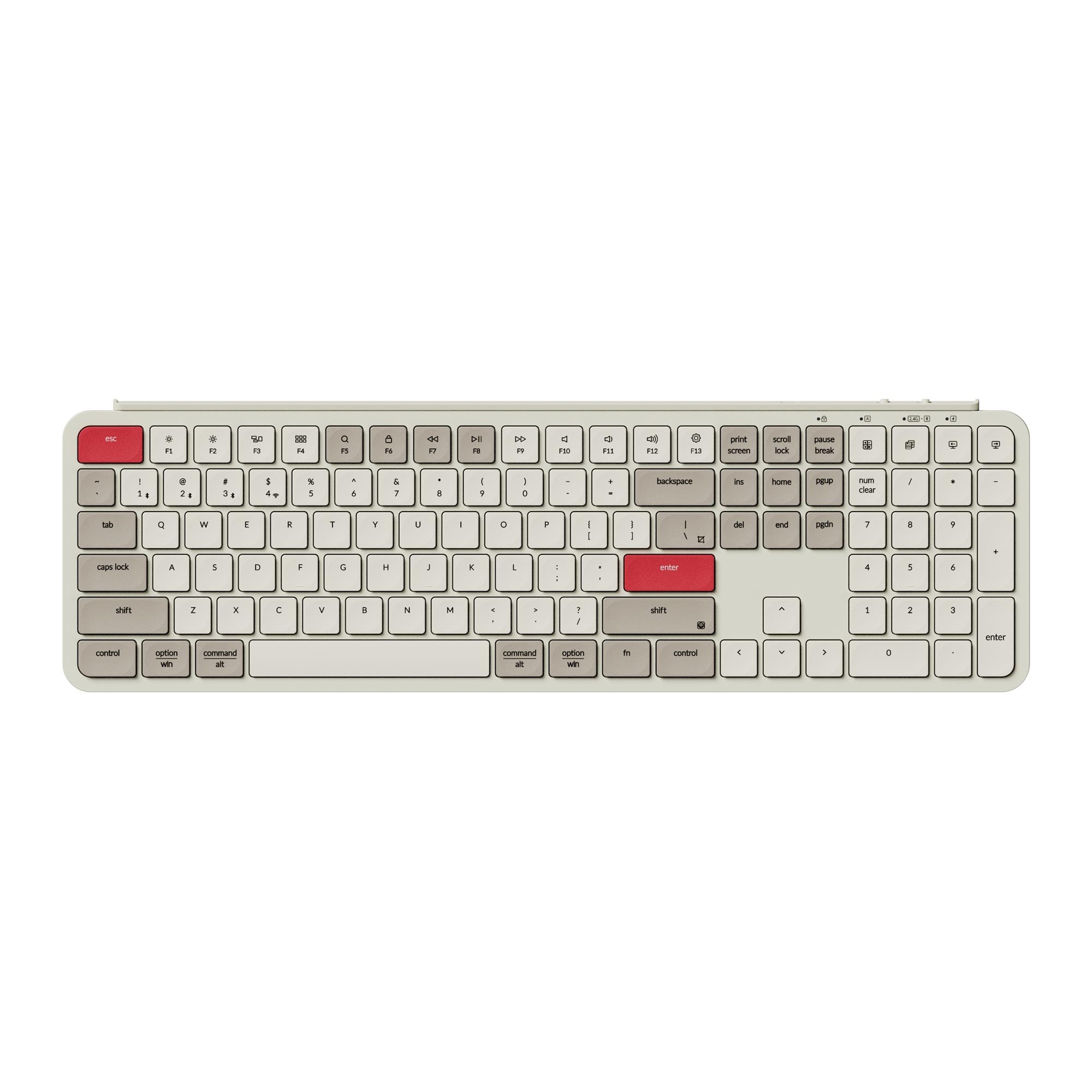
The B6 Pro is the value pick, and its whole case is the battery. Keychron claims up to 1,200 hours from its 800 mAh cell — about eight months at five hours a day — because there is no backlight to drain it. Treat that figure as a maker claim from lab conditions; real-world use will be lower. Tri-mode covers every desk: Bluetooth 5.2, a 2.4 GHz receiver, and wired USB-C, with 1,000 Hz polling on the receiver and wired modes. The 109-key full-size layout has a number pad and dedicated media controls, and remapping runs through Keychron Launcher.
The trade is feel. ABS case and keycaps, ultra-slim at a 3.2-degree typing angle, about 429 mm wide and 623 g — practical, not premium, and the typing feel is competent rather than luxurious. No backlight. If you want a full-height mechanical board with hot-swap switches instead, the Keychron K8 Pro is the enthusiast alternate — but it is tenkeyless, so it loses the number pad.
Pros
- Up to 1,200-hour battery claim (maker's figure)
- Tri-mode: Bluetooth, 2.4 GHz, wired USB-C
- Full-size with a number pad
- Cheapest full-size multi-device board here
Cons
- No backlight
- ABS case and keycaps feel plain
- 1,200-hour claim is lab conditions, unverified independently
- Typing feel is competent, not luxurious
Logitech Pebble Keys 2 K380s
Best Budget CompactBuy if: you hot-desk or work hybrid and want three-device switching at a third of the MX Keys S price
Don't buy if: you need a number pad, or you need a backlight
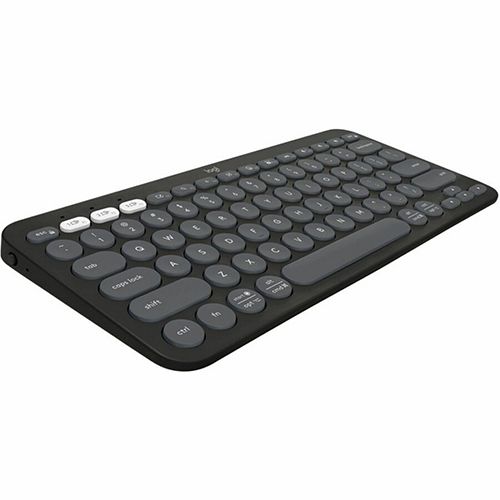
The K380s is the full three-device Easy-Switch experience at roughly a third of the MX Keys S price. Round, scooped low-profile keys with a short, quiet stroke. Two AAA batteries are rated by Logitech for up to three years. It fits in a bag, works from a couch or a counter, and maps its keys per operating system across Windows, macOS, iPadOS, ChromeOS and Android. For hot-desking, hybrid workers and team rollouts, it is the easiest board to hand out.
Two limits. It is Bluetooth only — no receiver, no backlight — and a small minority of owner reviews report Bluetooth drops after sleep or wake that need re-pairing. And there is no number pad, which rules it out for spreadsheet roles. The round keys also divide people for the first few days. Give it a week before you judge the shape.
Pros
- Three-device switching at a budget price
- Up to 3 years on 2× AAA (maker's claim)
- Compact and portable — great for hot-desking
- Quiet, short keystroke
Cons
- Bluetooth only — no receiver, no backlight
- No number pad
- Some owners report drops after sleep/wake
- Round keys take a few days to get used to
Bluetooth or USB Receiver — Which Is Better for Work?
Bluetooth, if you hop between devices. A USB receiver, if your work laptop has Bluetooth disabled or you want the most stable link. The best boards here give you both.
Bluetooth vs USB receiver: Bluetooth is better suited for hopping between a laptop, tablet and phone because it needs no dongle. A USB receiver works better when your work laptop has Bluetooth disabled or you want the most stable link. The key difference is the dongle: a receiver uses one USB port but rarely drops.
Here's the thing: corporate IT disables Bluetooth more often than anyone admits. If your work laptop is locked down, a Bluetooth-only board like the K380s is a paperweight at the office — and only one top-10 guide mentions this at all. A board with a Logi Bolt receiver keeps working, because the receiver is just a USB device. Check two things before you buy: does your laptop have a spare USB-A port for the receiver, or only USB-C? And is Bluetooth switched on at all? A USB-C-only laptop needs a small adapter for the receiver, and that adapter is easy to forget on the one day you need it.
Bluetooth adds a little latency next to a receiver, but most typists will never notice it. Gamers notice. Typists don't. The first keystroke after wake can also go missing on some Mac setups — a small, real annoyance worth knowing about before you buy.
How Long Does a Wireless Keyboard Battery Really Last?
Months to years on AA or AAA batteries; days to weeks on a rechargeable board with the backlight on. The backlight is the whole story — turn it off and the same board lasts months.
| Keyboard | Backlight on | Backlight off / batteries |
|---|---|---|
| MX Keys S | Up to 10 days | Up to 5 months (rechargeable) |
| MX Mechanical | Up to 15 days | Up to 10 months (rechargeable) |
| Ergo K860 | No backlight | Up to 24 months (2× AAA) |
| Signature Slim K950 | No backlight | Up to 36 months (2× AAA) |
| Keychron B6 Pro | No backlight | Up to 1,200 h claimed (rechargeable) |
| Pebble Keys 2 K380s | No backlight | Up to 3 years (2× AAA) |
Every figure is the maker's claim, and every rechargeable figure assumes the backlight is off for the long number. That is the trick the top 10 mostly repeat without saying: "up to 5 months" and "up to 10 months" are backlight-off numbers. Run the backlight at full brightness in a dim room and you charge every week or two. If you hate charging, buy a AAA board — the K950's three years means you change batteries once and forget about it until 2029.
Why Does My Wireless Keyboard Keep Disconnecting?
Low batteries first, then the receiver's position. A USB 3.0 drive in the next port can make a 2.4 GHz board lag from three feet away. Fresh batteries, a front USB port, and a re-pair fix most dropouts.
To stop a wireless keyboard disconnecting, follow these steps: 1. Put in fresh batteries or charge the board fully. 2. Plug the receiver into a front USB port, away from USB 3.0 drives and hubs. 3. Move metal objects and other wireless devices away from the desk. 4. Re-pair the keyboard in your Bluetooth settings.
Work through it in order. Low batteries cause most dropouts, and a board will drop keystrokes long before it dies outright. Next, move the receiver: USB 3.0 ports and hubs throw out interference that hits 2.4 GHz receivers hard, and a receiver buried behind a metal monitor stand is worse. A front port, or a short USB extension cable pulling the receiver onto the desk, fixes most of the rest. If Bluetooth drops after sleep or wake — the K380s complaint — remove the board from your Bluetooth settings and pair it again. That clears the stale pairing most of the time.
Buying Guide: What Actually Matters
After the number pad, the four things worth your attention are switch type, connection, battery and layout — in that order.
Switch type is the feel under your fingers. Scissor switches are laptop-like: short travel, quiet, fast to type on — the MX Keys S, K860, K950, B6 Pro and K380s all use them. Mechanical switches are deeper and last longer — the MX Mechanical's Tactile Quiet variant is the office-safe one, with a soft bump and no click. Membrane switches are the cheapest and softest, and they wear out fastest. You will not mod, lube or remap anything on an office board, so buy the feel you like out of the box.
Connection decides whether the board works on your desk at all: Bluetooth plus a receiver covers every laptop, including locked-down work machines. Battery decides how often you think about it: rechargeable means a cable every week or two with the backlight on, AAA means years of forgetting. Layout decides your shoulders: full-size for numbers, compact for mouse room.
Buying for a team changes the maths. Six to twelve boards for a shared floor means per-unit reliability matters more than one person's favourite switch, AAA batteries beat charging rotas, and a board under the approval threshold ships faster than a flagship. The K380s and K950 are the rollout picks here — cheap, quiet, and nobody has to learn a new layout.
Keyboards to Skip in 2026
Clicky mechanical boards — the single most common wrong buy for a shared office. Blue switches and their clones sound great alone and terrible on a call. If your board clicks, your colleagues hear it. Tactile Quiet or scissor only.
RGB gaming boards in "office" roundups. Several top-10 lists for this query include gaming boards with polling rates and RGB lighting. A 1,000 Hz polling rate does nothing for a spreadsheet. Office lists should stay office-only.
The original Logitech MX Keys (2019). Still pushed by stale lists, superseded by the MX Keys S. Same shape, older battery, no Smart Actions. Buy the S.
Any listing for a "Logitech MX Mechanical Pro". No such product exists — Logitech sells the MX Mechanical and the MX Mechanical Mini. A listing using "Pro" is inventing a model, and its specs cannot be trusted.
Cheap bundled keyboards. The free board in the box, or the one IT handed out, feels mushy, drops keystrokes and eats batteries. It is the board most people are replacing — and the reason they are reading this guide.
Frequently Asked Questions
What's the best wireless keyboard for office work in 2026?
The Logitech MX Keys S — quiet scissor keys, a full-size layout with a number pad, and three-device switching. If your wrists ache, the Logitech Ergo K860 is the ergonomic pick instead.
What's the quietest wireless keyboard for an office?
The Logitech MX Keys S, with low-profile scissor keys measured at 35 decibels per keystroke in mkbguide's lab test. The Logitech Signature Slim K950 is nearly as quiet and costs less.
How long do wireless keyboard batteries last?
Months to years on AA or AAA batteries — up to three years for the K950 and K380s. Rechargeable boards last 10 to 15 days with the backlight on, and months with it off.
Can I use one wireless keyboard with three devices?
Yes — the MX Keys S, K950, MX Mechanical and K380s all switch between three devices with Logitech Easy-Switch. The K860 and B6 Pro do not offer the same three-device hopping.
Is Bluetooth or a USB receiver better for work?
Bluetooth is better for hopping between devices; a USB receiver is better when work IT disables Bluetooth or you want the most stable link. Boards with both, like the MX Keys S, cover either case.
Should I get a keyboard with a number pad for office work?
Yes if you type numbers all day — finance, data entry and accounting need one. If you mostly write and email, a compact board without a pad gives your mouse more room.
Are mechanical keyboards too loud for the office?
Clicky ones are, yes. The Logitech MX Mechanical with Tactile Quiet switches is the office-safe exception — a soft bump, no click, and the same quiet as a scissor board.