Best Laptop Charger for Travel (2026): 6 Picks

Your laptop is at 9 percent and boarding starts in twenty minutes. The brick in your bag is the one that came with the laptop — heavy, single-port, prongs snagging everything. Next to it sits a phone cube. And a tablet cable. Three chargers for three devices.
You have tried the shortcuts. A phone charger in a café barely slowed the drain. A power bank weighed as much as the laptop and still needed its own wall charger to refill. You don't need three bricks, and you don't need a power bank either — you need one brick that does the whole job. This guide ranks six wall chargers by the one question that matters on a trip: what does your laptop actually get when your phone is plugged in too?
A travel laptop charger is a compact wall charger — usually GaN — that plugs into an outlet and fast-charges a laptop over USB-C, plus a phone and tablet at the same time. It is not a power bank: it holds no battery of its own.
No prices are printed in this guide — charger prices move daily and rival pages disagree by $20 or more on the same model. Check the live price before buying. All watts and weights are the makers' own figures, or a reviewer's measurement where stated — never a guess.
What Wattage Laptop Charger Do I Need?
Match the brick to your laptop, not the other way round. A MacBook Air needs 30–65W, a 14-inch MacBook Pro 65–100W, and a 16-inch Pro 96–140W — buy to your laptop's number and the rest is noise.
What wattage laptop charger you need depends on your laptop, not the charger. According to ChargeTechLab, a MacBook Air needs about 30 to 65W, a 14-inch MacBook Pro needs 65 to 100W, and a 16-inch Pro needs 96 to 140W. A Dell XPS 15 officially needs 90W, and on a 45W charger it slowly loses battery while in use.
| Your laptop | Watts it needs | What to buy |
|---|---|---|
| MacBook Air (13" / 15") | 30–65W | Any 65W+ brick |
| MacBook Pro 14" | 65–100W | A 100W brick |
| MacBook Pro 16" | 96–140W | A 100–140W brick |
| Dell XPS 13 / ThinkPad X1 | 45–65W | Any 65W+ brick |
| Dell XPS 15 / 16" Windows laptop | 90–130W | A 100W+ brick — check it charges over USB-C |
| Gaming laptop | 100W+ via USB-C, often proprietary | Check with the maker — many won't fast-charge over USB-C at all |
A travel laptop charger should give your laptop its full wattage from one port, with something left for your phone. According to gagadget, the box number is the total across all ports, not what one port delivers, and several 100W bricks drop to 65W or less the moment a second device plugs in. Check the port split before you buy.
Buy the watts your laptop drinks. Nothing more.
Wall Charger vs Power Bank vs Travel Adapter — Which One Do You Need?
A wall charger plugs into an outlet. A power bank carries its own battery. A travel adapter only changes the plug shape. Three products, three jobs — and half the pages ranking for this keyword mix them up.
A wall charger, a power bank and a travel adapter solve three different problems. A wall charger plugs into an outlet and charges fast. A power bank carries its own battery for planes and cafés with no outlet. A travel adapter only changes the plug shape so a charger fits a foreign socket. Most travellers need the wall charger first.
| Product | What it does | When you need it |
|---|---|---|
| Wall charger (this guide) | Plugs into an outlet, charges fast over USB-C | Hotels, cafés, airports — anywhere with a socket |
| Power bank | Carries its own battery, charges with no outlet | Planes, trains, long days away from a socket |
| Travel adapter | Changes the plug shape so your charger fits a foreign socket | Only when you fly abroad — or buy the Satechi, which includes the heads |
Here's the thing: search results for this keyword are a mess. Half the top ten answers a different question than the one asked — power banks in a wall-charger search, desk stations in a "portable" list, plug adapters sold as laptop chargers. This guide covers wall chargers only, because that is what the keyword means: one brick, one outlet, laptop plus phone.
Quick note: a power bank still needs a wall charger to refill. If you buy one, buy the wall charger first — it charges the bank, the laptop and the phone, and it weighs less than the bank does.
Can I Use a 140W Charger on a Laptop That Only Needs 65W?
Yes — the laptop only draws what it needs. A 140W brick on a 65W laptop is safe. It is also heavier, pricier, and pointless unless your next laptop needs the watts.
100W vs 140W travel chargers: 100W is better suited for most travellers because it covers a 14-inch MacBook Pro at full speed in a smaller, lighter brick. 140W works better when your laptop is a 16-inch Pro or a power-hungry Windows machine. The key difference is one port's ceiling, not the whole brick.
Even on a laptop that can drink 140W, the gain is small. According to distratech, a 140W charger barely beats a 100W charger on a 14-inch MacBook Pro — about 29 minutes to 50 percent versus about 30. One minute, for a bigger brick and a bigger price. On a 16-inch Pro the gap is wider, and on a MacBook Air it does not exist at all.
Here's my honest take: most travellers should buy 100W and stop there. The 140W tier costs more, weighs more, and buys nothing on a 14-inch Pro. People who genuinely need 140W already know who they are — everyone else is paying for a number on a box.
Why Does My Laptop Charge Slowly on a Multi-Port Charger?
Because the number on the box is the total, not one port's share. Plug in a phone and the laptop port drops — sometimes by a third, sometimes by half.
Every multi-port charger splits its watts between the ports in use, and the split is what matters. The Anker Prime 100W gives your laptop the full 100W alone, then 65W when a phone joins it. The UGREEN Nexode 100W does the same: 100W alone, 65W with a second device. The Satechi 145W spreads its watts four ways — 65W, 30W, 25W and 20W with all four ports in use. None of this is on the box. You have to read the maker's port-split table, and this guide prints it for every pick.
Or maybe I should say it this way: the box number is a budget, not a promise. A "100W" charger that gives your laptop 65W the moment your phone plugs in is a 65W charger with a 100W label. The test that matters is the two-device test, and it is the test this guide ranks on.
One more trap: an underpowered charger does not just charge slowly — it can lose ground. ChargeTechLab found a Dell XPS 15, which officially needs 90W, slowly loses battery while in use on a 45W charger. The laptop is charging and draining at the same time, and the drain wins. If your laptop has ever "charged" for an hour and ended up lower than it started, this is why.
Quick Comparison
| Product | Total watts / ports | Laptop alone | Laptop + phone | Brick weight | ||
|---|---|---|---|---|---|---|
| #1 | Anker Prime 100W GaN ChargerBest Overall | 100W / 2C + 1A | 100W | 65W | 170g | Check Price |
| #2 | UGREEN Nexode 100W GaN ChargerBest Multi-Device | 100W / 3C + 1A | 100W | 65W | 218–235g | Check Price |
| #3 | Anker 737 GaNPrime 120W ChargerBest for Travel | 120W / 2C + 1A | 100W | Split not published | 187g | Check Price |
| #4 | Satechi 145W USB-C 4-Port GaN Travel ChargerBest for International Travel | 145W / 4C | 140W | 65W (all four: 65+30+25+20) | 346g | Check Price |
| #5 | Baseus PicoGo Pro AH22 100WBest Lightweight | 100W / 3C | 100W | Split not published | 163g | Check Price |
| #6 | Apple 96W USB-C Power AdapterBest for MacBook | 96W / 1C | 96W | No second port | Not published | Check Price |
Kit weight is the brick plus about 50g for a braided 100W cable — the number that actually lands in your bag. On that math the Baseus kit is the lightest here at about 213g, the Anker Prime kit about 220g, and the Satechi kit the heaviest by a wide margin before you count its plug heads. Apple doesn't publish the 96W adapter's weight, so no kit figure is given for it.
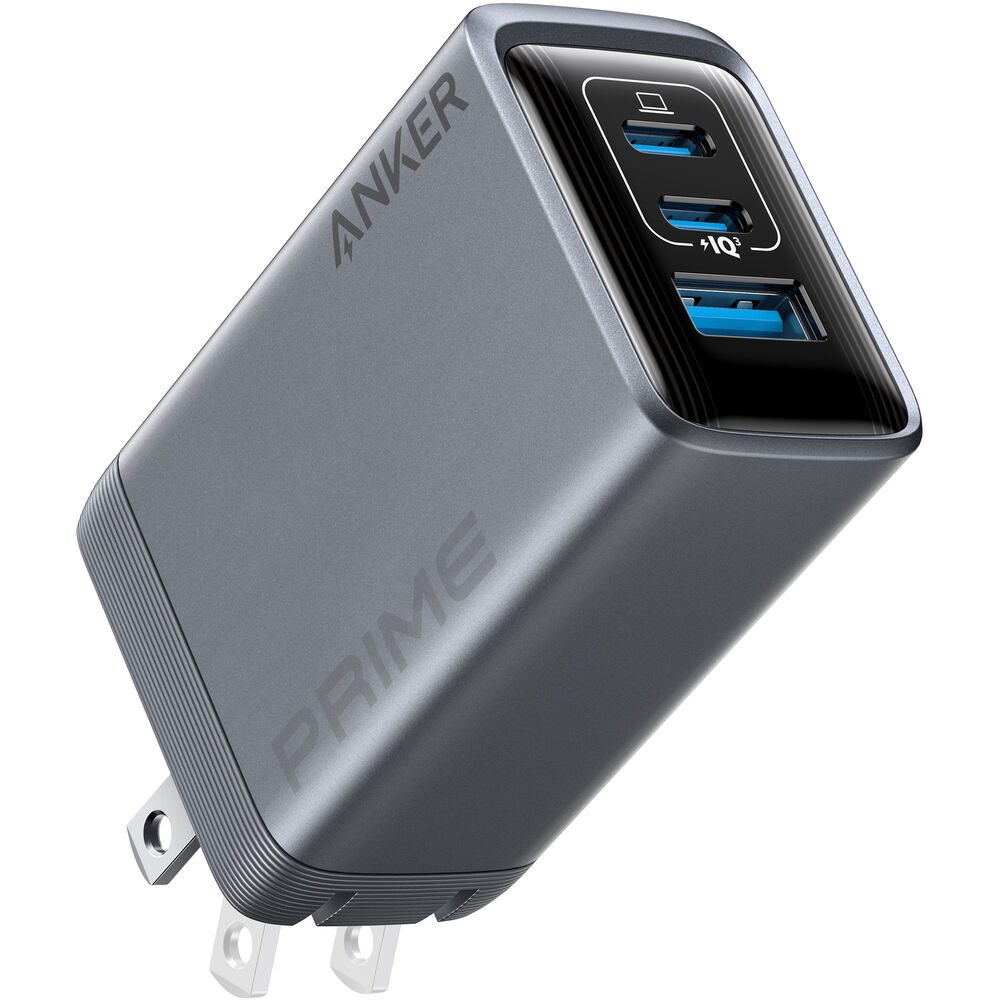
Anker Prime 100W GaN Charger
Best OverallBuy if: you want the smallest 100W brick that keeps your laptop at full speed with a phone plugged in
Don't buy if: you need a fourth port, or you charge two laptops at once
The Anker Prime 100W is the smallest 100W brick in this guide — about 86 cubic centimetres by gagadget's measurement, and 170g on the scale. Either of its two USB-C ports gives the full 100W on its own, and with a phone plugged in the split is 65W for the laptop and 35W for the phone. That 65W still covers a MacBook Air at full speed and a 14-inch Pro at a decent pace, which is the whole point: the laptop never drops to a trickle.
It is also the critics' pick. Gagadget named it Editor's Choice, and it folds flat for a bag with prongs that tuck away instead of snagging everything else in the pocket. ActiveShield 2.0 watches the temperature and throttles the output before the brick gets hot, which is the safety net that matters in a hotel room at 2 a.m. The one thing it doesn't do is a fourth port — two USB-C and one USB-A is the limit, and the USB-A port is the slow one for older gear.
Pros
- Full 100W from either USB-C port — the laptop never trickles
- 170g, the smallest 100W brick here
- Foldable prongs that tuck away for a bag
- ActiveShield 2.0 temperature monitoring
Cons
- Only 3 ports — no fourth for a second laptop
- USB-A port is slow
- No wattage display — the Baseus has one
- 100W ceiling, no 140W tier
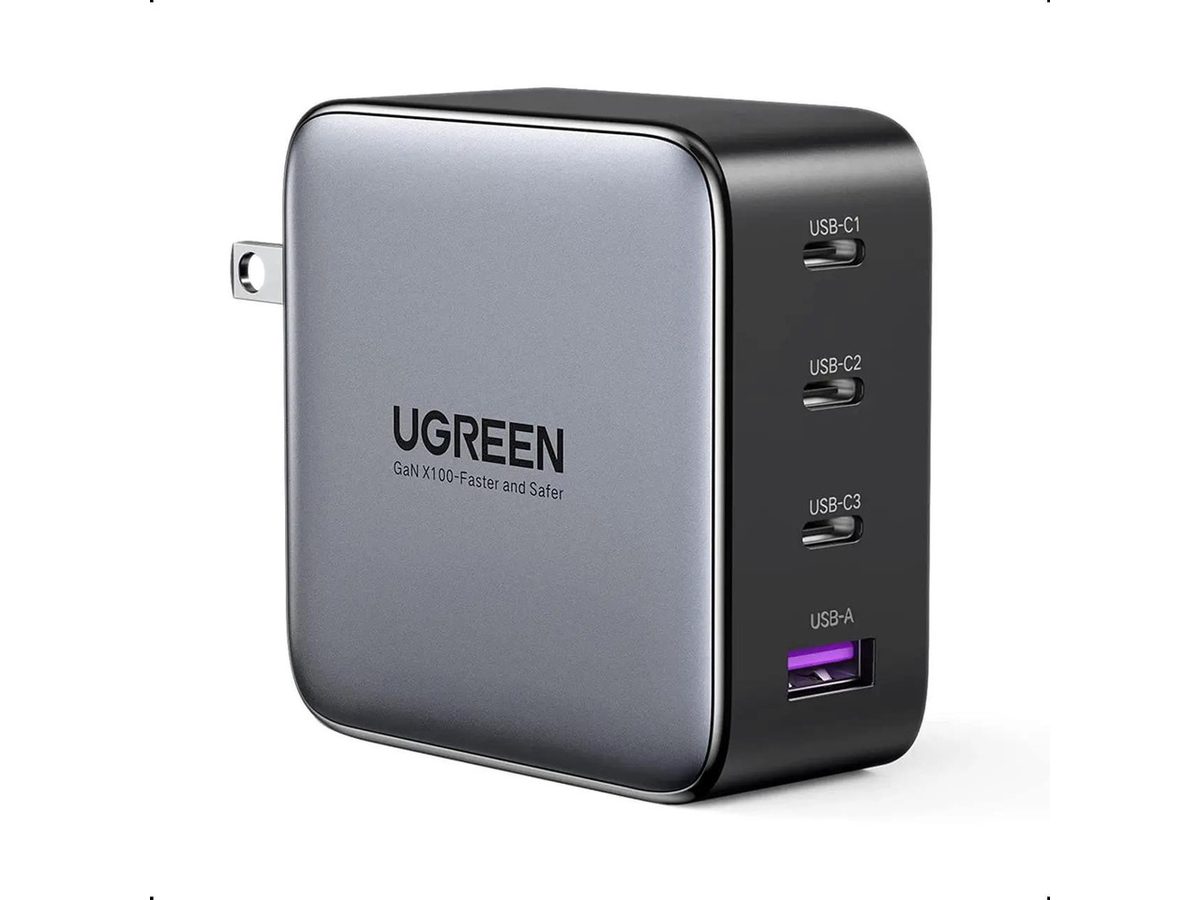
UGREEN Nexode 100W GaN Charger
Best Multi-DeviceBuy if: you charge a laptop, a phone and a tablet from one brick
Don't buy if: every gram counts, or you want a wattage display
The Nexode 100W is the four-port answer to the same problem. Three USB-C ports plus one USB-A, and either of the two main USB-C ports gives the full 100W alone — the same 65W-plus-30W split as the Anker Prime when a second device joins. It also speaks PPS, so Samsung phones get Super Fast Charging instead of the slow standard rate, and gagadget named it Best Overall.
Two things to know before you buy. First, the weight figures disagree: earthsims lists 218g and gagadget measures 235g. I've seen conflicting data — earthsims says 218g, gagadget says 235g. My read is the difference is the cable in the box, so this guide uses the higher figure and the kit math still holds. Second, check the model before you buy: UGREEN sells several near-identical Nexode 100W chargers — Pro, Air and X565 among them — and this pick is the CD226, the one with three USB-C ports and one USB-A.
Pros
- Four ports — laptop, phone and tablet from one brick
- Full 100W from either of two USB-C ports
- PPS support for Samsung Super Fast Charging
- Foldable prongs
Cons
- Weight figures disagree — 218g vs 235g
- Several near-identical Nexode 100W models — check it's the CD226
- Bigger than the Anker Prime
- No wattage display
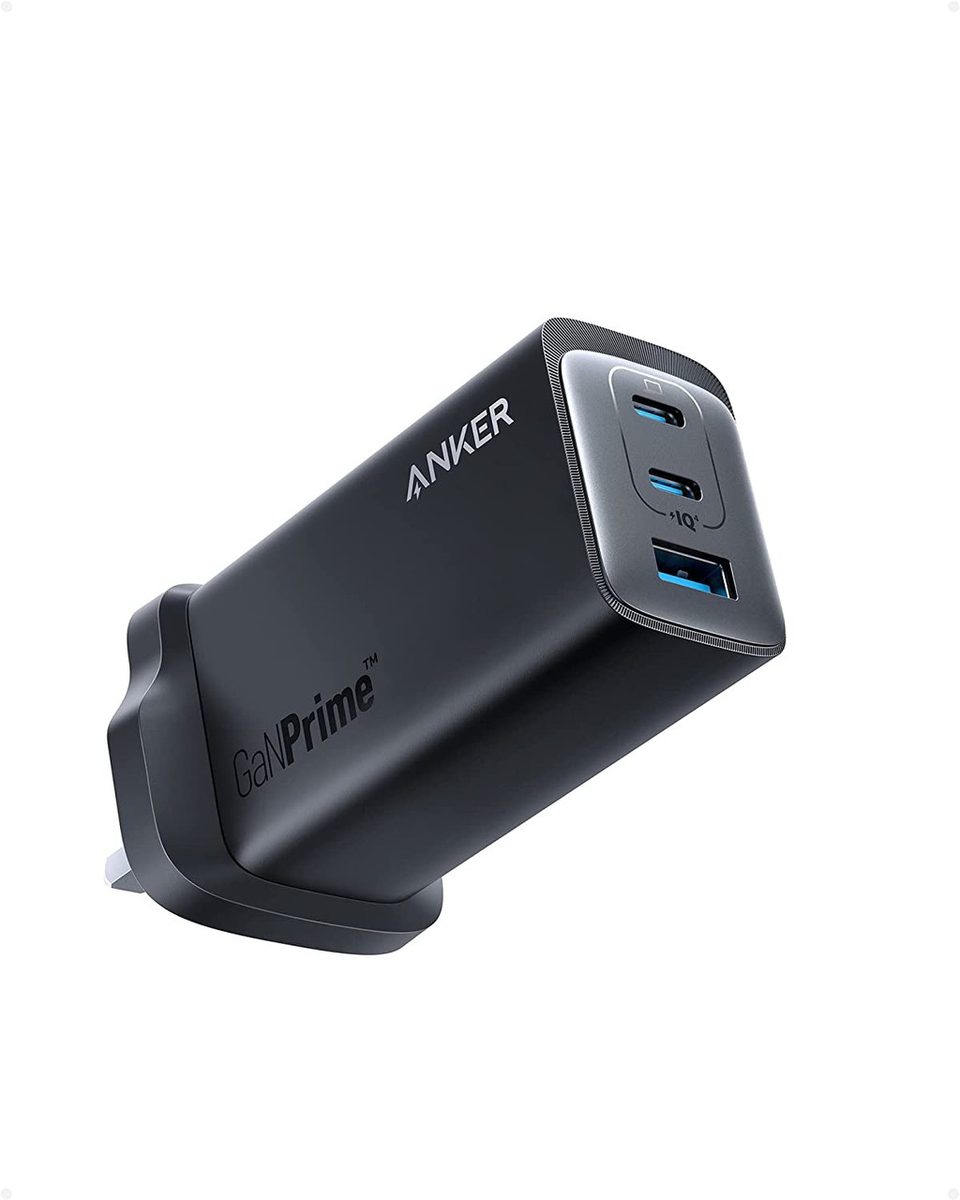
Anker 737 GaNPrime 120W Charger
Best for TravelBuy if: you want the travel classic with a 120W ceiling
Don't buy if: you need four ports, or you want the lightest brick here
The 737 is the travel classic. It has been the default recommendation on travel roundups for two years, and the reason is simple: 120W total, up to 100W from a single USB-C port, at 187g with foldable prongs. That single-port 100W covers a 14-inch MacBook Pro at full speed and a 16-inch Pro at nearly full speed, and the extra 20W headroom means a phone on the second port doesn't steal from the laptop as hard as it does on a 100W brick. Truegearguide calls it the best travel charger in its roundup, and earthsims calls it the best for power users.
Two honest limits. First, Anker doesn't publish the two-port split, so don't assume the laptop keeps 100W when the phone plugs in — the total is 120W and the split is Anker's secret. Second, the name is a trap: "Anker 737" is also a power bank, and several roundups list the battery under the same name. Check the model number before you buy. You want the wall charger, A2148 — not the power bank.
Pros
- 120W ceiling — headroom a 100W brick doesn't have
- 100W on one port, 187g, foldable prongs
- GaNPrime with PowerIQ 4.0 and ActiveShield 2.0
- The travel classic — recommended everywhere
Cons
- Two-port split not published
- "737" is also a power bank — check the model number A2148
- No fourth port
- Pricier than the 100W bricks
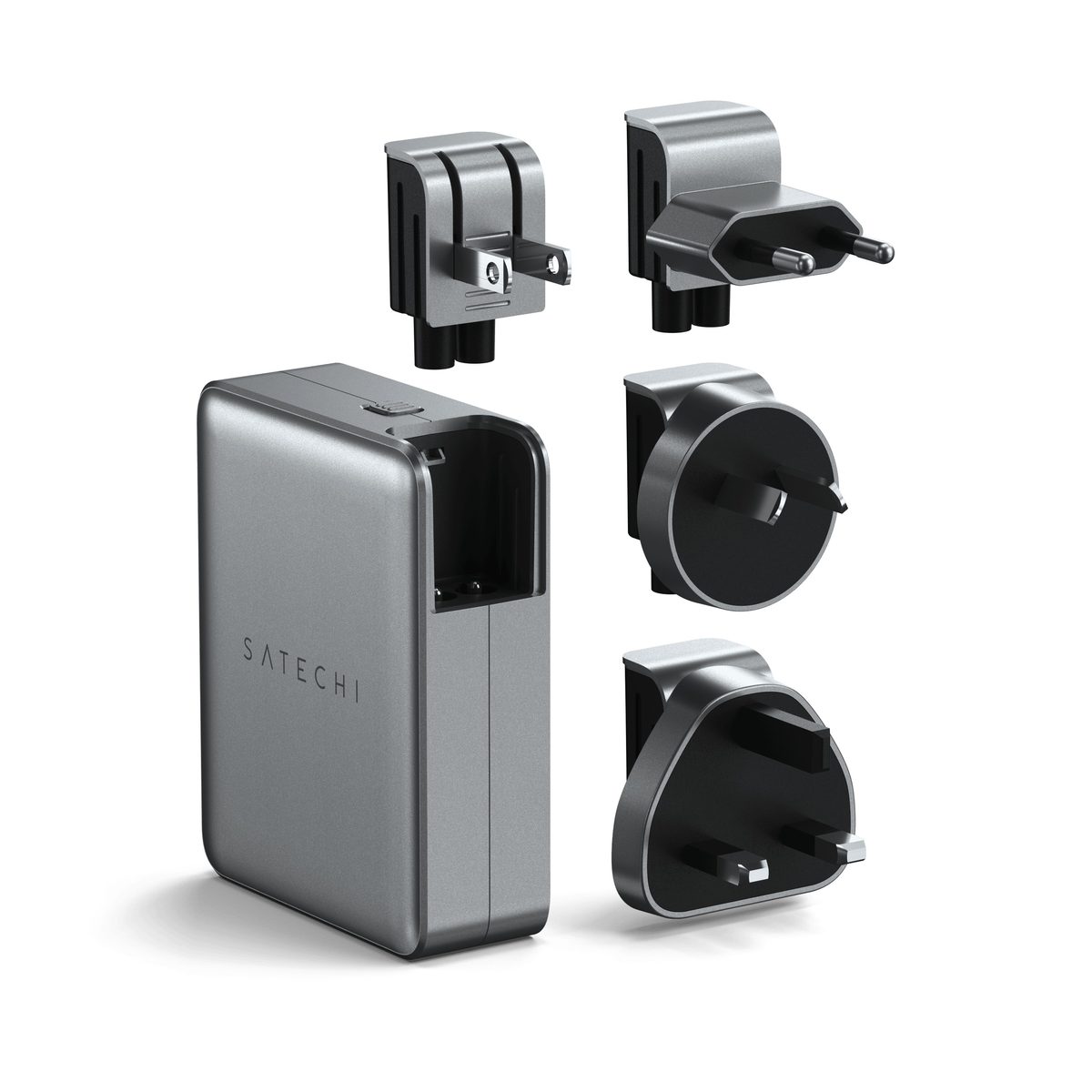
Satechi 145W USB-C 4-Port GaN Travel Charger
Best for International TravelBuy if: you fly abroad and want the plug heads in the box, not in a separate adapter
Don't buy if: you travel light, or you only charge one laptop and a phone
The Satechi is the only pick here built for crossing borders. Four USB-C ports, 145W total, and the first two ports each deliver up to 140W on their own — Satechi's own page says so, which settles a disagreement between reviewers over the second port's cap. The third and fourth ports give 45W each, and with all four in use the split is 65W, 30W, 25W and 20W. The box also holds swappable US, UK, EU and AU plug heads plus a mesh pouch, so the adapter you would otherwise buy separately is already in the bag.
The trade is weight. At 346g the brick is the heaviest here by a wide margin — nearly double the Baseus — and the plug heads add more on top. There is no USB-A port either, so older cables need a USB-C adapter. And 140W only matters if your laptop drinks it: a 14-inch MacBook Pro caps near 100W, so on that machine the extra 40W buys nothing. Unearththevoyage still made it their number-one travel pick, and Android Police scored it 8 out of 10 — for the frequent international flyer, the plug heads are worth the grams.
Pros
- Only pick with plug heads in the box — US, UK, EU, AU
- 140W on two ports, 145W total
- Four USB-C ports
- Mesh pouch included
Cons
- 346g — the heaviest brick here by far
- No USB-A port
- 140W wasted on a 14-inch Pro
- Heaviest kit once you count the plug heads
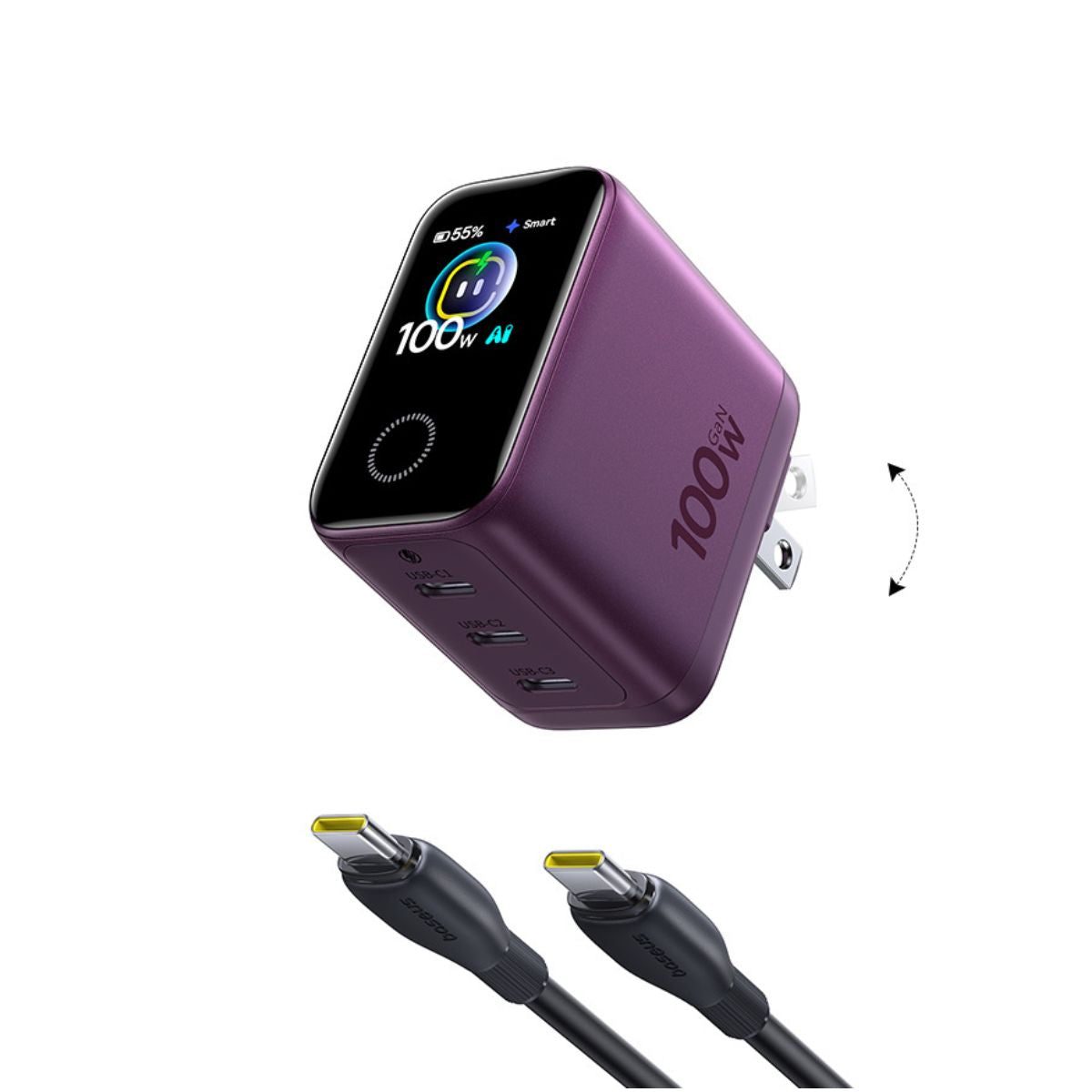
Baseus PicoGo Pro AH22 100W
Best LightweightBuy if: you want the lightest 100W brick, with a display that shows the watts
Don't buy if: you need a USB-A port, or you hate glossy displays
The PicoGo Pro AH22 is the lightest 100W brick in this guide at 163g, and the only one with a screen. Any of its three USB-C ports gives the full 100W on its own, the foldable prongs tuck away, and a cable comes in the box — one less thing to buy. The display is the real reason to pick it: it shows the live wattage, so you can see at a glance whether the laptop is actually getting 100W or whether the cable is the bottleneck. Gear Diary called it the best charger they had ever used in a November 2026 review.
Check the model name before you buy, because Baseus sells three different "100W GaN" chargers and only one of them is this one. The PicoGo Pro AH22 has three USB-C ports and the display. The older GaN2 CCGAN100US has two USB-C and two USB-A ports and weighs 205g. The EnerFill has two USB-C and one USB-A. Same wattage on the box, three different chargers — buy the AH22.
Pros
- 163g — the lightest 100W brick here
- Display shows live watts — you can see the cable trap happening
- Any USB-C port gives the full 100W
- Cable included in the box
Cons
- No USB-A port
- Three Baseus 100W models — check it's the AH22
- Display adds a failure point
- Two-port split not published
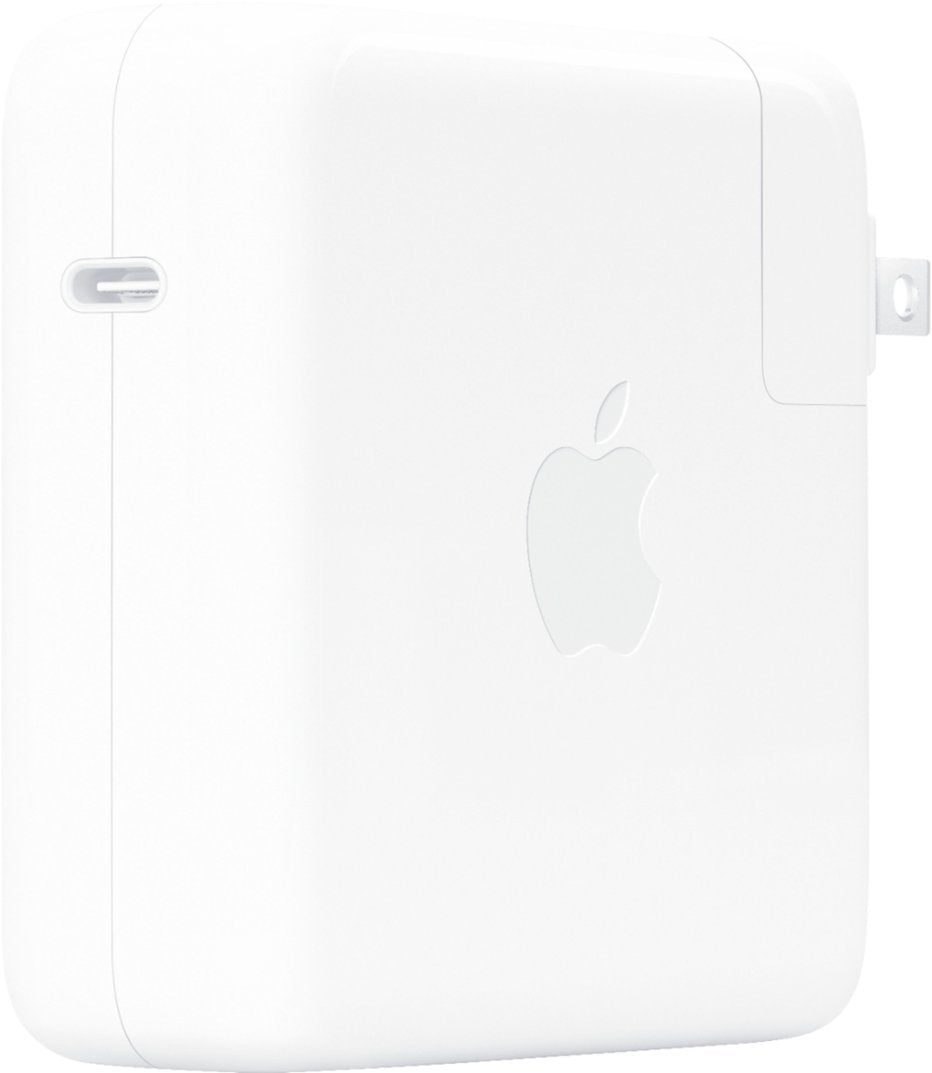
Apple 96W USB-C Power Adapter
Best for MacBookBuy if: you only own Apple gear and want the adapter Apple ships
Don't buy if: you charge anything that isn't a MacBook, or you want more than one port
The Apple 96W is the adapter Apple ships with the 14-inch MacBook Pro, and it charges that machine at full speed — 96W through a single USB-C port, with a foldable prong and nothing to configure. Truegearguide picks it for the 14-inch Pro, and the case for it is simple: zero compatibility questions, no third-party guesswork, and it runs cool and quiet. If your bag holds nothing but Apple gear, it works.
Two things to know. First, Apple refreshed its adapters in late October 2026 — a new 100W adapter at the same $79 replaces the 96W, and the new one isn't in every listing yet. Check whether the box says 96W or 100W before you buy; either charges a 14-inch Pro at full speed. Second, the hard limit: one port. A phone means a second brick, which is exactly the problem this guide is trying to solve. The 96W is the right adapter and the wrong travel charger, and which one matters more depends on what else is in your bag.
Pros
- Apple's own adapter — zero compatibility questions
- 96W covers a 14-inch Pro at full speed
- Foldable prong
- Cool, quiet running
Cons
- One port only — a phone needs a second brick
- No GaN size advantage over the Anker Prime
- Superseded by the new 100W — check the box
- The priciest way to get 96W
Do I Need a Special Cable for 100W or 140W Charging?
Yes, above 60W. A standard USB-C cable tops out at 60W, so a 100W charger on a cheap cable silently delivers 60W. You need a 5A e-marked cable — and for 140W, a 240W EPR cable.
The cable is the trap nobody budgets for. A USB-C cable carries a tiny chip — an e-marker — that tells the charger how much current it can safely pass. A standard cable is rated for 3 amps, which caps it at 60W. Plug a 100W charger into it and the charger plays safe: 60W, no warning, no error light. Your laptop charges slowly and nothing tells you why.
For 100W you need a 5A e-marked cable, usually printed "100W" on the connector. For 140W you need a 240W EPR cable, or the charger falls back to 100W — ChargeTechLab's testing shows the fallback is silent. The Baseus AH22 ships with a cable in the box, which is one less thing to buy, but for every other pick here the cable is a separate purchase. Check the print on the connector before you pack it.
Look — if you're packing for one bag, here's what actually works: one braided 100W e-marked cable, one metre long. It charges the laptop at full speed and the phone too, and it survives being coiled and uncoiled every day. A two-metre cable weighs more and charges no faster.
Can I Bring a GaN Charger on a Plane?
Yes — in carry-on or checked bags. A wall charger has no battery, so the lithium rules don't apply to it at all.
The rules that ground power banks don't touch wall chargers. A GaN brick holds no lithium cells, so the 100Wh limit, the carry-on-only rule and the two-per-passenger cap on international flights — in force since March 2026, according to Belkin — are all about batteries, not bricks. Pack the charger wherever it fits.
Power banks are the ones with the limit, and the maths catches people out. A 30,000mAh bank is about 111Wh — over the 100Wh carry-on limit, so it needs airline approval. A 27,650mAh bank sits just under it, which is why so many travel banks are sold at exactly that size. If you carry a bank as well as a brick, check the milliamp-hours before you fly, not at the gate.
One more thing about planes: heavy bricks droop out of loose in-seat outlets. Owners report it with the heavier bricks in this guide, and gagadget flags it too — a 346g charger hanging off a worn outlet will work itself loose mid-flight. Pack a short cable and rest the brick in the seat pocket instead of letting it hang.
How to Pack Your Travel Charger Kit in 5 Steps
Measure first, buy second, and the packing takes five minutes. Get the wattage right and the rest is just placing things.
To pack a travel charger kit, follow these steps: 1. Check your laptop's wattage need. 2. Pick one brick that covers it plus a phone. 3. Add one 100W e-marked USB-C cable. 4. Add a plug adapter only if flying abroad. 5. Weigh the kit and drop anything over your limit.
Step 1 — check your laptop's wattage need. Use the table at the top of this guide: a MacBook Air needs 30 to 65W, a 14-inch Pro 65 to 100W, a 16-inch Pro 96 to 140W. That number is the whole purchase decision.
Step 2 — pick one brick that covers it plus a phone. The brick must give your laptop its full wattage from one port with a second port left for the phone. Every pick in this guide passes that test except the Apple 96W, which has one port.
Step 3 — add one 100W e-marked USB-C cable. One metre, braided, with 100W printed on the connector. A standard cable caps at 60W and throttles the whole kit.
Step 4 — add a plug adapter only if flying abroad. Domestic trips need nothing extra. For international travel, either pack a small adapter or pick the Satechi 145W, which ships with the plug heads in the box.
Step 5 — weigh the kit and drop anything over your limit. Brick plus cable together. If the kit tops 300g and your laptop only needs 65W, drop down to a smaller brick — the Anker Prime 67W at 138g does the same job for a MacBook Air or an XPS 13.
Buying Guide: What Actually Matters
After the wattage check, the four things worth your attention are the port split, the weight, the prongs and the cable — in that order.
The port split comes first because it decides what your laptop actually gets. Read the maker's split table, not the box number. A brick that gives 100W alone and 65W with a phone is a good travel charger. A brick that gives 100W alone and 30W with a phone is a phone charger with delusions.
Weight comes second, and it is the kit weight that counts — brick plus cable, not the brick alone. The r/onebag crowd draws a hard line at 100g for a single-port 65W charger, and they are right to be strict: grams add up across a whole bag. Our lightest kit here is the Baseus at about 213g with its cable; the heaviest is the Satechi at about 396g before its plug heads. If your laptop is a MacBook Air or an XPS 13, you don't need 100W at all — the Anker Prime 67W at 138g covers it with a smaller brick and a smaller price.
Prongs come third. Foldable prongs matter more than they sound like they should — fixed prongs snag cables, scratch screens and poke holes in packing cubes. The Satechi's swappable heads are the exception that proves the rule: they are the only honest answer to "what about London?" that doesn't involve a second purchase.
The cable comes last, and only because you buy it once. Get the 100W e-marked cable, one metre, braided, and stop thinking about it. The wrong cable quietly caps everything else you bought, and it is the cheapest part of the kit to get right.
Chargers to Skip in 2026
Desktop bricks sold as travel chargers. The two most-recommended "travel" chargers in older roundups are the Satechi 108W Pro and the Belkin BoostCharge 108W — and neither one travels. The Satechi 108W Pro is a 2020 pre-GaN desktop unit at 417g with a detachable cord and no foldable plug. The Belkin 108W is a desk unit at 330g with a two-metre cord, designed to sit on a desk. Both still show up in "best travel charger" lists. Skip them both.
Phone chargers for laptops. A 20W or 35W brick will not charge a laptop in any useful sense — one roundup in the top ten recommends a 20W adapter for laptops, and another lists Apple's 35W dual charger as a travel pick. A laptop on a 20W charger is a laptop losing battery more slowly, not charging.
No-name 100W bricks. A 100W label on an unknown brand is a claim, not a fact. Buy a known brand with real certification — the failure mode of a cheap high-wattage charger is heat, and heat in a hotel room is the one thing you don't want to discover at 2 a.m.
Desk stations in "portable" lists. The 165W and 250W multi-port stations that show up in portable-charger roundups are desk furniture. They weigh over a kilogram with their cords, they have no foldable prongs, and they belong on a desk, not in a carry-on. If your charger never leaves the desk, see our 100W USB-C laptop charger guide — it ranks six bricks by what your laptop actually gets at a desk.
Frequently Asked Questions
What's the best laptop charger for travel in 2026?
The Anker Prime 100W GaN Charger — the smallest 100W brick here at 170g, with full 100W from either USB-C port and foldable prongs.
What wattage laptop charger do I need?
A MacBook Air needs 30–65W, a 14-inch Pro 65–100W, a 16-inch Pro 96–140W, and a Dell XPS 15 needs 90W. Match the brick to your laptop.
Can I use a 140W charger on a laptop that only needs 65W?
Yes. The laptop only draws what it needs, so a 140W brick is safe on a 65W laptop — just heavier and pricier than you need.
Why does my laptop charge slowly on a multi-port charger?
The box number is the total across all ports, not one port's share. Plug in a phone and many 100W bricks cut the laptop port to 65W or less.
Do I need a special cable for 100W or 140W charging?
Yes, above 60W you need a 5A e-marked cable. For 140W you need a 240W EPR cable, or the charger silently falls back to 100W.
Can I bring a GaN charger on a plane?
Yes. A wall charger has no battery, so lithium limits don't apply — it can go in carry-on or checked bags. The 100Wh rule is for power banks.
Can I charge my laptop with a phone charger?
Barely. A 5–20W phone charger won't meaningfully charge a laptop, and an underpowered charger can lose battery while the laptop is in use.