Best USB C Laptop Charger 100W (2026): 6 Picks

Your laptop sits on your desk at 9 percent. The brick that came with it is a fat single-port block that hogs the whole outlet strip. Next to it, the phone cube. And the tablet cable. Three chargers, three sockets, one desk.
You have tried the shortcuts. A phone charger in the kitchen barely slowed the drain. A cheap multi-port brick from a roundup promised 100W and delivered 65W the moment your phone plugged in. You don't need a travel charger — your laptop never leaves the room. You need one brick that lives on the desk and does the whole job.
A 100W USB-C laptop charger is a wall or desk charger that delivers up to 100 watts over USB-C Power Delivery — enough to fast-charge a 14-inch MacBook Pro or a Dell XPS 15 at full speed. The number is the total across all ports, not what one port gets.
This guide ranks six 100W chargers by the one question that matters at a desk: what does your laptop actually get when your phone is plugged in too? The travel version of this question lives in our best laptop charger for travel guide — weight, packing and plug heads. This one is about the desk: corded units, outlet blocking, and the split.
No prices are printed in this guide — charger prices move daily and rival pages disagree by $20 or more on the same model. Check the live price before buying. All watts and sizes are the makers' own figures, or a reviewer's measurement where stated — never a guess.
Is a 100W USB-C Charger Enough for a Laptop?
For most laptops, yes. A 100W charger covers a MacBook Air, a 14-inch MacBook Pro and most 15-inch Windows laptops at full speed. It falls short on a 16-inch Pro under heavy load and on gaming laptops — those need 140W or the stock brick.
A 100W USB-C charger is enough for most laptops. According to ChargeTechLab, a MacBook Air needs 30 to 65W, a 14-inch MacBook Pro needs 65 to 100W, and a Dell XPS 15 needs 90W — all inside a 100W budget. A 16-inch MacBook Pro needs 96 to 140W, so 100W charges it, just not at full speed under load.
| Your laptop | Watts it needs | What to buy |
|---|---|---|
| MacBook Air (13" / 15") | 30–65W | A 100W brick is plenty — a 65W brick works too |
| MacBook Pro 14" | 65–100W | A 100W brick at full speed |
| MacBook Pro 16" | 96–140W | A 100W brick charges it; 140W for full speed |
| Dell XPS 13 / ThinkPad X1 | 45–65W | Any 65W+ brick |
| Dell XPS 15 / 16" Windows laptop | 90–130W | A 100W+ brick — check it charges over USB-C |
| Gaming laptop | 100W+ via USB-C, often proprietary | Check with the maker — many won't fast-charge over USB-C at all |
A 100W charger is the sweet spot for most desks. According to SolderMag, the best 100W charger depends on port count, power sharing and cables — not the number on the box. A 65W brick saves money on a MacBook Air, but it leaves a 14-inch Pro charging slowly while you work.
Buy to your laptop's number. Nothing else matters as much.
One minute. That is the gap distratech measured between a 140W and a 100W charger on a 14-inch MacBook Pro — about 29 minutes to 50 percent versus about 30. On a 16-inch Pro the gap is wider, and on a MacBook Air it does not exist at all.
Why Does My 100W Charger Only Show 65W?
Because the 100W on the box is the total, not one port's share. Plug in a phone and most multi-port bricks cut the laptop port — usually to 65W, sometimes to 45W.
A 100W charger shows 65W when a second device is plugged in because the brick splits its total watts between ports. A laptop alone gets the full 100W; add a phone and the split is usually 65W for the laptop and 30W for the phone. The fix is a charger whose split you have checked before buying.
Every multi-port charger in this guide prints its split, and this guide prints it for every pick. The Satechi gives your laptop 60W when a second USB-C device joins it. The UGREEN station gives 65W. The Baseus and the INIU give 70W — the best two-port figure here. The Belkin is the one to watch: sources disagree on its two-port split, and the Belkin card below says which figure this guide uses and why.
Or maybe I should say it this way: the box number is a budget, not a promise. A "100W" charger that gives your laptop 65W the moment your phone plugs in is a 65W charger with a 100W label. The test that matters is the two-device test, and it is the test this guide ranks on.
One more trap sits underneath the split: an underpowered charger does not just charge slowly — it can lose ground. ChargeTechLab found a Dell XPS 15, which officially needs 90W, slowly loses battery while in use on a 45W charger. The laptop is charging and draining at the same time, and the drain wins. If your laptop has ever "charged" for an hour and ended up lower than it started, this is why.
Wall Brick or Corded Desk Charger — Which One Belongs on Your Desk?
The corded charger. A wall brick hangs off the outlet and blocks the socket next to it. A corded unit sits on the desk, its ports face you, and the outlet stays free.
Wall brick vs corded desk charger: a wall brick is better suited for a bag or a spare outlet because it is small and plugs straight in. A corded charger works better when the charger lives on a desk, because it sits flat, keeps the outlet free and puts the ports in reach. The key difference is where the charger spends its life.
| Form | How it sits | The catch | Best for |
|---|---|---|---|
| Wall brick | Plugs straight into the outlet and hangs | Blocks the socket next to it; heavy bricks droop out of loose outlets | A bag, a spare outlet, a second desk |
| Corded desk charger | Sits on the desk on a 3-foot cord | Takes up desk space; heavier than a wall brick | A permanent desk, where the charger never moves |
| Desktop station | Sits on the desk, four ports facing you | The biggest footprint here; check the single-port max — some "100W" stations only give 65W | A desk that charges a laptop, phone and tablet at once |
Here's my honest take: the best 100W charger for a desk isn't a wall brick at all. Every roundup crowns the Anker Prime — and for a bag, they're right. But a charger that lives on a desk should sit on the desk. A wall brick's whole design is about being small enough to carry, and you pay for that smallness with a blocked outlet and a brick that pulls itself loose. The Satechi and the UGREEN station in this guide give that up, and the desk is better for it.
Heavy bricks droop. Owners report it with the heavier wall bricks, and reviewers flag it too — a brick hanging off a worn outlet works itself loose, and the laptop stops charging without a word. A corded unit can't droop. It sits flat, and the cord takes the weight.
Should I Buy a One-Port or Multi-Port 100W Charger?
Buy one port if the laptop is the whole job. Buy multi-port if a phone and tablet share the brick — and check the split first, because every extra port takes watts from the laptop.
You don't need four ports if you've only got one laptop and a phone, and you won't miss them. A single-port charger gives the laptop the full 100W, always, with nothing to split and nothing to check. It also ships with the cable — the Anker 317 in this guide comes with a 5-foot 5A cable in the box, which is the part multi-port buyers end up buying separately.
Multi-port earns its keep when the brick is the desk's only charger. Laptop, phone and tablet from one unit, one outlet used, three cables tidy. The price is the split: your laptop drops to 60–70W the moment the phone joins. On a MacBook Air that drop is invisible. On a 14-inch Pro under load, it is the difference between charging and standing still.
The benchmark most roundups crown is the Anker Prime 100W — 100W from either USB-C port, 65W plus 35W with two devices, 170g, and no cable in the box. It is the best wall brick in this class. It is also the top pick in our travel charger guide, which is why it is a benchmark here, not a pick. If you want a wall brick and nothing else, buy the Prime. If you want a desk charger, keep reading.
Quick Comparison
| Product | Total watts / ports | Laptop alone | Laptop + phone | Cable in box | Form | ||
|---|---|---|---|---|---|---|---|
| #1 | Satechi 100W Compact GaNBest for Your Desk | 100W / 2C + 1A | 100W | 60W | No | Corded desk | Check Price |
| #2 | UGREEN Nexode 100W Desktop StationBest Desktop Station | 100W / 3C + 1A | 100W | 65W | No | Corded station | Check Price |
| #3 | Belkin BoostCharge Pro 100W WCH016Best Warranty | 100W / 2C + 1A | 100W | 65W | Not stated | Wall brick | Check Price |
| #4 | Baseus EnerFill 100W CCXFK100CSBest Budget | 100W / 2C + 1A | 100W | 70W | No | Wall brick | Check Price |
| #5 | INIU Cougar A11 100WBest Value Bundle | 100W / 2C + 1A | 100W | 70W | Yes — 5 ft braided | Wall brick | Check Price |
| #6 | Anker 317 Charger 100WBest Single-Port | 100W / 1C | 100W | No second port | Yes — 5 ft | Wall brick | Check Price |
The "Laptop + phone" column is the two-port split — what your laptop gets when a phone plugs into the second USB-C port. The Belkin figure uses the lower of two conflicting sources, and the Belkin card below explains why. The Satechi's 60W is the weakest two-port figure here, and it is the price of the corded form: it trades the split for the desk.
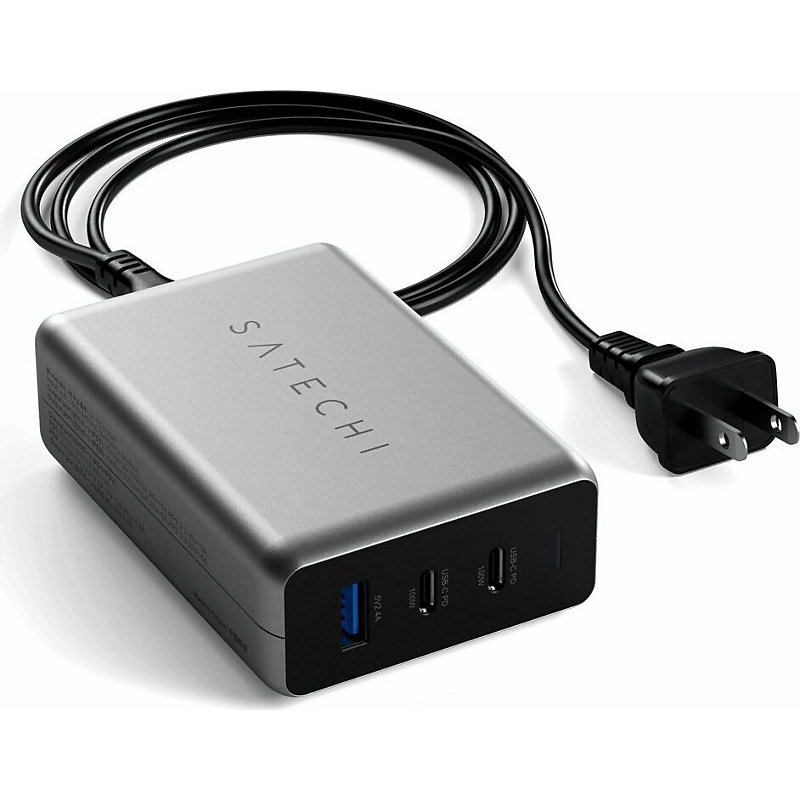
Satechi 100W USB-C PD Compact GaN Charger
Best for Your DeskBuy if: your charger never leaves the desk and you want the outlet free
Don't buy if: you need the best two-port split, or you carry the charger in a bag
The Satechi is the only pick here built to sit on a desk instead of hanging off a wall. A 3-foot detachable cord runs from the outlet to an aluminium block with rubber feet, and the ports face you — two USB-C and one USB-A. Either USB-C port gives the full 100W on its own, and the brick never blocks a second socket, because it never touches the wall at all.
It is also the pick with the weakest two-port split. Two USB-C devices in use means 60W for the laptop and 30W for the phone, and with all three ports the split is 60W, 30W and 12W. On a MacBook Air that 60W is still full speed. On a 14-inch Pro under load, it is a slow charge. The trade is the point: this charger is for a desk where the laptop is usually the only thing plugged in, and the phone joins for twenty minutes, not all day.
Pros
- Corded — sits on the desk, outlet stays free
- Full 100W from either USB-C port alone
- Aluminium body with rubber feet, built to stay put
- Ports face you — no reaching behind the desk
Cons
- Weakest two-port split here — 60W for the laptop
- No USB-C cable in the box
- 317g — the heaviest pick here
- No wattage display
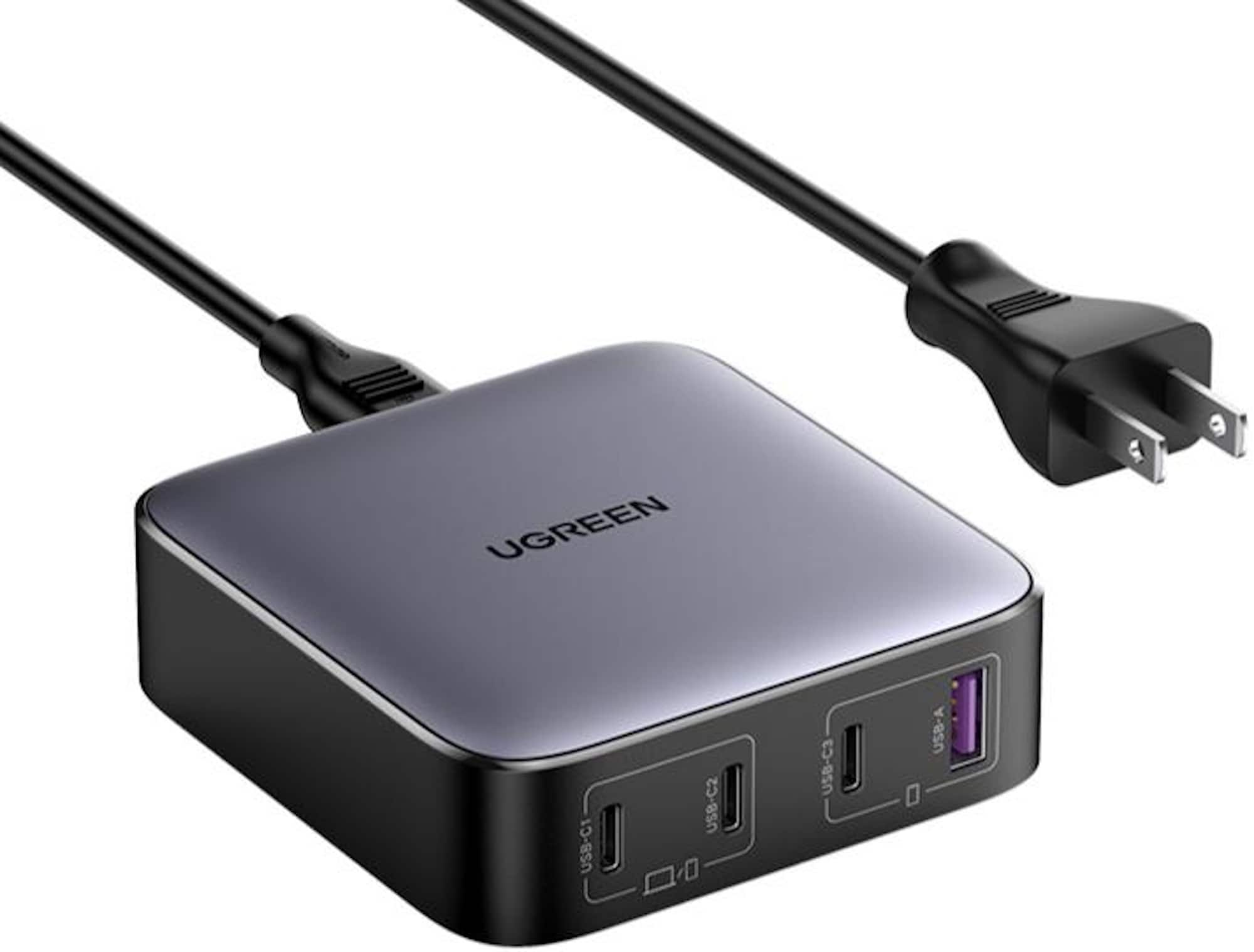
UGREEN Nexode 100W GaN Desktop Charging Station
Best Desktop StationBuy if: one corded base should charge your laptop, phone and tablet at once
Don't buy if: desk space is tight, or you want a wall brick
The UGREEN station is the four-port answer to the same problem. A detachable cord runs to a flat black base with three USB-C ports and one USB-A across the front, and the first two USB-C ports each give the full 100W on their own. With all four ports in use the split is 45W, 30W, 10.5W and 10.5W — enough to keep a laptop, a phone, a tablet and an accessory ticking over at once.
One thing to know before you buy: this station shares its electronics with UGREEN's wall Nexode 100W, the 40737 — the same split table, the same 100W ceiling, a different housing. That is not a flaw. The wall version hangs off an outlet; this one sits on a desk with its ports facing you and a cord long enough to reach the strip under it. If you already own the wall Nexode, this station adds nothing but the form. If you don't, the form is the whole reason to buy it.
Pros
- Four ports — laptop, phone and tablet from one base
- Full 100W from either of two USB-C ports
- Corded base — the outlet stays free, ports face you
- PPS support for Samsung Super Fast Charging
Cons
- Same electronics as the wall Nexode — buy it for the form, not the power
- No device cables in the box
- Biggest footprint here
- Check the model number — UGREEN sells several near-identical Nexode 100W units
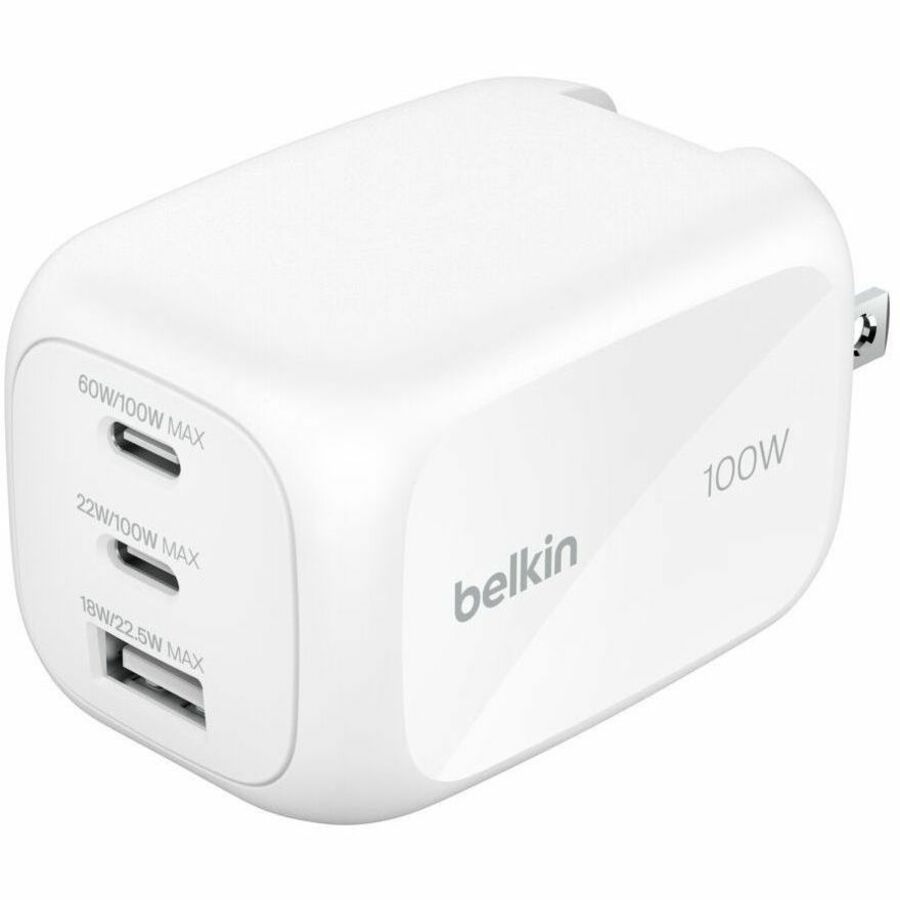
Belkin BoostCharge Pro 100W GaN Wall Charger
Best WarrantyBuy if: you want the strongest warranty on a 100W brick
Don't buy if: you need a cable in the box, or you want a corded desk unit
The Belkin is the wall brick with the best safety net. Two USB-C ports plus one USB-A, either USB-C giving the full 100W on its own, PD 3.1 with PPS, and a 2-year warranty backed by a $2,500 Connected Equipment Warranty — if the charger ever damages a connected device, Belkin covers it. No other pick here offers anything like that. At 176g with foldable prongs it is also light enough to move between desks, and some versions ship with interchangeable plug tips for travel.
I've seen conflicting data — TechFindLab lists the two-port split as 70W plus 30W, while ShaunChng's hands-on review measured 65W plus 30W. My read is the split shifts with the devices plugged in, so this guide uses the lower figure and the comparison table does too. With all three ports the split is 60W, 22W and 18W everywhere, which no source disputes. One thing Belkin doesn't say: whether a USB-C cable comes in the box. Don't assume one does.
Pros
- $2,500 Connected Equipment Warranty — the best cover here
- Full 100W from either USB-C port
- PD 3.1 with PPS and QC5
- 176g, foldable prongs, plug tips on some versions
Cons
- Two-port split disputed — 70W or 65W depending on the source
- Cable in the box not stated — assume it isn't
- Only 3 ports — no fourth for a second laptop
- Wall form — blocks the neighbouring socket
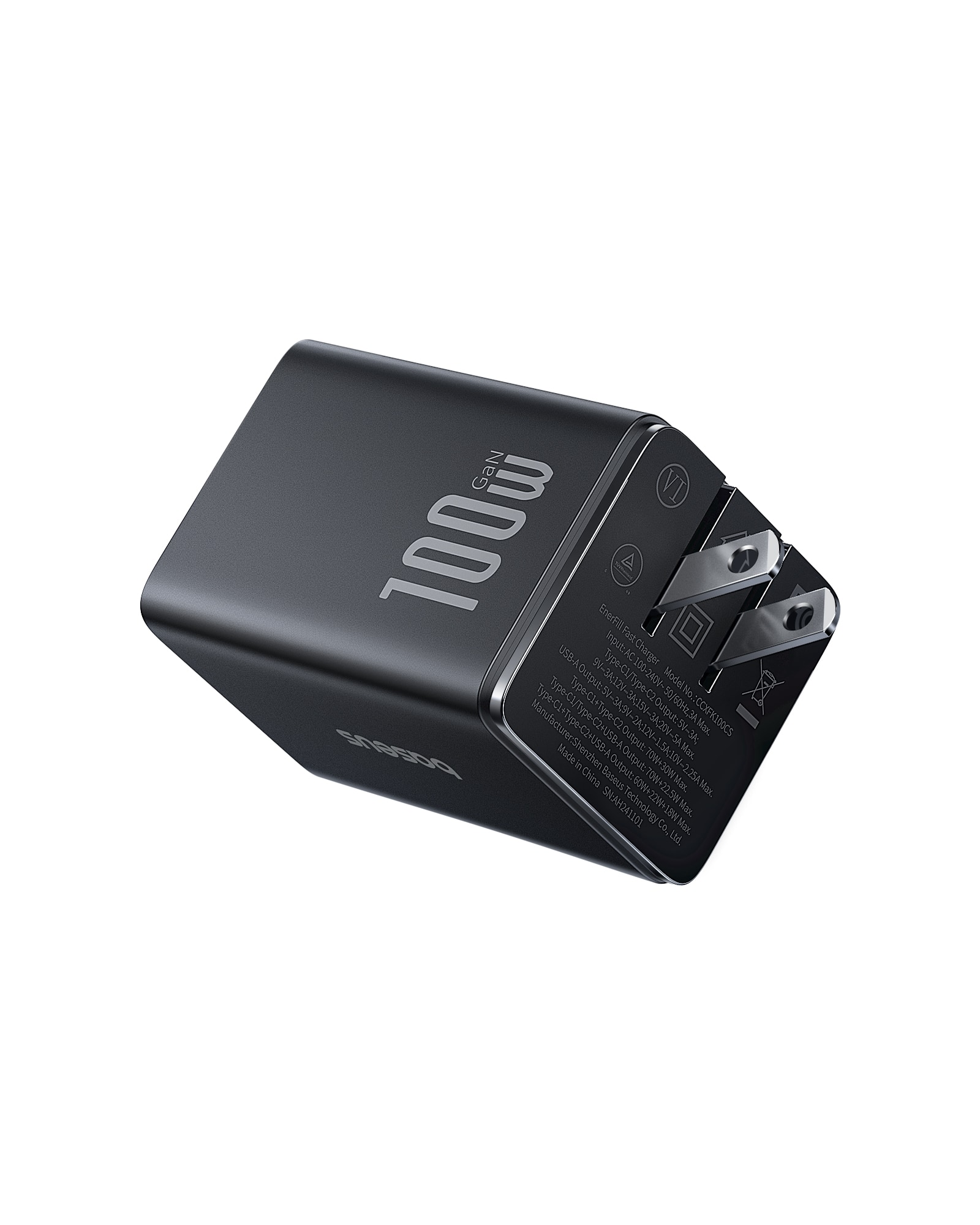
Baseus EnerFill 100W GaN Charger
Best BudgetBuy if: you want the cheapest real 100W brick from a known brand
Don't buy if: you need a cable in the box, or you want a warranty like Belkin's
The Baseus is the budget pick that doesn't cut the watts to get there. Two USB-C ports plus one USB-A, either USB-C giving the full 100W on its own, and the best two-port split in this guide — 70W for the laptop and 30W for the phone. With all three ports the split is 65W, 20W and 15W. PD 3.0, QC 3.0 and PPS are all supported, and the GaN build keeps it small enough for a crowded outlet strip.
Check the model number before you buy, because Baseus sells three different "100W GaN" chargers and only one of them is this one. The EnerFill CCXFK100CS is the one with two USB-C and one USB-A port — the model number is printed on the side of the brick, and the photo above shows it. The other two Baseus 100W units have different port layouts. Same wattage on the box, three different chargers — buy the CCXFK100CS. The manual lists the weight at 184g; one reviewer measured closer to 250g, and the maker's figure is the one this guide uses.
Pros
- Best two-port split here — 70W for the laptop
- Full 100W from either USB-C port
- PPS support for Samsung fast charging
- Foldable pins, small enough for a crowded strip
Cons
- No cable in the box
- Three Baseus 100W models — check it's the CCXFK100CS
- Weight figures disagree — 184g per the manual, ~250g per one review
- No wattage display
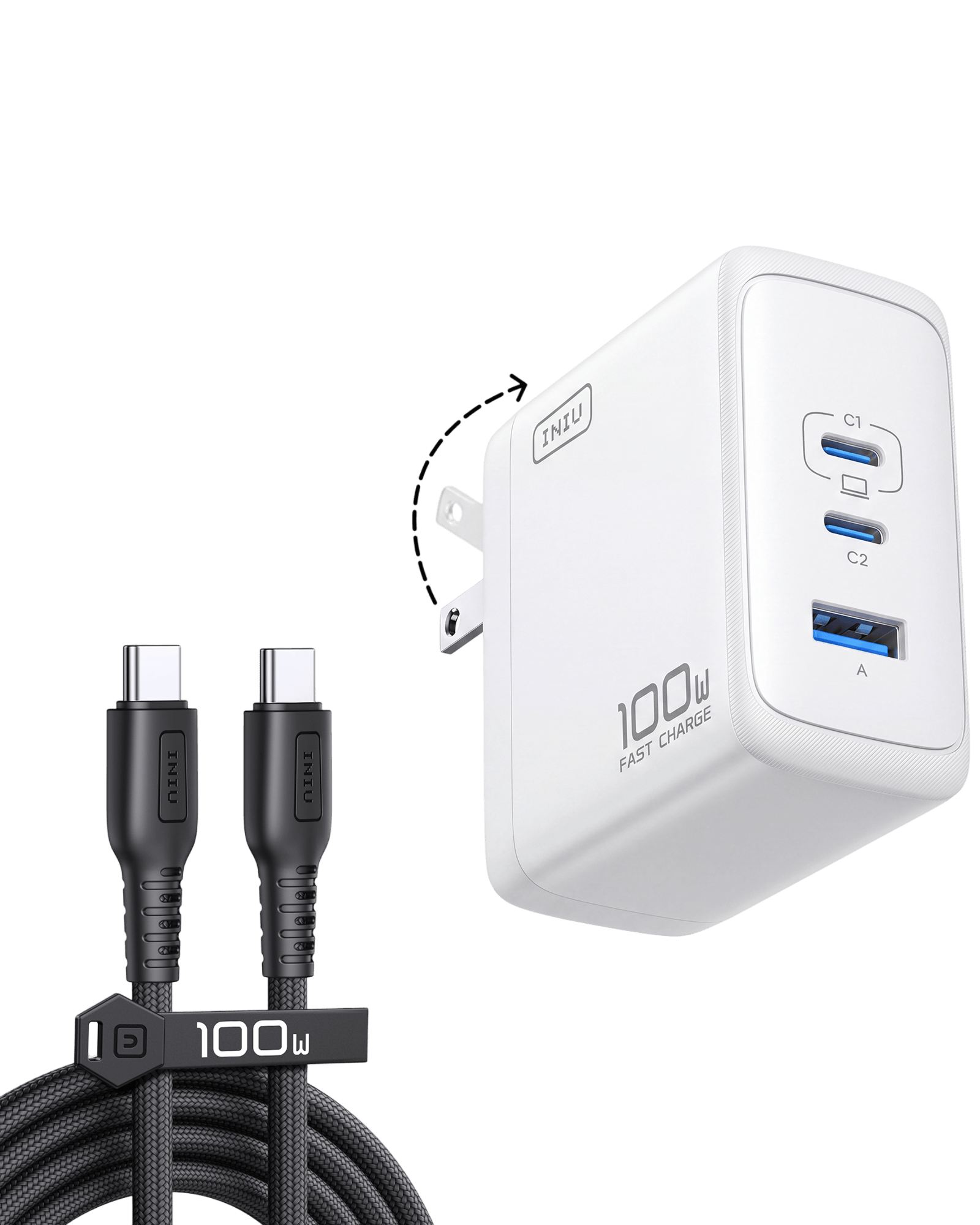
INIU Cougar A11 100W GaN Charger
Best Value BundleBuy if: you want the cable in the box and the best two-port split for the money
Don't buy if: you want a big-name brand, or you need a fourth port
The INIU is the only pick here that ships ready to use. Two USB-C ports plus one USB-A, either USB-C giving the full 100W on its own, and a 5-foot braided 100W USB-C cable in the box — the cable every other pick here makes you buy separately. The two-port split matches the Baseus at 70W for the laptop and 30W for the phone, and with all three ports it is 45W, 30W and 22.5W. Foldable plug, 3-year warranty, and ETL and FCC listings on the box.
INIU is the least-known brand on this page, and that is the honest trade. The charger does the same job as the Baseus with a cable included and a longer warranty, for about the same money. What it doesn't have is Belkin's equipment warranty or Anker's track record. If the brand name matters to you, buy the Baseus and add a cable. If the bundle matters more, this is the pick.
Pros
- 5-foot braided 100W cable included — the only bundle here
- Best two-port split here — 70W for the laptop
- Full 100W from either USB-C port
- 3-year warranty, foldable plug
Cons
- Least-known brand on this page
- Only 3 ports — no fourth for a second laptop
- No wattage display
- All-three-ports split drops the laptop to 45W
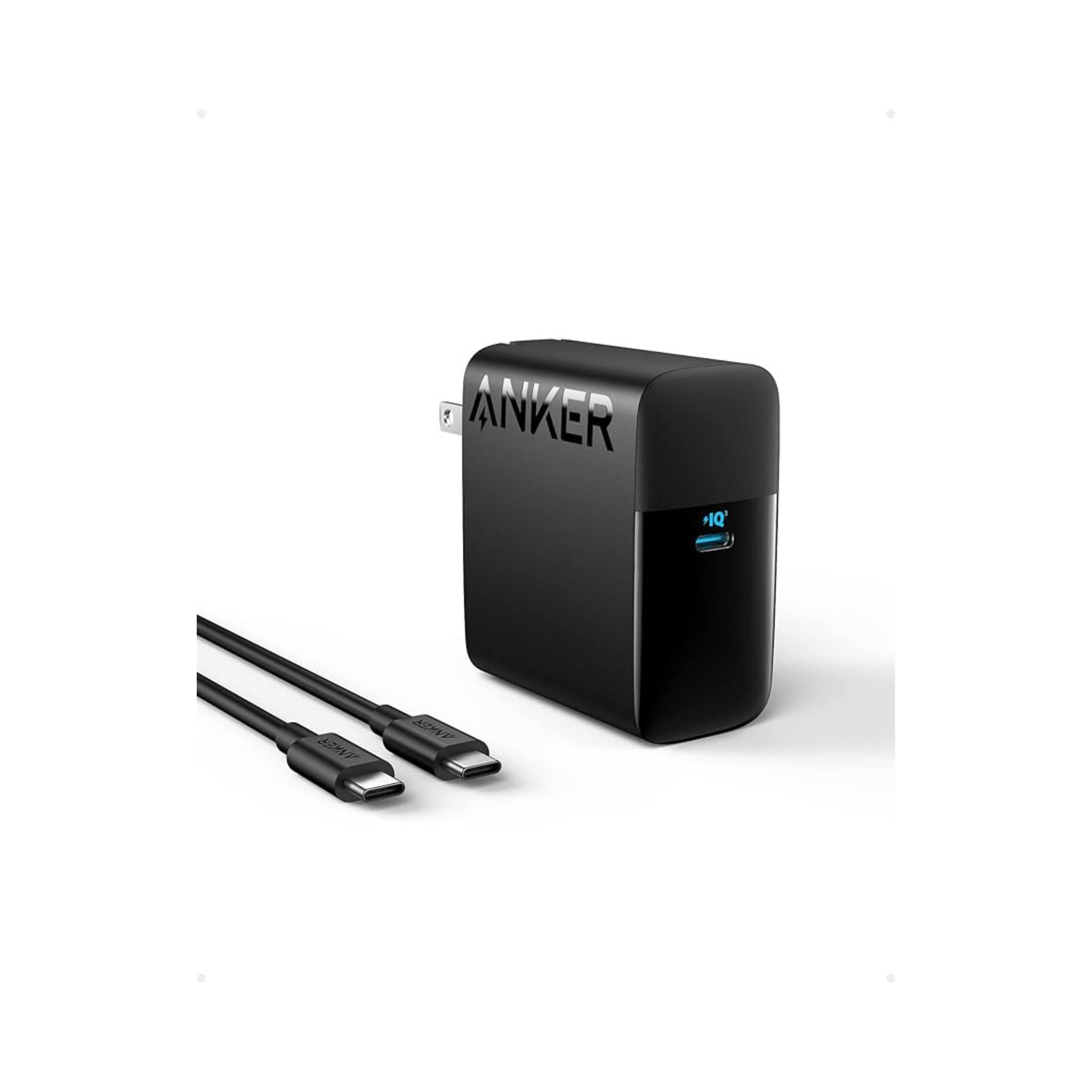
Anker 317 Charger 100W
Best Single-PortBuy if: the laptop is the whole job and you want the simplest 100W charger there is
Don't buy if: you charge a phone from the same brick, or you want GaN
The Anker 317 is deliberately simple: one USB-C port, up to 100W, and nothing else to think about. No split to check, because there is nothing to split — the laptop gets the full 100W, always. A 5-foot 5A USB-C cable comes in the box, the plug folds flat, and PowerIQ 3.0 with ActiveShield watches the temperature. It is the cheapest Anker 100W charger and the easiest one to buy right.
Two things to know. First, this is not a GaN charger — Anker's own pages don't present it as one, whatever the roundups say. It runs warmer and bigger than the GaN bricks here, and that is the price of the simple design. Second, one port is one port. A phone means a second brick, which is exactly the problem this guide is trying to solve. The 317 is the right charger for a desk with one laptop and a phone charger that already lives somewhere else.
Pros
- Full 100W always — no split to check
- 5-foot 5A cable included in the box
- Foldable plug, simplest setup here
- PowerIQ 3.0 with ActiveShield temperature monitoring
Cons
- One port only — a phone needs a second brick
- Not a GaN charger — bigger and warmer than the GaN picks
- No PPS for Samsung fast charging
- 18-month warranty — the shortest here
Do I Need a Special Cable for 100W Charging?
Yes, above 60W. A standard USB-C cable tops out at 60W, so a 100W charger on a cheap cable silently delivers 60W. You need a 5A e-marked cable — and for 140W, a 240W EPR cable.
The cable is the trap nobody budgets for. A USB-C cable carries a tiny chip — an e-marker — that tells the charger how much current it can safely pass. A standard cable is rated for 3 amps, which caps it at 60W. Plug a 100W charger into it and the charger plays safe: 60W, no warning, no error light. Your laptop charges slowly and nothing tells you why.
Here's the thing: the cable is the cheapest part of the kit and the easiest to get wrong. For 100W you need a 5A e-marked cable, usually printed "100W" on the connector. For 140W you need a 240W EPR cable, or the charger falls back to 100W — and ChargeTechLab's testing shows the fallback is silent. The INIU and the Anker 317 ship with a cable in the box, which is one less thing to buy, but for every other pick here the cable is a separate purchase. Check the print on the connector before you plug it in.
Look — if you're setting up one desk, here's what actually works: one braided 100W e-marked cable, one metre long. It charges the laptop at full speed and the phone too, and it survives being coiled and uncoiled every day. A two-metre cable weighs more and charges no faster.
The 65W Trap: The "100W" Desktop Station That Isn't
Some "100W" desktop stations only give 65W from a single port. The box number is the total across six ports — and no one port ever sees 100W.
The worst offender is UGREEN's own 100W 6-port desktop charging station: four USB-C ports, two USB-A, an AC cord, and a single-port maximum of 65W. It cannot fast-charge a 100W laptop, despite the "100W" in its name. It shows up in "100W desktop charger" searches because the listing says 100W. Read the per-port figure, not the headline.
UGREEN's model numbers make the trap worse. The 40737 is the wall charger. The 90928 is the desktop station in this guide. The Nexode Pro X757 is a three-port compact unit. The Nexode Air is a slim three-port. Same brand, same "100W", four different forms, four different splits, and listings that mix them up — one UGREEN page even says "2 USB-C plus 1 USB-A" for a four-port unit. Check the model number on the listing before you buy, and check the single-port figure on the spec sheet. If a "100W" charger doesn't print a 100W single-port figure, it isn't one.
One rule saves you from all of it: if the listing can't tell you what one port gives your laptop alone, don't buy it.
How to Set Up Your Desk Charger in 5 Steps
Measure first, buy second, and the setup takes five minutes. Get the wattage right and the rest is just placing things.
To set up a 100W desk charger, follow these steps: 1. Match the charger to your laptop's wattage. 2. Put the charger where it will live. 3. Check the port split. 4. Add a 5A e-marked cable. 5. Test the laptop alone, then add your phone.
- Check your laptop's wattage need. Find it in the table above — a MacBook Air needs 30 to 65W, a 14-inch Pro 65 to 100W, a 16-inch Pro 96 to 140W, a Dell XPS 15 needs 90W.
- Put the charger where it will live. Corded on the desk if it never moves, wall brick if it travels between rooms. A corded unit keeps the outlet free.
- Read the port-split table. Check what your laptop gets alone and what it gets with a phone plugged in — the two-device figure is the one that matters.
- Add a 5A e-marked cable if the box has none. One braided 100W cable, one metre long. A standard cable caps the whole setup at 60W.
- Test the laptop alone, then add the phone. Plug the laptop in first and check it shows 100W, then plug the phone in and watch the laptop's figure. If it drops below what your laptop needs, you bought the wrong split.
Quick note: plug the laptop into the port marked 100W, not just any USB-C port. On the UGREEN station and the Satechi, only the first two USB-C ports give the full 100W — the third tops out near 22W.
Buying Guide: What Actually Matters
After the wattage check, the four things worth your attention are the port split, the form, the cable and the warranty — in that order.
The port split comes first because it decides what your laptop actually gets. Read the maker's split table, not the box number. A brick that gives 100W alone and 70W with a phone is a good desk charger. A brick that gives 100W alone and 30W with a phone is a phone charger with delusions.
Form comes second, and it is the choice this guide exists to make. A corded charger sits on the desk and keeps the outlet free. A wall brick hangs off the outlet and blocks the socket next to it. If the charger never leaves the room, buy the corded form — the wall brick's smallness is a feature you will never use.
The cable comes third, and only because you buy it once. Get the 100W e-marked cable, one metre, braided, and stop thinking about it. The wrong cable quietly caps everything else you bought, and it is the cheapest part of the kit to get right.
Warranty comes last, and it is where the Belkin earns its place. A $2,500 Connected Equipment Warranty covers the laptop if the charger ever fails badly. Anker gives 18 months, INIU gives 3 years, and the rest sit in between. On a device that pushes 100W through your laptop all day, the warranty is not a footnote — it is the price of the risk.
One last question worth asking: 65W vs 100W. If your laptop is a MacBook Air or an XPS 13, a 65W brick charges it at full speed for less money and less bulk. The 100W tier only pays off on a 14-inch Pro or bigger. Buy the watts your laptop drinks. Nothing more.
Chargers to Skip in 2026
The "100W" station that only gives 65W. UGREEN's 100W 6-port desktop station tops out at 65W from a single port. It is a fine phone-and-tablet station and a bad laptop charger. Skip it for any laptop that needs 100W.
65W bricks in 100W lists. One roundup in the top ten recommends a 65W Anker Nano inside a 100W article. A 65W brick is a good charger and the wrong answer to this search — it will never give your laptop 100W, whatever the headline says.
No-name 100W bricks. A 100W label on an unknown brand is a claim, not a fact. Buy a known brand with real certification — the failure mode of a cheap high-wattage charger is heat, and heat on a desk all day is the one thing you don't want to discover at 2 a.m.
Old pre-GaN desktop units. The Satechi 108W Pro is a 2020 pre-GaN desktop unit at 417g with a detachable cord — superseded by the ST-TC100GM in this guide. The Belkin 108W is a desk unit at 330g with a two-metre cord. Both still show up in "best 100W charger" lists. Skip them both.
Frequently Asked Questions
What's the best 100W USB-C laptop charger in 2026?
The Satechi 100W Compact GaN — a corded desk charger that gives your laptop the full 100W and keeps the outlet free.
Is a 100W USB-C charger enough for a laptop?
For most laptops, yes. It covers a MacBook Air, a 14-inch Pro and a Dell XPS 15 at full speed. A 16-inch Pro needs 140W for full speed.
Why does my 100W charger only show 65W?
The 100W is the total across all ports. Plug in a phone and most bricks cut the laptop port to 65W. Check the port split before you buy.
Should I buy a one-port or multi-port 100W charger?
One port if the laptop is the whole job — it always gets the full 100W. Multi-port if a phone and tablet share the brick.
Do I need a special cable for 100W charging?
Yes. A standard USB-C cable caps at 60W. You need a 5A e-marked cable, usually printed "100W" on the connector.
Can I use a 100W charger on a laptop that only needs 65W?
Yes. The laptop only draws what it needs, so a 100W brick is safe on a 65W laptop — just bigger than you need.
Is a 100W charger safe for my laptop?
Yes, with a known brand. USB Power Delivery negotiates the watts, so the charger never forces 100W into a laptop that wants less.