Best CPU Coolers for Gaming PC in 2026: 6 Picks

November 2026 is a strange month to buy a CPU cooler. The coolers themselves have never been better value — a $35 air cooler now does the job a $150 liquid cooler did a few years ago — but the guides ranking them have not kept up. The biggest name in the field still crowns a cooler that has been superseded, two of the best 2026 releases are missing from its list entirely, and several roundups still recommend a brand Americans cannot legally buy any more. This guide is current as of 15 November 2026: every pick is buyable in the US today, every price was verified this week, and every variant trap is named.
One thing this guide will not do is pretend we tested these coolers ourselves. Every temperature and noise figure below is attributed to the outlet that measured it — Tom's Hardware, PC Gamer, GamersNexus-derived data — and where sources disagree, the disagreement is printed, not hidden.
Quick Comparison
| Product | Key Specs | ||
|---|---|---|---|
| #1 | Thermalright Peerless Assassin 120 SE ARGBTop Pick · Best for Most | Dual tower · 265W rated · 155mm tall · ~$35 | Check Price |
| #2 | Arctic Liquid Freezer III Pro 360 A-RGBBest AIO | 360mm · 38mm radiator · VRM fan · $121.71 | Check Price |
| #3 | Thermalright Royal Pretor 130Best Big Air Cooler | Dual tower · 120+130mm fans · >259W · $52.90 | Check Price |
| #4 | Noctua NH-D15 G2Best Premium Air | Dual tower · 2× 140mm · 168mm tall · $159.95 | Check Price |
| #5 | NZXT Kraken Elite 360 RGBBest Showcase AIO | 360mm · 2.72" LCD · RGB ring · $299.99 | Check Price |
| #6 | Cooler Master Hyper 212 Halo WhiteBest Budget Air | Single tower · 180W max · 154mm tall · $29.99 | Check Price |
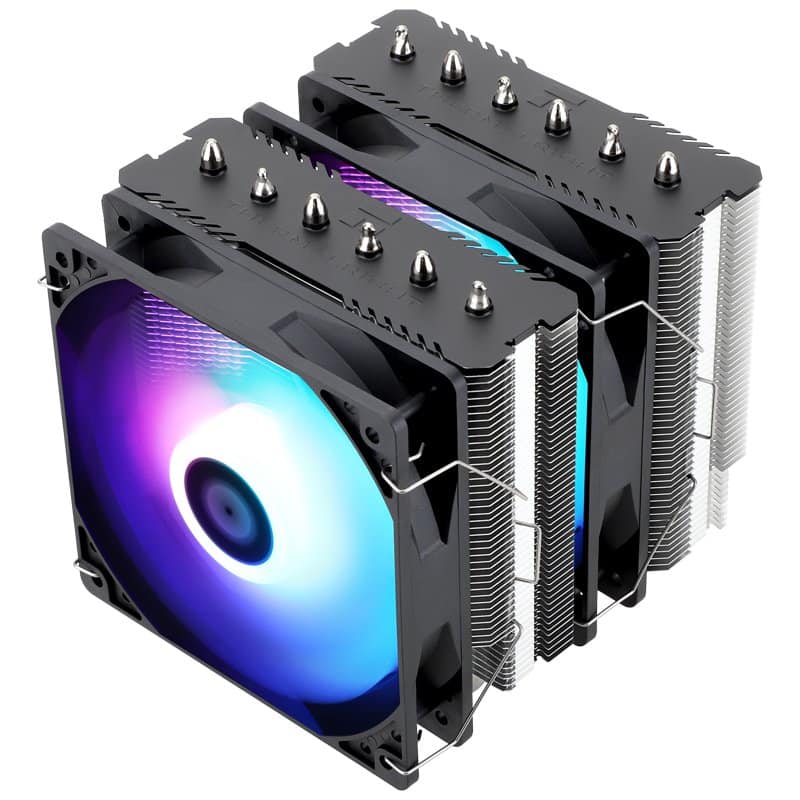
Thermalright Peerless Assassin 120 SE ARGB
Top Pick · Best for MostBuy if: your CPU draws up to about 200W — that is nearly every gaming CPU sold today, including the Ryzen 7 9800X3D
Don't buy if: you run a Core i9-14900K at full tilt (300W+) or you want a screen on your cooler
The Peerless Assassin 120 SE ARGB is the default answer to this whole question, and every serious roundup agrees: Tom's Hardware calls it the best cooler for most builders, PCGamesN crowns it best overall, and it costs less than a game. It is a dual-tower air cooler with two 120mm fans and six heat pipes, rated for 265W, and it handles a 200W-plus Intel i9-12900K without breaking a sweat (Tom's Hardware). For the most-bought gaming CPU of 2026, the Ryzen 7 9800X3D, it lands within 3–5°C of a $150 AIO — because on that chip, the 3D V-Cache under the cores is the thermal bottleneck, not the cooler.
The honest caveats are small. Installation is fiddly — the long screwdriver has to thread between the two towers — and the front fan sits over the first RAM slot, so very tall RGB memory may need the fan raised a few millimetres. And the 265W rating has a real ceiling: PCGamesN is blunt that it cannot handle the 300W-plus of a Core i9-14900K, so flagship Intel buyers should look at the Royal Pretor 130 or the Arctic 360 below. None of that changes the verdict: for most gaming builds, this is the cooler, and the $35 it costs is the best money in the whole build.
Pros
- Cools every mainstream gaming CPU to ~200W for around $35 — the best price-to-performance in cooling
- Within 3–5°C of a $150 AIO on the Ryzen 7 9800X3D
- Quiet at gaming loads — 25.6 dBA stated, and near-silent in practice at 200W
- Supports AM5, LGA1851 and LGA1700 — the current sockets
Cons
- Cannot handle 300W+ flagship CPUs (Core i9-14900K)
- Fiddly install — the mounting screwdriver threads between the towers
- Front fan overhangs the first RAM slot; very tall RGB sticks may need it raised
Street price around $35, widely reported across Nov 2026 roundups (PCGamesN, Tom's Hardware, MaxMyBuild). Check the price before buying, as prices change.
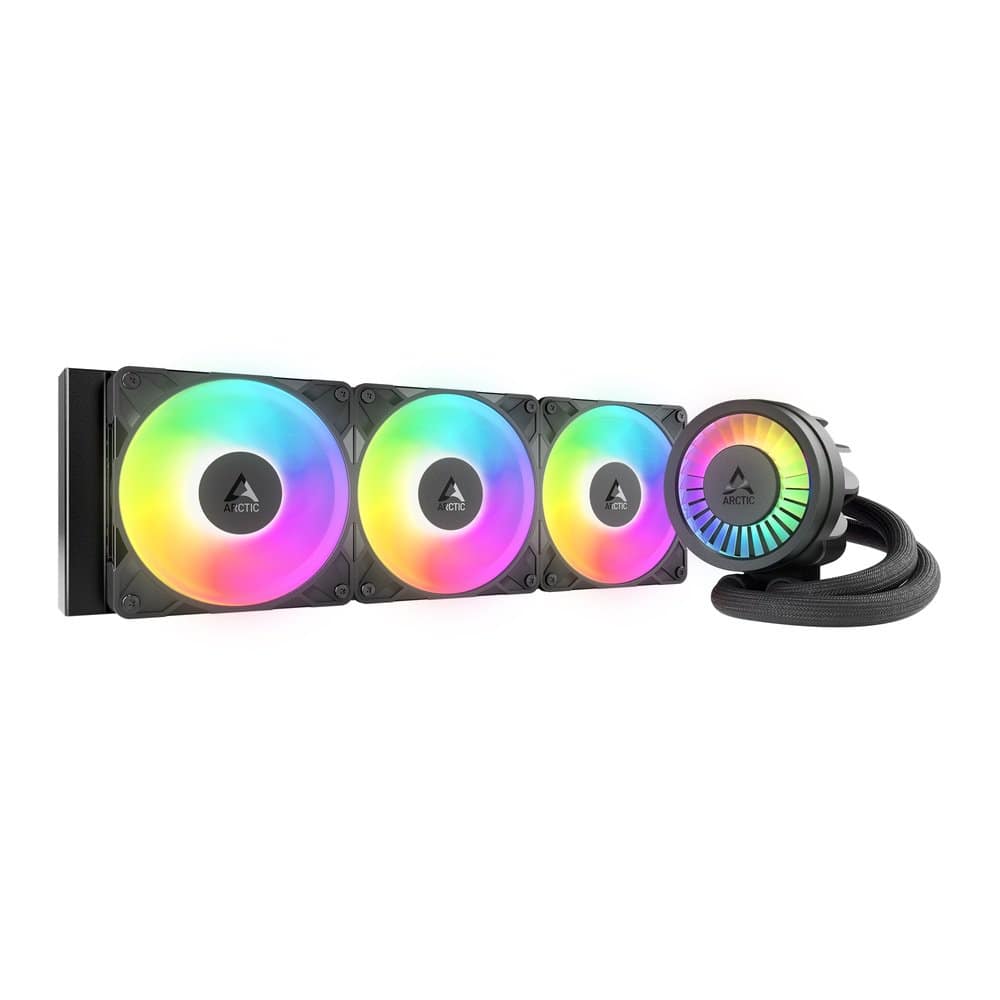
Arctic Liquid Freezer III Pro 360 A-RGB
Best AIOBuy if: your CPU sustains 200W or more, you overclock, or your case cannot fit a tall air tower
Don't buy if: you run a 9800X3D or any CPU under 150W — a $35 air cooler does the same job for a third of the money
The Liquid Freezer III Pro 360 is the AIO that earns its price, and it is the one Tom's Hardware and PC Gamer both crown as the best liquid cooler of 2026. The Pro is not a paint job on the standard Liquid Freezer III: it gets P12 Pro fans that spin to 3,000 RPM, denser radiator fins, and an Intel offset contact frame, and Arctic claims up to 10°C better than the non-Pro on Intel at matched noise — treat that as the vendor's claim, not a measured fact, but the independent reviews back the direction of it. There is also a small VRM fan built into the pump block, cooling the motherboard power delivery that a big air tower's airflow used to cover.
Two honest warnings before you buy. First, the radiator is 38mm thick — 13mm thicker than a standard AIO radiator — so a case that fits a normal 360mm radiator may not fit this one with fans attached; measure the mount, not just the length. Second, it is loud at full tilt: PC Gamer measured 52 dB(A) from 40cm at maximum speed, so run it on a curve, not flat out. And check your motherboard headers: the whole unit draws about 1.4A, which can overload a 1A fan header — use the pump or AIO header, or a hub.
Pros
- The best 360mm AIO of 2026 by Tom's Hardware and PC Gamer's testing
- P12 Pro fans to 3,000 RPM plus an integrated VRM fan — the pump block cools the motherboard too
- Offset mounting for AMD and Intel, and a 6-year warranty
- Also available in 240, 280 and 420mm if 360 does not fit
Cons
- 38mm radiator is 13mm thicker than standard — measure the mount before ordering
- Loud at maximum speed (52 dB(A) at 40cm, PC Gamer) — needs a fan curve
- Draws about 1.4A — can overload a 1A motherboard fan header
List price $121.71 at Best Buy (sale, checked 15 Nov 2026); Tom's Hardware found it at $88 on Amazon on 6 Nov 2026 — the street price moves fast, so check the live price before buying.
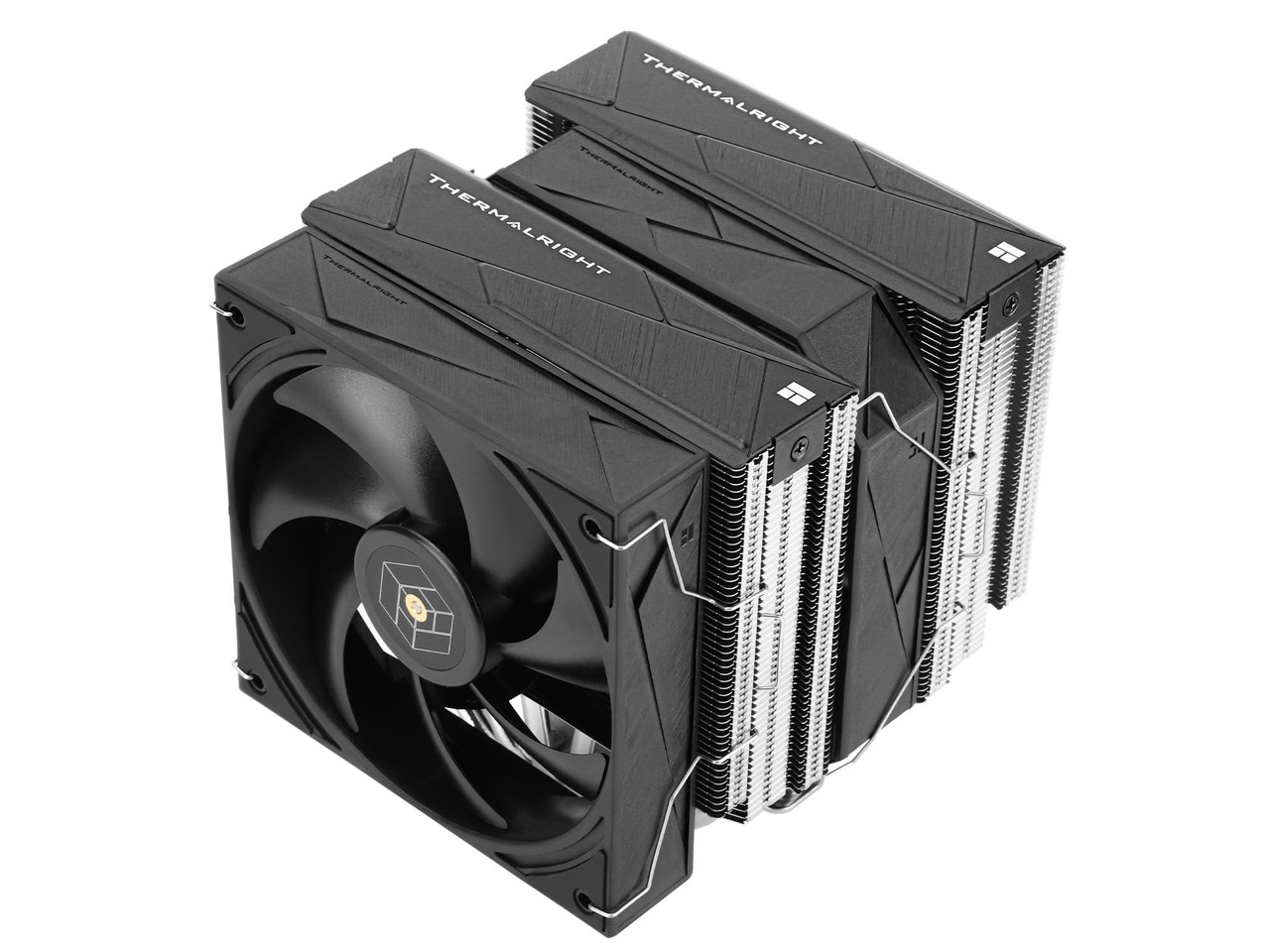
Thermalright Royal Pretor 130
Best Big Air CoolerBuy if: you want the strongest air cooling available and you run a hot CPU — a Core Ultra 9, a Ryzen 9, or a heavy overclock
Don't buy if: your case is short (it is 158mm tall) or your CPU draws under 150W — the Peerless Assassin does that job for $18 less
The Royal Pretor 130 is the cooler Tom's Hardware calls the best air cooler on the market, and the numbers explain why: it handled more than 259W on a Core i7-14700K and more than 254W on a Ryzen 9 9950X3D in Tom's testing, and its 243W noise-normalised result is the best air-cooling figure Tom's has ever measured — on par with a budget 360mm AIO. It does that with an unusual fan pairing: a 120mm fan and a 130mm fan on a dual tower, in a 130×112×158mm frame, for an MSRP of $52.90. That is $18 more than the Peerless Assassin and a whole tier more cooling.
The trap is the name. "Royal Pretor 130" is not one cooler: there is a standard version with six heat pipes, an Ultra Black version with seven, a white version, and a Digital version with a temperature display on top — all sold under near-identical listings. Buy the standard black six-heat-pipe model (the one pictured) unless you specifically want one of the others, and check the listing before paying: some sellers price the Ultra Black near $100, which is not the $52.90 cooler this card describes.
Pros
- Strongest air cooler Tom's Hardware has measured — over 259W handled, 243W noise-normalised
- On par with a budget 360mm AIO, with no pump, no liquid, and nothing to leak
- $52.90 MSRP — $18 over the Peerless Assassin for a full tier more headroom
- Supports AM5, LGA1851 and LGA1700
Cons
- 158mm tall — check your case's maximum cooler height first
- Four near-identical variants (standard, Ultra Black, white, Digital) — easy to buy the wrong one
- Overkill for CPUs under 150W — the cheaper Peerless Assassin is the better buy there
MSRP $52.90 (Tom's Hardware). Check the price before buying, as prices change — and confirm the listing is the standard six-heat-pipe model, not the Ultra Black.
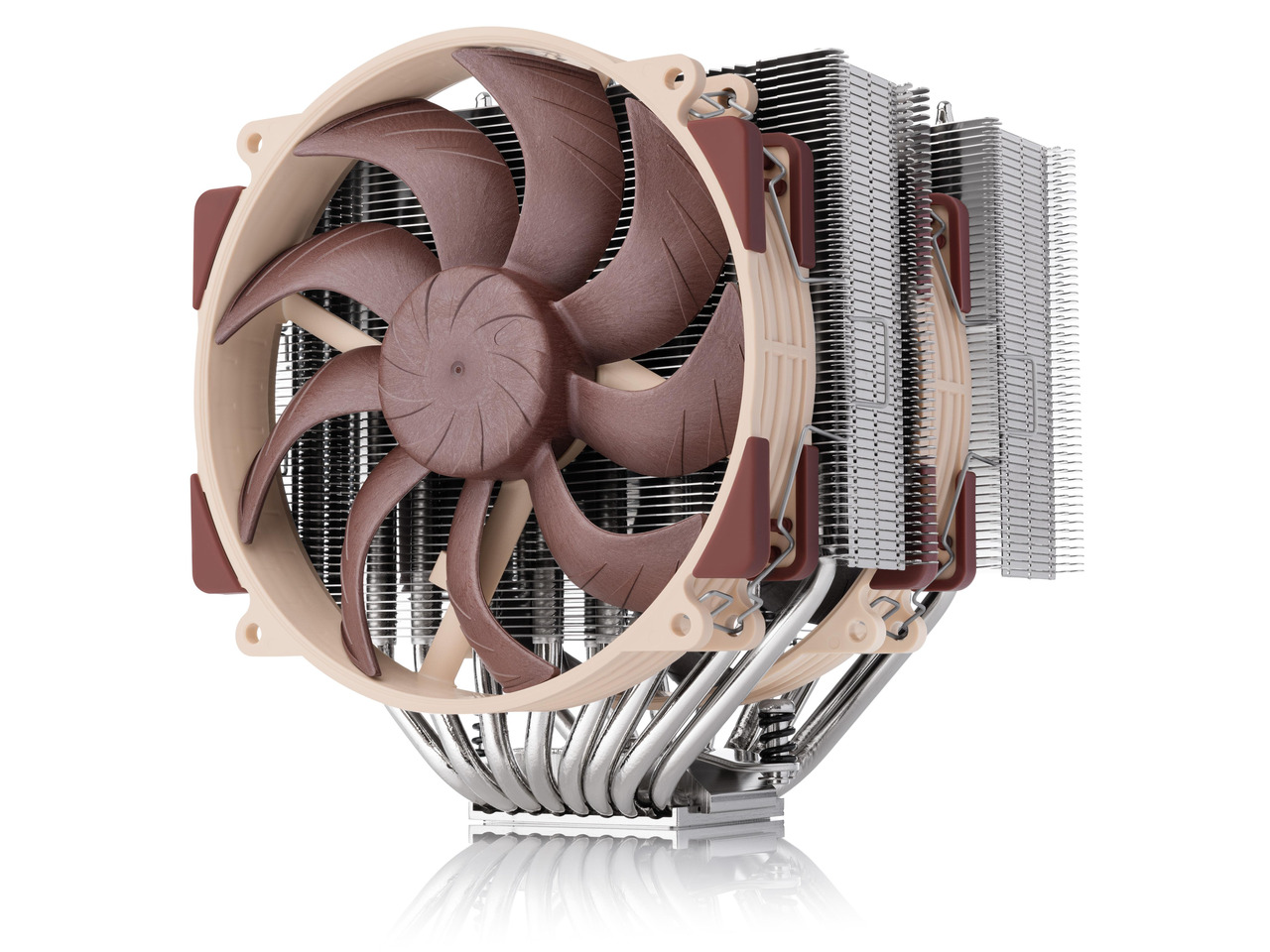
Noctua NH-D15 G2
Best Premium AirBuy if: you want the quietest, best-built air cooler money can buy and you will keep it through two or three CPU upgrades
Don't buy if: you want the best cooling per dollar — the Royal Pretor 130 is within a degree or two for a third of the price
The NH-D15 G2 is the cooler the original NH-D15 should have been: two new NF-A14x25 G2 140mm fans, eight heat pipes, and a redesigned fin stack in a 168mm-tall, roughly 1.5kg dual tower. It is about 1–2°C better than the original NH-D15, which does not sound like much — and it isn't, on paper — but the G2 is quieter doing it, and it carries a 6-year warranty and Noctua's free mounting-kit policy, which means this is the last air cooler you buy for a decade. That is the whole case for it: not the temperature, the ownership.
The trap is the variant. The G2 comes in three versions — Standard, HBC (high base convexity, for Intel) and LBC (low base convexity, for AMD) — and the LBC is AMD-only: fitting it on an Intel board costs performance, not gains it. The LBC shaves about 1–2°C on AM5, so buy it only if you are certain you are staying AMD. There is also a chromax.black version, which is the same cooler in black, not a performance tier. And do not confuse the G2 with the original NH-D15 at $109.95: the original is the value alternative, the G2 is the premium one, and they are different coolers with different prices.
Pros
- The quietest premium air cooler — superb acoustics at full load
- 6-year warranty plus free mounting kits for future sockets — buy once, keep for a decade
- About 1–2°C better than the already excellent original NH-D15
- Supports AM5, LGA1851 and LGA1700 (Standard version)
Cons
- $159.95 — three times the Royal Pretor 130 for 1–2°C
- 168mm tall and blocks the first two DIMM slots with tall RAM
- Three variants (Standard, HBC, LBC) — the LBC is AMD-only and must not go on Intel
List price $159.95 at Amazon (reported Sep 2026, still current in Nov 2026 roundups); launch price was $150. The chromax.black version is $169.95. Check the price before buying, as prices change.
NZXT Kraken Elite 360 RGB
Best Showcase AIOBuy if: you want a screen on your cooler and a build that looks as good as it performs — and you accept paying double the Arctic for the display
Don't buy if: you want the best cooling per dollar — the Liquid Freezer III Pro 360 cools as well for $178 less
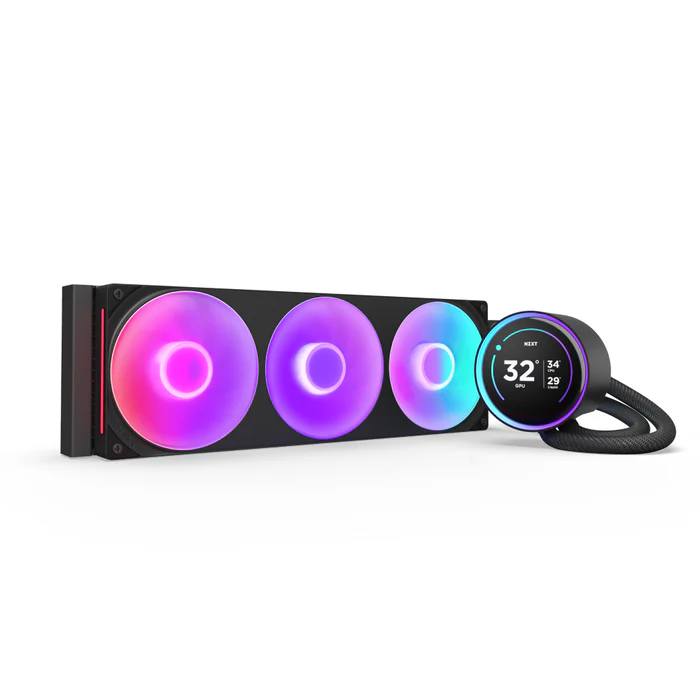
The Kraken Elite 360 RGB is the showpiece AIO: a 2.72-inch round IPS LCD on the pump, 640×640 at 60Hz, ringed by RGB, with a single-frame F360 RGB Core fan and NZXT's Turbine pump behind it. The screen shows temperatures, a clock, or any image you like, and it is the reason this cooler exists — nobody buys a $299.99 AIO for its thermal performance alone, and NZXT knows it. Under the display it is a solid 360mm cooler with a 6-year warranty, support for LGA1851, LGA1700, AM5 and AM4, and NZXT CAM software for the screen and the fan curves.
The trap is the tier. "Kraken Elite" is now three coolers: the Elite with the 2.72-inch round LCD, the Plus with a smaller 1.54-inch square LCD, and the Core with RGB only and no display at all — and the 2023 Kraken Elite, with its 2.36-inch screen, is a different, superseded product still circulating in old listings. Buy the 2024 model by its part number: RL-KR36E-B2 in black, RL-KR36E-W2 in white. The non-RGB Elite 360, with three plain F120P fans, is $279.99 at NZXT and $259.99 at Best Buy if the RGB ring is not worth $20–40 to you.
Pros
- The best-looking AIO on the market — a 2.72" 640×640 IPS LCD with an RGB ring
- Solid 360mm cooling with a 6-year warranty
- Supports LGA1851, LGA1700, AM5 and AM4
- The F360 RGB Core fan is a single frame — one cable, no fan-to-fan wiring mess
Cons
- $299.99 — double the Arctic for the same cooling, the difference is the screen
- Three tiers (Elite, Plus, Core) plus a superseded 2023 model — easy to buy the wrong one
- NZXT CAM software is required for the screen and full fan control
List price $299.99 at NZXT (checked 15 Nov 2026); the non-RGB Elite 360 is $259.99 at Best Buy. Check the price before buying, as prices change — and confirm the part number RL-KR36E-B2 (black) or RL-KR36E-W2 (white).
Cooler Master Hyper 212 Halo White
Best Budget AirBuy if: your CPU draws 105W or less — a Ryzen 5 7600X, a Core Ultra 5 — and you want the cheapest cooler worth owning
Don't buy if: your CPU draws more than 105W — the Peerless Assassin 120 SE is $5 more and handles twice the heat
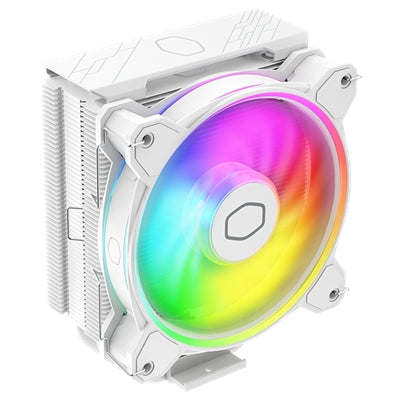
The Hyper 212 is the oldest name in CPU cooling, and the Halo White is its current form: a single tower with one 120mm Halo² ARGB fan, 154mm tall, rated for 180W maximum TDP. For a Ryzen 5 7600X or any CPU at 105W or under, it is enough — quiet, simple to install, and it looks far better than its price suggests in a white build. One 4-pin PWM cable powers both the fan and the lighting, so there is no extra wiring to hide.
The honest version: this is the floor, not the sweet spot. The Peerless Assassin 120 SE ARGB costs about $5 more and handles 265W against the Halo's 180W — for almost every buyer, the extra $5 is the better spend. The Halo earns its place here for exactly two buyers: a white-themed build on a tight budget, and a low-power CPU where a dual tower is genuinely wasted. And mind the family: the Hyper 212 name covers a dozen variants — Halo, Spectrum, Black, V2, EVO — with different fans, prices and TDPs. The one in this card is the Halo White, part number RR-S4WW-20PA-R1; the black Halo is RR-S4KK-20PA-R1.
Pros
- $29.99 — the cheapest cooler in this guide that is actually worth buying
- Single 4-pin PWM cable powers the fan and the ARGB lighting
- 154mm tall and compact — fits cases and RAM the dual towers cannot
- Supports AM5, LGA1851 and LGA1700
Cons
- 180W maximum TDP — not enough for a Ryzen 7, Core i7, or anything hotter
- The Peerless Assassin 120 SE is about $5 more and handles 265W
- A dozen Hyper 212 variants share the name — check the part number before paying
List price $29.99 at the Cooler Master US store (Nov 2026); Amazon street price around $29–33. Check the price before buying, as prices change.
Which Cooler Matches Your CPU?
Match the cooler to your CPU's sustained wattage, not its name. A good rule is 20–30% headroom over the CPU's TDP — the cooler should be rated for comfortably more than the chip will ever draw. The table below is the whole buying decision for most readers.
| Your CPU | Sustained Power | Buy This |
|---|---|---|
| Ryzen 5 7600X, Core Ultra 5 | Up to ~105W | Hyper 212 Halo White ($29.99) — or any single tower rated 180W |
| Ryzen 7 9800X3D, Ryzen 7, Core i7 | 120–200W | Peerless Assassin 120 SE ARGB (~$35) — the default pick |
| Ryzen 9 9900X, Core Ultra 7 | 150–200W | Peerless Assassin 120 SE ARGB or Royal Pretor 130 ($52.90) for headroom |
| Ryzen 9 9950X3D, Core Ultra 9 285K | 200–250W | Royal Pretor 130 (>259W tested) or Liquid Freezer III Pro 360 |
| Core i9-14900K, heavy overclocking | 250–300W+ | Liquid Freezer III Pro 360 or Kraken Elite 360 — air cannot do 300W+ |
Two notes on the table. First, the 9800X3D sits in the 120–200W row but behaves like a lighter chip: its 3D V-Cache is the thermal bottleneck, so a bigger cooler buys almost nothing on it (see the 9800X3D section below). Second, "sustained" is the operative word — a CPU that spikes to 250W for ten seconds and settles at 150W is a 150W CPU for cooling purposes.
Do I Need Liquid Cooling for Gaming?
No — not for most gaming PCs. A $35 dual-tower air cooler handles every mainstream gaming CPU up to about 200W, quietly, with no pump to fail and nothing to leak. Air cooling wins on price, on reliability, and on the fact that there is nothing in it that wears out: the fans are replaceable, the heatsink lasts forever.
Liquid earns its price in three cases. First, a CPU that sustains 200W or more under load — a Core i9-14900K, a Ryzen 9 9950X at full tilt, or a heavy overclock — where a 360mm AIO is genuinely cooler than any air tower. Second, a case too short for a tall air tower: a 240mm AIO fits where a 168mm Noctua cannot. Third, a showcase build, where the screen on a Kraken Elite or the clean look of a radiator is the point. For everyone else, the air cooler is the right call — and the $60–200 you save buys RAM, which in November 2026 is the part that actually costs money.
One more thing the field gets wrong: a 120mm AIO is not a middle ground. A single-tower air cooler matches it for less money, with no pump and no leak risk. If you are buying liquid, buy 240mm or larger.
What's the Best CPU Cooler for the Ryzen 7 9800X3D?
The Thermalright Peerless Assassin 120 SE ARGB, at around $35. The 9800X3D is the most-bought gaming CPU of 2026 and the one every main roundup ignores in its own section — so here is the answer plainly.
The 9800X3D draws about 120W under load. More importantly, its 3D V-Cache sits under the cores, and AMD's own figures put the core-side thermal resistance 46% lower than the previous generation — the cache is the bottleneck, not the cooler. Independent testing puts a $35 air cooler within 3–5°C of a $150 AIO on this chip, because a bigger cooler cannot pull heat through the cache any faster. TechSpot measured the chip at about 118W in Cinebench 2024 with the CCD at 79°C or under on a 360mm AIO — comfortable, and comfortably within what the Peerless Assassin handles.
So the honest advice for a 9800X3D build is: buy the $35 air cooler, and put the $60–120 you did not spend on an AIO toward the RAM. A 360mm AIO on a 9800X3D is money spent on a temperature number you will never see in a game.
What Size AIO Do I Need?
Buy the radiator your CPU and your case agree on — the bigger number is not automatically better. KitGuru's June 2026 testing found only about 2°C separates the best and worst current 360mm AIOs, so within a size, brand matters far less than the size itself.
| Radiator | Best For | The Catch |
|---|---|---|
| 120mm | Small cases only | A single-tower air cooler matches it for less — skip it for gaming |
| 240mm | Most gaming builds, CPUs up to ~200W | The sweet spot: fits far more cases than 360mm |
| 280mm | Same as 240mm, quieter | Needs a 140mm-fan mount — check the case, not just the length |
| 360mm | 200W+ sustained, flagship CPUs, overclocking | Needs a genuine 360mm mount plus clearance for radiator and fans |
| 420mm | Big cases, maximum headroom | Marginal gain over 360mm — only if the case is built for it |
Is a 360mm AIO worth it for gaming? As a rule, no — it is nice to have, not mandatory. Buy it when your CPU sustains 200W or more, when your case has the mount for it, or when you want the look. Otherwise the 240mm does the job, and the air cooler in this guide does it cheaper.
Will It Fit? The 4-Minute Fit Check
More coolers get returned for fit than for performance. Run this check before ordering — it takes four minutes and saves a return label.
| Pick | Size That Matters | Watch Out For |
|---|---|---|
| Peerless Assassin 120 SE ARGB | 155mm tall | Front fan sits over the first RAM slot — raise it for very tall RGB sticks |
| Liquid Freezer III Pro 360 A-RGB | 360mm mount, 38mm radiator | Radiator is 13mm thicker than standard — measure the mount, not just the length |
| Royal Pretor 130 | 158mm tall | 130mm fan makes it wider than a standard dual tower — check side clearance |
| NH-D15 G2 | 168mm tall | Blocks the first two DIMM slots with tall RAM; needs a case rated 168mm+ |
| Kraken Elite 360 RGB | 360mm mount | Needs a real 360mm radiator mount with room for the radiator plus fans |
| Hyper 212 Halo White | 154mm tall | The compact one — clears most RAM and most cases |
The three numbers to check on your own hardware: your case's maximum CPU cooler height (leave 10mm of margin), your RAM height (tall RGB sticks are the most common collision), and your socket — every pick here supports AM5, LGA1851 and LGA1700, but the NH-D15 G2's LBC variant is AMD-only and must not be fitted on an Intel board. If your case manual does not list a maximum cooler height, measure from the motherboard surface to the side panel and subtract 10mm.
The Name Traps: Same Name, Different Cooler
CPU coolers are the worst category in PC hardware for same-name confusion. A listing that says the right brand and the right number can still be the wrong cooler. These are the traps in this guide's own shortlist.
| The Name | What It Actually Hides |
|---|---|
| Peerless Assassin 120 | Five coolers: the 120 (non-SE, different fans), the 120 SE, the 120 SE ARGB, the 120 MINI (shorter, 135mm), and the Phantom Spirit 120 SE (7 heat pipes). Always name the SE and the ARGB. |
| Liquid Freezer III | Two generations of cooler: the III and the III Pro. The Pro has P12 Pro fans to 3,000 RPM, denser fins, and an Intel offset contact frame — do not transfer non-Pro test results to the Pro, or the other way round. |
| Kraken Elite | Three tiers: Elite (2.72" round LCD), Plus (1.54" square LCD), Core (RGB only, no display) — plus the superseded 2023 Elite with a 2.36" screen. Buy by part number: RL-KR36E-B2 (black) or RL-KR36E-W2 (white). |
| NH-D15 G2 | Three variants: Standard, HBC (Intel) and LBC (AMD-only — never on Intel). And the original NH-D15 ($109.95) is a different cooler from the G2 ($159.95) — never mix their prices. |
| Hyper 212 | A dozen variants: Halo, Spectrum V3, Black, V2, EVO and more, with different fans, prices and TDP ratings. The Halo White is part number RR-S4WW-20PA-R1. |
| Royal Pretor 130 | Four variants: standard (6 heat pipes), Ultra Black (7 heat pipes), white, and Digital (temperature display). The $52.90 MSRP is the standard black model. |
Does a CPU Cooler Affect FPS?
No — until it does. Below about 85°C, a better cooler adds zero frames: your CPU runs at its rated boost speed either way, and the cooler is just keeping it there. A cooler buys you the frames you already paid for; it does not add new ones.
The cooler only affects FPS when the CPU is hot enough to throttle. At 95–100°C a chip cuts its clocks to protect itself, and that can cost 10–30% of performance — the frames vanish because the CPU is defending itself, not because the game got harder. Normal gaming temperatures are 70–80°C; if your CPU sits there consistently, the cooler is doing its job and a bigger one changes nothing. If your games stutter and your CPU sits under 85°C, the cooler is not the problem — check the GPU, the RAM, or the game itself. Our FPS guide walks through the real bottlenecks.
How Long Do AIO Coolers Last?
Realistically 5–7 years. An AIO peaks in years 3–4, declines in years 4–6 as coolant slowly permeates through the tubes, and reaches end of life after about 6 years. That is the honest number the roundups leave out: a liquid cooler is a consumable with a clock on it, and the clock starts the day you install it.
The signs of a dying pump are a grinding or whining noise, sudden temperature spikes under load, and a 0 RPM pump reading in the BIOS. If you hear the pump change its note, replace the unit — do not wait for it to fail, because a failed pump means a CPU with no cooling at all. Sealed AIOs are not refillable: when the coolant is gone, you replace the cooler, not the fluid.
Can they leak? Rarely, but it is possible. Modern AIOs from major brands claim leak rates under 0.1%, and a leak that damages hardware is rarer still — but the risk is not zero, and it is the one risk an air cooler does not carry at all. Buy from a brand with a real warranty (Arctic and NZXT both offer 6 years), mount the radiator with the tubes at the bottom where possible so air collects away from the pump, and treat a noisy pump as a replacement signal, not a quirk.
Why Isn't DeepCool in This Guide?
Because Americans cannot legally buy DeepCool products any more — and several 2026 guides still recommend them anyway.
The US State Department sanctioned Beijing DeepCool Industries on 13 June 2024, after the company was found to have supplied more than $1 million of goods on the Common High Priority List to Russian firms. US residents and businesses are barred from dealing with the company, and DeepCool products were delisted from Amazon, Newegg, Micro Center and Best Buy in the US. There is no US warranty and no US after-sales support.
What you will still find are resellers offloading remaining stock under the rebrand "Shaking Tank" — same coolers, logos blurred, new name — which TechSpot documented in August 2024. Do not buy them: no warranty, no support, and no honest seller. The AK620, AK400, Assassin IV and LS720 were all good coolers, and none of them belongs in a US buying guide in 2026. If a roundup still lists one without mentioning the sanctions, the roundup is stale — treat everything else on it with the same suspicion.
Buying Guide: What Actually Matters
Match watts, not brands. The cooler decision is the table in the "Which Cooler Matches Your CPU?" section above: find your CPU's sustained wattage, buy the cooler rated comfortably above it. Everything else is secondary.
Measure before you order. Case height, RAM height, radiator mount, socket — the fit check above takes four minutes and is the difference between a cooler that works and a return label. The most common mistake in this category is buying a 168mm tower for a 160mm case.
Thermal paste: check the box. Most air coolers include a tube of paste, and Arctic and Corsair AIOs come with it pre-applied. The exception that catches buyers is the Arctic Freezer 7 X, which ships with no tube at all. If your cooler comes with paste, use it — the bundled paste is fine, and the $10 tube from the shelf buys nothing measurable.
The stock cooler is enough — barely. AMD's bundled Wraith Stealth is adequate at stock settings on a Ryzen 5, but it runs hot and loud, and it is not a cooler for a Ryzen 7 or above. Intel's stock cooler is the same story. If your CPU came with one, it will work; if you are spending more than $30 on a cooler, you are buying quiet, not survival.
Noise is a spec, not a vibe. Makers quote their quietest number. The figures that matter are the measured ones at load: the Peerless Assassin at 25.6 dBA stated, the Liquid Freezer III Pro at 52 dB(A) from 40cm at maximum speed (PC Gamer). Run any AIO on a fan curve, not flat out — the difference between a curve and full speed is the difference between a quiet PC and a loud one.
Do not overspend on cooling in 2026. DDR5 is running near $20 per gigabyte (RamRadar, 5 November 2026), a 32GB kit costs $350–480, and TrendForce expects prices to stay elevated into late 2027. The cooler is the cheap part of a 2026 build. A $35 air cooler and the $200 you did not spend on a showcase AIO is a better PC than a $300 cooler and 16GB of RAM.
Frequently Asked Questions
Is air cooling or liquid cooling better for gaming?
Air cooling for most gaming PCs. A $35 dual-tower air cooler handles every mainstream gaming CPU up to about 200W, quietly, with no pump to fail and nothing to leak. Liquid earns its price in three cases: a CPU sustaining 200W or more under load (a 14900K or 9950X at full tilt), a case too short for a tall air tower, or a showcase build where the look matters. For a Ryzen 7 9800X3D specifically, the difference is a few degrees — buy the air cooler and put the $60+ saving toward RAM.
What is the best CPU cooler for the Ryzen 7 9800X3D?
The Thermalright Peerless Assassin 120 SE ARGB at around $35. The 9800X3D draws about 120W, and its 3D V-Cache sits under the cores, so the cache itself is the thermal bottleneck — a bigger cooler cannot pull heat through it any faster. Independent testing puts a $35 air cooler within 3–5°C of a $150 AIO on this chip. Spend the difference on RAM or a better GPU; a 360mm AIO on a 9800X3D is money spent on a number you will never see in a game.
What size AIO do I need — 240mm or 360mm?
A 240mm AIO for most gaming builds — it handles CPUs up to about 200W and fits in far more cases. Step up to 360mm only if your CPU sustains 200W or more under load (a Core i9-14900K, a Ryzen 9 9950X at full tilt, or heavy overclocking) or your case has a genuine 360mm mount with clearance for the radiator plus fans. A 120mm AIO is not worth buying for gaming: a single-tower air cooler matches it for less money and no pump. Check the fit section before ordering — Arctic's Liquid Freezer III radiators are 38mm thick, 13mm thicker than standard, and that alone has caught buyers out.
Does a CPU cooler affect FPS?
No — until it does. Below about 85°C, a better cooler adds zero frames: your CPU runs at its rated boost speed either way, and the cooler is just keeping it there. The cooler only affects FPS when the CPU is hot enough to throttle — at 95–100°C a chip can lose 10–30% of its performance as it cuts clocks to protect itself. So a cooler buys you the frames you already paid for; it does not add new ones. If your games stutter and your CPU sits under 85°C, the cooler is not the problem — check the GPU, RAM, or the game itself.
How long do AIO coolers last?
Realistically 5–7 years. An AIO peaks in years 3–4, declines in years 4–6 as coolant slowly permeates through the tubes, and reaches end of life after about 6 years. The signs of a dying pump are a grinding or whining noise, sudden temperature spikes under load, and a 0 RPM pump reading in the BIOS. Sealed AIOs are not refillable — when the coolant is gone, you replace the unit. An air cooler has no such clock: fans are replaceable, and the heatsink itself lasts indefinitely.
Can AIO coolers leak?
Rarely, but it is possible. Modern AIOs from major brands claim leak rates under 0.1%, and a leak that damages hardware is rarer still — but the risk is not zero, and it is the one risk an air cooler does not carry at all. The practical advice: buy from a brand with a real warranty (Arctic and NZXT both offer 6 years), mount the radiator with the tubes at the bottom where possible so air collects away from the pump, and replace an AIO that starts making pump noises rather than waiting for it to fail.
Will a tall air cooler fit my case and block my RAM?
Check three numbers before ordering. First, your case's maximum CPU cooler height — the Noctua NH-D15 G2 is 168mm tall and needs a case rated for at least that, with 10mm of margin. Second, your RAM: tall RGB sticks collide with the front fan of a dual-tower cooler — the NH-D15 G2 blocks the first two DIMM slots with tall memory, and the Peerless Assassin's front fan sits over the first slot too. Third, your socket: every pick in this guide supports AM5, LGA1851 and LGA1700, but the NH-D15 G2's LBC variant is AMD-only and must not be fitted on an Intel board. Measure first, order second.