Best Wireless In-Ear Monitors 2026: 6 Picks for Stage

Wireless in-ear monitors are small earphones fed by a radio link instead of a cable. A transmitter plugs into the mixer's monitor output, a bodypack receiver on your belt picks up the signal, and the earphones deliver your own mix. The wireless part is the radio link — not Bluetooth.
Look — if you sing or play in a band or a worship team and you can't hear yourself on stage, here's what actually works: your own mix, in your ears, that follows you wherever you stand. No wedge blasting the front row. No guessing.
One trap first. Three different products share this name, and most roundups mix them up: true wireless earbuds shaped like stage monitors, wired earphones with a Bluetooth adapter, and real radio systems with a transmitter and a bodypack. They are not the same thing, and they do not do the same job. Every pick below is the third kind — a complete radio system, checked as buyable on 25 November 2026, with prices from pro-audio stores and live listings. No dead model, no mystery brand, no paid placement.
Short version: the U4 wins for most bands and churches. The rest of this guide explains why, and when to spend more — or less.
Quick Comparison
| Product | Key Specs | ||
|---|---|---|---|
| #1 | Xvive U4Best Overall | 2.4GHz · mono · <5ms · 5h · 6 channels · 90ft · $199.99 | Check Price |
| #2 | Xvive U45Best Stereo Upgrade | 5.8GHz · stereo · 24-bit/48kHz · <5ms · 100ft · $229.99 | Check Price |
| #3 | LEKATO MS-02Best Budget | 2.4GHz · stereo · <4.5ms · ~6h · 100ft · 4 receivers · $59.99 | Check Price |
| #4 | Phenyx Pro PTM-33-4BBest for Whole Bands | UHF · 4 channels · 4 bodypacks · 4×25 freqs · 164ft · $449.99 | Check Price |
| #5 | Shure PSM300Best Pro | UHF · stereo · SE215 included · metal pack · ~5h · $989 | Check Price |
| #6 | Sennheiser ew IEM G4Best for Big Stages | UHF · stereo · 16 systems · auto scan · XLR + ¼" · $1,249 | Check Price |
Earphones are not always in the box: the U4, U45 and MS-02 ship without earphones — you supply your own wired pair. The PSM300, G4 and PTM-33-4B include earphones. Budget $30–$100 for a decent wired pair if you buy one of the first three.
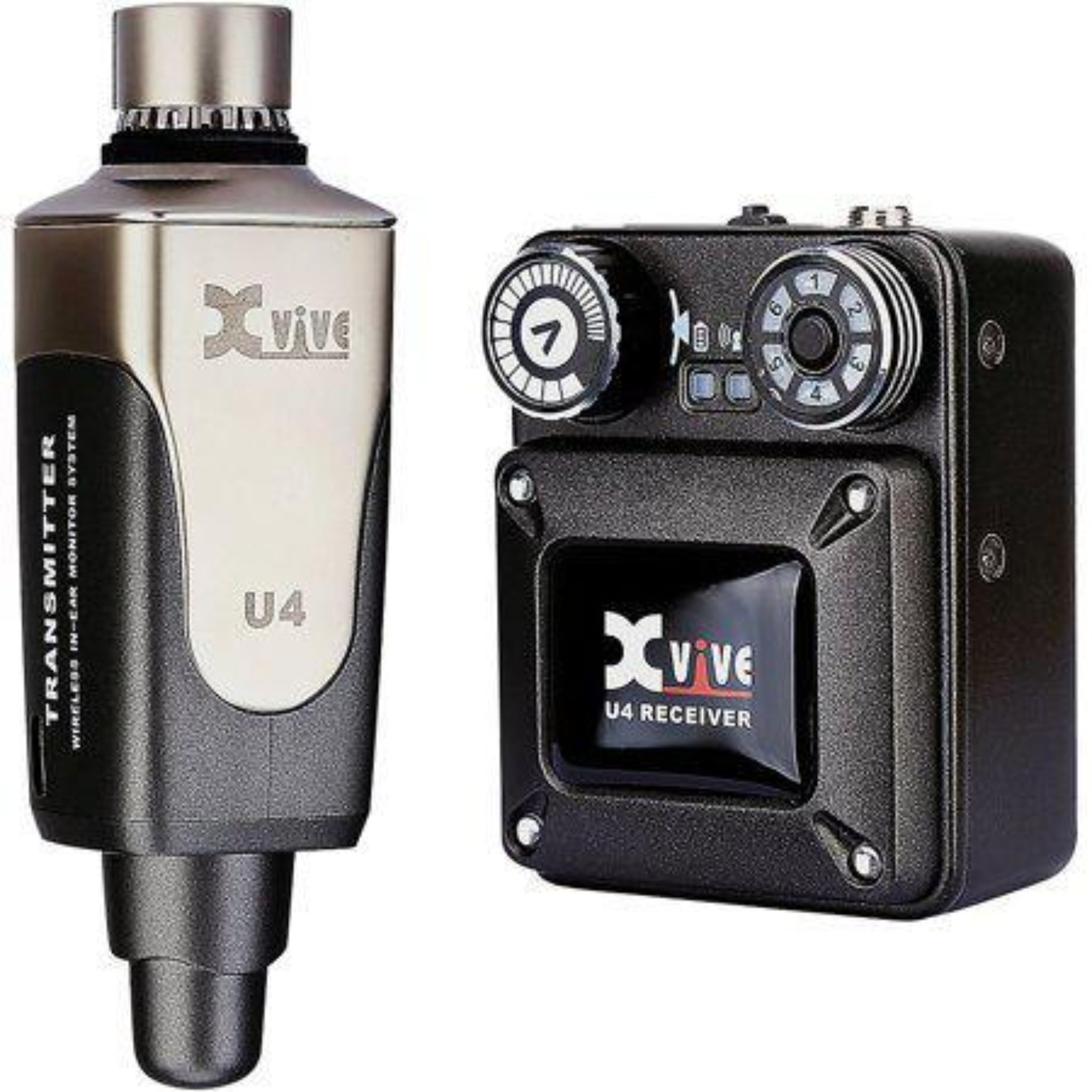
Xvive U4
Best OverallBuy if: you want the simplest way onto in-ear monitors — plug it in, pair it, play
Don't buy if: you need stereo — this system is mono only, and drummers and keys players will feel it
The U4 is the system most working bands actually buy, and the reason is simple: nothing about it fights you. The transmitter plugs straight into your mixer's XLR or quarter-inch output like a chunky microphone plug. The bodypack clips on, pairs on its own, and you hear your mix. Setup takes under three minutes the first time, and under one minute after that.
Sound is clean for the price. The frequency response covers the full 20Hz to 20kHz range with 107 dB signal-to-noise, so vocals stay clear and bass stays defined. Latency sits under 5ms, which your drummer will not notice. The 5-hour rechargeable battery covers a rehearsal and a full set with charge to spare, and six channels let about six systems run side by side in one room.
For most small bands and churches, the $200 U4 beats the $989 Shure. That is an opinion, and plenty of people will disagree. But the Shure buys radio headroom you will never use in a 200-seat room, and the U4 buys you the same clean mix for a fifth of the money.
Pros
- Dead-simple setup — transmitter plugs into the mixer, no rack, no scan
- Under 5ms latency; clean 20Hz–20kHz sound, 107 dB signal-to-noise
- 5-hour rechargeable battery; 6 channels for small multi-system setups
- 4.5 stars from 203 reviews on Sweetwater — the most-reviewed pick here
Cons
- Mono only — no stereo separation for drums or keys
- 2.4GHz shares its band with Wi-Fi, so crowded rooms can cause dropouts
- Internal battery can't be swapped mid-show
- No earphones in the box — budget for a wired pair
Price $199.99 at Sweetwater and Guitar Center, checked 25 Nov 2026. Check the price before buying, as prices change.
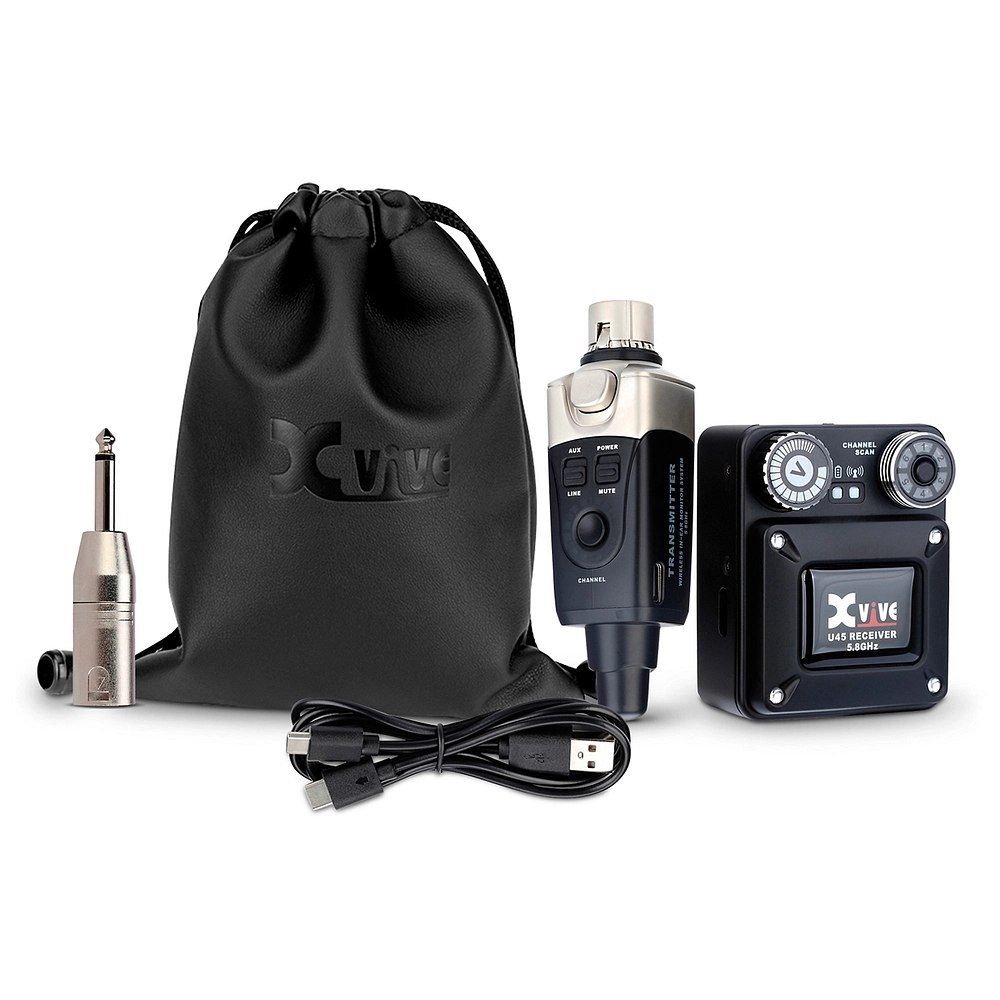
Xvive U45
Best Stereo UpgradeBuy if: you want true stereo and a radio band that Wi-Fi can't touch
Don't buy if: you only sing — mono is enough for a vocal and a click, and the U4 costs $30 less
The U45 is the U4 with the two limits fixed. It moves to 5.8GHz, which Wi-Fi routers and Bluetooth devices don't use, and it sends a true stereo mix at 24-bit/48kHz. A channel-scan button finds the cleanest frequency for you, instead of leaving you to hunt for it. Range stretches to 100 feet, and the kit ships with a carry pouch, an adapter and cables in the box.
I've seen conflicting data here. Some stores list the U45 at $229.99, others at $269.99. My read is $229.99 is the current street price at the big pro-audio stores — Sweetwater, Guitar Center and Musician's Friend all show it — and the higher figure is an older list price that hasn't moved. Check the store before you pay list price.
Here's the thing: stereo matters more than the spec sheet suggests. Panned guitars, stereo reverb and a click sitting to one side make a mix feel like a room instead of a phone call. If you play keys or drums, the $30 step up from the U4 pays for itself in the first rehearsal.
Pros
- True stereo at 24-bit/48kHz — the mix feels wide, not flat
- 5.8GHz band dodges Wi-Fi and Bluetooth interference
- Channel scan finds a clean frequency in seconds
- 5 stars from 23 reviews on Sweetwater; carry pouch and adapters included
Cons
- Some sellers list it at $269.99 — check the store first
- $30 more than the U4 for stereo many vocalists won't miss
- 5-hour battery, same as the U4 — no gain there
- No earphones in the box — budget for a wired pair
Price $229.99 at Sweetwater, Guitar Center and Musician's Friend, checked 25 Nov 2026 (some sellers list $269.99). Check the price before buying, as prices change.
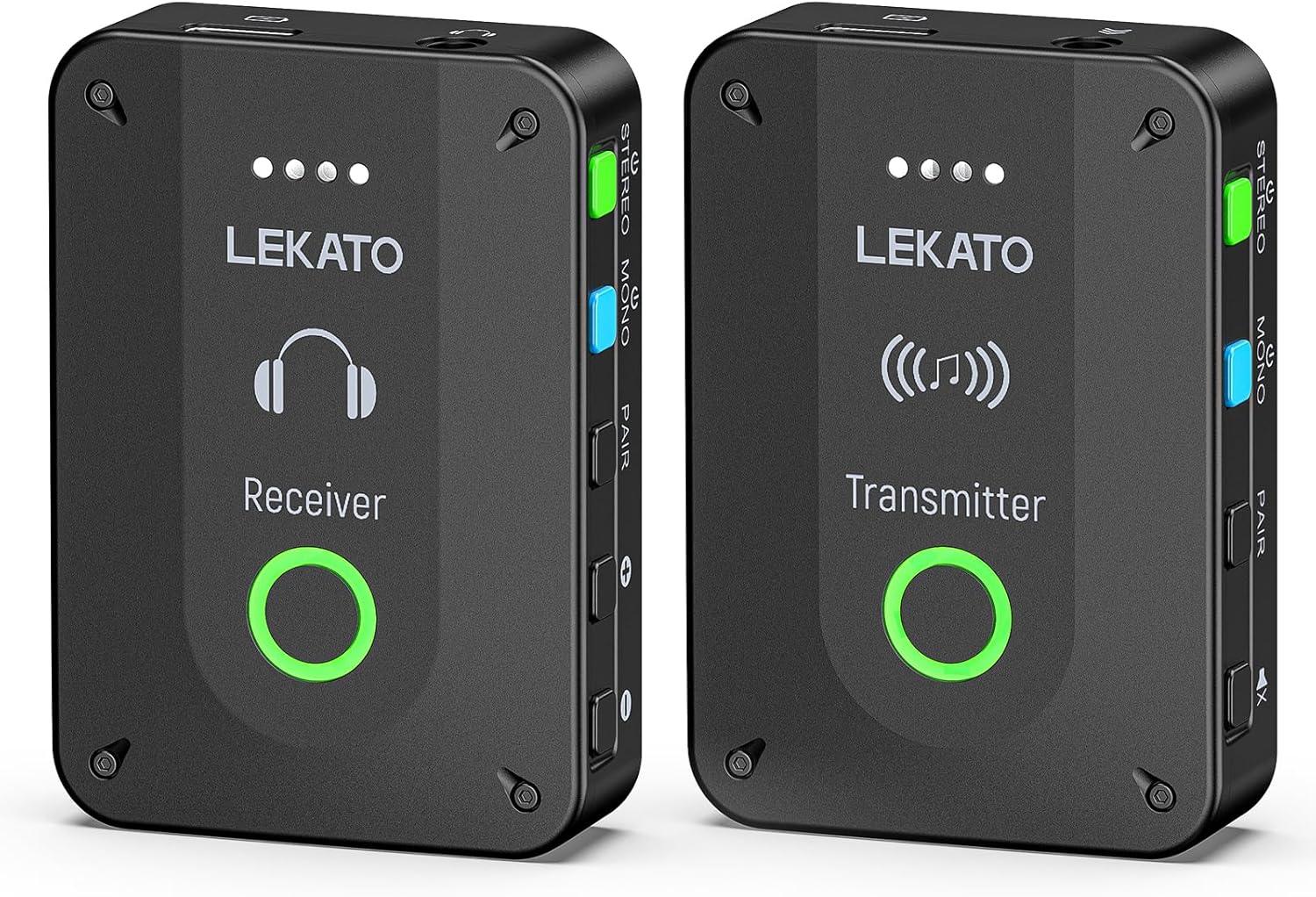
LEKATO MS-02
Best BudgetBuy if: you want to try wireless in-ears for the least money — and you want stereo at that price
Don't buy if: you play big rooms or crowded venues — 2.4GHz and plastic build show their limits there
The MS-02 is the cheapest real system in this guide, and the surprise is what it doesn't cut. It sends a true stereo mix — most budget systems collapse to mono — with latency under 4.5ms in mono mode. Auto-pairing gets the receiver online in under a minute, and one transmitter can feed up to four receivers, so a small band can share one mix without buying four systems.
Quick note: the price moves with the seller. LEKATO's own store lists it at $59.99, and Amazon sellers list it from $44.21. Either way it is the budget pick by a wide margin — the next system up costs more than three times as much.
Or maybe I should say it this way: the MS-02 is a rehearsal-room system, not a touring system. The plastic casing feels basic next to the Xvive metal, charging is micro-USB in 2026, and a few owners report crackle when the room is full of Wi-Fi. For a church band or a practice space, none of that matters much. For a paid gig in a packed club, it does.
Pros
- True stereo at a budget price — rare under $60
- Under 4.5ms latency; auto-pairing; one transmitter feeds up to 4 receivers
- Mono/stereo switch and one-key mute on the transmitter
- Topped headphoneinfatuation's 2026 church-audio guide
Cons
- Plastic build — basic next to the Xvive metal units
- Micro-USB charging in 2026, not USB-C
- Occasional crackle in crowded 2.4GHz rooms
- No earphones in the box — budget for a wired pair
Price $59.99 on LEKATO's own store, checked 25 Nov 2026 — Amazon sellers list it from $44.21. Check the price before buying, as prices change.
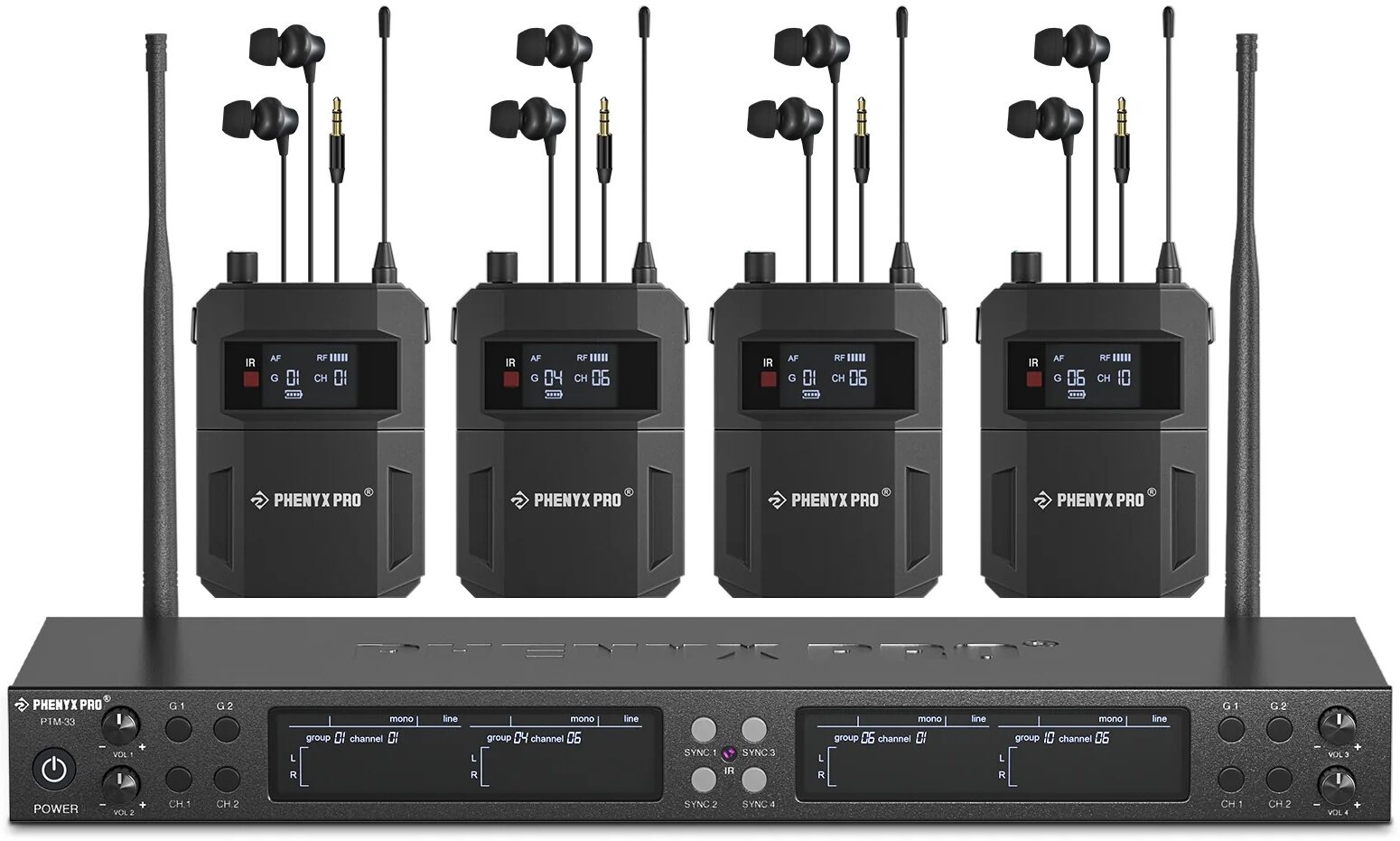
Phenyx Pro PTM-33-4B
Best for Whole BandsBuy if: you need four separate mixes from one rack — a whole band or worship team on one system
Don't buy if: you play solo — four channels and a rack unit are overkill for one person
The PTM-33-4B answers a different question from the rest of this guide: how do you put a whole band on in-ears without buying four systems? One 1U rack unit holds four independent UHF channels, each with its own bodypack and earphones in the box. Four players, four mixes, one box, $449.99. Buying four single systems would cost twice as much.
Each channel runs on UHF in the 902–928MHz range with 25 selectable frequencies, and the rack reaches about 164 feet. Infrared sync pairs each bodypack to its channel in seconds. The mixes are mono, which is the honest trade for four channels at this price — singers get their voice and a click, and that is what most of them ask for.
Count the mixes first, not the musicians. Four players who share one mix need one transmitter and four receivers, not four systems. Four players who each want their own mix need four channels — and that is exactly what this rack is.
Pros
- Four independent mixes from one rack — the cheapest way to cover a band
- Earphones included for all four players — nothing extra to buy
- UHF with 4×25 frequencies and infrared sync
- 1U rack-mount — bolts into the same rack as your mixer
Cons
- Mono only — no stereo mixes at this price
- Bodypacks run on AA batteries — no charging dock, keep spares
- Rack unit needs rack space or a shelf — not a grab-and-go box
- Overkill for a solo act or a duo
Price $449.99 at zZounds, checked 25 Nov 2026. Check the price before buying, as prices change.
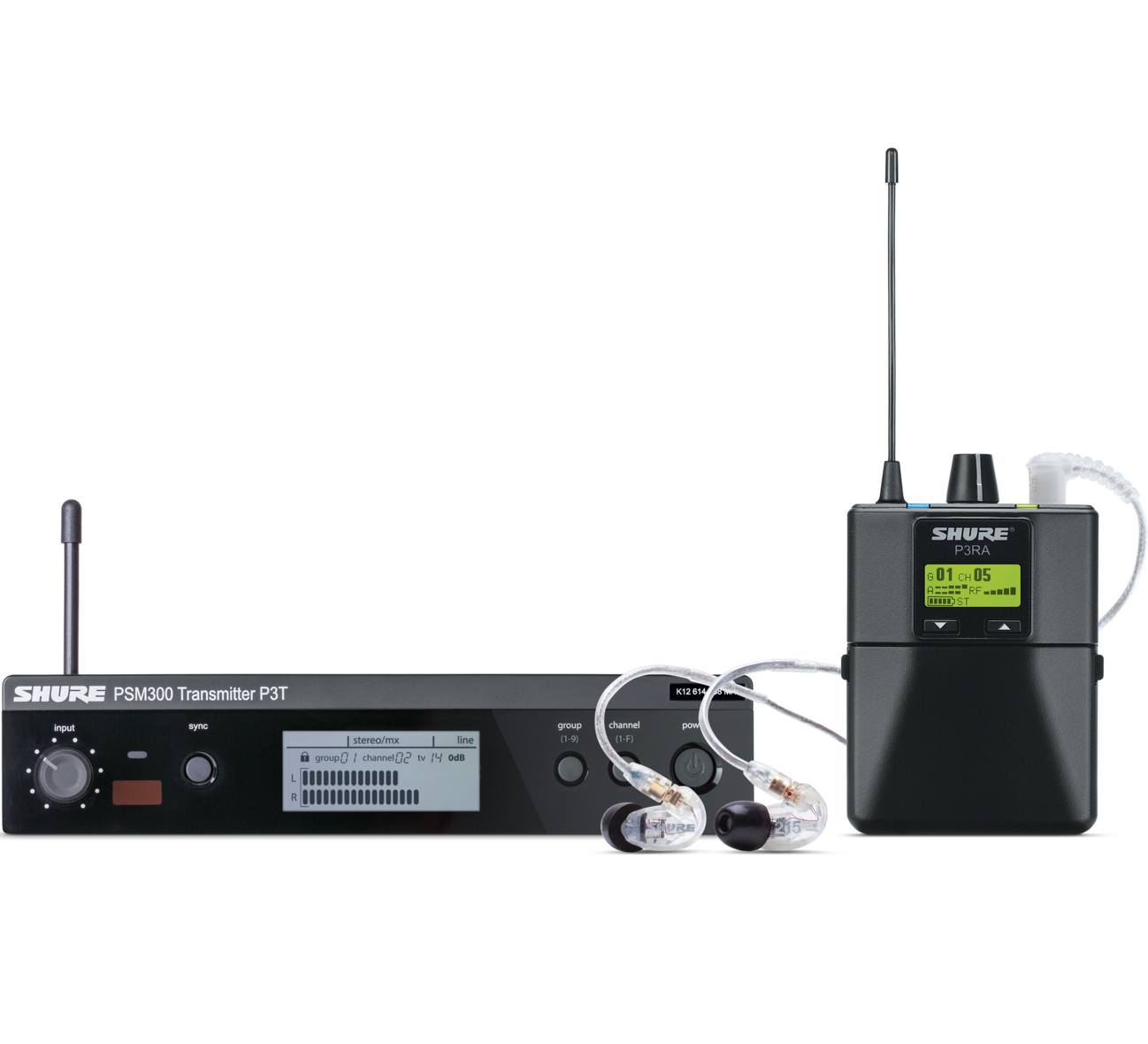
Shure PSM300
Best ProBuy if: you want the system every sound engineer already knows — and the one riders ask for by name
Don't buy if: you play small rooms — the radio headroom is wasted there, and the U4 does the same job for $790 less
The PSM300 is the industry's default first pro system, and it earns that spot the boring way: it works, everywhere, every night. A rack transmitter, a metal P3RA bodypack with a small screen, and Shure's own SE215 earphones in the box. The UHF link is rock solid, the Audio Reference Companding keeps the sound clean at stage volume, and the stereo mix has the width the cheaper mono systems lack.
Ezvid's October 2026 roundup calls it the simplest way for a band to go wireless, and notes that nearly every professional review recommends it. That matches what you hear from working engineers: nobody ever got fired for speccing a PSM300.
The costs are real, though. $989 buys one channel — each extra player needs another bodypack, and the price climbs fast. The bodypack runs on two AA batteries for around 5 hours, and the transmitter takes quarter-inch plugs only, no XLR. If your mixer is short on quarter-inch aux sends, plan an adapter.
Pros
- The pro standard — rider-recognised, engineer-approved
- Rock-solid UHF link with stereo and Audio Reference Companding
- SE215 earphones included; metal bodypack built for the road
- Nearly every professional review recommends it, per Ezvid
Cons
- $989 for one channel — extra players cost extra
- AA batteries, around 5 hours — no rechargeable pack
- Transmitter takes quarter-inch plugs only, no XLR
- Overkill for small rooms and rehearsal spaces
Price $989 at Sweetwater and Guitar Center, checked 25 Nov 2026. Check the price before buying, as prices change.
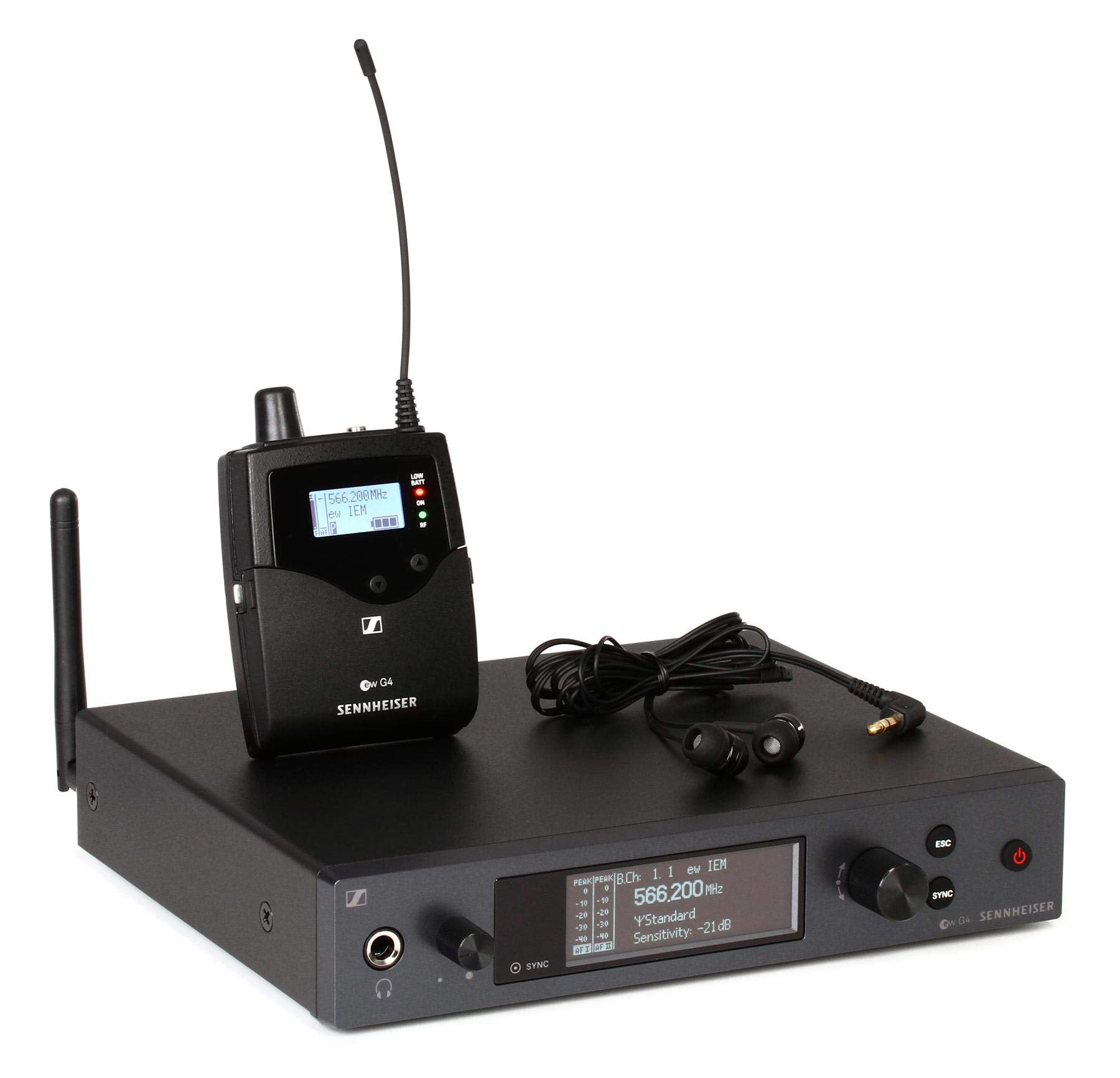
Sennheiser ew IEM G4
Best for Big StagesBuy if: you run many mixes at once — big churches, theatres and touring acts
Don't buy if: you run one mix — the channel scan and the 16-system capacity are wasted on a four-piece band
The G4 is the system for when the stage gets big. Big churches, theatres and touring acts that run many mixes at once lean on it, because it scans for open channels on its own and can run as many as 16 systems side by side in one band. The metal transmitter takes XLR or quarter-inch cables, the bodypack is metal too, and the IE 4 earphones come in the box.
Sound is the Sennheiser house style: clean, honest, a little lean in the bass until the earphones seal properly. The stereo mix is wide, the link is UHF so latency is effectively zero, and the bodypack runs about 8 hours on two AA batteries — the longest here.
At $1,249 it costs more than the other five picks put together, and that is the point. You are not buying better sound than the PSM300. You are buying scale: sixteen mixes, coordinated spectrum, and a system that a touring engineer can run without thinking. For a four-piece band in a club, that scale is dead weight.
Pros
- Up to 16 systems side by side — the most here by far
- Auto frequency scan finds clean channels in seconds
- XLR and quarter-inch inputs; metal transmitter and bodypack
- About 8 hours on two AA batteries — the longest here
Cons
- $1,249 — more than the other five picks combined
- Needs real RF know-how once you run several systems
- AA batteries — no rechargeable pack
- Overkill for any band running one or two mixes
Price $1,249 at Sweetwater, checked 25 Nov 2026. Check the price before buying, as prices change.
How Do Wireless In-Ear Monitors Work?
Your mix leaves the mixer, rides a radio wave, and lands in your ears. The transmitter plugs into a spare aux output on the mixing desk. It broadcasts your personal mix — your voice louder, the guitar lower, the click track in — to a small receiver on your belt. Your earphones plug into that receiver, and a volume knob on the pack sets how loud it all sounds.
Wireless in-ear monitors work by sending your monitor mix over a radio link. According to Thomann, the signal leaves the mixer through an aux output, enters the transmitter, and reaches the bodypack receiver on your belt. Your earphones plug into the bodypack, and a volume knob on the pack sets how loud your own mix sounds.
A wireless in-ear monitor system has three parts: a transmitter, a bodypack receiver, and earphones. According to wearesalt.org, the mix stays consistent no matter where you stand on stage, the stage volume drops, and your hearing gets real protection over the long haul. Floor wedges cannot do any of that.
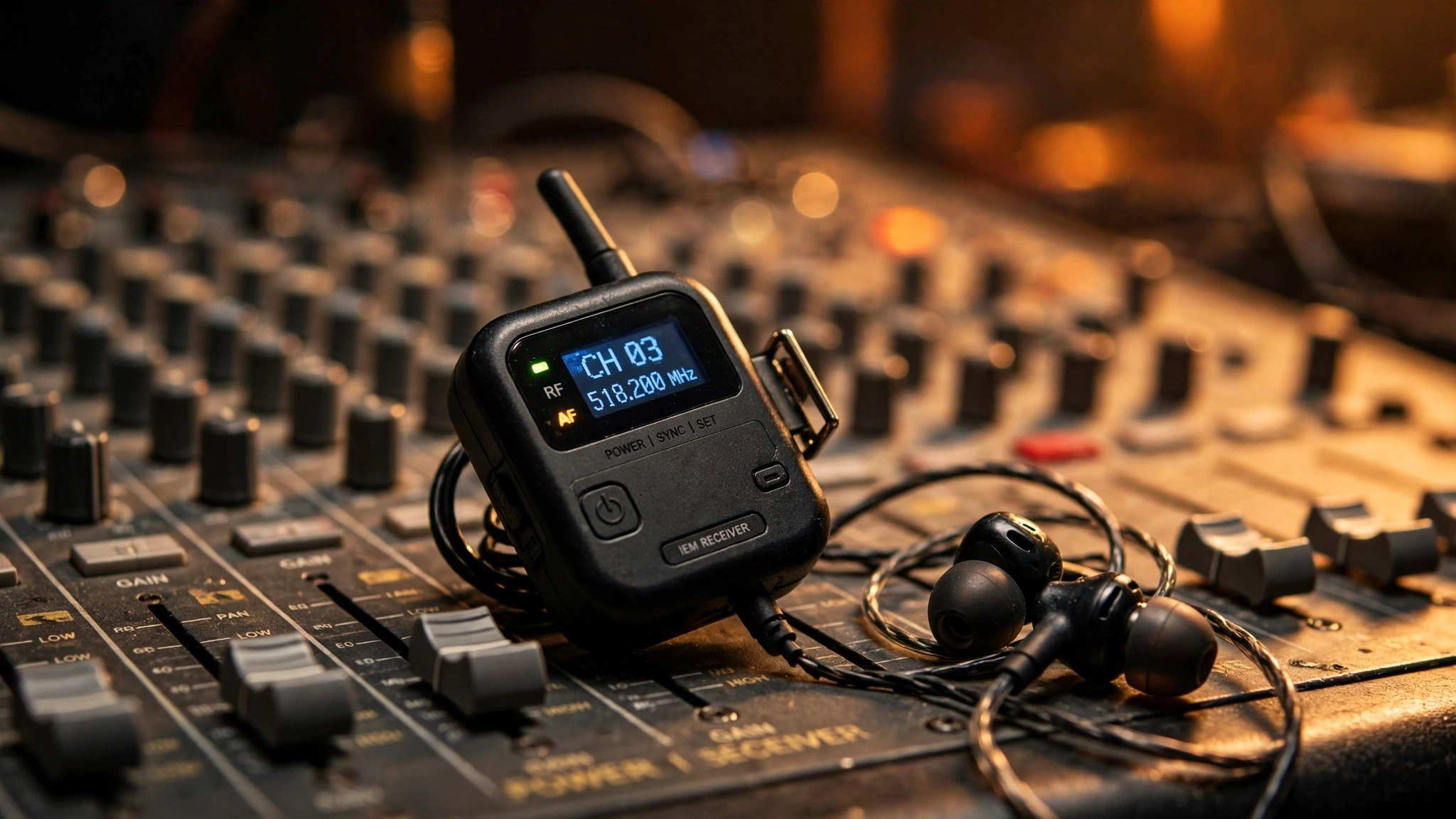
To set up a wireless in-ear monitor system, follow these steps: 1. Plug the transmitter into a free aux send on your mixer. 2. Scan for a clear channel. 3. Pair the bodypack receiver. 4. Plug in your earphones. 5. Set the volume, then turn on the limiter.
- Plug the transmitter into a free aux send The transmitter plugs into a free aux send on your mixer. Mono needs one send; stereo needs two.
- Scan for a clear channel Do it before the show, not during soundcheck. Pick the quietest one the scan finds, not the first one on the list.
- Pair the bodypack receiver Turn on the bodypack receiver and pair it to the transmitter. Most systems pair on their own in under a minute.
- Plug in your earphones Plug your earphones into the bodypack and check the fit. A loose seal kills the bass before the system gets a chance.
- Set the volume, then the limiter Start low, bring the volume up slowly, then switch the limiter on. The limiter caps sudden peaks and protects your hearing.
One detail catches first-timers out: the earphones matter as much as the radio. A $200 system with $15 earbuds sounds like a $15 system. Spend at least $30 on the earphones, and check the seal — foam tips beat silicone tips for most people on stage.
Do You Need a Special Mixer to Use In-Ear Monitors?
No — any mixer with a free aux send works. The aux send is the tap that builds your personal mix. If your mixer has one spare aux output, you can feed one in-ear system. Two spare aux sends give you a stereo mix, or two separate mono mixes.
You do not need a special mixer for in-ear monitors. Any mixer with a free aux send can feed a system, and a standard aux output on your front-of-house board works fine for smaller setups. Dedicated personal monitor mixers give each player hands-on control, but they are an upgrade, not a requirement.
Count the mixes before you count the players. Four singers who share one mix need one aux send and one transmitter. Four singers who each want their own mix need four aux sends and four transmitters. The mixer decides what is possible — the wireless system just carries it.
Small digital mixers earn their keep here. A Behringer XR18 or a Soundcraft Ui24R gives you six aux sends in a box the size of a laptop, which is enough for a whole band to go in-ear. An old analogue board with two aux sends caps you at two mixes, and that is fine for a duo.
How Many Wireless In-Ear Monitor Systems Can You Run at Once?
It depends on the band, not the brand. A 2.4GHz system like the U4 runs about six side by side before the channels run out. A 5.8GHz system like the U45 runs a few more. A UHF system like the G4 runs up to 16 in one band, because UHF has far more room to spread out.
The rule is simple: one frequency per mix. Two systems on the same channel fight each other, and both lose. Scan before the show, give each system its own channel, and keep a spare channel free in case one goes noisy mid-set.
Sharing a mix is the cheap way to add players. One transmitter can feed several receivers tuned to the same channel — the MS-02 feeds up to four, and the U4 feeds six receivers off one transmitter if they all want the same mix. That is how a church puts a whole choir on in-ears with one box.
Big venues change the maths. A festival stage with wireless mics, guitar links and in-ears all running at once needs someone who understands frequency coordination. That is the moment to hire a sound engineer, not to buy a seventh cheap system and hope.
2.4GHz vs 5.8GHz vs UHF: Which Band Should You Pick?
Small rooms: 2.4GHz. Crowded venues: UHF. The middle ground: 5.8GHz. The band is the radio road your mix drives on, and each road has different traffic.
2.4GHz is the cheap road. The U4 and the MS-02 live here, and so does every Wi-Fi router, Bluetooth speaker and wireless mic in the building. In a quiet rehearsal room it works fine. In a packed club with fifty phones in the crowd, it can stutter.
5.8GHz is the quieter road. Fewer devices use it, so the U45 rarely fights for space. Range is a little shorter through walls, but on an open stage that never matters.
UHF is the pro road. The PSM300, the G4 and the PTM-33-4B all run on UHF slices that Wi-Fi never touches, with dozens of channels to pick from. Latency is effectively zero, because the link is analogue radio, not digital packets. The cost is money and know-how: UHF systems cost more, and running several of them needs a frequency scan before every show.
2.4GHz vs 5.8GHz vs UHF: 2.4GHz is better suited for small rooms and rehearsals because the gear is cheap and the setup is simple. UHF works better when the venue is crowded or the stage is big. The key difference is interference: 2.4GHz shares its band with Wi-Fi, while UHF runs on its own slice of spectrum.
Mono or Stereo — Does It Matter?
For singers, no. For drummers and keys players, yes. Mono puts the whole mix in both ears at once — your voice, the band, the click, all centred. That is all a singer needs to stay in tune and on time.
Stereo splits the mix left and right. Guitars sit to one side, keys to the other, reverb breathes around the edges. Drummers hear the kit the way it sits on stage. Keys players hear the stereo spread of their own instrument. The mix feels like a room instead of a phone call.
Most first systems are mono, and that is fine. The U4, the MS-02 in mono mode and the PTM-33-4B are all mono, and thousands of singers use them every weekend. Buy stereo when you play an instrument that lives in stereo — drums, keys, or a guitar rig with stereo effects.
One more thing: stereo needs two aux sends from your mixer, mono needs one. If your board is short on sends, mono is the practical choice whatever your ears want.
Can You Use Wireless In-Ear Monitors With Your Phone?
Not directly — and this is the confusion that costs people money. Stage in-ear systems use a radio transmitter plugged into a mixer. They do not have Bluetooth, and they cannot pair with a phone. The bodypack has no Bluetooth radio in it at all.
If you want wireless earphones for your phone, you want true wireless earbuds — a different product for a different job. Our best true wireless earbuds guide covers the ones worth buying, and our best sport earbuds guide covers the ones that stay in while you move.
There is a middle ground. The Shure Aonic 215 Gen 2 is a true wireless earphone shaped like a stage monitor, and the Sennheiser IE 100 PRO Wireless pairs wired stage earphones with a Bluetooth neckband. Both work with a phone for practice and travel. Neither replaces a radio system on stage — Bluetooth latency is too high for live monitoring, and the range dies at about 30 feet.
So: phone listening, buy earbuds. Stage monitoring, buy a radio system. Buying one to do the other's job is the most common regret in this category.
Are Wireless In-Ear Monitors Worth It?
Yes — if you play live more than a few times a year. The payoff is hearing yourself clearly, every time, wherever you stand. No more leaning into a wedge. No more asking the sound engineer for more of yourself in the mix mid-song.
The hearing protection is the quiet benefit. Wedges push stage volume up for everyone; in-ears let you turn your own mix down. Over years of gigs, that difference adds up to real hearing saved.
Wired in-ears are the honest alternative. A wired bodypack amp and the same earphones cost a fraction of the wireless system, and the sound is identical — the wire just ties you to one spot. If you play keys or drums and never move, wired saves you hundreds. If you sing and walk the stage, wireless is worth every cent.
Start cheap if you are unsure. The MS-02 at $59.99 tells you in one rehearsal whether in-ears suit you. If they do, upgrade to the U4 or the U45 later — the earphones carry over, and the cheap system becomes your spare.
Buying Guide: What Actually Matters
To pick the right wireless in-ear monitor system, follow these steps: 1. Count your mixes. 2. Match the band to your venue. 3. Check what is in the box. 4. Check the battery.
Count your mixes first. One mix per transmitter, one transmitter per mix. A solo singer needs one system. A four-piece band with four mixes needs four channels — or one PTM-33-4B rack. Get this number wrong and nothing else matters.
Match the band to your venue. Small rooms and rehearsal spaces: 2.4GHz is fine and cheap. Packed clubs with fifty phones in the crowd: 5.8GHz or UHF. Big stages and festivals: UHF, with a scan before every show.
Check what is in the box. The U4, U45 and MS-02 ship without earphones, so add $30–$100 for a wired pair. The PSM300, G4 and PTM-33-4B include earphones — the PSM300's SE215 alone would cost about $99 on its own.
Check the battery. Rechargeable packs (U4, U45, MS-02) run 5–6 hours and charge over USB — easy, but dead means done until you charge. AA packs (PSM300, G4, PTM-33-4B) run 5–8 hours and swap in seconds — keep spares in the gig bag.
Check the latency. Anything under 10ms is invisible on stage. Every pick here is under 5ms, or effectively zero on UHF. Bluetooth earbuds run 100ms or more — that is why they never work for live monitoring, whatever the box says.
Try the fit before the gig. Foam tips seal better than silicone for most ears, and a loose seal kills the bass. Buy a pack of foam tips with the system, and wear the whole rig at one rehearsal before you trust it on stage.
What to Skip
True wireless earbuds sold as stage monitors. The Shure Aonic 215 is a fine earphone for practice, but it is a Bluetooth earbud, not a radio system. It cannot take a mix from your desk, and its latency rules it out on stage.
No-name UHF systems under $100 with no brand site. A $60 rack system from a brand with no website and no support line is a gamble with your gig. If it dies mid-set, nobody answers. Every pick in this guide comes from a brand you can contact — that is worth more than a spec sheet on a box you cannot return.
The Xvive U4 confused with the U4R4 four-pack. The U4 is one transmitter and one receiver for $199.99. The U4R4 is one transmitter and four receivers for about $600. Sellers mix the names up. Check the receiver count on the box.
The Phenyx Pro PTM-10 confused with the PTM-33. The PTM-10 is a single-channel rack system; the PTM-33-4B at #4 is the four-channel one. If you need four mixes, the PTM-10 will not do it. Check for "33-4B" on the label.
Any system with no frequency scan and no channel choice. A fixed-channel system works until the venue's Wi-Fi sits on its one channel — then it is a paperweight. Every pick here lets you change channels. Don't buy one that doesn't.
Frequently Asked Questions
What's the best wireless in-ear monitor system overall?
The Xvive U4 at $199.99 — simple plug-in setup, under 5ms latency, 5-hour battery, and the most-reviewed system in this guide.
How do wireless in-ear monitors work?
A transmitter plugs into your mixer's aux send and beams your mix to a bodypack receiver on your belt. Your earphones plug into the pack. The link is radio, not Bluetooth.
Do wireless in-ear monitors need earphones?
Most systems ship without them — the U4, U45 and MS-02 expect you to supply your own. The PSM300, G4 and PTM-33-4B include earphones in the box.
Can I use wireless in-ear monitors with my phone?
Not directly. Stage systems use a radio transmitter, not Bluetooth, so they cannot pair with a phone. For phone listening, true wireless earbuds are the right tool.
How many wireless in-ear monitor systems can I run at once?
It depends on the band. 2.4GHz systems like the U4 run about six side by side. UHF systems like the G4 run up to 16. Always scan for a clear channel first.
Is mono or stereo better for in-ear monitors?
Stereo sounds wider and suits drummers and keys players. Mono is fine for singers who mainly need their own voice and a click. Most first systems are mono, and nobody misses stereo until they have tried it.
Should I buy the Xvive U4 or the U45?
Buy the U4 at $199.99 if you sing or play in small rooms — mono is enough and the setup is simpler. Buy the U45 at $229.99 if you want stereo and a 5.8GHz band clear of Wi-Fi.