Best Vertical Mouse for Office Work in 2026: 6 Picks That Ease Your Wrist

It's mid-afternoon. Your wrist aches. Your forearm feels tight, and the mouse you have used for years suddenly feels like the problem. You've tried a wrist rest. You've watched the stretching videos. Maybe you've even worn a brace at night. None of it stuck — because the shape of the mouse never changed.
That's the person this guide is for: an office worker at a desk six to ten hours a day, with a dull ache that shows up by lunch and a worry that it's getting worse. A vertical mouse can help that person. It can also waste their money if they buy the wrong size, the wrong angle, or a cheap copy with no track record. This guide fixes that. Every pick is chosen by hand size first, with the angle, weight and buttons checked against real reviews — not by copying a spec sheet.
The top 10 results for "best vertical mouse for office work" are mostly thin affiliate listicles. They crown the same two Logitech mice, repeat each other's specs without checking them, and never mention that a vertical mouse raises your palm 7 to 9 cm above a flat keyboard — a mismatch that can move the ache from your wrist to your shoulder. This guide covers that, plus a real hand-measurement rule, an honest adjustment plan, and a clear list of who should not buy one at all.
No prices are printed in this guide — mouse prices move by seller and week, so check the live price before buying. Battery-life figures are the makers' own claims, not test results, and where sources disagree — the Razer's weight, the Keychron's sensor options, the ProtoArc's weight — the disagreement is stated on the card.
What Size Vertical Mouse Do I Need for Office Work?
Measure your hand first. Under 17 cm from wrist crease to middle fingertip means small hands; 17 to 19 cm is medium; 19 cm or longer is large — and the mouse must match that band.
The best vertical mouse size for office work starts with your hand, not the brand. According to Logitech, the MX Vertical suits medium-to-large hands while the Lift fits small-to-medium hands, and both share the same 57-degree angle. Measure from wrist crease to middle fingertip: under 17 cm means small, 17 to 19 cm is medium, and 19 cm or longer is large.
A vertical mouse for office work is a mouse that holds your hand in a handshake position instead of flat on the desk. According to ProtoArc, its EM11 NL uses a 58-degree angle for hands under 19 cm. The tilt takes the twist out of your forearm, which is why office workers with aching wrists reach for one.
To measure your hand for a vertical mouse, follow these steps: 1. Hold your hand flat, palm down, fingers together. 2. Measure from your wrist crease to the tip of your middle finger. 3. Measure across your knuckles for palm width. A hand under 17 cm needs a small vertical; 17 to 19 cm is medium; 19 cm or longer needs a large one.
Quick note: the size bands matter more with a vertical mouse than a flat one. A flat mouse that's a little small is annoying. A vertical mouse that's a little small forces your thumb to pinch and your fingers to curl — the exact strain you're trying to escape. Check the millimetres on the listing, not the word "ergonomic" on the box.
Is a Vertical Mouse Better Than a Regular Mouse?
For wrist comfort over a long office day, yes. For fast, precise pointer work, no — a flat mouse is still quicker until you adjust.
A vertical mouse for office work is an ergonomic mouse that holds your hand upright in a handshake position instead of flat on the desk. The tilt — usually 47 to 72 degrees — keeps your forearm closer to neutral, so the wrist twists less during a long day.
A vertical mouse is better than a regular mouse for wrist comfort during long office days, but not for every task. The handshake angle cuts forearm twist, yet it slows precise pointer work at first and feels strange for a few days. If your wrist aches by mid-afternoon, the trade is worth it; if it never aches, keep your flat mouse.
Here's the thing: the shape changes where the load goes, not how much load there is. Your hand still clicks and scrolls all day. What changes is the twist — a flat mouse holds your forearm twisted palm-down for hours, and a vertical mouse lets it rest closer to neutral. That's the whole mechanism, and it's enough for most office workers with a dull ache. It is not a cure, and any page that promises one is selling you something.
Look — if you're in the situation where your wrist hurts by lunch and a wrist rest didn't fix it, here's what actually works: a vertical mouse in the right size, given two full weeks. Not a brace. Not another stretch routine. A different shape, sized to your hand, with time to adjust.
Logitech MX Vertical vs Lift: What's the Difference?
Same 57-degree angle, different hands. The MX Vertical is the bigger, taller shell for medium-to-large hands; the Lift is the shorter, quieter shell for small-to-medium hands and lefties.
MX Vertical vs Lift: the MX Vertical is better suited for medium-to-large hands because its taller, longer shell fills a bigger palm. The Lift works better when your hand is under 17 cm, or you want quiet clicks and a left-handed version. The key difference is size: same 57-degree angle, different hands.
| MX Vertical | Lift | |
|---|---|---|
| Hand size | Medium to large (17 cm and up) | Small to medium (under 17 cm) |
| Size | 120 × 79 × 79 mm | 108 × 70 × 71 mm |
| Weight | 135 g | 125 g |
| Angle | 57° | 57° |
| Sensor | Up to 4,000 DPI | Up to 4,000 DPI |
| Battery | USB-C rechargeable, up to 4 months (maker's claim) | 1 × AA, up to 24 months (maker's claim) |
| Left-handed | No | Yes — Lift Left |
| Clicks | Standard | Quiet clicks |
| Devices | 3, with Logitech Flow | 3, no Flow |
Or maybe I should say it this way: buy the MX Vertical if your hand is 17 cm or longer and you want the flagship. Buy the Lift if your hand is under 17 cm, you share an office and need quiet clicks, or you're left-handed. Either way, don't buy both to compare — measure once, buy once.
Quick Comparison
| Product | Angle / Weight / Type | ||
|---|---|---|---|
| #1 | Logitech MX VerticalBest Overall | 57° / 135 g / vertical | Check Price |
| #2 | Logitech LiftBest for Small Hands | 57° / 125 g / vertical | Check Price |
| #3 | Razer Pro Click V2 Vertical EditionSteepest Angle | 71.7° / 150 g / vertical | Check Price |
| #4 | Keychron M5Best Value | 47° / 95 g / vertical tilt | Check Price |
| #5 | ProtoArc EM11 NLBest Budget Rechargeable | 58° / ~115 g / vertical | Check Price |
| #6 | Anker 2.4G Wireless Vertical MouseBest Cheap Trial | ~55° / ~95 g / vertical | Check Price |
Angles are the makers' figures. Anker publishes no exact angle, so its figure is approximate. Weights are the makers' figures except the ProtoArc, where sources disagree between 110 g and 119 g. No prices are printed — check the live price before buying.
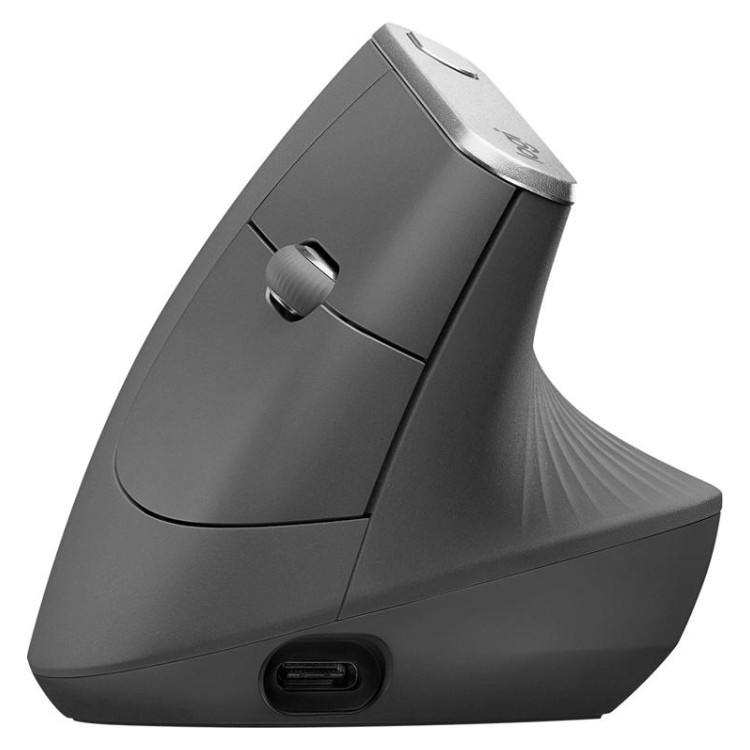
Logitech MX Vertical
Best OverallBuy if: your hand is 17 cm or longer and you want the reference vertical mouse for all-day office work
Don't buy if: your hand is under 17 cm, or you need a left-handed mouse
The MX Vertical is the vertical mouse every other one gets compared to, and for office work it earns that place. Logitech sizes it for medium-to-large hands — 120 mm long, 79 mm wide, 79 mm tall, at a 57-degree handshake angle — with a textured rubber grip and a wide thumb rest that fills a bigger palm. The 4,000 DPI sensor is plenty for spreadsheets and a 4K screen, Bluetooth and the Logi Bolt receiver cover up to three devices, and the USB-C rechargeable battery is rated by Logitech for up to four months. Logitech's own ERGO Lab work claims it cuts muscular strain by 10% against a standard mouse — the maker's figure, not a medical result.
The limits are honest ones. At 135 g it is heavy for a mouse, and very large hands — over 21 cm — may still find the shell short. The clicks are louder than the Lift's, which matters in a quiet shared office. And it is not a gaming mouse: no low-latency mode, no high polling rate, and 4,000 DPI is the ceiling. For eight hours of email, spreadsheets and documents, none of that matters.
Pros
- 57-degree handshake angle eases wrist twist
- Tall shell fills a medium-to-large palm
- Three-device switching with Logitech Flow
- Long battery claim (maker's figure)
- The reference vertical — the most-reviewed pick here
Cons
- 135 g — heavy for a mouse
- Right-handed only
- Too big for hands under 17 cm
- Louder clicks than the Lift
- 4,000 DPI max — not for gaming
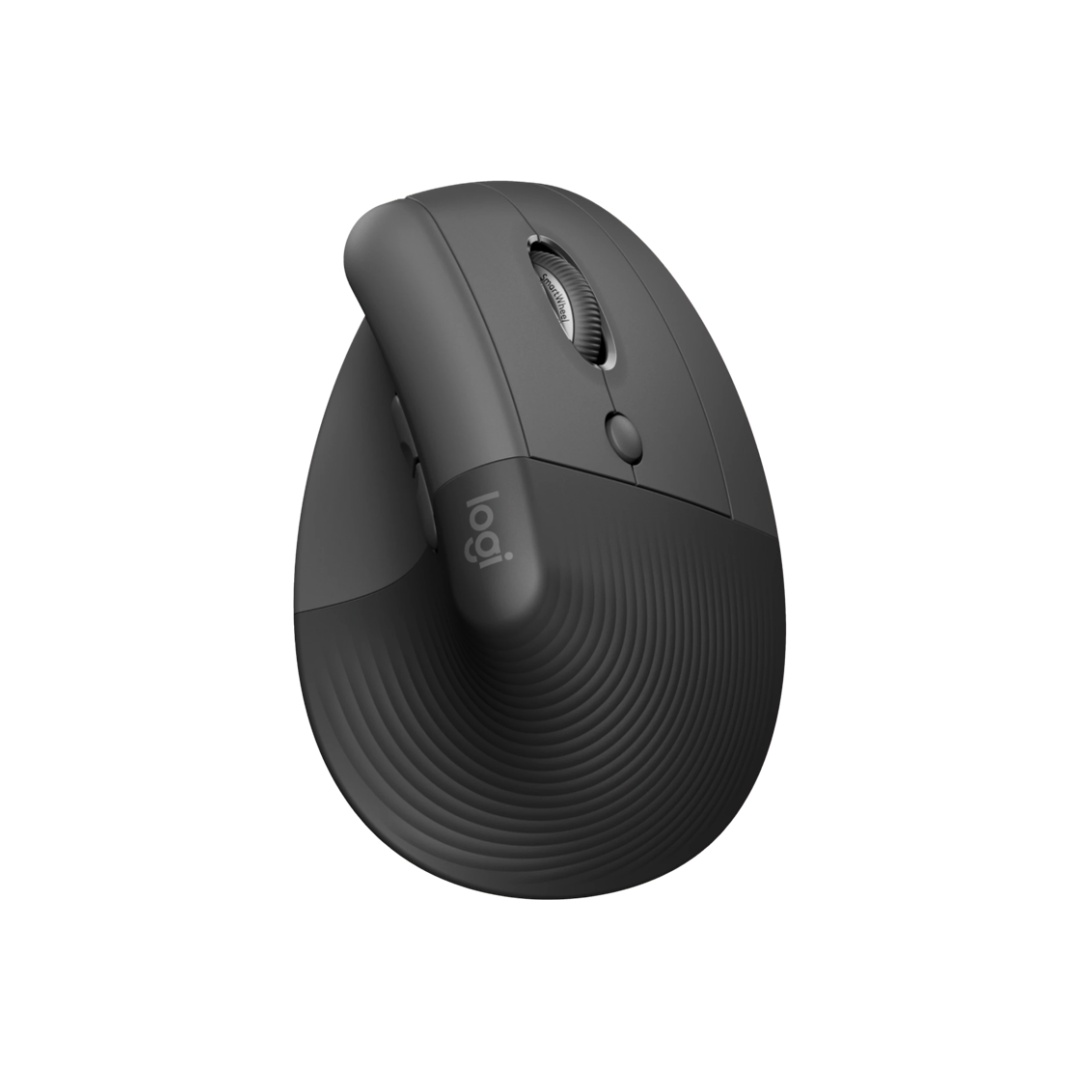
Logitech Lift
Best for Small HandsBuy if: your hand is under 17 cm, you share a quiet office, or you are left-handed
Don't buy if: your hand is 19 cm or longer, or you want a rechargeable battery
The Lift is the same idea as the MX Vertical in a shorter, quieter shell — and for small hands it is the better mouse. Same 57-degree angle, same 4,000 DPI ceiling, same three-device switching, but 108 mm long and 125 g, with quiet clicks that won't carry across an open-plan office. It comes in Graphite, Rose, Off-White and Sand, and — the part that matters most — it is the only mainstream vertical mouse with a true left-handed version, the Lift Left.
Two trade-offs to know. It runs on one AA battery instead of USB-C charging, though Logitech rates it for up to 24 months. And it has fewer buttons than the MX Vertical, no Logitech Flow, and a SmartWheel rather than the magnetic MagSpeed unit. None of that slows office work down. If your hand is under 17 cm and every "ergonomic" mouse you've tried felt like holding a brick, this is the one that fits.
Pros
- Sized for small-to-medium hands — 108 mm long
- Quiet clicks for shared offices
- True left-handed version exists
- Three-device switching
- Long battery claim (maker's figure)
Cons
- AA battery, not rechargeable
- Too small for hands 19 cm or longer
- Fewer buttons than the MX Vertical
- No Logitech Flow
- SmartWheel, not MagSpeed
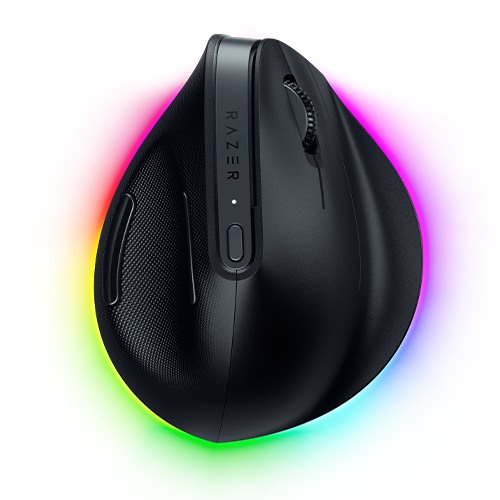
Razer Pro Click V2 Vertical Edition
Steepest AngleBuy if: your wrist already hurts every day and you want the steepest angle in this guide
Don't buy if: this is your first vertical mouse, or you want a light one
The Razer is the steepest vertical mouse here at 71.7 degrees — nearly upright — and that angle is the whole point. For people whose wrist pain is already a daily fact, the extra tilt takes more twist out of the forearm than the Logitech pair's 57 degrees. It also carries the best sensor in this guide: Razer's Focus Pro 30K optical unit, rated to 30,000 DPI and able to track on glass. HyperSpeed 2.4 GHz plus Bluetooth cover three devices, a USB-C cable turns it wired, and Razer rates the battery at up to six months with the RGB off. PCMag named it an Editor's Choice in May 2026.
Two numbers need correcting, because roundups keep getting them wrong. The weight is 150 g — Razer's own spec page says so, and several roundups print 102 g, which belongs to a different Razer mouse. And the sensor tops out at 30,000 DPI, not the 16,000 DPI some tables list. At 150 g it is the heaviest mouse here, and the AI Prompt Master button is a gimmick most reviewers ignore. Here's my honest take: start with 57 degrees, not 71.7. The Razer is the right mouse when the pain is already daily — as a first vertical, the steep angle is a harder adjustment than most people need.
Pros
- Steepest angle here — 71.7 degrees
- Focus Pro 30K sensor, tracks on glass
- Three-device switching (HyperSpeed + Bluetooth)
- Long battery claim with RGB off (maker's figure)
- PCMag Editor's Choice, May 2026
Cons
- 150 g — heaviest mouse here
- Right-handed only
- Steep angle means a longer adjustment
- AI button is a gimmick
- RGB lighting drains the battery fast
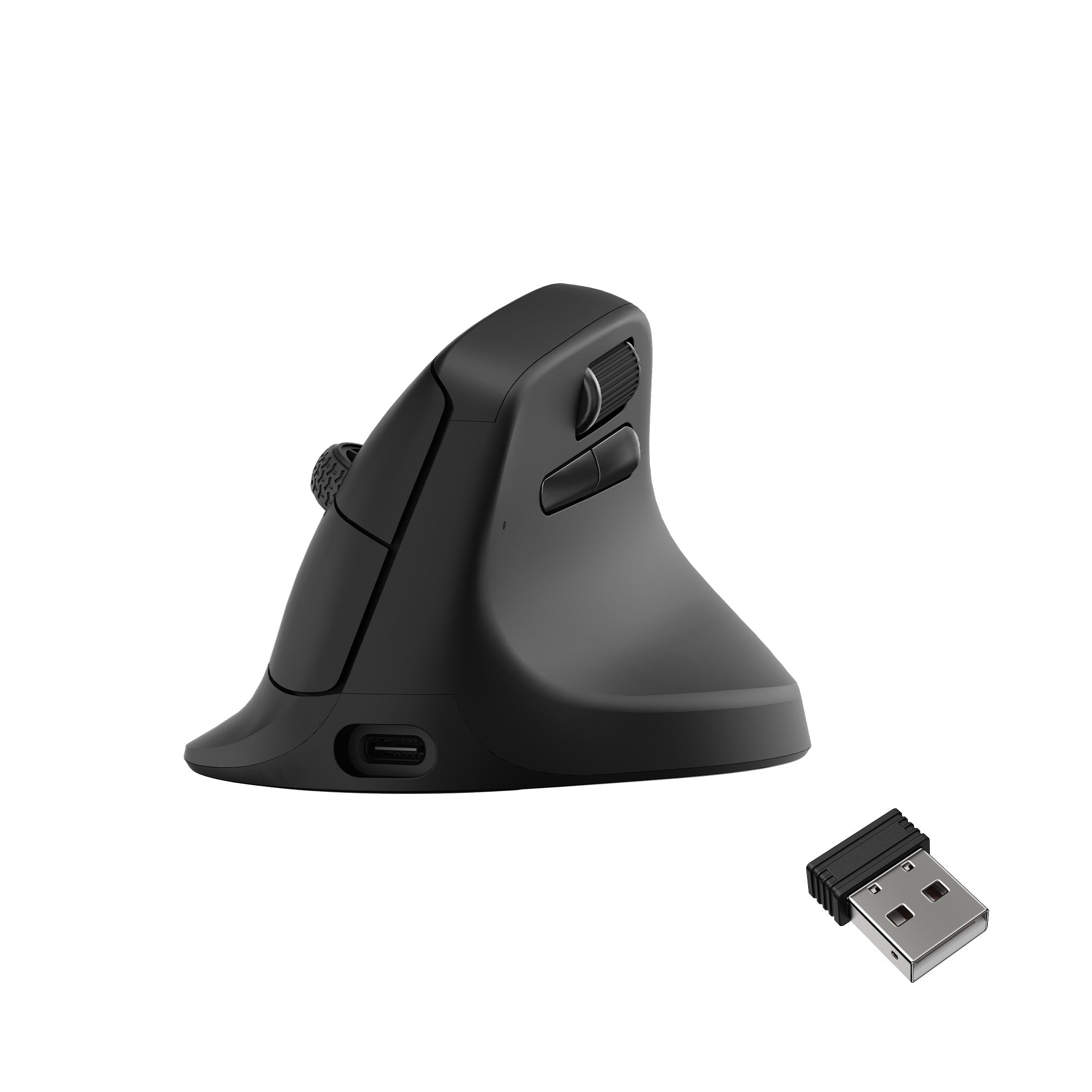
Keychron M5
Best ValueBuy if: you want a gentler first vertical with a serious sensor, for less than the Logitech flagships
Don't buy if: you want the full upright angle, or you switch between three computers
The Keychron M5 is the value pick, and the gentlest first step into vertical mice. Its tilt is 47 degrees — a lean, not a full upright — which makes the first week far easier than the Razer's 71.7. At 95 g it is the lightest mouse here, with a thumb wheel for sideways scrolling, tri-mode connection (2.4 GHz, Bluetooth and USB-C wired), and a 600 mAh battery Keychron rates for up to 140 hours. The standard model runs a 12,000 DPI sensor; a pricier 8K version swaps in a 30,000 DPI unit with 8,000 Hz polling.
Be careful which version you buy. The standard M5 and the M5 8K look identical and share the same shell, but the sensor and polling rate differ — and some listings mix the two. The M5 also connects to two devices, not three, and it has a shorter track record than the Logitech pair, with less long-term owner feedback. For a first vertical mouse that still handles spreadsheets and a 4K screen without breaking a sweat, it is the best money-to-comfort ratio here.
Pros
- 47-degree tilt — the gentlest adjustment here
- Lightest mouse here at 95 g
- Thumb wheel for sideways scrolling
- Tri-mode connection (2.4 GHz, Bluetooth, USB-C)
- Long battery claim (maker's figure)
Cons
- Only two-device switching
- 47 degrees is a tilt, not a full vertical
- Two sensor versions — check the listing
- Shorter track record than Logitech
- Right-handed only
ProtoArc EM11 NL
Best Budget RechargeableBuy if: your hand is under 19 cm and you want a rechargeable vertical mouse for little money
Don't buy if: your hand is large, or you want software to customise the buttons
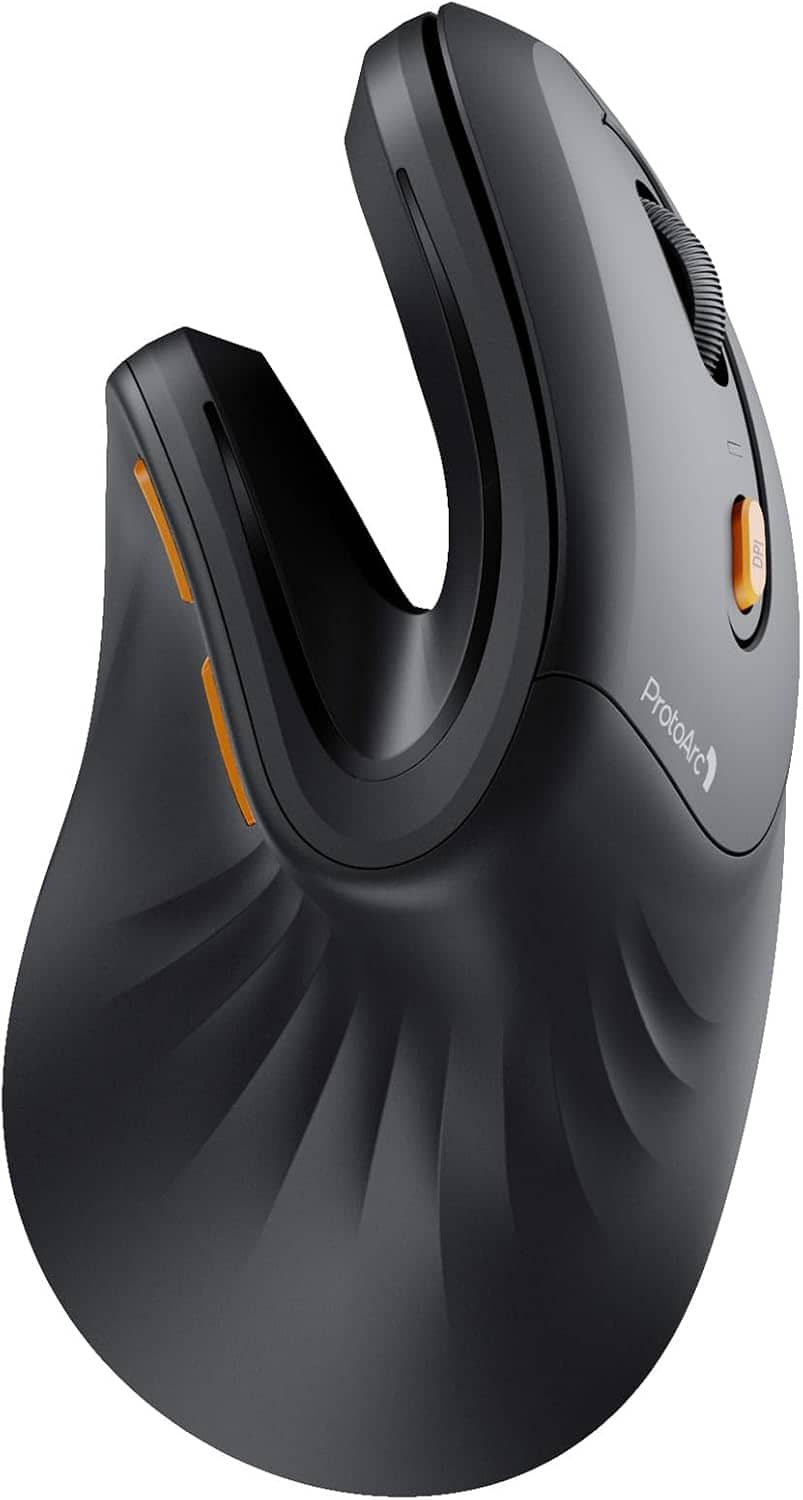
The ProtoArc EM11 NL is the budget rechargeable pick, and the best way to try the vertical shape without spending flagship money. At a 58-degree angle with three DPI steps (1,000 / 1,600 / 2,400), a 500 mAh USB-C rechargeable battery, silent clicks and three-device switching (two Bluetooth channels plus 2.4 GHz), it covers the office basics for a fraction of the Logitech price. AppleInsider's review calls it well-made for the money, with very quiet clicks and plug-and-play use on Mac — though the forward and back buttons don't work in macOS browsers.
Know what you're giving up. The sensor is basic, the buttons aren't programmable, and there is no software to customise anything. The weight is also disputed: AppleInsider's spec box says about 110 g, one review measured 119 g, and a few listings print nonsense figures — call it roughly 115 g. And it is built for hands under 19 cm; a large hand will find it cramped. For a small-to-medium hand on a budget, it's the cheapest honest vertical here.
Pros
- 58-degree angle for small-to-medium hands
- USB-C rechargeable — no batteries to buy
- Silent clicks for quiet offices
- Three-device switching
- Cheapest rechargeable pick here
Cons
- Basic sensor — 2,400 DPI max
- Buttons are not programmable
- No customisation software
- Thumb buttons don't work in macOS browsers
- Not for large hands
Anker 2.4G Wireless Vertical Mouse
Best Cheap TrialBuy if: you want to test the vertical shape for the least money before committing
Don't buy if: you need Bluetooth, multi-device switching, or high DPI
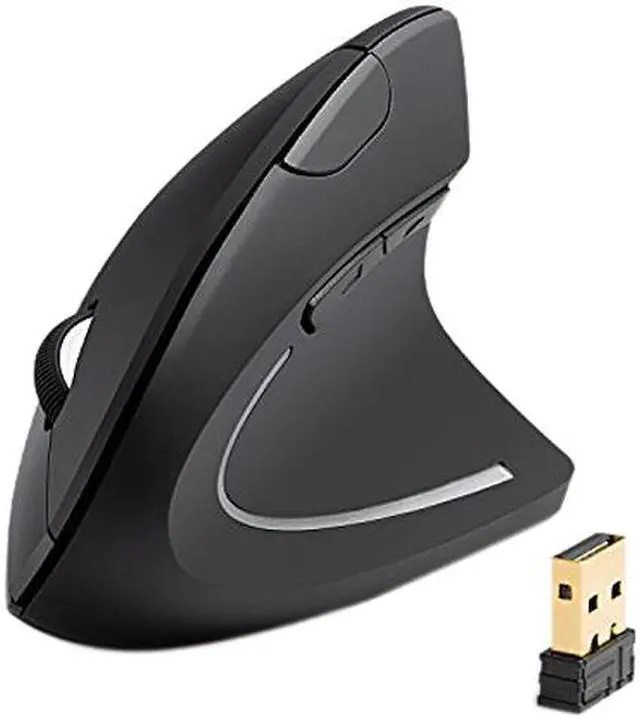
The Anker is the cheapest honest way to find out whether a vertical mouse suits you. Around 55 degrees of tilt, three DPI steps (800 / 1,200 / 1,600), five buttons and about 95 g — a simple, effective shape that Tom's Guide calls exactly that: simple but effective. It has an onboard DPI button and a dongle slot in the base, so the receiver travels with the mouse.
The price is the trade. It runs on two AAA batteries (not included), connects by a 2.4 GHz receiver only — no Bluetooth, no multi-device switching — and it sleeps after eight minutes idle, so the first click after a coffee break wakes it rather than moving the cursor. The thumb buttons don't work on Mac. Buy it as a shape test: if two weeks with the Anker stops your wrist aching, spend the real money on the MX Vertical or the Lift. If it doesn't, you've spent very little to learn that.
Pros
- Cheapest pick here — a low-cost shape test
- Simple, proven vertical shape
- Onboard DPI button
- Dongle stores in the base
- Light at about 95 g
Cons
- Two AAA batteries, not included
- No Bluetooth or multi-device switching
- 1,600 DPI ceiling
- Sleeps after 8 minutes idle
- Thumb buttons don't work on Mac
Do Vertical Mice Actually Help With Wrist Pain?
They can ease the strain — they are not a treatment. A vertical mouse holds the forearm closer to a handshake position, so the wrist twists less during a long day. That helps many people with aching wrists. It does not fix carpal tunnel, and it is not a medical device.
I've seen conflicting data — some sources say a vertical mouse cuts muscle strain by 10%, others claim 25%, and one page even quotes a 42% pain reduction in two weeks. My read is that only Logitech's 10% figure traces back to a named source, its own ERGO Lab testing, while the bigger numbers come from different methods or untraceable citations. Treat them as marketing, not medicine. The honest framing is simpler: a vertical mouse changes where the load goes, not how much load exists.
The honest limit: no mouse in this guide is a medical product, and no maker claim here is a clinical result. If you have numbness, tingling or pain that does not fade after a few days away from the mouse, see a doctor — a mouse change is the wrong fix for a nerve problem. What a vertical does do, for the right hand size, is remove one source of strain: the twist. Pair it with a chair and desk height that lets your forearm rest flat, and with breaks — the mouse alone is half the fix.
The Keyboard-Height Problem Nobody Mentions
A vertical mouse raises your palm 7 to 9 cm off the desk. Your keyboard sits at 2 to 3 cm. That gap can move the ache from your wrist to your shoulder.
This is the gap almost no roundup covers, and it matters. With a flat mouse, your hand and your keyboard sit at roughly the same height. With a vertical mouse, your mousing hand rides much higher than your typing hand — and your shoulder carries the difference all day. If your desk is too high, or your chair is too low, the mouse arm hangs and the shoulder complains within the week.
Fix it before you blame the mouse. Set your chair so your forearm rests flat and your elbow sits near 90 degrees, with the mouse close to the keyboard — not stretched out to the side. A keyboard tray helps if your desk is fixed-height. And if you use a laptop on a stand, put the mouse on the same surface as the keyboard, not on a lower desk tier. A vertical mouse plus a bad desk setup is a new ache wearing a different name.
How Long Does It Take to Get Used to a Vertical Mouse?
A few days to feel normal, up to two weeks to judge fairly. The first two days feel strange for almost everyone — that is normal, not a sign you bought the wrong mouse.
To switch to a vertical mouse, follow these steps: 1. Keep your old mouse plugged in for the first week. 2. Use the vertical mouse for email and browsing first, not deadline work. 3. Lower your DPI one step so the cursor feels steady. 4. Judge it after 14 days, not after day one.
Day by day, it goes like this. Days one and two: slow, clumsy, and your thumb aches in a new place — keep the old mouse handy for anything urgent. Days three to five: the clicks land, the cursor stops overshooting, and the wrist feels less twisted by lunch. Week two: it starts to feel like your mouse. If it still hurts after that full second week, the size is wrong, not the shape — measure your hand again and check the millimetres.
One honest warning. Some people get thumb pain in the first week, usually because they're gripping too hard. A vertical mouse needs a relaxed grip — the shell holds your hand, your fingers don't need to pinch it. If your thumb aches, loosen your grip before you blame the mouse.
Are There Left-Handed Vertical Mice?
Yes, but the choice is thin: the Logitech Lift Left is the only mainstream vertical mouse with a true left-handed version — and it is sized for small-to-medium hands, not large ones.
That is the honest gap in this market. Every other mouse in this guide is right-handed, because the big shells are sculpted for a right hand. The Lift Left is the same 108 mm shell, mirrored, with the same quiet clicks and three-device switching. If you are left-handed with a hand under 17 cm, it is the pick. If you are left-handed with a large hand, the market has almost nothing for you — Evoluent makes left-handed specialist models, but they are niche, pricey, and hard to find in stock.
Check the listing before you buy anything. The standard Lift and the Lift Left look identical in thumbnails, and "Left" appears only in the product name. A left-handed buyer who orders the standard Lift gets a right-handed mouse.
Who Should NOT Buy a Vertical Mouse?
If you use a computer for a few hours a day and your wrist never aches, don't buy one. A vertical mouse solves a problem you don't have.
Here's my opinion, and some readers will push back on it: most office workers don't need a vertical mouse at all. If your wrist feels fine after a full day, your flat mouse is doing its job — spend the money on a better chair or a keyboard tray instead. A vertical mouse earns its keep only when the ache is real and regular. Buying one "just in case" is how it ends up in a drawer by February.
Skip it too if you play competitive games on the same mouse — the angle slows fast, precise flicks, and none of these six is a gaming mouse. Skip it if your desk setup can't be fixed — a vertical mouse on a too-high desk trades wrist ache for shoulder ache. And skip it if you share one mouse with a right-handed colleague and you're left-handed, or the other way round: these shells are one-handed by design.
If you like the ergonomic idea but can't stand the vertical shape, the honest alternative is a sculpted flat mouse — the Logitech MX Master 4 is the one most office workers end up with, and our large-hands guide covers it in detail.
Buying Guide: What Actually Matters
After size, the four things worth your attention are angle, connection, battery and clicks — in that order.
Angle decides how much twist comes out of your forearm: 57 degrees is the standard starting point, 47 is a gentler tilt, 71.7 is the steepest relief. Connection decides how it joins your setup: Bluetooth and 2.4 GHz cover most desks, and three-device switching matters if you move between a laptop and a desktop — the Logitech pair, the Razer and the ProtoArc all switch between devices. Battery decides how often you think about it: the MX Vertical and Keychron recharge over USB-C, the Lift runs on one AA for a maker's claim of 24 months, the Anker eats AAA batteries. Clicks decide whether your office hears you: the Lift and the ProtoArc are quiet; the MX Vertical is not.
Three things not to overpay for: DPI above 4,000 on a work mouse (you will never use it), RGB lighting on a mouse your hand covers, and a "gaming" label on a mouse with no low-latency wireless. And one thing to check before you buy: the return window. A vertical mouse needs two weeks to judge, so buy from a seller that gives you at least that long.
Mice to Skip in 2026
Logitech MX Master 4 — a superb mouse, and not a vertical one. The best sculpted flat mouse for office work, and the wrong buy if you want a handshake angle. Buy it if you can't stand vertical — don't buy it expecting one.
Evoluent VerticalMouse 4 — the specialist pick. Nearly 90 degrees of tilt, built for severe pronation pain, but niche pricing, hard to find, and a tiny owner base. A doctor's conversation, not a first buy.
Microsoft Sculpt Ergonomic Mouse — sculpted, not vertical, and ageing. A comfortable old design that never tilted the hand upright. It belongs in a museum of office ergonomics, not on a 2026 shortlist.
No-name budget verticals (TECKNET, UGREEN, Lekvey and friends) — cheap for a reason. They flood low-quality roundups with inconsistent model names, no professional-review backing, and no track record. The Anker and the ProtoArc cover the budget tier with real verification behind them.
Logitech MX Anywhere 3S — a great mouse for the wrong job. 100.5 mm long, 99 g, superb for travel and small hands. For eight hours at a desk with a vertical grip in mind, it is the cramp you are trying to escape.
The pattern is the same every time: a good mouse, recommended to the wrong hands — or the wrong shape entirely.
Frequently Asked Questions
What's the best vertical mouse for office work in 2026?
The Logitech MX Vertical for medium-to-large hands. For small hands or lefties, the Logitech Lift.
Are vertical mice good for office work?
Yes, for long days at a desk. The handshake angle cuts forearm twist, but give it two weeks to adjust.
Do vertical mice actually help with wrist pain?
They can ease strain by reducing wrist twist, but they are not a treatment. Numbness or tingling needs a doctor.
How long does it take to get used to a vertical mouse?
A few days to feel normal, up to two weeks to judge fairly. Keep your old mouse plugged in for week one.
Is there a vertical mouse for left-handed people?
Yes — the Logitech Lift Left is the only mainstream one, sized for small-to-medium hands.
Can a vertical mouse help with carpal tunnel?
It may ease strain, but it does not treat carpal tunnel. If you have numbness or tingling, see a doctor.
What DPI do I need for office work?
1,000 to 4,000 DPI covers spreadsheets and 4K screens. Anything higher is wasted on office work.