Best Laptop Cleaning Kit for Screen and Keyboard (2026)

Your laptop screen is a map of fingerprints. The keyboard crunches when you type. You wipe the screen with your sleeve and it just moves the smear around.
You have tried the obvious stuff. A damp cloth. Glass cleaner, maybe, before someone told you not to. Shaking the laptop upside down over the bin. The crumbs stayed. The smears came back.
A laptop cleaning kit for screen and keyboard is a set of tools made for both jobs at once: a coating-safe spray and microfiber cloths for the screen, plus a brush, blower or gel for the crumbs between the keys. One kit, two surfaces, no guesswork about what is safe.
This guide ranks six kits by what each tool actually does — screen, keyboard, vents — and by the safety rules that matter most. Our screen-only advice lives in the monitor screen cleaning guide; this one is for laptops, where one kit has to do both jobs.
No prices are printed in this guide — cleaning kit prices move daily and rival pages disagree on the same kit. Check the live price before buying. All tool counts and sizes are the makers' own figures — never a guess.
What's the Best Laptop Cleaning Kit for Screen and Keyboard?
The Ordilend 10-in-1. It is the only kit here with a tool for every part of the job — a retractable brush and keycap puller for the keys, spray and cloths for the screen — and it is the pick that shows up in the most independent roundups.
The best laptop cleaning kit for screen and keyboard is the Ordilend 10-in-1, according to the roundups that tested it against rival kits. It bundles a retractable brush, a keycap puller, spray and several polishing cloths, so one kit covers fingerprints, crumbs and dust in the vents. Owners praise the brush most, and reviewers keep ranking it first for completeness.
A good laptop cleaning kit needs three things, according to the cleaning guides that rank highest. A coating-safe spray and microfiber cloths for the screen, a soft brush or blower for the keyboard, and nothing abrasive anywhere in the box. Kits that add a keycap puller earn extra credit — but only for desktop mechanical keyboards, never for laptop keys.
The Ordilend wins on completeness, not on any single tool. The Altura kit has the better spray and the better cloth. The iFixit kit has the better brush. But no other kit here covers the screen, the keys and the vents in one box — and that is what this search is asking for.
One kit. Both jobs. That is the whole test.
What Should a Laptop Cleaning Kit Actually Include?
Four things: a coating-safe spray, two or more microfiber cloths, a soft brush, and a blower or gel for the gaps between keys. Anything beyond that is a bonus, not a need.
The safest way to clean a laptop screen is a dry microfiber cloth first, then a cloth lightly dampened with water or a dedicated screen cleaner, according to pcrepairatlas.com. Never spray liquid on the screen, never press hard, and let the panel dry before closing the lid. Glass cleaner and paper towels are the two mistakes that cause permanent damage.
| Tool | What it cleans | Watch out for |
|---|---|---|
| Screen spray | Fingerprints and smudges | Must be ammonia- and alcohol-free; spray the cloth, never the screen |
| Microfiber cloths | Screens, lids, palm rests | Wash them — a dirty cloth just moves grime around |
| Soft brush | Keys, vents, ports | Bristles must be soft; stiff bristles scratch coatings and key legends |
| Air blower | Dust under keys and in vents | Hand-squeezed only — canned air sprays liquid propellant if tilted |
| Cleaning gel | Crumbs deep between keys | Keyboards and vents only — never on a screen |
| Keycap puller | Desktop mechanical keys | Never on laptop keys — the clips break |
Two cloths matter more than twenty tools. One cloth does the damp wipe, the second does the dry buff — and a single cloth doing both jobs just smears the dirt back on. The kits that ship one cloth leave you washing it mid-clean.
Here's the thing: the spray size tells you how serious a kit is. A 2 oz bottle lasts months. A 15ml bottle lasts a few cleanings, and the 2.5ml mist sprays in the budget kits are closer to a sample than a supply. Check the millilitres before you buy.
Can I Use Glass Cleaner on My Laptop Screen?
No. Window cleaner and other household glass cleaners contain ammonia, which strips the anti-reflective coating off a laptop screen. The damage is permanent — and you only notice it when the light hits the screen at the wrong angle.
Laptop screens carry thin coatings: anti-reflective layers on matte screens, oleophobic layers on glossy ones. Ammonia, bleach and acetone eat those layers. Dell tells owners not to use window cleaner or any household cleaner on a laptop screen, and Microsoft warns that alcohol and ammonia strip a screen's protective coating.
I've seen conflicting data — Apple says a cloth moistened with 70% isopropyl alcohol is fine on its own screens, while Microsoft tells Surface owners to avoid alcohol. My read is that your laptop maker's page wins: follow it, and when it says nothing, stick to water or a dedicated screen cleaner.
When in doubt, water wins.
Is Cleaning Gel Safe for a Laptop Screen?
No. Cleaning gel is made for textured surfaces — keyboards, vents, car dashboards. Press it on a flat screen and it smears, leaves residue, and can pull at coatings. Use it on the keys, never on the glass.
Spray vs gel vs brush: spray and a microfiber cloth are better suited for screens because they lift fingerprints without touching the coating. Gel works better when crumbs sit deep between keys, where a cloth cannot reach. A brush is the middle ground — it sweeps loose dust off both. The key difference is the surface: flat glass wants spray, gaps want gel.
Gel works because it flows into gaps and grabs what a brush leaves behind — crumbs, dust, pet hair. That same stickiness is the problem on glass: a flat screen gives the gel nothing to grip except the coating. Keep the gel in the keyboard, and keep the cloth on the screen.
One more rule for gel: replace it when it darkens. Old gel leaves bits behind and stops picking dirt up — at that point it is dirt itself.
Can I Pull the Keys Off My Laptop to Clean Under Them?
Don't. Laptop keys sit on tiny plastic clips that snap — and once one breaks, the key wobbles or won't stay on at all. Keycap pullers are for desktop mechanical keyboards, not laptops.
The puller in these kits is the most misunderstood tool in the box. On a desktop mechanical keyboard it pops keycaps off cleanly for a deep clean. On a laptop it pulls against clips that were never meant to come apart — and the repair is a new keyboard, not a new key.
Or maybe I should say it this way: the puller is a bonus for your desk keyboard, not a tool for your laptop. Clean laptop keys with the brush, the blower and the gel, and leave the caps where they are.
If a key already feels loose, stop cleaning around it and get it checked — a wobbling key is a broken clip announcing itself.
Quick Comparison
| Product | Kit contents | Screen tools | Keyboard tools | Best for | ||
|---|---|---|---|---|---|---|
| #1 | Ordilend 10-in-1Best Overall | 10 tools: brush, puller, spray, cloths, lens pen | Spray + polishing cloths | Retractable brush, keycap puller, detail tips | Everything in one box | Check Price |
| #2 | Altura Photo 5-PieceBest Premium | 5 pieces: 2 oz spray, blower, 100g gel, 16-inch cloth, brush | 2 oz spray + big cloth | Blower, gel, soft brush | A gentle premium clean | Check Price |
| #3 | iFixit Laptop Cleaning KitBest Trusted Brand | Spray, blower, anti-static brush, cloths, swabs, pouch | Screen Saver spray + cloths | Blower, brush, precision swabs | Vents, ports and upkeep | Check Price |
| #4 | OXO Sweep & SwipeBest Simple Tool | One tool: brush + microfiber pad | Microfiber pad | Retractable soft brush | A quick daily wipe-down | Check Price |
| #5 | ColorCoral Gel 160gBest for Keyboard Crumbs | One tub of cleaning gel | None — not for screens | Gel presses into key gaps | Crumbs between keys | Check Price |
| #6 | Tounee 20-in-1Best Budget | 20 tools: brush, 2.5ml spray, puller, detail tips | Mist spray + cloth | Brush, puller, detail tools | Most tools, least money | Check Price |
The "Best for" column is the honest summary: the Ordilend covers the most jobs, the Altura is the gentlest, and the ColorCoral does exactly one job — crumbs — better than anything else here. Buy the kit that matches the mess you actually have.
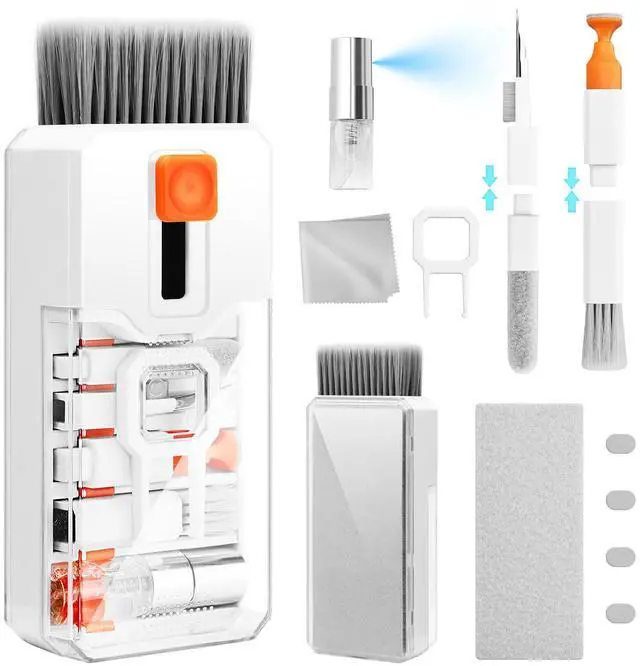
Ordilend Keyboard Cleaner & Laptop Cleaning Kit
Best OverallBuy if: you want one kit that covers the screen, the keys and the vents
Don't buy if: you only clean the screen — a screen-only kit costs less
The Ordilend is the most-cited laptop cleaning kit in the roundups we checked — Nerd Techy, Clear Review Zone, pcpartsgeek and Digital Wellness Labs all rank it first or near it. The reason is the tool count: a retractable large brush for the keys, a keycap puller, a spray bottle, two thickened polishing cloths plus five replacements, a lens pen and small detail tools, all in one compact case.
Owners praise the brush most — it reaches between keys without shedding bristles — and the cloths are 2mm thick, so they don't go see-through after a few washes. The weak spot is the spray: it is small, and some listings sell the bottle separately, so check what's in the box before you buy. The puller is for desktop mechanical keyboards — leave laptop keys alone.
Pros
- Most complete tool set here
- Brush reaches between keys
- Thick 2mm cloths, washable
- Compact case keeps it together
Cons
- Spray is small — some listings sell it separately
- Brush bristles feel stiff on delicate screens
- Keycap puller is not for laptop keys
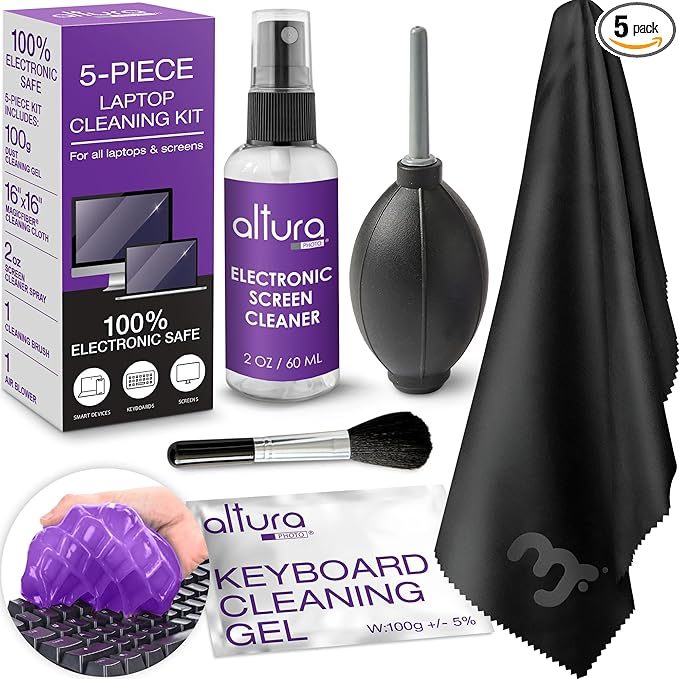
Altura Photo Keyboard Cleaner & Laptop Cleaning Kit
Best PremiumBuy if: you want the gentlest kit for a pricey laptop
Don't buy if: you want the most tools per dollar
Altura Photo comes from camera gear, and it shows in the cloth: a 16-by-16-inch microfiber that is softer than anything else here, big enough to cover a laptop screen in one pass. The five pieces are a 2 oz screen cleaner spray, a hand air blower, a 100g tub of keyboard cleaning gel, the big cloth and a soft brush.
This is the only kit here with both a gel and a blower, so it handles crumbs two ways — blow the loose dust out, press the gel into what's left. The spray is a proper bottle, not a sample, and the formula is alcohol- and ammonia-free. The trade is the tool count: five pieces against the Ordilend's ten, for similar money.
Pros
- Both gel and blower in one kit
- Biggest, softest cloth here
- Proper 2 oz spray bottle
- Alcohol- and ammonia-free formula
Cons
- Fewer tools than the Ordilend for similar money
- Gel needs replacing once it darkens
- Hand blower, not powered
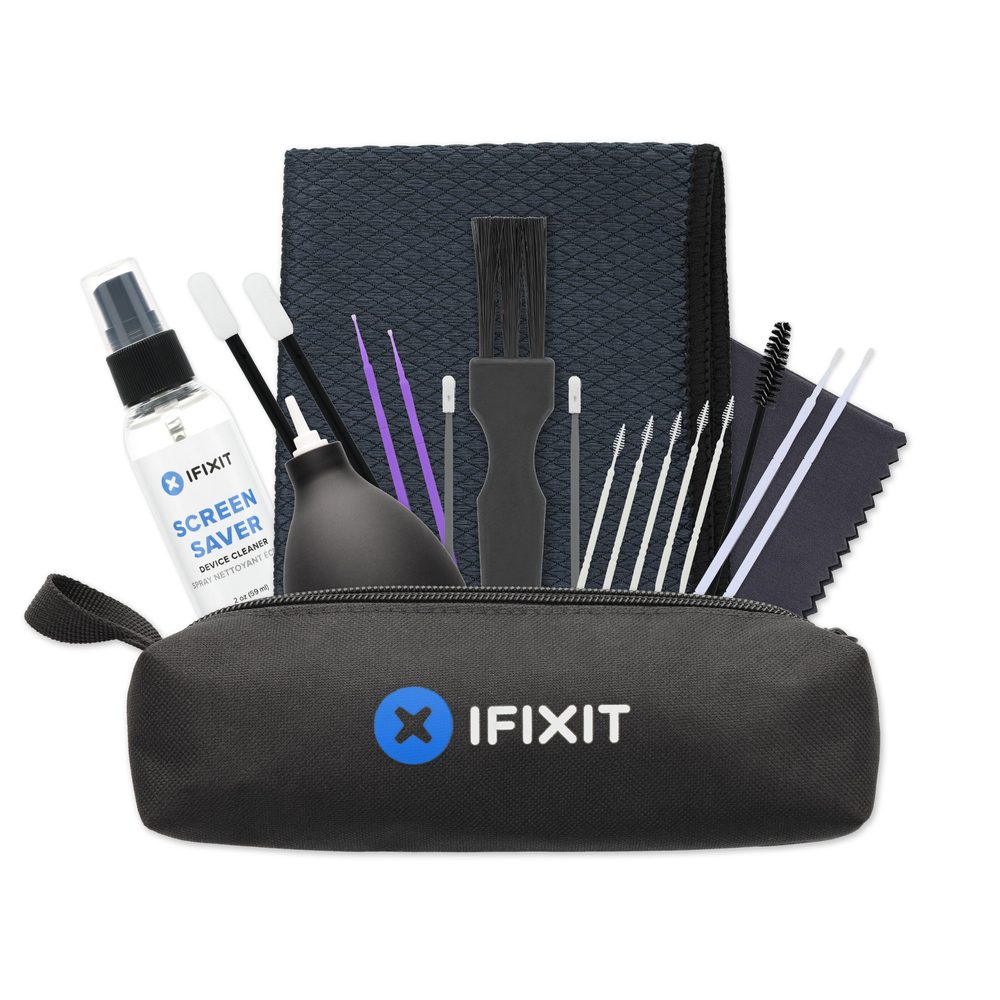
iFixit Laptop Cleaning Kit
Best Trusted BrandBuy if: you want a trusted brand and the safest brush
Don't buy if: you want the most tools in the box
iFixit is the brand repair technicians reach for, and this kit is built the same way: no gimmicks, just the tools that do the job. A 2 oz Screen Saver spray, a dust blower, an anti-static brush, microfiber cloths, precision swabs and a zip pouch that keeps it all together.
The anti-static brush is the safest brush here for electronics — it won't build the charge that can bother sensitive parts. The swabs reach ports and vents no brush can touch. What it doesn't have is a keycap puller or a gel, and it carries the smallest tool count here — you pay for the brand and the build, not the quantity.
Pros
- The brand repair techs trust
- Safest anti-static brush here
- Swabs reach ports and vents
- Pouch keeps everything together
Cons
- No keycap puller
- No cleaning gel
- Smallest tool count here
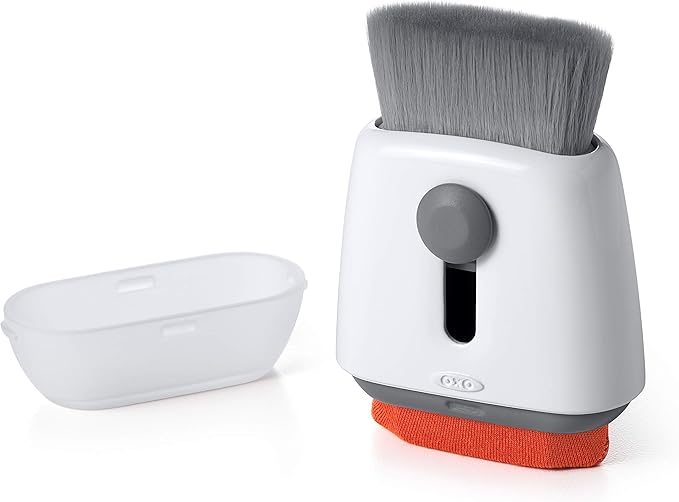
OXO Good Grips Sweep & Swipe Laptop Cleaner
Best Simple ToolBuy if: you want a quick daily wipe-down that lives on your desk
Don't buy if: you need a deep clean with spray and gel
The OXO is the simplest tool here and the fastest clean: a retractable soft brush on one end, a microfiber pad on the other. Brush the crumbs out, flip it over, swipe the screen. No spray, no gel, nothing to run out or spill in your bag.
It lives on a ring with your keys or hangs off a desk hook, so it is the kit you actually use — the one that is there beats the one in a drawer. The limits are real, though: dried-on smudges need a damp cloth from elsewhere, and the pad is small on a 16-inch screen.
Pros
- Fastest clean here — brush, flip, swipe
- Nothing to spill or run out
- Pad is washable
- Lives on a key ring
Cons
- No spray — dried smudges need a separate cloth
- Pad is small for big screens
- No tools for ports or vents
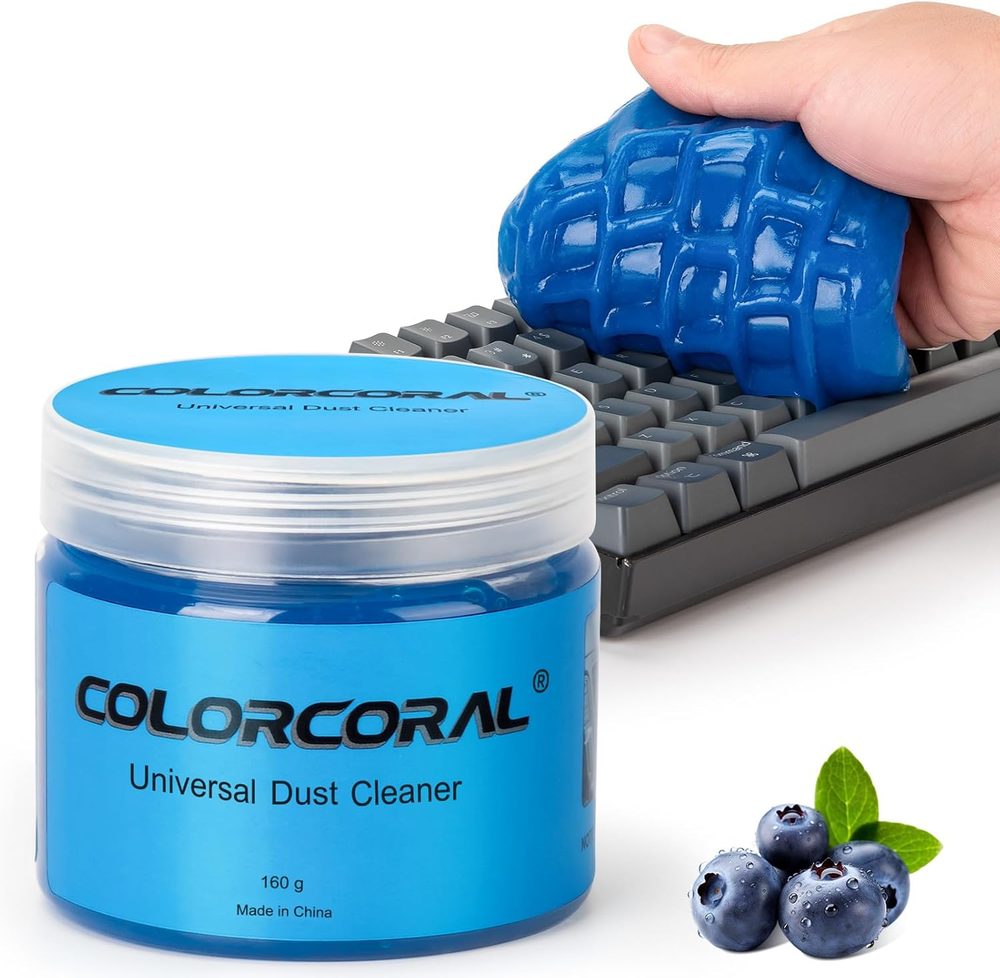
ColorCoral Cleaning Gel Universal Dust Cleaner
Best for Keyboard CrumbsBuy if: crumbs between the keys are the whole problem
Don't buy if: you want one kit for screen and keyboard
ColorCoral is not a kit — it is one tub of blue gel, 160g, and it does one job better than any brush: press it onto the keyboard and it flows between the keys, grabs crumbs, dust and pet hair, and lifts them out in one piece. Owners keep buying it because it works on the mess brushes leave behind.
The rules are simple. Keyboards and vents only — never on a screen, where it smears and leaves residue. Replace the tub when the gel darkens: old gel stops picking dirt up and starts leaving bits behind. And you still need cloths and spray for the screen — this is half a kit, not a whole one.
Pros
- Best crumb-lifter here — reaches where brushes can't
- Reusable until it darkens
- Cheap
- No batteries, no spray
Cons
- Not for screens — gel smears on glass
- Leaves residue once old
- Not a complete kit — you still need cloths and spray
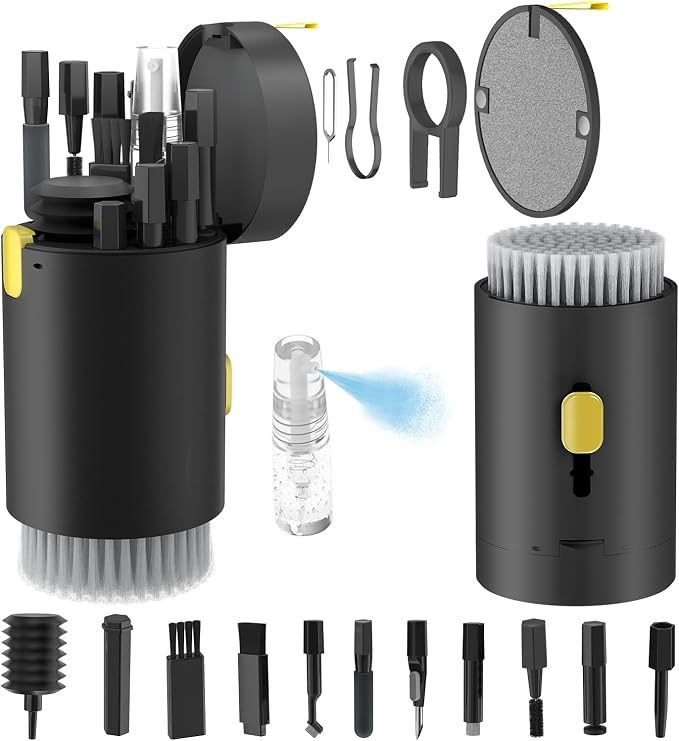
Tounee 20-in-1 Keyboard Cleaner Kit
Best BudgetBuy if: you want the most tools for the least money
Don't buy if: you want full-size tools and a proper spray bottle
The Tounee packs twenty tools into a round black case: a retractable big brush, a 2.5ml mist spray, a keycap puller, SIM ejectors, port picks and detail brushes. It is the most tools for the least money in this guide, and the case keeps them all in one place instead of scattered across a drawer.
The catch is size. The mist spray holds 2.5ml — a few cleanings, not a season — and the tools are small and fiddly next to the Ordilend's full-size brush. The puller is for desktop keyboards, not laptop keys. And near-identical kits sell under other names, so check the listing says Tounee before you buy.
Pros
- Most tools for the least money
- Case keeps everything together
- Travel-size mist spray
- Brush is full-size
Cons
- Spray is tiny — 2.5ml lasts a few cleanings
- Tools are small and fiddly
- Near-identical clones — check the brand
How to Clean Your Laptop Screen and Keyboard in 5 Steps
Shut it down, brush the keys, gel the gaps, wipe the screen dry, then wipe it damp. Five steps, five minutes, no special skill.
To clean your laptop screen and keyboard, follow these steps: 1. Shut the laptop down and unplug it. 2. Tip it upside down and tap out loose crumbs. 3. Brush the keys, then press gel into the gaps. 4. Wipe the screen with a dry microfiber cloth. 5. Dampen the cloth with spray and wipe again.
- Shut the laptop down and unplug it. A dark screen shows smudges better, and no power means no risk if a cloth is damper than planned.
- Tip it upside down and tap out the loose crumbs. Hold it at an angle over a bin and tap the base gently — most of the mess falls out here.
- Brush the keys, then press gel into the gaps. Sweep crumbs out with the brush, blow the dust out, and press gel between the keys for what's left.
- Wipe the screen with a dry microfiber cloth. Light, even strokes, one direction — this lifts dust without grinding it into the coating.
- Dampen the cloth with spray and wipe again. Spray the cloth, never the screen. Buff dry with a second cloth and let the panel dry before closing the lid.
Quick note: close the lid only when the screen is fully dry. Trapped moisture fogs the panel and can mark the keyboard underneath.
Buying Guide: What Actually Matters
After the screen-safety check, the four things worth your attention are the tool mix, the cloth, the spray size and the case — in that order.
The tool mix decides what the kit can actually clean. Spray and cloths handle the screen. A brush and a blower handle loose dust. Gel handles crumbs. A kit missing any one of those leaves a job undone — and the missing tool is always the one you need most.
The cloth matters more than the brand. Thick microfiber — the 2mm cloths in the Ordilend, the 16-inch cloth in the Altura — lifts grime without scratching. Thin cloths go see-through after a few washes and start smearing. Wash your cloths: a dirty cloth just moves dirt around.
Spray size is the quiet trap. A 2 oz bottle lasts months of weekly cleans. A 15ml bottle lasts a few weeks. The 2.5ml mist sprays in budget kits are samples — fine for travel, useless as your only supply. Check the millilitres, not the marketing.
The case decides whether the kit gets used. A kit in a pouch or on a ring lives on the desk; a kit in loose pieces lives in a drawer. Here's my honest take: most people don't need a 20-in-1 kit. A spray, two cloths and a brush cover nearly every laptop clean — the other seventeen tools clean earbuds and camera lenses you may never touch. Buy the kit for the three tools you'll use weekly, not the twenty you'll use once.
Three tools, used weekly, beat twenty tools in a drawer.
Kits to Skip in 2026
Screen-only kits. WHOOSH! and Screen Mom make fine screen cleaners — they live in our monitor screen guide for a reason. But they leave the keyboard dirty, and this search asks for both jobs. Buy them for a monitor, not for a laptop.
Canned air as a kit. A can of compressed air blows dust out, then runs out — and tipped on its side it sprays liquid propellant into the keyboard. A hand blower or a gel costs less over a year and can't do that.
No-name 20-in-1 clones. The same black cylinder sells under a dozen names, and the quality swings with the seller — bristles that shed, sprays that leak, cloths that feel like sandpaper. If the listing won't name a brand, don't buy it.
Household disinfecting wipes. Fine for a desk, wrong for a laptop — unless your laptop maker approves them. The chemicals that kill germs can also strip screen coatings, and a soaking wipe drips liquid into the keyboard.
Frequently Asked Questions
What's the best laptop cleaning kit for screen and keyboard?
The Ordilend 10-in-1 — it has a tool for every part of the job, from the screen spray to the keycap puller, and it tops the most independent roundups.
Can I use Windex on my laptop screen?
No. Windex contains ammonia, which strips the anti-reflective coating off laptop screens. Use a dedicated screen cleaner or a cloth dampened with distilled water instead.
Can I use rubbing alcohol on my laptop screen?
Only if your laptop maker says so. Apple allows 70% isopropyl on its screens; Microsoft says to avoid it on Surface. When in doubt, use water or a dedicated screen cleaner.
Does cleaning gel work on laptop screens?
No. Gel is made for textured surfaces like keyboards and vents. On flat glass it smears and leaves residue. Use a microfiber cloth and spray for the screen.
How often should I clean my laptop?
Wipe the screen weekly and clean the keyboard every two weeks. If you eat at the desk, do the keyboard weekly — crumbs build up fast.
Can I use a vacuum cleaner on my laptop keyboard?
No. A household vacuum builds static and can damage electronics. Use a brush, a hand blower or cleaning gel instead.
Can I pull the keys off my laptop to clean underneath?
Don't. Laptop keys sit on small clips that break easily. Brush the gaps, use a blower, or press cleaning gel between the keys instead.