Best Silent Mechanical Keyboard for Office in 2026: 6 Picks

You love the feel of a mechanical keyboard. Your coworkers do not love the sound of it. Every keystroke clacks across the open-plan office, and on video calls your mic picks up each press like a drumbeat. You have tried typing lighter. Maybe you tried a desk mat. The board is still the loudest thing in the room.
This guide fixes that — with one warning first. The same keyboard model is often sold with quiet AND loud switches, and most roundups never say so. Buy the wrong variant and you own a loud board with a "silent" review attached. Six picks here, all chosen for office use, with the exact switch name to order spelled out on every card. No gaming boards leaked in, no invented models, and every switch figure is the maker's own spec.
No prices are printed in this guide — keyboard prices move by seller and week, so check the live price before buying. Switch figures are the makers' own specs, and where sources disagree on noise, the disagreement is stated in the guide.
Are Silent Mechanical Keyboards Really Silent?
No — but they are much quieter than a standard mechanical board. A silent-switch keyboard fades into office background noise instead of carrying across the room.
A silent mechanical keyboard for office use is a mechanical keyboard with dampened switches — rubber pads inside each switch that soften the keypress on the way down and back up. It keeps the feel and durability of a mechanical board while cutting the sharp clack that carries across a room.
Silent mechanical keyboards are not fully silent, but they are much quieter than standard mechanical boards. According to Canopy, which cites RTINGS testing, a standard mechanical keyboard hits 60–70 decibels while a silent-switch board drops to 40–50 decibels. That is the gap between a normal conversation and a quiet library.
The quietest switch type for office use is the silent linear switch, such as Cherry MX Silent Red or Gateron Silent Red. According to WorkWellSetup, silent linear switches are the consensus pick for minimum noise with a true mechanical feel. Silent tactile switches add a small bump at a small noise cost.
I've seen conflicting data — one test puts silent switches near 40–50 dB, another measures 65 dB against 78 dB for a standard switch. My read is the distance and typing force change the number more than the switch does, so treat any single decibel figure as a rough guide, not a lab result.
Look — if you're on calls all day and your mic picks up every keystroke, here's what actually works: a silent linear switch, not a quieter version of the board you already own. The switch is the noise. Everything else is refinement.
What Is the Quietest Switch Type for Office Use?
Silent linear switches — Cherry MX Silent Red or its equivalents. Smooth, soft, no bump, no click. Start here if you are unsure.
Silent linear vs silent tactile switches: silent linear is better suited for the office because the keypress is smooth and soft, with no bump and no click. Silent tactile works better when you want a small bump to confirm each keypress. The key difference is feel: linear glides, tactile confirms.
A quiet mechanical keyboard is not as quiet as a membrane or scissor-switch board, and honest guides say so. The gap is small, though: a silent mechanical board fades into normal office background noise, while a laptop-style board is barely audible at all. You trade a little quiet for a much better typing feel.
Three switch types cover almost every office board. Silent linear (Cherry MX Silent Red, Gateron Silent Red) has rubber pads that cushion the key on the way down and back up — the quietest true mechanical option. Silent tactile adds a small bump for feedback at a small noise cost. Low-profile switches travel a shorter distance, so they hit softer by design — that is why the Logitech and NuPhy picks here are so quiet despite their slim keys.
Here's the thing: the switch name on the box is not enough. The same model is sold in quiet and loud versions — the MX Mechanical comes in Tactile Quiet, Clicky and Linear, and the KC 200 MX comes in Silent Red and Brown. Check the variant on the listing before you pay. One wrong click at checkout and the "silent" board you bought clicks through every meeting.
Or maybe I should say it this way: the switch decides the noise, the board decides everything else. Get the switch right first, then worry about layout, wireless and looks.
Will My Coworkers Still Hear Me Typing?
Up close, yes — a little. Across an open-plan office, a silent-switch board fades into the background hum. You stop being the person everyone hears.
Sound drops fast with distance. A silent mechanical board is audible to the person next to you and near-silent three desks away. That is the whole point: you are not buying silence, you are buying a board that stops projecting. In a library-quiet room, any keyboard is audible — but you won't be the person everyone hears.
Your call mic is the stricter test. A laptop mic sits a foot from your hands and picks up every keystroke, silent switch or not. Two fixes help more than any board: sit the mic closer to your mouth than to your keys, and use push-to-talk or a mute hotkey when you are not speaking. A silent board plus a muted mic beats a loud board plus noise suppression every time.
Quick note: the absolute quietest keyboard is not mechanical at all. A scissor-switch board like the Logitech MX Keys S is still quieter than any board here. If silence beats feel for you, buy that instead — it is the honest answer, and no mechanical pick closes the last bit of the gap. The six boards below are for people who want mechanical feel with office-acceptable noise.
How Can I Make My Current Mechanical Keyboard Quieter?
Fit silicone O-rings under the keycaps, add a desk mat, and type lighter. If your board is hot-swap, fit silent switches — that is the biggest single change you can make.
Three cheap fixes cut noise a lot before you buy anything new. O-rings are the best spend: small rubber rings that slip under each keycap and soften the bottom-out thock, about ten dollars for a full set. A thick desk mat absorbs case resonance and the general clatter of setting things down. And typing lighter is free — bottoming out every key with full force is the loudest habit there is.
Then there is the rattle nobody mentions. The metal bars under long keys — spacebar, Enter, Shift — can rattle if poorly lubricated, and one guide ranks stabiliser rattle the top noise source on many boards. If your spacebar sounds like a tin can, the switches are not the problem. Lubed screw-in stabilisers fix it; cheap clip-in ones rarely do. Hot-swap boards let you fix this yourself, which is one more reason the Keychron picks here earn their place.
One fix at a time. Fit the O-rings first and listen for a day — if the board is still too loud, the switches are the problem, not the case.
Quick Comparison
| Product | Switch / Layout / Connection | ||
|---|---|---|---|
| #1 | Logitech MX MechanicalBest Overall for the Office | Tactile Quiet low-profile / full-size, numpad / Bluetooth + Bolt, 3 devices | Check Price |
| #2 | CHERRY KC 200 MXQuietest True Mechanical | MX2A Silent Red / full-size, numpad / wired USB-A | Check Price |
| #3 | Keychron Q1 MaxBest Premium / Customisable | Gateron Jupiter + silent swap / 75% / tri-mode wireless | Check Price |
| #4 | NuPhy Air75 V3Best Low-Profile | Blush Nano silent low-profile / 75% / tri-mode wireless | Check Price |
| #5 | Razer Pro Type UltraBest Full-Size Wireless + Wrist Rest | Razer Yellow silent linear / full-size, numpad / Bluetooth + 2.4 GHz | Check Price |
| #6 | Keychron C3 Pro 8KBest Budget | Standard + silent swap / TKL / wired USB-C | Check Price |
Four of the six boards are quiet out of the box. The Q1 Max and C3 Pro 8K are not — they ship with standard switches and need a silent-switch swap to earn their place here. The swap takes five minutes on a hot-swap board, but it is a real extra step, and the cards say so plainly.
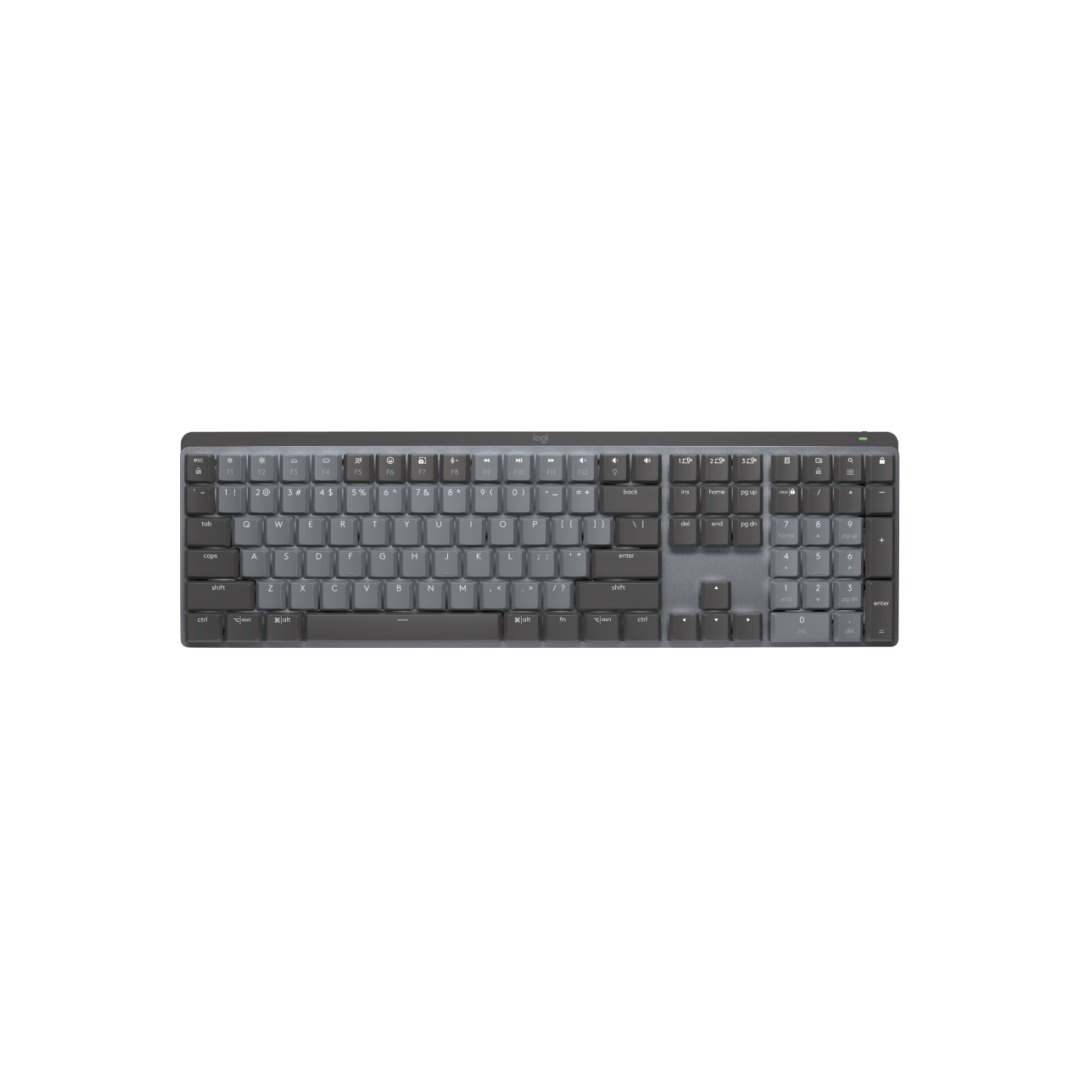
Logitech MX Mechanical
Best Overall for the OfficeBuy if: you want the safest office pick — quiet, wireless, multi-device, corporate-safe
Don't buy if: you want to swap switches later, or you need the quietest board here
The MX Mechanical is the board built for offices, not adapted to them. Low-profile keys sit close to a laptop keyboard, so the switch from membrane is easy. The Tactile Quiet version — order this one, not the Clicky or Linear — has a small bump and no click. Full-size layout with a number pad, smart backlighting, and Easy-Switch across three devices over Bluetooth or the Logi Bolt receiver. It looks like standard office equipment, which is the point: nobody from IT stops by to ask about it.
Don't buy it if you plan to change switches later — the switches are soldered, so what you buy is what you keep. Battery life is the other trade: months with the backlight off, about two weeks with it on. And be honest about the goal — this is refined and quiet, not the quietest board here. The KC 200 MX below is quieter. But for most offices, this is the board that disappears into the workday.
Pros
- Purpose-built for offices, looks corporate-safe
- Multi-device Easy-Switch across 3 devices
- Low-profile keys feel close to a laptop
- Full-size layout with a number pad
Cons
- Switches are soldered — no upgrade path
- Backlight-on battery lasts about two weeks
- Still louder than a scissor-switch board
- Must order the Tactile Quiet variant
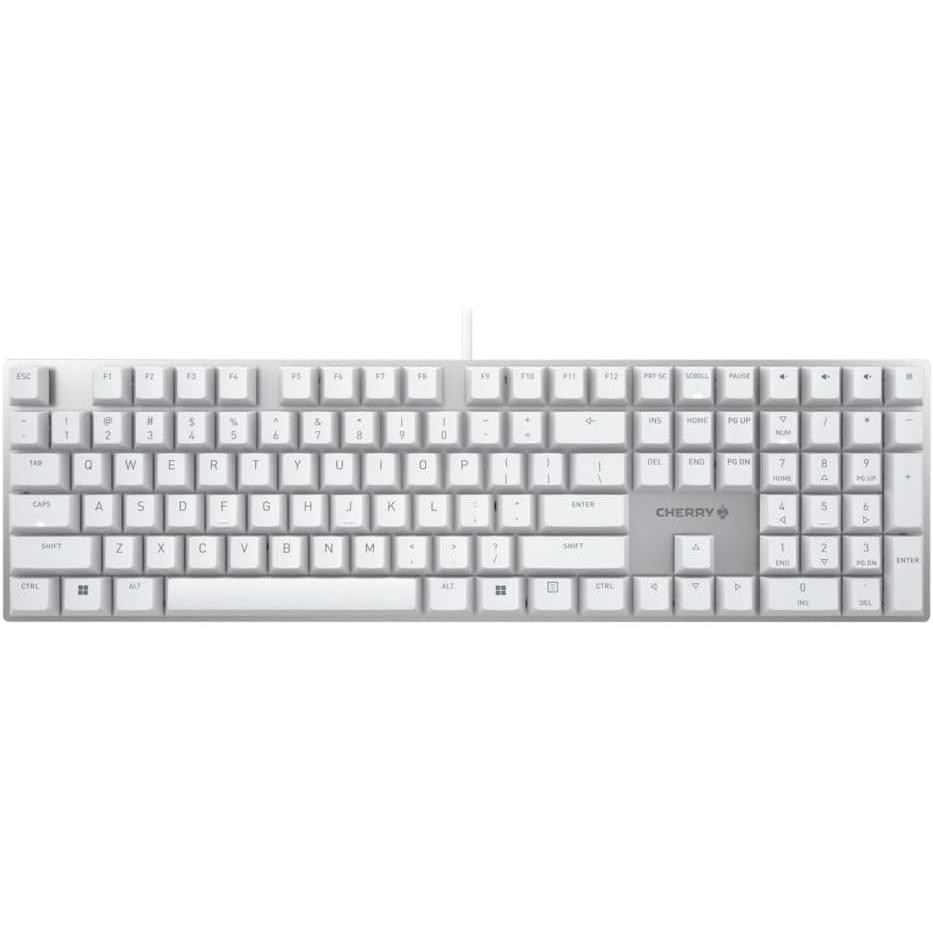
CHERRY KC 200 MX
Quietest True MechanicalBuy if: you want the quietest real mechanical board for the least money
Don't buy if: you need wireless, backlighting, or a board that looks premium
The KC 200 MX is the purest answer to this query. Cherry's own MX2A Silent Red switches — 45 cN linear, 1.9 mm pre-travel, rated past 50 million keystrokes — carry rubber damping in the stem itself, so the board is quiet with no mods, no foam, no fiddling. Full-size layout with a number pad, an anodised metal plate under the keys, and a two-year warranty. It is also the cheapest genuine silent-mechanical route with a numpad.
The trade is everything around the switches. Wired USB-A only, so no wireless and no battery to think about. Laser-etched ABS keycaps instead of the thick PBT rivals use, and no general backlighting. The design is plain on purpose — a tool, not a showpiece. If your desk never moves and your budget is tight, this is the board to buy first and think about last.
Pros
- Silence engineered into the switch — quiet out of the box
- Cheapest genuine silent-mechanical board with a numpad
- Cherry's own pick for a silent office keyboard
- Anodised metal plate, 2-year warranty
Cons
- Wired only — no wireless or Bluetooth
- ABS keycaps, not thick PBT
- No backlighting
- Plain, utilitarian design
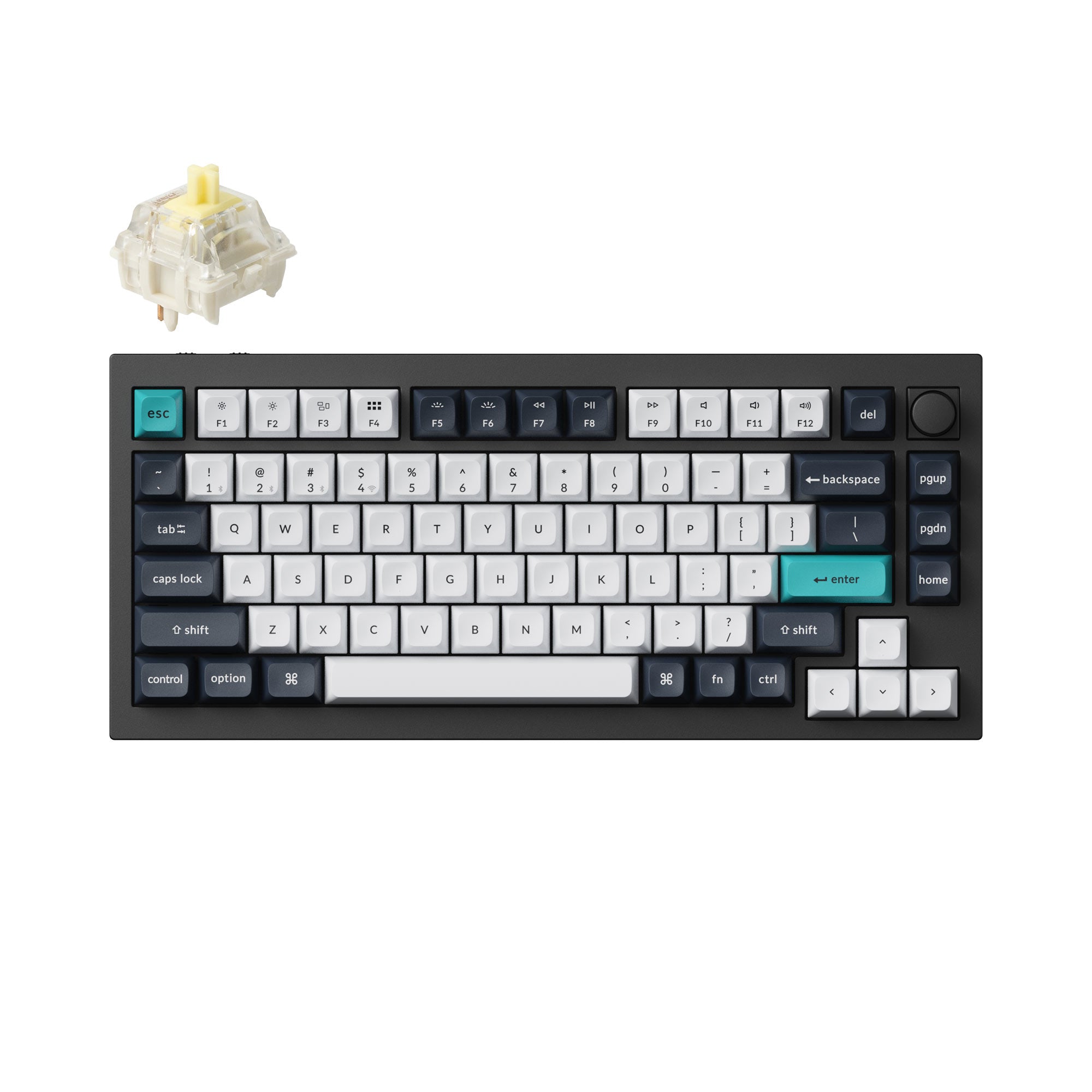
Keychron Q1 Max
Best Premium / CustomisableBuy if: you want the best-built quiet platform and don't mind a 5-minute switch swap
Don't buy if: you want silence out of the box, a number pad, or a light board
Read this card carefully, because most roundups get it wrong. The Q1 Max does NOT ship with silent switches — it ships with Gateron Jupiter Red, Brown or Banana. Buy it, then order a set of silent switches (Cherry MX Silent Red or Gateron Silent Red) and pull the stock ones out by hand. Hot-swap sockets take 3- and 5-pin MX switches, no soldering. Once you do that, the board attacks noise three ways: silent switches, a double-gasket mount, and foam layers between the plate and the case, all in a CNC aluminium case.
RTINGS rates the Q Max series' typing noise quiet — the strongest published verdict for a mechanical board here. Full QMK/VIA remapping runs in the browser, and tri-mode covers Bluetooth, 2.4 GHz and wired USB-C. The cost is real: this is the priciest board here, the heaviest at 1,724 g, and a 75% layout with no number pad. Buy it for the platform, not for out-of-the-box silence.
Pros
- Quiet attacked at switch, mount and case — not just the switch
- Hot-swap lets you try silent switches without soldering
- RTINGS rates the Q Max series' typing noise quiet
- Full QMK/VIA remapping, tri-mode wireless
Cons
- Not silent out of the box — needs a switch purchase
- Priciest and heaviest board here
- 75% layout, no number pad
- Extra cost and a 5-minute job rivals skip
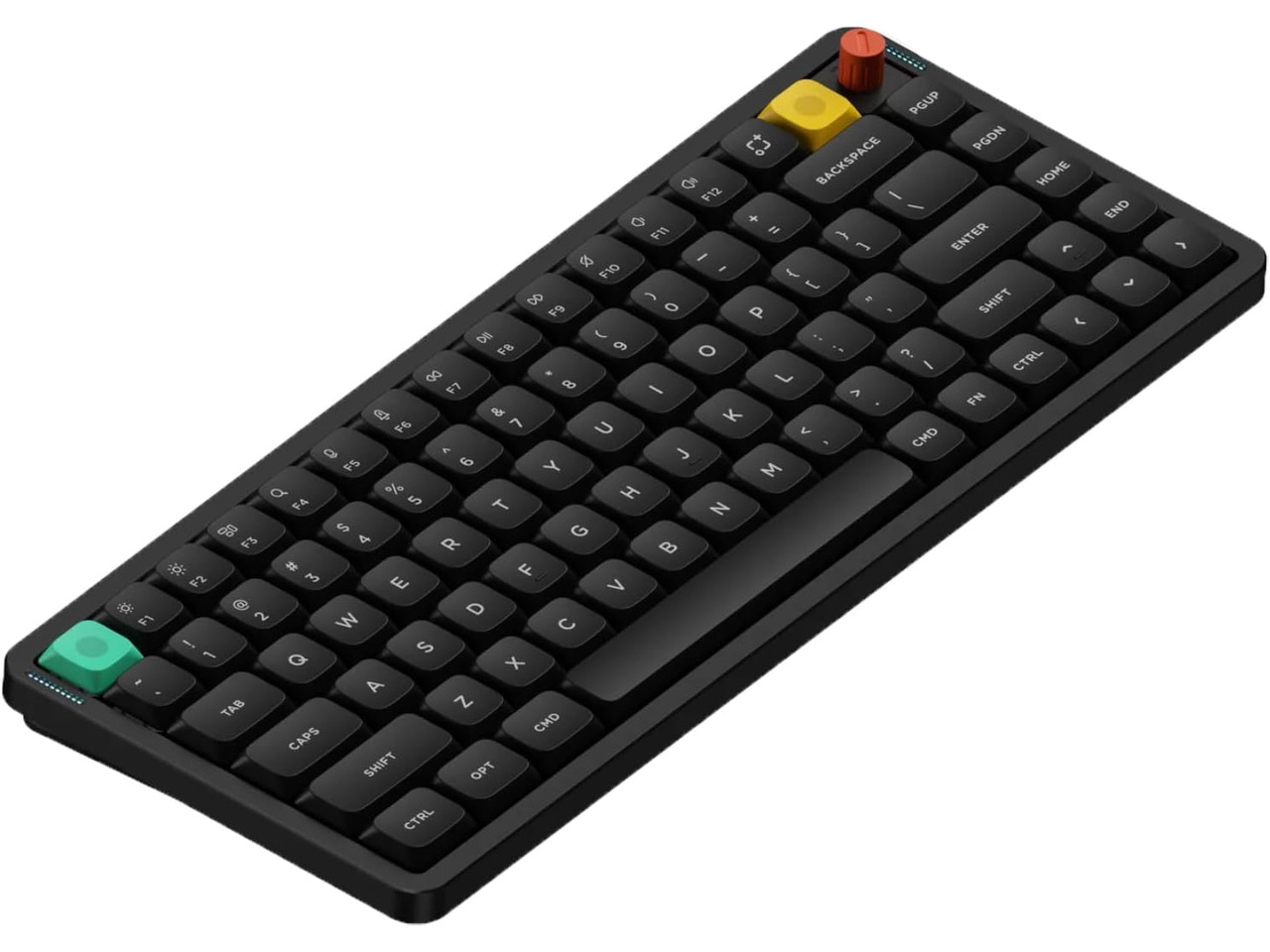
NuPhy Air75 V3
Best Low-ProfileBuy if: you want the thinnest, most portable quiet board for a shared desk
Don't buy if: you type on full-height boards and hate shallow keys, or you need a number pad
The Air75 V3 is the thinnest board here at 13.2 mm, and thin is quiet: shorter travel means less distance to slam. Order the Blush Nano switch version — the silent version of NuPhy's Nano switch, with built-in dampening. The board also ships in Brown and Red, so check the variant. Gasket-mounted, hot-swappable, 75% layout with 84 keys, and tri-mode wireless over 2.4 GHz, Bluetooth 5.0 and USB-C. RTINGS' testing points to this exact Blush Nano setup as an excellent quiet choice for shared offices.
The trade is feel. Low-profile keys are shallow, and typists coming from full-height boards find them thin for the first week. Bluetooth polls at 125 Hz against 1,000 Hz on 2.4 GHz and cable — fine for typing, worth knowing if you also game on it. No number pad, no wrist rest. But for a hot desk or a small shared workspace, nothing here takes up less room or draws less attention.
Pros
- Thinnest pick — least travel distance to slam
- Blush Nano silent switches, gasket-mounted
- Hot-swap sockets, tri-mode wireless
- Big battery — up to 1,200 hours with lighting off
Cons
- Shallow feel — thin for full-height typists
- Bluetooth polls slower than 2.4 GHz or cable
- No number pad, no wrist rest
- Must order the Blush Nano variant
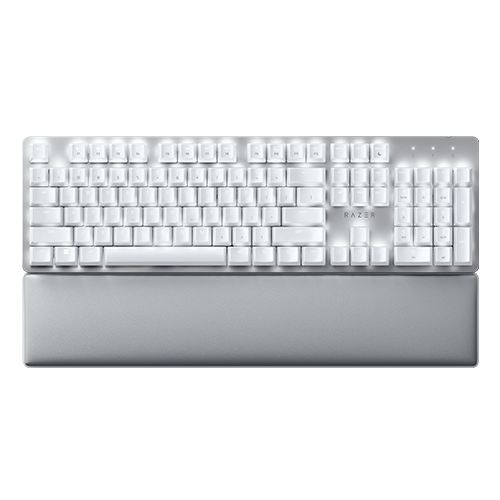
Razer Pro Type Ultra
Best Full-Size Wireless + Wrist RestBuy if: you want a full-size wireless board with a proper wrist rest in the box
Don't buy if: you want the quietest board here, or the newest model at this price
Razer built the Pro Type Ultra for offices, not esports. Silent linear Yellow switches with sound-dampening foam, rated to 80 million clicks, in a clean white-and-silver body with a soft-touch coating — no gamer look at all. Full-size layout with a number pad, a plush leatherette wrist rest in the box (the only pick here with one), and wireless across Bluetooth for up to four devices plus 2.4 GHz HyperSpeed. Battery runs about 214 hours on Bluetooth with the backlight off.
Be clear-eyed about it: this is an older model, and newer enthusiast boards at the same price offer more. It is also not the quietest board here — large, feature-heavy, and a step behind the Cherry and the Keychron on raw silence. And it runs 10-key rollover only, where rivals offer N-key. Buy it for the wrist rest, the four-device pairing and the full-size wireless package, not for the lowest noise.
Pros
- Only pick with a cushioned wrist rest in the box
- 4-device Bluetooth pairing, best after Logitech
- Clean white/silver office look, no gamer aesthetic
- Long battery with the backlight off
Cons
- Older model — weaker value against newer boards
- 10-key rollover only, vs N-key on rivals
- Not the quietest board here
- Backlight-on battery drops to about 13 hours
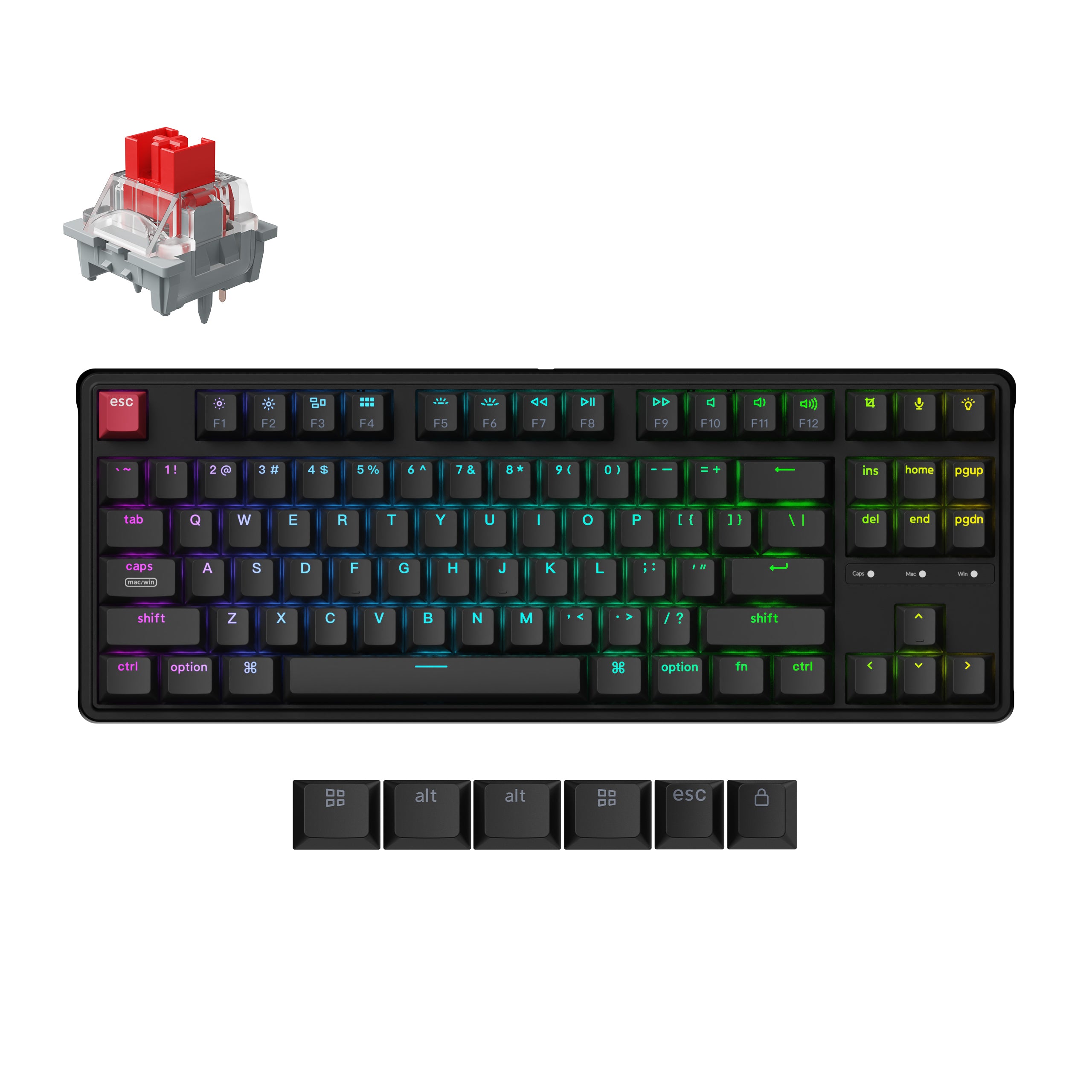
Keychron C3 Pro 8K
Best BudgetBuy if: you want the cheapest real route to a quiet mechanical board
Don't buy if: you want silence out of the box, wireless, or a number pad
The C3 Pro 8K is the budget pick with a catch, stated up front: it is NOT quiet out of the box. It ships with standard switches. But it is a gasket-mounted board with hot-swap sockets and full QMK/VIA remapping — a rare recipe at this price — so a set of silent linear switches drops in by hand in five minutes, no soldering. That is the cheapest legitimate route to a quiet mechanical board on this list.
The rest of the board is honest for the money. Tenkeyless layout with 87 keys, wired USB-C only, and an 8,000 Hz polling rate that is unusual at this price. The case is thin plastic with less internal damping than the Q1 Max, and the stock stabilisers rattle until lubed — budget for ten minutes with a small brush and some grease, or live with the spacebar. If your budget is tight and your desk never moves, this is the board.
Pros
- Cheapest legitimate route to a quiet mechanical board
- Hot-swap makes the silence upgrade a 5-minute job
- Gasket mount + QMK/VIA at a budget price
- 8K polling, unusual at this price
Cons
- Not quiet out of the box — needs a switch purchase
- Thin plastic case, less internal damping
- Stock stabilisers rattle until lubed
- Wired only, no numpad, no wireless
How Do I Fit O-Rings to My Keyboard?
Pull one keycap off, slide a silicone O-ring onto its stem, press it back on, and repeat. Ten minutes, about ten dollars, and the loudest part of the keypress is gone.
To quiet your current mechanical keyboard, follow these steps: 1. Pull off one keycap with a keycap puller. 2. Slide a silicone O-ring onto the keycap stem. 3. Press the keycap back on and test the sound. 4. Repeat for every key you type on. 5. Add a desk mat under the board for extra damping.
O-rings work best on standard switches — they soften the bottom-out thock that makes a board sound loud. On already-silent switches the gain is small, so try the rings before buying a new board. One warning: thick O-rings shorten key travel a little, so if you buy them, get the thin 1.5 mm kind first and test one key before doing the whole board.
Keyboards to Skip in 2026
Clicky Blue switches in a shared office — the single most common wrong buy for office workers who want a mechanical board. They sound great alone and terrible on a call. Silent linear or silent tactile only.
"Silent" gaming boards that aren't silent. The SteelSeries Apex Pro TKL Gen 3 tops some "silent" lists, yet its own listing says it is not a silent keyboard. A gaming board with quiet switches is still a gaming board — check the switch, not the headline.
Stale pre-2024 picks. Old roundups still push boards from 2022 and earlier that have been superseded twice over. If a guide's top pick has no current listing, the guide is stale — skip the board, not just the guide.
The original Keychron K3. Still pushed by stale lists, superseded by the K3 Max. Same shape, older switches, no gasket mount. Buy the Max if you want a Keychron low-profile board.
60% boards for office work. No function row means your call mute, volume and media keys live on a layer you have to hold to reach — fine for typing, annoying the moment a call starts. The Air75 V3 above is the smallest layout that still keeps a function row.
Buying Guide: What Actually Matters
After the switch, the four things worth your attention are the mount, the layout, the connection and the stabilisers — in that order.
Switch type is the noise. Silent linear is the safe first choice: smooth, soft, no bump, no click. Silent tactile adds feedback at a small noise cost. Low-profile is the third path — shorter travel, softer hit, laptop-like feel. And the trap, one more time: check the variant on the listing. The same model ships quiet and loud, and no return policy fixes a board you bought in the wrong version.
The mount and case decide what the switch leaves behind. Gasket-mounted boards put foam between the plate and the case, absorbing the hollow "thock" that even silent switches make in a cheap shell. Heavy cases and thick PBT keycaps sound deeper and quieter than thin plastic. The Q1 Max earns its price here; the C3 Pro 8K is the budget version of the same idea.
Layout decides whether the board fits your work. Full-size with a number pad suits spreadsheet days. A 75% board like the Q1 Max or Air75 V3 keeps the function row and arrows while pulling your mouse closer — better for small desks. Connection decides whether the board works across your machines: multi-device Bluetooth covers a work laptop and a personal machine, while wired-only saves money and never needs charging.
Here's my honest take: if your only goal is a quiet office, don't buy a board you have to modify. Buy one that's quiet out of the box. The hobby boards are better keyboards — but the KC 200 MX is the better office buy. Some readers will push back on that, and they have a point if you enjoy tinkering. But if you just want the noise gone by Monday, the board that needs nothing from you wins.
Frequently Asked Questions
What's the best silent mechanical keyboard for the office?
The Logitech MX Mechanical in the Tactile Quiet version — low-profile keys, three-device wireless, and a look no IT department will question. The CHERRY KC 200 MX is the quieter, cheaper wired alternate.
Are silent mechanical keyboards really silent?
No. They are much quieter than standard mechanical boards, but you can still hear them up close. In a normal office they fade into background noise instead of carrying across the room.
What switch is quietest for office use?
Silent linear switches, like Cherry MX Silent Red or Gateron Silent Red. They have rubber dampeners that soften the keypress on the way down and back up.
How do I make my mechanical keyboard quieter?
Fit silicone O-rings under the keycaps, add a desk mat, and type lighter. If your board is hot-swap, fit silent switches — that is the biggest single change you can make.
Will my coworkers still hear me typing?
Up close, yes — a little. Across an open-plan office, a silent-switch board fades into the background hum. In a library-silent room, any keyboard is audible.
Do O-rings make a big difference?
Yes, on standard switches — they soften the bottom-out thock for about ten dollars. On already-silent switches the gain is small, so try them before buying a new board.
Should I get a low-profile keyboard for the office?
Yes, if you want the quietest feel with the shortest learning curve. Low-profile keys travel less, so they hit softer — and they feel close to a laptop keyboard.