Best Desk Cable Management Tray (2026): 6 Picks

You finally got the desk looking good. Then you looked underneath it. The power strip sits on the floor, cables dangle where your feet and the vacuum go, and on video calls the mess shows in the background. You've already tried zip ties and adhesive clips that peeled off in a few weeks, and maybe one cheap tray that sagged or didn't fit your strip. This guide is written for you. It starts with fit — the strip, the desk, the mount — then picks the tray.
Best desk cable management tray refers to a basket or channel that mounts under your desk and holds the power strip, bricks and cables off the floor. It keeps wires out of sight and out of the way of your feet. Most trays screw, clamp or stick to the desktop.
The top 10 results for this keyword are mostly thin roundups that repeat listing titles and move on. One leading page is two and a half years old. Another mixes clips and cable boxes into a "tray" search. None of them tell you which tray fits which desk, and none explain the standing-desk slack problem or the hollow IKEA desktop trap. This guide checks every spec against the maker's own listing, labels every load rating as a listing claim where it isn't tested, and starts with the fit questions that decide the buy. If your desk itself still needs sorting, our dual monitor stand guide and home office monitor guide cover the rest of the setup.
No prices are printed in this guide — tray prices move by seller and week, so check the live price before buying. Specs come from the makers' own listings, and where sources disagree, the disagreement is stated on the card.
What Size Cable Management Tray Do I Need?
Measure your power strip, then buy a tray at least 2 inches longer than the strip. A 25-inch tray fits most home-office strips; a dual-monitor desk needs 30 to 36 inches.
What size cable management tray do you need? Measure your power strip first, then buy a tray at least 2 inches longer than the strip. According to Mzmaxy, a 25-inch tray fits most home-office strips with room for bricks. A tray shorter than the strip leaves plugs hanging over the edge, which defeats the point.
How long should a cable management tray be for a dual-monitor desk? A 30 to 36-inch tray suits most two-screen setups, since it holds a 12-outlet strip plus two laptop bricks and the monitor cables. Shorter trays force you to stack bricks, which traps heat. Longer trays waste space on a small desk.
Length is only half the fit. Depth matters just as much: a shallow tray won't hold a chunky laptop brick on its side, and a deep tray hangs low enough to bump your knees. Five inches of interior depth covers most bricks standing upright. Check the depth figure on the listing before you buy, not after the box arrives.
| Your setup | Tray length to buy | Why |
|---|---|---|
| Small desk, one monitor | 15–20 inches | Holds a 6-outlet strip and one brick |
| Home office, laptop + monitor | 24–30 inches | Strip, laptop brick and monitor brick fit side by side |
| Dual monitors | 30–36 inches | 12-outlet strip plus two bricks, no stacking |
| Gaming desk, two PCs or consoles | 36 inches or more | Two strips, or one strip plus a dock and bricks |
One more check: the tray has to fit between your desk legs or the modesty panel, not just under the top. Measure the clear span under the desk before you order. A 36-inch tray on a 48-inch desk with legs at the corners leaves no room for the clamps.
Buy the length once. A tray you outgrow is a tray you replace.
Should I Screw, Clamp or Stick My Cable Tray On?
Clamp if you rent or your desk is hollow or glass. Screw if the desk is solid wood and the tray will never move. Stick only for light loads — adhesive holds a strip, not a strip plus bricks.
Can you install a cable tray without drilling? Yes — clamp trays grip the desk edge and adhesive trays stick to the underside, so no holes are needed. Clamps suit rented or hollow desks, while screws suit solid wood. According to Mzmaxy, its 25-inch clamp tray fits desktops from 0.4 to 2 inches thick.
Screw vs clamp vs adhesive trays: screw mounts are better suited for heavy loads and permanent desks because the screws bite into solid wood. Clamp trays work better when you rent or own a thin or hollow desk. The key difference is commitment — screws hold the most but leave holes, clamps hold plenty and leave nothing.
Here's the thing: for most desks, a clamp tray beats a screwed one. Clamps hold a full strip and bricks without touching the desktop, and you can slide the tray to a new spot in a minute. Screws win only when the load is heavy and the desk is solid — a thick wood top that you own outright. Or maybe I should say it this way: if you'd hesitate to drill the desk, don't. The clamp exists for exactly that desk.
Adhesive is the weakest mount and the one most listings oversell. The trays stick with strong tape, and they hold fine on day one. Forum reports say the mounts can peel off after 30 to 45 days under a loaded strip, and heat from bricks softens the glue. Use adhesive for a light strip on a desk you can't clamp or screw — glass tops and thin metal frames — and keep the bricks on the floor or in a second tray.
The IKEA trap deserves its own warning. Linnmon and Lagkapten desktops are hollow — cardboard honeycomb inside a thin skin — and screws tear straight out of them. If your desk is one of those, a clamp or adhesive tray is your only safe choice, and the clamp must grip the solid edge frame, not the hollow middle. Check your desktop before you drill anything into it.
Match the mount to the desk, not the other way round.
What Is the Best Cable Management Tray for a Standing Desk?
A steel tray that bolts or clamps tight, with a slack loop of cable hanging below it. The tray rides up and down with the desk, so the cables need 70 to 80 cm of slack between the tray and the wall — one cable to the wall, everything else in the tray.
A standing desk breaks every cable plan that works on a fixed desk. The tray moves with the desktop, so a cable with no slack yanks the plug out of the wall — or drags the strip out of the tray — the first time you raise the desk. Most roundups never mention this. They should: it's the reason standing-desk owners end up re-doing the whole job a week after installing the tray.
The fix is a service loop. Leave 70 to 80 cm of slack in the cable that runs from the tray down to the wall outlet, coiled loosely under the desk, and let it rise and fall with the desk. Everything else — strip, bricks, monitor cables — lives in the tray and never moves relative to the desk. One cable crosses the gap to the wall. That's the whole trick.
Clamp trays suit standing desks well, since the clamp grips the moving desktop and the tray never touches the frame. Screw mounts work too, if the desktop is solid. Skip adhesive on a standing desk: the up-and-down motion and the weight of a full strip work the glue loose faster than on a fixed desk. And pick a tray with open sides or mesh, so you can add or pull a cable without unmounting the tray every time the setup changes.
Quick note: test the full travel before you call the job done. Raise the desk all the way, watch the slack loop, then lower it and check nothing snags on the frame. Five minutes now saves a ripped plug later.
The desk moves. The cables must move with it.
How Do I Install an Under-Desk Cable Tray?
Measure the strip, hold the tray 2 to 3 inches from the back edge, check your knees clear it, then screw, clamp or stick it in place. Fifteen minutes, one screwdriver — the tray does the rest.
To install an under-desk cable tray, follow these steps: 1. Measure your power strip and pick a tray 2 inches longer. 2. Hold the tray under the desk 2 to 3 inches from the back edge. 3. Mark the holes or clamp spots and check knee room. 4. Screw, clamp or stick it in place. 5. Lay the strip in first, then the bricks, then the cables.
- Measure the strip. Lay the power strip flat and measure end to end, plugs included. The tray needs to be at least 2 inches longer.
- Hold the tray in place. Press it under the desk, 2 to 3 inches from the back edge, and sit in your chair. Your knees should clear it with room to spare.
- Mark the spots. Pencil the screw holes or clamp positions. On a hollow desktop, mark the solid edge frame, not the middle.
- Mount it. Screw into solid wood, tighten the clamps by hand, or press adhesive pads firmly for 30 seconds. If the tray uses screws to join two halves, join them first.
- Load the strip first. The strip goes in before anything else, plugs facing the back edge so cables exit cleanly.
- Add bricks, then cables. Bricks sit flat with space between them for air. Route cables in, tie the slack with Velcro ties, and leave a service loop if the desk moves.
Look — if you're in a rental and the lease says no holes in the furniture, here's what actually works: a clamp tray. It holds as much as a screwed one on any normal desk, and it leaves no trace when you move out. The only desks clamps can't grip are glass tops with no edge to bite — and that's what adhesive trays are for.
Don't load the tray before it's mounted. It sags, the screws strip, and you do the job twice.
Quick Comparison
| Product | Length / Mount | Best For | ||
|---|---|---|---|---|
| #1 | Univivi 36" No-Drill Fabric TrayBest Overall | 36" / clamp or screw | Biggest desks, no drilling | Check Price |
| #2 | VIVO Extra Deep (DESK-AC16-2C)Best Steel 2-Pack | 17" × 2 / screw | Steel trays, two desks | Check Price |
| #3 | Mzmaxy 25" Clamp TrayBest Clamp-On | 25" / clamp | Renters, standing desks | Check Price |
| #4 | Scanfield 17" 2-PackBest Adhesive | 17" × 2 / adhesive | Glass and thin desks | Check Price |
| #5 | FlexiSpot CMP502Best for Standing Desks | 19.7" / screw | Standing desks, airflow | Check Price |
| #6 | Delamu 2-Pack U-ChannelBest Budget | 2-pack / screw | Tight budgets, two desks | Check Price |
Lengths are the maker's figures; weight ratings are listing claims, not test results — treat them as rough guides. No prices are printed — check the live price before buying.
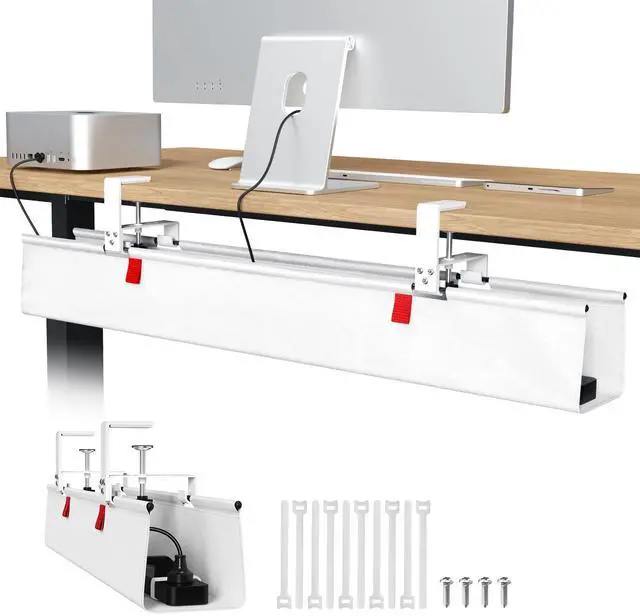
Univivi 36" No-Drill Fabric Tray
Best OverallBuy if: you want the longest tray here and no holes in your desk — 36 inches of fabric basket that clamps on
Don't buy if: you want rigid steel — fabric flexes under a heavy load and hides the cables instead of showing them
The Univivi is the best desk cable management tray in this list because it solves the two problems that matter most: length and drilling. At 36 inches it is the longest tray here, long enough for a 12-outlet strip plus two laptop bricks with room left over. It mounts with clamps or screws, so you can put it up without drilling — and the fabric basket is light, quiet and kind to cables, with no sharp steel edges to nick a cord.
Fabric has a real edge over steel for most desks. It bends around an awkward plug, it doesn't rattle when you bump the desk, and it weighs almost nothing. The trade-off is structure: a fabric tray sags a little under a heavy strip, and you can't see at a glance which cable is which. For a home office with a normal load, that trade is worth it.
Two honest limits. First, the 36-inch length needs a desk wide enough to take it — measure the clear span between the legs before you order. Second, treat any weight number on the listing with care: some fabric-tray listings claim loads no fabric basket could hold, and Univivi's own listing doesn't publish a tested rating. Load it with a strip and bricks and it holds; don't hang a UPS off it.
Pros
- 36 inches — the longest tray here, fits a full strip plus bricks
- Clamp or screw mount, no drilling needed
- Fabric won't scratch cables or rattle
- Light and easy to reposition
Cons
- Fabric flexes under heavy loads — no rigid structure
- Can't see cables at a glance
- Needs a wide desk — check the span between legs
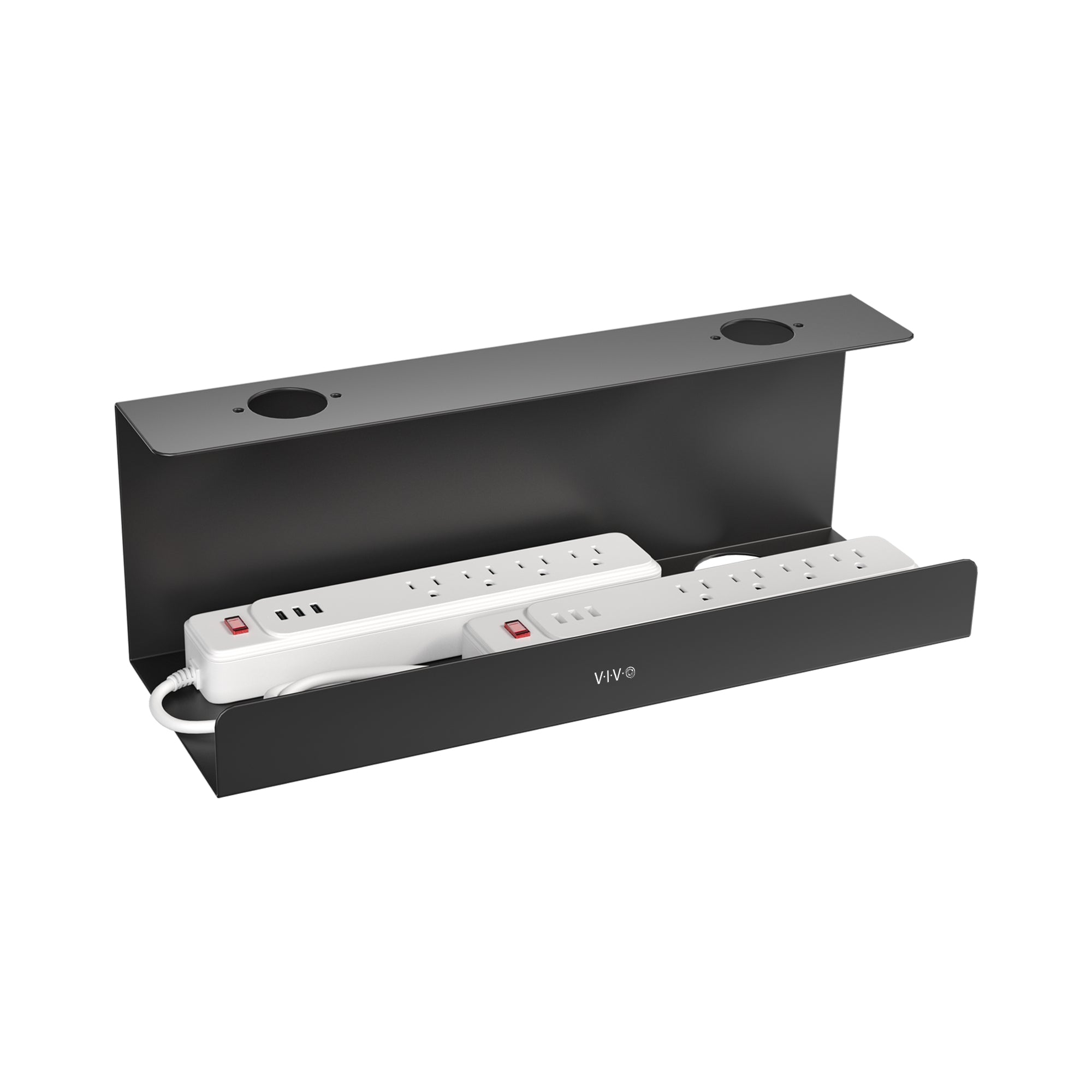
VIVO Extra Deep (DESK-AC16-2C)
Best Steel 2-PackBuy if: you want rigid steel, deep sides and a spare tray — two 17-inch trays for the price of one roundup slot
Don't buy if: you can't screw into your desk — this one is screw-mount only, no clamps
The VIVO is the steel pick. Two 17-inch extra-deep trays in the box, sold direct by VIVO, and the depth is the point: the tall sides hold a power strip and chunky bricks upright instead of stacked, so the cables sit flat and the bricks get air. The tray in the photo holds two full strips side by side without breaking a sweat.
A 2-pack changes the maths. One tray goes under the main desk, the second under a side desk, a workbench or your partner's desk — or both go under one long desk for a 34-inch run. Steel doesn't flex, so a loaded tray keeps its shape, and the open top means you can drop a cable in or pull one out without unmounting anything.
Two honest limits. First, screw-mount only: if your desk is hollow, glass or rented, this tray isn't for you — VIVO makes clamp trays, but this isn't one of them. Second, VIVO doesn't publish a weight rating for this tray, so don't treat it as a shelf. A strip and bricks, yes. A UPS or a desktop PC, no.
Pros
- Extra-deep sides hold bricks upright, not stacked
- Two trays in the box — covers two desks
- Rigid steel keeps its shape under load
- Open top for easy cable changes
Cons
- Screw-mount only — no clamp option
- No published weight rating
- 17 inches is short for a dual-monitor desk on its own
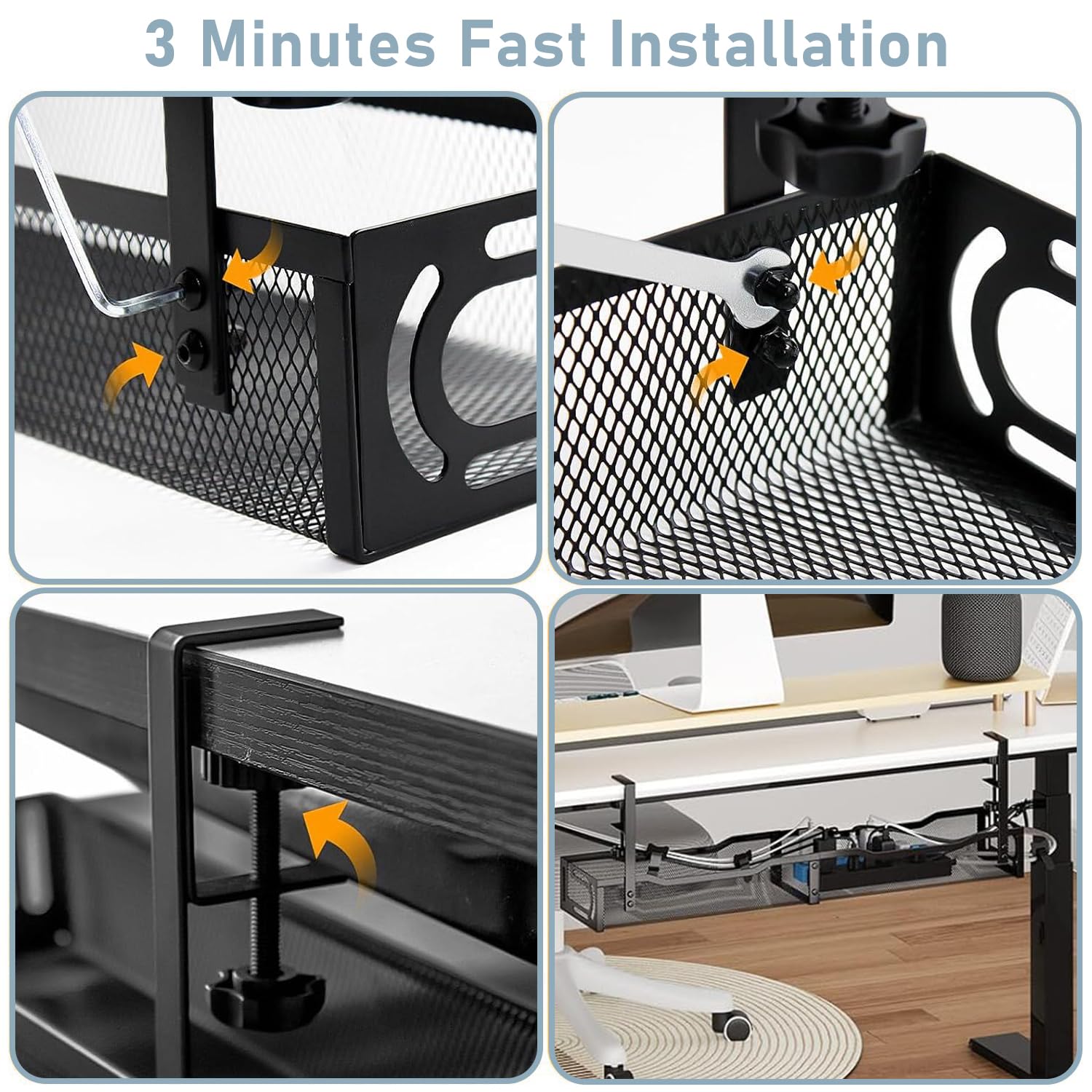
Mzmaxy 25" Clamp Tray
Best Clamp-OnBuy if: you rent, your desk is hollow, or you want the tray up in three minutes with no tools and no holes
Don't buy if: your desktop is thicker than 2 inches — the clamps won't reach around it
The Mzmaxy is the clamp pick, and it's the one to buy if drilling is off the table. A 25-inch steel mesh tray that grips the desk edge with two adjustable clamps — turn them by hand, no tools, about three minutes from box to mounted. Mzmaxy rates it at about 15 lb, and the listing fits desktops from 0.4 to 2 inches thick, with non-slip rubber pads on the clamps so they don't mark the surface.
The mesh is the feature that matters most here. The open weave lets heat out, so bricks stay cooler than they would in a solid tray, and it stops dust settling in a pile at the bottom. The sides are open too, so cables pass through freely and you can change the tray's position without taking it apart. It comes in two halves that screw together — one joint, one screwdriver, done.
Two honest limits. First, the clamp range is real: thicker than 2 inches and it won't fit, so measure your desktop edge before you order. Second, 15 lb is the maker's own rating, not a tested load — a strip and two bricks sit well inside it, but don't treat the number as a guarantee.
Pros
- No drilling — clamps on by hand in about 3 minutes
- Mesh keeps bricks cool and dust-free
- Fits desktops 0.4 to 2 inches thick
- Open sides for easy cable changes
Cons
- Won't fit desktops thicker than 2 inches
- 15 lb rating is the maker's claim, not a test
- Two-part assembly adds one step
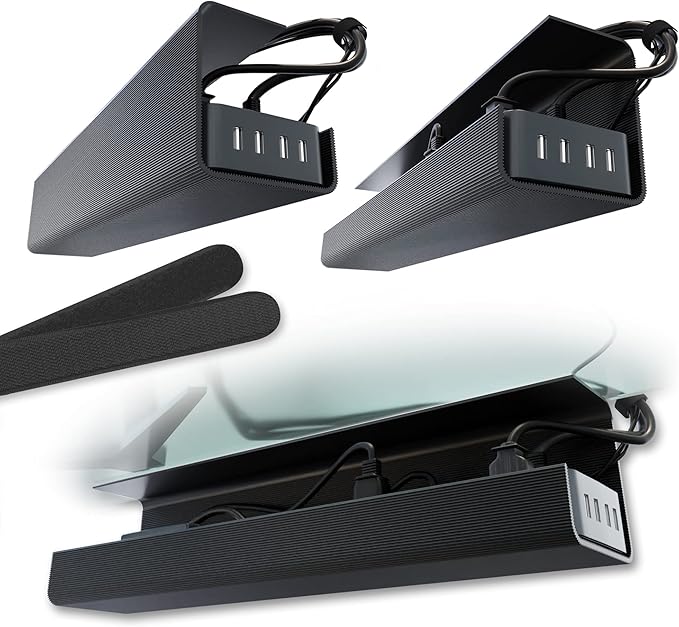
Scanfield 17" 2-Pack
Best AdhesiveBuy if: your desk can't be clamped or screwed — glass tops, thin metal frames, and desks you must return in perfect shape
Don't buy if: the tray will carry a heavy strip plus bricks — adhesive is the weakest mount here
The Scanfield is the adhesive pick: two 17-inch fabric trays that stick to the underside of the desk with strong tape, no screws and no clamps. The 5-inch interior depth fits a power strip and chargers standing upright, and the 2-pack covers two desks or gives you a 34-inch run under one long desk.
Adhesive trays exist for desks that take no other mount. A glass top has nothing to screw into and no edge to clamp; a thin metal frame bends under a clamp. For those desks, tape is the only way in — and the Scanfield's tape is the strongest in this list, rated by the maker for a 24-hour cure before you load it. Press it on, wait a day, then load it.
Two honest limits. First, the load: adhesive holds a light strip fine, but a strip plus two bricks is a lot to ask of glue, and forum reports say adhesive mounts can peel off after 30 to 45 days under a full load. Keep the heavy bricks out of this tray. Second, the tape is one-shot — peel it off and it won't stick again, so measure twice and place it once.
Pros
- Sticks to glass and thin desks nothing else fits
- Two trays in the box
- 5-inch depth fits strips and chargers upright
- No tools, no holes, no marks
Cons
- Weakest mount — not for heavy loads
- Adhesive can peel under a full strip in weeks
- One-shot placement — no re-sticking

FlexiSpot CMP502
Best for Standing DesksBuy if: you own a standing desk and want a tray built for it — steel, vented, and made by a standing-desk company
Don't buy if: you need a long tray — at 19.7 inches this one suits a single-monitor desk, not a dual setup
The FlexiSpot CMP502 is the standing-desk pick. A 19.7-inch steel tray from a company that makes standing desks for a living, with an open, slotted design that lets heat out and dust fall through instead of collecting. It screws to the desktop and rides up and down with it — and because it's built for desks that move, the mount is solid enough that a full strip doesn't work it loose over time.
The airflow is the reason to pick this one over a solid steel tray. Bricks run warm, and a closed tray traps that heat around them; the CMP502's slots vent it. The open design also makes it easy to add a cable later without unmounting the tray, which matters on a standing desk where the setup changes more often than on a fixed one.
Two honest limits. First, the length: 19.7 inches holds a standard strip and one or two bricks, but a dual-monitor desk with a 12-outlet strip will outgrow it — pair it with a second tray or size up. Second, screw-mount only, so hollow and glass desks are out.
Pros
- Built by a standing-desk maker, for desks that move
- Slotted steel vents heat and sheds dust
- Sturdy screw mount that stays put
- Easy to add cables without unmounting
Cons
- 19.7 inches is short for a dual-monitor desk
- Screw-mount only — no clamp option
- White shows dust more than black
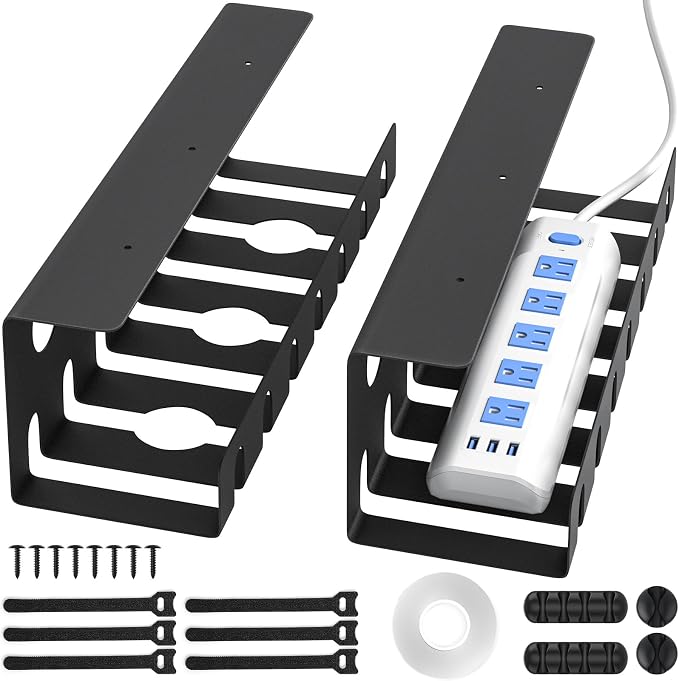
Delamu 2-Pack U-Channel
Best BudgetBuy if: you want the cheapest way to tidy two desks — two metal trays, screws included, for less than one premium tray
Don't buy if: you need deep sides — the U-channel is shallow, so tall bricks sit proud of the rim
The Delamu is the budget pick: two metal U-channel trays in the box, pre-drilled, with screws and cable ties included. The listing rates each tray at 15 lb, and the open channel shape means cables drop in from above and lift out just as easily — no threading plugs through holes.
Cheap trays usually cut corners on steel thickness, and the Delamu is no exception — it's lighter gauge than the VIVO. But for a normal home-office load it holds fine, and the 2-pack is the real value: one tray under the desk, one under a second desk, or both under a long desk for a full-width run. At this price, it's the tray to buy when you're tidying a whole room, not one desk.
Two honest limits. First, the shallow U-channel won't hide tall bricks — they sit above the rim, so the tidy look depends on the tray being deep enough for your gear. Measure your tallest brick. Second, the 15 lb figure is the listing's claim; treat it as a rough guide and keep the load to a strip and a couple of bricks.
Pros
- Two trays in the box for the price of one
- Pre-drilled with screws and ties included
- Open channel — cables drop in and lift out
- Cheapest way to cover two desks
Cons
- Shallow sides — tall bricks sit above the rim
- Lighter steel than the VIVO or FlexiSpot
- 15 lb rating is the listing's claim
Buying Guide: What Actually Matters
After fit, the four things worth your attention are the mount, the material, the depth and the weight rating — in that order.
The mount decides whether the tray stays up. Screws hold the most on solid wood, clamps hold plenty on any desk with an edge, and adhesive holds the least. The material decides heat and noise: steel mesh vents heat and stays rigid, solid steel is quieter but traps warmth, fabric is light and silent but flexes. The depth decides whether your bricks stand upright or stack — 5 inches covers most bricks. The weight rating decides nothing on its own, because no two makers measure it the same way.
I've seen conflicting data — some listings claim 66 lb for a fabric tray, others rate a similar steel tray at 11 to 15 lb. My read is that the big numbers are marketing, not tests: a full strip with two bricks weighs about as much as a small laptop, and any tray here holds that. Ignore the headline number and check the mount instead — that's what fails first.
Two more checks before you buy. First, the desktop: solid wood takes screws, hollow IKEA tops don't, glass takes nothing but clamps or tape. Measure the thickness at the edge and match it to the clamp range. Second, your knees: mount the tray 2 to 3 inches from the back edge and sit in your chair before you tighten anything. A tray that brushes your thighs every time you sit down will come off within a week.
Trays to Skip in 2026
Adhesive-only trays under a heavy strip. Tape holds a light strip. A strip plus two bricks pulls it off the desktop in weeks, usually at 2 a.m. If the load is heavy, clamp or screw it.
Fabric trays rated at fantasy weights. A fabric basket rated at 60 lb or more is a listing that nobody checked. Fabric holds a normal load fine — the number is the lie, not the tray.
A tray shorter than your power strip. Plugs hang over the edge, cables dangle, and the tidy look is gone. Measure the strip first. Every time.
No-name trays with no clamp range listed. If the listing won't say which desk thicknesses it fits, the maker doesn't know either. Buy a tray that names its numbers.
Cable boxes sold as trays. A closed box hides cables well and cooks bricks badly. Boxes belong on the floor for a TV setup, not under a desk full of warm chargers.
The pattern is the same every time: the wrong mount for the desk, or a number on the listing that nobody verified.
Frequently Asked Questions
What's the best desk cable management tray?
The Univivi 36-inch fabric tray — longest here, no drilling needed, and it swallows a full strip plus bricks. For steel, get the VIVO extra-deep 2-pack.
How do I hide cables under my desk without drilling?
Use a clamp tray or an adhesive tray. Clamps grip the desk edge; adhesive sticks underneath. Both leave no holes when you move out.
What size cable management tray do I need?
Measure your power strip, then buy a tray at least 2 inches longer. A 25-inch tray fits most home-office strips; dual-monitor desks need 30 to 36 inches.
Will an adhesive cable tray hold a power strip?
A light strip, yes. A strip plus two bricks, maybe not — forum reports say adhesive mounts can peel off in a month. Clamp or screw for heavy loads.
How much weight can a cable management tray hold?
Most steel trays list 11 to 15 lb. Treat listing numbers as rough guides, not test results — makers rarely say how they measured them.
Can I put a cable tray under a glass desk?
Yes, if it clamps or sticks — never screw into glass. Clamp trays need an edge to grip, so check the clamp fits your desktop thickness first.
Do power bricks overheat in a cable tray?
They can in a closed box with no airflow. Mesh or open trays let heat out, and spacing bricks apart helps more than any vent.