Best 4K Gaming Monitors in 2026: 6 Picks for Every Budget

You just bought — or you're about to buy — a graphics card that costs more than your whole PC did three years ago. Now your 1440p monitor looks soft next to a friend's 4K OLED, and every "best 4K monitor" list names the same three $1,000-plus screens with a different price on every site. None of them says whether your card can actually drive one. You've read the RTINGS tables. You've read the Reddit threads. You're more confused about HDMI versions and burn-in than when you started. This guide fixes that. Six picks, one per budget tier, with the traps the spec sheets hide called out in plain words.
Best 4K gaming monitors refers to 32-inch displays at 3840×2160 built for fast, smooth play. The sweet spot is 240Hz on an OLED panel — sharp enough that you stop seeing pixels, fast enough for competitive games — without paying for speed your graphics card cannot feed.
Below: the 6 best 4K gaming monitors you can buy in 2026 — four 240Hz OLED flagships, one Mini-LED for bright rooms, and one budget dual-mode IPS — ranked by what they actually deliver at your desk. Prices checked 24 Nov 2026. Read the GPU check first if you're unsure your card can feed 4K. Start there.
Is a 4K Gaming Monitor Worth It?
Yes — if your graphics card can hold 60 frames per second or more at 3840×2160 in the games you actually play. A 4K panel shows four times the pixels of a 1080p screen, so textures stay crisp at 32 inches and text looks printed, not drawn. In open-world games the difference is obvious the moment you stop and look around. In a fast shooter at low settings, you will barely notice it — and your frame rate will notice the cost.
A 4K gaming monitor is worth it when your graphics card holds 60 frames per second or more at 3840×2160 in the games you play, and you sit close enough to a 32-inch screen to see the extra detail. According to RTINGS, the best 4K gaming monitor it has tested is the ASUS PG32UCDM Gen3, a 240Hz QD-OLED panel.
A 4K monitor is better than a 1440p monitor for sharpness and desktop space, but it costs more and needs a much stronger graphics card to run at the same frame rate. According to Tom's Hardware, the best 4K pick in its 2026 guide is the ASUS ROG Strix XG32UCWMG, a dual-mode WOLED panel with a 1,300-nit HDR peak.
The honest test is simple. If you play single-player games, story games, or anything where you stop to look at the world, 4K earns its money. If you play competitive shooters at minimum settings and chase frame rate above all else, 1440p at 240Hz will make you happier for half the price — our 1440p guide covers that side properly. And if your graphics card is a mid-range card from two years ago, 4K will make your games slower, not prettier. The monitor can't invent frames your PC doesn't draw.
What GPU Do You Need for 4K Gaming?
Start with the graphics card, not the panel. A monitor can't show frames your PC doesn't draw, and at 4K the card is the limit far more often than the screen. Match the refresh rate to the card you actually own — our graphics card guide ranks the six best cards with street prices checked 24 Nov 2026:
The graphics card you need for 4K gaming is an RTX 5070 Ti or RX 9070 XT for 60 frames per second in demanding games, an RTX 5080 for high-refresh 4K, and an RTX 5090 for 4K at 240Hz. According to TechSpot's 52-game aggregate, the two cards run within a few percent of each other at 4K.
- 4K 60Hz: an RTX 5070 Ti / RX 9070 XT class card holds 60 fps in AAA games at high settings with DLSS or FSR upscaling. This is the 4K entry point.
- 4K 120–144Hz: an RTX 5080 class card gets you there in competitive games and lighter AAA titles. Native 4K Ultra at 144Hz is still out of reach in the heaviest games.
- 4K 160Hz: an RTX 5080 with DLSS frame generation, or an RTX 5090 for native rendering.
- 4K 240Hz: an RTX 5090, full stop — and even then, only in esports titles or with frame generation switched on. In Cyberpunk 2077 at Ultra, native 4K runs near 110 fps on a 5090.
Look — if your graphics card rarely clears 120 fps at 4K, here's what actually works: buy the 160Hz IPS panel below and spend the savings on the card. It's not the panel that's slow, it's the card, and you can't fix a slow card with a faster screen. Or maybe I should say it this way: a 240Hz monitor on a card that draws 90 fps is a 90Hz monitor that cost $1,300.
4K vs 1440p — Should You Stay at 1440p?
4K packs 8.3 million pixels against 1440p's 3.7 million — more than double. On a 32-inch screen that means 140 pixels per inch against 92, and the difference is visible in text, foliage, and distant detail. But those pixels cost frames: the same card runs roughly 40–50% slower at 4K than at 1440p in the same game. So the question is never "which looks better" — 4K always wins that — it is "which can your card actually run".
4K vs 1440p: 4K is better suited for sharp text, open-world games and desktop work because it packs four times the pixels of 1080p into the same screen. 1440p works better when your graphics card is mid-range or your budget stops under $400. The key difference is GPU cost, not the panel.
Stay at 1440p if your card is an RTX 5060 Ti or RX 9060 XT class card, if you play competitive shooters at high refresh, or if your budget stops under $400 — our 1440p guide has a 240Hz OLED at $349.99 in Black Friday week. Move to 4K if you own an RTX 5070 Ti or better, if you sit 24 inches or closer to a 32-inch screen, or if you also use the monitor for work — the extra desktop space is worth as much as the game sharpness. One more thing: you can run a 4K monitor at 1440p, but it looks soft — 1440p doesn't divide evenly into 3840×2160, so the scaling blurs text. Don't buy 4K planning to run it at 1440p.
The 6 Best 4K Gaming Monitors in 2026
Our Top Pick
ASUS ROG Swift OLED PG32UCDM Gen3
Best Overall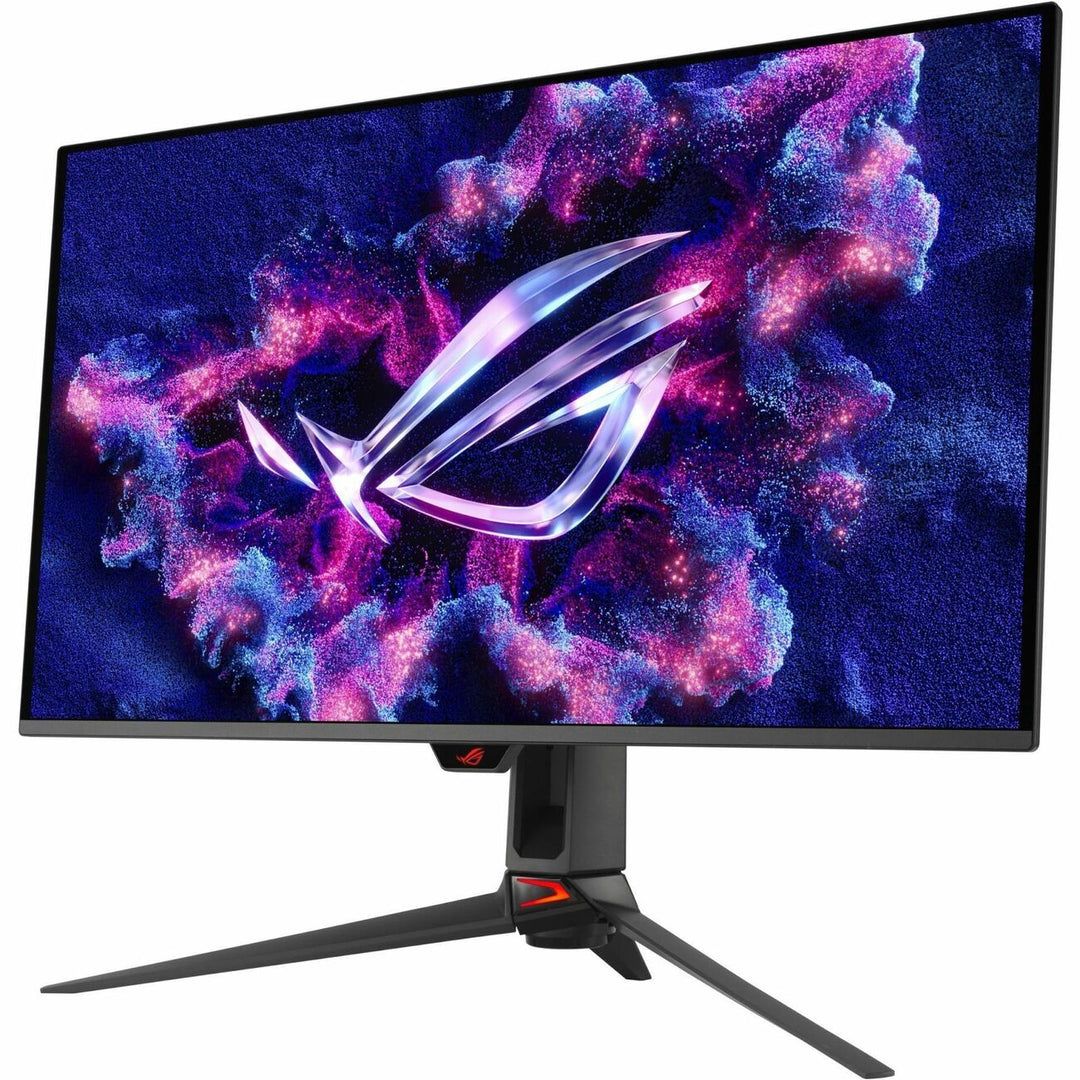
This is the monitor RTINGS rates the best 4K gaming monitor it has tested. A fourth-generation tandem QD-OLED panel at 240Hz with DisplayPort 2.1, a 1,000-nit HDR peak, and a 3-year burn-in warranty — at $1,299, the flagship that makes the older PG32UCDM look like a stopgap. No other pick here gives you the newest panel and the fastest uncompressed connection in one screen. That's the whole story.
Check Price on AmazonQuick Comparison
| Product | Key Specs | Ports | ||
|---|---|---|---|---|
| #1 | ASUS ROG Swift OLED PG32UCDM Gen3Best Overall | 31.5" QD-OLED · 240Hz · 0.03ms · $1,299 | DP 2.1a UHBR20 · 2× HDMI 2.1 | Check Price |
| #2 | MSI MPG 322URX QD-OLEDBest Value Flagship | 31.5" QD-OLED · 240Hz · 0.03ms · $1,029.99 | DP 2.1a UHBR20 · 2× HDMI 2.1 | Check Price |
| #3 | LG UltraGear 32GS95UE-BBest Dual-Mode WOLED | 31.5" WOLED · 240Hz / 480Hz · 0.03ms · $1,099.99* | DP 1.4 · 2× HDMI 2.1 | Check Price |
| #4 | Dell Alienware AW3225QFBest Curved / Console Value | 31.6" QD-OLED curved · 240Hz · 0.03ms · $699.99 | DP 1.4 · 2× HDMI 2.1 FRL | Check Price |
| #5 | Samsung Odyssey Neo G8Best Mini-LED / Bright Room | 32" VA Mini-LED · 240Hz · 1ms · $799.99 | DP 1.4 · 2× HDMI 2.1 | Check Price |
| #6 | ASUS ROG Strix XG32UCGBest Budget 4K | 31.5" Fast IPS · 160Hz / 320Hz · 1ms · ~$599–619 | DP 1.4 · 1× HDMI 2.1 | Check Price |
* LG price is in dispute — LG's own store lists $1,099.99 while Amazon shows $1,439.00. See the LG card below.
Best 4K Gaming Monitor by Use
All six picks are 4K, but they suit very different desks. Match the pick to how you actually play:
- Best overall: ASUS ROG Swift OLED PG32UCDM Gen3 — $1,299 gets you the newest QD-OLED panel and uncompressed 240Hz over DisplayPort 2.1.
- Best value flagship: MSI MPG 322URX QD-OLED — the same 240Hz experience with DP 2.1 for $1,029.99, about $270 less.
- Best for competitive play: LG UltraGear 32GS95UE-B — the only pick that flips to 1080p at 480Hz for esports titles.
- Best curved / console value: Dell Alienware AW3225QF — 240Hz QD-OLED for $699.99 in Black Friday week, with full-bandwidth HDMI for PS5 and Xbox.
- Best for bright rooms: Samsung Odyssey Neo G8 — Mini-LED with a 2,000-nit peak and no burn-in homework, at $799.99.
- Best budget 4K: ASUS ROG Strix XG32UCG — 4K at 160Hz for about $599, with a 1080p 320Hz mode for shooters.
ASUS ROG Swift OLED PG32UCDM Gen3
Best OverallBuy if: you want the best 4K panel you can buy in 2026 — newest QD-OLED, uncompressed 240Hz, and a 3-year burn-in warranty
Don't buy if: $1,299 is too much for a monitor, or your graphics card can't feed 4K at 120 fps — the MSI below saves $270
The PG32UCDM Gen3 is the fourth-generation tandem QD-OLED panel, and it shows. At $1,299 on the ASUS US store (13 Nov 2026), it gives you 31.5 inches of 3840×2160 at 240Hz with a 0.03ms response, a 1,000-nit HDR peak, and DisplayHDR True Black 500 — one step above every other OLED in this guide. RTINGS rates it the best 4K gaming monitor it has tested. The full-screen brightness is 300 nits against 250 on the older panel, so it holds up better in a lit room, and the BlackShield film cuts reflections without the matte haze.
The part that matters most is the port: DisplayPort 2.1a at UHBR20, 80Gbps — the only connection that carries 4K at 240Hz in 10-bit colour without compression. On an RTX 50-series card you get the full, uncompressed signal. On an older card the monitor still works over DP 1.4 with DSC, which looks identical in practice. Two HDMI 2.1 ports, USB-C with 90W power delivery, and a KVM switch round out a screen that needs no excuses — except the price.
Pros
- Newest 4th-generation tandem QD-OLED — brightest OLED picture here
- DisplayPort 2.1a UHBR20 — uncompressed 4K240 on RTX 50-series cards
- DisplayHDR True Black 500, 1,000-nit peak, Dolby Vision
- 3-year warranty including burn-in, USB-C 90W + KVM
Cons
- $1,299 — the most expensive pick in this guide
- DP 2.1 buys nothing on RTX 40-series or older cards
- Check the suffix: the original PG32UCDM and the PG32UCDMR are different, cheaper monitors
Full specifications
- 31.5-inch 4K (3840×2160) QD-OLED, 4th-generation tandem panel
- 240Hz refresh rate, 0.03ms GtG response
- 300 nits SDR / 1,000 nits HDR peak, DisplayHDR True Black 500, Dolby Vision
- DisplayPort 2.1a UHBR20 + 2× HDMI 2.1 + USB-C (90W PD) + KVM
- G-SYNC Compatible, FreeSync Premium Pro, 99% DCI-P3
- 3-year warranty including burn-in, BlackShield anti-glare film
Prices change frequently — click through to see today's price.
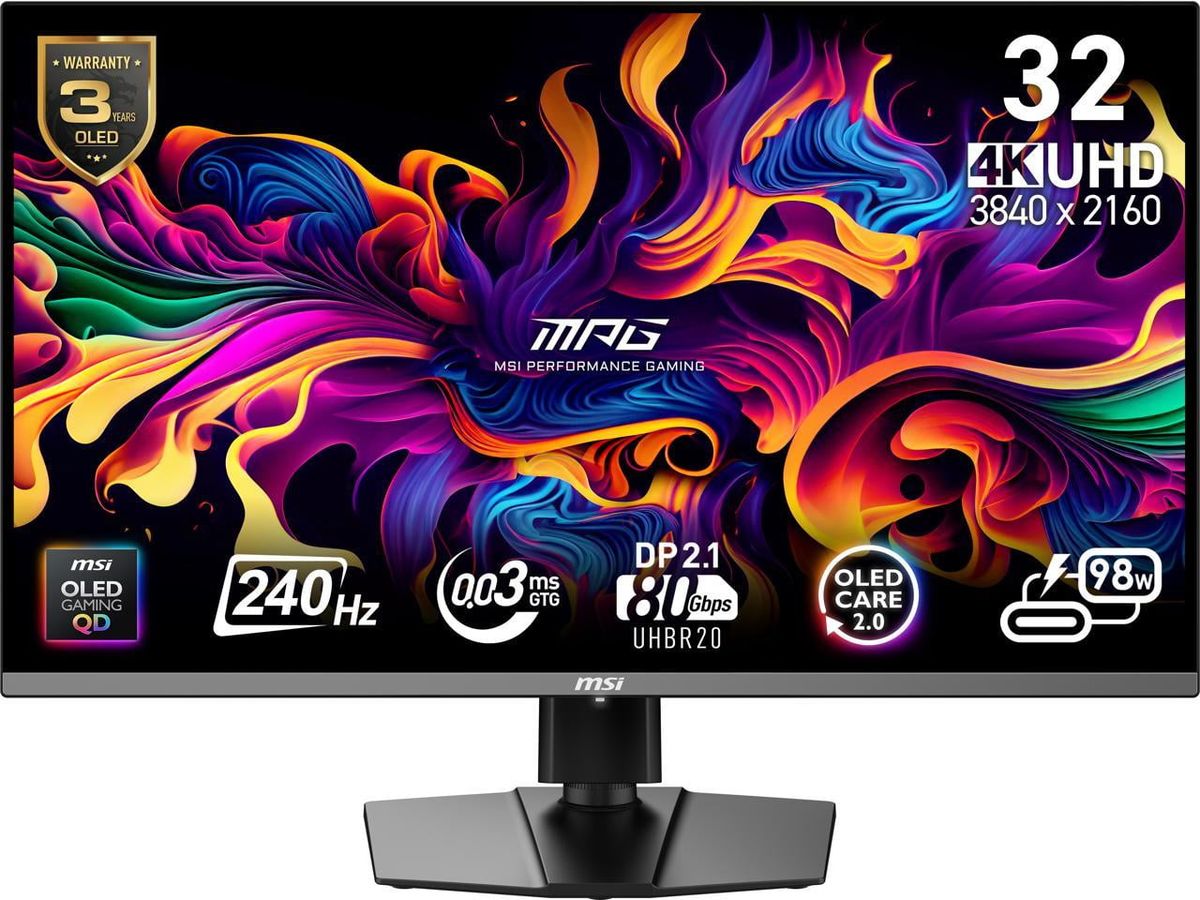
MSI MPG 322URX QD-OLED
Best Value FlagshipBuy if: you want DP 2.1 and 240Hz OLED for about $270 less than the ASUS flagship
Don't buy if: you need the newest tandem panel or the brightest HDR peak — the ASUS above wins both
The 322URX is the smart money in the flagship tier. A 31.5-inch third-generation QD-OLED at 240Hz with the same DisplayPort 2.1a UHBR20 connection as the ASUS above, for $1,029.99 at B&H (list $1,199.99, checked ~19 Nov 2026; street band $960–$1,030). PC Gamer names it the best gaming monitor overall in its 2026 guide, and its 1,000-nit HDR peak matches the ASUS on paper. The panel is one generation older, so full-screen brightness is lower and the HDR badge reads True Black 400 rather than 500 — in a dim room you will struggle to tell them apart.
What you keep is the full flagship feature set: USB-C with 98W power delivery, a KVM switch, MSI's OLED Care 2.0, and a 3-year burn-in warranty. One trap to dodge: the older sibling, the MSI MPG 321URX, still sells for around $899 — same panel family, but DisplayPort 1.4 only, so 4K240 runs through compression. If the price gap is under $130, the 322URX is the better buy.
Pros
- DP 2.1a UHBR20 for $1,029.99 — $270 less than the ASUS flagship
- USB-C 98W + KVM, the best USB-C power in this guide
- 1,000-nit HDR peak, 3-year burn-in warranty, OLED Care 2.0
- PC Gamer's best gaming monitor overall for 2026
Cons
- Third-generation panel — dimmer full-screen brightness than the ASUS Gen3
- True Black 400, not 500 — a smaller HDR ceiling
- Don't confuse it with the older 321URX (DP 1.4 only) at $899
Full specifications
- 31.5-inch 4K (3840×2160) QD-OLED, 3rd-generation panel
- 240Hz refresh rate, 0.03ms GtG response
- 250 nits SDR / 1,000 nits HDR peak, DisplayHDR True Black 400
- DisplayPort 2.1a UHBR20 + 2× HDMI 2.1 + USB-C (98W PD) + KVM
- MSI OLED Care 2.0, 99% DCI-P3, G-SYNC Compatible
- 3-year warranty including burn-in
Prices change frequently — click through to see today's price.
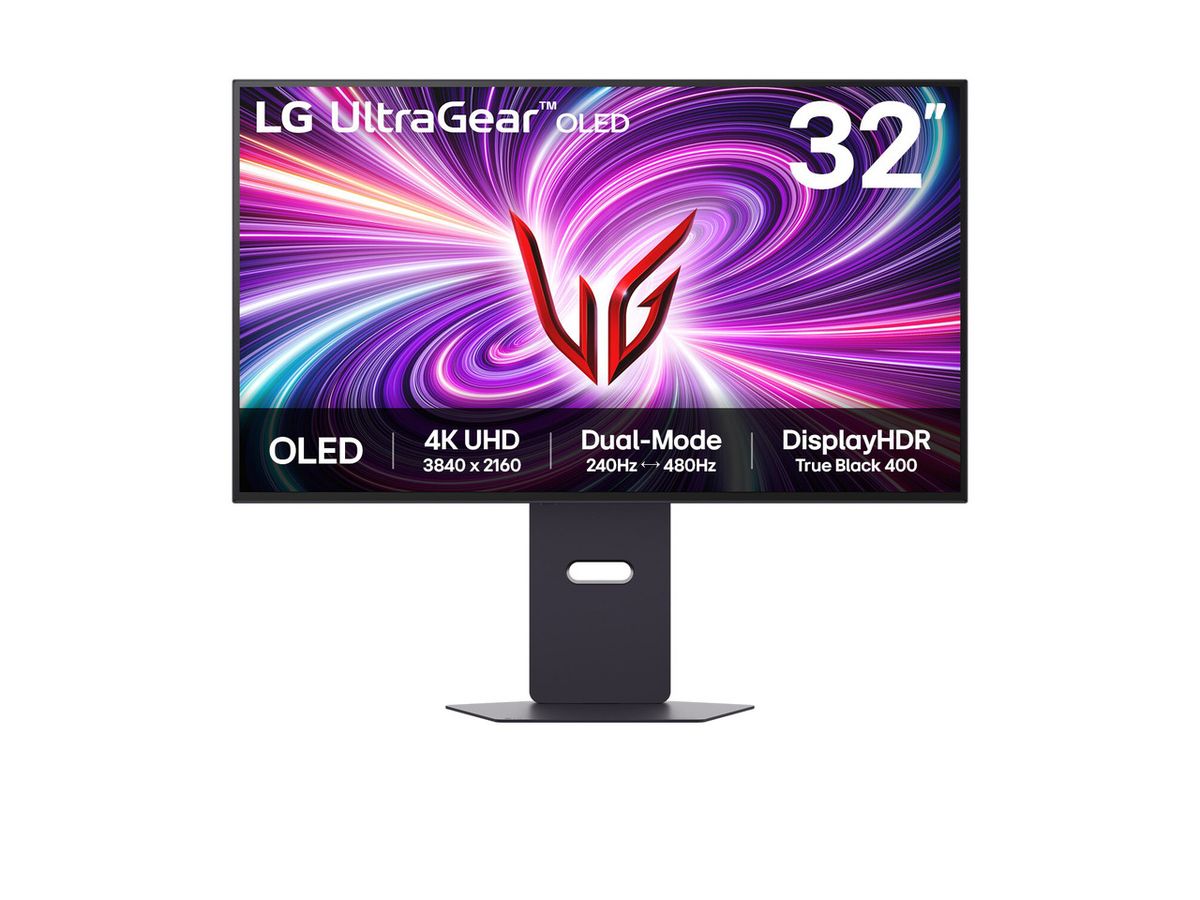
LG UltraGear 32GS95UE-B
Best Dual-Mode WOLEDBuy if: you split your time between story games at 4K and competitive shooters at 480Hz
Don't buy if: you want DisplayPort 2.1, or the price gap to the MSI above bothers you — the LG costs more for an older connection
The 32GS95UE is the only monitor here that is genuinely two monitors. Its Dual Mode switch flips the panel from 4K at 240Hz to 1080p at 480Hz with one button — 4K for story games, 480Hz for Valorant and Counter-Strike. The WOLED panel with Micro Lens Array+ gives you perfect blacks and a 1,000-nit-class HDR peak, and the Pixel Sound system fires audio through the panel itself, which sounds better than the tinny speakers most monitors ship with.
I've seen conflicting data — LG's own store lists the 32GS95UE at $1,099.99, while Amazon shows $1,439.00. My read is that the Amazon figure is a third-party seller price, so I print both and let the LG figure stand as the maker's price. Check the live price before you buy, and don't pay $1,439 for a monitor LG sells at $1,099.99.
The honest catch is the connection: DisplayPort 1.4 only, so 4K240 runs through DSC — fine in practice, but no uncompressed path like the two picks above. And LG's burn-in warranty is 2 years, not 3. If you play competitive shooters seriously, the dual-mode trick is worth those trade-offs. If you don't, the MSI above is the better buy.
Pros
- Dual Mode: 4K240 for story games, 1080p480 for competitive shooters
- WOLED MLA+ panel — perfect blacks, strong colour accuracy
- Pixel Sound audio through the panel — better than monitor speakers
- USB-C 90W, the only dual-mode WOLED at this size
Cons
- Price in dispute: $1,099.99 at LG vs $1,439.00 on Amazon — check before buying
- DisplayPort 1.4 only — no DP 2.1, 4K240 runs through DSC
- 2-year burn-in warranty — one year shorter than Dell, ASUS, MSI and Samsung
Full specifications
- 31.5-inch 4K (3840×2160) WOLED MLA+, Dual Mode (4K240 / 1080p480)
- 240Hz at 4K / 480Hz at 1080p, 0.03ms GtG response
- 275 nits SDR / 1,000-nit class HDR peak, DisplayHDR True Black 400
- DisplayPort 1.4 + 2× HDMI 2.1 + USB-C (90W PD)
- Pixel Sound, G-SYNC Compatible, FreeSync Premium Pro
- 2-year warranty including burn-in (US)
Prices change frequently — click through to see today's price.
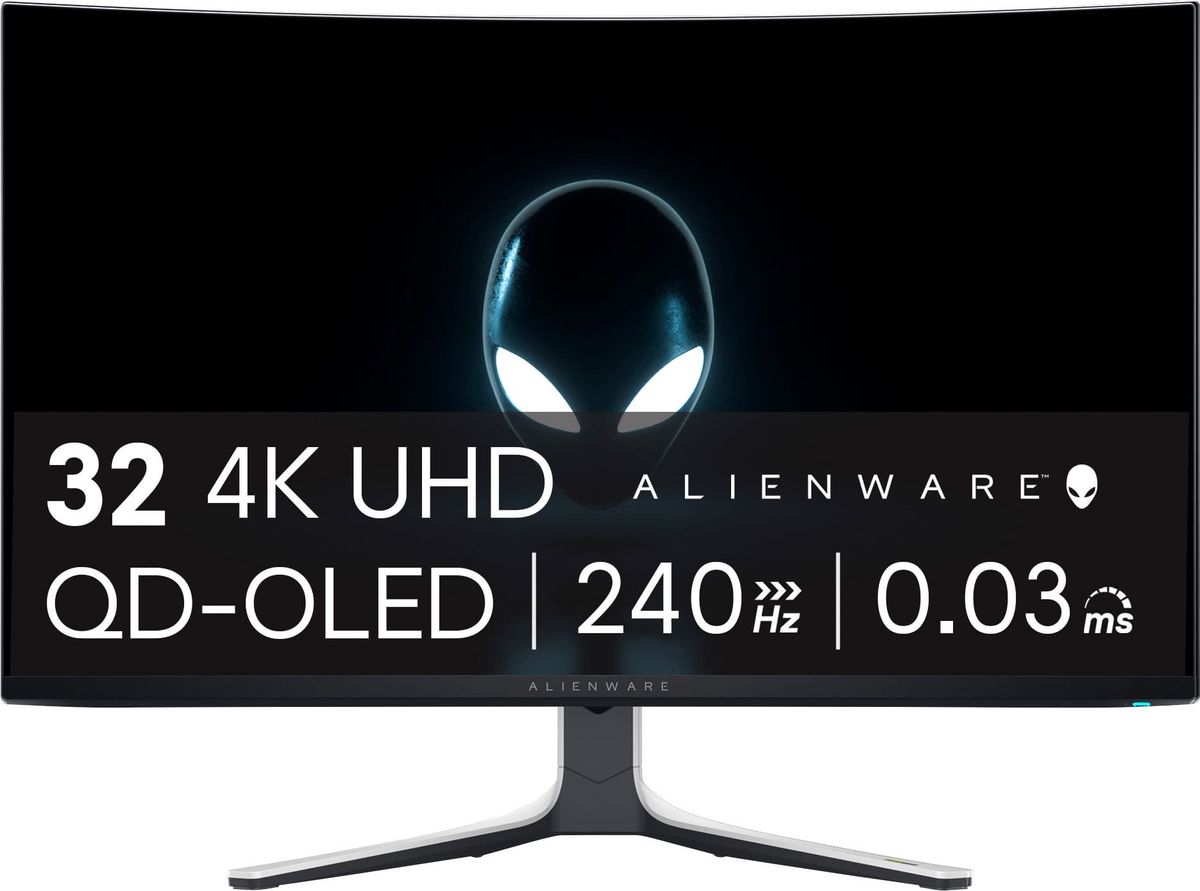
Dell Alienware AW3225QF
Best Curved / Console ValueBuy if: you want 240Hz QD-OLED for the lowest honest price — $699.99 in Black Friday week
Don't buy if: you hate curved screens, or you need DisplayPort 2.1 — this is DP 1.4 only
The AW3225QF is the value shock of this guide. A 31.6-inch curved QD-OLED at 240Hz with Dolby Vision and a 1,000-nit HDR peak, at $699.99 on Dell.com and Best Buy (checked 24 Nov 2026 — Black Friday deal, list $999.99, sale ends 28 Nov). That is $600 less than the ASUS flagship for the same panel class. Earlier this month Best Buy showed $899 and $979.99 for the same monitor; both stores now show $699.99, and that is the price to print.
The curve is gentle — 1700R, subtle enough that straight lines stay straight for desktop work — and the HDMI ports are full-bandwidth FRL, verified on Dell's own spec page, so a PS5 or Xbox gets 4K at 120Hz with VRR and no compression. The trade-offs are real: DisplayPort 1.4 only, so PC 240Hz runs through DSC; the USB-C port is downstream-only, so no video and no KVM; and there are no speakers. None of that matters at $699.99 if you want OLED and your room is dim.
Pros
- $699.99 in Black Friday week — $600 less than the ASUS flagship
- Full-bandwidth HDMI 2.1 FRL — 4K120 with VRR on PS5 and Xbox
- Dolby Vision + True Black 400, 1,000-nit peak, 3-year burn-in warranty
- Gentle 1700R curve — immersive without bending straight lines
Cons
- DisplayPort 1.4 only — 4K240 runs through DSC on PC
- USB-C is downstream-only — no video, no KVM, no speakers
- Black Friday price ends 28 Nov — it will cost more in December
Full specifications
- 31.6-inch 4K (3840×2160) QD-OLED, 1700R curved
- 240Hz refresh rate, 0.03ms GtG response
- 250 nits SDR / 1,000 nits HDR peak, DisplayHDR True Black 400, Dolby Vision
- DisplayPort 1.4 + 2× HDMI 2.1 FRL (one with eARC) + USB-C downstream
- G-SYNC Compatible, FreeSync Premium Pro, 99% DCI-P3
- 3-year warranty including burn-in, Premium Panel Exchange
Prices change frequently — click through to see today's price.
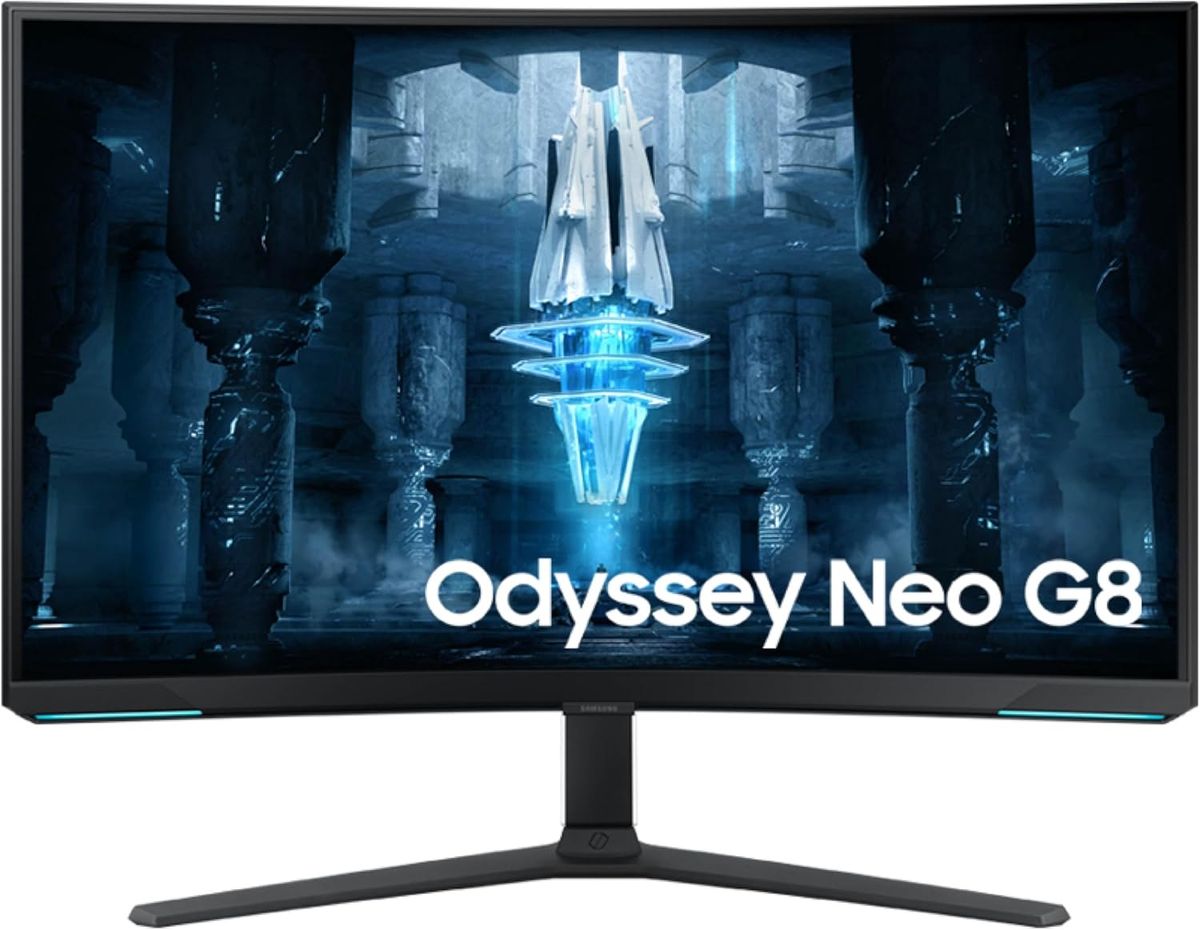
Samsung Odyssey Neo G8
Best Mini-LED / Bright RoomBuy if: you game in a bright room, hate the idea of burn-in homework, or want the brightest HDR in this guide
Don't buy if: you want perfect blacks or the fastest response — OLED still wins both
The Neo G8 is the only pick here that never asks you to think about burn-in. A 32-inch VA panel with a Quantum Mini-LED backlight — about 1,196 dimming zones — pushing a 2,000-nit HDR peak, at $799.99 on Amazon (via PCGuide, 5 Nov 2026). In a bright room it is the brightest screen in this guide by a wide margin, and the 1,000R curve wraps the picture around you in a way no flat panel does.
Say the age plainly: this is a 2022 design. Samsung's own US store lists it at $1,299.99 on Notify-Me only — not a buyable price — and the $720.99 Target marketplace listing is out of stock. The $799.99 Amazon figure is the real price. The trade-offs are the usual VA ones: 1ms response with some black smear in dark, fast motion, and no per-pixel blacks, so dark scenes look grey next to an OLED. But if your desk faces a window, this is the pick that still looks good at noon.
Pros
- ~2,000-nit HDR peak — brightest screen in this guide, by far
- No burn-in — Mini-LED with ~1,196 dimming zones, no pixel-care routine
- 1,000R curve, 240Hz, Quantum HDR 2000
- $799.99 — cheaper than every OLED flagship here
Cons
- 2022 design — Samsung's list price is Notify-Me only, not buyable
- VA panel: black smear in dark, fast motion; no per-pixel blacks
- DisplayPort 1.4 only — 4K240 runs through DSC
Full specifications
- 32-inch 4K (3840×2160) VA Quantum Mini-LED, 1000R curved, ~1,196 zones
- 240Hz refresh rate, 1ms GtG response
- 350 nits SDR / ~2,000 nits HDR peak, Quantum HDR 2000
- DisplayPort 1.4 + 2× HDMI 2.1
- G-SYNC Compatible, FreeSync Premium Pro, 95% DCI-P3
- 3-year warranty
Prices change frequently — click through to see today's price.
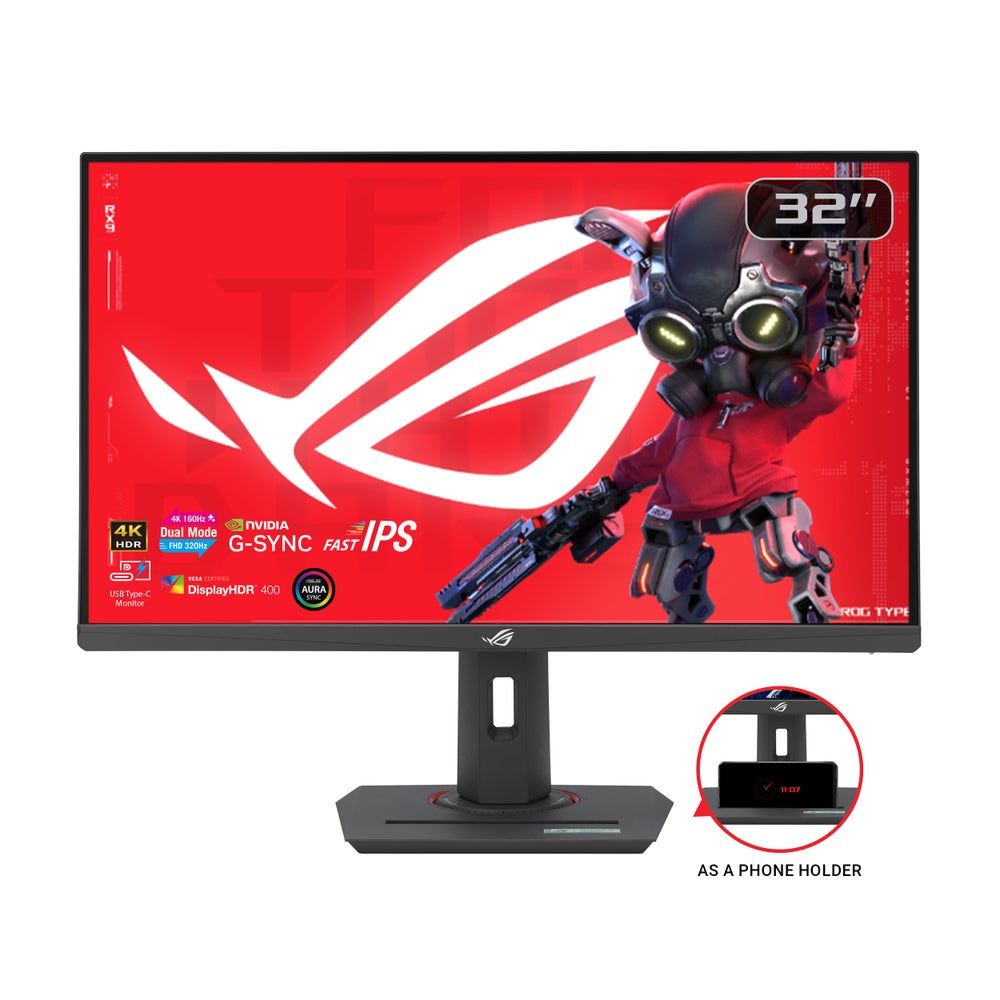
ASUS ROG Strix XG32UCG
Best Budget 4KBuy if: your budget stops at $600 and you still want 4K, 160Hz, and a 320Hz mode for shooters
Don't buy if: you want OLED blacks or real HDR — this is a 400-nit IPS panel, and it shows in dark scenes
The XG32UCG is the cheapest honest way into 4K gaming. A 31.5-inch Fast IPS panel at 160Hz in 4K, with a dual-mode switch to 1080p at 320Hz for competitive games, for about $599–619 (Abt $599, B&H $619, checked ~23 Nov 2026 — the tightest price agreement in this roundup). It is the only pick here under $700 that isn't a Black Friday sale, and it has the same phone-holder stand trick as its bigger ROG siblings.
The honest catch is the panel: 400 nits peak and a DisplayHDR 400 badge, so HDR is a label rather than an experience, and IPS blacks look grey next to the OLEDs above. The 95% DCI-P3 colour is strong for the price, and the 160Hz refresh is genuinely fast for a budget 4K screen. PC Gamer calls its 27-inch sibling the best budget 4K monitor — but note their "$400" figure is a UK/list price, not a US street price. In the US, $599 is the number.
Pros
- 4K at 160Hz for about $599 — the cheapest non-sale pick here
- Dual Mode: 1080p at 320Hz for competitive shooters
- 95% DCI-P3, USB-C, phone-holder stand
- Tightest price agreement in the roundup — $599 to $619 everywhere
Cons
- 400-nit peak — HDR is a badge, not an experience
- IPS blacks look grey next to OLED in dark rooms
- Only one HDMI 2.1 port — a second console needs the DisplayPort
Full specifications
- 31.5-inch 4K (3840×2160) Fast IPS, Dual Mode (4K160 / 1080p320)
- 160Hz at 4K / 320Hz at 1080p, 1ms GtG / 0.3ms minimum
- 350 nits SDR / 400 nits HDR peak, DisplayHDR 400, 95% DCI-P3
- DisplayPort 1.4 + 1× HDMI 2.1 + USB-C (15W, DP Alt)
- G-SYNC Compatible, FreeSync Premium, ELMB, Aura Sync
- 3-year warranty
Prices change frequently — click through to see today's price.
Worth a Look, Not a Pick
Six more monitors came up in research. Each is worth one line — and one caveat:
- Gigabyte AORUS FO32U2P — the DP 2.1 value pick with a daisy-chain DisplayPort out, but its price runs $949.99–$1,299.99 depending on the store, and it duplicates the MSI 322URX's story at a similar-or-higher price with weaker USB-C (65W vs 98W).
- Samsung Odyssey OLED G8 G81SF — the flat QD-OLED alternative to the curved Alienware, with Glare Free coating; $849 on Amazon in late September against a $1,299.99 Best Buy list that is a launch-MSRP anchor Samsung no longer charges.
- Sony Inzone M9 II — the best 27-inch console-first alternative: 4K160, DisplayHDR 600, PS5 Auto HDR Tone Mapping, $699.99 on Sony's store against a $949.99 list. Loses the sixth slot to the XG32UCG on price.
- TCL 32R84 — the newer Mini-LED alternative to the 2022 Neo G8: 1,400 zones, DisplayHDR 1400, $799.99 at Walmart, and RTINGS' number three 4K pick. US brand support is thinner than Samsung's.
- ASUS ROG Strix XG32UCWMG — the 2026 dual-mode WOLED flagship TechSpot and Tom's Hardware both crown as their top 4K pick, under $1,000 with a 1,300-nit peak. Not maker-verified in this run, so it stays a mention, not a pick.
- LG UltraGear 45GX950A-B — the 45-inch 5120×2160 ultrawide OLED at $1,999.99. A different budget and a different article — our ultrawide guide covers it.
OLED vs Mini-LED vs IPS: Which Panel for Your Room?
Start with your room, not the spec sheet. If you game in a bright room or in front of a window, buy Mini-LED or IPS. If you game in a dim room and mix competitive shooters with big single-player games, buy OLED. That one choice decides more than any refresh-rate number.
Here's the thing: OLED wins on contrast and response — perfect blacks, 0.03ms, no backlight bleed — but it tops out near 250–335 nits across the whole screen, so it looks faint in sunlight. Mini-LED wins on brightness — the Neo G8 holds 350 nits across the screen and bursts to 2,000 — but dark scenes show blooming around bright objects, and fast black motion can smear. IPS wins on price and never burns in, but its blacks are grey and its HDR is a badge.
Match the panel to the room first, then your budget. A dim-room gamer who buys the Neo G8 pays for brightness they never use; a bright-room gamer who buys the cheapest OLED hates it by noon. The panel is the room decision. The refresh rate is the GPU decision.
Will an OLED Monitor Burn In?
It can — but in 2026 the warranty has mostly answered the fear. Static HUDs left on screen for hours are the risk: health bars, minimaps, taskbars. Every OLED in this guide carries a burn-in warranty, and they are not all equal:
| Brand | Burn-in cover | Care system |
|---|---|---|
| Dell / Alienware | 3 years, including burn-in | Premium Panel Exchange |
| ASUS | 3 years, including burn-in (current models; older list is 2 years) | OLED Care Pro |
| MSI | 3 years, including burn-in | OLED Care 2.0 — keep the care features on |
| Gigabyte | 3 years, including burn-in | AI OLED Care |
| Samsung | 3 years, including burn-in (select Odyssey OLED models) | Standard OLED care routine |
| LG | 2 years | One year shorter than the rest — read the terms |
The routine matters as much as the warranty. Leave the pixel-refresh cycles running — they take a few minutes and trigger when the monitor turns off. Vary your content, hide the taskbar when you can, and let the screen go dark when you step away. The cover everywhere comes with conditions: care features left on, original purchaser, residential use, no signage. That routine is the price of OLED.
27-Inch or 32-Inch for 4K?
32 inches. For almost everyone, at a normal desk, 32 inches is the answer — and the math is simple. A 32-inch 4K panel packs 140 pixels per inch, so text stays sharp at 100–125% Windows scaling and you can't pick out individual pixels at arm's length. Shrink the same 3840×2160 to 27 inches and density jumps to 163 PPI, which is sharper on paper but makes text small enough that Windows needs 150% scaling — and some older apps still blur at that setting.
27-inch 4K suits a small desk or close seating, and competitive players who sit near the screen. 32-inch suits immersion, mixed work, and anyone whose desk is 30 inches deep or more. Measure your desk before you buy: a 32-inch panel needs about 24 inches from your eyes to the screen, and a curved one wants you centred.
Curved or flat? Only two picks here are curved — the Alienware at a gentle 1700R and the Neo G8 at an aggressive 1000R. The 1700R curve is subtle enough for desktop work; the 1000R curve wraps the picture around you but bends straight lines, so it divides opinion for productivity. Every other flagship here is flat. If you also work on the monitor, buy flat or buy the gentle curve.
HDMI 2.1, DisplayPort 2.1 and the Bandwidth Traps
"HDMI 2.1" on the box means three different things, and the box never says which one you bought. The bandwidth decides what actually reaches the screen:
| Port label | Real bandwidth | What it carries |
|---|---|---|
| HDMI 2.1 (TMDS) | 18Gbps — the HDMI 2.0 ceiling | 4K60 max; 4K120 only with heavy compromise |
| HDMI 2.1 (FRL 24Gbps) | 24Gbps | 4K120 only with 4:2:0 or 4:2:2 chroma subsampling — colour detail is lost |
| HDMI 2.1 (FRL 48Gbps) | 48Gbps — full HDMI 2.1 | 4K120 in 10-bit RGB, uncompressed — what consoles need |
The trap bites console buyers hardest, because a PS5 or Xbox cannot use DSC compression to squeeze through a narrow port. On PC the same port is fine — DisplayPort carries the signal instead. Of the six picks here, only the Alienware's 48Gbps HDMI is verified on the maker's own spec page; the other five list "HDMI 2.1" without a published Gbps figure, so don't assume 48Gbps until you check the exact model's spec sheet.
DisplayPort is the same story in reverse. 4K at 240Hz in 10-bit colour needs about 80Gbps uncompressed; DisplayPort 1.4 tops out at 32.4Gbps, so it needs DSC compression. DSC looks identical in practice — RTINGS and TechSpot agree on that — so the honest framing is this: DP 2.1 removes compression, it doesn't remove a visible flaw. Only RTX 50-series and RX 9000-series cards have DP 2.1 outputs, so a DP 2.1 monitor buys nothing on an RTX 40-series card. The two picks with DP 2.1 are the ASUS Gen3 and the MSI 322URX; the other four run 4K240 through DSC, and you won't see the difference.
How to Set Up Your 4K Monitor
A new monitor ships at 60Hz out of the box. Until you change it, you paid for 240Hz and got 60. Five minutes fixes it.
To get the full 240Hz from your 4K monitor, follow these steps: 1. Connect with DisplayPort 2.1 or 1.4 — HDMI caps some models at 120Hz. 2. Open display settings and select 240Hz. 3. Turn on G-Sync or FreeSync. 4. Launch your main game and check the frame rate. 5. Lower graphics settings until it holds steady.
- Connect the monitor with DisplayPort 2.1 or 1.4 — HDMI caps some models at 120Hz.
- Open display settings and select 240Hz (or 160Hz on the ASUS XG32UCG).
- Turn on G-Sync or FreeSync in your graphics settings.
- Launch your main game and check the frame rate holds above 120.
- Lower graphics settings until the frame rate holds steady.
If the refresh rate won't stick, the cable is the usual suspect — a cheap HDMI cable or an old DisplayPort cable silently caps you. Our 144Hz stuck at 60Hz guide walks through the full fix. And if the picture looks washed out with HDR on, our HDR washed out guide covers the SDR slider and RGB range fixes.
Frequently Asked Questions
Can a 4K monitor run 120Hz on PS5?
Yes — the PS5 tops out at 4K120 over HDMI, so buy for the HDMI port, not the 240Hz. Our PS5 monitor guide ranks the console-first picks.
Is 4K 144Hz good for gaming?
Yes, if your card holds 100+ fps at 4K — an RTX 5080 class card. Below that, 4K60 with upscaling looks better than a stuttering 144Hz.
Can I run a 4K monitor at 1440p?
You can, but it looks soft — 1440p doesn't divide evenly into 4K, so text blurs. Buy 4K only if your card can feed it.
Is DisplayHDR 400 real HDR?
Not really on an IPS panel — it's a 400-nit peak badge. On OLED, True Black 400 is a different, much better standard. Judge by SDR brightness first.
How long will a 4K gaming monitor last?
A decade or more for the panel itself. OLEDs need their pixel-care routines; Mini-LED backlights age differently. The warranty is the real limit — 3 years on most, 2 on LG.
Is a 4K monitor good for work too?
Yes — 4K at 32 inches fits two windows side by side at readable text. QD-OLED text can fringe slightly; WOLED and IPS are cleaner for all-day text.
Should I buy 240Hz or save money with 160Hz?
Save the money unless you own an RTX 5090. Below about 200 fps you won't see 240Hz, and the XG32UCG at $599 plus a better card beats a 240Hz panel on a weak GPU.
The Bottom Line
4K is worth it in 2026 because the monitors finally caught up with the price. The ASUS ROG Swift OLED PG32UCDM Gen3 is our top pick because it puts the newest QD-OLED panel and uncompressed 240Hz at $1,299 with a 3-year burn-in warranty — no other pick here needs so few excuses. The MSI MPG 322URX QD-OLED is the best buy under $1,100 if you want DP 2.1 without the flagship price, and the Dell Alienware AW3225QF is the value shock of the guide at $699.99 in Black Friday week. That's the short version.
Here's my honest opinion, and some of you will disagree: 240Hz at 4K is a trophy spec for most buyers. A 4K160 panel and the money saved on the graphics card will make your games look better than 240Hz ever will. Be honest about your room and your GPU before buying: OLED in a bright room disappoints, and 240Hz on a card that draws 90 fps is money spent twice. Check current prices on Amazon via the links above — monitor prices move fast in Black Friday week, and the figures here are dated 24 Nov 2026. If 4K isn't your resolution, our 1440p guide and ultrawide guide cover the alternatives.