How to Fix Xbox Series X Overheating (2026 Guide)

An Xbox Series X that shuts down mid-game, throws an overheating warning, or sounds like a jet engine is not necessarily broken. In most cases the cause is one of three things, in this order: the console cannot breathe where it sits, dust has choked its vents and fan, or — on older launch-era consoles — the cooling inside has degraded. This guide diagnoses which one you have from the symptom, then fixes them in the order a repair technician would, cheapest and safest first.
The short version: if it only happens in a closed cabinet or on carpet, move it. If the fan is loud everywhere and the console is a few years old, clean it. If it still shuts down within minutes after a proper clean, stop opening it and get it repaired — that last step is a fan or thermal-paste job, not a settings fix.
Is It Normal for My Xbox Series X to Get Hot?
Yes — a warm console with a fan you can hear during a demanding game is normal; a warning message, a shutdown, or a fan screaming at the home screen is not. The Series X pushes a lot of heat through one chip, so hot air from the top vent and a fan that ramps up under load are signs the cooling system is doing its job. Match your symptom to the row below before changing anything — each one points at a different cause.
| What you see | What it usually means | Do this first |
|---|---|---|
| Warm air from the top vent, fan audible in demanding games | Normal cooling under load | Nothing — unless it is new behaviour |
| Fan loud all the time, even at the home screen | Blocked airflow or dust buildup | Placement check, then vent clean |
| "Your console overheated" warning on screen | Thermal limit reached; shutdown is next | Power off, cool down, then the fix order below |
| Console shuts off mid-game, restarts only after cooling | Thermal protection tripped | Cool fully, then diagnose — do not keep restarting it |
| Grinding, clicking, or rattling from the fan | Failing fan bearing, not dust | Repair — cleaning will not fix a bearing |
| Freezing, stuttering, or graphical glitches plus heat | Heat-related throttling or a deeper fault | Clean and re-test; if glitches persist, repair |
| Only one game overheats it | That game pushes sustained maximum clocks — or a false alarm | Check the one-game test in the fix order below |
Two numbers put "hot" in perspective. There is no built-in temperature readout on Xbox, so owners have to rely on independent measurements: Digital Foundry measured exhaust air peaking at 62°C under load, while GamesBeat and Windows Central recorded around 47.7°C on average and 50.4°C at peak, with the console's skin reaching 48–49°C at its hottest point and the fan at 37.3 dB(A) under load. In other words, a Series X that feels hot to the touch around its vents is behaving as designed — Microsoft itself says the console feeling hot around the vents is normal, because hot air is being ventilated out to cool the interior.
One test separates "my room is hot" from "my console is sick": move the Series X to open air on a hard surface, give it clearance on all sides, and play the same game for 30 minutes. If the noise and heat drop sharply, placement was the problem all along. If nothing changes, work through the cleaning section — the fault is inside the console, not around it. And ignore the old launch-era "smoking Xbox" videos if you ever see them recirculated: they were faked with vape smoke, and Microsoft said so at the time.
Why Does My Xbox Series X Keep Shutting Down?
Because the console is protecting itself: when its internal temperature passes a safe limit, it shuts down rather than cook its own chip — and it tells you so. The on-screen warning reads, in full: "Your console overheated. Make sure you do not have your console exposed to direct sunlight, in a closed cabinet and not near any other electrical sources." A thermal shutdown is a safety feature, not proof the console is dead — but it is proof something is wrong, and repeatedly powering straight back on is the one thing you should not do.
When it shuts down, do exactly what Microsoft's own troubleshooting says: turn the console off and leave it off for at least one hour, move it to an open, well-ventilated spot with nothing on top of it or right next to it, then turn it back on and play the same game that triggered the shutdown for at least as long as it took to fail before. If it then runs normally, trapped heat was the problem and better placement is the fix. Do not restart it into the same game in the same closed cabinet — that just repeats the shutdown and adds heat stress each time.
If shutdowns happen within a few minutes of starting any demanding game even after a move and a clean, the cause is almost certainly internal: a dust-clogged heatsink the surface clean could not reach, a fan that is not spinning properly, or thermal paste that has dried out on an older console. That is the repair section at the end of this guide, not another settings change — no firmware update or cache clear fixes a dry patch on the chip.
Also rule out the non-heat lookalike: a console that loses power randomly, including at the home screen and without any heat or warning, may have a power-supply fault rather than a cooling fault. Heat shutdowns follow a pattern — demanding games, rising fan noise, then a warning or a cut-out. Random cut-outs with no pattern deserve a repair diagnosis on their own terms.
How Do I Fix Xbox Series X Overheating, in Order?
Work cheapest and safest first, and re-test after each step — most consoles never need step 7. Do not start by opening the console: start by giving it air.
Step 1 — Placement. Put the Series X on a hard, flat surface in open air, with 4–6 inches (10–15 cm) of clearance on all sides and above it, away from direct sunlight, radiators, heat registers, stoves, and other heat-producing kit such as amplifiers. Microsoft lists an operating temperature range of 41–95°F (5–35°C) for the console, so a hot room alone can push a marginal setup over the edge.
Never put it on a bed, sofa, or carpet, and never inside a closed cabinet unless the space is genuinely well ventilated. If you moved it across a temperature difference of 20°F (11°C) or more — say, from a cold car into a warm room — let it reach room temperature before powering it on. Then re-test with the game that caused the problem.
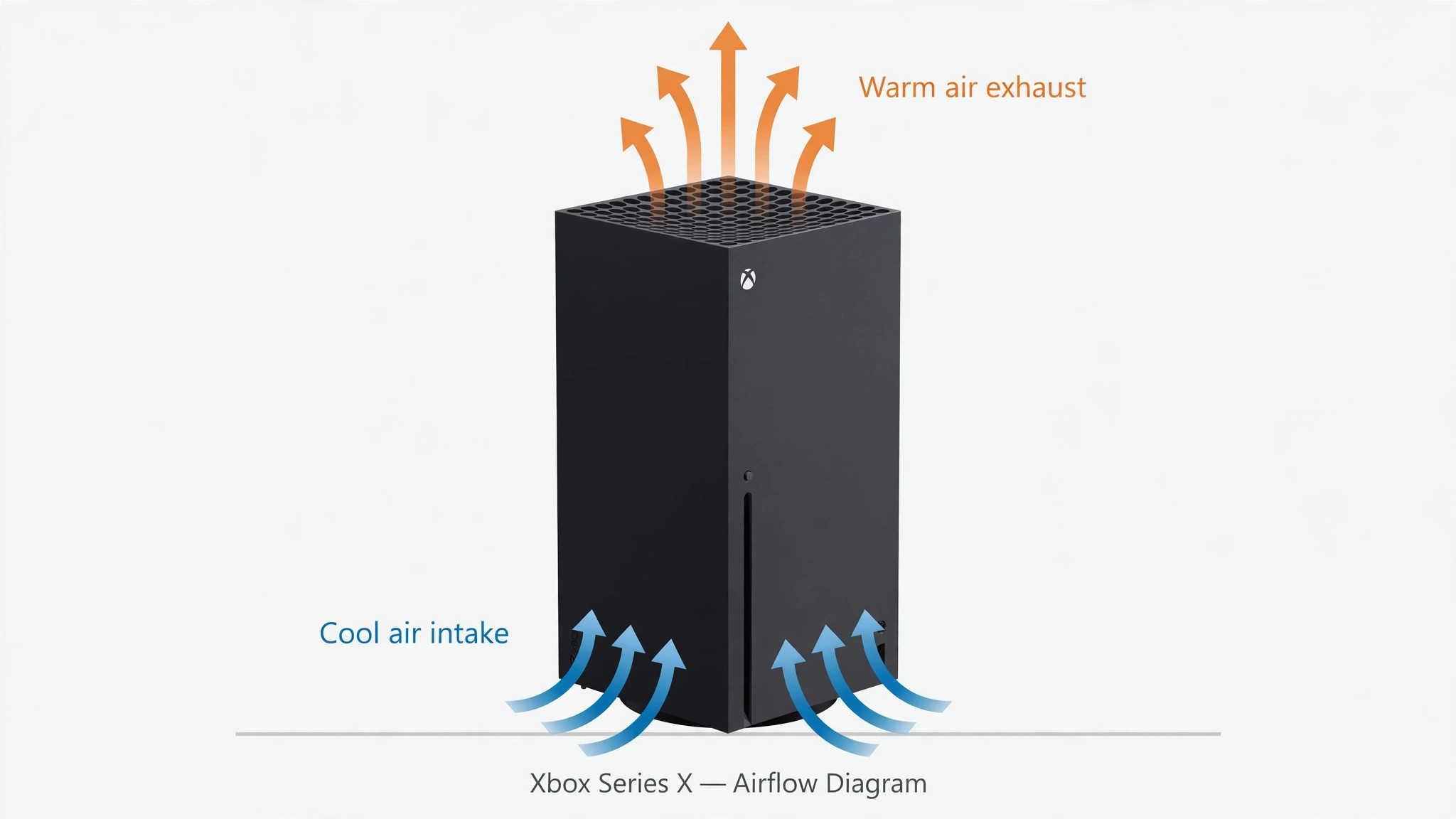
Step 2 — Surface clean. Power off fully and unplug. The Series X pulls cool air in at the base and pushes hot air out through the large round exhaust on top, driven by a single 130mm fan — so both ends of that path need to be clear. Wipe the exterior with a soft, lint-free cloth and use a soft brush to lift dust from the top vent and the base intake.
On compressed air, be honest about the disagreement: Microsoft does not recommend it, and some guides repeat that advice, while repair guides and iFixit do use it. The safest position is cloth and brush first; if you do use compressed air, use only short, angled bursts from outside the vents, never a long blast, and never spin the fan up with the air — hold the fan still if you can reach it, because spinning it with compressed air can generate voltage back into the board. Then re-test.
Step 3 — Check the room, not just the console. A console in a 35°C room has almost no thermal headroom left, and one sitting next to a radiator or an amplifier is breathing pre-heated air. Move heat sources away, open the cabinet door during long sessions, and give the room itself some airflow — a small room fan improving circulation beats any clip-on console cooler. If the shutdowns only happen on the hottest afternoons, the room is part of the diagnosis.
Step 4 — Software checks. Make sure system software is up to date, since firmware updates can adjust fan behaviour, and do a full power cycle (hold the power button for 10 seconds until it shuts off completely, unplug for 30 seconds, plug back in) rather than a rest-mode wake. As an optional extra, clearing the persistent storage or the local cache can clear software-related performance spikes — but be honest about what it is: it fixes software oddities, not heat, so only try it if the console also stutters or behaves strangely outside of heat symptoms.
Step 5 — The one-game test. If only one game ever triggers the warning, test before you spend anything. Play a different demanding game for the same length of time in the same spot. If only the one game fails, check that game's performance mode — a 60fps or performance option runs cooler than a fidelity or ray-tracing mode — and check whether other players are reporting the same thing.
There are genuine reports of EA titles (Battlefield 6, NHL, UFC, Madden, FIFA, and Flight Simulator among them) triggering overheating warnings on consoles that later passed a warranty inspection with no fault found. Treat a single-game warning as a testable lead, not a diagnosis: if the console still shuts down across several games after the placement and cleaning steps, the cooling margin is the problem, not the game.
Step 6 — Remove clip-on cooling accessories. If you added an external fan or cooling stand, take it off and re-test before buying anything else. Some clip-on fans divert air away from the console's own airflow path and can make cooling worse, not better — removing one is a free diagnostic step that repair shops use themselves. If the shutdowns stop with the accessory removed, the accessory was the problem.
Step 7 — The internal job (repair, not DIY for most people). If placement and a proper clean have not fixed shutdowns, the remaining causes are a heatsink clogged deep inside, a failing fan, or dried-out thermal paste. Launch-era Series X consoles (2020–2023) cool the chip with a vapour-chamber heatsink; the 2024 refresh models use a copper heat-pipe cooler instead, and thermal paste dries out over 2–3 years of heavy use on either design. A professional deep clean and thermal-paste service addresses all three at once.
Do not open the console yourself to do this: the manual states the console contains no serviceable parts, and opening it can affect warranty coverage, so if the console is still under warranty, contact Xbox Support first and let them direct the repair.
Is It Better to Keep the Xbox Series X Vertical or Horizontal?
There is no thermal difference — Microsoft designed the Series X to run in either orientation, and ventilation matters far more than which way up it sits. A vertical console on a hard surface with clear airflow will run cooler and quieter than a horizontal one buried on thick carpet. Some guides claim vertical is better, but that is uncited opinion; the consensus among repair guides is that orientation does not change temperatures.
- If your console runs fine vertically, leave it. Orientation alone does not overheat a healthy Series X, and moving a working console to chase a theory gains nothing.
- What actually matters is the exhaust. Standing upright, the exhaust is the large round vent on top — nothing may sit on it. Lying horizontally, the exhaust faces sideways, and the same rule applies: nothing pressed against it, and the console must sit on a hard surface so the base intake is not blocked. Never run it upside down.
- The one orientation trap is the stand. A vertical console without its stand can tip and block its own base intake; a horizontal console without its feet can sit with vents against the surface. Use the stand or feet in whichever orientation you choose.
Should I Use a Cooling Fan for My Xbox Series X?
Most clip-on external fans do not help, and some make things worse. The Series X's internal fan and heatsink are engineered as one airflow path: cool air in at the base, hot air out through the top. A cheap fan strapped to the exhaust can fight that path, add noise, and in some cases push hot air back toward the intake. Asurion's advice is blunt: most Series X owners do not need an external cooling fan. Our verdict is the same: do not buy a clip-on cooler to fix an overheating console — fix the placement and the dust first, because no add-on fan compensates for a blocked vent.
What can help is a stand that improves the console's situation rather than blowing at it: a stand that lifts the console off a surface, keeps its vents clear, and holds it stable does the same job as good placement, which is the actual fix. The same logic applies to the console's surroundings: an open shelf, a small room fan improving air circulation in the room, and keeping the TV unit door open during long sessions all beat a clip-on cooler. If a cooling stand's main selling point is extra fans, skip it; if it gives the console clearance and stability, it is just good furniture.
What About the Xbox Series S?
The same diagnostic order applies, but the Series S has less thermal headroom — so the same mistakes show up sooner. The Series S is a much smaller, lower-power console (around 65W against the Series X's far higher draw), cooled by a single blower-style fan and a compact heatsink. Its large black circle on top is the exhaust vent, with intakes on the sides, base, and back — and it has no disc drive, so there is no disc slot to mistake for a vent.
Everything in this guide applies to the Series S with the same priority: clearance, a hard surface, and clean vents first. Two things that do differ: the smaller chassis leaves less margin for bad placement, so a Series S in a closed cabinet will show symptoms sooner than a Series X in the same spot; and the black circular vent is easy to cover accidentally with a book, a controller, or a stack of games — keep it clear. The models are the 512GB Robot White, the 1TB Carbon Black (2023), and the 1TB Robot White (2024); the cooling layout is the same across them.
When Should I Stop and Get It Repaired?
Stop DIY work and book a repair if any of these are true: shutdowns continue after a proper placement fix and vent clean; the fan grinds, rattles, or does not spin; the console shuts down within minutes of starting a game even from cold; or you smell burning or see smoke. Burning smell or smoke means unplug at the wall immediately and do not power it on again — that is no longer a cooling question.
Before booking, check your warranty position: the manual states the console contains no serviceable parts, and deeper disassembly can affect warranty coverage, so if the console is still under warranty, register it at Microsoft's device service portal and let them direct the repair — in-warranty service is free, and out-of-warranty service is a flat fee published by device type.
Out of warranty, a reputable repair shop's deep clean and thermal-paste service is the standard fix for this exact fault, and it is a same-day job at most shops. Tell the shop the symptom pattern — which games, how fast it shuts down, whether cleaning helped at all — because that pattern is what separates a dust job from a fan or paste job.
One honest note on cost: a surface clean costs nothing and a professional deep clean is a modest repair bill, while ignoring repeated thermal shutdowns risks permanent damage to the chip. The expensive outcome is not the repair — it is months of shutdowns you played through.
How Do I Keep My Xbox From Overheating Again?
Keep it simple and regular: a maintenance routine that takes five minutes a few times a year beats a crisis clean every time.
- Every few months: brush or vacuum the vents, and check nothing has crept up against them — a new book, a controller dock, a curtain.
- Every 3–6 months (sooner in dusty or pet-heavy homes): give the top vent and base intake a proper external clean.
- Every session, honestly: leave the cabinet door open during long sessions, and give the console a cooldown break on marathon days rather than running it for eight hours in a hot room. Long sessions expose a cooling problem; they do not create one.
- Once, and then never again: set the console up properly — hard surface, clearance, stand fitted — and stop rearranging it into worse spots for tidiness.
For the wider picture on keeping a console responsive rather than just cool, our Xbox input-lag guide and Xbox stick-drift guide cover the other two faults Xbox owners actually hit, and our PS5 overheating guide covers the same problem on the other side of the TV stand. Our gaming-router guide covers the network side of lag that heat and hardware cannot explain.
Frequently Asked Questions
Is it normal for my Xbox Series X to get hot?
Yes. The console pushes a lot of heat through one chip, and hot air from the top vent plus a fan you can hear in demanding games are signs the cooling system is working. Independent measurements put exhaust air at up to 62°C under load, and Microsoft says the console feeling hot around the vents is normal. What is not normal is a warning message, a shutdown, or a fan screaming at the home screen.
How do I know if my Xbox Series X is actually overheating?
The console tells you: an on-screen "Your console overheated" warning followed by a shutdown is the real signal. A loud fan on its own is not overheating — it is the fan compensating for load, dust, or blocked airflow. Match your symptom to the table at the top of this guide before changing anything.
Why does my Xbox keep overheating after I cleaned the vents?
Because the blockage is usually not on the surface: a surface clean cannot reach dust packed deep inside the heatsink, a fan that is failing, or thermal paste that has dried out after 2–3 years of heavy use. It can also be placement — a clean console in a closed cabinet still recirculates its own hot exhaust. If placement is fixed and a proper clean has not helped, the next step is a professional deep clean and thermal-paste service, not another surface clean.
How hot does the Xbox Series X get?
Hotter than most people expect, and that is by design. Digital Foundry measured exhaust air peaking at 62°C under load; GamesBeat and Windows Central recorded around 47.7°C on average and 50.4°C at peak, with the console's skin reaching 48–49°C at its hottest point. There is no built-in temperature readout on Xbox, so these independent measurements are the best reference available.
Can a game falsely say my Xbox is overheating?
Possibly. There are genuine reports of EA titles — Battlefield 6, NHL, UFC, Madden, FIFA, and Flight Simulator among them — triggering overheating warnings on consoles that later passed a warranty inspection with no fault found. Treat a single-game warning as a testable lead, not a diagnosis: play a different demanding game for the same length of time, and if only the one game fails, the game is the suspect, not the console.
What room temperature is safe for a Series X?
Microsoft lists an operating range of 41–95°F (5–35°C). A console in a room near the top of that range has almost no thermal headroom left, so hot rooms, radiators, and direct sunlight all count as part of the problem. Keep the console away from heat sources and give it 4–6 inches (10–15 cm) of clearance on all sides, especially above the top vent.
Will Microsoft repair an overheating Series X?
Yes — persistent overheating shutdowns with clear vents are a service matter, and Microsoft's own troubleshooting says so. Register the console at Microsoft's device service portal: in-warranty service is free, and out-of-warranty service is a flat fee published by device type. Do not open the console yourself first — the manual states it contains no serviceable parts, and opening it can affect warranty coverage.