How to Clean a PS5 (2026 Guide)

Your PS5 fan just got loud, or the console shut itself off mid-game, and now every cleaning guide you find says something different. One tells you to vacuum it. The next says a vacuum will kill it with static. One swears by rubbing alcohol. The next says alcohol will melt the plastic. No wonder most owners do nothing — and the dust keeps building.
How to clean a PS5 refers to clearing dust from the vents, dust catchers and fan of a PS5 so it can cool and run quietly. It starts with a wipe and a low-powered vacuum, and only goes deeper — covers off, then the fan — when the noise or heat says it must.
Here's the thing: the contradiction has a real answer, and it comes from Sony, not from a forum. This guide follows Sony's own safety guidance, settles the two arguments every other guide leaves open, and covers all three consoles — the original PS5, the Slim and the Pro — instead of pretending they are the same machine. Pick your depth, do the steps in order, and stop when the console is quiet again.
Can You Vacuum a PS5?
Yes — if it is the right kind of vacuum. Sony tells owners to use a low-powered vacuum cleaner to remove dust from the air vents, with the console switched off and the power cable unplugged first. That sentence settles the argument. The blogs that say "never vacuum" are warning about the wrong machine.
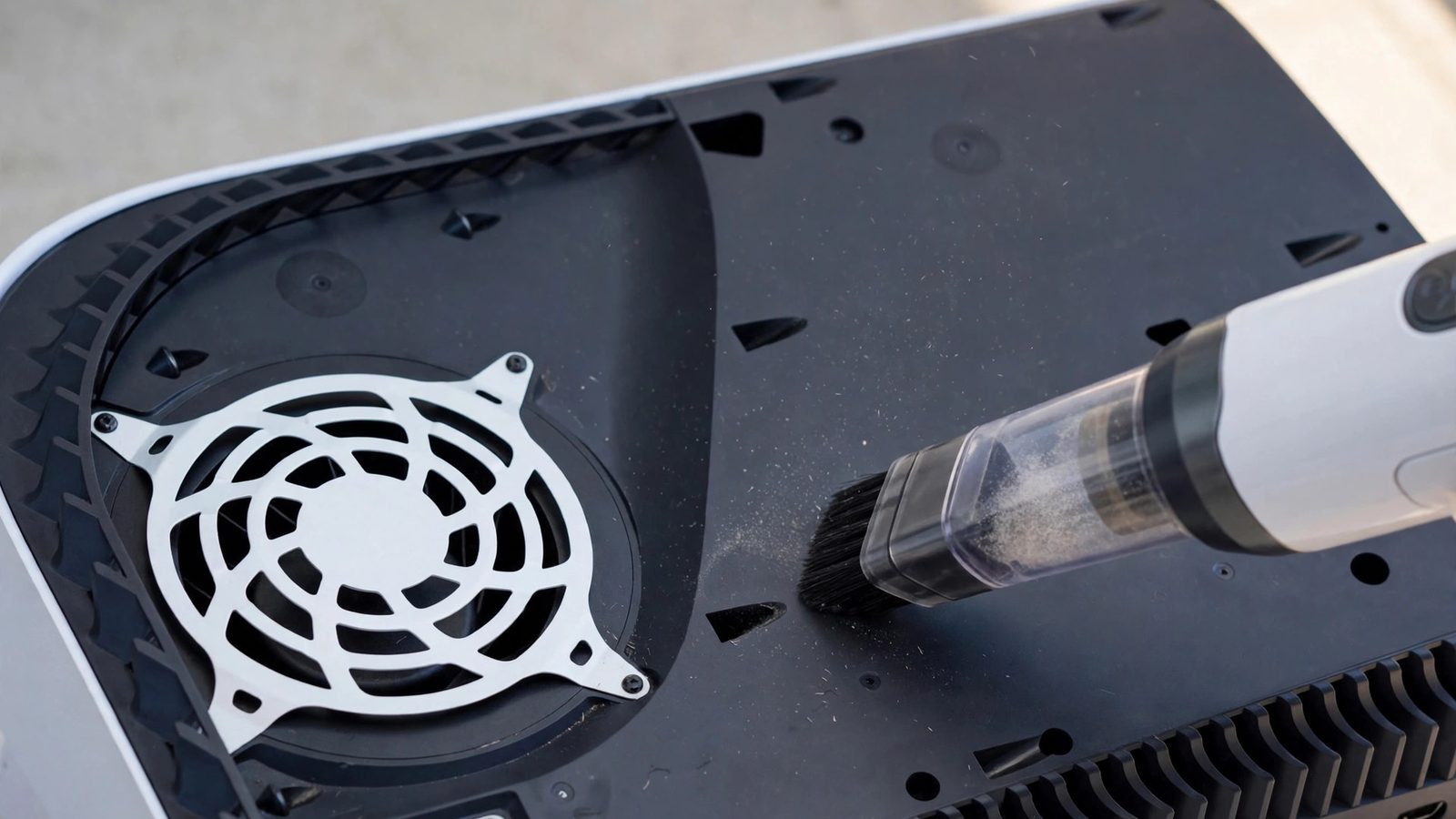
Vacuuming a PS5 is safe when you use a low-powered handheld vacuum with the console switched off and unplugged. According to PlayStation Support, that is exactly how Sony tells owners to clear dust from the air vents. Keep the suction gentle, use a brush nozzle, and never push the nozzle into the vents.
Cleaning a PS5 quiets a loud fan when dust is the cause. According to the PS5 Safety Guide, dust must not build up on the vents, and the console needs 10 cm of clear space on every side. If the fan stays loud after a proper clean, the cause is likely a worn bearing or coil whine.
I've seen conflicting data — some guides say vacuum, others say never vacuum, and a few say both on the same page. My read is that Sony's own support page settles it: a small handheld vacuum, yes; a big household or shop vacuum, no. The static fear is real for a powerful vacuum dragged across bare electronics. It is not a reason to fear the tool Sony itself recommends.
Vacuum vs compressed air: a low-powered vacuum suits routine PS5 cleaning better because it pulls dust out of the vents, which is what Sony recommends. Compressed air suits stuck dust in tight spots. The key difference is direction — a vacuum removes dust, while air only moves it somewhere else.
Three rules keep the vacuum safe. Use the lowest suction setting. Hold the nozzle just off the surface, never jammed into a vent slot. And clean with the console unplugged, not in rest mode, not on standby. Or maybe I should say it this way: the vacuum is fine, the impatience is the risk.
How Do I Clean My PS5 Without Opening It?
Most PS5s never need more than this. A five-minute clean of the outside fixes the majority of loud-fan complaints, because most of the dust lives in the vent slots you can already see. Start here every time. Only open the covers when you can still see dust after this level.
Cleaning a PS5 without opening it takes about five minutes and suits most consoles. Switch the console fully off, unplug it, vacuum the side and rear vents with a low-powered handheld vacuum, wipe the covers with a soft dry cloth, and give it 10 cm of space on every side. Open the covers only when dust is still visible inside.
To clean a PS5 without opening it, follow these steps: 1. Switch the console fully off and unplug it. 2. Vacuum the side and rear vents with a low-powered handheld vacuum. 3. Wipe the covers with a soft, dry cloth. 4. Clear 10 cm of space around every side. 5. Plug it back in and test it on the same game.
Look — if you're in the situation where the fan screams the moment a game loads, here's what actually works: do this five-minute clean, then play the same game for half an hour. If the noise drops, dust was the problem and you are done. If nothing changes, the dust is deeper, and the next section is your step.
Two mistakes. First, people clean with the console in rest mode. Don't. Switch it fully off and pull the power cable out of the back — Sony's guidance is explicit about that, and a spinning fan plus a vacuum nozzle is a bad combination. Second, they spray cleaner onto the console. Don't do that either. Sony's safety guide says to wipe the outside with a soft, dry cloth, and never to apply alcohol, benzene, paint thinner or any chemically treated cloth. The white plastic is ABS and polycarbonate, and solvents can discolour it or dull the finish. A dry cloth is the whole method.
While you are there, fix the placement. The console needs at least 10 cm of free space on every side, a hard flat surface, and no long-fibre carpet underneath. A PS5 inside a closed TV cabinet is breathing its own hot air, and no amount of cleaning fixes that. Our PS5 overheating guide walks through the full placement and diagnosis order if heat is the real complaint.
How Do I Clean the Dust Catchers Under the Covers?
This is the clean most guides skip — and the one that reaches the dust a surface wipe cannot. Sony designed the side covers to come off without tools, and underneath them sit dust-catcher holes that exist to trap dust before it reaches the fan. If your console is a few years old and has never had its covers off, this is where the grey felt-like mat of dust lives.
First, find your model. The model number is on the sticker on the base of the console, and it decides how the covers come off. An original PS5 (CFI-1000 series) has two big covers. Grip the top corner on the PlayStation-logo side, lift it slightly, then slide the cover toward the bottom of the console. A PS5 Slim (CFI-2000 series) or PS5 Pro (CFI-7000 series) has four smaller panels held by clips. Pull each panel straight up from a corner, and note the shape mark inside each one — triangle, circle, cross or square — which shows where it goes back.
With the covers off, vacuum the exposed area gently with the brush nozzle and wipe what you can reach with a dry cloth. On an original PS5, look for the two triangular dust-catcher holes under the logo-side cover and vacuum those directly — they are the feature Sony built for this. On a Slim or Pro, Sony publishes no dust-catcher map, so don't hunt for two triangular holes that may not be there. Vacuum the vent area and any visible dust under the panel instead.
Quick note: let the console cool before you take the covers off, and never run it with the covers off. Sony warns against operating the console without its covers fitted, and a hot console plus bare hands is a burn risk. Covers back on, cables back in, same game, half an hour — that is the test every time.
Do not go deeper than the covers and the visible fan area at this level. The heatsink and the cooling layer sit further in, and the section on the fan below explains where the line is.
How Do I Clean the PS5 Fan — and Should I Take It Out?
Try cleaning the fan in place first. Taking it out is optional, and for most people it is the wrong call. With the covers off, you can see the fan through its grille. Vacuum it gently with the brush nozzle, and use a soft brush or cotton swab for dust the vacuum won't lift. That is enough for most consoles.
If you do use compressed air here, hold the fan still first — a cotton swab wedged gently between the blades works. A fan spun up by a blast of air can generate voltage back into the board, and that is a real risk, not a myth. Short bursts, can upright, about 15 cm away. Never tilt the can: liquid propellant can spray out and freeze a component.
Removing the fan itself means unscrewing it and unplugging its cable, and that is where you should pause. The screw size differs by model, so check the iFixit guide for your exact model before buying a driver — guides online disagree on the size, and a wrong bit chews the screw head. More important is the warranty line: removing the user-removable covers is a step Sony documents for owners, but taking the console apart further can affect warranty coverage. If your console is still under warranty, contact PlayStation Support before going deeper.
And one hard line, whatever you do: never remove the heatsink or disturb the cooling layer underneath it. The PS5 cools its chip with liquid metal, not ordinary thermal paste, and liquid metal conducts electricity. If any of it escapes onto the board it can short the console. Replacing it is a repair, not cleaning — if cleaning has not fixed your shutdowns, that is a job for a professional, as our overheating guide explains.
How Often Should I Clean My PS5?
Twice a year is enough for most consoles — monthly cleaning is overkill, and the people selling you cleaning kits won't tell you that. Dust builds slowly, and a console in a clean living room with open airflow can go months without any attention at all. The right schedule depends on your home, not on a calendar a shop printed.
| What | How often | When to do it sooner |
|---|---|---|
| Wipe the covers and vacuum the vents | Every 2–3 months | Visible dust on the vents, or the fan getting louder |
| Covers-off dust-catcher clean | Every 6–12 months | Pets, carpet, smoking indoors, or a dusty room |
| Fan clean in place | Once a year at most | Only if the fan stays loud after the levels above |
| Fan removal or anything deeper | Only when needed | Never on a schedule — only if a repair diagnosis says so |
A dusty home changes the maths. Pets, a carpeted floor, a console near an open window, or a smoker in the room all push dust into the vents faster, so check the vents every month and clean when you can see dust — not on a date. Check the vents, not the calendar. The test is always the same: same game, same room, same spot. Louder than it used to be means clean it.
Can I Use Compressed Air on a PS5?
Yes, with three conditions: can upright, short bursts, fan held still. Compressed air is the second-best tool for this job — the vacuum is first, because it removes dust instead of moving it. Air earns its place on dust that is stuck in a tight spot where the vacuum nozzle can't reach.
Hold the can upright and about 15 cm from the surface. Use short bursts, never a long blast. And hold the fan still before you blow near it, as the fan section explains — a free-spinning fan is the one real hazard here. Do the blowing outside or near an open window if you can: the dust has to go somewhere, and you don't want it landing straight back on the console.
Skip the air entirely if you have a low-powered vacuum. That's the honest ranking. Air is a workaround for a tool you don't own, not an upgrade over the one Sony recommends.
Why Is My PS5 Fan So Loud — Will Cleaning Fix It?
Cleaning fixes a loud fan when dust or blocked airflow is the cause — and those are the most common causes. A fan that has slowly got louder over months on the same games is almost always fighting dust. A fan that was always loud is usually just a loud game pushing the console hard, which is normal.
The trick is naming the noise before you start cleaning, because three different sounds mean three different problems:
- A rushing roar that rises and falls with the game. That is the fan doing its job. Cleaning helps when it has recently got louder on the same games.
- A high-pitched electronic whine that changes with the frame rate. That is coil whine, and no cleaning will touch it. It is annoying, not dangerous, and it is not a fault you can clean away.
- A rattle, grind, or rhythmic clicking. That is a worn fan bearing or something caught in the fan. Cleaning won't fix a bearing. Book a fan replacement.
If the fan is loud but the console never warns you and never shuts down, you can finish your session and clean it after. If it shuts down, stop playing through it — repeated thermal shutdowns are the console protecting itself, and ignoring them is how a dust problem becomes a dead console. The full diagnosis order lives in our PS5 overheating guide.
How Do I Clean My PS5 Controller?
The same dry-cloth rule covers the controller. Sony's care guidance for the console's plastic covers applies to the DualSense too: wipe it with a soft, dry cloth, and keep alcohol, solvents and chemically treated cloths away from it. That surprises people, because plenty of guides recommend an alcohol-dampened cloth on the controller. Sony's own wording covers the controller's exterior the same way it covers the console — so this guide follows Sony, not the blogs.
For the parts a cloth can't reach, use a dry soft brush around the sticks and buttons. A dry cotton swab works in the crevices. Dust packed around a stick can make it feel gritty or register movement you didn't make — try a gentle brush-out before assuming the stick is worn. Don't push anything into the USB-C port. And don't let liquid near it. If the stick still drifts after a clean, the fault is deeper — our PS5 stick-drift guide walks through the settings fixes and the repair options in order.
One small habit saves the controller more than any clean: don't rest it on top of the console. Sony says the same thing in its safety guide. A controller sitting on a warm console picks up heat and dust, and it blocks the top vents while it does it.
My PS5 Still Overheats After Cleaning — What Next?
Stop cleaning and start diagnosing. A proper clean — vents, dust catchers, fan in place — fixes dust. If the console still shuts down within minutes of starting a demanding game, the cause is deeper: a heatsink clogged where you can't reach it, a failing fan, or liquid metal that has shifted on an older console.
First, rule out the cheap answers. Is it still in a closed cabinet? On carpet? Pressed against a wall? Has anything crept up against the vents since you cleaned it — a book, a controller dock, a curtain? Move it to open air on a hard surface and test again, because placement is still the most common cause after dust.
If placement and a proper clean have both failed, contact PlayStation Support if the console is under warranty, or a reputable repair shop if it isn't. Tell them the pattern: which games, how fast it shuts down, whether cleaning helped at all. That pattern is what separates a dust job from a liquid-metal job, and a good shop will ask for it before they open anything. Don't keep playing through shutdowns while you decide — that is the one choice that turns a repair bill into a replacement.
Frequently Asked Questions
What's the best way to clean a PS5?
Switch it fully off, unplug it, vacuum the vents with a low-powered handheld vacuum, and wipe the covers with a soft, dry cloth. Take the covers off for the dust catchers every 6–12 months.
Should I use a vacuum or compressed air on my PS5?
Use the vacuum first — Sony recommends a low-powered vacuum because it pulls dust out. Save compressed air for stuck dust in tight spots, with short bursts and the fan held still.
Does cleaning my PS5 void the warranty?
Removing the covers to clean the dust catchers is a step Sony documents for owners. Taking the console apart further, like removing the fan, can affect warranty coverage — check with PlayStation Support first.
Can I use rubbing alcohol to clean my PS5?
No. Sony's safety guide says not to apply alcohol, benzene or paint thinner to the console or controller, because they can discolour or degrade the plastic. Use a soft, dry cloth.
How often should I clean my PS5?
Wipe the vents every 2–3 months and clean the dust catchers under the covers every 6–12 months. Clean sooner in dusty or pet-heavy homes, or when the fan gets louder.
Will cleaning stop my PS5 from overheating?
Yes, when dust or blocked airflow is the cause — those are the most common reasons a PS5 overheats. If it still shuts down after a proper clean, the fault is deeper and needs a repair.
How do I clean my PS5 Slim or PS5 Pro — is it different?
The steps are the same, but the covers differ: the Slim and Pro have four clip-off panels instead of two sliding covers, and Sony publishes no dust-catcher map for them — vacuum the vent area under the panels instead.