Best UPS for Gaming PC in 2026: 6 Picks That Fit Your Watts

The lights flicker. Your PC restarts mid-game. Your save is gone, and Windows wants to check the drive again. A surge protector does nothing here, because the problem is not a spike — the power simply vanished for two seconds. That is the moment a UPS earns its place under the desk.
A UPS for a gaming PC is a battery box that sits between the wall and your PC. When power cuts or dips, it takes over at once and gives you minutes to save your game and shut down safely.
Below: the 6 best UPS units for a gaming PC in 2026. Every watt rating, outlet count and runtime figure comes from the maker's own spec sheet or spec page, and prices were checked on 26 Nov 2026. Read the sizing section first. It decides which pick fits your PC.
What Size UPS Do You Need for a Gaming PC?
Size by watts. Add up what your PC, monitor and router really pull in games, then buy a UPS rated above that total. For most gaming PCs, that means a 900W to 1,080W unit.
The UPS size a gaming PC needs depends on real watts at the wall, not the VA number on the box. According to Schneider Electric, its 1500VA Back-UPS Pro is rated at 900W, so VA and watts are never the same figure. Add your PC and monitor draw, then choose a UPS rated above that total.
A gaming PC with a 750W power supply rarely pulls 750W, so the label on the power supply is the wrong number to size from. Measure or estimate the draw in games, add the monitor and router, then leave headroom for spikes and battery ageing. Most single-GPU gaming PCs land in 1000W-class UPS territory.
VA is the big number on the box. Watts is the number that decides whether the UPS can carry your PC at all. A unit marked 1500VA may only deliver 900W, and if your gear pulls more than that, the UPS overloads and drops the load — the exact failure you bought it to prevent.
Look — if your PC reboots every time the lights flicker, here's what actually works: count the watts your whole setup pulls at its worst moment in a demanding game, add the monitor and router, then buy the next size up. Guessing from the power supply label is how people end up with a UPS that trips in the first outage.
| Your Real Draw | UPS Watts to Buy | Picks Here That Fit |
|---|---|---|
| About 250W — esports or older build | 450W or more | CP1000PFCLCD (600W) |
| About 400W — mid-range gaming PC | 600W or more | CP1350PFCLCD (880W), CP1500PFCLCD (1,000W) |
| About 550W — high-end gaming PC | 800W or more | CP1500PFCLCD (1,000W), Eaton 5SC1500 (1,080W) |
| 700W or more — top-tier card plus heavy CPU | 1,000W or more | Eaton 5SC1500 (1,080W); past that, look at larger 2000VA-class units |
Not sure of your draw? The LCD on most picks here shows live load in watts once plugged in, and a cheap plug-in power meter tells you before you buy. Either beats guessing. Our gaming PC power supply guide explains why the label on the supply is a ceiling, not a draw figure.
Do You Need a Pure Sine Wave UPS?
Yes, for a gaming PC. Modern gaming power supplies expect clean, wall-like power, and a pure sine wave UPS gives them exactly that on battery. A cheaper simulated sine wave unit is the wrong saving here.
A pure sine wave UPS is the safer choice for a gaming PC because modern power supplies use active PFC and expect clean, wall-like power. According to Eaton, its 5SC UPS gives sine wave output for active PFC equipment, which is the compatibility gaming PCs need. Simulated sine wave units can buzz, error, or shut a PC down on battery.
Active PFC is the part of a power supply that cleans up the power it takes from the wall. It is built for a smooth wave. Feed it the blocky, stepped wave of a simulated sine wave UPS and some supplies buzz, log errors, or simply switch off. If it can't hold your rig, it isn't protecting anything, and that's the whole point.
Pure sine wave vs simulated sine wave: pure sine wave is better suited for gaming PCs because active PFC power supplies expect clean, wall-like power. Simulated sine wave works better when the load is simple gear that tolerates a stepped wave. The key difference is compatibility on battery.
Here's the thing: plenty of roundups still list simulated sine wave units as gaming picks because they are cheaper. Every pick in this guide is pure sine wave. That one spec is not where you save money.
Quick Comparison
| Product | Key Specs | ||
|---|---|---|---|
| #1 | CyberPower CP1500PFCLCDBest Overall | 1500VA/1,000W · pure sine wave · 6 battery outlets · $239.95 | Check Price |
| #2 | APC Back-UPS Pro BR1500MS2Best Premium Consumer Pick | 1500VA/900W · sine wave · 6 battery outlets · $299.99 | Check Price |
| #3 | Eaton 5SC1500Highest Wattage | 1440VA/1,080W · sine wave · 8 battery outlets · $482.99 | Check Price |
| #4 | CyberPower CP1350PFCLCDBest Value | 1350VA/880W · pure sine wave · 6 battery outlets · $219.95 | Check Price |
| #5 | CyberPower CP1000PFCLCDBest for Smaller Builds | 1000VA/600W · pure sine wave · 5 battery outlets · $179.95 | Check Price |
| #6 | APC Smart-UPS SMT1500CBest Monitoring | 1440VA/1,000W · sine wave · 8 battery outlets · $714.99 | Check Price |
Best UPS by Use
All six picks are pure sine wave, but they suit different PCs and budgets. Match the watts to your draw:
- Best overall: CyberPower CP1500PFCLCD — 1,000W for most gaming PCs, $239.95.
- Best premium consumer pick: APC Back-UPS Pro BR1500MS2 — 900W with a user-replaceable battery, $299.99.
- Highest wattage: Eaton 5SC1500 — 1,080W and 8 battery outlets, $482.99.
- Best value: CyberPower CP1350PFCLCD — 880W for mid-range PCs, $219.95.
- Best for smaller builds: CyberPower CP1000PFCLCD — 600W for light rigs and consoles, $179.95.
- Best monitoring: APC Smart-UPS SMT1500C — cloud alerts and long runtime at 500W, $714.99.
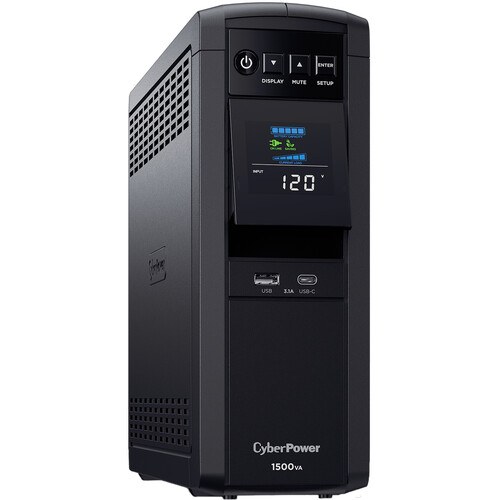
CyberPower CP1500PFCLCD
Best OverallBuy if: your gaming PC, monitor and router pull under about 700W in games
Don't buy if: your setup pulls near or past 1,000W — step up to the Eaton or a larger class
The CP1500PFCLCD is the default pick because 1,000W of pure sine wave output clears most single-graphics-card gaming PCs with headroom to spare. Six of its twelve outlets carry battery backup, which covers a PC, two monitors and a router without juggling plugs. The colour LCD shows live load in watts, so you can check your real draw against the ceiling instead of guessing.
I've seen conflicting data on this model — older CyberPower spec sheets and some store listings still show 900W and 10 outlets, while current listings show 1,000W and 12 outlets. My read is that the current model is the 1,000W, 12-outlet unit, so check the outlet count on the listing before you buy. Runtime is rated at 10 minutes at half load and 2.5 minutes at full load, which is save-and-shut-down time, not keep-playing time.
Pros
- 1,000W pure sine wave output fits most gaming PCs
- 6 battery outlets plus 6 surge-only outlets
- Colour LCD shows live load, runtime and battery level
- USB-A and USB-C charging ports on the front
Cons
- Older 900W, 10-outlet listings still circulate — check before buying
- Only 2.5 minutes at full 1,000W load
- Lead-acid battery will need replacing in a few years
Full specifications
- 1500VA / 1,000W, line-interactive with AVR
- Waveform on battery: sine wave; transfer time 4ms
- Outlets: 12 total — 6 battery and surge, 6 surge-only
- Runtime: 10 minutes at half load, 2.5 minutes at full load
- USB-A and USB-C charging; USB and serial for shutdown software
- User-replaceable battery; 3-year warranty
Prices change frequently — click through to see today's price. Seen at $239.95 (checked 26 Nov 2026).
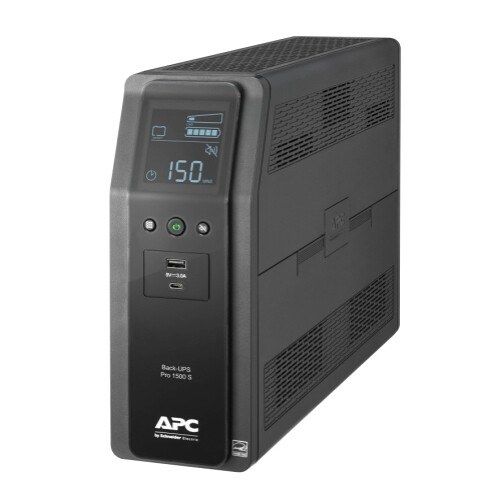
APC Back-UPS Pro BR1500MS2
Best Premium Consumer PickBuy if: you want APC build quality and a battery you can swap yourself later
Don't buy if: you need more than 900W — the CyberPower above gives you 1,000W for less
The BR1500MS2 is the premium consumer pick. Schneider Electric rates it at 1500VA and 900W with sine wave output, six battery outlets out of ten, and automatic voltage regulation that smooths dips and swells without touching the battery. The front USB-A and USB-C ports charge a phone during an outage, and the LCD shows load and battery level at a glance.
The honest trade-off is watts per dollar. At $299.99 it costs more than our top pick and carries 100W less, with about 3 minutes of runtime at a full 900W load on APC's current runtime graph. What you get back is a user-replaceable battery cartridge, so a worn battery in three years means a cartridge swap, not a whole new UPS.
Pros
- 900W sine wave output with AVR for dips and swells
- User-replaceable battery cartridge (APCRBC163)
- USB-A and USB-C charging ports, LCD status display
- Ethernet and coax surge protection built in
Cons
- 900W ceiling is lower than the cheaper CyberPower pick
- About 3 minutes at full 900W load
- Only 4 surge-only outlets for non-battery gear
Full specifications
- 1500VA / 900W, line-interactive with AVR
- Waveform: sine wave; transfer time 8ms typical
- Outlets: 10 total — 6 battery and surge, 4 surge-only
- Surge energy rating: 1080 joules; Ethernet and coax protection
- USB-A and USB-C charging; USB port for shutdown software
- User-replaceable battery; 3-year warranty
Prices change frequently — click through to see today's price. Seen at $299.99 (checked 26 Nov 2026).
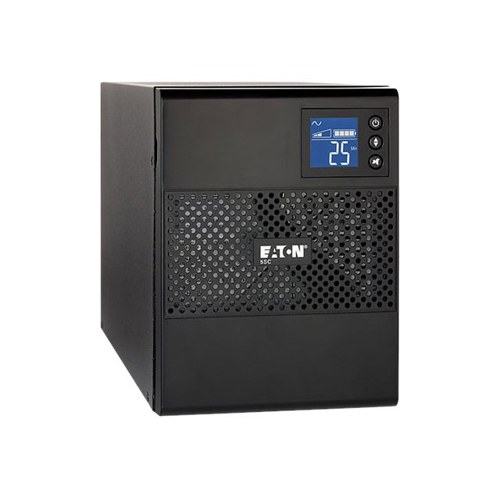
Eaton 5SC1500
Highest WattageBuy if: your gaming PC pulls hard and you want the most watts and battery outlets here
Don't buy if: space is tight or you want USB charging ports — this is a big, plain business tower
The 5SC1500 carries the most real power in this guide: Eaton rates it at 1440VA and 1,080W, even though it is sold in the 1500VA class. All eight outlets are battery-backed, so a PC, two monitors, a router and a console can all ride through a flicker together. Runtime is rated at 13 minutes at half load and 5 minutes at full load, the strongest figures here.
It is built for offices, not desks that care about looks. At 34 lb it is the heaviest pick here, there are no USB charging ports, and the $482.99 price is double our top pick. Or maybe I should say it this way: buy it for watts and outlets, not for features. If your rig pulls past 700W, that trade is worth it.
Pros
- 1,080W — the highest watt rating here
- All 8 outlets are battery-backed
- 13 minutes at half load, 5 minutes at full load
- ABM battery charging extends battery service life
Cons
- $482.99 — double the price of the top pick
- 34 lb and bulky next to the CyberPower towers
- No USB charging ports for phones or controllers
Full specifications
- 1440VA / 1,080W, line-interactive with AVR
- Waveform: sine wave, active PFC compatible
- Outlets: 8 NEMA 5-15R, all battery-backed
- Runtime: 13 minutes at half load, 5 minutes at full load
- USB and RS-232 ports for shutdown software
- Noise under 40 dB at 1 metre; 3-year warranty
Prices change frequently — click through to see today's price. Seen at $482.99 (checked 26 Nov 2026).
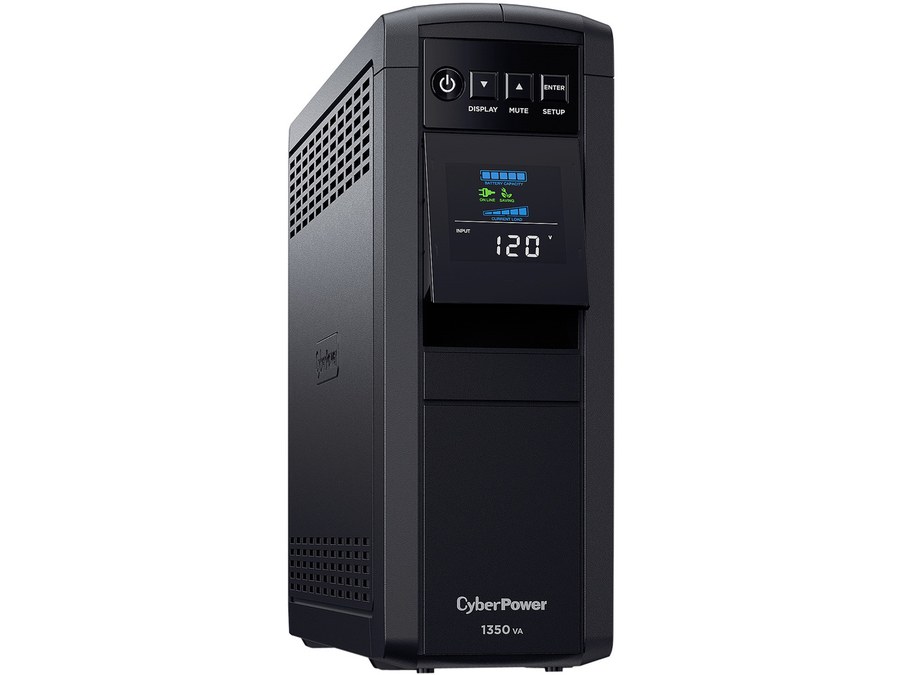
CyberPower CP1350PFCLCD
Best ValueBuy if: your PC and monitor pull under about 550W and you want pure sine wave for less
Don't buy if: you plan a top-tier graphics card upgrade soon — buy the 1,000W model instead
The CP1350PFCLCD is the value pick because it keeps the two specs that matter — pure sine wave output and a colour LCD — and trims the ceiling to 880W. That still covers a mid-range gaming PC, a monitor and a router with headroom. Six battery outlets out of twelve matches our top pick, so outlet count is not the compromise here.
The compromises are runtime and charging. CyberPower rates it at 8 minutes at half load and 2 minutes at full load, and there are no USB charging ports on this model. Quick note: some older listings show 810W for this model number — current CyberPower listings show 880W, so check the watt figure on the listing you buy from.
Pros
- 880W pure sine wave output for $219.95
- 6 battery outlets plus 6 surge-only outlets
- Colour LCD with live load and runtime readouts
- AVR corrects dips without using the battery
Cons
- No USB charging ports
- 2 minutes at full 880W load
- Some older listings show a lower 810W figure
Full specifications
- 1350VA / 880W, line-interactive with AVR
- Waveform on battery: sine wave
- Outlets: 12 total — 6 battery and surge, 6 surge-only
- Runtime: 8 minutes at half load, 2 minutes at full load
- Colour LCD; PowerPanel software for automatic shutdown
Prices change frequently — click through to see today's price. Seen at $219.95 (checked 26 Nov 2026).
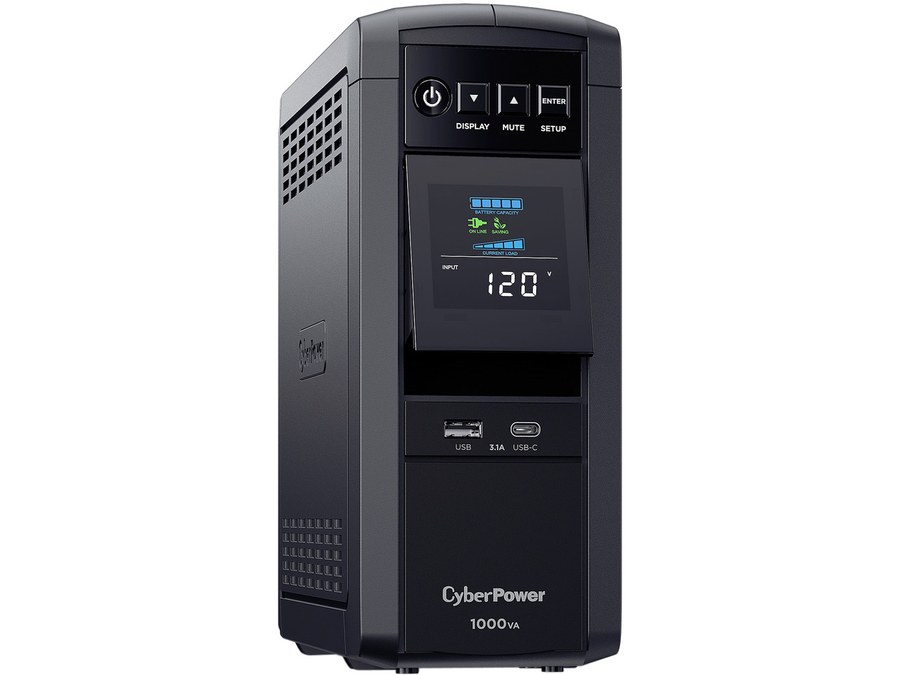
CyberPower CP1000PFCLCD
Best for Smaller BuildsBuy if: your PC is a light esports build, or you mainly protect a console, TV and router
Don't buy if: your PC pulls past about 400W in games — 600W leaves too little headroom
The CP1000PFCLCD brings pure sine wave output down to $179.95. Its 600W ceiling suits a modest gaming PC with one monitor, and it is plenty for a console and TV setup, which pulls far less than a desktop. Five battery outlets out of ten cover the essentials, and the front USB ports charge a controller or phone.
Know the limit before you buy. A single 12V battery means short runtime: listings put half-load runtime between 6 and 8 minutes, and a gaming load near 600W drains it fast. This is flicker insurance and a clean shutdown for a light setup. It is not the UPS for a high-end rig, and pretending otherwise would waste your money.
Pros
- Cheapest pure sine wave pick here at $179.95
- 600W suits light PCs, consoles and network gear
- 5 battery outlets plus 5 surge-only outlets
- USB charging ports and colour LCD
Cons
- 600W ceiling is too low for high-end gaming PCs
- Short runtime — about 6 to 8 minutes at half load
- Single battery ages into even shorter runtime
Full specifications
- 1000VA / 600W, line-interactive with AVR
- Waveform on battery: sine wave; transfer time 4ms
- Outlets: 10 total — 5 battery and surge, 5 surge-only
- Runtime: about 6 to 8 minutes at half load (listings vary)
- Single 12V/9Ah battery; 3-year warranty
Prices change frequently — click through to see today's price. Seen at $179.95 (checked 26 Nov 2026).
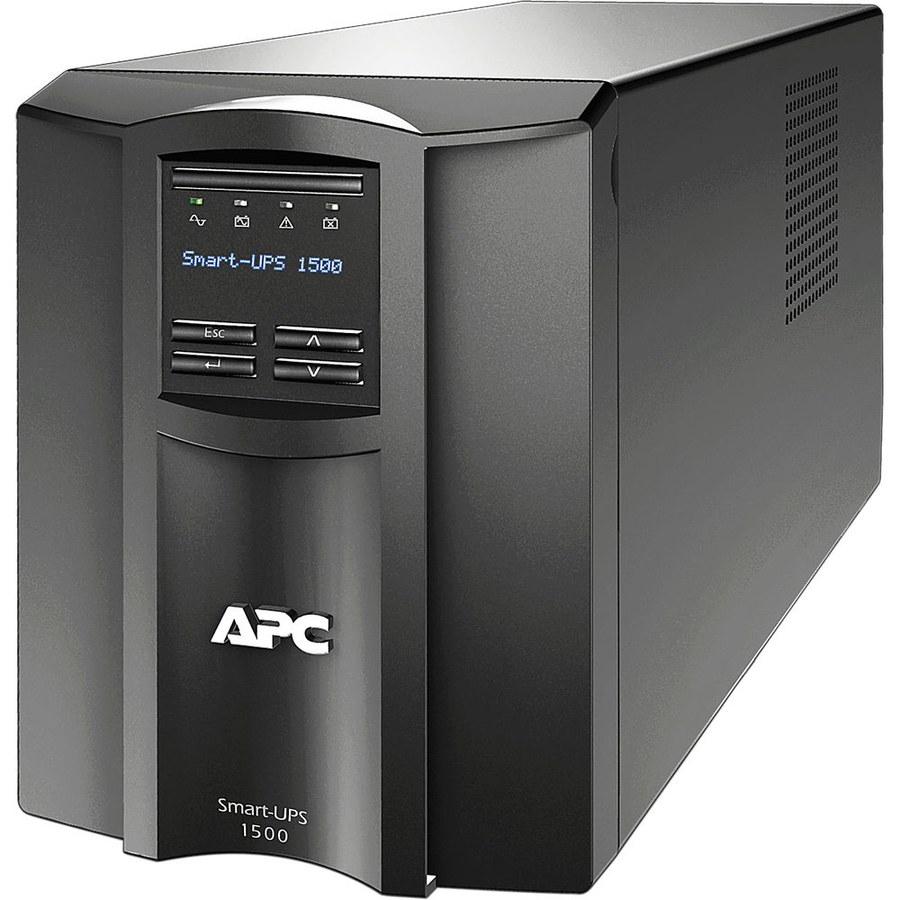
APC Smart-UPS SMT1500C
Best MonitoringBuy if: you stream or work from the same PC and want outage alerts sent to your phone
Don't buy if: you just game — the top pick protects the same PC for a third of the price
The SMT1500C is a business UPS that happens to suit a serious gaming desk. Schneider Electric rates it at 1440VA and 1,000W with sine wave output, and all eight outlets are battery-backed. Its SmartConnect port sends outage alerts and battery warnings over the internet, so you hear about a power cut even when you are away from the desk.
Runtime is its other strength: APC figures give about 23 minutes at a 500W load and 6.5 minutes at full load, well ahead of the consumer picks at gaming loads. The catch is price. At $714.99 it costs three times our top pick for the same 1,000W ceiling, and there are no USB charging ports. My take: most gamers should skip it, and streamers who lose income to outages should not.
Pros
- 1,000W sine wave output, all 8 outlets battery-backed
- About 23 minutes at a 500W load
- SmartConnect cloud alerts for outages and battery health
- SmartSlot for an optional network management card
Cons
- $714.99 — three times the top pick
- No USB charging ports
- Business software and menus are overkill for most desks
Full specifications
- 1440VA / 1,000W, line-interactive with AVR
- Waveform: sine wave; transfer time 6ms typical
- Outlets: 8 NEMA 5-15R, all battery and surge protected
- Runtime: about 23 minutes at 500W, 6.5 minutes at full load
- SmartConnect Ethernet port; USB and serial for shutdown
- Surge energy rating: 680 joules
Prices change frequently — click through to see today's price. Seen at $714.99 (checked 26 Nov 2026).
How Long Will a UPS Run Your Gaming PC?
Minutes. Not hours. At a gaming load, expect about 5 to 10 minutes from the bigger picks here, and less from the smaller ones. That is enough to save, quit and shut down cleanly.
Runtime depends on load, not on the VA badge. A 1,000W UPS running a 500W gaming load lasts far longer than the same UPS at 900W, because the battery holds a fixed amount of energy and a heavier load drains it faster. Every runtime figure in this guide assumes a new battery, and batteries lose capacity as they age.
Think of a UPS as a bridge, not a generator. It rides out flickers and short cuts without a restart, and it turns a long outage into a calm shutdown instead of a hard crash. If you want to keep gaming for hours with no mains power, no desktop UPS here does that job — that takes a large power station, which is a different purchase entirely.
Set the shutdown software to act on its own. With automatic shutdown turned on, the PC saves your work and powers down safely even if the outage hits while you are away from the desk. That setting is worth more than any single spec on the box.
How to Set Up a UPS for a Gaming PC
Plug it straight into the wall, put the right gear on the battery outlets, then turn on automatic shutdown. That order matters. Outlets first, software second, test last.
To set up a UPS for a gaming PC, follow these steps: 1. Plug the UPS straight into a grounded wall outlet. 2. Put the PC, monitor and router on battery outlets. 3. Connect the USB cable to the PC. 4. Turn on automatic shutdown in the software. 5. Test by unplugging the UPS once.
- Plug the UPS directly into a grounded wall outlet — never through a surge strip, power strip or extension cord — and let the battery charge fully before you rely on it.
- Connect your PC, main monitor and router or modem to the battery-backed outlets; put printers, speakers and chargers on surge-only outlets or the wall.
- Connect the USB cable between the UPS and the PC so the computer can read battery level and load.
- Install the maker's shutdown software (PowerPanel for CyberPower, PowerChute for APC, Intelligent Power Manager for Eaton) and set the PC to shut down on its own at a safe battery level.
- Test the setup by unplugging the UPS from the wall: the PC should stay on, the software should report battery power, and plugging back in should return everything to normal.
One warning while you plug things in: only the outlets marked battery backup stay live in an outage. The surge-only outlets on the same unit go dark with the room. A PC plugged into a surge-only outlet gets surge protection and nothing else, which is the most common UPS mistake we see.
Can You Plug a Surge Protector Into a UPS?
No. Plug the UPS straight into a grounded wall outlet, and plug your gear straight into the UPS. Daisy-chaining a surge strip onto a UPS can overload it and defeat its protection.
Makers say the same in their manuals: connect the UPS directly to the wall, and do not connect surge protectors or extension cords to its output. The UPS already includes surge protection on its outlets, so the extra strip adds risk, not safety. If you need more outlets, use the surge-only outlets on the UPS itself for gear that does not need battery time.
Keep heavy, spiky loads off the battery outlets too. Laser printers, space heaters and similar gear pull hard bursts of power and can trip a UPS sized for a PC. Printers belong on surge-only outlets or the wall. Your PC, monitor and router are what the battery is for.
Still chasing random restarts with clean power sorted? Our guide to fixing a PC that crashes when gaming covers the heat and driver causes a UPS cannot fix.
Frequently Asked Questions
What's the best UPS for a gaming PC?
The CyberPower CP1500PFCLCD. Its 1,000W pure sine wave output fits most gaming PCs, with six battery outlets for a monitor and router.
What size UPS do I need for my gaming PC?
Add your PC, monitor and router draw in watts, then buy a UPS rated above that total. Most gaming PCs need 900W to 1,080W.
How long will a UPS run my gaming PC?
About 5 to 10 minutes at a gaming load on the bigger picks here. That is time to save and shut down, not to keep playing.
Do I need a pure sine wave UPS?
Yes. Gaming power supplies use active PFC and expect clean, wall-like power. Simulated sine wave units can buzz, error, or shut the PC down.
Can I plug a surge protector into a UPS?
No. Plug the UPS straight into a grounded wall outlet and your gear straight into the UPS. Chaining strips can overload it and defeat protection.
What should I plug into the battery outlets?
Your PC, main monitor and router or modem. Printers, speakers and chargers belong on surge-only outlets or the wall.
How often should I replace a UPS battery?
Plan on about 3 years. Makers rate these lead-acid batteries near 3 years, and runtime drops as they age.
The Bottom Line
The CyberPower CP1500PFCLCD is our top pick because 1,000W of pure sine wave output, six battery outlets and a live load readout cover most gaming PCs at $239.95. The CyberPower CP1350PFCLCD is the buy for lighter rigs at $219.95, and the Eaton 5SC1500 is the one for heavy rigs that need 1,080W.
Count your watts before you buy, keep the PC on a battery outlet, and turn on automatic shutdown. Prices here were checked on 26 Nov 2026 and will move. If your power supply itself is undersized or ageing, start with our gaming PC power supply guide instead.