Best Electric Air Duster for PC in 2026: 6 Picks That Won't Wreck Your Fans

Your PC fans wear a grey coat of dust. Temps creep up. Then the can of air runs out halfway through the clean, cold and weak in your hand. If you're tired of cans that freeze, fade and quit mid-job, you're not imagining it — that's just how propellant cans behave.
Best electric air duster for PC refers to a reusable blower that pushes room air through a nozzle to clear dust from fans, heatsinks and keyboards. Good models add speed control, useful nozzles and enough airflow to shift dust without spinning fans out of control.
Below: the 6 best electric air dusters for PC cleaning in 2026, from a $44.99 cordless pick to a grounded ESD model for careful bench work. Prices were checked 27 Nov 2026 and will move. Read the safety check first. It takes one minute and saves fan bearings.
Can an Electric Air Duster Damage Your PC?
Yes, it can — if you blast fans at close range. Used with care, an electric duster is a normal PC cleaning tool. Power off, hold fans still, start low. That order matters.
An electric air duster can clean a desktop PC safely when you power the machine down, hold each fan still, start on low speed and keep the nozzle a few inches away. According to Dell guidance summarised in cleaning guides, blowers can create static, so check your PC manual before you start.
Fan damage is the main risk with any strong duster. Air can spin a fan far past its rated speed, stress its bearings and push voltage back through its cable. Hold the blades with a finger or plastic tool, use short bursts, and angle dust out of the case, not deeper inside.
Look — if your fans are caked and your temps keep creeping up, start on low speed and hold the blades still. Strong air feels great. It also turns a fan into a tiny generator. A spinning brushless fan can feed voltage back through its connector, and bearings hate overspeed. Short bursts. A few inches of distance. Dust goes out, not in.
Static needs honesty too. Fast air through a plain plastic nozzle is not ESD-safe by magic. True ESD protection needs static-dissipative attachments, a grounded cord and a wrist strap — the setup on pick #5. For a standard duster, unplug the PC, touch bare case metal first, and keep the nozzle off the board. Laptops need extra care: small fans break more easily, and some makers warn against strong close-range air. Our laptop dust guide covers the gentler route.
Electric Duster vs Canned Air: Which Is Better?
For regular cleaning, electric wins. A can costs less today and more over a year. If you clean twice a year, a can may still be the smart buy.
Electric dusters beat canned air on cost for regular cleaners because one rechargeable tool replaces repeated can purchases. According to Wolfbox price comparisons, a single 10 oz can often costs about $7 to $10, while cordless dusters in this guide start near $45 and keep working for years.
Canned "air" is not air. It is liquefied propellant, often difluoroethane. Tilt the can and it can spray cold liquid. Use it for a minute and it chills and weakens. The contents are flammable, and the can ends up in the bin. An electric duster blows room air at a steady rate, with speed control a can never gives you.
Now the maths. At $7 to $10 per can, a $44.99 Fanttik pays for itself after about 5 to 7 cans. The $89.99 MF100 needs about 9 to 13 cans. Clean monthly and you break even fast. My take: if you clean your PC twice a year, skip the $90 cordless and buy two cans. You'll spend less and store less. Frequent cleaners should switch.
What RPM Do You Actually Need for PC Cleaning?
Ignore RPM on its own. RPM is motor speed, not cleaning power at the nozzle. Blade shape and nozzle design change the result at the same RPM.
Or maybe I should say it this way: RPM is the motor's speed, not the force that lifts dust. Two dusters at 110,000 RPM can feel very different. Look for air speed in m/s, airflow in CFM, and speed settings you can turn down. Here's the thing: control beats peak power inside a PC. Low speed cleans keyboards and boards. High speed shifts heatsink dust. A single-speed blaster just makes a mess.
Runtime claims need the same honesty. "Up to 100 minutes" and "up to 300 minutes" are low-speed figures. At full speed, expect a small slice of that time. The MF100 states 10 to 100 minutes across its speeds, which is the honest way to print it. Any maker who hides the high-speed figure is asking you to guess.
Cordless or Corded: Which Should You Buy?
Buy cordless for one home PC. Buy corded if you clean several machines or hate charging batteries. Both types clean well. The cord decides the rest.
Cordless vs corded: cordless is better suited for most home PCs because it moves around the case with no outlet hunt. Corded works better when you clean several machines and want steady power. The key difference is freedom versus unlimited runtime.
Cordless tools are light, quick and easy to store. Their batteries wear over years, and strong models get loud. Corded tools never fade mid-clean and often cost less per unit of airflow. They tie you to an outlet and take more space. If dust makes your gaming PC loud, our loud PC guide explains the fan side of the problem.
The 6 Best Electric Air Dusters for PC in 2026
Our Top Pick
Wolfbox MF100 Electric Air Duster
Best for Most People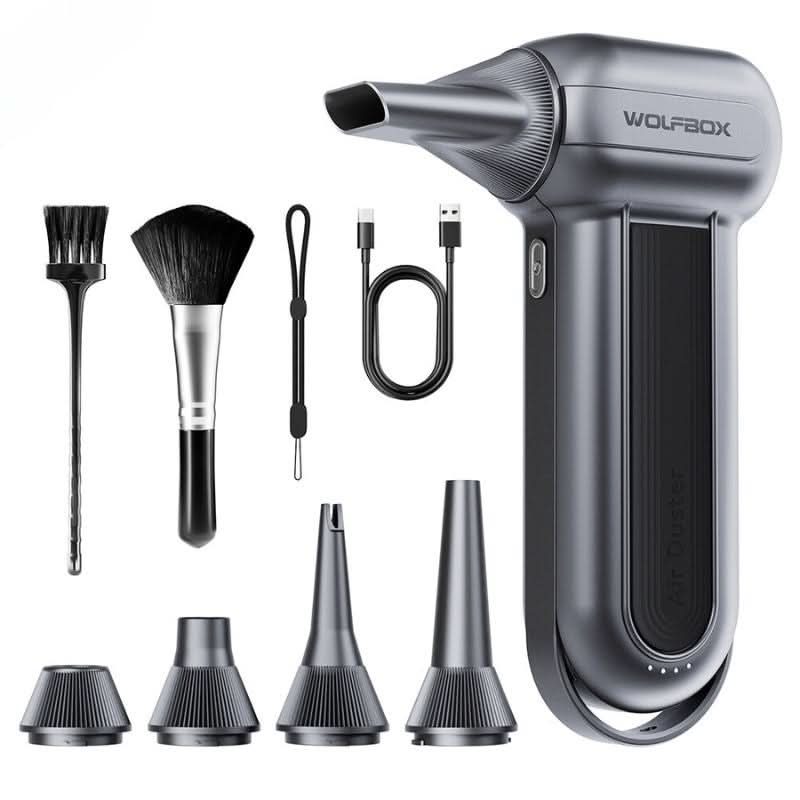
Three speeds, five nozzles, two brushes and the strongest maker airflow claim in this guide: 150,000 RPM, 45 m/s and 70 CFM. At $89.99 from Wolfbox (checked 27 Nov 2026) it costs more than rivals, and it earns it with control and kit.
Check Price on AmazonQuick Comparison
| Product | Key Specs | ||
|---|---|---|---|
| #1 | Wolfbox MF100Best for Most People | Cordless · 3 speeds · 45 m/s · $89.99 | Check Price |
| #2 | Fanttik B10 ProBest Value Cordless | Cordless · boost mode · LED ring · $44.99 | Check Price |
| #3 | Wolfbox MF70Best Runtime | Cordless · 3 speeds · 300 min low · $52.99 | Check Price |
| #4 | XPOWER A-2 Airrow ProBest Corded Value | Corded · 90 CFM · 2 speeds · price varies | Check Price |
| #5 | MetroVac DataVac ED-500-ESDBest ESD-Safe Pick | Corded · grounded · wrist strap · $187.99 | Check Price |
| #6 | Sin Shine Compressed Air 3.0Best Momentary Switch | Corded · 10 ft cord · LED · $70.88 | Check Price |
Best Electric Air Duster by Use
- Most home PCs: Wolfbox MF100 — control, kit and power in one tool.
- Tight budget: Fanttik B10 Pro — light, bright and half the MF100 price.
- Long desk sessions: Wolfbox MF70 — the longest low-speed runtime claim here.
- Several machines: XPOWER A-2 Airrow Pro — corded power with no charging.
- Static care: MetroVac DataVac ED-500-ESD — grounded cord and wrist strap.
- Short bursts only: Sin Shine Compressed Air 3.0 — air stops when you let go.
Wolfbox MF100 Electric Air Duster
Best for Most PeopleBuy if: you want one cordless duster for a PC, keyboard and desk, with real speed control
Don't buy if: you clean twice a year — cans cost less at that pace
The MF100 is the pick because it gives you control and kit, not just a big RPM number. Wolfbox states 150,000 RPM, 45 m/s air speed and 70 CFM air volume. Three speeds let you start gentle on boards, then step up for heatsink fins. Five nozzles and two brushes cover the jobs that matter.
Reviews back the basics. The Gadgeteer praised its build, grip and battery life, and PopSci listed the strong motor and seven accessories as pros. The honest con sits in the runtime line: 100 minutes is the low-speed figure. Wolfbox also states 10 to 100 minutes across speeds. Top speed will not last 100 minutes. No duster here will.
Pros
- Three speeds — low for boards, high for heatsinks
- Five nozzles plus two brushes in the box
- Light at 0.66 lb, with USB-C charging
- $89.99 at Wolfbox, checked 27 Nov 2026
Cons
- 100-minute runtime is low-speed only
- Battery is built in, not swappable
- Top speed is loud in owner reports
Full specifications
- Brushless turbo fan, up to 150,000 RPM (maker claim)
- 45 m/s max air speed; 70 CFM air volume (maker claim)
- 3,000 mAh × 2 battery; 10–100 minutes by speed
- 0.66 lb; 5 nozzles, 2 brushes, lanyard, pouch
Prices change frequently — click through to see today's price. $89.99 at Wolfbox (checked 27 Nov 2026).
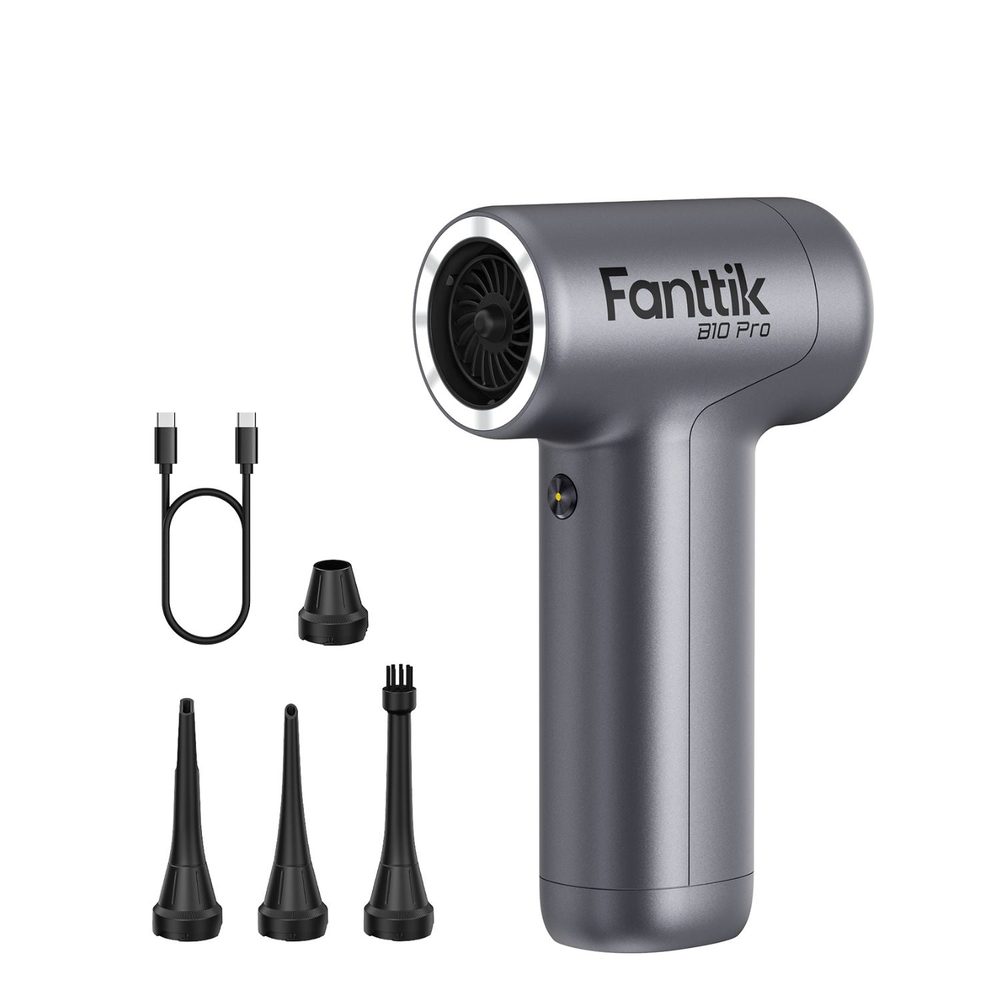
Fanttik B10 Pro Electric Air Duster
Best Value CordlessBuy if: you want a light cordless duster for one PC and a keyboard, for half the MF100 price
Don't buy if: you clean several machines back to back — runtime is the limit
The B10 Pro is the value pick because it keeps the useful parts: three gears, a one-tap boost, four nozzles and an LED ring that lights dark case corners. Fanttik claims boost reaches 110,000 RPM and 65 m/s. Treat those as maker claims, like every figure in this guide. The tool itself is small, light and simple.
One spec needs care. The box prints "2400mAh/17.76wh", while some listing copy says "dual 2400mAh". Those wordings do not match, so we print the box figure and skip the doubled claim. Price needs care too: $44.99 at Fanttik checked 27 Nov 2026, while Amazon deal posts had $30 on 22 Nov. Deals move. Check before you pay.
Pros
- Light at 0.61 lb — easy to aim inside a case
- LED ring helps in dark PC corners
- Boost mode for stuck dust, lower gears for boards
- $44.99 at Fanttik, checked 27 Nov 2026
Cons
- Charge indicator does not show a precise level
- Battery wording conflicts between box and listings
- One owner report called airflow weak — a single report, not a verdict
Full specifications
- Brushless motor; boost claim 110,000 RPM, 65 m/s
- 3 gears plus one-tap boost; 9-LED ring light
- Battery printed as 2400mAh/17.76Wh; USB-C charging
- 0.61 lb; 4 nozzles and storage bag
Prices change frequently — click through to see today's price. $44.99 at Fanttik (checked 27 Nov 2026); Amazon deal posts had $30 on 22 Nov 2026.
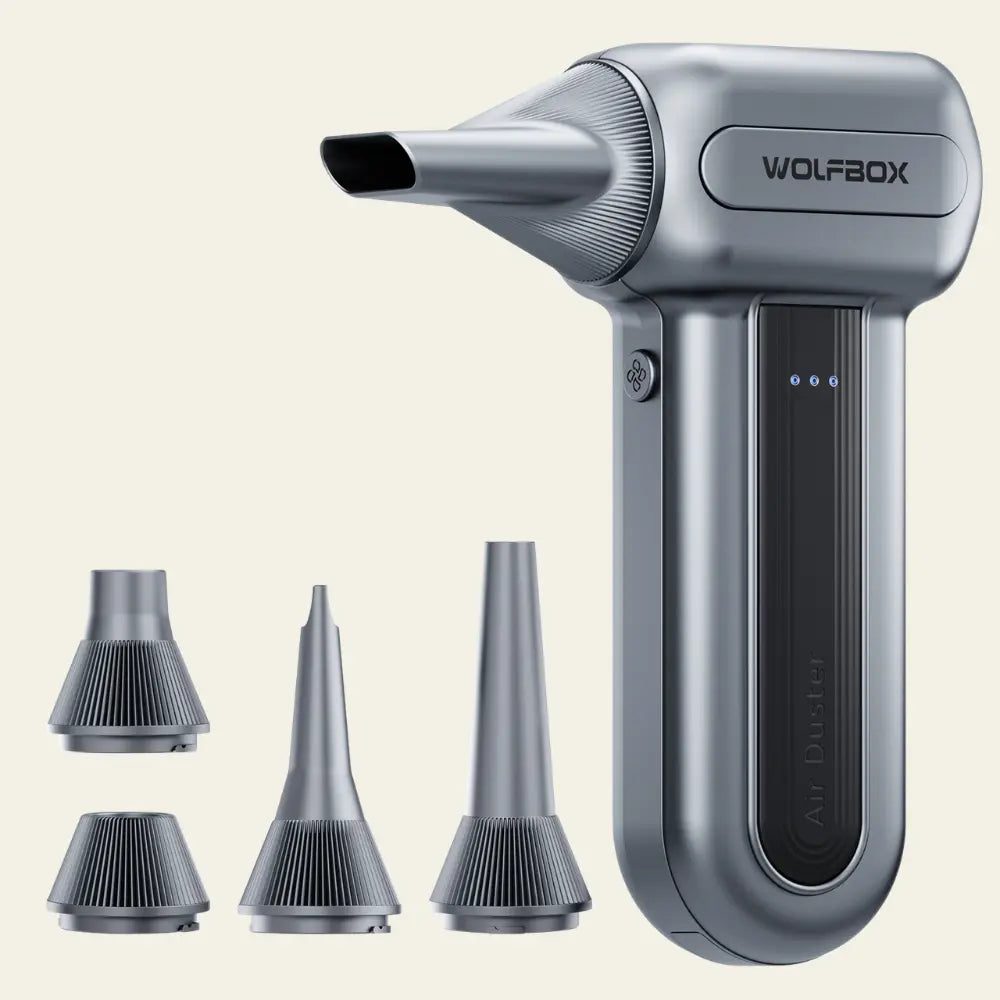
Wolfbox MF70 Compressed Air Duster
Best RuntimeBuy if: you clean a keyboard and desk often and want long low-speed sessions
Don't buy if: you want brushes in the box — none are listed
The MF70 trades peak power for stamina. Wolfbox states three speeds at 25,000, 60,000 and 110,000 RPM, with up to 300 minutes on gear 1. That figure is low-speed only, and we print it that way. For keyboard rows and desk dust, low speed is the gear you will use most.
PopSci listed the 110,000 RPM motor, three speeds and five nozzles as pros. Its con was price: the MF70 costs more than the MF50/MF60 for similar core specs. At $52.99 from Wolfbox's outdoor store, checked 27 Nov 2026, it sits between the Fanttik and the MF100. Heavy, caked dust may still feel stronger from a can at close range.
Pros
- Up to 300 minutes claimed on the lowest gear
- Three speeds, from gentle to 110,000 RPM claim
- Light at about 0.5 lb
- Five nozzles for keyboards and vents
Cons
- 300 minutes is a low-speed figure only
- No brushes listed in the kit
- Similar Wolfbox models cost less
Full specifications
- Brushless motor; 25,000 / 60,000 / 110,000 RPM gears
- Up to 300 minutes on gear 1 (maker claim)
- Rechargeable battery; USB-C charging
- About 0.5 lb; 5 nozzles
Prices change frequently — click through to see today's price. $52.99 at Wolfbox (checked 27 Nov 2026).
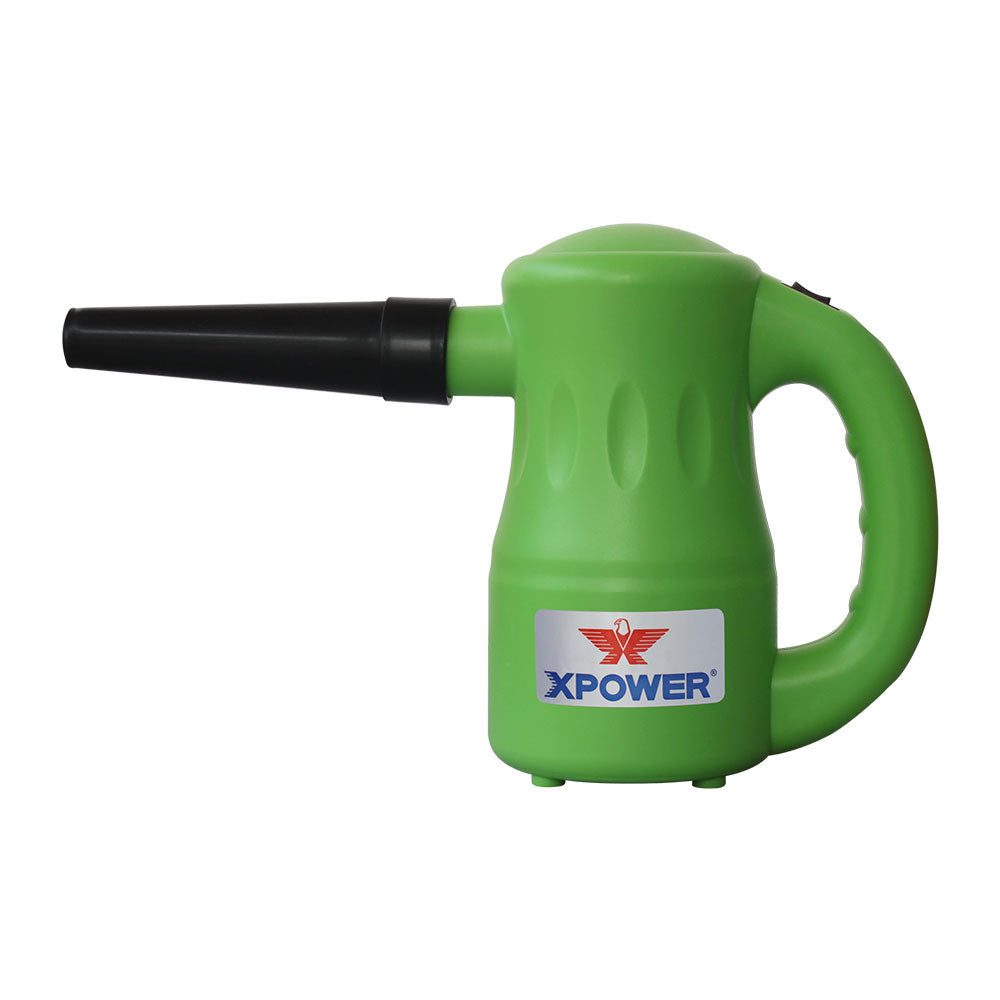
XPOWER A-2 Airrow Pro Electric Air Duster
Best Corded ValueBuy if: you clean near an outlet and want steady corded power with many nozzles
Don't buy if: you need to roam — the 10 ft cord sets your range
The A-2 Airrow Pro is the corded value pick because it never fades. XPOWER's spec sheet lists a 540 W motor and 90 CFM airflow with two speeds. Reviews often print 500 W for the same family, so we use the spec-sheet figure and name the conflict. How-To Geek counted nine attachments and scored it 7/10.
Price is the messy part. Listings disagree: $99 at Detail Culture checked 27 Nov 2026, $106.99 at Walmart in catalog results, and $50 to $54 in older reviews. The cheaper A-2S Cyber Duster is a different model with fewer attachments. Check the exact "A-2 Airrow Pro" name before you pay. We print no single price as settled.
Pros
- Corded power — no battery to fade or charge
- 90 CFM rated airflow with two speeds
- Nine attachments, including brushes and pump adapters
- Washable filter
Cons
- Listings disagree on price — check the exact model
- Noisy in reviews
- Filter can clog within one heavy clean, per Gizmodo
- Not sold as ESD-protected
Full specifications
- 540 W on XPOWER spec sheet; 90 CFM rated airflow
- 2 speeds; 10 ft cord; about 2.3 lb
- 9 nozzles and adapters in review counts
- Washable filter; ABS housing
Prices change frequently — click through to see today's price. Listings disagreed on 27 Nov 2026 ($99 to $106.99; older reviews $50–$54). Confirm the exact A-2 Airrow Pro model.
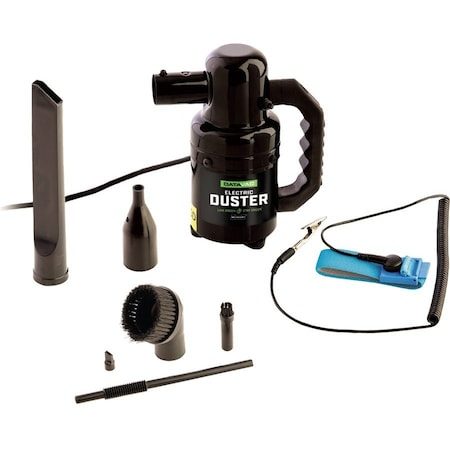
MetroVac DataVac ED-500-ESD Electric Duster
Best ESD-Safe PickBuy if: static care matters and you clean boards or several machines on a bench
Don't buy if: you want a light desk tool — this is heavy, corded and dear
The DataVac ED-500-ESD is the careful pick. It pairs a steel, corded blower with black anti-static attachments, a grounded 3-conductor cord and a wrist strap. That full setup is what ESD-safe means. A plain plastic nozzle on a cordless duster does not match it.
I've seen conflicting data on this family's airflow — MetroVac's spec chart lists 51 CFM, while other sheets list 70 CFM. My read is to trust the 51 CFM spec chart for the ED-500-ESD and ignore the bigger number. The motor figures agree better: 0.75 peak HP, 4.0 amps, 480 watts. At $187.99 from Zoro, checked 27 Nov 2026, it costs real money. Bench users get years of service for it.
Pros
- ESD-safe attachments, grounded cord and wrist strap
- Strong corded motor lifts embedded dust
- Steel body built for bench use
- Never runs out mid-clean
Cons
- $187.99 is a steep price for home use
- Corded and about 3 lb — not a desk toy
- Loud, and it blows dust into the room
Full specifications
- 0.75 peak HP motor; 4.0 A; 480 W; 51 CFM on spec chart
- 12 ft 3-conductor grounded cord; about 3 lb
- ESD-safe crevice tool, dust brush, micro tool kit
- Grounded wrist strap included
Prices change frequently — click through to see today's price. $187.99 at Zoro (checked 27 Nov 2026).
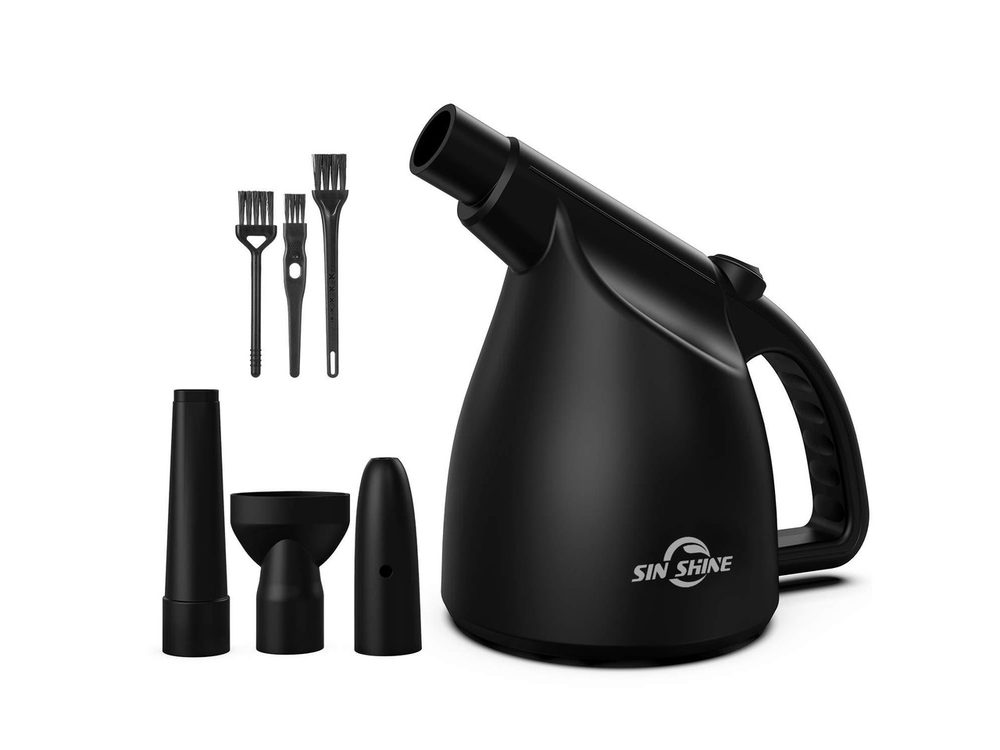
Sin Shine Compressed Air 3.0 Electric Air Duster
Best Momentary SwitchBuy if: you want corded power that stops the instant you release the switch
Don't buy if: you want a light tool — at 1.9 lb it feels heavy next to cordless picks
The Sin Shine 3.0 earns its place with one control: a momentary switch. Air flows while you hold it and stops when you let go. Inside a PC, that habit prevents long, careless blasts. A 10 ft cord, built-in LED and brush attachments round out a practical bench tool.
Its spec line teaches the RPM lesson. Listings claim 110,000 RPM, while a Woot listing states 27 m/s air speed. Both can be printed by sellers, yet they describe different things. Judge this duster by control and kit, not the RPM badge. One owner review reports the unit still strong after three years. At $70.88 from Newegg, checked 27 Nov 2026, confirm the 3.0 model before you buy.
Pros
- Momentary switch — air stops when you release it
- 10 ft cord and built-in LED
- Brushes and washable filters in the kit
- Owner report of 3+ years of use
Cons
- Loud at full power in reviews
- 1.9 lb — heavier than cordless picks
- RPM claim sits beside a modest 27 m/s figure
Full specifications
- Corded; 10 ft cord; momentary switch
- 110,000 RPM listing claim; 27 m/s on Woot listing
- Built-in LED; about 1.9 lb
- 3 nozzles, dust brushes, washable filters
Prices change frequently — click through to see today's price. $70.88 at Newegg (checked 27 Nov 2026). Confirm the Compressed Air 3.0 model.
Worth a Look, Not a Pick
Two names kept appearing in research and did not make the six. OPOLAR is the trap: the classic rechargeable model runs at 33,000 RPM with micro-USB, while newer roundups describe OPOLAR units at 100,000 RPM and up. One brand name now covers different tools. Buy only against an exact listing with specs you can read. IT Dusters CompuCleaner models also surfaced, with US stock under EasyGo branding and conflicting watt and CFM figures. Both may suit some buyers. Neither gave us a clean, verified US pick on 27 Nov 2026.
How to Clean Your PC With an Electric Duster
To clean your PC safely, follow these steps: 1. Power down and unplug the PC. 2. Hold every fan still. 3. Start on low speed. 4. Blow dust out of the case. 5. Check filters and cables.
- Power down and unplug. Shut the PC down, switch the power supply off and pull the plug. Dust a dead machine, never a running one.
- Hold every fan still. Use a finger, plastic tool or card on each fan before air hits it. Case fans, GPU fans and CPU fans all count.
- Start on low speed. Keep the nozzle a few inches away. Use short bursts. Step up only for heatsink fins and packed dust.
- Blow dust out, not deeper. Angle air toward vents and open panels. Dust on the desk beats dust in a slot.
- Check filters and cables. Tap out dust filters. Confirm no cable sits in a fan path before you close the case.
How often? Every 3 to 6 months suits most homes. Pets, carpet, smoking or a dusty room push that to every 2 to 3 months. Filters need a look more often. If your keyboard needs the same treatment, pair the duster with a brush from our cleaning kit guide.
Frequently Asked Questions
What's the best electric air duster for a PC?
The Wolfbox MF100 for most people. Three speeds, five nozzles and brushes, and $89.99 at Wolfbox checked 27 Nov 2026.
Can an electric air duster damage my PC?
It can if you blast fans at close range. Power off, hold each fan still, start low and keep the nozzle a few inches away.
Is an electric duster better than canned air?
For regular cleaning, yes. It costs more upfront, then replaces cans that freeze, fade and run out mid-clean.
How often should I clean my PC?
Every 3 to 6 months for most homes. Clean every 2 to 3 months with pets, carpet or a dusty room.
What RPM do I need for PC cleaning?
RPM alone tells you little. Look for speed control, useful nozzles and airflow figures in m/s or CFM beside the RPM claim.
Should I buy cordless or corded?
Cordless for one home PC. Corded if you clean several machines and want steady power with no charging.
Can I use an electric duster on a laptop?
Only with care. Laptop fans are fragile, and some makers warn against strong close-range airflow. Check the manual first.
Our Verdict
Buy the Wolfbox MF100 if you clean a PC and keyboard more than a few times a year. Buy the Fanttik B10 Pro if money matters more than kit. Buy corded if batteries annoy you. And hold the fans still. That one habit matters more than any RPM claim on a box.