How to Clean an Xbox Series X (2026 Guide)

Your Xbox fan just got loud, or the console shut itself off mid-game, and now every cleaning guide you find says something different. One tells you to vacuum it. The next says a vacuum will kill it with static. One says a damp cloth is fine. The next says water near a console is madness. No wonder most owners do nothing — and the dust keeps building.
How to clean an Xbox Series X refers to clearing dust from its vents and fan so it can cool and run quietly. It starts with a wipe and a vent clean, and only goes deeper — case off, then the fan — when the noise or heat says it must.
Here's the thing: the contradiction has a real answer, and most of it comes from Microsoft — except that Microsoft disagrees with itself. This guide follows the official guidance, names the places where it splits, and covers the Series S too, instead of pretending it is the same machine. Pick your depth, do the steps in order, and stop when the console is quiet again.
Can You Vacuum an Xbox Series X?
Yes — on the outside vents, with the right kind of vacuum. TechRadar and T3 both recommend a low-powered vacuum with a brush attachment on the lowest setting, held just off the grille. Back Market and PC Guide say the opposite: never vacuum, because of static. Both sides are describing a real risk. They are just describing it in different places.
Vacuuming an Xbox Series X is safe for the outside vents when you use a low-powered vacuum. According to TechRadar, a careful vacuum on the lowest setting lifts dust from the grille without touching the electronics inside. Never push the nozzle into the vents, and never vacuum inside an open console — that is where the static risk lives.
Vacuum vs compressed air: a low-powered vacuum suits routine Xbox cleaning better because it pulls dust out of the vents, which is what most guides recommend. Compressed air suits stuck dust in tight spots. The key difference is direction — a vacuum removes dust, while air only moves it somewhere else.
I've seen conflicting data — some guides say vacuum, others say never vacuum, and a few say both on the same page. My read is that the line is physical, not tribal: a small handheld vacuum on the outside vents is fine, because nothing electronic is exposed there. The static fear is real inside an open console, where bare boards sit millimetres from the nozzle.
Three rules keep the vacuum safe. Use the lowest suction setting. Hold the nozzle just off the surface, never jammed into a vent slot. And clean with the console switched off and unplugged, not in instant-on standby. The tool is not the risk. Rushing is.
How Do I Clean My Xbox Series X Without Opening It?
Most Xbox consoles never need more than this. A five-minute clean of the outside fixes the majority of loud-fan complaints, because most of the dust lives in the vent slots you can already see. Start here every time. Only open the case when you can still hear the fan working hard after this level.
Cleaning an Xbox Series X without opening it takes about five minutes and suits most consoles. Switch the console fully off, unplug it, wipe the case with a damp microfibre cloth, brush the top vent and base intake, and give it clear space on every side. Open the case only when dust is still visible inside.
To clean an Xbox Series X without opening it, follow these steps: 1. Switch the console fully off and unplug it. 2. Wipe the case with a damp microfibre cloth. 3. Vacuum the top vent and base intake on the lowest setting. 4. Brush dust from the vent slats with a soft brush. 5. Plug it back in and test it on the same game.
Microsoft tells owners to clean an Xbox every three to six months, or whenever it needs it. According to Microsoft's clean-and-care guidance, the outside wipe uses a soft lint-free cloth dampened with a little mild soap and water. Pets, carpet and a closed cabinet all shorten that interval toward three months.
Look — if you're in the situation where the fan screams the moment a game loads, here's what actually works: do this five-minute clean, then play the same game for half an hour. If the noise drops, dust was the problem and you are done. If nothing changes, the dust is deeper, and the next section is your step.
Two mistakes. First, people clean with the console in instant-on standby. Don't. Switch it fully off and pull the power cable out of the back — Microsoft's guidance is explicit about that, and a spinning fan plus a vacuum nozzle is a bad combination. Second, they spray cleaner onto the console. Don't do that either. Dampen the cloth, never the device — and keep the damp cloth on the case, not the vents, where moisture can reach the inside. Or maybe I should say it this way: the cloth can be damp, the console cannot.
While you are there, fix the placement. The Series X pulls cool air in at the base and pushes hot air out through the big round exhaust on top, so both ends of that path need to be clear. Give it open air on a hard, flat surface, nothing on top of it, and no long-fibre carpet underneath. A console inside a closed TV cabinet is breathing its own hot air, and no amount of cleaning fixes that. Our Xbox Series X overheating guide walks through the full placement and diagnosis order if heat is the real complaint.
How Do I Clean the Fan Inside My Xbox Series X?
Try the outside clean twice before you reach for a screwdriver. Opening the case is the step most guides rush into, and it is the step that carries the only real risk in this guide. If two external cleans have not quieted the fan, here is the honest way in.
Power down fully and unplug every cable. Two tamper-evident stickers hide the screws: one small sticker near the base, and the large sticker across the back panel. Peel them back just enough to reach the screws underneath, then remove the two 7.4 mm screws with a T8 Torx driver and unclip the back panel with a spudger. The fan sits under three more T8 screws — one 10.5 mm pancake screw and two 8.8 mm screws. Unplug the fan cable by its edges, slide the fan out, and pick hair and dust clumps off with tweezers.
Clean the blades with a soft brush, and wipe grime off with a damp rag or an isopropyl alcohol wipe. Blow the heatsink fins from both sides so the dust leaves the console instead of packing deeper. And hold the fan blades still while you work near them — a finger or a toothpick does it. A fan spun up by a blast of air can generate voltage back into the board, and that is a real risk, not a myth.
Quick note: check your model before you buy a driver. The white all-digital Series X uses different fan screws — a 10.3 mm pancake screw and two 9 mm screws — and the open-and-clean guide for it is still unfinished, so treat any Digital Edition teardown as unverified. The Series X25 anniversary console is a separate model too. If your console does not match the standard black Series X, stop at the outside clean.
Opening the console is rarely worth it. Two external cleans fix most loud fans, and the warranty argument alone is a reason to stop at the vents unless the noise survives both. I know plenty of owners will disagree — the inside of a three-year-old console can be grim — but a clean case and a quiet fan are not the same job, and most people only need the first.
And one hard line, whatever you do: never remove the heatsink or disturb the cooling layer underneath it. The Series X cools its chip with a vapour chamber and thermal paste, and replacing either is a repair, not cleaning. If cleaning has not fixed your shutdowns, that is a job for a professional, as our overheating guide explains.
Does Opening My Xbox Series X Void the Warranty?
It depends who you ask — and all three answers are on the record. This is the question every other guide answers with one confident line, and every one of those lines is only a third of the story.
Microsoft's warranty text says the warranty does not apply if the console is opened, modified or tampered with, or repaired by anyone other than Microsoft. That is the strict reading, and it is the one repair shops repeat. iFixit takes the opposite view, backed by US right-to-repair law: under the Magnuson-Moss Warranty Act, a manufacturer cannot void a warranty over a sticker alone, and the FTC warned Microsoft and others about exactly that in 2018. The manufacturer's burden is to prove your opening caused the failure. The middle ground, from TechRadar and Pure Xbox, is that opening is fine as long as you break nothing — and that the rules are vague enough to check with your warranty provider first.
What every side agrees on: damage you cause while opening is never covered. A stripped screw, a torn cable, a cracked clip — all yours. And the US-law argument is US-only; it does not help a console bought elsewhere. The practical call is simple. If your console is still under warranty and the fault is deeper than dust, contact Microsoft first. A free repair beats a clean you did not need.
How Often Should I Clean My Xbox Series X?
Twice a year is enough for most consoles — monthly cleaning is overkill, and the people selling you cleaning kits won't tell you that. Dust builds slowly, and a console in a clean living room with open airflow can go months without any attention at all. The right schedule depends on your home, not on a calendar a shop printed.
| What | How often | When to do it sooner |
|---|---|---|
| Wipe the case and vacuum the vents | Every 2–3 months | Visible dust on the vents, or the fan getting louder |
| Case-off fan clean | Once a year at most | Only if the fan stays loud after two external cleans |
| Deeper work — heatsink, thermal paste | Only when needed | Never on a schedule — only if a repair diagnosis says so |
A dusty home changes the maths. Pets, a carpeted floor, a console near an open window, or a smoker in the room all push dust into the vents faster, so check the vents every month and clean when you can see dust — not on a date. Check the vents, not the calendar. The test is always the same: same game, same room, same spot. Louder than it used to be means clean it.
Can I Use Compressed Air on an Xbox Series X?
Yes, with three conditions — but know that Microsoft's own manual says not to use it at all. Nearly every cleaning guide recommends compressed air. Microsoft's product manual says the opposite: "Do not use compressed air." That split is worth naming, because it decides whose advice you are following.
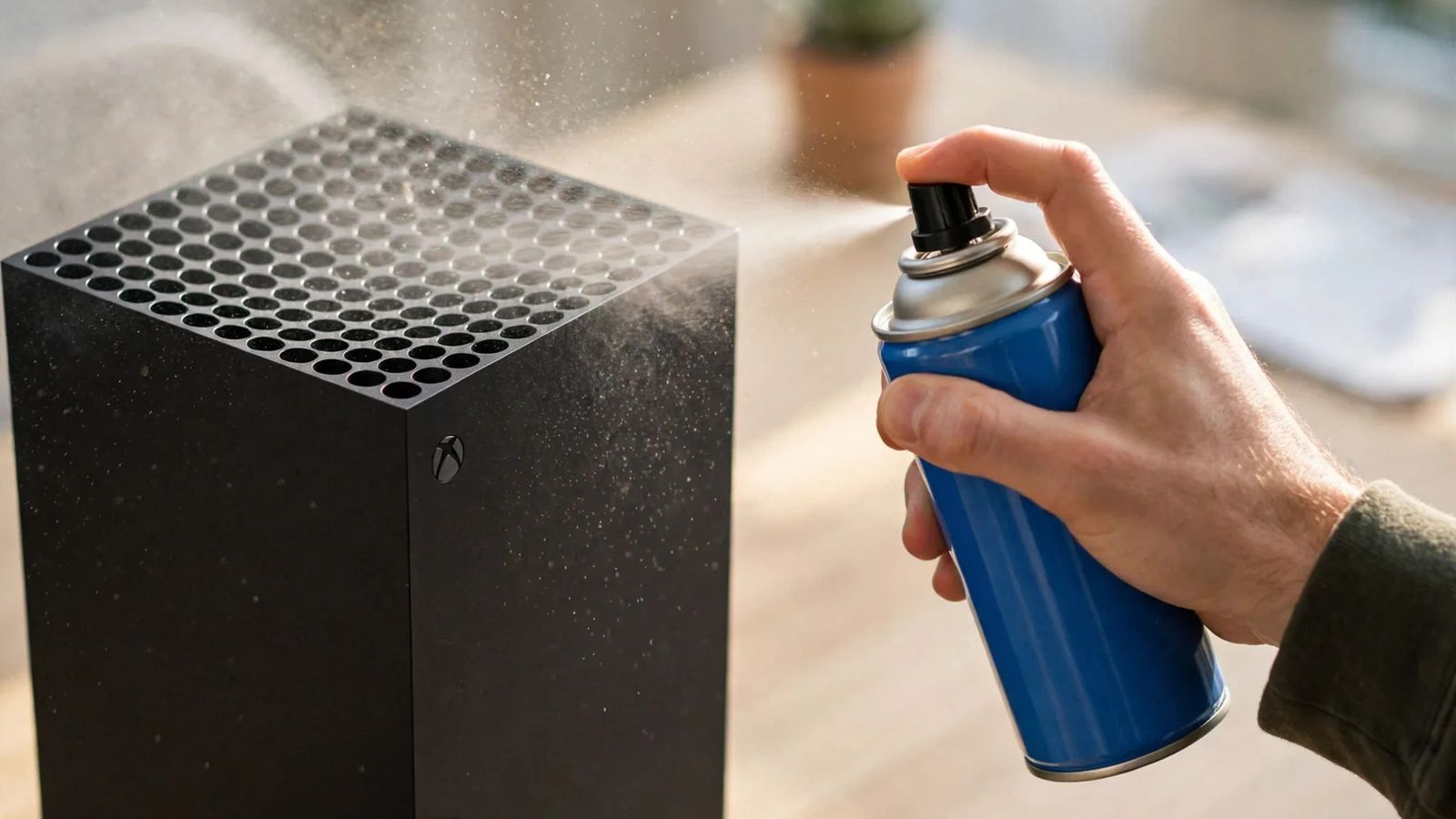
Hold the can upright and about 15 cm from the surface. Use short bursts, never a long blast. And hold the fan still before you blow near it, as the fan section explains — a free-spinning fan is the one real hazard here. Aim sideways or outward so the dust leaves the console instead of being forced deeper. Never tilt the can: liquid propellant can spray out and freeze a component.
Skip the air entirely if you have a low-powered vacuum. That's the honest ranking. Air is a workaround for a tool you don't own, not an upgrade over the one most guides recommend. And skip the air compressor or leaf blower — the air stream can carry moisture or oil into the console.
How Do I Clean My Xbox Controller?
The same careful-cloth rule covers the controller, with one exception. Microsoft's guidance lets you wipe a controller with a soft cloth dampened with isopropyl alcohol at 70% or less, or with one of its tested disinfectant wipes. The Elite Wireless Controller Series 2 is the exception: no disinfectant wipes at all — IPA, Formula 409, Windex or Dawn with water only.
Hold the Xbox button for 5–10 seconds to power the controller off. Wipe the sticks with the alcohol-dampened cloth, moving them around so you clean the base too. Use a dry cotton swab around the buttons and the D-pad, and a dry toothpick for the seams. Blow crumbs out with short bursts of air first, before you wipe. Then let it dry fully before you switch it back on — don't towel-dry it, or the lint ends up where the dust was.
One small habit saves the controller more than any clean: don't rest it on top of the console. The top of a Series X is the exhaust, and a controller sitting on it blocks the vent while it soaks up heat and dust.
Cleaning fixes a sticky button or a gritty stick when dirt is the cause. If the stick still drifts after a clean, the fault is deeper — the stick module is worn, not dirty. Try the calibration step first, then the repair options in our Xbox stick-drift guide. No amount of wiping fixes a worn potentiometer.
What About the Xbox Series S — Is It Different?
The outside clean is identical. The inside clean is not. The same Microsoft guidance, the same 3–6 month interval, the same cloth and alcohol rules apply to the Series S. Where the two consoles part ways is under the case.
The Series S needs a T8 and a T10 driver, not just a T8: two screws under the stickers at the back, then seven green screws before the white plastic case separates from the chassis. And the airflow runs the other way. The Series X is a chimney — cool air in at the base, hot air out the top. The Series S pulls air in at the sides and pushes warm air out the back and through the round grille. So never put the Series S grille against a wall, and never put anything on top of the Series X. The Series S has no disc drive, so there is no disc-drive step either.
Quick note: the smaller chassis leaves less margin for bad placement. A Series S in a closed cabinet will show symptoms sooner than a Series X in the same spot, and the black circular vent is easy to cover by accident with a book, a controller, or a stack of games. Keep it clear.
My Xbox Still Overheats After Cleaning — What Next?
Stop cleaning and start diagnosing. A proper clean — vents, fan in place — fixes dust. If the console still shuts down within minutes of starting a demanding game, the cause is deeper: a heatsink clogged where you can't reach it, a failing fan, or thermal paste that has dried out on an older console.
First, rule out the cheap answers. Is it still in a closed cabinet? On carpet? Pressed against a wall? Has anything crept up against the vents since you cleaned it — a book, a controller dock, a curtain? And check the USB ports: hot USB accessories and external drives have triggered overheating warnings on consoles that later passed a warranty inspection with no fault found. Move it to open air on a hard surface and test again, because placement is still the most common cause after dust.
If placement and a proper clean have both failed, contact Microsoft if the console is under warranty, or a reputable repair shop if it isn't. Tell them the pattern: which games, how fast it shuts down, whether cleaning helped at all. That pattern is what separates a dust job from a thermal-paste job, and a good shop will ask for it before they open anything. Don't keep playing through shutdowns while you decide — that is the one choice that turns a repair bill into a replacement. The full diagnosis order lives in our Xbox Series X overheating guide.
Frequently Asked Questions
What's the best way to clean an Xbox Series X?
Switch it fully off, unplug it, wipe the case with a damp microfibre cloth, and vacuum the top vent and base intake on the lowest setting. Open the case only if the fan stays loud after that.
Can I vacuum my Xbox Series X?
Yes, on the outside vents, with a low-powered vacuum and a brush nozzle on the lowest setting. Never vacuum inside an open console — the static risk there is real, and that is where the no-vacuum warnings come from.
Does opening my Xbox Series X void the warranty?
It depends who you ask. Microsoft's warranty says opening or modifying the console is not covered, while US right-to-repair law says a sticker alone cannot void it unless your opening caused the damage. Damage you cause is never covered.
Can I use compressed air on my Xbox Series X?
Most guides say yes — can upright, short bursts, fan held still. Microsoft's own product manual says do not use it. If you use air, keep the bursts short and the fan still, and never tilt the can.
How often should I clean my Xbox Series X?
Microsoft says every three to six months. Wipe the vents every two to three months in a normal home, and clean sooner with pets, carpet, smoke, or a closed cabinet.
How do I clean my Xbox Series X controller?
Power it off, wipe it with a soft cloth dampened with isopropyl alcohol at 70% or less, and use a dry cotton swab around the sticks and buttons. Let it dry fully before you switch it back on.
Will cleaning stop my Xbox from overheating?
Yes, when dust or blocked airflow is the cause — those are the most common reasons. If it still shuts down after a proper clean, the fault is deeper: dried thermal paste, a failing fan, or a heatsink fault.