Best Stream Decks 2026: 6 Picks for Streaming

There is no single best stream deck, because the right one depends on how many keys you actually press — and the top 10 results for "best stream decks" are full of stale advice. Several of them still recommend the Loupedeck Live, even though Logitech ended Loupedeck sales on 28 March 2025. Most of them still call the 32-key XL Elgato's biggest deck, even though the 36-key Stream Deck + XL launched in March 2026. One claims Razer support ended in May 2026 — it was restored in August. None of them covers the Logitech MX Keypad, announced 8 September 2026. And the Mini's list price dropped from $79.99 to $59.99 without a single roundup noticing.
So this guide is built on the corrections: current-generation naming throughout, every model named with its list price as verified on 9 November 2026, the discontinued decks flagged plainly, and a dials-versus-keys framework that no competitor page prints. If you are building the rest of the streaming setup, our capture card guide, microphone guide and webcam guide cover the other three pieces of the desk.
Prices below are the makers' list prices, verified 9 November 2026 — street prices move by retailer, so check the live price before buying.
Quick Comparison
| Product | Key Specs | ||
|---|---|---|---|
| #1 | Elgato Stream Deck MK.2Best Overall | 15 LCD keys · $149.99 list | Check Price |
| #2 | Elgato Stream Deck +Best with Dials | 8 keys + 4 dials + touch strip · $199.99 list | Check Price |
| #3 | Elgato Stream Deck + XLBest Flagship | 36 keys + 6 dials + touch strip · $349.99 list | Check Price |
| #4 | Elgato Stream Deck NeoBest First Deck | 8 keys + Infobar · $99.99 list | Check Price |
| #5 | Logitech MX Creative ConsoleBest for Adobe Editors | 9 keys + wireless dialpad · $199.99 list | Check Price |
| #6 | Razer Stream Controller XBest Alternative | 15 physical keys, no dials · $149.99 list | Check Price |
All six are current models you can buy new today — no discontinued decks, no previous-generation hardware at full price. Every Elgato deck shares the same plugin library, so the choice is keys versus dials versus size, not software.
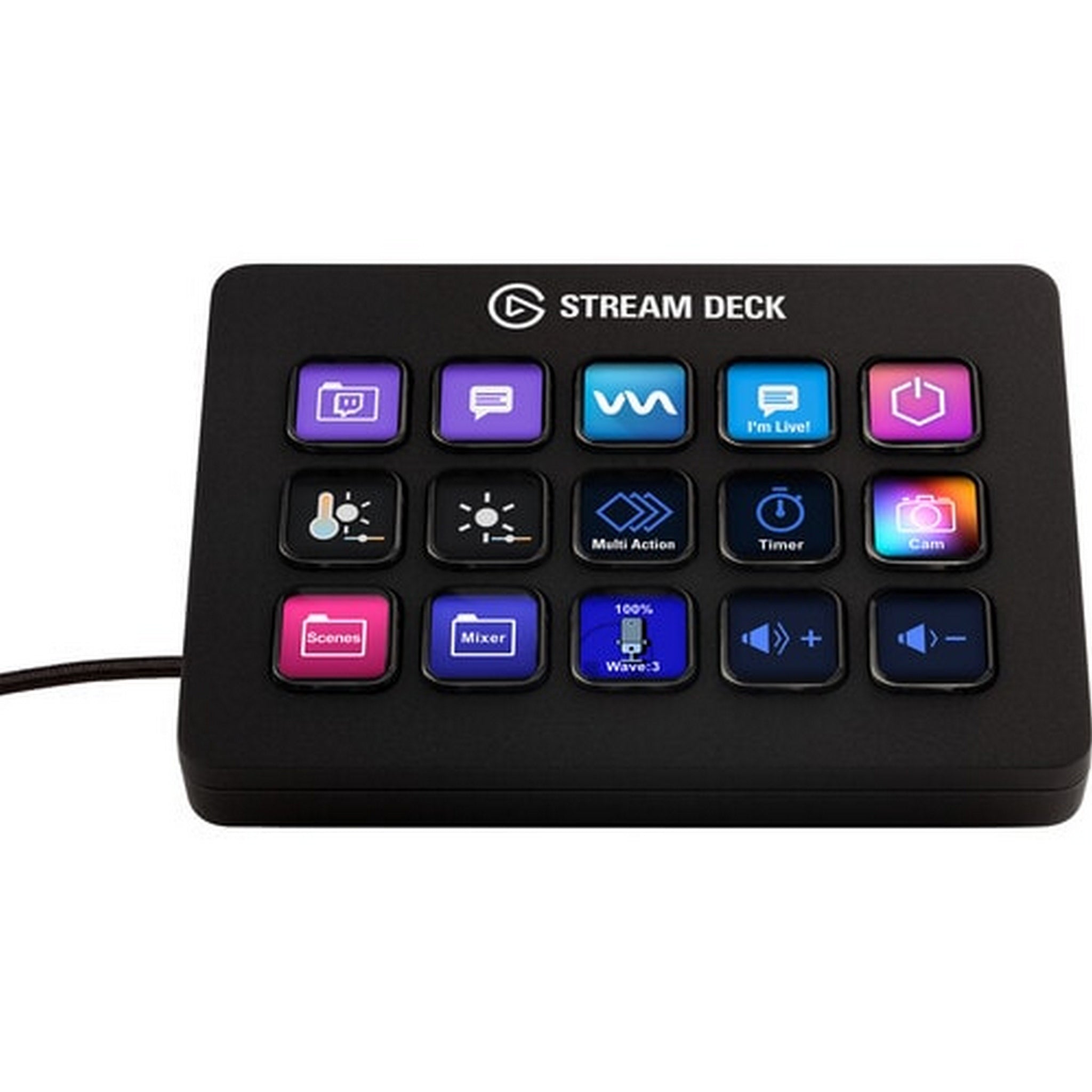
Elgato Stream Deck MK.2
Best OverallBuy if: you want the default stream deck — 15 keys, the deepest plugin library, and a price that is frequently under list
Don't buy if: you mix audio live and want dials, or you need more than 15 keys without using folders
The MK.2 is the deck every other deck is measured against, because it is the one the plugin ecosystem was built around. Fifteen customisable LCD keys, each showing its own icon, trigger scenes, sources, sounds, lights and macros in OBS, Discord, Spotify, Philips Hue, Twitch and YouTube through Elgato's Marketplace — the free official OBS and Discord plugins alone cover most of what a streamer presses in a session. The keys are the scissor-switch kind Elgato calls "OG 15-Key": tactile, quiet, and rated for heavy daily use.
Two details keep it ahead of its cheaper siblings. The USB-C cable detaches, so the cable that fails is a $5 replacement, not a dead deck — the Mini's fixed cable cannot say the same. And the faceplate is replaceable, which matters more than it sounds: the deck you look at for eight hours a day should look like yours, not like a stock photo. It is frequently on sale around $120 on Amazon against the $149.99 list price, which is the honest reason it beats the Neo for most buyers — the price gap is often $20, not $50.
Pros
- 15 LCD keys with the deepest plugin library in the category
- Detachable USB-C cable and replaceable faceplate
- Often ~$120 on Amazon against a $149.99 list price
- Folders and Smart Profiles multiply 15 keys into far more actions
Cons
- No dials — audio mixing takes key presses instead of one twist
- Needs folders past 15 actions, which costs a key per folder
- No wireless option — every Elgato deck is wired
- Requires Windows 11 or macOS 13+ — no Linux or ChromeOS
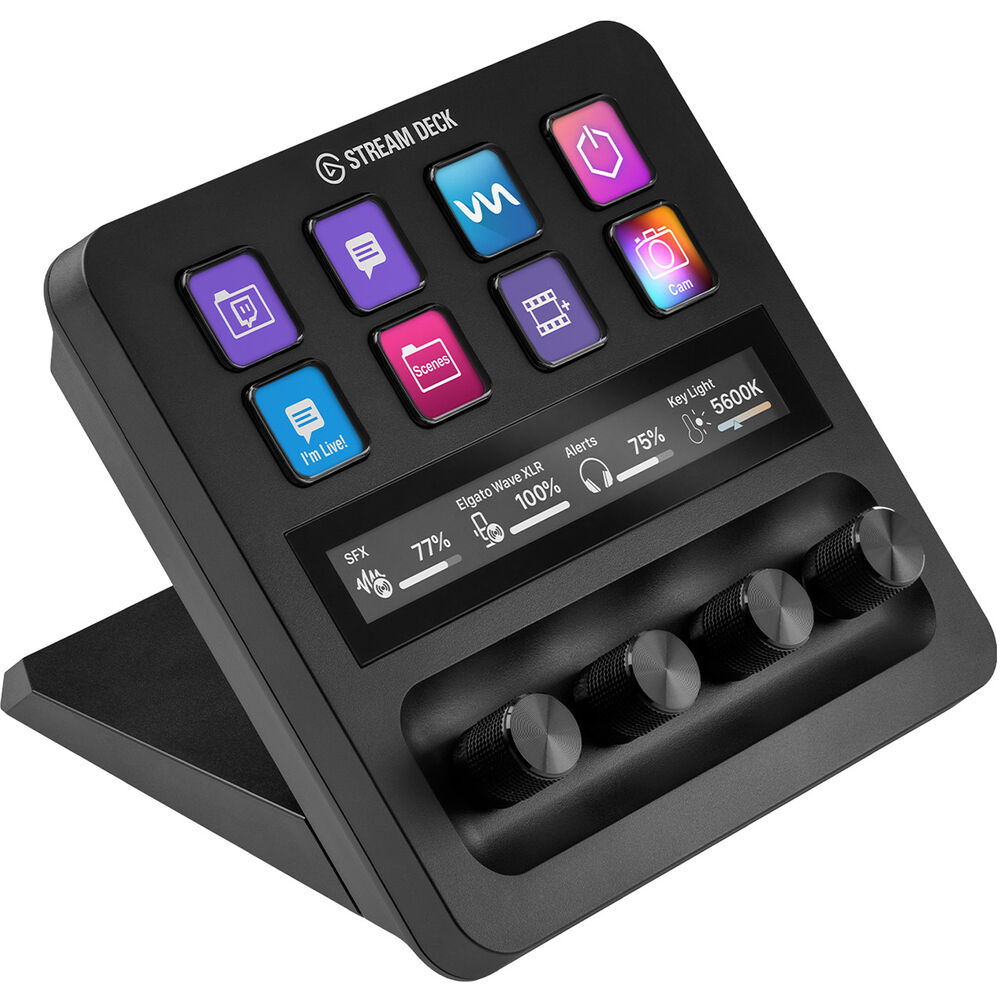
Elgato Stream Deck +
Best with DialsBuy if: you mix audio, scrub timelines, or adjust lights live — dials turn a three-press job into one twist
Don't buy if: you only switch scenes and fire sounds — the MK.2 gives you seven more keys for $50 less
The Stream Deck + trades seven keys for something no key can do: four endless dials and a touch strip. Twist a dial and the mic gain, game audio, music volume or Key Light brightness moves smoothly, with the current value shown live on the strip above. Press a dial and it mutes that channel. For a streamer who rides audio all session, that is the whole product — the keys handle scenes and sounds, the dials handle everything continuous.
The price needs reading carefully. The list price is $199.99, but Elgato's own shop currently sells it at $179.99, and Best Buy and B&H match that — so treat $179.99 as the real price and $199.99 as the ceiling. It is also the only deck in this roundup that takes the XLR Dock ($129.99), which slots an XLR microphone interface into the deck itself; the dock does not fit the + XL, despite the similar name. If you do not mix audio, the MK.2 is the better buy — eight keys is a small board, and you will feel it.
Pros
- Four dials + touch strip — the only way to ride audio smoothly
- Live values shown on the strip above the dials
- Takes the XLR Dock for a built-in mic interface
- Currently $179.99 at Elgato's own shop, not the $199.99 list
Cons
- Only 8 keys — half the MK.2, and folders cost keys
- Dials are wasted if you never mix audio live
- XLR Dock is a $129.99 extra, and fits the + only
- Heavier and wider than the MK.2 for the same key count
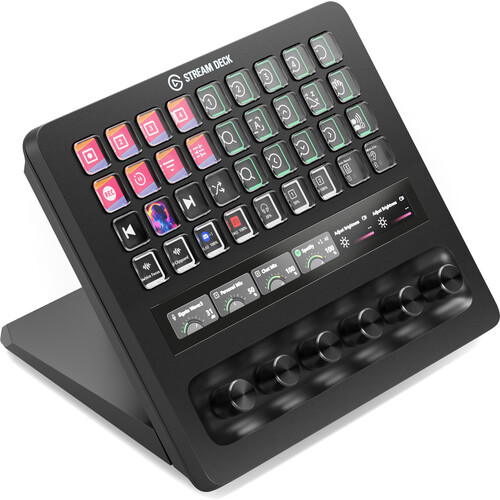
Elgato Stream Deck + XL
Best FlagshipBuy if: you run a full production — dozens of scenes, sources and sound boards — and hate living in folders
Don't buy if: you stream from a small desk, or your total action count fits on 15 keys
Launched in March 2026, the + XL is Elgato's biggest deck yet — and the reason several top-10 roundups are wrong when they still call the 32-key XL the biggest. Thirty-six LCD keys, six dials and the touch strip, in a 1,085 g slab that measures 205 × 147 × 175 mm. It is the + with the key count of the XL and then some: every scene, source, sound and light on one page, with dials left over for audio.
The honest question is whether you need it. Folders and Smart Profiles already multiply any Elgato deck — a 15-key MK.2 holds far more than 15 actions — so the + XL's advantage is not capacity, it is immediacy: everything visible at once, no folder diving mid-stream. That is worth $349.99 to a producer running a multi-camera show, and not worth it to a solo streamer with eight scenes. Measure your desk before you buy: at 205 mm wide and 175 mm deep it is a piece of furniture, not a peripheral, and the XLR Dock does not fit it.
Pros
- 36 keys + 6 dials — the most controls Elgato sells, no folders needed
- Everything visible at once for multi-camera productions
- Same plugin library as every other Elgato deck
- Launched March 2026 — the current flagship, not a refresh
Cons
- $349.99 — more than double the MK.2 for keys most buyers won't fill
- 1,085 g and 205 mm wide — needs a real desk footprint
- XLR Dock fits the + only, not the + XL
- Folders already multiply smaller decks, so the premium buys immediacy, not capacity
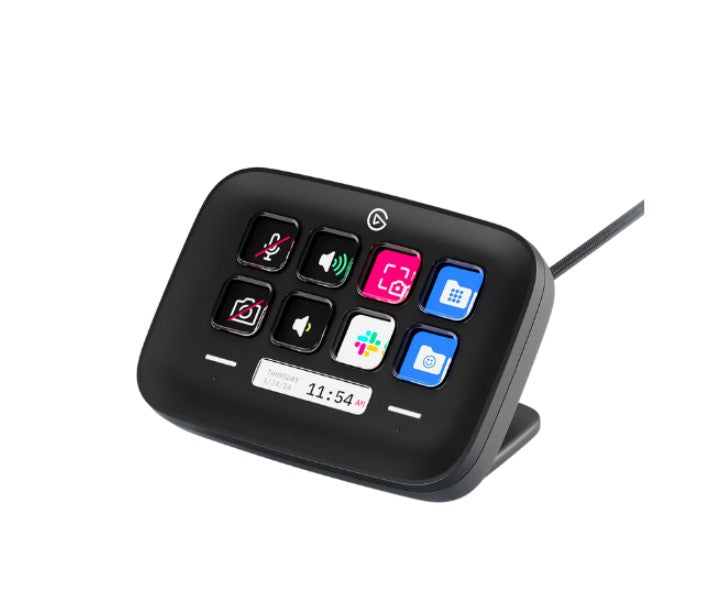
Elgato Stream Deck Neo
Best First DeckBuy if: you want the cheapest way to find out whether a deck earns its desk space — or a second deck for a specific job
Don't buy if: you already know you stream seriously — the MK.2 is often only ~$20 more on sale
The Neo is Elgato's starter deck, and it is honest about it: eight LCD keys, two touch points, and an Infobar — a thin strip that shows the time, a countdown, or a notification — for a $99.99 list price, often under $90 on the street. It is the deck for the buyer who is not sure a deck is for them: mute, scene switch, sound effect, light toggle, and a clock that is always in view.
The trade-offs are the size and the strip. Eight keys means folders arrive fast, and the Infobar and touch points are largely fixed — you cannot reassign them the way you can a key. But the Neo's real competition is not the MK.2, it is the Mini: for $40 more than the Mini's $59.99 list you get two more keys, the Infobar, and a deck that looks like it belongs on a desk rather than a stocking. Buy the Neo as a first deck, and buy the MK.2 when you outgrow it — the plugins and profiles carry over.
Pros
- $99.99 list, often under $90 — the cheapest proper Elgato deck
- Infobar shows time and notifications at a glance
- Same plugin library and Smart Profiles as the bigger decks
- Compact footprint that fits a crowded desk
Cons
- Only 8 keys — folders arrive fast
- Infobar and touch points are largely fixed, not reassignable
- No dials, no XLR Dock support
- Often only ~$20–$30 cheaper than a sale-priced MK.2
Logitech MX Creative Console
Best for Adobe EditorsBuy if: you edit in Adobe apps all day — the dialpad's per-app controls are deeper than anything Elgato offers for editing
Don't buy if: you mainly stream — OBS support exists, but this console is built for editors, not broadcasters
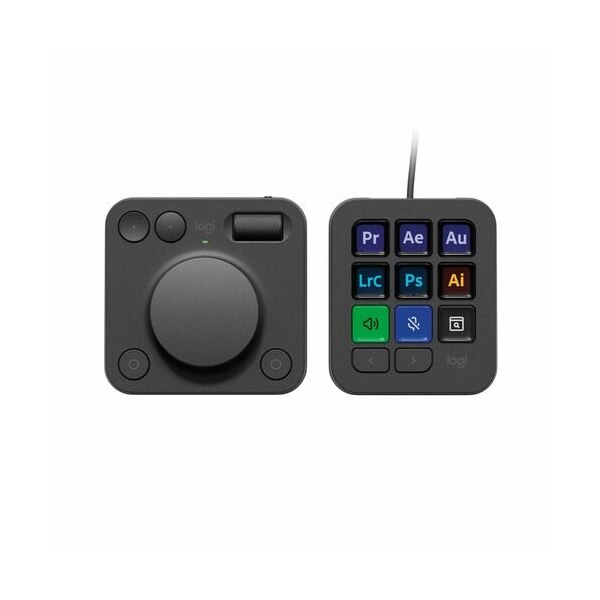
The MX Creative Console is the successor to the discontinued Loupedeck line, and it shows in the design: nine LCD keys on a wired keypad, plus a separate wireless dialpad with a big dial, a roller, and four buttons. Logitech rebuilt the Loupedeck software as Logi Options+, and the Adobe integration is the deepest in this roundup — brush size, timeline scrubbing, layer opacity and colour wheels mapped per app in Photoshop, Premiere Pro, Lightroom, Illustrator and After Effects, with three months of Adobe Creative Cloud included in the box. DaVinci Resolve, Figma and Affinity Photo plugins have followed since launch.
For streaming it is a competent second choice, not the first: OBS and Discord work, but the nine keys are few for a broadcaster, and the dialpad's strengths — fine scrubbing, brush control — are editor strengths. Buy it if your day is editing and your evenings are streaming; buy an Elgato deck if it is the other way round. At $199.99 it costs the same as the Stream Deck +'s list price, so the decision is workflow, not budget.
Pros
- Deepest Adobe integration here — per-app dial and key mapping
- Separate wireless dialpad — position it where your hand rests
- Three months of Adobe Creative Cloud included
- Loupedeck's software lineage, now under Logitech support
Cons
- Only 9 keys — few for a broadcaster's scene list
- Built for editors first; streaming is a secondary use
- Logi Options+ is a different ecosystem from Elgato's Marketplace
- Keypad is wired — only the dialpad is wireless
Razer Stream Controller X
Best AlternativeBuy if: you want 15 physical keys for $149.99 and prefer Razer's hardware feel to Elgato's LCD keys
Don't buy if: you want dials, or you want the biggest plugin library — both point back to Elgato
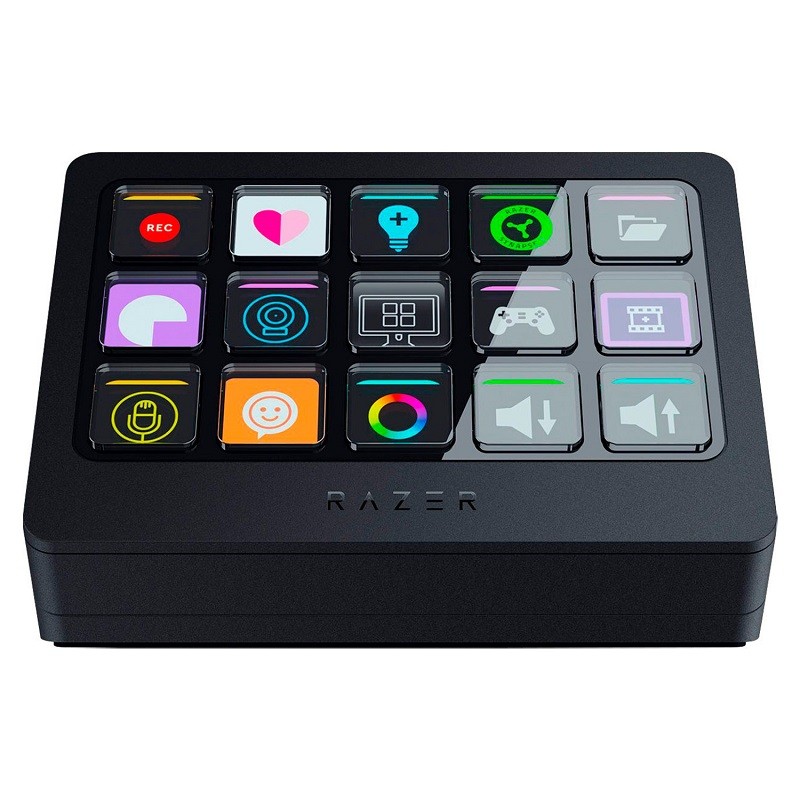
The Stream Controller X is the one non-Elgato deck in this roundup that is actually buyable new in November 2026, and it takes a different bet: fifteen physical switchblade keys with customisable icons, instead of LCD keys. The keys click. Some streamers prefer that — a physical key you can find by touch mid-game, without looking down. At $149.99 it is priced exactly against the MK.2, which makes the comparison a straight one: LCD keys and the deepest plugin library, or physical keys and Razer's hardware.
Two things to know before you buy. It has no dials, so audio mixing is key presses, like the MK.2. And the software story had a scare: Loupedeck announced in May 2026 that version 6.4 would drop Razer devices, then reversed that decision on 19 August 2026 — support continues in Loupedeck 6.4.1 and later. Several roundups still print the May announcement as fact; it is not. One caution from owner reports: the Razer Synapse plugin broke with Synapse 4, and Razer plugins need Loupedeck 6.4.1 or earlier in some setups — check the plugin versions before you commit.
Pros
- 15 physical switchblade keys — tactile, findable without looking
- $149.99 — priced exactly against the MK.2
- Razer device support confirmed continuing (August 2026 reversal)
- Solid build with the same Loupedeck software base as the MX Console
Cons
- No dials — audio is key presses, like the MK.2
- Smaller plugin library than Elgato's Marketplace
- Synapse plugin breakage reported by owners — check versions first
- No XLR Dock or equivalent accessory path
Is a Stream Deck Worth It?
Yes — if you press the same five or more actions every session, and no if you do not. A stream deck is not a performance upgrade. It does not make your stream look better or your game run faster. What it does is put the actions you already do — mute, scene switch, sound effect, light toggle, clip marker — under one finger, without alt-tabbing or memorising hotkeys. The value is in the repetition: the fifth time you fumble for a hotkey mid-match is the moment a deck pays for itself.
The honest counter-case is OBS hotkeys, which are free. If your whole stream is one scene and a mute button, a deck is a luxury. If you run multiple scenes, sources, sounds and lights, hotkeys become a spreadsheet you have to remember under pressure — and a deck with labelled icons is the difference between performing and fumbling. The free way to find out which camp you are in is the Stream Deck Mobile app: six keys free, forever, on your phone. Use it for a week; if you reach for it every session, buy a deck.
How Many Keys Do You Actually Need?
Start from your action count, not the key count — and remember that folders multiply every deck. A typical solo streamer presses six to ten actions a session: mute, two or three scenes, a sound or two, a light toggle, a clip marker. That fits on the Neo's eight keys with room to spare. A multi-camera producer with dozens of scenes, sources and sound boards needs the + XL's 36 keys, or a life spent in folders.
| Your setup | Keys you need | Buy first |
|---|---|---|
| One scene, a mute, a sound or two | 6–8 | Neo or Mini |
| Several scenes, sounds and lights | 15 | MK.2 |
| Audio mixing live + scenes | 8 keys + dials | Stream Deck + |
| Multi-camera production, dozens of actions | 36 keys + dials | Stream Deck + XL |
| Adobe editing all day | 9 keys + dialpad | MX Creative Console |
The multiplier is folders and Smart Profiles. One key becomes a folder holding a whole page of actions, and Smart Profiles switch the deck's layout automatically when you change apps — OBS open, streaming layout; Photoshop open, editing layout. So a 15-key MK.2 holds far more than 15 actions, and the + XL's advantage is immediacy — everything visible at once — not capacity. Count your actions, add a third for growth, and buy the smallest deck that holds the result without a folder on your most-pressed page.
Do You Need Dials, or Are Keys Enough?
Dials are for anything continuous; keys are for anything binary. Mute is binary — a key. Volume, mic gain, light brightness, timeline position and colour temperature are continuous — a dial. Twist a dial and the value moves smoothly with live feedback on the touch strip; do the same job with keys and you are tapping a volume-up key twenty times, or holding it and overshooting.
That is the whole decision. If you mix audio live, ride music levels, or scrub a timeline, dials are not a luxury — they are the reason to buy the + or the + XL, or the MX Console's dialpad if you edit. If you switch scenes, fire sounds and toggle lights, dials sit unused and the money is better spent on keys: the MK.2 gives you seven more keys than the + for $50 less. One trap: only the + and + XL have dials in Elgato's range, and the MX Console's dial is on a separate pad — the Neo, Mini, MK.2 and Razer X have none, and no software update adds one.
Does a Stream Deck Work with PS5 or Xbox?
Not directly — a stream deck needs a PC or Mac running the app, so console streaming goes through a capture card and OBS. The deck talks to software on your computer: OBS, Discord, Spotify, your lights. A console has no Stream Deck app, no plugin system, and no USB host support for one. Plug a deck into a PS5 and nothing happens.
The working setup is the one our capture card guide covers: console → capture card → PC → OBS, with the deck controlling OBS on the PC. Scene switches, mutes, sounds and clip markers all work that way, because the deck is driving OBS, not the console. If you stream straight from the console with no PC in the loop, a deck has nothing to control — spend the money on a better headset or a capture card first.
Can I Try a Stream Deck for Free?
Yes — the Stream Deck Mobile app gives you six keys free, forever, on your phone or tablet. Install the app, connect it to the desktop Stream Deck software over Wi-Fi, and you have a working deck: six keys, the same plugin library, the same actions. Pro is $2.99 a month, $24.99 a year, or $49.99 for life, and unlocks up to 64 keys — 128-key layouts on iPad.
Use the free tier as the test the whole category deserves. Set up the six actions you press most, run it for a week of streams, and watch whether you reach for it. If you do, the hardware is the same software with real keys under your fingers — buy the MK.2. If you do not, you have learned the answer for free, and the $149.99 stays in your pocket. The app is also a genuine second deck for owners: a phone on a stand beside a hardware deck, running the actions that do not deserve a physical key.
Which Stream Deck Should I Buy?
Buy for your workflow first and your key count second — a deck that cannot do your most-pressed job is a paperweight, however many keys it has. Use this chooser:
| You are | Buy first | Why |
|---|---|---|
| Starting streaming | Elgato Stream Deck Neo | $99.99, eight keys, the Infobar — the cheapest honest start |
| Streaming regularly | Elgato Stream Deck MK.2 | 15 keys, deepest plugins, often ~$120 on sale |
| Mixing audio live | Elgato Stream Deck + | Four dials + touch strip; currently $179.99 |
| Running a full production | Elgato Stream Deck + XL | 36 keys + 6 dials — everything visible at once |
| Editing in Adobe all day | Logitech MX Creative Console | Per-app dial mapping no Elgato deck matches |
| Prefer physical keys | Razer Stream Controller X | 15 switchblade keys for the MK.2's price |
| On a tight budget | Elgato Stream Deck Mini | $59.99 list — six keys, and the free Mobile app first |
One more rule: check the edition before you buy, because this category is full of lookalikes. The + is not the + XL, the XL is not the + XL, the MK.2 is not the original 2017 Stream Deck, and the MX Creative Console is not the MX Keypad. Name the model with its key count and its price together, and you will not buy the wrong one.
Buying Guide: What Actually Matters
After workflow, the four things worth your attention are key count, dials, software, and desk space — in that order. Key count decides how much you can do without folders: count your actions, add a third, and buy the smallest deck that holds the result. Dials decide whether continuous jobs — audio, lights, timelines — feel smooth or fiddly. Software decides what the deck can actually control: Elgato's Marketplace is the deepest library, Logi Options+ is the deepest for Adobe, and Loupedeck's software underpins both the MX Console and the Razer X. Desk space decides whether the deck gets used: a 36-key flagship that does not fit your desk is a shelf ornament.
Three things not to overpay for: a key count you will never fill (folders already multiply smaller decks), RGB lighting on a deck whose keys already glow with their own icons, and "pro" bundles that add a pedal or a dock you did not ask for. Check the return policy before the spec sheet: hand size and desk layout are personal, and a week of real streams is the only review that counts. And check the model is current before you buy — Loupedeck hardware is discontinued, the original Stream Deck is superseded by the MK.2, and several roundups still list both as buyable.
More Decks and Accessories Worth Knowing
Elgato Stream Deck Mini — the cheapest entry, with a catch. $59.99 list now, down from $79.99 — six LCD keys and nothing else. It is the deck for a single job: a mute button, a scene switcher, a sound board on a tiny desk. The catch is the fixed, non-detachable USB cable and the key count: six keys means folders from day one, and several owner roundups now say to skip it and save for the Neo. Fair advice — unless you know your job is exactly six actions. Check the Stream Deck Mini on Amazon.
Elgato Stream Deck XL — the former flagship. 32 keys for a $249.99 list, often around $200 on Amazon. It was Elgato's biggest deck until the + XL arrived in March 2026 — and that is the problem: for $100 more the + XL adds four keys, six dials and a touch strip. Buy the XL only if you find it well under $200 and never want dials. Check the Stream Deck XL on Amazon.
Logitech MX Keypad — the new developer wildcard. Announced 8 September 2026 at $99.99: nine full-colour LCD keys, wired USB-C only, no dialpad. Its pitch is not streaming at all — it is coding and AI workflows, with GitHub, VS Code, Copilot, Claude Code and Codex integrations and three months of GitHub Copilot Pro+ in the box. If you stream and code, it pairs with the MX Console's dialpad; if you only stream, the Neo is the better $99.99. Check the MX Keypad on Amazon.
Stream Deck Mobile — the free trial that is also a second deck. Six keys free forever on your phone or tablet, Pro at $2.99 a month, $24.99 a year or $49.99 for life for up to 64 keys. Try it for a week before you buy hardware, and keep it as a second deck afterwards. Check Stream Deck Mobile on Amazon.
Stream Deck Pedal and XLR Dock — accessories, not decks. The Pedal (~$89.99) is a three-pedal foot controller for hands-busy moments — push-to-talk, scene changes, mute — with interchangeable springs and a heavy base. The XLR Dock ($129.99) slots an XLR mic interface into the Stream Deck + and only the +: it does not fit the + XL, whatever the similar name suggests. Buy either after the deck, never instead of it. Check the Stream Deck Pedal on Amazon · Check the XLR Dock on Amazon.
Loupedeck Live — discontinued, do not buy new. Logitech ended Loupedeck sales on 28 March 2025 to focus on the MX Creative Console. Remaining stock circulates, support and warranty continue, and the software lives on — but several roundups still recommend it as a current buy, and it is not. The MX Creative Console is its successor; the original Razer Stream Controller ($269.99, 12 haptic touch keys + 6 dials + 8 buttons) is a Loupedeck Live rebadge in the same boat, and its availability is already doubtful. Check Loupedeck Live availability on Amazon.
Budget clones — a short honest note. AJAZZ, FIFINE and SOOMFON sell macro pads with LCD keys for far less than Elgato, and they appear in the lower-authority roundups. They are real products with real keys — but smaller plugin libraries, thinner software support, and no path to the accessories above. Worth a look if the budget is truly fixed; not a substitute for a deck you will use every day.
Frequently Asked Questions
Is a Stream Deck worth it?
Yes — if you press the same five or more actions every session, and no if you do not. A stream deck puts mute, scene switches, sounds and light toggles under one finger without alt-tabbing or memorising hotkeys. If your whole stream is one scene and a mute button, OBS hotkeys are free and a deck is a luxury. Try the Stream Deck Mobile app first — six keys free, forever — and if you reach for it every session, buy a deck.
Which Stream Deck should I buy first?
For most first-time buyers, the Elgato Stream Deck Neo at $99.99 — eight keys, an Infobar, and the same plugin library as the bigger decks. If you already stream regularly, skip straight to the Stream Deck MK.2 at $149.99 list, often around $120 on sale: 15 keys, a detachable cable and a replaceable faceplate. If you mix audio live, buy the Stream Deck + instead — its four dials do in one twist what takes several key presses on a key-only deck.
Do I need a Stream Deck to stream?
No. OBS hotkeys are free, and a keyboard macro does most of what a deck does. A deck earns its place when you run several scenes, sources, sounds and lights and need them labelled and under one finger, under pressure, without looking at a hotkey cheat sheet. It is a workflow upgrade, not a requirement — no viewer has ever watched a stream and thought "that needed a deck".
Does a Stream Deck work with PS5 or Xbox?
Not directly. A stream deck needs a PC or Mac running the Stream Deck app, and consoles have no such app. The working setup is console → capture card → PC → OBS, with the deck controlling OBS on the PC. If you stream straight from the console with no PC in the loop, a deck has nothing to control.
Can I try a Stream Deck for free?
Yes — the Stream Deck Mobile app gives you six keys free, forever, on your phone or tablet. Connect it to the desktop Stream Deck software over Wi-Fi and you get a working deck with the same plugin library. Pro is $2.99 a month, $24.99 a year, or $49.99 for life, and unlocks up to 64 keys. Use the free tier for a week of streams before you spend $99.99 or more on hardware.
How many keys do I need on a Stream Deck?
Count the actions you press every session, add a third for growth, and buy the smallest deck that holds the result without a folder on your most-pressed page. Six to eight keys covers a solo streamer; 15 covers most regular streamers; 36 keys plus dials is for multi-camera productions. Remember that folders and Smart Profiles multiply every Elgato deck, so a 15-key MK.2 holds far more than 15 actions — the + XL's advantage is immediacy, not capacity.
Is Loupedeck dead?
Loupedeck hardware is discontinued — Logitech ended sales on 28 March 2025 and now sells the MX Creative Console as its successor. Support and warranty continue for existing owners, and the software lives on in Logi Options+ and in the Razer Stream Controller X. Do not buy a Loupedeck Live as a new purchase in 2026: buy the MX Creative Console if you edit in Adobe, or an Elgato deck if you stream.