Best Gaming Mice in 2026: 6 Wired Picks by Grip and Game

The wireless flagships get all the headlines — and the $150–$180 price tags to match. What the top 10 results for "best gaming mice" rarely say is that the same flagship sensors now live in wired mice costing $35–$80, with no battery to charge, no receiver to lose, and no latency question to answer. Every authority roundup is wireless-led; the wired picks are a category buried at the bottom, and the smaller sites filling the gap are stale — still crowning the old DeathAdder V2, the discontinued Corsair M65 RGB Ultra, and the SteelSeries Rival 5.
So this guide is wired-only, and it ranks by the thing that actually decides whether you will love a mouse after a week: shape and grip, then weight, then the features you will use every day. The gaps we fill: current-generation naming throughout (no V2s, no discontinued "premium picks"), every same-name variant separated so you buy the wired one, honest 8K polling and DPI verdicts, cable quality compared, and switch durability explained. If you want the wireless flagships instead, our wireless gaming mouse guide ranks those by grip and game.
Prices below are the makers' list prices, not deals — street prices move, so check the live price before buying. Our keyboard and mouse deals guide tracks the live cuts.
Quick Comparison
| Product | Key Specs | ||
|---|---|---|---|
| #1 | Razer DeathAdder V3Best Overall | 59g · Focus Pro 30K, 8,000Hz · $69.99 list | Check Price |
| #2 | Logitech G502 XBest All-Rounder | 89g · HERO 25K, 1,000Hz · $79.99 list | Check Price |
| #3 | Razer Basilisk V3 35KBest for Gaming + Work | 101g · Focus Pro 35K Gen-2, 1,000Hz · $79.99 list | Check Price |
| #4 | HyperX Pulsefire Haste 2Best Ultralight Value | 53g · HyperX 26K, up to 8,000Hz · $59.99 list | Check Price |
| #5 | Glorious Model O 2 WiredBest Lightweight Symmetrical | 59g · BAMF 2.0 26K, 1,000Hz · $64.99 list | Check Price |
| #6 | SteelSeries Rival 3 Gen 2Best Budget Pick | 77g · TrueMove Core 8,500 DPI, 1,000Hz · $34.99 list | Check Price |
All six are wired-only models with light, flexible cables — no battery, no receiver, no charging. List prices are the makers' own figures; the Basilisk V3 35K launched at $69.99 and now lists at $79.99 on Razer's US store.
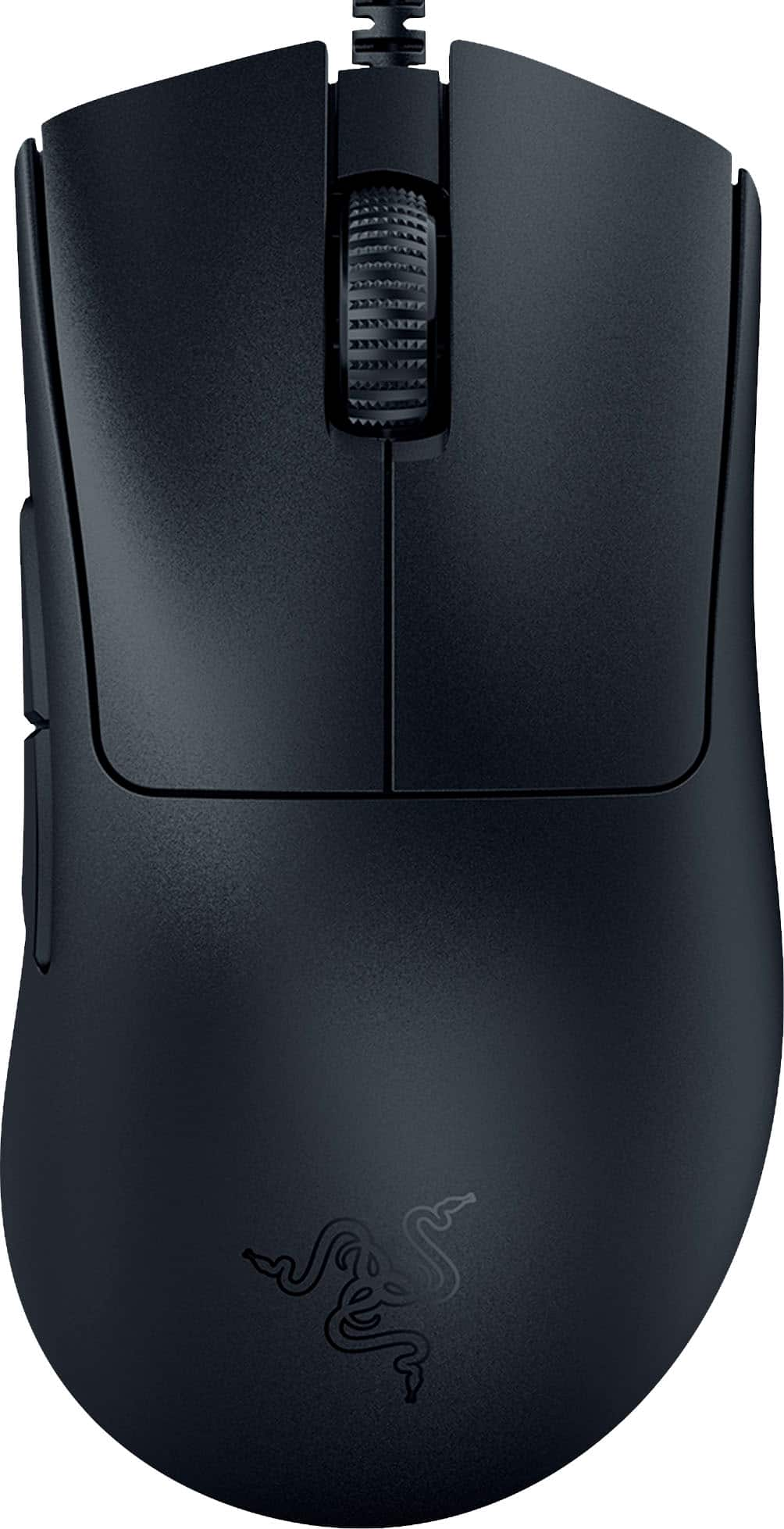
Razer DeathAdder V3
Best OverallBuy if: you want the best all-round wired mouse — light, ergonomic, and fast enough for competitive play
Don't buy if: you are left-handed — this is a right-handed ergonomic shell only
The DeathAdder is the oldest shape in esports for a reason: its right-handed ergonomic curve fills the palm in a way no symmetrical mouse can, and at 59g the wired V3 is finally properly lightweight. The Focus Pro 30K sensor tracks flawlessly, Gen-3 optical switches remove the double-click failure that killed older Razer mice, and — the part most roundups miss — the wired V3 polls at a true 8,000Hz over the cable, no dongle required. PC Gamer's wired pick in its own roundup is the G502 X, but retailer guides and Currys both name the DeathAdder V3 the best wired gaming mouse outright, and for palm and claw players they are right.
Do not confuse it with the older DeathAdder V2, which several stale roundups still list: the V2 is heavier (82g), runs the older Focus+ 20K sensor, and uses mechanical switches. The V3 is the current wired model. The wireless DeathAdder V3 Pro and the newer V4 Pro are different mice at roughly double the price — this guide covers them in our wireless roundup, not here.
Pros
- 59g ergonomic shape — the most comfortable here for palm and claw grips
- True 8,000Hz polling over the cable, no dongle or battery cost
- Focus Pro 30K sensor with Gen-3 optical switches rated for 90 million clicks
- Light SpeedFlex cable that barely drags
Cons
- Right-handed only — no left-handed version
- Only 6 buttons — MMO players need the Basilisk or G502 X
- No RGB lighting to speak of
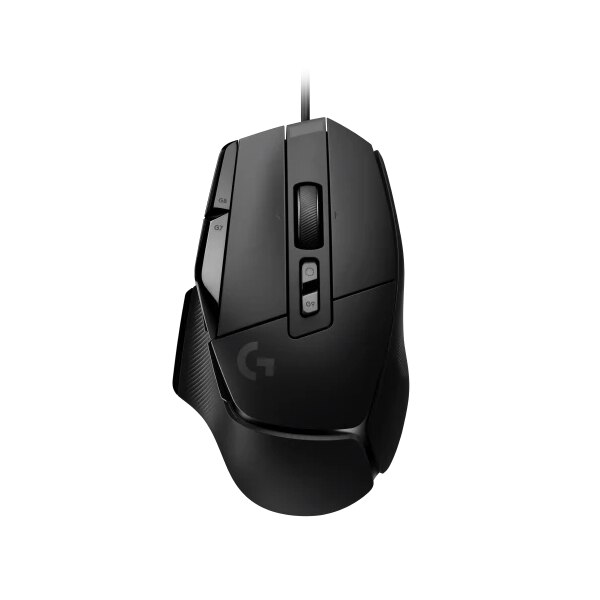
Logitech G502 X
Best All-RounderBuy if: you want one mouse for everything — shooters, MMOs, work, and media — with the most buttons here
Don't buy if: you play fast shooters competitively — at 89g it is the heaviest of the top two, and it is right-handed only
The G502 X is the consensus best wired gaming mouse among the big reviewers — PC Gamer names it outright — because it does everything well. The HERO 25K sensor is flawless, LIGHTFORCE hybrid switches combine optical actuation with a mechanical click feel, and 13 programmable controls plus the dual-mode scroll wheel (free-spin for documents, ratcheted for weapon switching) make it the most versatile mouse in this guide. At 89g it is 32g lighter than the old G502 HERO it replaces, and it drops the adjustable weights and RGB in the process.
Know what you are buying: the G502 X is a different mouse from the G502 HERO, which is still sold alongside it. The HERO is heavier (121g), has adjustable weights and RGB, and uses older mechanical switches — it is covered below as a budget alternative, not the same mouse. The G502 X Plus and X Lightspeed are the wireless versions; they cost roughly twice as much and belong in our wireless guide.
Pros
- 13 programmable controls and a dual-mode scroll wheel — the most versatile mouse here
- HERO 25K sensor with LIGHTFORCE hybrid optical-mechanical switches
- 89g with a thumb rest that suits palm and claw grips
- On-board memory stores your settings without software running
Cons
- Heavier than the ultralight picks — you feel it in fast flick shots
- No RGB lighting and no adjustable weights (both were on the old HERO)
- Right-handed ergonomic shell only
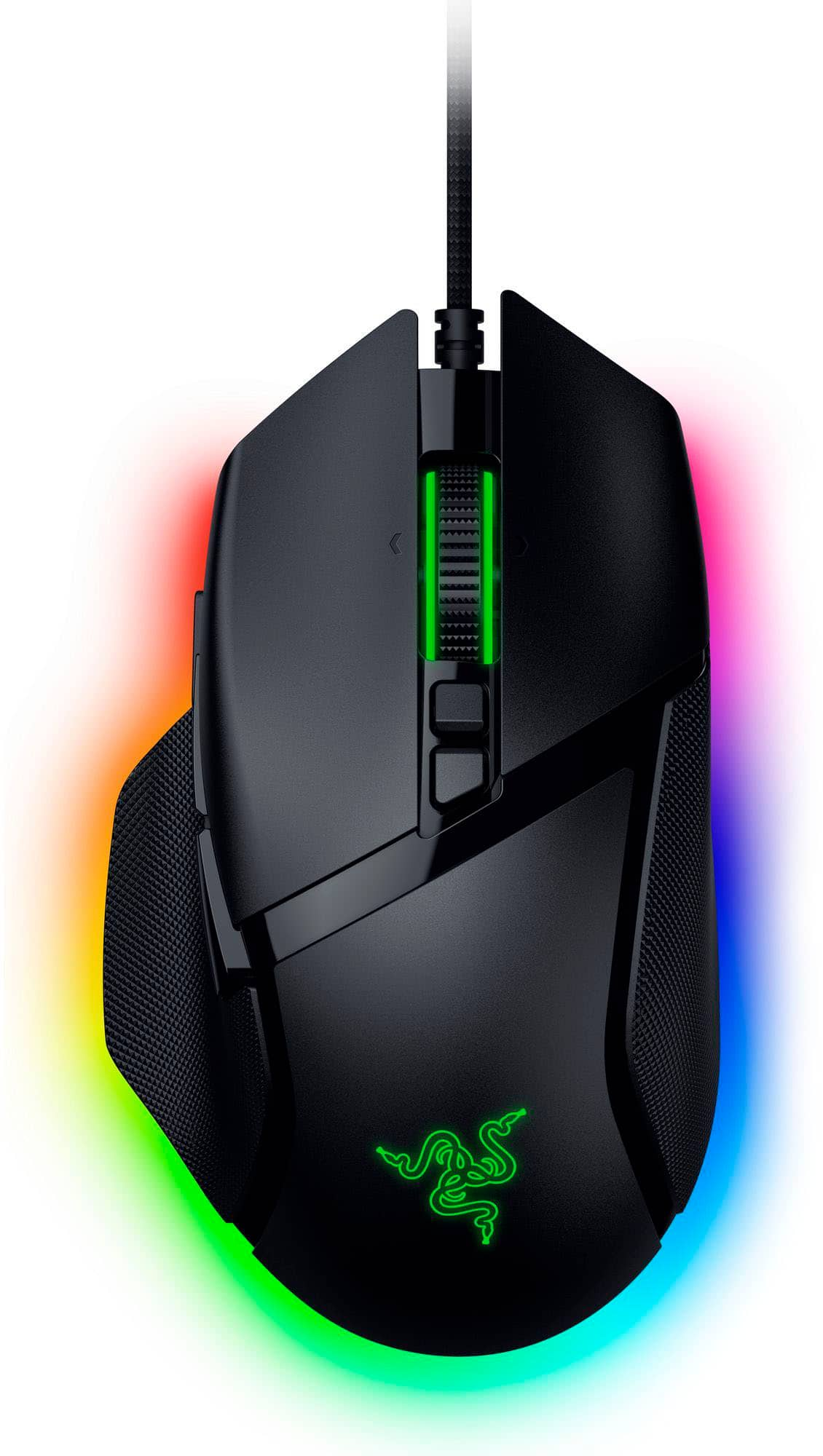
Razer Basilisk V3 35K
Best for Gaming + WorkBuy if: you want one mouse for competitive gaming, work, and media — with the best scroll wheel you can buy
Don't buy if: you play fast shooters competitively — at 101g it is the heaviest mouse in this guide
The Basilisk is the feature-loaded mouse in this guide, and its HyperScroll Tilt Wheel is the reason it earns its place: free-spinning for long documents, notched for precise weapon switching, switchable at a button press, with tilt left and right for horizontal scrolling. Around it: a Focus Pro 35K Gen-2 sensor, 13 programmable controls, Gen-3 optical switches rated for 90 million clicks, and 11-zone Chroma RGB. Reviewers call it the one mouse that does it all, and for a gaming-plus-work desk they are right.
The naming trap is real, so buy carefully: the original Basilisk V3 (2021, Focus+ 26K) is still listed by some retailers and some roundups — the current wired pick is the V3 35K, launched October 2024 with the newer sensor. The Basilisk V3 Pro 35K is the wireless version at roughly twice the price, and the V3 X HyperSpeed is a cut-down wireless model. Only the V3 35K is this pick. One price note: it launched at $69.99 but now lists at $79.99 on Razer's US store.
Pros
- HyperScroll Tilt Wheel — free-spin and notched modes plus tilt, in one wheel
- 13 programmable controls and full Chroma RGB
- Focus Pro 35K Gen-2 sensor with Gen-3 optical switches
- The best gaming-plus-work mouse here by a wide margin
Cons
- 101g — the heaviest mouse in this guide
- Right-handed ergonomic shell only
- Price moved up from its $69.99 launch MSRP to $79.99
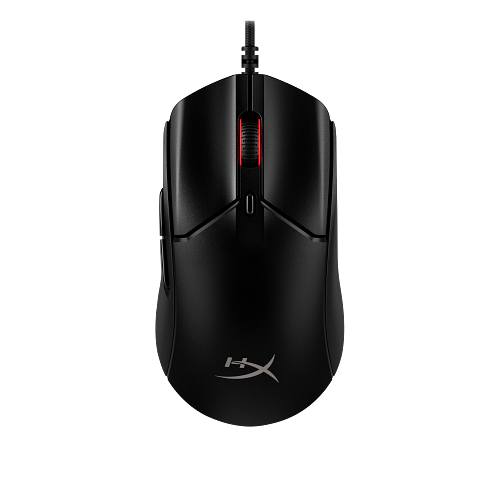
HyperX Pulsefire Haste 2
Best Ultralight ValueBuy if: you want the lightest mouse in this guide, with 8,000Hz polling, for under $60
Don't buy if: you need more than 6 buttons, or you palm-grip with large hands — the slim shell is built for claw and fingertip
At 53g, the Haste 2 is the lightest mouse in this guide — lighter than mice costing three times as much — and it is the cheapest way to get 8,000Hz polling: the wired version reports at up to 8K with no dongle and no battery penalty. The solid shell (unlike the honeycomb original Haste) feels sturdier and keeps dust out, the HyperX 26K sensor tracks flawlessly at normal sensitivities, and the HyperFlex 2 cable is one of the lightest, most flexible cables here. HyperX's own switches are rated for 100 million clicks.
Buy the exact variant: there are three Haste 2s, and they are not the same mouse. The wired Haste 2 (this pick, 53g, 8K) is different from the Haste 2 Wireless (60g) and the Haste 2 Core Wireless (70g, a budget 12K sensor, 1,000Hz polling, AAA battery) — "Core" is a cheaper mouse wearing a similar name. The original honeycomb Haste (16K sensor) is a different, older mouse again. Check the listing says "wired" and "26K" before you buy.
Pros
- 53g — the lightest mouse in this guide
- Up to 8,000Hz polling over the cable at a $59.99 list price
- Solid shell with a very light, flexible HyperFlex 2 cable
- Switches rated for 100 million clicks
Cons
- Only 6 buttons — not enough for MMO/MOBA-heavy players
- Slim symmetrical shell suits claw/fingertip — large palm grippers should look at the DeathAdder V3
- No on-board DPI button on top
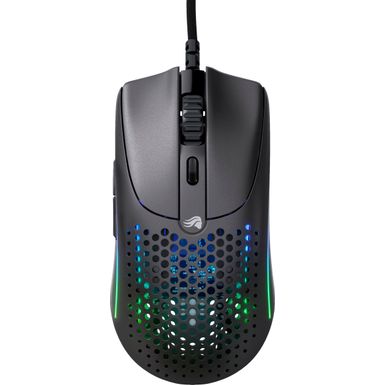
Glorious Model O 2 Wired
Best Lightweight SymmetricalBuy if: you want a light symmetrical mouse that works for either hand, with a honeycomb shell and RGB
Don't buy if: you hate honeycomb shells, or you need 8,000Hz polling — this tops out at 1,000Hz
The Model O 2 Wired is the ambidextrous pick of this guide: a symmetrical 59g shell that works for left- and right-handed players alike, with a BAMF 2.0 26K sensor, 80-million-click switches, G-Skates PTFE feet, and Glorious's light Ascended cable. It is the only mouse here that genuinely suits every grip and either hand, and the honeycomb shell with RGB lighting gives it a look none of the plain black mice here match.
The Glorious naming trap is the worst in this guide, so read the listing twice. The original Model O (2019, 12K sensor, 67g) is a different, older mouse. The Model O 2 Wired (this pick, April 2024, 26K sensor, 59g) is the wired one. The Model O 2 Pro is the wireless version, and the Model O Classic (March 2026, wireless, $89.99) is newer still. Only "Model O 2 Wired" is this pick — and PC Gamer names the budget Glorious Model O Eternal as its best budget wired mouse, which is yet another model; it is covered in the budget section below.
Pros
- 59g symmetrical shell — the only truly ambidextrous pick here
- BAMF 2.0 26K sensor with G-Skates PTFE feet
- Honeycomb shell with RGB — the most distinctive look in this guide
- Light, flexible Ascended cable
Cons
- 1,000Hz polling only — no 8,000Hz mode
- Honeycomb shell is not to everyone's taste and lets dust in
- Side buttons are right-hand only despite the symmetrical shell
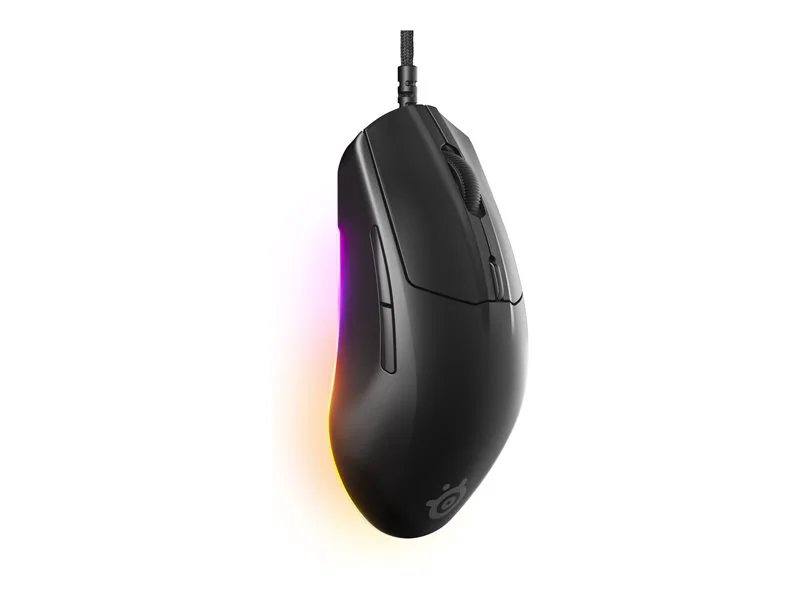
SteelSeries Rival 3 Gen 2
Best Budget PickBuy if: you want a proper gaming mouse for $34.99 — light, well-built, and fast enough for ranked play
Don't buy if: you need high DPI headroom or optical switches — the sensor tops out at 8,500 DPI and the switches are mechanical
The Rival 3 Gen 2 is the pick that makes the rest of this guide look expensive. Launched in May 2025, it replaces the original Rival 3 with a refined shape, better PTFE feet, lower click latency (SteelSeries claims 1.35ms), and a paracord-style cable — at the same $34.99 list price. At 77g it is light enough for shooters, the ergonomic right-handed shape suits palm and claw grips, and the 3-zone RGB lighting is a genuine surprise at this price. RTINGS lists the G502 HERO and G203 as its budget wired picks; the Rival 3 Gen 2 is the newer, lighter alternative to both.
One honest limit: the wired Gen 2 uses SteelSeries' TrueMove Core sensor at 8,500 DPI — plenty for real play (pros use 400–1,600), but the 18,000 DPI TrueMove Air sensor belongs to the wireless Gen 2, not this one. The switches are mechanical, rated for 60 million clicks, so the double-click wear pathway exists here where the optical picks above avoid it — at this price, that is a fair trade.
Pros
- $34.99 list — the cheapest proper gaming mouse in this guide
- 77g with a refined ergonomic shape and 100% PTFE feet
- Paracord-style cable and 3-zone RGB at a budget price
- SteelSeries Engine software is optional — settings store on board
Cons
- 8,500 DPI sensor ceiling — fine for play, but no headroom on paper
- Mechanical switches, not optical — the double-click wear pathway exists
- Only 6 buttons and no free-spinning scroll wheel
What Shape Should I Buy for My Grip?
Buy for your grip first and your spec sheet second — a perfectly shaped 1,000Hz mouse beats an ill-fitting 8,000Hz mouse every time. This is the single most repeated lesson across every serious mouse review, and it is where most buyers go wrong: they buy the lightest, highest-polling mouse and then fight its shape for a year.
Use this chooser:
| Your grip | What it means | Buy first |
|---|---|---|
| Palm | Whole hand rests on the mouse | DeathAdder V3 (large hands) or G502 X (medium hands) |
| Claw | Palm rests, fingers arched | DeathAdder V3, or Haste 2 if you play shooters |
| Fingertip | Only fingertips touch the mouse | Haste 2 — 53g, slim, and easy to lift |
| Large hands | Most esports mice feel cramped | DeathAdder V3 or G502 X |
| Small hands | Full-size mice feel like bricks | Rival 3 Gen 2 or Haste 2 |
| Left-handed | Ergonomic shells are right-handed only | Model O 2 Wired (symmetrical shell) |
Two practical notes. First, hand size matters as much as grip: measure from wrist crease to middle fingertip — under 17cm is small, 17–19cm medium, over 19cm large — and be sceptical of any mouse marketed as "one size fits all." Second, if you can, buy from a retailer with easy returns and give a new shape a full week: a shape that feels odd on day one often feels invisible by day seven, and vice versa.
Is a Wired Mouse Still Faster Than Wireless in 2026?
No — not in any way you can feel. A good 2.4GHz wireless mouse now matches wired latency to within a fraction of a millisecond, and most professional players compete on wireless. Independent end-to-end measurements put the gap between a mouse's wired and wireless modes at roughly 0.2–4ms depending on the model — the model matters more than the cable — and RTINGS' click-latency testing finds some receiver-based wireless mice matching or beating wired rivals. Bluetooth is the exception: it drops polling to 125Hz or lower and adds real delay, which is why it is never a gaming connection.
So why buy wired at all? Three honest reasons. Price: a flagship sensor costs $35–$80 wired and $150–$180 wireless. Zero maintenance: no battery to charge, no receiver to lose, no firmware to update before a ranked session. And tournament rules: some LAN events still require wired peripherals. If you already own a good wireless mouse, there is no speed reason to switch. If you are buying new and the budget matters, wired is where the value is — that is the whole point of this guide.
Is 8000Hz Polling Worth It on a Wired Mouse?
For most players, 8,000Hz is measurable but barely perceptible — but on a wired mouse it is free, so take it when it comes with the shape you want. The maths: 1,000Hz reports position every 1ms, 8,000Hz every 0.125ms. That 0.875ms difference is real on an oscilloscope, but human reaction time is roughly 150–250ms, and even professional players struggle to identify polling rates blind. Where 8K does help is at very high frame rates (240Hz and above) with 1,600+ DPI, where smoother cursor reporting makes micro-adjustments feel more precise — and even there, reviewers describe the gain as subtle. It can also add CPU overhead on weaker systems, which is the one real cost.
The wired advantage is that the usual cost disappears: on wireless mice, 8K polling can halve battery life, but a cable has no battery to drain. The DeathAdder V3 and the Haste 2 both give you true 8,000Hz over the cable at no penalty. Our advice: buy the mouse whose shape fits you, run it at 1,000Hz for daily play, and switch to 8K only for ranked sessions on a high-refresh monitor. A 1,000Hz mouse with the right shape (the G502 X, the Rival 3 Gen 2) will serve you better than an 8K mouse that cramps your hand.
What DPI Should I Actually Use for Gaming?
Use 400–1,600 DPI — competitive players typically sit at 400–800 — and ignore the 26,000–35,000 DPI ceilings on the box. DPI is the figure most advertised on a gaming mouse and the one that changes nothing on its own: it only sets how far the cursor moves per inch of mouse travel, and nobody plays at 30,000 DPI because a full 360° turn would fit in barely a centimetre of mousepad. Competitive players measure sensitivity in centimetres per 360° turn, not DPI, and they cluster around 40–50cm per turn in games like CS2 and Valorant.
Practically: start at 800 DPI, set your in-game sensitivity so a comfortable arm sweep turns you 180°, and stop tuning. A higher DPI ceiling does not mean better accuracy — every sensor in this guide tracks flawlessly at normal sensitivities, and the difference between an 8,500 DPI sensor and a 35,000 DPI sensor is invisible in actual play. If a listing leads with DPI, it is selling you a number, not a mouse.
Will My Mouse Start Double-Clicking?
Eventually, maybe — if it uses mechanical switches. Optical and hybrid switches effectively remove the problem. Double-clicking is almost always switch wear: the metal contacts inside a traditional mechanical switch oxidise and bounce, registering two clicks for one press. It is the most common way a gaming mouse dies, and it has nothing to do with software — no driver update fixes worn contacts.
Four of the six mice here avoid the failure mode entirely: the DeathAdder V3 and Basilisk V3 35K use Razer's Gen-3 optical switches, the G502 X uses Logitech's LIGHTFORCE hybrid switches (optical actuation, mechanical feel), and the Haste 2 uses HyperX's optical switches. The Rival 3 Gen 2 and Model O 2 Wired use mechanical switches — rated for 60 and 80 million clicks respectively, so they will last years of normal play, but the wear pathway exists. If you have killed a mouse to double-clicking before, buy optical and stop worrying about it.
Does the Cable Actually Matter?
Yes — it is the one thing every wired buyer feels every day, and it is the main reason cheap wired mice feel cheap. A stiff rubber cable drags, catches on the desk edge mid-flick, and fights every movement. A light paracord-style cable — the SpeedFlex on the DeathAdder V3, the HyperFlex 2 on the Haste 2, the Ascended cable on the Model O 2, the paracord on the Rival 3 Gen 2 — barely registers. It is the difference between forgetting the cable exists and fighting it all session.
Two fixes if your cable still drags. First, route it: run the cable up behind the monitor and let it drop to the mouse, so the desk edge never touches it. Second, buy a mouse bungee — a small weighted stand that holds the cable up and off the desk for about the price of a pizza. Every mouse in this guide already ships with a light, flexible cable, so a bungee is a nice-to-have here, not a rescue. If you are comparing two mice and everything else is equal, buy the one with the lighter cable.
Buying Guide: What Actually Matters
After shape, the five things worth your attention are weight, sensor class, switches, feet, and software — in that order. Weight affects every flick: under 65g is the modern competitive standard, 65–80g is fine for most players, and over 100g is a deliberate choice (buttons and battery) rather than a default. Sensor class matters less than marketing suggests — any modern sensor from the brands here tracks flawlessly at normal sensitivities; DPI ceilings above 20,000 are irrelevant to human play, since competitive players typically use 400–1,600 DPI.
Switches decide click feel and longevity: optical switches (Razer Gen-3, Logitech LIGHTFORCE) avoid double-click failures and last tens of millions of clicks, while traditional mechanical switches can develop double-click issues over time. Feet — the small PTFE pads underneath — decide glide: pure PTFE feet glide smoother than coated plastic, and worn feet are the cheapest upgrade in gaming (replacement sets cost a few dollars and transform an old mouse). Software (Synapse, G HUB, SteelSeries GG, NGenuity) matters for remapping and DPI profiles, but a good mouse should store its settings on board so you can uninstall the software after setup — and the Zowie EC2-C below needs no software at all. Finally, check the return policy before the spec sheet: shape is personal, and a week of real play is the only review that counts. Prices move fast — our keyboard and mouse deals guide tracks the live cuts.
Three More Wired Mice Worth Knowing
Logitech G502 HERO — the button-loaded classic. Still sold alongside the G502 X, the HERO is the old flagship: 121g with five adjustable 3.6g weights, 11 buttons, RGB lighting, and the HERO 25K sensor. Its list price is $49.99 and it regularly sells for around $40 — the cheapest way to get 11 buttons and a weight system. The trade is age: mechanical switches (the double-click wear pathway exists) and 32g more than the G502 X. Buy it if you want maximum buttons for minimum money and do not mind the weight. Check the G502 HERO on Amazon.
Razer Cobra — the cheapest ultralight. At 58g and a $39.99 list price, the wired Cobra is the lightest cheap mouse you can buy: Gen-3 optical switches, 8 programmable buttons, SpeedFlex cable, and Chroma underglow. One correction worth making, because several low-quality roundups get it wrong: the wired Cobra has an 8,500 DPI optical sensor, not the Focus Pro 30K — that sensor belongs to the wireless Cobra Pro ($129.99). At 8,500 DPI it is still more than any human plays at. Buy it if $40 is your ceiling and you want ultralight. Check the Razer Cobra on Amazon.
Zowie EC2-C — the no-software esports pick. The EC2-C is the purist's mouse: 73g, a PMW3360 sensor, fixed DPI steps of 400/800/1600/3200 set with a button on the underside, a 24-step scroll wheel, Huano switches, and no software whatsoever — nothing to install, nothing to update, nothing to break. That is also its limit: no remapping, no profiles, no RGB, and the 3,200 DPI ceiling is by design, not a flaw. Zowie's current line is the wireless DW 4K series, so check stock before buying — the wired EC2-C is still listed on Amazon US, but it is the last of its line. Check the Zowie EC2-C on Amazon.
One to skip: the Corsair M65 RGB Ultra. Several roundups still list it as a premium wired pick, but Corsair's own US store marks both the wired and wireless versions discontinued. Do not buy it at old-guide prices — if you want a Corsair mouse, wait for the replacement line instead.
Frequently Asked Questions
What is the best gaming mouse in 2026?
The Razer DeathAdder V3 (wired) is the best gaming mouse for most players — 59g, a Focus Pro 30K sensor, true 8,000Hz polling over the cable, and the ergonomic shape that suits the most hands. If you want wireless flagships instead, our wireless gaming mouse guide ranks the Superlight 2, Viper V3 Pro and DeathAdder V3 Pro.
Are wired gaming mice better than wireless in 2026?
Not on speed — a good 2.4GHz wireless mouse matches wired latency to within a fraction of a millisecond, and most pros now play wireless. Wired still wins on price (flagship sensors for $35–$80 instead of $150–$180), zero battery or receiver hassle, and tournament rules that sometimes require a cable. Buy wired for value and simplicity; buy wireless for freedom from the cable.
Is 8000Hz polling worth it on a wired mouse?
For most players, no — the difference between 1,000Hz (1ms) and 8,000Hz (0.125ms) is measurable but barely perceptible, and 8K needs 1,600+ DPI and a strong CPU to show any benefit. On a wired mouse the one cost disappears: there is no battery to drain, so the DeathAdder V3 and Pulsefire Haste 2 give you 8K for free. Run 1,000Hz for daily play and switch to 8K only for ranked sessions on a high-refresh monitor.
What DPI should I use for gaming?
Most players should use 400–1,600 DPI — competitive players typically sit at 400–800 DPI with a large mousepad. DPI ceilings of 26,000–35,000 are marketing: nobody plays at those sensitivities, and a higher ceiling does not mean better accuracy. Pick a sensitivity that gives you a comfortable centimetres-per-360° turn, then leave DPI alone.
Why does my gaming mouse double-click?
Double-clicking is almost always mechanical switch wear — the metal contacts inside a traditional switch oxidise and bounce, registering two clicks for one press. Optical and hybrid switches (Razer's Gen-3 optical, Logitech's LIGHTFORCE) actuate with light instead of metal contact, so that failure mode effectively disappears. If your mouse double-clicks, it is a worn switch, not a software bug.
Do I need mouse software, or can I use a gaming mouse without it?
You can game without it. Every mouse in this guide stores its DPI and button settings on board once configured, and the Zowie EC2-C needs no software at all — its DPI steps are set with a button on the underside. Install the maker's software once to set your preferences, then uninstall it if you like; the mouse keeps working.
What is the best wired gaming mouse for large hands?
The Razer DeathAdder V3 — its right-handed ergonomic shape fills a large palm in a way symmetrical mice cannot, at just 59g. The Logitech G502 X is the alternative if you also want many programmable buttons, a dual-mode scroll wheel and a thumb rest.