Best Nintendo Switch 2 Accessories in 2026: 6 Picks

You've just unboxed it, you're staring at the box, and you've got no case, no storage card, and a grip that doesn't charge. That's the Switch 2's opening trap: the console is $499.99, and the box gives you almost nothing to protect it or expand it.
This guide fixes that in order. Every price below is a US list price verified on 18 November 2026, and every trap — the old memory card that won't work, the $99.99 controller that isn't the standard one, the camera that costs three different prices — is named on the card it belongs to.
Nintendo Switch 2 accessories are the add-ons that turn the console from a handheld into a complete setup. The essentials are a microSD Express card for storage, a case and screen protector for travel, and a Pro Controller for TV play. Everything else is for a specific kind of player.
Quick Comparison
| Product | Key Specs | ||
|---|---|---|---|
| #1 | Nintendo Switch 2 Pro ControllerBest Overall | C button · GL/GR rear buttons · 3.5mm jack · ~40h battery · $89.99 | Check Price |
| #2 | SanDisk microSD Express 256GBBest Storage Upgrade | microSD Express · ~880 MB/s · Nintendo-licensed · $59.99 | Check Price |
| #3 | tomtoc Slim Carrying CaseBest Case | IGN Editor's Choice · 12 game slots · stick clearance · $36.99 list | Check Price |
| #4 | 8BitDo Ultimate 2 BluetoothBest Third-Party Controller | TMR sticks · Hall-effect triggers · charging dock · $69.99 | Check Price |
| #5 | Joy-Con 2 Charging GripBest Under-$50 Fix | Charges while you play · GL/GR buttons · $39.99 | Check Price |
| #6 | Nintendo Switch 2 CameraBest Camera for GameChat | 1080p · privacy shutter · GameChat video · $54.99 | Check Price |
Pro Controller vs 8BitDo Ultimate 2 Bluetooth: the Pro is better suited for Nintendo-first players because it has the C button, amiibo scanning and a headphone jack. The 8BitDo works better when you want drift-proof TMR sticks and a charging dock for $20 less. The key difference is Nintendo's ecosystem features against better sticks.
The best Nintendo Switch 2 accessories for most owners are a microSD Express card, a case, and a Pro Controller. According to Nintendo, the console has 256GB of internal storage and accepts only microSD Express cards up to 2TB. A camera matters only if you use GameChat video, and a second controller can wait.
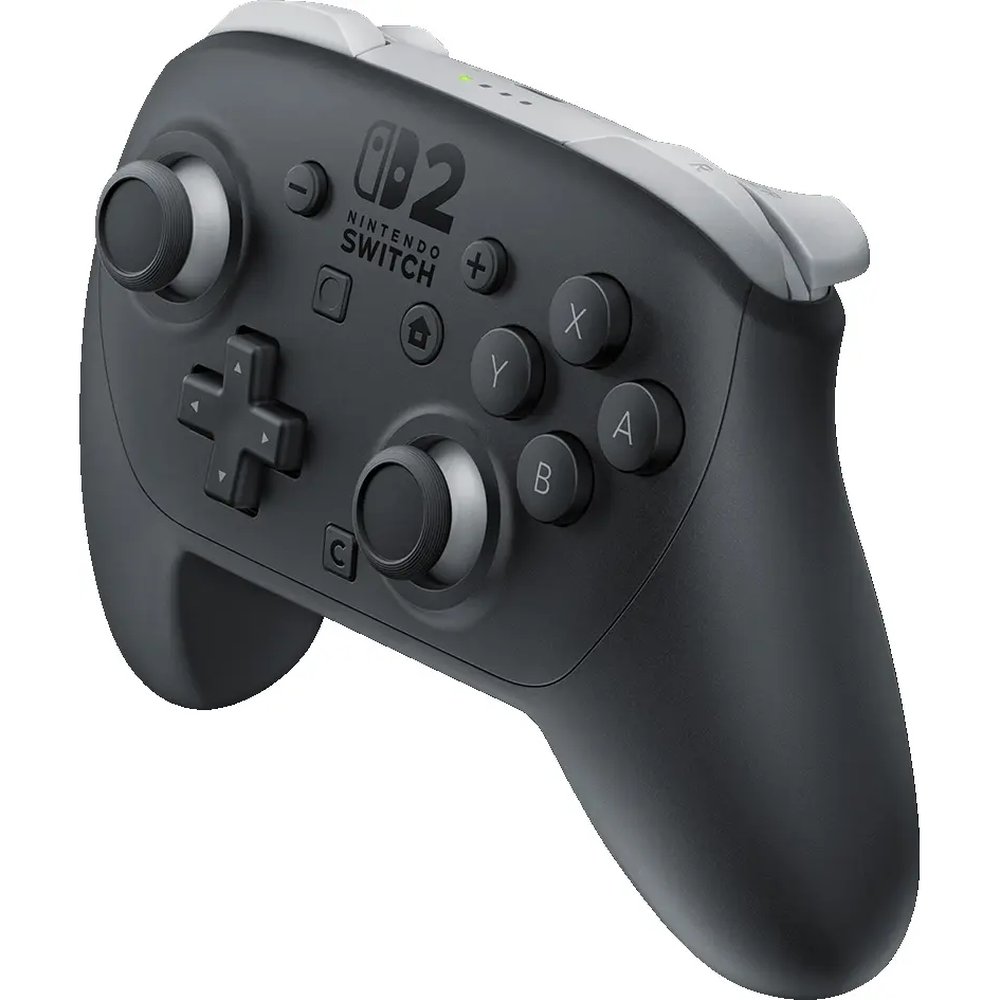
Nintendo Switch 2 Pro Controller
Best OverallBuy if: you play docked or on the TV most nights and want every Nintendo feature in one pad
Don't buy if: you only play handheld, or you want drift-proof sticks — the 8BitDo at #4 is the pick there
The Pro Controller is the default first upgrade for a reason. It adds the C button for GameChat, remappable GL/GR rear buttons, a 3.5mm headphone jack, HD Rumble 2 and amiibo NFC, with about 40 hours of battery — roughly double a Joy-Con 2 pair. If you play on the TV, this is the controller you will reach for every night.
The default first upgrade. Full stop.
Two things to get right before you buy. First, the price: the standard controller is $89.99. The $99.99 figure floating around is the Zelda 40th Anniversary Edition — a different controller, not the standard price. The Pro launched at $84.99 in June 2025 and has risen twice since, so older guides quoting $84.99 or $85 are stale. Second, the sticks: Nintendo's are conventional potentiometers. Nintendo has never claimed Hall-effect or TMR sticks for this pad, and both TechRadar and GamesRadar flag it — so do not expect the drift-proofing the 8BitDo offers. It is also Switch 2 only: it does not work with the original Switch.
Pros
- C button, rear buttons, headphone jack and amiibo in one pad
- About 40 hours of battery — double the Joy-Con 2
- The only controller here with full GameChat and amiibo support
- Comfortable full-size grip for long TV sessions
Cons
- Potentiometer sticks — no drift-proofing, unlike the 8BitDo
- Switch 2 only — does not work with the original Switch
- $89.99 is $5 up from the $84.99 launch price
- No charging dock in the box — it charges over USB-C
List price $89.99 — the $99.99 Zelda edition is a separate controller. Check the price before buying, as prices change.
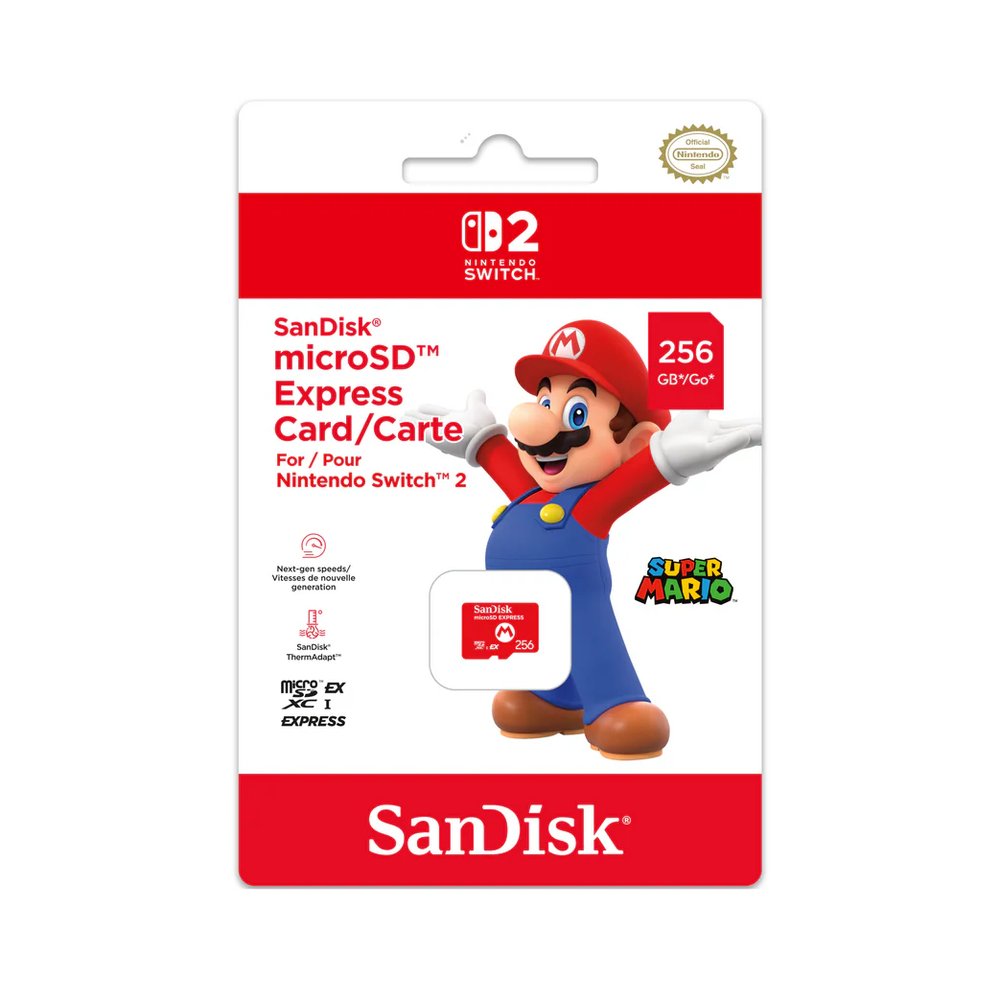
SanDisk microSD Express 256GB
Best Storage UpgradeBuy if: you download games — the 256GB inside the console fills fast
Don't buy if: you already own the Samsung 256GB Express — same card, same $59.99, different label
This is the card most owners need first, and the rule is simple: only microSD Express works for Switch 2 games. Your old Switch card will not store or run a single Switch 2 game, no matter how fast it was. The SanDisk 256GB is Nintendo-licensed, reads at up to about 880 MB/s, and at $59.99 it doubles your storage for the price of a game.
The card most owners need first.
Two honest notes. First, the alternatives are real: Samsung's licensed 256GB Express is also $59.99 at the Nintendo Store, so buy whichever is in stock. The Lexar Play Pro 256GB is the speed pick at $60 list — up to 900 MB/s read — and Walmart's Onn 512GB is the cheapest per GB at $85 list, though Engadget found it noticeably slower moving games between card and system. Second, the trap: SanDisk's Zelda Edition 1TB card looks like it belongs here, but it is UHS-I — an original Switch card — and it will not store Switch 2 games. Check for the EX logo on the card, and run the internet system update the console asks for on first use.
Pros
- Nintendo-licensed Express card at the right price
- About 880 MB/s read — fast enough for any Switch 2 game
- 256GB doubles the console's storage for $59.99
- Samsung's twin at the same price if this one is out of stock
Cons
- 256GB still fills up with a few big downloads
- 512GB and 1TB Express cards cost far more per GB
- First use needs an internet system update
- The Zelda Edition 1TB lookalike is UHS-I and does not work
List price $59.99 at the Nintendo Store. Check the price before buying, as prices change.
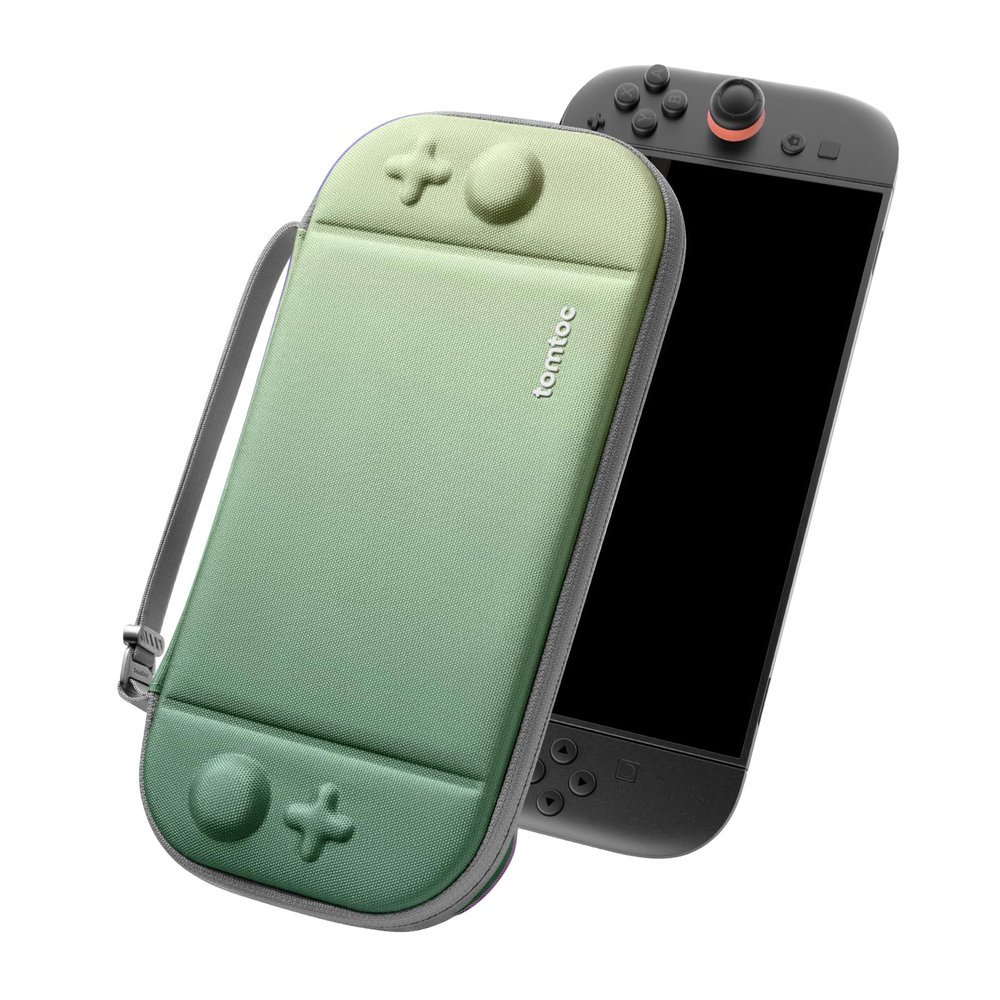
tomtoc Slim Carrying Case
Best CaseBuy if: the console ever leaves the house — this is the first thing to buy after the card
Don't buy if: it never leaves the dock — save the $36.99
The tomtoc Slim Case is the case most 2026 roundups keep recommending, and it earned it: IGN gave it an Editor's Choice 9/10, it carries military-grade drop protection, and it holds 12 game cards. The detail that matters most is the stick clearance — it was the only slim case to pass an independent October 2026 press test with no stick clicks when the case was closed. A case that presses your sticks shut is a case that drifts them.
The case that won't press your sticks.
Your old Switch case will not fit: the Switch 2 is bigger, with a 7.9-inch screen and taller sticks. The tomtoc is sized for it, with a wrist strap and a slim profile that still fits in a bag. List price is $36.99, and colours have been on sale at $25.88–$29.59 — check before you pay full price. The trade-off for slim is space: there is no room for a charger or a big accessory pouch, so this is a console-and-games case, not a travel kit.
Pros
- Stick and button clearance — no pressed sticks when closed
- IGN Editor's Choice 9/10 with military-grade drop protection
- 12 game-card slots and a wrist strap
- Often on sale well under the $36.99 list price
Cons
- Slim means no room for a charger or accessories
- Sale prices vary by colour — check before buying
- Not a charging case — it only protects
List price $36.99 — colours on sale at $25.88–$29.59. Check the price before buying, as prices change.
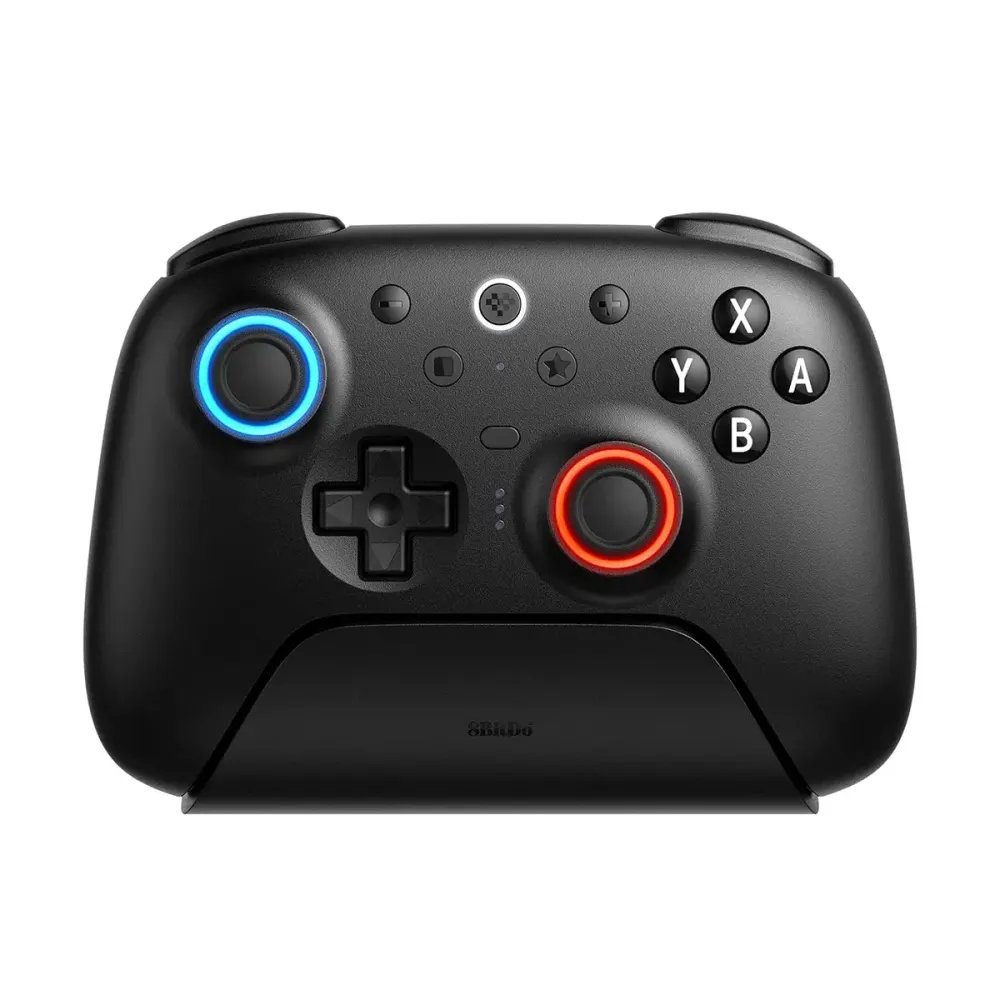
8BitDo Ultimate 2 Bluetooth Controller
Best Third-Party ControllerBuy if: you want drift-proof sticks and a charging dock for $20 less than Nintendo's pad
Don't buy if: you need amiibo scanning, a headphone jack, or the C button — only Nintendo's pad has those
This is the controller for anyone who has replaced a drifting pad before. The Ultimate 2 Bluetooth has TMR sticks and Hall-effect triggers — magnetic sensing with nothing to wear out — plus a charging dock in the box, about 25 hours of battery, and 1,000Hz polling over its 2.4GHz dongle. Engadget scored it 9.5/10 and called it the best Switch 2 controller out there. At $69.99, it is $20 cheaper than Nintendo's Pro.
Better sticks, $20 less, fewer Nintendo features.
Two catches, both fixable. First, it needs a firmware update before it works with the Switch 2 — do that on a PC before your first session, or it will not pair. Second, the name: 8BitDo sells three lookalikes. The Ultimate 2 Bluetooth ($69.99) is the Switch 2 one. The Ultimate 2 Wireless ($59.99) is PC, Android and Apple only — it does not work with a Switch at all. The Ultimate 2C Bluetooth ($29.99) is the budget second pad. Check the word "Bluetooth" and the price on the listing, not just the shape.
Pros
- TMR sticks and Hall-effect triggers — drift-proof by design
- Charging dock included, unlike Nintendo's pad
- $20 cheaper than the Pro Controller
- Engadget 9.5/10 — the best-reviewed third-party pad here
Cons
- No amiibo NFC and no headphone jack
- No C button — no quick GameChat access
- Needs a firmware update before first use with Switch 2
- 1,000Hz polling needs the dongle, not Bluetooth
List price $69.99 — make sure the listing says "Bluetooth", not "Wireless". Check the price before buying, as prices change.
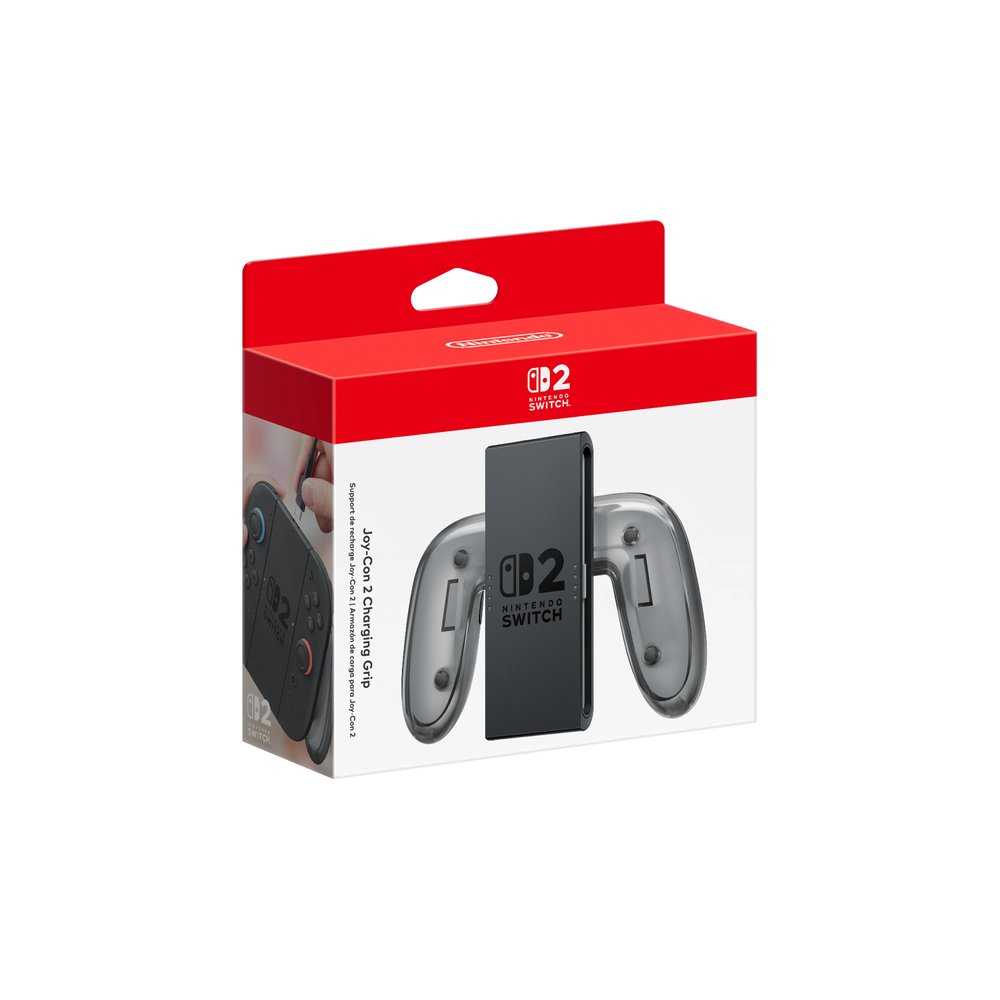
Joy-Con 2 Charging Grip
Best Under-$50 FixBuy if: you play with the Joy-Con 2 slotted into a grip — this is the grip you should have had
Don't buy if: you already play with a Pro Controller and never touch the grip
The grip in the box does not charge. That is the whole story: play a long session with the included grip and your Joy-Con 2 run flat, because the only way to charge them is to slide them back onto the console. The $39.99 Charging Grip fixes it — it charges both Joy-Con 2 while you play, over USB-C, and it adds mappable GL/GR rear buttons the included grip lacks.
The $39.99 fix for the box's biggest omission.
It is the cheapest meaningful upgrade in this guide, and the one most owners notice first. The trade-off is scope: it only fixes the grip. It does not add a second controller, it does not hold a charge on its own, and it is useless if you already play with a Pro Controller. Buy it if the grip is how you play; skip it if the Pro is.
Pros
- Charges both Joy-Con 2 while you play
- Adds GL/GR rear buttons the included grip lacks
- Cheapest meaningful upgrade in this guide
Cons
- Only fixes the grip — nothing else
- Useless if you already play with a Pro Controller
- Needs a USB-C cable and a power source to charge
List price $39.99. Check the price before buying, as prices change.
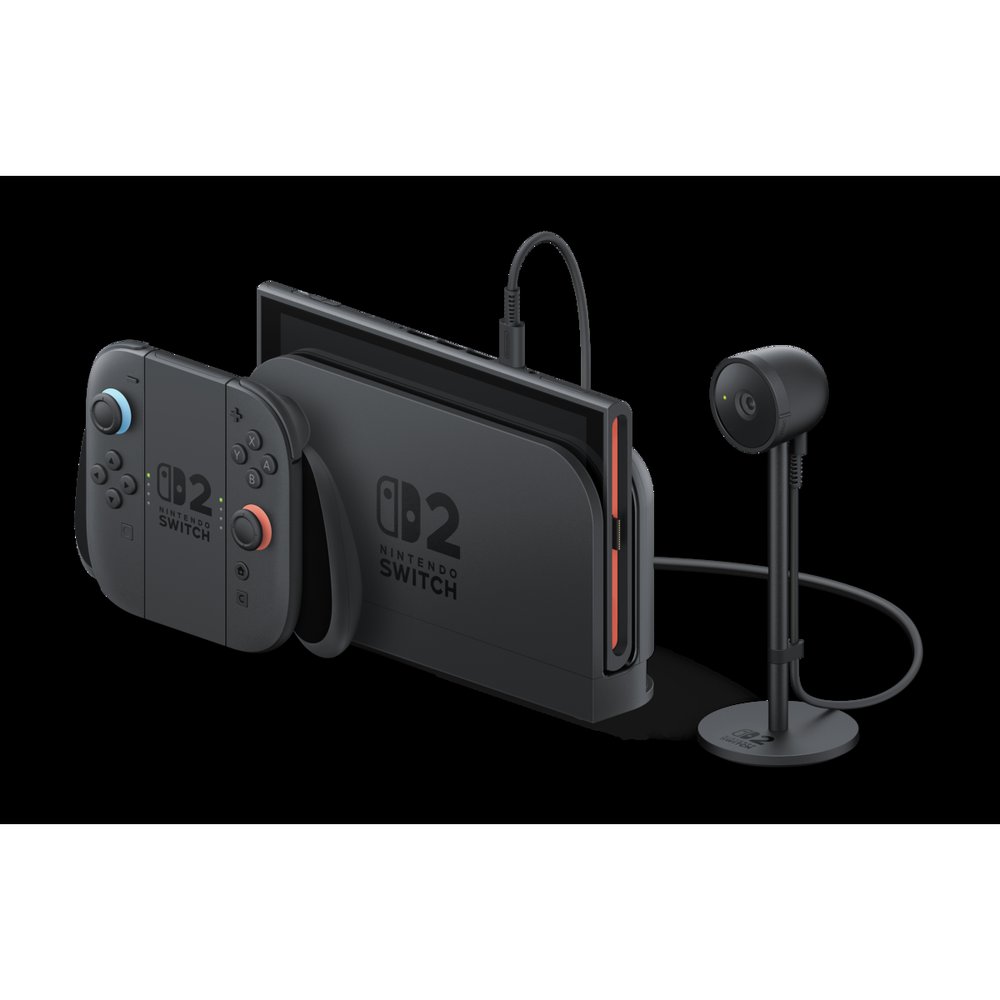
Nintendo Switch 2 Camera
Best Camera for GameChatBuy if: you use GameChat video with friends regularly — this is the only 1080p first-party option
Don't buy if: you never use GameChat, or audio-only chat is enough for you
The Switch 2 Camera is a 1080p camera with a wide field of view, a privacy shutter and a rigid stand that works docked or in handheld mode. It exists for one job: GameChat video, where up to four people can share video at once. Audio-only GameChat, for up to twelve people, needs no camera at all — so this is a purchase for regular video chatters, not for everyone.
Only if you actually use GameChat video.
Two things before you buy. First, GameChat needs a paid Nintendo Switch Online membership — the free trial ended on 31 March 2026 — so the camera is a $54.99 add-on to a subscription, not a one-off. Second, the cheaper rival is not equal: HORI's Piranha Plant Camera shoots at 480p, not 1080p, and its price depends on where you buy it — $59.99 at the Nintendo Store, $39.99 at HORI's own store, and $29.99 on sale at Target. Buy the HORI for the novelty; buy Nintendo's for the picture.
Pros
- 1080p — the only first-party camera at full HD
- Privacy shutter and a stand that works docked or handheld
- Wide field of view fits several people on one couch
Cons
- Needs a paid Nintendo Switch Online membership
- Useless if you never use GameChat video
- The HORI camera is cheaper, but only 480p
List price $54.99. Check the price before buying, as prices change.
Also Worth Knowing
Nintendo GameCube Controller — $64.99. The retro pick, with a gate: it is sold only to Nintendo Switch Online members, only from the Nintendo Store, with a limit of one per account. And playing GameCube games needs Nintendo Switch Online + Expansion Pack, at $49.99 a year. Do not print or believe the $69.99 figure in some roundups — Nintendo's own support page says $64.99. Worth it if you play GameCube classics; a pricey novelty if you don't.
8BitDo Pro 3 — $69.99 list, about $50 street. The symmetrical-layout alternative to the Ultimate 2 Bluetooth: TMR sticks, Hall-effect triggers with a linear/tactile switch, swappable magnetic ABXY buttons and a charging dock, with the broadest platform support of any pad here — Switch 1 and 2, PC, iOS and Android. No amiibo scanning. Buy it if you prefer a PlayStation-style symmetrical layout, or if you want one pad for every device you own. Check price on Amazon.
Joy-Con 2 pair — $99.99. The simplest multiplayer add: a second pair turns the console into a two-player machine in seconds, and each side doubles as a mouse in Mouse Mode games. Single Joy-Con 2 cost $54.99 each. Buy the pair if you play local multiplayer; buy the Pro Controller first if you mostly play alone. Check price on Amazon.
What Accessories Do You Actually Need for a Switch 2?
Three things, in this order: protection, storage, then a controller. A case and a screen protector first, because a scratched screen on day one is the damage you cannot undo. A microSD Express card second, because 256GB of internal storage fills up fast once downloads start. A Pro Controller third, if you play on the TV — or an 8BitDo if you want better sticks for less.
The accessories most Switch 2 owners need first are a microSD Express card, a case, and a screen protector. According to Nintendo, the console has 256GB of internal storage and accepts only microSD Express cards up to 2TB. A Pro Controller comes next for TV play, while a camera matters only if you use GameChat video.
The best Switch 2 controller for most players is the Nintendo Switch 2 Pro Controller at $89.99. According to Nintendo's own store listing, it has a C button for GameChat, remappable rear buttons, a headphone jack and about 40 hours of battery. Third-party pads with TMR sticks cost less but lose Nintendo's amiibo and GameChat features.
After those three, everything is optional. The Charging Grip is a $39.99 fix for anyone who plays with the grip. The camera is for GameChat video users only. A second Joy-Con 2 pair is for local multiplayer. And the GameCube Controller is for retro fans with a Nintendo Switch Online membership — not a first-week buy.
What is already in the box: the console, a Joy-Con 2 pair, the Joy-Con 2 Grip (which does not charge), two straps, the dock, the AC adapter, a USB-C cable and an Ultra High Speed HDMI cable. No game, no case, no screen protector, no storage card, no camera, no charging grip. Do not buy any of those twice.
Can I Use My Old Switch microSD Card in the Switch 2?
No — not for games. The Switch 2 accepts only microSD Express cards, and an ordinary microSD card from the original Switch will not store or run Switch 2 games at all. It is not a speed problem; the console simply will not use it for game storage.
An old Switch microSD card cannot store or run Nintendo Switch 2 games. The Switch 2 accepts only microSD Express cards, and Nintendo says an ordinary card from the original Switch will not work for game storage at all. Keep the old card only for moving screenshots and videos to the new console's system memory.
Here's the thing: the label to look for is the EX logo. Capacity and speed numbers alone do not prove a card is Express — and the trap card is SanDisk's Zelda Edition 1TB, which sits next to the Express cards on the shelf but is UHS-I, an original Switch card. First use of a real Express card also needs an internet system update, so set it up on Wi-Fi before you need it.
Is the Switch 2 Pro Controller Worth $89.99?
Yes, if you play on the TV. The C button, rear buttons, headphone jack, amiibo support and 40-hour battery are the full Nintendo feature set in one pad, and no third-party controller has all of them. If you only play handheld, the money is better spent on storage and a case — the Joy-Con 2 in the Charging Grip do the same job for less.
The price is the part to watch. The Pro launched at $84.99 in June 2025 and now lists at $89.99 after two rises. The $99.99 figure is the Zelda 40th Anniversary Edition, a separate controller. And the $84.99 or $85 figures in older guides are launch prices, not today's price. Check the edition on the listing before you pay.
The honest trade is the sticks. Nintendo's are conventional potentiometers, not Hall-effect or TMR — Nintendo has never claimed otherwise, and both TechRadar and GamesRadar say so plainly. If drift is your fear, the 8BitDo Ultimate 2 Bluetooth at $69.99 has TMR sticks and a dock, and it costs $20 less. You lose the C button, amiibo and the headphone jack for that trade. Pick the feature set, not the brand.
Which microSD Express Card Should You Buy — and What Size?
Buy the 256GB card first. At $59.99 it doubles the console's storage, and it is enough for a library of cartridges plus a handful of downloads. The SanDisk and Samsung 256GB cards are both $59.99 at the Nintendo Store — buy whichever is in stock.
Go to 512GB if you buy most games digitally. Walmart's Onn 512GB is the cheapest per GB at $85 list, though it is slower moving games between card and system. The Lexar Play Pro 512GB is $120 list and the fastest mainstream option. The 1TB cards — Lexar's is $220 list — are for all-digital libraries only. Most owners will never need one.
Speed matters less than the guides suggest. Game loads stop improving well before the fastest cards' headline speeds, so a 256GB card at 880 MB/s is not meaningfully slower in practice than a 900 MB/s one. Buy on capacity and price, not on the biggest MB/s number on the box.
Do Switch 1 Accessories Work with the Switch 2?
Some do, and the split is simple: anything that plugs in wirelessly mostly works, and anything that has to fit the console physically does not. Your old Joy-Con and old Pro Controller work wirelessly with the Switch 2, and the old Pro charges from the dock's USB port. But old Joy-Con cannot attach to the magnetic rail, cannot charge on the console, and cannot wake a sleeping Switch 2.
Cases, screen protectors, grips and docks do not carry over. The Switch 2 is bigger — 272 × 166 × 13.9 mm with a 7.9-inch screen — so Switch 1 cases and protectors are the wrong size, and the old dock is not compatible at all. The old AC adapter can still charge the handheld directly, and Ring-Con and Labo Toy-Con accessories do not fit Joy-Con 2. Joy-Con 2, meanwhile, do not work on the original Switch.
The practical version: keep your old controllers and your old games. Replace the case, the protector, the grip and the memory card. And check the Switch 2 dock's power supply — it needs 60W, where the Switch 1's was 39W — before you trust a cheap third-party dock with 4K output.
Do You Need a Camera for GameChat?
No, unless you want video. GameChat audio works for up to twelve people with no camera at all — the console's built-in mic handles it. Video and screen-sharing, for up to four people, need a camera. If your friends mostly talk while they play, skip the camera and spend the $54.99 on storage.
I've seen conflicting data — some stores list the HORI Piranha Plant Camera at $59.99, others at $39.99, and Target has had it on sale at $29.99. My read is the $59.99 figure is the Nintendo Store price, and the camera is a $30–40 buy in practice — which still doesn't fix its 480p sensor against the official camera's 1080p.
Here's an opinion that might get pushback: the Switch 2 Camera is the weakest buy in this guide. GameChat video is fun for an evening, but most players will use it twice and forget it. Spend the $54.99 on a storage card instead, and add the camera later if your group actually video-chats every week.
Two more facts: GameChat needs a paid Nintendo Switch Online membership — the free trial ended on 31 March 2026 — and Bluetooth microphones do not work with it. Use the built-in mic, a wired headset, or a USB headset.
Which Case Actually Fits the Switch 2?
Only a case made for the Switch 2. The console is bigger than the original in every direction, and the sticks are taller — up to 30.7 mm — so a Switch 1 case will not close properly, and a tight one will press the sticks. The tomtoc Slim Case at #3 is the pick here: it is the only slim case that passed an independent press test with no stick clicks.
The screen needs the same care. The Switch 2 ships with a built-in anti-scattering film on the screen — do not peel it off. Put a tempered-glass protector over it instead. A 7.9-inch Switch 2 protector is the only size that fits; a Switch 1 protector is too small, and a cheap one that leaves bubbles is worse than none.
If you want a case that charges, Belkin's Charging Case Pro is the option the big guides pick — it charges the console in the case. It costs more than the tomtoc and weighs more, so it is a travel pick, not an everyday one. For most owners, the slim case plus the console's own charger is the better buy.
Buying Guide: What Actually Matters
To set up your Switch 2 accessories, follow these steps: 1. Insert a microSD Express card and run the system update it asks for. 2. Charge the Joy-Con 2 in the charging grip, not the included grip. 3. Pair the Pro Controller and test the C button. 4. Fit the screen protector over the factory film, then the case.
Buy in order: protection, storage, controller. A scratched screen and a full drive are the two problems you cannot fix later for free. The camera and the second controller can both wait a month — the case and the card cannot.
Check the model name, not just the brand. The 8BitDo Ultimate 2 Bluetooth works with Switch 2; the Ultimate 2 Wireless does not. The SanDisk Express card works for Switch 2 games; the Zelda Edition 1TB does not. The standard Pro Controller is $89.99; the $99.99 one is the Zelda edition. In this market, one word on the box is the difference between a working purchase and a return.
Price the complete setup, not the headline. The camera needs a Nintendo Switch Online membership. The GameCube Controller needs a membership plus the Expansion Pack. The 8BitDo needs a firmware update before it pairs. Add the subscription and the setup time before you compare prices.
Don't buy what's already in the box. The console ships with a grip, two straps, a dock, an AC adapter, a USB-C cable and an HDMI cable. The only thing the box grip cannot do is charge — and that is exactly what the $39.99 Charging Grip is for.
Look — if you play on the TV most nights, here's what actually works: the Pro Controller first, the storage card second, and the camera only if your friends video-chat. Or maybe I should say it this way: buy the things that stop damage and running out of space, then buy the things that make play nicer.
What to Skip
Your old microSD card, for games. It will not store or run Switch 2 games. Keep it only for moving screenshots and videos.
Switch 1 cases, screen protectors and grips. Wrong size, wrong sticks, wrong dock. They do not fit, and a tight case presses the sticks.
The HORI Piranha Plant Camera at $59.99. That is the Nintendo Store price. It is $39.99 at HORI's own store and has been $29.99 on sale at Target — and it is 480p either way. Buy it at $30 for the novelty, or buy Nintendo's 1080p camera.
The SanDisk Zelda Edition 1TB card. It is UHS-I, an original Switch card, and it will not store Switch 2 games — no matter how close it sits to the Express cards on the shelf.
A second Pro Controller before a storage card. One good controller and a full drive is a worse setup than one controller and room for your games. Storage first.
The GameCube Controller, unless you play GameCube games. It is $64.99, Nintendo Store only, members only, one per account — and the games need Nintendo Switch Online + Expansion Pack. A pricey novelty for anyone who is not already a retro fan.
A card without the EX logo. If the card does not say Express, it is not an Express card, whatever the speed number on the box claims. The logo is the test.
Frequently Asked Questions
What's already in the Switch 2 box — what don't I need to buy?
The console, a Joy-Con 2 pair, a grip that doesn't charge, two straps, a dock, an AC adapter, a USB-C cable and an HDMI cable. No game, case, protector, card, camera or charging grip.
Should I buy a second pair of Joy-Con 2, or a Pro Controller?
Buy the Pro Controller if you mostly play alone — it is better for TV play at $89.99. Buy the Joy-Con 2 pair at $99.99 if you play local multiplayer.
Why does the GameCube controller need a Nintendo Switch Online membership?
Nintendo sells it only to members, only from its own store, one per account. Playing GameCube games also needs Nintendo Switch Online + Expansion Pack, at $49.99 a year.
Does the Joy-Con 2 Charging Grip charge while I play?
Yes — that is the point. It charges both Joy-Con 2 over USB-C while you play, and adds GL/GR buttons. The grip in the box does not charge at all.
Can I use my old Switch Joy-Con and Pro Controller on Switch 2?
Yes, wirelessly. Old Joy-Con cannot attach to the magnetic rail, charge on the console, or wake a sleeping Switch 2. Old Pro Controllers charge from the dock's USB port.
Is the HORI Piranha Plant Camera as good as Nintendo's camera?
No. It shoots at 480p against Nintendo's 1080p, though it is cheaper — $39.99 at HORI's store and $29.99 on sale at Target. Buy it for the novelty, not the picture.
Do I need to peel the film off the Switch 2 screen?
No. The screen ships with a built-in anti-scattering layer — leave it on and put a tempered-glass protector over it.
What's the difference between the 8BitDo Ultimate 2 Bluetooth, Wireless and 2C?
The Bluetooth model at $69.99 works with Switch 2. The Wireless model at $59.99 is PC, Android and Apple only. The 2C Bluetooth at $29.99 is the budget second pad.