Best Gaming Soundbars in 2026: 6 Picks for PS5, Xbox & PC

The gaming-soundbar field split in two in 2026, and the guides at the top of Google did not notice. Living-room systems and desk bars are now different products with different connections, different channel counts, and different traps — but most roundups still review them as one list, still crown the 2024 Samsung Q990D and the 2021 Sony HT-A7000, and still print "Dolby Atmos" against bars that have no height speakers at all.
This guide sorts the field by where you actually play, then decodes the three traps that cost buyers their 4K120 signal: the passthrough cap, the PC-bar mistake, and the virtual-Atmos numbers game. Every price below is a maker's list price unless labelled as a street price, re-verified on 14 November 2026.
Quick Comparison
| Product | Key Specs | ||
|---|---|---|---|
| #1 | Samsung HW-Q990HBest Overall | True 11.1.4 · 2× HDMI 2.1 in · 4K120 + VRR + ALLM passthrough · $1,997 list | Check Price |
| #2 | Razer Leviathan V2Best PC Soundbar | 2.1 · Subwoofer · THX Spatial Audio · Optical + USB-C · $249.99 list | Check Price |
| #3 | Creative Sound Blaster Katana V2XBest Console-Compatible Desk Bar | 5.1 virtual · Compact sub · HDMI ARC + optical + USB-C · $323.99 street | Check Price |
| #4 | SteelSeries Arena 9Best True 5.1 PC Setup | True 5.1 · Real rears + centre + sub · Single USB · $549.99 list | Check Price |
| #5 | Sonos Arc UltraBest Premium Single Bar | 9.1.4 · 14 drivers · HDMI eARC only, no HDMI input · $1,099 list | Check Price |
| #6 | JBL Bar 1000 MK2Best Detachable Surround | 7.1.4 · Battery-powered detachable rears · 4K/60 passthrough cap · $1,199.95 | Check Price |
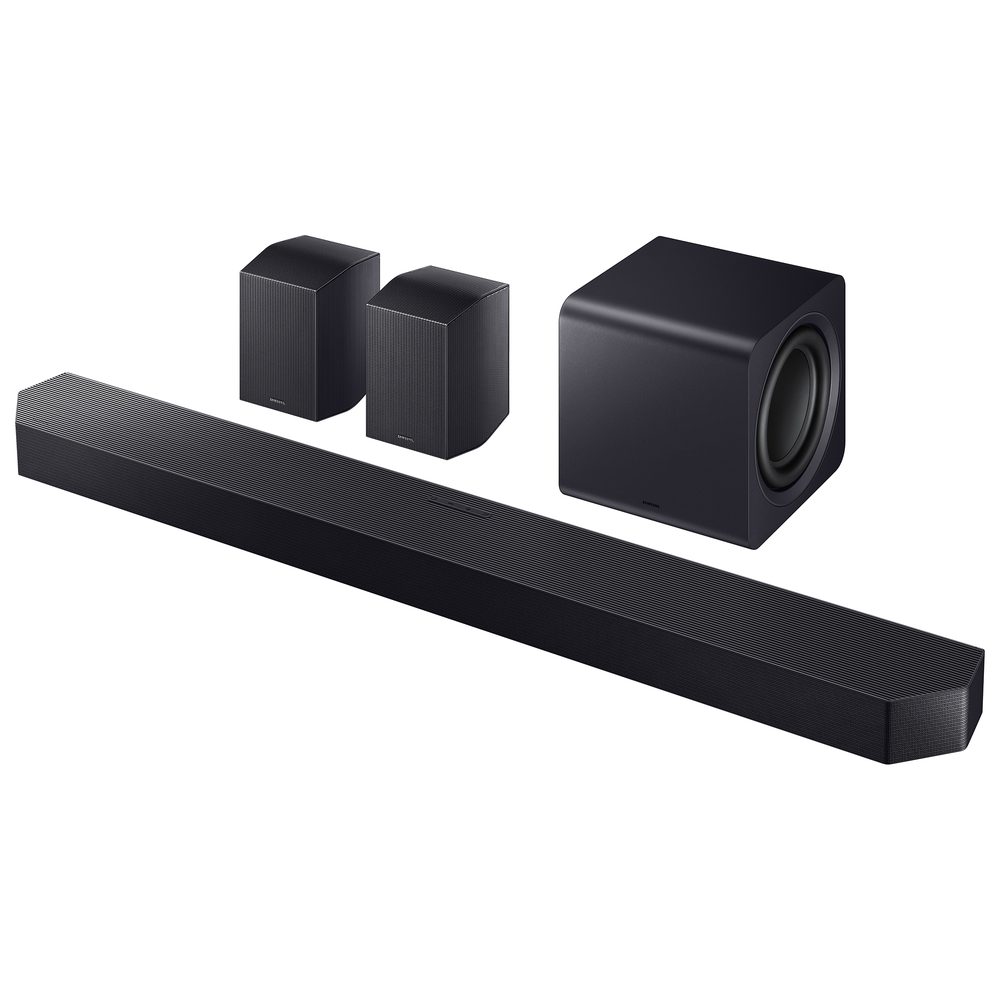
Samsung HW-Q990H
Best OverallBuy if: you play PS5 or Xbox on a living-room TV and want real surround sound without losing 4K120, VRR or ALLM
Don't buy if: you play at a desk — this kit is built for a room, not a monitor, and it needs four wall outlets
The Q990H is Samsung's 2026 flagship, and it is the current model — not the Q990F from 2025 and not the Q990D from 2024 that most roundups still crown. It is a true 11.1.4 system: the bar, a wireless subwoofer and two wireless rear speakers with up-firing drivers, all in the box. Tom's Guide reviewed it in October 2026 and scored it 4.25 out of 5, and RTINGS lists it as the newer model in its 2026 guide.
What earns it the top spot is the signal chain. Two HDMI 2.1 inputs pass 4K120, Dolby Vision, HDR10+ and VRR, so a PS5 or Xbox routed through the bar keeps every feature — the thing most bars in this price range quietly break. Game Mode Pro keeps latency low, and SpaceFit Sound Pro now works on non-Samsung TVs too, so the room calibration is no longer locked to Samsung's own sets.
The honest costs: this is a big, expensive kit. Four wall outlets in total — bar, sub, and one per rear — and the rears need somewhere to sit behind you. At $1,997 list it is the priciest bar here, though Best Buy has it at $1,499.99 right now, which is $100 less than the older Q990F costs there. The Q990F is still a fine bar and has repeatedly sold near $999.99 — watch for that price if the Q990H is out of reach — but it is last year's model, and Samsung's own US store shows conflicting availability for it.
Pros
- True 11.1.4 with real rear speakers and up-firing drivers — the most convincing Atmos here
- Two HDMI 2.1 inputs pass 4K120, VRR, ALLM, Dolby Vision and HDR10+
- Game Mode Pro keeps latency low; SpaceFit Sound Pro now works on non-Samsung TVs
- Current 2026 model, in stock — and $100 cheaper at Best Buy than the older Q990F
Cons
- $1,997 list is the highest price in this guide
- Four wall outlets needed for the full kit — plan the room before you buy
- Too big and too room-shaped for a desk setup
- Rear speakers need stands or shelves behind the sofa
List price $1,997 — $1,499.99 at Best Buy on 14 November 2026. Check the price before buying, as prices change.
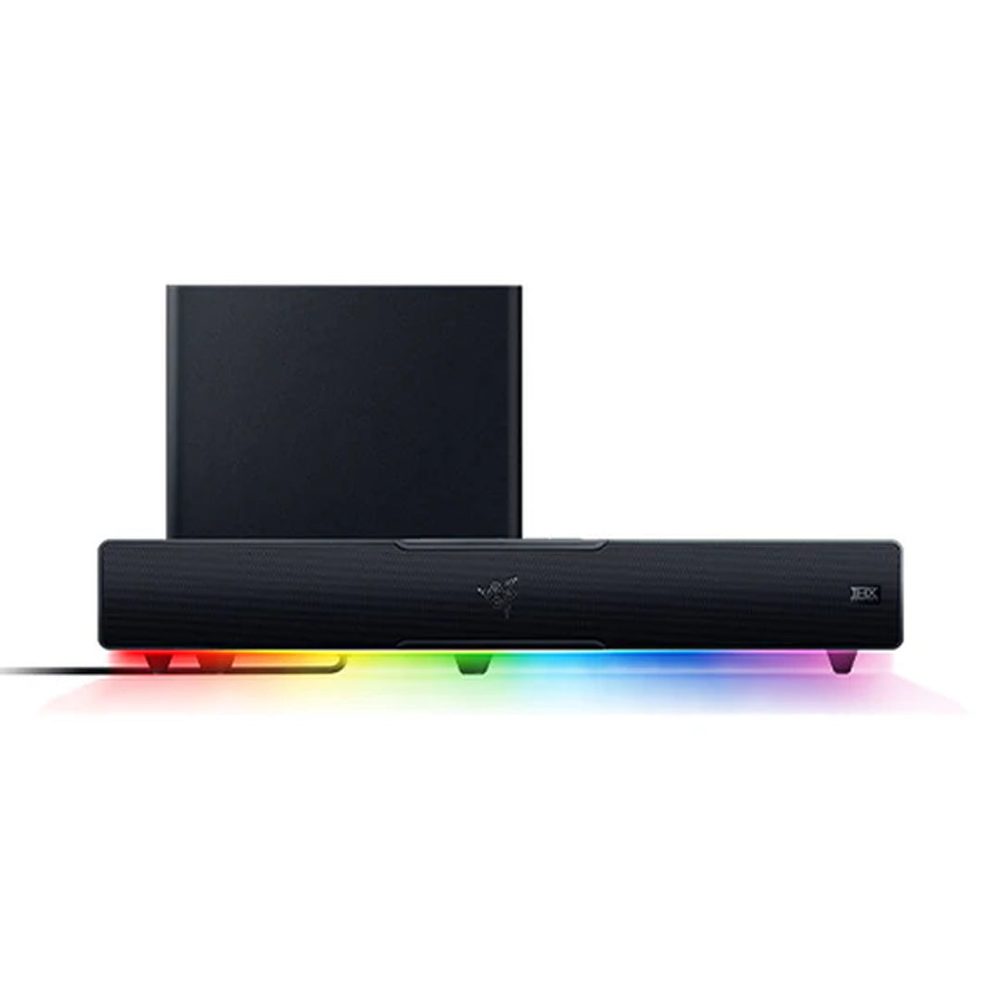
Razer Leviathan V2
Best PC SoundbarBuy if: you play on PC at a desk and want a bar with a real subwoofer that fits under a monitor
Don't buy if: you need it for a TV or console — it has no HDMI input and cannot connect to one
The Leviathan V2 is the desk bar to buy, and the name trap is the first thing to get right: this is the $249.99 V2 with a down-firing subwoofer, THX Spatial Audio and Chroma RGB — not the $99.99 V2 X, which has no subwoofer and no optical input, and not the V2 Pro, which is out of stock at $499.99 on Razer's US store and should not be treated as a current buy.
What makes the V2 the pick is its connections. It is the only Leviathan with an optical input, alongside USB-C, Bluetooth 5.2 and a 3.5mm AUX — so it takes a PC over USB, a console's optical output, or a phone over Bluetooth, all in a 500mm bar that fits under most monitors. The multi-driver bar plus sub gives it bass the V2 X simply does not have, and THX Spatial Audio does a convincing job of widening the soundstage for a 2.1 system.
The honest limits: this is a PC-only bar. No HDMI means no TV and no direct console connection, and the virtual surround is beamforming, not real height channels — do not compare its "5.1" to the Q990H's true 11.1.4. It is also a 2.1 system, so positional audio is good for a desk but never as precise as a headset in ranked play.
Pros
- Only Leviathan with an optical input — USB-C, Bluetooth 5.2 and AUX as well
- Down-firing subwoofer gives it real bass the V2 X lacks
- THX Spatial Audio and Chroma RGB are genuinely useful, not just decoration
- 500mm wide — fits under most monitors without crowding the desk
Cons
- PC-only: no HDMI input, so no TV or direct console connection
- Virtual surround, not real height channels — the numbers are not equivalent to 11.1.4
- No head-tracking like the V2 Pro — but the Pro is out of stock anyway
- 2.1 positional audio will not match a headset for competitive play
List price $249.99. Check the price before buying, as prices change.
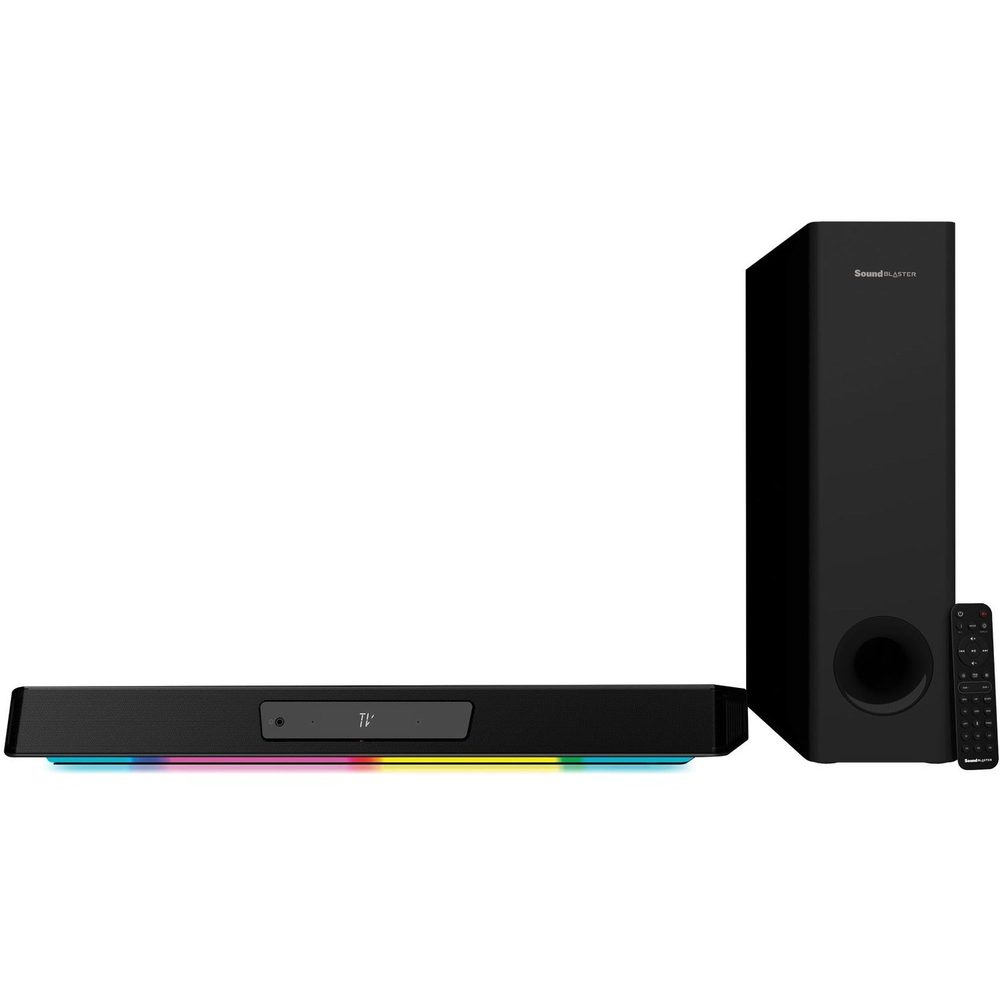
Creative Sound Blaster Katana V2X
Best Console-Compatible Desk BarBuy if: you play PC and console at the same desk and want one bar that takes both
Don't buy if: you want lossless Atmos — its HDMI is ARC, not eARC, and it cannot receive it
The Katana V2X is the only desk bar in this guide that takes a console. Its 600mm bar and compact sub — 40% smaller than the original Katana V2's — connect over HDMI ARC, optical, USB-C, AUX and Bluetooth 5.0, so a PS5 or Xbox can plug into the TV and send audio back over ARC, while the PC uses USB-C. No other desk bar here does that.
The model trap matters: the V2X is not the V2. The V2 is the bigger, louder one — 252W peak with a large standalone sub — while the V2X is 90W RMS / 180W peak with the compact sub. The V2X trades raw power for inputs and size, and for a desk that is the right trade. Super X-Fi and Scout Mode are the gaming features: Scout Mode lifts footsteps and reload sounds above the mix, which is genuinely useful in shooters.
The honest limits: the HDMI port is ARC, not eARC, so it cannot receive lossless Atmos — Dolby Audio comes through HDMI ARC or optical only, and the 5.1 is virtual, not real channels. Creative's own page lists no price; the $323.99 figure is the verified Best Buy street price, not a list price.
Pros
- The only desk bar here that takes a console — HDMI ARC plus optical, USB-C, AUX and Bluetooth 5.0
- Compact sub fits under a desk where the V2's large sub does not
- Scout Mode genuinely lifts footsteps and reload cues in shooters
- 600mm bar with RGB underglow — sized for a monitor, not a TV
Cons
- HDMI ARC, not eARC — no lossless Atmos, and no 4K120 passthrough at all
- 90W RMS is quieter than the Katana V2's 126W RMS — this is the smaller, not the louder, Katana
- 5.1 is virtual, not real channels
- No list price from Creative — $323.99 is a retailer street price
Street price $323.99 at Best Buy on 14 November 2026 (Creative lists no price). Check the price before buying, as prices change.
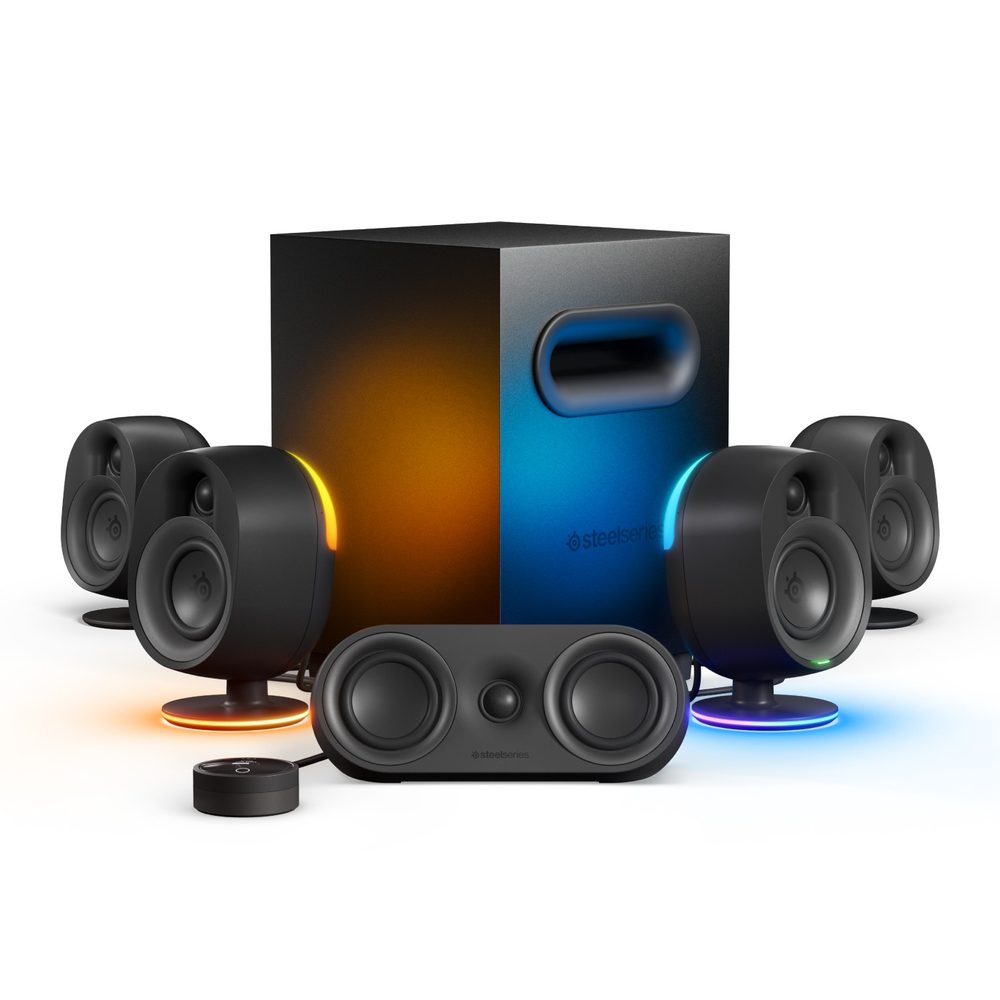
SteelSeries Arena 9
Best True 5.1 PC SetupBuy if: you want real surround sound at your PC and you have the desk and floor space for five speakers and a sub
Don't buy if: you play on console or TV — it is USB-only and has no HDMI, optical, or console support
The Arena 9 is the only true 5.1 desktop system in this guide — and the only one where "5.1" means what it says. Two front speakers, a centre channel, two wireless rear speakers and a 6.5-inch subwoofer, all over a single USB connection to the PC, with an OLED control puck for volume, EQ and mute. Tom's Guide calls it "as good as gaming speakers get", and the reason is simple: real speakers behind you beat beamforming every time.
The tier trap matters: Arena is three products, not one. The Arena 3 is a 2.0 stereo pair and the Arena 7 is a 2.1 system with a sub — neither has rear speakers, and neither is this pick. Only the Arena 9 at $549.99 has the rears and the centre channel, so never print Arena 9 specs against the 7 or the 3.
The honest limits: it is PC-only, full stop. No HDMI, no optical, no console support — a PS5 or Xbox cannot use it. It is also bulky and cable-heavy for a desk: five speakers, a sub, and rear speakers that still need wall power. If your desk is small, the Leviathan V2 is the better buy.
Pros
- True 5.1 with real rear speakers and a centre channel — the only desk system here that is not virtual
- Single USB connection to the PC — no receiver, no extra boxes
- OLED control puck puts volume, EQ and mute at your fingertips
- Reactive PrismSync RGB ties the speakers into the rest of a SteelSeries setup
Cons
- PC-only: no HDMI, no optical, no console support at all
- Bulky and cable-heavy — five speakers plus a sub need real desk and floor space
- Wireless rears still need wall power, like every "wireless" rear
- $549.99 is a lot for a desk setup — the Leviathan V2 is half the price
List price $549.99. Check the price before buying, as prices change.
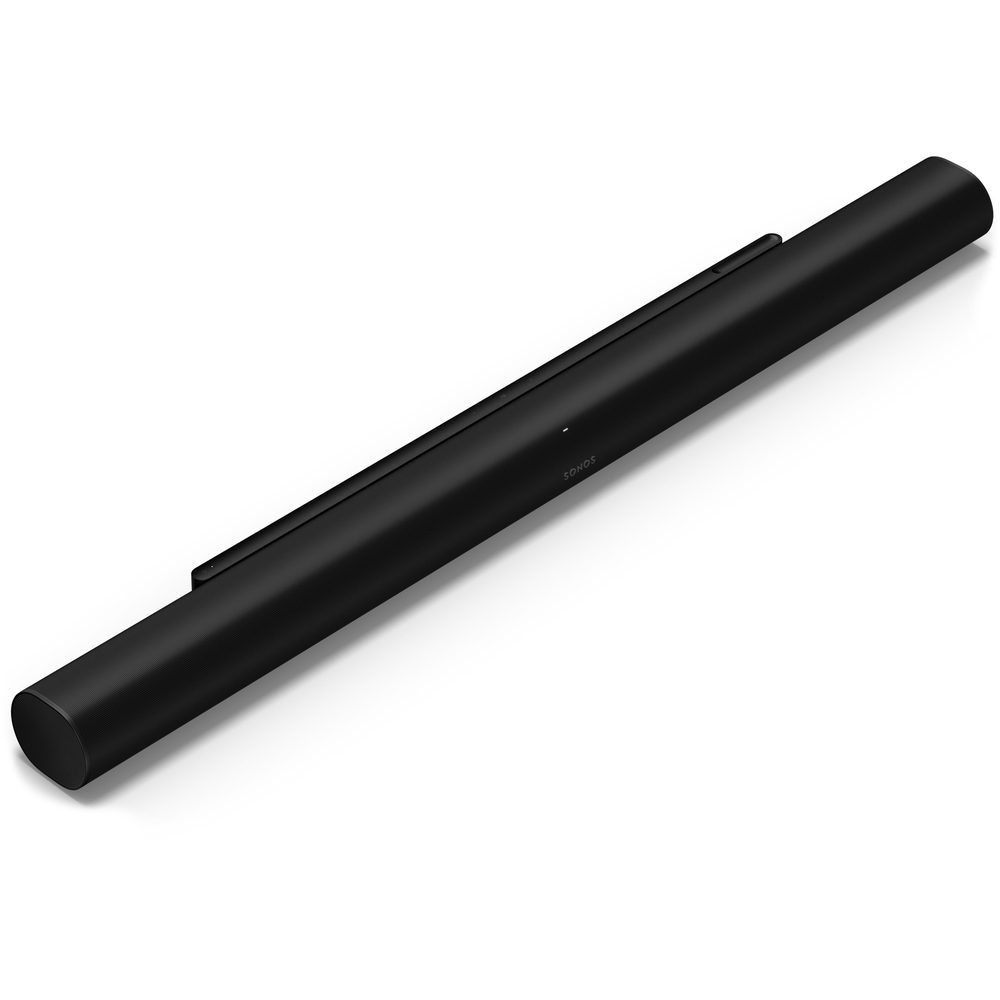
Sonos Arc Ultra
Best Premium Single BarBuy if: you want the best single-bar sound for films and story games, and you already live in the Sonos ecosystem
Don't buy if: you need an HDMI input for your console, or you want a subwoofer in the box — this bar has neither
The Arc Ultra is the best standalone Atmos bar you can buy, and Tom's Guide names it the best overall soundbar in its 2026 roundup. Fourteen drivers and Sonos's new Sound Motion woofer squeeze a 9.1.4 soundstage out of a single bar — no sub, no rears, nothing else in the box. For films and story-driven games, the dialogue clarity and the width of the soundstage are the best of any single bar here.
The price moved since launch: it arrived at $999 in October 2024 and now lists at $1,099. It is also the most connection-limited bar in this guide — HDMI eARC only, with no HDMI input at all. Your console must plug into the TV, and the TV must have an eARC port. If your TV is older and ARC-only, the Arc Ultra cannot receive lossless Atmos from it.
The honest trade-off: at $1,099 it overlaps the Q990H, which costs $400 more at Best Buy but includes a sub and real rears. The Arc Ultra's case is simplicity and the Sonos ecosystem — one bar, one cable, whole-home audio — not value. And if you want bass, you add a Sub 4 later; there is no subwoofer in this box.
Pros
- Best single-bar sound here — 14 drivers, Sound Motion woofer, genuine 9.1.4 width
- One bar, one cable — the simplest setup in this guide
- Sonos ecosystem: whole-home audio, Trueplay tuning, easy expansion with Era speakers
- Dialogue clarity is the best of any bar here for story games and films
Cons
- No HDMI input at all — console must go to the TV, and the TV must have eARC
- No subwoofer in the box — bass is good for a bar, but it is not a sub
- $1,099 list is a price rise from the $999 launch price
- Beamforming Atmos, not real rears — the Q990H's true 11.1.4 is more convincing for the money
List price $1,099 (launched at $999). Check the price before buying, as prices change.
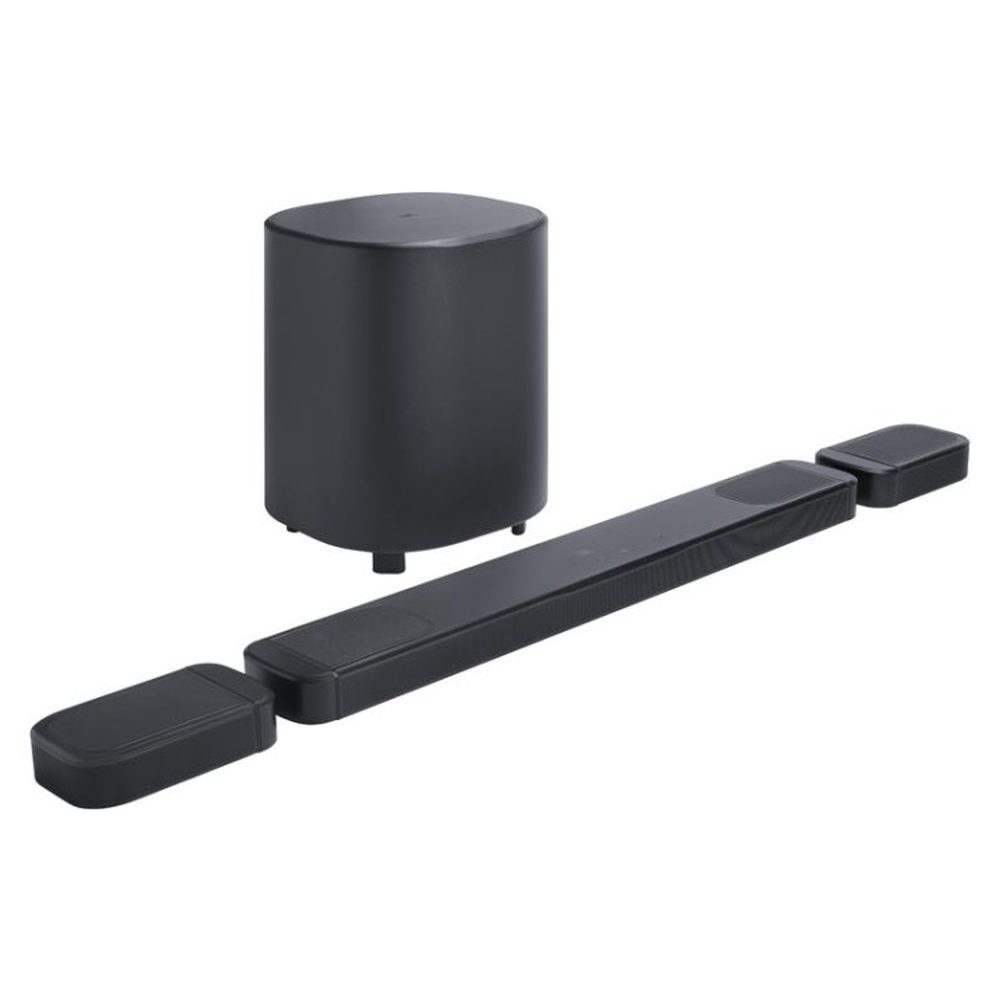
JBL Bar 1000 MK2
Best Detachable SurroundBuy if: you want real rear speakers that detach and recharge, and your console goes direct to the TV over eARC
Don't buy if: you route your console through the soundbar — its HDMI passthrough caps at 4K/60, and your 120Hz games lose their frame rate
The Bar 1000 MK2 has the cleverest trick in this guide: two battery-powered wireless speakers that dock onto the ends of the bar for charging, then detach and sit behind you as real rear speakers. It is a 7.1.4 system with a 10-inch sub and 960W of power, and RTINGS names it the best mid-range soundbar of 2026. At $1,199.95 it undercuts the Q990H by $300 at Best Buy while still giving you real rears.
But the passthrough trap is printed on this card for a reason. Both RTINGS and Tom's Guide confirm the HDMI passthrough tops out at 4K/60Hz — not 4K/120Hz. If you route a PS5 or Xbox through this bar, your 120Hz games drop to 60Hz. The fix is simple and costs nothing: plug the console into the TV and connect the bar over eARC. Just never buy this bar expecting a clean 4K120 chain through it.
Two more honest notes: the detachable satellites lag the bar slightly on Atmos content, per RTINGS latency testing, and the step-up Bar 1300X MK2 at $1,700 shares the same 4K/60 cap — paying more does not fix it.
Pros
- Detachable battery-powered rears are genuinely clever — dock to charge, place behind you to play
- True 7.1.4 with a 10-inch sub — real rears, not beamforming
- $1,199.95 undercuts the Q990H by $300 at Best Buy for a similar living-room setup
- RTINGS best mid-range soundbar of 2026
Cons
- HDMI passthrough caps at 4K/60 — routing a console through it kills 120Hz gaming
- Detachable satellites lag the bar slightly on Atmos content
- The $1,700 Bar 1300X MK2 shares the same 4K/60 cap — more money does not fix it
- Detachable rears need charging — forget to dock them and you have no surround
List price $1,199.95. Check the price before buying, as prices change.
Should I Plug My PS5 Into the Soundbar or the TV?
Into the TV — for most setups, that is the right answer. Plug the PS5 or Xbox into the TV's HDMI 2.1 port, then connect the soundbar to the TV's HDMI eARC port. The console keeps its direct 4K120, VRR and ALLM connection to the TV, and the TV sends full-quality audio back to the bar over eARC.
The only reason to plug the console into the soundbar instead is if your TV has no eARC port, or if the bar is the only device with an HDMI 2.1 input. And that is exactly where the trap bites: routing through the bar only works if the bar passes 4K120, VRR and ALLM. The Samsung HW-Q990H does. The Sony Bravia Theatre Bar 9 does. The JBL Bar 1000 MK2 does not — it caps at 4K/60, so a console routed through it loses 120Hz. Sonos bars have no HDMI input at all, so the question answers itself: console to the TV, bar to eARC.
Check one thing before you decide: your TV must actually have an eARC port. Any TV with an HDMI 2.1 port has eARC; older ARC-only TVs cap the audio at compressed formats. If your TV is ARC-only, routing through a bar with 4K120 passthrough is the better route — which is another reason the Q990H earns the top pick.
Does a Soundbar Add Input Lag When Gaming?
No — a soundbar does not add input lag to the picture. It adds audio delay, which is a different thing, and the two get confused constantly. Input lag is the delay between your controller and the screen; a soundbar sits in the audio chain, not the video chain, so it cannot slow your display. What it can do is make the sound arrive late.
How late depends on the connection. Bluetooth adds roughly 40–80ms of delay in measured tests — enough to feel in any game where sound cues matter, which is why no competitive setup should run on Bluetooth. Wired connections are a different story: HDMI eARC, HDMI direct, optical and USB are all near-instant, and Samsung's Game Mode Pro on the Q990H measured under 18ms in one test.
If your audio is out of sync, the cause is usually processing, not the connection. Room correction, upmixing and virtual-surround modes typically add 15–40ms. Switch the bar to its game mode, turn off upmixing and room correction for gaming, and send PCM rather than bitstream from the console if the delay persists.
Is a Soundbar Good for Gaming, or Should I Buy a Headset?
Both — for different games. A headset wins ranked, competitive play: footsteps, reloads and direction are more precise in your ears than in any room, and nobody else hears your game at 2am. A soundbar wins everything else: story games, open worlds, co-op on the couch, and any game where bass and scale matter more than pinpoint footsteps.
The honest split: if you mostly play competitive shooters, buy a headset first — our best gaming headset guide ranks six picks by platform and grip — and treat a soundbar as the upgrade for everything else. If you mostly play single-player games, a soundbar is the better first buy, because it makes every game feel bigger in a way no headset can. And if you play both, the two are not rivals: the headset is for ranked nights, the soundbar is for the rest of the week.
One practical note: a soundbar is a shared device and a headset is a private one. If you share a room, a headset is the polite choice. If you have the room to yourself, a soundbar is the more comfortable one — no weight on your head, no sweaty ears, no battery to charge.
Can You Use a Soundbar With a Gaming Monitor?
Yes — but not the way you would with a TV, because most gaming monitors have no eARC port and many have no audio output at all. A monitor's HDMI port takes video in; it does not send audio back out to a soundbar. So the audio has to route around the monitor, not through it.
For a PC, the route is simple: USB or optical straight from the PC to the bar. The Leviathan V2 takes USB-C, the Katana V2X takes USB-C or optical, and the Arena 9 takes a single USB cable. For a console on a monitor, the route depends on the bar: if it has an HDMI input, the console plugs into the bar — but check the passthrough first, because a 4K/60 cap costs you 120Hz. If the bar has no HDMI input, use an HDMI audio extractor between the console and the monitor, and verify the extractor passes 4K120, VRR and HDCP before buying, because cheap ones do not.
The desk bars in this guide are built for exactly this problem. The TV bars are not: a Q990H or an Arc Ultra on a monitor is the wrong purchase, because neither can take the monitor's audio in the first place.
Is Dolby Atmos on a Soundbar Real or Just Marketing?
Real — but only when the bar has the hardware to back the label. True Atmos needs height: either real up-firing speakers bouncing sound off your ceiling, or real rear speakers with up-firing drivers. The Samsung Q990H has both, which is why its 11.1.4 is a real channel count. The JBL Bar 1000 MK2 has real rears too, so its 7.1.4 is real as well.
Virtual Atmos is the marketing version. A single bar with no height drivers and no rears cannot put sound above you — it can only widen the soundstage and call the result "Atmos". The Sonos Arc Ultra does this better than anyone, with 14 drivers and beamforming, and in a room with an 8–10 foot ceiling it genuinely sounds spacious. But it is not the same as the Q990H's real rears, and the numbers should never be compared as if they were.
The desk bars are further down the same scale. The Leviathan V2's THX Spatial Audio and the Katana V2X's Super X-Fi are virtual surround, not Atmos at all — useful for widening a 2.1 soundstage, but not height channels. Buy them for what they are, not for the numbers on the box.
The Exact-Model Trap Decoder
Three names in this market each hide two or three different soundbars. Check the model, the inputs, and the passthrough on the listing — the name alone will not save you.
HDMI passthrough: what each bar actually passes
| Bar | Console Through the Bar | What to Do Instead |
|---|---|---|
| Samsung HW-Q990H | Passes 4K120, VRR, ALLM, Dolby Vision, HDR10+ | Route through the bar or direct to TV — both work |
| Sony Bravia Theatre Bar 9 | Passes 4K120 (measured 9ms in passthrough) | Route through the bar or direct to TV — both work |
| JBL Bar 1000 MK2 | Caps at 4K/60 — 120Hz games drop to 60Hz | Console direct to TV, bar over eARC |
| Sonos Arc Ultra / Beam Gen 2 | No HDMI input at all | Console direct to TV, bar over eARC — the only option |
| Creative Katana V2X | HDMI ARC only — no passthrough, no eARC | Console to TV, audio back over ARC; no lossless Atmos |
| Razer Leviathan V2 / SteelSeries Arena 9 | No HDMI at all — PC desk bars | PC over USB or optical; not for consoles |
PC bar vs TV bar: which is which
| Name on the Box | What It Actually Is |
|---|---|
| Razer Leviathan V2 / V2 X / V2 Pro | PC desk bars. No HDMI input — they cannot connect to a TV or console. The V2 is the pick ($249.99, optical + sub); the V2 X is the budget bar ($99.99, no sub); the V2 Pro is out of stock in the US ($499.99). |
| Creative Katana V2 / V2X / SE | Desk bars. V2 is the loud one (252W, large sub); V2X is the connected one (HDMI ARC, most inputs); SE has no subwoofer at all. Only the V2X takes a console. |
| SteelSeries Arena 3 / 7 / 9 | PC-only USB speaker systems. Arena 3 is 2.0, Arena 7 is 2.1, only the Arena 9 ($549.99) is true 5.1 with rears and a centre channel. |
| Samsung Q990D / Q990F / Q990H | Living-room flagships by year: Q990D is 2024, Q990F is 2025, Q990H is 2026. The Q990H is the current model and the pick; rivals still crowning the Q990D are a year behind. |
| Sony HT-A7000 / Bravia Theatre Bar 9 | The HT-A7000 is the 2021 model rivals still crown. The Bar 9 ($1,499.99) is its successor in spirit, with 4K/120 passthrough — the honest 2026 Sony pick. |
Buying Guide: What Actually Matters
Decide the room first. Living room or desk is the whole decision. A TV bar on a desk is the wrong purchase — it has no way to take the monitor's audio — and a desk bar in a living room is too small, too quiet, and has no HDMI input for the console. Pick the room, then pick the bar.
Check the passthrough before you check the price. If your console routes through the bar, the bar must pass 4K120, VRR and ALLM, or those features break. The Q990H and the Bar 9 pass. The JBL MK2 line caps at 4K/60. Sonos has no input at all. If the bar fails this test, the fix is free — console direct to the TV, bar over eARC — but only if your TV has an eARC port.
Count the channels honestly. Real rears and real up-firing drivers are true Atmos. Beamforming from a single bar is virtual Atmos. THX Spatial Audio and Super X-Fi are virtual surround, not Atmos at all. Never compare a virtual number against a true one.
Count the outlets. "Wireless" rears and subs still need wall power. The Q990H kit needs four outlets in total. The Arena 9's rears need power too. Plan the room before the bar arrives.
Never buy on Bluetooth. Bluetooth adds roughly 40–80ms of delay, which is enough to feel in any game where sound cues matter. Wired is the only gaming connection: HDMI eARC, HDMI direct, optical, or USB.
Budget mentions worth knowing. The Razer Leviathan V2 X at $99.99 list ($79.99 at Best Buy until 15 November) is the cheapest real gaming bar — USB-C and Bluetooth only, no sub, but a genuine desk upgrade over monitor speakers. Samsung's HW-Q800H at $1,099.99 list ($699.99 at Best Buy) is the 5.1.2 living-room alternative that still passes VRR, HDR and ALLM. And Sonos's new Beam Ultra, launched 29 September 2026 at $699, is the compact Sonos that finally adds real up-firing drivers — worth a look if the Arc Ultra is too big or too dear.
Frequently Asked Questions
What is the difference between eARC and regular ARC?
eARC carries lossless audio — Dolby TrueHD, DTS-HD Master Audio, and Dolby Atmos in TrueHD — at far higher bandwidth than ARC, which is limited to compressed formats like Dolby Digital and lossy Atmos. For gaming, eARC is what lets a console plugged into the TV send full-quality Atmos to the bar. Any TV with an HDMI 2.1 port has eARC; older ARC-only TVs cap the audio.
Do I need a subwoofer with a gaming soundbar?
For story-driven and open-world games, yes — a sub is where explosions, engine rumble and low-frequency ambience live, and no bar alone moves that much air. For competitive shooters, no — footsteps and callouts sit in the mids and highs, and a sub adds nothing to hearing them. Every pick in this guide except the Arc Ultra ships with a sub; the Arc Ultra is the only card here where you add a sub later if you want one.
Are wireless rear speakers really wireless?
No. Wireless means no audio cable back to the bar — each rear speaker and the sub still needs its own wall outlet. The Samsung Q990H kit needs four outlets in total: one for the bar, one for the sub, one for each rear. Plan the outlets before you buy, not after.
Why is my soundbar audio out of sync with the game?
Processing adds delay: room correction, upmixing and virtual-surround modes typically add 15–40ms. Switch the bar to its game mode, turn off upmixing and room correction for gaming, and send PCM (not bitstream) from the console if the delay persists. If you use Bluetooth, that is the delay — Bluetooth adds roughly 40–80ms, which is why no competitive setup should run on it.
Can you connect a soundbar to a monitor with no audio output?
Yes, but not through the monitor. Route the audio around it: PC to the bar over USB or optical, console to the bar over HDMI if it has an input, or use an HDMI audio extractor between the console and the monitor — and verify the extractor passes 4K120, VRR and HDCP before buying, because cheap ones do not.
Does Bluetooth add delay for gaming?
Yes — roughly 40–80ms in measured tests, which is enough to feel in any game where sound cues matter. Use a wired connection for gaming: HDMI eARC, HDMI direct, optical, or USB. Bluetooth is fine for music and films; it is the wrong connection for play.
Is the Razer Leviathan V2 Pro still available?
Barely, in the US. Razer lists it out of stock at $499.99 on its US store (checked 14 November 2026), while Razer's Canadian store still shows it in stock. Do not pay a scalper price for it, and do not treat it as a current buy — the Leviathan V2 at $249.99 is the pick, and the Pro's head-tracking only works for one listener sitting 0.3–1.5m from the camera anyway.