Best Gaming Keyboard and Mouse for PS4: 6 Picks That Actually Work in 2026
For shooters and strategy games, a mouse and keyboard can offer noticeably better aiming than a gamepad. But first, the honest truth: the PS4 accepts USB keyboards and mice, yet only a handful of games implement full keyboard-and-mouse gameplay. Titles like Fortnite, War Thunder, and certain Call of Duty releases let you plug in and play; many others use a keyboard only for menus and text chat.
So there are two routes. The first is native support: connect a good wired or wireless keyboard and mouse to the PS4's USB ports and use them in the games that support them. The second is an adapter — a device like the XIM MATRIX or GameSir VX2 that translates your keyboard and mouse inputs into controller signals, so they work in any PS4 game. Adapters are powerful but need setup, and using keyboard and mouse in competitive multiplayer via an adapter may violate some games' terms of service.
Below are six current options sold on Amazon in 2026: budget combos, a wireless keyboard, a top-tier gaming mouse, a couch-friendly keypad bundle, and two adapters. Prices change constantly, so check the current price on Amazon before you buy.
The Best Keyboard and Mouse Options for PS4 in 2026
Our Top Pick
Redragon S101 Gaming Keyboard and Mouse Combo
Best Budget Combo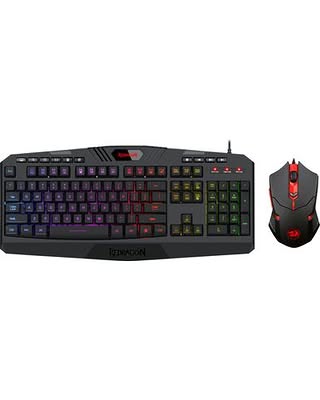
The Redragon S101 has been a go-to budget pick for years, and based on specifications and owner feedback it remains one of the simplest ways to get keyboard and mouse working on a PS4 in 2026. Everything is plug-and-play…
Check Price on AmazonQuick Comparison
| Product | Key Specs | ||
|---|---|---|---|
| #1 | Redragon S101 Gaming Keyboard and Mouse ComboBest Budget Combo | Wired USB connection (keyboard and mouse) · 104-key keyboard with RGB backlighting and wrist rest · 3200 DPI gaming mouse with 6 buttons and adjustable weights | Check Price |
| #2 | KLIM Chroma Wireless Gaming KeyboardBest Wireless Keyboard | 2.4 GHz wireless connection via USB receiver · RGB backlit, slim low-profile keys · Rechargeable battery with long standby time | Check Price |
| #3 | Razer DeathAdder V3 WiredBest Premium Gaming Mouse | Razer Focus Pro 30K optical sensor · Ultra-lightweight 59 g ergonomic design · Razer Optical Mouse Switches Gen-3 (90-million-click rated) | Check Price |
| #4 | GameSir VX2 AimSwitchBest Couch-Friendly Keypad and Mouse Bundle | 36-key keypad, gaming mouse, and console adapter included · TTC Red mechanical switches on the keypad · Agility X 2.4 GHz receiver with up to 1000 Hz polling | Check Price |
| #5 | XIM MATRIXBest Adapter for Serious Players | Multi-input adapter: keyboard, mouse, gyro, cross-console controllers · Smart Translator precision aim system, Smart Actions macro engine · Real-time configuration via the XIM MATRIX Manager app | Check Price |
| #6 | GameSir VX2 AimBoxBest Budget Adapter (Bring Your Own Gear) | Console adapter for your own keyboard and mouse · Key mapping and mouse sensitivity via the GameSir app · 3.5 mm audio jack for headsets | Check Price |
Redragon S101 Gaming Keyboard and Mouse Combo
Best Budget ComboBuy if: you prefer true plug-and-play over wired USB with no software needed on PS4
Don't buy if: you can't live with membrane keyboard, not mechanical
The Redragon S101 has been a go-to budget pick for years, and based on specifications and owner feedback it remains one of the simplest ways to get keyboard and mouse working on a PS4 in 2026. Everything is plug-and-play: connect both USB cables and they work in any natively supported game, no software required.
The keyboard is membrane rather than mechanical — but you still get backlighting, multimedia keys, a wrist rest, and splash resistance at a price well below mechanical alternatives. The mouse adjusts up to 3200 DPI with a weight-tuning kit, plenty for casual play.
Check Price on Amazon
Pros
- True plug-and-play over wired USB with no software needed on PS4
- 25-key anti-ghosting and WIN-key lockout for gaming
- 3200 DPI mouse with 6 buttons and adjustable weight kit
- RGB backlighting, multimedia keys, wrist rest, and splash resistance
Cons
- Membrane keyboard, not mechanical
- Wired only, so cables and desk space needed
- 3200 DPI mouse ceiling is modest by modern gaming standards
Full specifications
- Wired USB connection (keyboard and mouse)
- 104-key keyboard with RGB backlighting and wrist rest
- 3200 DPI gaming mouse with 6 buttons and adjustable weights
- 25-key anti-ghosting, WIN-key lockout for gaming
Prices change frequently — click through to see today's price.
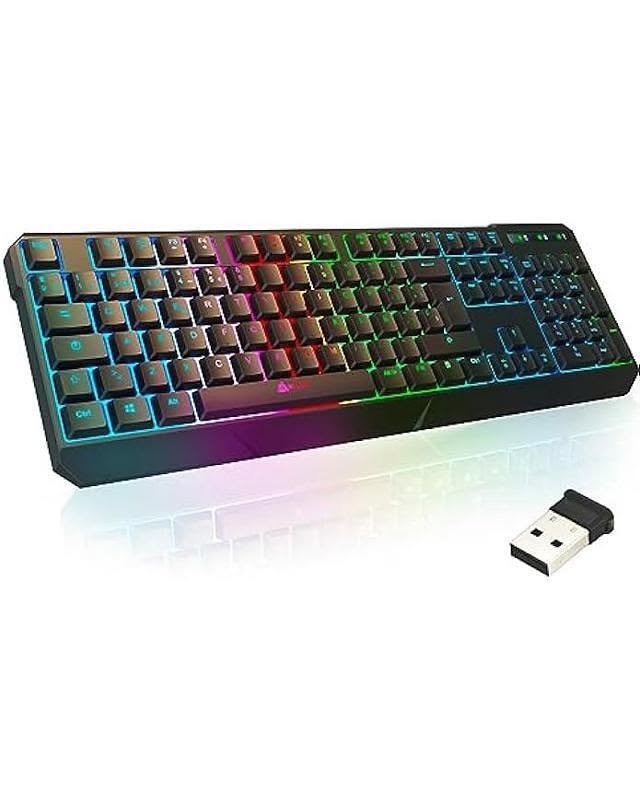
KLIM Chroma Wireless Gaming Keyboard
Best Wireless KeyboardBuy if: you want 2.4 GHz wireless via USB receiver, much lower latency than Bluetooth
Don't buy if: keyboard only, no mouse included is a dealbreaker for you
The KLIM Chroma is a well-regarded wireless keyboard listing PS4 compatibility right on the box. It uses a dedicated 2.4 GHz USB receiver rather than Bluetooth, keeping latency far lower than Bluetooth — important for gaming.
The quiet, low-profile keys suit chat-heavy games and menus as well as supported keyboard-and-mouse titles. Pair it with any USB mouse for a fully wireless setup. Wireless still cannot quite match a cable's responsiveness, so competitive players may prefer wired.
Check Price on Amazon
Pros
- 2.4 GHz wireless via USB receiver, much lower latency than Bluetooth
- Explicitly lists PS4 and PS5 compatibility
- Rechargeable battery with long standby time
- Slim low-profile keys and spill-resistant build
Cons
- Keyboard only, no mouse included
- Wireless latency still trails a wired connection for competitive play
- Low-profile keys may disappoint mechanical keyboard fans
Full specifications
- 2.4 GHz wireless connection via USB receiver
- RGB backlit, slim low-profile keys
- Rechargeable battery with long standby time
- Spill-resistant; lists PS4 and PS5 compatibility
Prices change frequently — click through to see today's price.
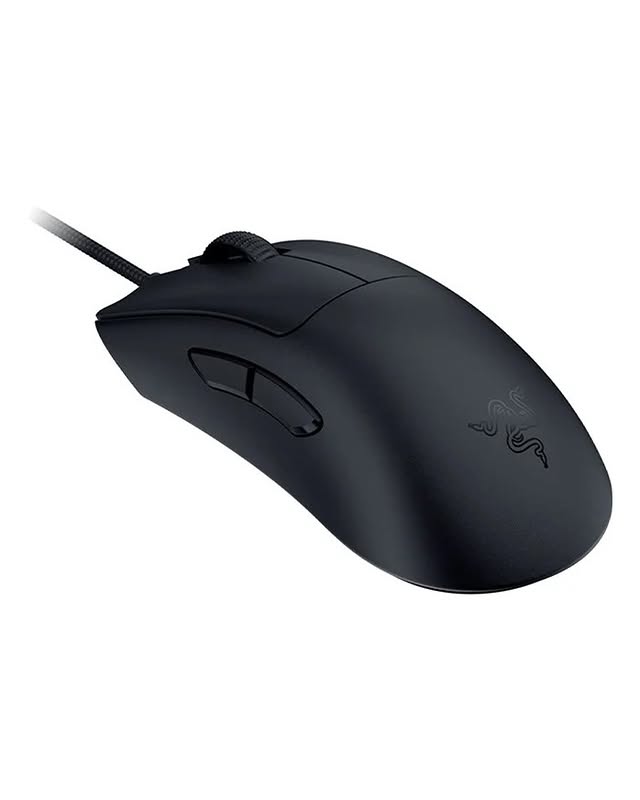
Razer DeathAdder V3 Wired
Best Premium Gaming MouseBuy if: you're after focus Pro 30K optical sensor tracks cleanly on most surfaces
Don't buy if: you won't accept Mouse only, no keyboard included
For the best aiming hardware in PS4 games that support mice natively, the DeathAdder V3 is a strong pick based on specifications and the line's track record in owner feedback. The Focus Pro 30K sensor tracks cleanly on virtually any surface, the 59-gram body reduces fatigue, and optical switches eliminate double-click failures.
On PS4 it works as a standard USB mouse — plug in and play. One caveat: Razer Synapse is PC-only, so remap buttons on a computer first; onboard-memory profiles carry over to the console.
Check Price on Amazon
Pros
- Focus Pro 30K optical sensor tracks cleanly on most surfaces
- Ultra-light 59 g ergonomic body reduces fatigue
- Optical Mouse Switches Gen-3 rated for 90 million clicks
- Onboard-memory profiles carry over to PS4
Cons
- Mouse only, no keyboard included
- Razer Synapse is PC-only, so remapping must be done on a computer first
- Premium price for a mouse that runs as a standard USB device on PS4
Full specifications
- Razer Focus Pro 30K optical sensor
- Ultra-lightweight 59 g ergonomic design
- Razer Optical Mouse Switches Gen-3 (90-million-click rated)
- Up to 8000 Hz HyperPolling; 6 programmable buttons
Prices change frequently — click through to see today's price.
GameSir VX2 AimSwitch
Best Couch-Friendly Keypad and Mouse BundleBuy if: you're looking for compact 36-key keypad — comfortable on the lap from the couch
Don't buy if: you can't live with no headphone support on the keypad, so voice chat needs a controller headset
The GameSir VX2 AimSwitch solves the couch problem: a compact 36-key keypad with linear TTC Red mechanical switches plus a dedicated gaming mouse, connected through a console adapter dongle. The keypad sits far more comfortably on your lap than a full board, and 1000 Hz wireless polling keeps response times tight.
Because it includes its own adapter, the VX2 works in games without native support — the console simply sees controller inputs. Aim translation is good for the price based on specifications and owner feedback. Note the keypad does not support headphones, so keep a headset on your controller for voice chat.
Check Price on Amazon
Pros
- Compact 36-key keypad is comfortable on the lap from the couch
- TTC Red linear mechanical switches on the keypad
- 1000 Hz polling over 2.4 GHz keeps wireless response tight
- Included adapter makes it work in games without native KB+M support
Cons
- No headphone support on the keypad, so voice chat needs a controller headset
- 36 keys limits typing for text chat versus a full keyboard
- Adapter-based input may breach some games' terms of service
Full specifications
- 36-key keypad, gaming mouse, and console adapter included
- TTC Red mechanical switches on the keypad
- Agility X 2.4 GHz receiver with up to 1000 Hz polling
- Works on PS4, PS4 Slim, and PS4 Pro
Prices change frequently — click through to see today's price.
XIM MATRIX
Best Adapter for Serious PlayersBuy if: you need per-game Smart Translator profiles for faithful mouse-to-stick conversion
Don't buy if: bring your own keyboard, mouse, and a genuine PS4 controller for authentication is a dealbreaker for you
The XIM MATRIX is widely regarded as the benchmark for keyboard-and-mouse console adapters. Its Smart Translator system is tuned per game to convert mouse movement into analog-stick input faithfully, and the companion app adjusts sensitivity, dead zones, and macros in real time. It works on PS4 with a genuine PS4 controller connected for authentication, and is also PS5-compatible.
This is enthusiast gear: expect to spend time dialing in per-game profiles, and keep firmware updated — console updates can break compatibility until XIM releases a fix.Important:using a keyboard-and-mouse adapter in competitive multiplayer may violate some games' terms of service or trigger anti-cheat measures. Check each game's policies first.
Check Price on Amazon
Pros
- Per-game Smart Translator profiles for faithful mouse-to-stick conversion
- Real-time configuration via the XIM MATRIX Manager app
- Multi-input support for keyboard, mouse, gyro, and cross-console controllers
- Firmware-upgradable and works on PS4, PS5, Xbox, and PC
Cons
- Bring your own keyboard, mouse, and a genuine PS4 controller for authentication
- Enthusiast setup time with per-game tuning and firmware upkeep
- Competitive multiplayer use may trigger anti-cheat or violate game rules
Full specifications
- Multi-input adapter: keyboard, mouse, gyro, cross-console controllers
- Smart Translator precision aim system, Smart Actions macro engine
- Real-time configuration via the XIM MATRIX Manager app
- Supports PS4, PS5, Xbox consoles, and PC; firmware upgradable
Prices change frequently — click through to see today's price.
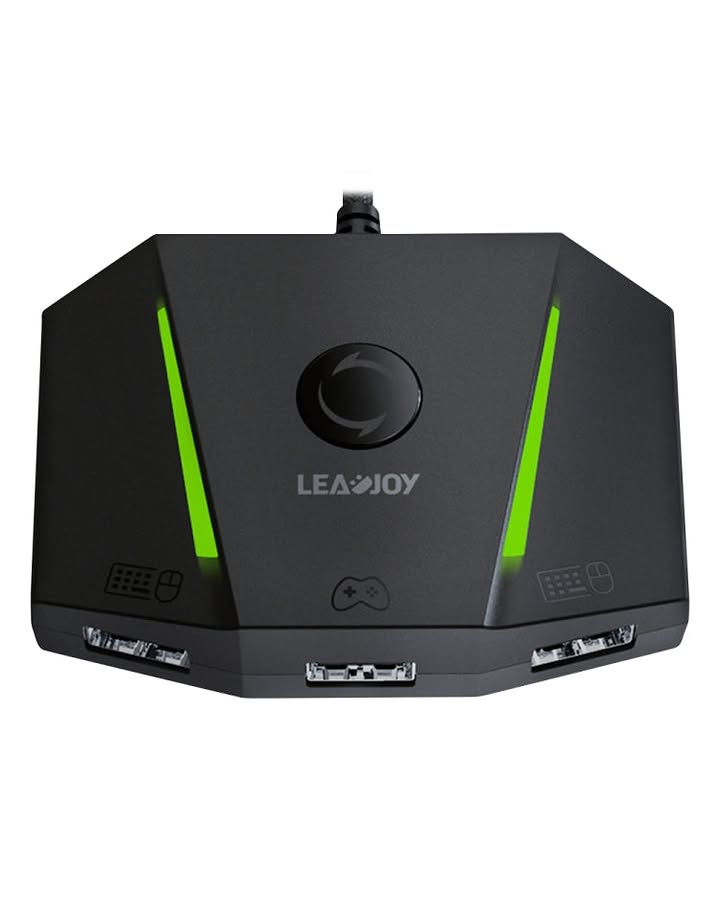
GameSir VX2 AimBox
Best Budget Adapter (Bring Your Own Gear)Buy if: you prefer a budget adapter that works with keyboard and mouse you already own
Don't buy if: you won't accept aim tuning less fine-grained than the XIM MATRIX
Already own a keyboard and mouse you like? The VX2 AimBox is the budget-friendly bridge between your gear and the console, converting your inputs into controller signals with key remapping and sensitivity tuning through GameSir's mobile app.
The standout extra is the 3.5 mm audio port, letting you plug a headset directly into the adapter. Translation quality is solid for the price based on specifications and owner feedback, though aim tuning is less fine-grained than the XIM. The same note applies: adapter-based keyboard and mouse in competitive multiplayer may breach some games' terms, so play by your game's rules.
Check Price on Amazon
Pros
- Budget adapter that works with keyboard and mouse you already own
- 3.5 mm audio jack lets you plug a headset directly into the adapter
- Key mapping and mouse sensitivity tuning via the GameSir app
- Works across PS4, PS5, Xbox, and Switch
Cons
- Aim tuning less fine-grained than the XIM MATRIX
- Wired connection only between adapter and console
- Competitive multiplayer use may breach some games' terms
Full specifications
- Console adapter for your own keyboard and mouse
- Key mapping and mouse sensitivity via the GameSir app
- 3.5 mm audio jack for headsets
- Wired connection; works with PS4, PS5, Xbox, and Switch
Prices change frequently — click through to see today's price.
Buying Guide: What to Know Before You Buy
Native support vs. adapters
If you mainly play games with built-in keyboard-and-mouse support, plug a USB keyboard and mouse into the PS4's front USB ports and you are done. Bluetooth keyboards pair through the console's settings, though Bluetooth mice are not reliably supported. If your favorite games do not support mouse input natively, an adapter is the only option — it sits between your peripherals and the console, and needs a genuine PS4 controller connected for authentication.
Wired vs. wireless latency
Wired connections give the lowest, most consistent latency. A 2.4 GHz wireless connection with a USB receiver (especially 1000 Hz polling) is fine for casual play, but Bluetooth adds noticeable input delay and is best avoided for fast-paced shooters.
Anti-ghosting and key rollover
In action games you often press several keys at once — sprinting while reloading and strafing. Anti-ghosting makes sure those simultaneous presses all register. Budget boards advertise "19-key" or "25-key" anti-ghosting; premium mechanical keyboards offer full n-key rollover. For PS4 gaming, at least partial anti-ghosting is worth having.
DPI and sensor quality
Most players game between 400 and 3200 DPI no matter how high the number on the box goes — what matters more is a clean modern optical sensor without acceleration or smoothing. Adjustable DPI steps and a couple of side buttons are genuinely useful on console.
Playing from the couch
A full-size keyboard and mouse are built for a desk. From the couch, a compact tenkeyless or 60% keyboard — or a one-handed gaming keypad like the GameSir VX2 — is far more practical.
Frequently Asked Questions
Does the PS4 support keyboard and mouse natively?
Yes, partially. The PS4 recognizes USB keyboards and mice (and Bluetooth keyboards) at the system level — keyboards work broadly for text input and menus. Full in-game mouse support depends on each game: only titles that implement it (Fortnite, War Thunder, certain Call of Duty releases) let you aim and play with a mouse directly.
Can I get banned for using a keyboard and mouse adapter on PS4?
Sony has not issued console-wide bans for adapter hardware itself, but publishers differ. Some games' anti-cheat systems detect or restrict unapproved input devices, and KB+M in ranked or competitive modes is widely considered unfair play. For single-player or casual modes, adapters are generally unproblematic; for competitive play, research each game's current policy first.
Do I need to install drivers or software on my PS4?
No. The PS4 does not run PC configuration software. Keyboards, mice, and combos like the Redragon S101 work as standard USB devices with no drivers. For premium gear with PC software (such as Razer Synapse), configure profiles on a computer first — settings saved to onboard memory carry over to the console.
Should I buy wired or wireless for PS4 gaming?
Wired is the safest choice: zero batteries, zero interference, lowest latency. If you prefer wireless, choose a 2.4 GHz gaming-grade connection with a USB receiver rather than Bluetooth, which adds noticeable input delay.
Conclusion
Your ideal setup depends on what you play. For games with native keyboard-and-mouse support, a plug-and-play option like the Redragon S101 combo, the wireless KLIM Chroma keyboard, or the premium Razer DeathAdder V3 mouse is all you need. For games without native support, an adapter is the answer: the GameSir VX2 AimSwitch is the most convenient all-in-one bundle, the GameSir VX2 AimBox is the budget route for gear you already own, and the XIM MATRIX is the enthusiast choice with the best aim translation.
Keep the two honest caveats in mind: native mouse support on PS4 is game-dependent, and adapter use in competitive multiplayer may breach some games' rules. Once your controls are sorted, consider expanding your setup — see our guides to USB storage for PS4, the best gaming monitors for PS5, or the best gaming PCs under $1,000.