Google Nest Cam (Battery) Review: Best Self-Monitored Home Security System 2026
The monthly monitoring bill is the part that stings. You have priced plans at $20–$40 a month, checked the contract terms, and wondered why a camera alert needs a call centre in the middle.
That is the frustration self-monitoring answers. The camera watches, your phone gets the alert, and you decide what matters.
A self-monitored home security system is defined as a security setup that alerts the homeowner directly instead of sending events to a professional monitoring centre. It suits people who want camera alerts without a monthly monitoring contract.
Look — if you're renting or you hate contracts, here's what actually works. Start with alerts you will actually read. You don't need a siren first, you won't watch a feed all day, and you can't act on alerts your phone buries.
This is a single-product review, not a roundup, because the Nest Cam (battery) covers what most self-monitoring shoppers actually need. Based on specifications and professional reviews, here's what it does well, where it falls short, and whether the optional Nest Aware subscription is worth it.
Choosing a self-monitored security camera without a subscription starts with useful alerts, because motion pings alone quickly become noise you ignore. According to Google, the Nest Cam (battery) recognises people, animals, and vehicles on the device, so alerts name what the camera saw without requiring Nest Aware for those smart notifications at home.
Installing a wire-free security camera indoors or outdoors depends on placement and weather rating, because a camera under eaves faces different rain and temperature than one in a hallway. According to the specifications listed here, the Nest Cam (battery) is rated IP54 and operates from -4°F to 104°F, with a magnetic mount for tool-light mounting.
Needing 24/7 recording from a battery security camera changes the buying decision, because continuous recording needs mains power rather than motion-triggered battery events. On battery, the Nest Cam records events and stores up to one hour locally during Wi-Fi outages. That suits alert-first monitoring, but it does not replace continuous recording for evidence after an incident.
Our Top Pick
Google Nest Cam (Battery)
Best Self-Monitored Security Camera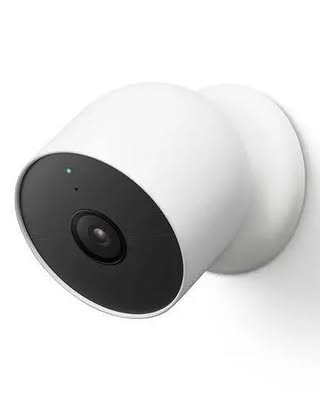
The Nest Cam (battery) earns its place because of one thing competitors usually charge for: intelligence. On-device processing recognizes people, animals, and vehicles, so you get meaningful alerts ("person seen at front…
Check Price on AmazonGoogle Nest Cam (Battery)
Best Self-Monitored Security CameraBuy if: you need smart alerts with no subscription and wire-free indoor/outdoor use
Don't buy if: you can't live with no 24/7 recording on battery
The Nest Cam (battery) earns its place because of one thing competitors usually charge for: intelligence. On-device processing recognizes people, animals, and vehicles, so you get meaningful alerts ("person seen at front door") instead of a notification every time a branch moves. Activity zones can be set up without any subscription, and the camera stores events locally so a Wi-Fi outage doesn't leave a gap.
Where it shows limits: on battery power it records events only, not 24/7 — continuous recording needs the camera wired to mains power plus a Nest Aware Plus subscription. Google says battery life reaches roughly three months with a typical 8–10 events per day, but a busy street-facing camera will need charging sooner. If you're deep in the Alexa/Ring ecosystem rather than Google Home, a Ring camera will integrate more naturally.
Pros
- Smart alerts with no subscription
- wire-free indoor/outdoor use
- IP54 weather resistance
- magnetic mount makes installation trivial
- works with Google Home and Nest Hub displays.
Cons
- No 24/7 recording on battery
- battery needs recharging every few months in busy spots
- best experience requires the Google Home ecosystem.
Full specifications
- 1080p HDR video, 130-degree diagonal field of view
- Wire-free rechargeable lithium-ion battery, IP54 weather resistance
- Free person, animal, and vehicle alerts — no subscription required
- 3 hours of event video history included free; Nest Aware adds more
- Two-way talk with noise cancellation, automatic night vision
- Magnetic mount; setup takes about 10 minutes via the Google Home app
Prices change frequently — click through to see today's price.
Why Self-Monitored Security Makes Sense
A self-monitored camera sends alerts straight to your phone: motion detected, person at the door, package delivered. You decide what to do — check the live feed, talk through the two-way speaker, or call for help. There's no monthly contract and no call center, which keeps the lifetime cost of the system to the price of the camera itself (plus an optional cloud subscription if you want longer video history).
Key Features of the Nest Cam (Battery)
Wire-Free Placement, Indoors or Out
The rechargeable battery and IP54 weather resistance mean the camera goes wherever you need it: front door, driveway, garage, nursery, or back yard. The magnetic mount snaps onto a wall plate attached with two screws, and the camera can be re-aimed any time without tools. A weatherproof cable (sold separately) lets you wire it permanently if you prefer never to charge it.
Smart Alerts Without a Subscription
This is the feature that separates the Nest Cam from budget cameras: on-device intelligence distinguishes people, animals, and vehicles, and activity zones let you ignore the street while watching the driveway. Three hours of event video history are included free, which covers the "what just happened?" check for most people.
Two-Way Talk and Night Vision
The built-in speaker and microphone let you speak to visitors or warn off a suspicious stranger from anywhere via the Google Home app. Night vision switches on automatically, and 1080p HDR video keeps daytime footage clear enough to read faces and license plates at typical door distances.
Installation: About 10 Minutes
Setup happens in the Google Home app: create a "home," tap add device, scan the QR code on the camera, connect it to Wi-Fi, and mount it. The magnetic mount is genuinely tool-light — two screws for the wall plate, then the camera snaps on. Based on professional reviews, most people go from box to live feed in about ten minutes.
To install the Nest Cam (battery), follow these steps: 1. Create a home in the Google Home app. 2. Tap add device and scan the QR code. 3. Connect the camera to Wi-Fi. 4. Mount the wall plate and snap on the camera.
Here's the thing: free alerts are the reason to buy it. Or maybe I should say it this way: pay for history only after the free tier proves too short.
Do You Need Nest Aware?
Nest Aware is Google's optional subscription. Without it you get the free 3-hour event history and all the smart alerts. With it, you get longer video history (up to 60 days of event history on the standard plan) and, with the camera wired to mains, 24/7 continuous recording on the Plus plan. Skip Nest Aware at first, even if the upsell feels safer, because three hours of free history shows quickly whether you need weeks of clips. Most self-monitoring users find the free tier covers their needs; add the subscription only if you want weeks of history or continuous recording.
How the Nest Cam Compares to Full Self-Monitored Systems
One honest framing this review owes you: the Nest Cam is a camera, not a full alarm system, and the search results for this keyword are mostly full systems — so here is how the two shapes compare. The top-ranked self-monitored systems in current independent guides are SimpliSafe (best no-contract pick: free self-monitoring tier, and you can switch between self-monitoring and professional monitoring month to month with no contract), Abode (the affordability pick: a genuinely full-featured free tier with automations and Apple HomeKit support, a Smart Security Kit around $199, and a $6/month Connect plan that adds cellular backup), and ADT Blu (the equipment pick: a DIY system with month-to-month self-monitoring you can cancel anytime). What the Nest Cam wins is the camera-first job: free on-device person, animal and vehicle alerts with no subscription at all, where the kit systems typically charge for their smarter camera features. What it cannot do is what a kit does: door and window sensors, a keypad, and an alarm siren. So the decision is simple. If you want to know what is happening at home and talk to whoever is there, the Nest Cam alone is enough. If you want entry-point sensors plus cameras in one system, buy a kit instead — our Ring Alarm review covers the cheapest full-system route, with free self-monitoring through the Ring app. And if you want the freedom to switch between self-monitoring and professional monitoring as life changes — self-monitor normally, upgrade to professional cover while on holiday, then switch back — SimpliSafe and Abode are built for exactly that pattern.
Nest Cam vs full self-monitored systems: the Nest Cam is better suited for camera-first alerts because smart notifications work without a subscription. A full kit works better when you need door sensors, a keypad, and a siren. The key difference is camera alerts versus entry-point protection.
I've seen conflicting data — some sources quote months of battery life, others report frequent charging in busy spots. My read is event count decides: quiet spots last longer, busy doors need charging sooner.
When self-monitoring is not enough
The core limit is you: a self-monitored system is only as effective as the person operating it. Nobody watches while you sleep, while you are on a flight, or while your phone is on silent — and if an alarm triggers while you cannot react, no one is dispatched. That is the honest reason independent guides still lean toward professional monitoring for round-the-clock cover, and why the switchable systems above are worth considering if your household has stretches where no one can respond. For a single camera watching one home, the Nest Cam is the right tool; for a house that sits empty for weeks at a time, a system with a professional option is the safer buy.
Frequently Asked Questions
Can the Nest Cam record all day and night?
Only when wired to mains power with Nest Aware Plus. On battery it records motion-triggered events, which helps it achieve months of battery life.
How long will the battery actually last?
Google rates it at up to around three months with 8–10 recorded events per day. Busy areas need charging sooner; quiet indoor spots can go longer.
Does the Nest Cam work with Alexa?
Only in a limited way. It is built for Google Home, with live feeds on Nest Hub displays and Chromecast TVs. Alexa-heavy homes may prefer Ring.
Can I leave the Nest Cam outside in rain?
Yes. It is rated IP54 for dust and water resistance and operates from -4°F to 104°F (-20°C to 40°C).
What happens if my Wi-Fi goes down?
It stores up to one hour of recorded events locally. Footage captured during the outage uploads once the connection returns.
Conclusion
The Google Nest Cam (battery) is the best self-monitored home security system for most people in 2026 because it removes the usual compromises: no wiring to run, no subscription required for smart alerts, and installation measured in minutes. Its limits — event-only recording on battery, Google-ecosystem focus — are honest ones, and for anyone who just wants to know what's happening at home without a monthly bill, it's the camera to buy. Check the current price on Amazon and skip the subscription until you know you need it.